PROCESS OF MAKING MAGAZINE
Front Cover
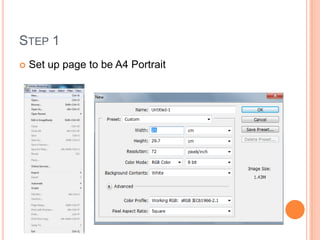
STEP 1
   Set up page to be A4 Portrait
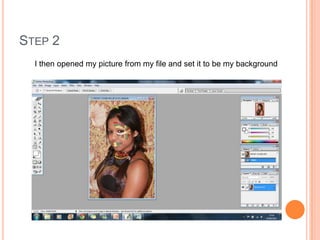
STEP 2
  I then opened my picture from my file and set it to be my background
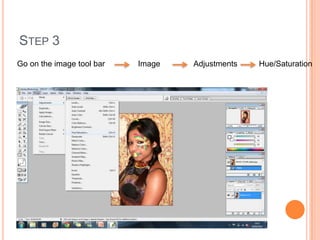
STEP 3
Go on the image tool bar   Image   Adjustments   Hue/Saturation
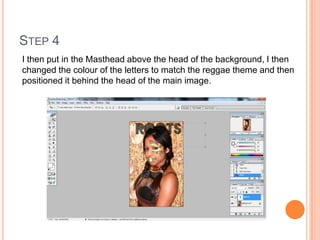
STEP 4
I then put in the Masthead above the head of the background, I then
changed the colour of the letters to match the reggae theme and then
positioned it behind the head of the main image.
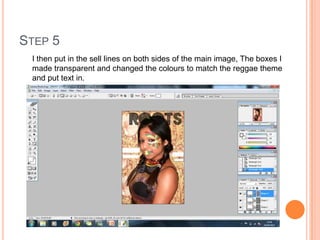
STEP 5
 I then put in the sell lines on both sides of the main image, The boxes I
 made transparent and changed the colours to match the reggae theme
 and put text in.
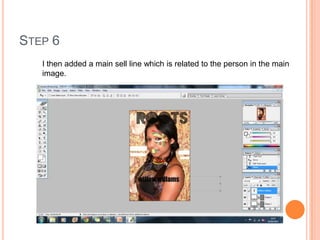
STEP 6
   I then added a main sell line which is related to the person in the main
   image.
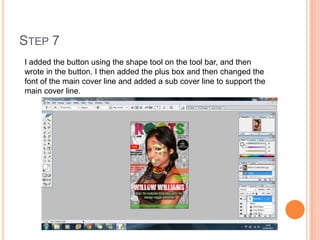
STEP 7
I added the button using the shape tool on the tool bar, and then
wrote in the button. I then added the plus box and then changed the
font of the main cover line and added a sub cover line to support the
main cover line.
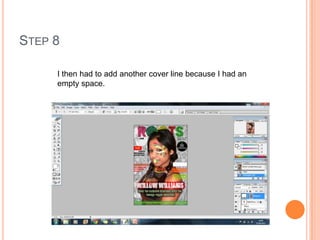
STEP 8

     I then had to add another cover line because I had an
     empty space.
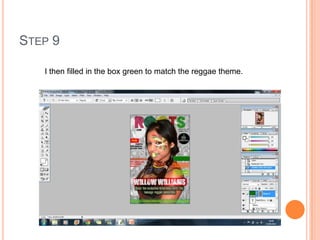
STEP 9

   I then filled in the box green to match the reggae theme.
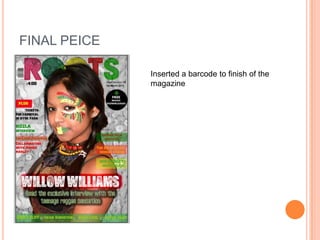
FINAL PEICE

              Inserted a barcode to finish of the
              magazine

Process of making magazine

  • 1.
    PROCESS OF MAKINGMAGAZINE Front Cover
  • 2.
    STEP 1  Set up page to be A4 Portrait
  • 3.
    STEP 2 I then opened my picture from my file and set it to be my background
  • 4.
    STEP 3 Go onthe image tool bar Image Adjustments Hue/Saturation
  • 5.
    STEP 4 I thenput in the Masthead above the head of the background, I then changed the colour of the letters to match the reggae theme and then positioned it behind the head of the main image.
  • 6.
    STEP 5 Ithen put in the sell lines on both sides of the main image, The boxes I made transparent and changed the colours to match the reggae theme and put text in.
  • 7.
    STEP 6 I then added a main sell line which is related to the person in the main image.
  • 8.
    STEP 7 I addedthe button using the shape tool on the tool bar, and then wrote in the button. I then added the plus box and then changed the font of the main cover line and added a sub cover line to support the main cover line.
  • 9.
    STEP 8 I then had to add another cover line because I had an empty space.
  • 10.
    STEP 9 I then filled in the box green to match the reggae theme.
  • 11.
    FINAL PEICE Inserted a barcode to finish of the magazine