


Process Builder and Flow
An Admin’s Trigger
Rich.E@Veltig.com
@developingflow
Rich Englhard
Principal Consultant
About Me
Building with Salesforce since 2014
Forward-Looking Statements
Statement under the Private Securities Litigation Reform Act of 1995:
This presentation may contain forward-looking statements that involve risks, uncertainties, and assumptions. If any such uncertainties materialize or if any
of the assumptions proves incorrect, the results of salesforce.com, inc. could differ materially from the results expressed or implied by the forward-looking
statements we make. All statements other than statements of historical fact could be deemed forward-looking, including any projections of product or
service availability, subscriber growth, earnings, revenues, or other financial items and any statements regarding strategies or plans of management for
future operations, statements of belief, any statements concerning new, planned, or upgraded services or technology developments and customer contracts
or use of our services.
The risks and uncertainties referred to above include – but are not limited to – risks associated with developing and delivering new functionality for our
service, new products and services, our new business model, our past operating losses, possible fluctuations in our operating results and rate of growth,
interruptions or delays in our Web hosting, breach of our security measures, the outcome of any litigation, risks associated with completed and any possible
mergers and acquisitions, the immature market in which we operate, our relatively limited operating history, our ability to expand, retain, and motivate our
employees and manage our growth, new releases of our service and successful customer deployment, our limited history reselling non-salesforce.com
products, and utilization and selling to larger enterprise customers. Further information on potential factors that could affect the financial results of
salesforce.com, inc. is included in our annual report on Form 10-K for the most recent fiscal year and in our quarterly report on Form 10-Q for the most
recent fiscal quarter. These documents and others containing important disclosures are available on the SEC Filings section of the Investor Information
section of our Web site.
Any unreleased services or features referenced in this or other presentations, press releases or public statements are not currently available and may not
be delivered on time or at all. Customers who purchase our services should make the purchase decisions based upon features that are currently available.
Salesforce.com, inc. assumes no obligation and does not intend to update these forward-looking statements.
Overview
Workflow – An Admin’s Best Friend
Where Workflow Breaks – Lookup Fields and Child Objects (Among Others)
Process Builder – Lookup Fields and Child Objects
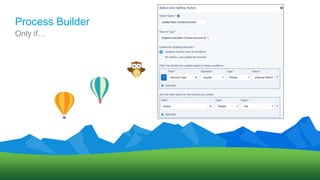
Process Builder – Only update if…
Flow – Complex Processes
Flow – Button Click
Process Builder and Flow – An Admin’s Trigger
Workflow
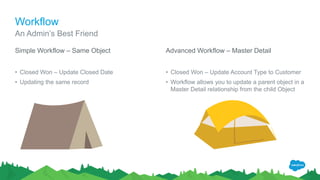
Simple Workflow – Same Object
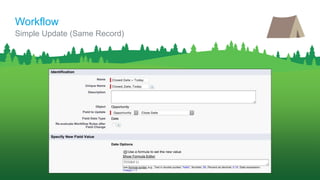
• Closed Won – Update Closed Date
• Updating the same record
Advanced Workflow – Master Detail
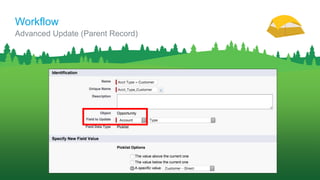
• Closed Won – Update Account Type to Customer
• Workflow allows you to update a parent object in a
Master Detail relationship from the child Object
An Admin’s Best Friend
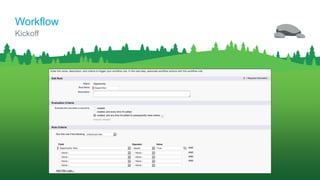
Kickoff
Workflow
Simple Update (Same Record)
Workflow
Advanced Update (Parent Record)
Workflow
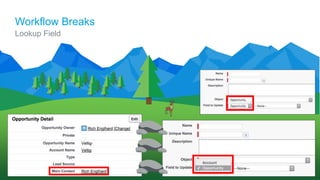
Workflow Breaks
Lookup Field
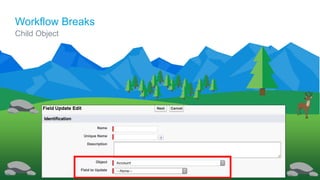
Workflow Breaks
Child Object
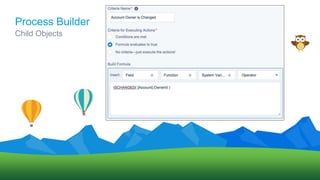
Process Builder
Child Objects
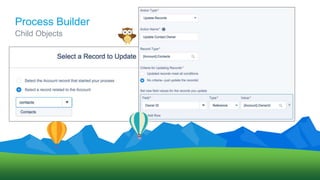
Process Builder
Child Objects
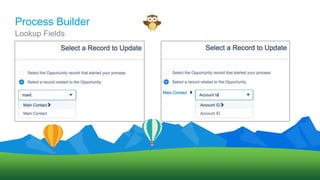
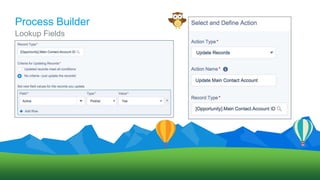
Process Builder
Lookup Fields
Process Builder
Lookup Fields
Process Builder
Only if…
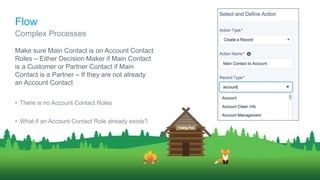
Make sure Main Contact is on Account Contact
Roles – Either Decision Maker if Main Contact
is a Customer or Partner Contact if Main
Contact is a Partner – If they are not already
an Account Contact
• There is no Account Contact Roles
• What if an Account Contact Role already exists?
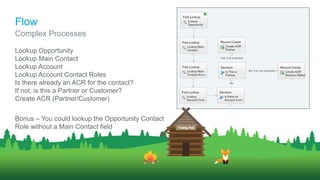
Complex Processes
Flow
Lookup Opportunity
Lookup Main Contact
Lookup Account
Lookup Account Contact Roles
Is there already an ACR for the contact?
If not, is this a Partner or Customer?
Create ACR (Partner/Customer)
Bonus – You could lookup the Opportunity Contact
Role without a Main Contact field
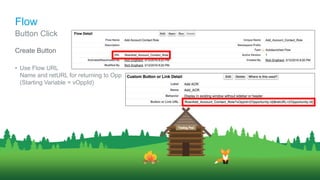
Complex Processes
Flow
Create Button
• Use Flow URL
Name and retURL for returning to Opp
(Starting Variable = vOppId)
Button Click
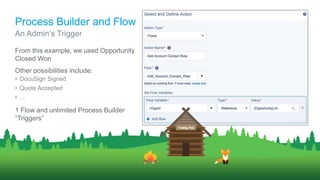
Flow
From this example, we used Opportunity
Closed Won
Other possibilities include:
• DocuSign Signed
• Quote Accepted
• …
1 Flow and unlimited Process Builder
“Triggers”
An Admin’s Trigger
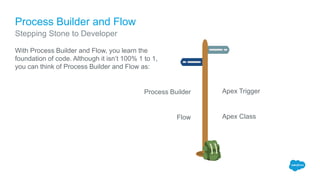
Process Builder and Flow
Apex Trigger
Apex Class
Process Builder and Flow
With Process Builder and Flow, you learn the
foundation of code. Although it isn’t 100% 1 to 1,
you can think of Process Builder and Flow as:
Process Builder
Flow
Stepping Stone to Developer
Thank Y u
Process Builder and Flow: An Admin's Trigger by Rich Englhard

Process Builder and Flow: An Admin's Trigger by Rich Englhard

  • 1.
    Process Builder andFlow An Admin’s Trigger Rich.E@Veltig.com @developingflow Rich Englhard Principal Consultant
  • 2.
    About Me Building withSalesforce since 2014
  • 3.
    Forward-Looking Statements Statement underthe Private Securities Litigation Reform Act of 1995: This presentation may contain forward-looking statements that involve risks, uncertainties, and assumptions. If any such uncertainties materialize or if any of the assumptions proves incorrect, the results of salesforce.com, inc. could differ materially from the results expressed or implied by the forward-looking statements we make. All statements other than statements of historical fact could be deemed forward-looking, including any projections of product or service availability, subscriber growth, earnings, revenues, or other financial items and any statements regarding strategies or plans of management for future operations, statements of belief, any statements concerning new, planned, or upgraded services or technology developments and customer contracts or use of our services. The risks and uncertainties referred to above include – but are not limited to – risks associated with developing and delivering new functionality for our service, new products and services, our new business model, our past operating losses, possible fluctuations in our operating results and rate of growth, interruptions or delays in our Web hosting, breach of our security measures, the outcome of any litigation, risks associated with completed and any possible mergers and acquisitions, the immature market in which we operate, our relatively limited operating history, our ability to expand, retain, and motivate our employees and manage our growth, new releases of our service and successful customer deployment, our limited history reselling non-salesforce.com products, and utilization and selling to larger enterprise customers. Further information on potential factors that could affect the financial results of salesforce.com, inc. is included in our annual report on Form 10-K for the most recent fiscal year and in our quarterly report on Form 10-Q for the most recent fiscal quarter. These documents and others containing important disclosures are available on the SEC Filings section of the Investor Information section of our Web site. Any unreleased services or features referenced in this or other presentations, press releases or public statements are not currently available and may not be delivered on time or at all. Customers who purchase our services should make the purchase decisions based upon features that are currently available. Salesforce.com, inc. assumes no obligation and does not intend to update these forward-looking statements.
  • 4.
    Overview Workflow – AnAdmin’s Best Friend Where Workflow Breaks – Lookup Fields and Child Objects (Among Others) Process Builder – Lookup Fields and Child Objects Process Builder – Only update if… Flow – Complex Processes Flow – Button Click Process Builder and Flow – An Admin’s Trigger
  • 5.
    Workflow Simple Workflow –Same Object • Closed Won – Update Closed Date • Updating the same record Advanced Workflow – Master Detail • Closed Won – Update Account Type to Customer • Workflow allows you to update a parent object in a Master Detail relationship from the child Object An Admin’s Best Friend
  • 6.
  • 7.
    Simple Update (SameRecord) Workflow
  • 8.
    Advanced Update (ParentRecord) Workflow
  • 9.
  • 10.
  • 11.
  • 12.
  • 13.
  • 14.
  • 15.
  • 16.
    Make sure MainContact is on Account Contact Roles – Either Decision Maker if Main Contact is a Customer or Partner Contact if Main Contact is a Partner – If they are not already an Account Contact • There is no Account Contact Roles • What if an Account Contact Role already exists? Complex Processes Flow
  • 17.
    Lookup Opportunity Lookup MainContact Lookup Account Lookup Account Contact Roles Is there already an ACR for the contact? If not, is this a Partner or Customer? Create ACR (Partner/Customer) Bonus – You could lookup the Opportunity Contact Role without a Main Contact field Complex Processes Flow
  • 18.
    Create Button • UseFlow URL Name and retURL for returning to Opp (Starting Variable = vOppId) Button Click Flow
  • 19.
    From this example,we used Opportunity Closed Won Other possibilities include: • DocuSign Signed • Quote Accepted • … 1 Flow and unlimited Process Builder “Triggers” An Admin’s Trigger Process Builder and Flow
  • 20.
    Apex Trigger Apex Class ProcessBuilder and Flow With Process Builder and Flow, you learn the foundation of code. Although it isn’t 100% 1 to 1, you can think of Process Builder and Flow as: Process Builder Flow Stepping Stone to Developer
  • 21.

Editor's Notes

  • #4 Key Takeaway: We are a publicly traded company. Please make your buying decisions only on the products commercially available from Salesforce. Talk Track: Before I begin, just a quick note that when considering future developments, whether by us or with any other solution provider, you should always base your purchasing decisions on what is currently available.