
Visual Workflow Overview
The subtitle goes here
Rajaram Varadarajan, salesforce.com, Director Product Management
@wassupraja

   /salesforcevpm
   raja-sfdc
Safe Harbor
 Safe harbor statement under the Private Securities Litigation Reform Act of 1995:

 This presentation may contain forward-looking statements that involve risks, uncertainties, and assumptions. If any such uncertainties
 materialize or if any of the assumptions proves incorrect, the results of salesforce.com, inc. could differ materially from the results
 expressed or implied by the forward-looking statements we make. All statements other than statements of historical fact could be
 deemed forward-looking, including any projections of product or service availability, subscriber growth, earnings, revenues, or other
 financial items and any statements regarding strategies or plans of management for future operations, statements of belief, any
 statements concerning new, planned, or upgraded services or technology developments and customer contracts or use of our services.

 The risks and uncertainties referred to above include – but are not limited to – risks associated with developing and delivering new
 functionality for our service, new products and services, our new business model, our past operating losses, possible fluctuations in our
 operating results and rate of growth, interruptions or delays in our Web hosting, breach of our security measures, the outcome of
 intellectual property and other litigation, risks associated with possible mergers and acquisitions, the immature market in which we
 operate, our relatively limited operating history, our ability to expand, retain, and motivate our employees and manage our growth, new
 releases of our service and successful customer deployment, our limited history reselling non-salesforce.com products, and utilization
 and selling to larger enterprise customers. Further information on potential factors that could affect the financial results of
 salesforce.com, inc. is included in our annual report on Form 10-Q for the most recent fiscal quarter ended July 31, 2012. This
 documents and others containing important disclosures are available on the SEC Filings section of the Investor Information section of
 our Web site.

 Any unreleased services or features referenced in this or other presentations, press releases or public statements are not currently
 available and may not be delivered on time or at all. Customers who purchase our services should make the purchase decisions based
 upon features that are currently available. Salesforce.com, inc. assumes no obligation and does not intend to update these forward-
 looking statements.
Pain Point
Frustration with Technology


 ”I just want to add a new field on the form in step 2 and show
 what is shown in step 2 to be in step 3.


 Why the heck is this seemingly simple thing taking so long to
 make the change!”
Business + IT / Developer
Faster than the speed of technology
Agenda
Simplest Agenda Ever!

  Overview Visual Workflow
     Common use cases
  Build it!
     App from scratch
     Only flow, no code
  Q&A
Visual Workflow
Overview

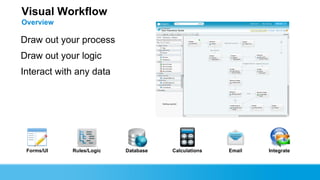
Draw out your process
Draw out your logic
Interact with any data


 Forms/UI   Rules/Logic   Database   Calculations   Email   Integrate
Visual Workflow
Common Use Cases
  Call Scripts
       Let your agent focus on customer and let Flow provide you with the relevant information.

  “Smart” Forms
       Not just a form storing data. Include Logic.

  Modern “Front End” to Backend System
       UI with Flow, Logic with Flow, Integrate through Web Services in Flow

  Bring “App Focus” on Processes and Win the Battle of Clicks
       Provide only the relevant information and let Flow do the hard work.

  Wizards
       No code solution.

  Surveys
       Build dynamic survey, store survey data, deploy on a site – all without code.
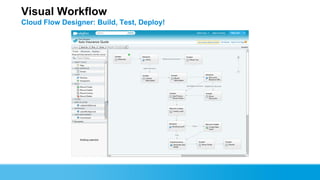
Visual Workflow
Cloud Flow Designer: Build, Test, Deploy!
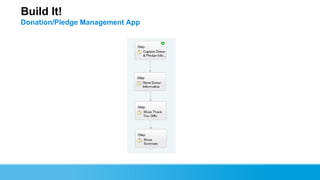
Build It!
Donation/Pledge Management App
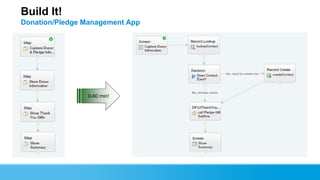
Build It!
Donation/Pledge Management App


                0-60 min!
Summary

 When do you look to use Visual Workflow?
   Guided screen flow – call script style
   Forms with logic
   Too many clicks and entering data across multiple records
   Came process across any channel – Org user, Portal, Site
   Interact with data from external systems
Visual Workflow
Getting Help

  Salesforce On-line Help
  Discussion Board Forums
     http://boards.developerforce.com/t5/Visual-Workflow/bd-p/visual-
      workflow
  Self-paced Training
     Visual Workflow: Cloud Flow Designer
Visual Workflow
Related Sessions

  Visual Workflow for Developers
     Tomorrow (9/19/2012) @ 4:30 PM
  Visual Workflow – Automate without Code!
     Friday (9/21/2012) @ 10:00 AM
  Hands-on-Training – Automate your Business Process w/ Visual
  Workflow
     Tomorrow (9/19/2012) @ 12:30 PM
     Friday (9/21/2012) @ 11:30 AM
Visual Workflow
Resources

Github
    https://github.com/raja-sfdc/
Cloud Flow Designer Workbook
Apex Developers Guide
Visualforce Developers Guide
Visual Workflow Sample AppExchange Pack
    Click on the link in the new Get Started section
Rajaram
Director, Product
 Management,
 @wassupraja
Visual Workflow Overview

Visual Workflow Overview

  • 1.
    Visual Workflow Overview Thesubtitle goes here Rajaram Varadarajan, salesforce.com, Director Product Management @wassupraja /salesforcevpm raja-sfdc
  • 2.
    Safe Harbor Safeharbor statement under the Private Securities Litigation Reform Act of 1995: This presentation may contain forward-looking statements that involve risks, uncertainties, and assumptions. If any such uncertainties materialize or if any of the assumptions proves incorrect, the results of salesforce.com, inc. could differ materially from the results expressed or implied by the forward-looking statements we make. All statements other than statements of historical fact could be deemed forward-looking, including any projections of product or service availability, subscriber growth, earnings, revenues, or other financial items and any statements regarding strategies or plans of management for future operations, statements of belief, any statements concerning new, planned, or upgraded services or technology developments and customer contracts or use of our services. The risks and uncertainties referred to above include – but are not limited to – risks associated with developing and delivering new functionality for our service, new products and services, our new business model, our past operating losses, possible fluctuations in our operating results and rate of growth, interruptions or delays in our Web hosting, breach of our security measures, the outcome of intellectual property and other litigation, risks associated with possible mergers and acquisitions, the immature market in which we operate, our relatively limited operating history, our ability to expand, retain, and motivate our employees and manage our growth, new releases of our service and successful customer deployment, our limited history reselling non-salesforce.com products, and utilization and selling to larger enterprise customers. Further information on potential factors that could affect the financial results of salesforce.com, inc. is included in our annual report on Form 10-Q for the most recent fiscal quarter ended July 31, 2012. This documents and others containing important disclosures are available on the SEC Filings section of the Investor Information section of our Web site. Any unreleased services or features referenced in this or other presentations, press releases or public statements are not currently available and may not be delivered on time or at all. Customers who purchase our services should make the purchase decisions based upon features that are currently available. Salesforce.com, inc. assumes no obligation and does not intend to update these forward- looking statements.
  • 3.
    Pain Point Frustration withTechnology ”I just want to add a new field on the form in step 2 and show what is shown in step 2 to be in step 3. Why the heck is this seemingly simple thing taking so long to make the change!”
  • 4.
    Business + IT/ Developer Faster than the speed of technology
  • 5.
    Agenda Simplest Agenda Ever! Overview Visual Workflow  Common use cases Build it!  App from scratch  Only flow, no code Q&A
  • 6.
    Visual Workflow Overview Draw outyour process Draw out your logic Interact with any data Forms/UI Rules/Logic Database Calculations Email Integrate
  • 7.
    Visual Workflow Common UseCases Call Scripts  Let your agent focus on customer and let Flow provide you with the relevant information. “Smart” Forms  Not just a form storing data. Include Logic. Modern “Front End” to Backend System  UI with Flow, Logic with Flow, Integrate through Web Services in Flow Bring “App Focus” on Processes and Win the Battle of Clicks  Provide only the relevant information and let Flow do the hard work. Wizards  No code solution. Surveys  Build dynamic survey, store survey data, deploy on a site – all without code.
  • 8.
    Visual Workflow Cloud FlowDesigner: Build, Test, Deploy!
  • 9.
  • 10.
  • 11.
    Summary When doyou look to use Visual Workflow?  Guided screen flow – call script style  Forms with logic  Too many clicks and entering data across multiple records  Came process across any channel – Org user, Portal, Site  Interact with data from external systems
  • 12.
    Visual Workflow Getting Help Salesforce On-line Help Discussion Board Forums  http://boards.developerforce.com/t5/Visual-Workflow/bd-p/visual- workflow Self-paced Training  Visual Workflow: Cloud Flow Designer
  • 13.
    Visual Workflow Related Sessions Visual Workflow for Developers  Tomorrow (9/19/2012) @ 4:30 PM Visual Workflow – Automate without Code!  Friday (9/21/2012) @ 10:00 AM Hands-on-Training – Automate your Business Process w/ Visual Workflow  Tomorrow (9/19/2012) @ 12:30 PM  Friday (9/21/2012) @ 11:30 AM
  • 14.
    Visual Workflow Resources Github  https://github.com/raja-sfdc/ Cloud Flow Designer Workbook Apex Developers Guide Visualforce Developers Guide Visual Workflow Sample AppExchange Pack  Click on the link in the new Get Started section
  • 15.