Insight to Action
Using WAVE Analytics and Custom Actions
Kerry Townsend
Solution Architect, Associate Manager - Accenture
@kerrytownsend
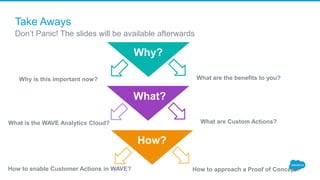
Take Aways
Don’t Panic! The slides will be available afterwards
Why?
What are the benefits to you?Why is this important now?
What?
What are Custom Actions?What is the WAVE Analytics Cloud?
How?
How to approach a Proof of Concept?How to enable Customer Actions in WAVE?
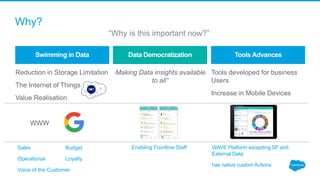
Reduction in Storage Limitation
The Internet of Things
Value Realisation
WWW
“Making Data insights available
to all”
Tools developed for business
Users
Increase in Mobile Devices
Swimming in Data Data Democratization Tools Advances
WAVE Platform excepting SF and
External Data
has native custom Actions
Sales Budget
Operational Loyalty
Voice of the Customer
Enabling Frontline Staff
Why?
“Why is this important now?”
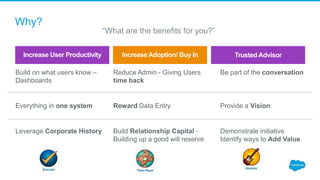
Build on what users know –
Dashboards
Everything in one system
Leverage Corporate History
Reduce Admin - Giving Users
time back
Reward Data Entry
Build Relationship Capital -
Building up a good will reserve
Be part of the conversation
extra
Provide a Vision
Demonstrate initiative
Identify ways to Add Value
Increase User Productivity Increase Adoption/ Buy In Trusted Advisor
Why?
“What are the benefits for you?”
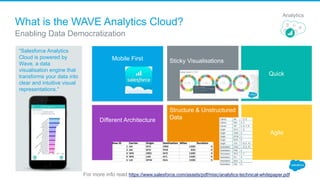
What is the WAVE Analytics Cloud?
“Salesforce Analytics
Cloud is powered by
Wave, a data
visualisation engine that
transforms your data into
clear and intuitive visual
representations.“
Enabling Data Democratization
For more info read https://www.salesforce.com/assets/pdf/misc/analytics-technical-whitepaper.pdf
Analytics
Mobile First Sticky Visualisations
Quick
Different Architecture
Structure & Unstructured
Data
Agile
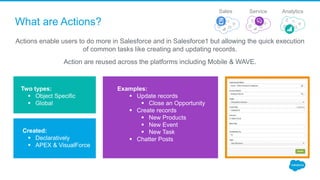
What are Actions?
Actions enable users to do more in Salesforce and in Salesforce1 but allowing the quick execution
of common tasks like creating and updating records.
Action are reused across the platforms including Mobile & WAVE.
Two types:
 Object Specific
 Global
Examples:
 Update records
 Close an Opportunity
 Create records
 New Products
 New Event
 New Task
 Chatter Posts
Created:
 Declaratively
 APEX & VisualForce
ServiceSales Analytics
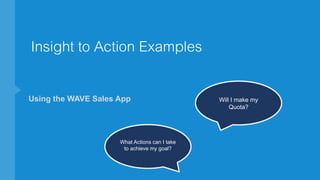
Insight to Action Examples
Using the WAVE Sales App Will I make my
Quota?
What Actions can I take
to achieve my goal?
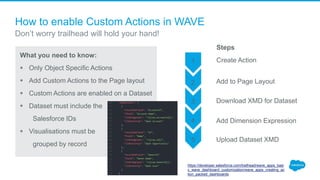
How to enable Custom Actions in WAVE
What you need to know:
 Only Object Specific Actions
 Add Custom Actions to the Page layout
 Custom Actions are enabled on a Dataset
 Dataset must include the
Salesforce IDs
 Visualisations must be
grouped by record
Steps
Create Action
Don’t worry trailhead will hold your hand!
1
2
3
4
5 Upload Dataset XMD
Add Dimension Expression
Download XMD for Dataset
Add to Page Layout
https://developer.salesforce.com/trailhead/wave_apps_basi
c_wave_dashboard_customization/wave_apps_creating_ac
tion_packed_dashboards
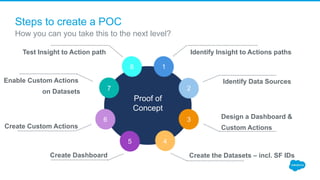
Steps to create a POC
How you can you take this to the next level?
Proof of
Concept
Test Insight to Action path
Identify Data Sources
Design a Dashboard &
Custom Actions
Identify Insight to Actions paths
Create the Datasets – incl. SF IDsCreate Dashboard
Create Custom Actions
Enable Custom Actions
on Datasets
1
2
3
45
6
7
8
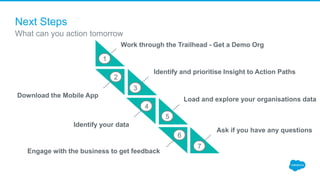
Next Steps
What can you action tomorrow
Work through the Trailhead - Get a Demo Org
Download the Mobile App
Identify and prioritise Insight to Action Paths
Identify your data
Load and explore your organisations data
Engage with the business to get feedback
Ask if you have any questions
1
2
3
4
5
6
7
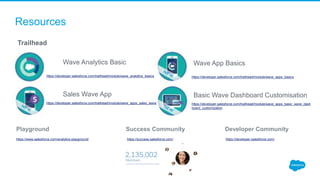
Resources
Playground Success Community Developer Community
https://www.salesforce.com/analytics-playground/ https://success.salesforce.com/ https://developer.salesforce.com/
Trailhead
Wave Analytics Basic
https://developer.salesforce.com/trailhead/module/wave_analytics_basics
Sales Wave App
https://developer.salesforce.com/trailhead/module/wave_apps_sales_wave
Wave App Basics
https://developer.salesforce.com/trailhead/module/wave_apps_basics
Basic Wave Dashboard Customisation
https://developer.salesforce.com/trailhead/module/wave_apps_basic_wave_dash
board_customization
thank y u
@kerrytownsend
Questions?

Insight to Action Using Wave Analytics and Custom Actions

  • 1.
    Insight to Action UsingWAVE Analytics and Custom Actions Kerry Townsend Solution Architect, Associate Manager - Accenture @kerrytownsend
  • 2.
    Take Aways Don’t Panic!The slides will be available afterwards Why? What are the benefits to you?Why is this important now? What? What are Custom Actions?What is the WAVE Analytics Cloud? How? How to approach a Proof of Concept?How to enable Customer Actions in WAVE?
  • 3.
    Reduction in StorageLimitation The Internet of Things Value Realisation WWW “Making Data insights available to all” Tools developed for business Users Increase in Mobile Devices Swimming in Data Data Democratization Tools Advances WAVE Platform excepting SF and External Data has native custom Actions Sales Budget Operational Loyalty Voice of the Customer Enabling Frontline Staff Why? “Why is this important now?”
  • 4.
    Build on whatusers know – Dashboards Everything in one system Leverage Corporate History Reduce Admin - Giving Users time back Reward Data Entry Build Relationship Capital - Building up a good will reserve Be part of the conversation extra Provide a Vision Demonstrate initiative Identify ways to Add Value Increase User Productivity Increase Adoption/ Buy In Trusted Advisor Why? “What are the benefits for you?”
  • 5.
    What is theWAVE Analytics Cloud? “Salesforce Analytics Cloud is powered by Wave, a data visualisation engine that transforms your data into clear and intuitive visual representations.“ Enabling Data Democratization For more info read https://www.salesforce.com/assets/pdf/misc/analytics-technical-whitepaper.pdf Analytics Mobile First Sticky Visualisations Quick Different Architecture Structure & Unstructured Data Agile
  • 6.
    What are Actions? Actionsenable users to do more in Salesforce and in Salesforce1 but allowing the quick execution of common tasks like creating and updating records. Action are reused across the platforms including Mobile & WAVE. Two types:  Object Specific  Global Examples:  Update records  Close an Opportunity  Create records  New Products  New Event  New Task  Chatter Posts Created:  Declaratively  APEX & VisualForce ServiceSales Analytics
  • 7.
    Insight to ActionExamples Using the WAVE Sales App Will I make my Quota? What Actions can I take to achieve my goal?
  • 8.
    How to enableCustom Actions in WAVE What you need to know:  Only Object Specific Actions  Add Custom Actions to the Page layout  Custom Actions are enabled on a Dataset  Dataset must include the Salesforce IDs  Visualisations must be grouped by record Steps Create Action Don’t worry trailhead will hold your hand! 1 2 3 4 5 Upload Dataset XMD Add Dimension Expression Download XMD for Dataset Add to Page Layout https://developer.salesforce.com/trailhead/wave_apps_basi c_wave_dashboard_customization/wave_apps_creating_ac tion_packed_dashboards
  • 9.
    Steps to createa POC How you can you take this to the next level? Proof of Concept Test Insight to Action path Identify Data Sources Design a Dashboard & Custom Actions Identify Insight to Actions paths Create the Datasets – incl. SF IDsCreate Dashboard Create Custom Actions Enable Custom Actions on Datasets 1 2 3 45 6 7 8
  • 10.
    Next Steps What canyou action tomorrow Work through the Trailhead - Get a Demo Org Download the Mobile App Identify and prioritise Insight to Action Paths Identify your data Load and explore your organisations data Engage with the business to get feedback Ask if you have any questions 1 2 3 4 5 6 7
  • 11.
    Resources Playground Success CommunityDeveloper Community https://www.salesforce.com/analytics-playground/ https://success.salesforce.com/ https://developer.salesforce.com/ Trailhead Wave Analytics Basic https://developer.salesforce.com/trailhead/module/wave_analytics_basics Sales Wave App https://developer.salesforce.com/trailhead/module/wave_apps_sales_wave Wave App Basics https://developer.salesforce.com/trailhead/module/wave_apps_basics Basic Wave Dashboard Customisation https://developer.salesforce.com/trailhead/module/wave_apps_basic_wave_dash board_customization
  • 12.

Editor's Notes

  • #3 Next Steps Resources
  • #4 Swimming in Data Changes seen in the internet Mobile Apps Ease of use Visually Sticky
  • #7 Definition Usage Types Examples Mobile In the Menu Menu form analytics
  • #10 It is possible that this is not the right time but it will start the discussion and position you as a someone that is looking for ways to add value.
  • #11 It is possible that this is not the right time but it will start the discussion and position you as a someone that is looking for ways to add value.
  • #12 Blogs https://www.andrewprice.me/blog/ Spacing of Paragraphs White Papers https://www.salesforce.com/assets/pdf/misc/analytics-technical-whitepaper.pdf