BASIC COMPUTER PROGRAMMING1
ETHIOPIAN TECHNICALUNIVERSITY BAHIRDAR SATELLITE CAMPUS
Chapter One
Problem Solving Using Computers
1. ComputerFundamentals
A computer is a programmable machine with electronic and electromechanical parts. It allows the
user to store all sorts of information and then ‘process’ that information, or data, or carry out
actions with the information, such as calculating numbers or organizing words. It is programmable
and is capable of performing the following basic computing functions:
▪ Accept data (input)
▪ Process data
▪ Generate output (information)
▪ Store data/information
▪ Retrieve/send data/information
Therefore, a Computer can be defined based on its functions as:
• It is an electronic device that processes data based upon the instructions provided and
generates the desired output.
• A computer is a machine that can be programmed to carry
out sequences of arithmetic or logical operations automatically. Modern computers can
perform generic sets of operations known as programs. These programs enable computers
to perform a wide range of tasks.
• A computer system is a "complete" computer that includes the hardware, operating
system (main software), and peripheral equipment needed and used for "full" operation.
This term may also refer to a group of computers that are linked and function together,
such as a computer network or computer cluster.
2. Generation of computers
Generation in computer terminology is a change in technology a computer is/was being used.
Initially, the generation term was used to distinguish between varying hardware technologies.
Nowadays, generation includes both hardware and software, which together make up an entire
computer system.
There are five computer generations known till date. Each generation has been discussed in detail
along with their time period and characteristics.
2.
BASIC COMPUTER PROGRAMMING2
ETHIOPIAN TECHNICALUNIVERSITY BAHIRDAR SATELLITE CAMPUS
i. First Generation
The period of first generation was from 1946-1959. The computers of first generation used vacuum
tubes as the basic components for memory and circuitry for CPU (Central Processing Unit). These
tubes, like electric bulbs, produced a lot of heat and the installations used to fuse frequently.
Therefore, they were very expensive and only large organizations were able to afford it.
In this generation, mainly batch processing operating system was used. Punch cards, paper tape,
and magnetic tape was used as input and output devices. The computers in this generation used
machine code as the programming language. Some computers of this generation were: ENIAC,
EDVAC, UNIVAC, IBM-701, IBM-650
The main features of the first generation are:
• Vacuum tube technology
• Unreliable
• Supported machine language only
• Very costly
• Generated a lot of heat
• Slow input and output devices
• Huge size
• Need of AC
• Non-portable
• Consumed a lot of electricity
ii. Second Generation
The period of second generation was from 1959-1965. In this generation, transistors were used
that were cheaper, consumed less power, more compact in size, more reliable and faster than the
first generation machines made of vacuum tubes. In this generation, magnetic cores were used as
the primary memory and magnetic tape and magnetic disks as secondary storage devices.
In this generation, assembly language and high-level programming languages like FORTRAN,
COBOL were used. The computers used batch processing and multiprogramming operating
system. Some computers of this generation were: IBM 1620, IBM 7094, CDC 1604, CDC 3600,
UNIVAC 1108.
The main features of second generation are:
• Use of transistors
• Reliable in comparison to first generation computers
• Smaller size as compared to first generation computers
• Generated less heat as compared to first generation computers
• Consumed less electricity as compared to first generation computers
3.
BASIC COMPUTER PROGRAMMING3
ETHIOPIAN TECHNICALUNIVERSITY BAHIRDAR SATELLITE CAMPUS
• Faster than first generation computers
• Still very costly
• AC required
• Supported machine and assembly languages
iii. Third Generation
The period of third generation was from 1965-1971. The computers of third generation used
Integrated Circuits (ICs) in place of transistors. A single IC has many transistors, resistors, and
capacitors along with the associated circuitry.
The IC was invented by Jack Kilby. This development made computers smaller in size, reliable,
and efficient. In this generation remote processing, time-sharing, multi-programming operating
system were used. High-level languages (FORTRAN-II TO IV, COBOL, PASCAL PL/1, BASIC,
ALGOL-68 etc.) were used during this generation. Some computers of this generation were: IBM-
360 series, Honeywell-6000 series, PDP (Personal Data Processor), IBM-370/168, TDC-316.
The main featuresof third generation are:
• IC used
• More reliable in comparison to previous two generations
• Smaller size
• Generated less heat
• Faster
• Lesser maintenance
• Costly
• AC required
• Consumed lesser electricity
• Supported high-level language
iv. Fourth Generation
The period of fourth generation was from 1971-1980. Computers of fourth generation used Very
Large Scale Integrated (VLSI) circuits. VLSI circuits having about 5000 transistors and other
circuit elements with their associated circuits on a single chip made it possible to have
microcomputers of fourth generation.
Fourth generation computers became more powerful, compact, reliable, and affordable.As a result,
it gave rise to Personal Computer (PC) revolution. In this generation, time sharing, real time
networks, distributed operating system were used. All the high-level languages like C, C++,
DBASE etc., were used in this generation. Some computers of this generation were: DEC 10,
STAR 1000, PDP 11, CRAY-1(Super Computer), CRAY-X-MP(Super Computer).
The main featuresof fourth generation are:
• VLSI technology used
4.
BASIC COMPUTER PROGRAMMING4
ETHIOPIAN TECHNICALUNIVERSITY BAHIRDAR SATELLITE CAMPUS
• Very cheap
• Portable and reliable
• Use of PCs
• Very small size
• Pipeline processing
• No AC required
• Concept of internet was introduced
• Great developments in the fields of networks
• Computers became easily available
v. Fifth Generation
The period of fifth generation is 1980-till date. In the fifth generation, VLSI technology became
ULSI (Ultra Large Scale Integration) technology, resulting in the production of microprocessor
chips having ten million electronic components.
This generation is based on parallel processing hardware and AI (Artificial Intelligence) software.
AI is an emerging branch in computer science, which interprets the means and method of making
computers think like human beings. All the high-level languages like C and C++, Java, .Net etc.,
are used in this generation. Some computer types of this generation are: Desktop, Laptop,
NoteBook, UltraBook, ChromeBook.
AI includes:
• Robotics
• Neural Networks
• Game Playing
• Development of expert systems to make decisions in real-life situations
• Natural language understanding and generation
The main features of fifth generation are:
• ULSI technology
• Development of true artificial intelligence
• Development of Natural language processing
• Advancement in Parallel Processing
• Advancement in Superconductor technology
• More user-friendly interfaces with multimedia features
• Availability of very powerful and compact computers at cheaper rates
5.
BASIC COMPUTER PROGRAMMING5
ETHIOPIAN TECHNICALUNIVERSITY BAHIRDAR SATELLITE CAMPUS
3. Typesof Computers
i. Microcomputer
Microcomputers can be person computer or workstation computer that uses a microprocessor as
its central processing unit (CPU).
a. Personal computer
A PC can be defined as a small, relatively inexpensive computer designed for an individual user.
PCs are based on the microprocessor technology that enables manufacturers to put an entire CPU
on one chip.
b. Workstation computer
Workstation is a computer used for engineering applications (CAD/CAM), desktop publishing,
software development, and other such types of applications which require a moderate amount of
computing power and relatively high quality graphics capabilities.
ii. Minicomputer
Minicomputer, a mid-level computer built to perform complex computations while dealing
efficiently witha high level of input and output from users connected via terminals. Minicomputers
also frequently connect to other minicomputers on a network and distribute processing among all
the attached machines. Minicomputers are used heavily in transaction-processing applications and
as interfaces between mainframe computer systems and wide area networks. It is a midsize multi-
processing system capable of supporting up to 250 users simultaneously.
iii. Mainframe
Mainframe is very large in size and is an expensive computer capable of supporting hundreds or
even thousands of users simultaneously. Mainframe executes many programs concurrently and
supports many simultaneous execution of programs.
iv. Supercomputer
Supercomputers are one of the fastest computers currently available. Supercomputers are very
expensive and are employed for specialized applications that require immense amount of
mathematical calculations (number crunching). For example, weather forecasting, scientific
simulations, (animated) graphics, fluid dynamic calculations, nuclear energy research, electronic
design, and analysis of geological data (e.g. in petrochemical prospecting).
4. The ComputerSystem
A system, generally, is any collection of component elements (also called subsystems) that work
together to perform a task; therefore, the components collectively make the whole (the system).
Each component has a specific task to accomplish. A system can be characterized as:
▪ a system has more than one element,
6.
BASIC COMPUTER PROGRAMMING6
ETHIOPIAN TECHNICALUNIVERSITY BAHIRDAR SATELLITE CAMPUS
▪ all elements of a system are logically related, and
▪ all elements of a system are controlled in a manner to achieve the system goal.
Therefore, a computer is a system as it comprises of integrated components (input unit, output unit,
storage unit, and CPU) that work together to perform the steps called for in the executing program.
Collectively, parts of a computer can be classified as hardware and software. Hardware refers to
the physical components - the electric, electronic, and mechanical equipment that makes up a
computer; on the other hand, computer software refers to the computerized instruction/programs
that operate a computer, manipulate the data and execute particular functions or tasks. A computer
system in general can be categorized as hardware and software.
i. Computer Hardware: is the general term for the physical devices that carry out the
activities of capturing, processing, storing, and communicating data and information.
The hardware of a computer system is made up of a number of electronic devices
connected together.
It is composed of a number of interacting physical parts based on the need of the
information flow. Based on the dataand information processing function; the hardware
part of a computer fall in to five categories: Input devices, Processor, Memories, Output
devices and Storage devices.
ii. Computer software: Computer software comprises a set of machine-readable
instructions that directs a computer’s processor to perform specific operations.
Computer software can be divided into the following types:
▪ System software
▪ Application software
▪ Programming tools and language translators
5. Programing Languages
What is programming? Programming is a skill that can be acquired by a computer professional
that gives him/her the knowledge of making the computer perform the required operation or
task.
Why do we need to learn computer programming? Computer programming is critical if one
wants to know how to make the computer perform a task. Most users of a computer only use the
available applications on the computer. These applications are produced by computer
programmers. Thus if someone is interested to make such kind of applications, he/she needs to
learn how to talk to the computer, which is learning computer programming.
What is programming language? Programming Language is a set different category of written
symbols that instruct computer hardware to perform specified operations required by the designer.
7.
BASIC COMPUTER PROGRAMMING7
ETHIOPIAN TECHNICALUNIVERSITY BAHIRDAR SATELLITE CAMPUS
What skills do we need to be a programmer? For someone to be a programmer, in addition
to basic skills in computer, needs to have the following major skills:
• Programming Language Skill: knowing one or more programming language
to talk to the computer and instruct the machine to perform a task.
• Problem Solving Skill: skills on how to solve real world problem and
represent the solution in understandable format.
• Algorithm Development: skill of coming up with sequence of simple
and human understandable set of instructions showing the step of solving
the problem. Those set of steps should not be dependent on any
programming language or machine.
In every programming Language there are sets of rules that govern the symbols used in a
programming language. These set of rules determine how the programmer can make the computer
hardware to perform a specific operation. These sets of rules are called syntax.
6. Generationsof Programming Language
Programming languages are categorized into five generations: (1st, 2nd,3rd, 4th and 5th generation
languages).
These programming languages can also be categorized into two broad categories: low level and
high level languages. Low level languages are machine specific or dependent and high level
languages like COBOL, BASIC are machine independent and can run on variety of computers.
From the five categories of programming languages, first and second generation languages
are low level languages and the rest are high level programming languages. The higher the level
of a language, the easier it is to understand and use by programmers. Languages after the
fourth generation are referred to as a very high level languages.
First Generation (Machine languages, 1940’s):
• Difficult to write applications with.
• Dependent on machine languages of the specific computer being used.
• Machine languages allow the programmer to interact directly with the hardware,
and it can be executed by the computer without the need for a translator.
• Is more powerful in utilizing resources of the computer.
• Gives power to the programmer.
• They execute very quickly and use memory very efficiently.
Second Generation (Assembly languages, early 1950’s):
• Uses symbolic names for operations and storage locations.
• A system program called an assembler translates a program written in assembly
language to machine language.
• Programs written in assembly language are not portable. i.e., different
• Computer architectures have their own machine and assembly languages.
• They are highly used in system software development.
8.
BASIC COMPUTER PROGRAMMING8
ETHIOPIAN TECHNICALUNIVERSITY BAHIRDAR SATELLITE CAMPUS
Third Generation (High level languages, 1950’s to 1970’s):
• Uses English like instructions and mathematicians were able to define variables with
statements such as Z = A + B
• Such languages are much easier to use than assembly language.
• Programs written in high level languages need to be translated into machine
language in order to be executed.
• The use of common words (reserved words) within instructions makes them easier to
learn.
• All third generation programming languages are procedural languages.
• In procedural languages, the programmer is expected to specify what is required and
how to perform it.
Fourth Generation (since late 1970’s):
• Have a simple, English like syntax rules; commonly used to access databases.
• Fourth generation languages are non-procedural languages.
▪ The non-procedural method is easier to write, but you have less control over
how each task is actually performed.
▪ In non-procedural languages the programmer is not required to write traditional
programming logic. Programmers concentrate on defining the input and output
rather than the program steps required. For example, a command, such as LIST,
might display all the records in a file on screen, separating fields with a blank
space.
▪ In a procedural language, all the logic for inputting each record, testing for end
of file and formatting each column on screen has to be explicitly programmed.
• Fourth generation languages have a minimum number of syntax rules.
• This saves time and free professional programmers for more complex tasks.
• Some examples of 4GL are structured query languages (SQL), report generators,
application generators and graphics languages.
Fifth Generation (1990’s):
• These are used in artificial intelligence (AI) and expert systems; also used for
accessing databases.
• 5GLs are “natural” languages whose instruction closely resembles human speech.
For example, “get me Jone Brown’s sales figure for the 1997 financial year”.
• 5GLs require very powerful hardware and software because of the complexity
involved in interpreting commands in human language.
7. Problem Solving Methods
Problem Solving: It is the process of transforming the description of a problem into the solution
by using our knowledge of the problem domain and by relying on our ability to select and use
appropriate problem-solving strategies, techniques, and tools.
9.
BASIC COMPUTER PROGRAMMING9
ETHIOPIAN TECHNICALUNIVERSITY BAHIRDAR SATELLITE CAMPUS
A problem is an undesirable situation that prevents the organization from fully achieving its
purpose, goals and objectives. Or problem can also be defined as the gap between the existing
and the desired situation where problem solving will try to fill this gap.
There are two approaches of problem solving:
▪ Top down design: is a systematic approach based on the concept that the
structure of the problem should determine the structure of the solution and what
should be done in lower level. This approach will try to disintegrate a larger
problem into more smaller and manageable problems to narrow the problem
domain.
▪ Bottom up design: is the reverse process where the lowest level component
are built first and the system builds up from the bottom until the whole process
is finally completed.
Basic Program development tips: The program we design in any programming language need to
be:
▪ Reliable: the program should always do what it is expected to do and handle all
types of exception.
▪ Maintainable: the program should be in a way that it could be modified
and upgraded when the need arises.
▪ Portable: It needs to be possible to adapt the software written for one type of
computer to another with minimum modification.
▪ Efficient: the program should be designed to make optimal use of time, space and
other resources of the computer.
Algorithm designing and modeling the logic (using flow chart): A digital computer is a
useful tool for solving a great variety of problems. A solution to a problem is called an
algorithm; it describes the sequence of steps to be performed for the problem to be solved.
Generally, an algorithm is a finite set of well-defined instructions for accomplishing some task
which, given an initial state, will terminate in a corresponding recognizable end-state.
The algorithm should be:
▪ Precise and unambiguous
▪ Simple
▪ Correct
▪ Efficient
Modeling a programs logic using flow chart: Algorithm could be designed using many
techniques and tools. One tool of designing algorithm is by using flowcharts. Flowchart is a
graphical way of expressing the steps needed to solve a problem. A flow chart is a schematic
(diagrammatic description) representation of a process.
10.
BASIC COMPUTER PROGRAMMING10
ETHIOPIAN TECHNICALUNIVERSITY BAHIRDAR SATELLITE CAMPUS
Basic flowcharting symbols are:
Terminal Point
Decision
Process
Input/Output
Flow Line
Inter Page Connector
One Page Connector
11.
BASIC COMPUTER PROGRAMMING11
ETHIOPIAN TECHNICALUNIVERSITY BAHIRDAR SATELLITE CAMPUS
Example: A flow chart that depicts weather a number is positive or negative.
8. SoftwareCrisis
Developments in software technology continue to be dynamic. New tools and techniques are
announced in quick succession. This has forced the software engineers and industry to
continuously look for new approaches to softwaredesign and development, and they are becoming
more and more critical in view of the increasing complexity of software systems as well as the
highly competitive nature of the industry. These rapid advances appear to have created a situation
of crisis within the industry. The following issued need to be addressed to face the crisis:
• How to represent real-life entities of problems in system design?
• How to design system with open interfaces?
• How to ensure reusability and extensibility of modules?
• How to develop modules that are tolerant of any changes in future?
• How to improve software productivity and decrease software cost?
• How to improve the quality of software?
• How to manage time schedules?
Number
/2== 00
Display Even
Start
End
Display Odd
Enter Number
12.
BASIC COMPUTER PROGRAMMING12
ETHIOPIAN TECHNICALUNIVERSITY BAHIRDAR SATELLITE CAMPUS
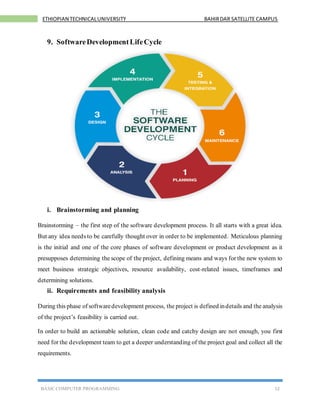
9. SoftwareDevelopmentLifeCycle
i. Brainstorming and planning
Brainstorming – the first step of the software development process. It all starts with a great idea.
But any idea needs to be carefully thought over in order to be implemented. Meticulous planning
is the initial and one of the core phases of software development or product development as it
presupposes determining the scope of the project, defining means and ways for the new system to
meet business strategic objectives, resource availability, cost-related issues, timeframes and
determining solutions.
ii. Requirements and feasibility analysis
During this phase of softwaredevelopment process, the project is defined indetails and the analysis
of the project’s feasibility is carried out.
In order to build an actionable solution, clean code and catchy design are not enough, you first
need for the development team to get a deeper understanding of the project goal and collect all the
requirements.
13.
BASIC COMPUTER PROGRAMMING13
ETHIOPIAN TECHNICALUNIVERSITY BAHIRDAR SATELLITE CAMPUS
Feasibility analysis displays all the technical and economic aspects impacting the application
development process: time, resources and tasks and involvement estimates from theteam members
help calculate ROI and determine project cost and profit.
Requirements analysis also helps identifythe risks at the very start so that risk mitigation strategies
can be worked out from the very beginning. Clear structured documentation ensures better
cooperation and understanding for both the development team and clients. Analysis of
requirements and software performance is crucial for the successful next step of the software
development lifecycle.
iii. Design
Software design is a preeminent component of product development cycle. During the design
phase, the actual conceptualizing of the solution is created,that is the detailed softwarearchitecture
meeting specific project requirements is created. During this phase, the whole structure of the
project is built with the final prototype and mockups used for the next stages of the software
development process.
This is a kind of modeling visually everything starting from the functionality of the solution and
up to defining the fundamental hardware/software components, software tools for the future
development, structure capabilities, processes to realize its business needs and objectives of the
proposed solution. After the design is identified it’s time to move to the very development.
iv. Development & coding
The development phase is about writing code and converting design documentation into the actual
software within the software development process. This stage of software development cycle is
generally the longest as it’s the backbone of the whole process and there are a number of vital
things to pay attention to.
The software engineering team has to make sure their code meets the software requirements
specifications, conforms to the stakeholders’ requirements, etc. but if the previous stages of
software development were carefully fulfilled, the ready-to-use software is bound to match the
requirements tothe softwareproject. The softwaredevelopment release cycle proceeds from alpha,
beta, and release candidate to actual production build. Once the complete architecture (DB, API,
etc) and planned functionality of the solution is built, the testing stage starts.
14.
BASIC COMPUTER PROGRAMMING14
ETHIOPIAN TECHNICALUNIVERSITY BAHIRDAR SATELLITE CAMPUS
v. Integrationand testing
Now that the software is built and completed the next phase involving system testing and
integration starts. Depending on the adopted testing processes it might vary. But typically the QA
engineers use a whole range of frameworks alongside continuous integration executing unit tests,
automation compilation, and testing.
The Quality Assurance team conducts a series of tests including functionality testing, systems
integration, and interoperability as well as user acceptance testing, etc. in order to ensure the code
is clean and business goals of the solution are met. Verification and validation make up a vital part
in ensuring the application/solution is completed successfully. Now that the software is bug-free,
the implementation phase starts.
vi. Implementation and deployment
This is a stage when the actual installation of the crafted solution takes place. It’s done step-by-
step according to the implementation plan. The newly built and tested application is moved to
production including data and components transfer while during the next releases only the specific
changes will be deployed.Dependingon thecomplexity of the project it might be a straightforward
release (if the project is simple) or staggered released (in stages) in case of a more complex project.
Now system analysts and the end-users can actually see and try out the ready application.
vii.Operations and maintenance
The final stage of software development lifecycle includes maintenance and regular updates. The
phase is treated with the utmost attention since during the stage the product is polished, upgraded,
enhanced and fine-tuned according to the real-world feedbacks on its performance. That’s exactly
a perfect timing to robust the application’s functionalities to upgrade its performance and modify
according to the actual needs of the end-user add new capabilities or meet additional user
requirements.