

12/2/2020 1
Samina khan
FDC Risalpur
• Chapter 1 More on Number System
• Chapter 2 Working on Word
• Chapter 3 Working with Spreadsheet
• Chapter 4 Problem solving
• Chapter 5 Introduction to programming
• Chapter 6 Programming in GW-BASIC
• Chapter 7 Data verification & validation
• Chapter 8 Data protection & security
• Chapter 9 Applications of computers
• Chapter 11 The future of Technology
• Chapter 12 Creating webpages
12/2/2020
2
CHAPTER 4
Problem solving
• Problem-solving is a process—an ongoing
activity in which we take what we know to
discover what we don't know.
• It involves steps arranged in a manner to solve a
particular problem
A step-by-step approach to problem -
solving
• We can solve a problem by thinking about it in a
step by step manner.
• This helps us think clearly and avoid becoming
confused.
1. Defining the problem
• The first step in problem-solving is to define the
problem.
• What the problem is?
• A good problem definition is precise.
• The more precise the problem statement is, the
easier it becomes to find the right solution.
2. The Input
• After problem definition we move towards
finding the solution.
• We collect input carefully from surroundings.
• This is similar to data capturing and data
collection in data processing cycle.
3. The Output
• After input we think what the result of our
solution should be.
• We should ask ourselves the question: What
should change as a result of the solution?
• This is called output requirement.
• When we are able to define the output
requirements, we can reach a good solution to
the problem.
3. The processing requirement
• Once we are clear about our input and output
requirement, we can think about how to use
those inputs to achieve output.
4. The solution
• By thinking carefully about the processing
requirements we can discover the right
solution for the problem.
• When we go in step by step manner we can
easily arrive at a solution.
• Programmers follow this approach when
they create programs.
Repetition
• A repetition problem arises when we want a
computer to do a task again and again.
• When we ask a computer to repeat an action
we use the following two statements:
1. The Do…WHILE statement
2. The REPEAT…UNTIL statement
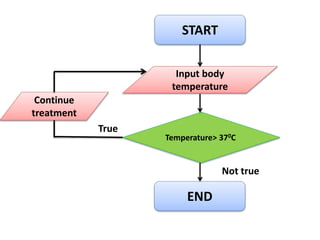
1. The Do…WHILE statement
• It is a conditional statement.
• It uses a condition to instruct the computer.
• The condition might be true or not true.
• The computer repeat an action while the
condition is true.
• The computer stops repeating the action when
the condition becomes not true.
Algorithm
12/2/2020 13
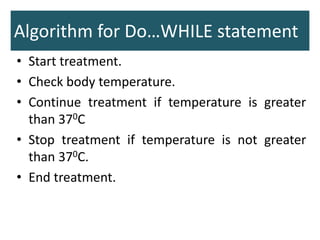
Algorithm for Do…WHILE statement
• Start treatment.
• Check body temperature.
• Continue treatment if temperature is greater
than 370C
• Stop treatment if temperature is not greater
than 370C.
• End treatment.
12/2/2020 15
START
Input body
temperature
Temperature> 370C
END
Continue
treatment
True
Not true
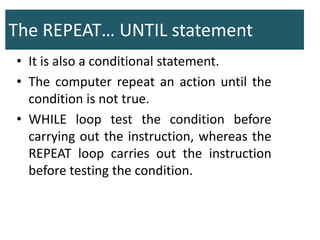
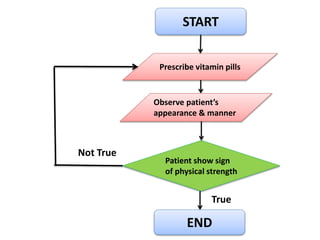
The REPEAT… UNTIL statement
• It is also a conditional statement.
• The computer repeat an action until the
condition is not true.
• WHILE loop test the condition before
carrying out the instruction, whereas the
REPEAT loop carries out the instruction
before testing the condition.
START
Prescribe vitamin pills
Patient show sign
of physical strength
END
Observe patient’s
appearance & manner
Not True
True

Problem solving

  • 1.
  • 2.
    • Chapter 1More on Number System • Chapter 2 Working on Word • Chapter 3 Working with Spreadsheet • Chapter 4 Problem solving • Chapter 5 Introduction to programming • Chapter 6 Programming in GW-BASIC • Chapter 7 Data verification & validation • Chapter 8 Data protection & security • Chapter 9 Applications of computers • Chapter 11 The future of Technology • Chapter 12 Creating webpages 12/2/2020 2
  • 3.
  • 4.
    Problem solving • Problem-solvingis a process—an ongoing activity in which we take what we know to discover what we don't know. • It involves steps arranged in a manner to solve a particular problem
  • 5.
    A step-by-step approachto problem - solving • We can solve a problem by thinking about it in a step by step manner. • This helps us think clearly and avoid becoming confused.
  • 6.
    1. Defining theproblem • The first step in problem-solving is to define the problem. • What the problem is? • A good problem definition is precise. • The more precise the problem statement is, the easier it becomes to find the right solution.
  • 7.
    2. The Input •After problem definition we move towards finding the solution. • We collect input carefully from surroundings. • This is similar to data capturing and data collection in data processing cycle.
  • 8.
    3. The Output •After input we think what the result of our solution should be. • We should ask ourselves the question: What should change as a result of the solution? • This is called output requirement. • When we are able to define the output requirements, we can reach a good solution to the problem.
  • 9.
    3. The processingrequirement • Once we are clear about our input and output requirement, we can think about how to use those inputs to achieve output.
  • 10.
    4. The solution •By thinking carefully about the processing requirements we can discover the right solution for the problem. • When we go in step by step manner we can easily arrive at a solution. • Programmers follow this approach when they create programs.
  • 11.
    Repetition • A repetitionproblem arises when we want a computer to do a task again and again. • When we ask a computer to repeat an action we use the following two statements: 1. The Do…WHILE statement 2. The REPEAT…UNTIL statement
  • 12.
    1. The Do…WHILEstatement • It is a conditional statement. • It uses a condition to instruct the computer. • The condition might be true or not true. • The computer repeat an action while the condition is true. • The computer stops repeating the action when the condition becomes not true.
  • 13.
  • 14.
    Algorithm for Do…WHILEstatement • Start treatment. • Check body temperature. • Continue treatment if temperature is greater than 370C • Stop treatment if temperature is not greater than 370C. • End treatment.
  • 15.
  • 16.
  • 17.
    The REPEAT… UNTILstatement • It is also a conditional statement. • The computer repeat an action until the condition is not true. • WHILE loop test the condition before carrying out the instruction, whereas the REPEAT loop carries out the instruction before testing the condition.
  • 18.
    START Prescribe vitamin pills Patientshow sign of physical strength END Observe patient’s appearance & manner Not True True