Printing with APEX: PL/PDF
Scott Spendolini
Executive Director, Enkitec
1
— Scott Spendolini
— scott.spendolini@enkitec.com
— @sspendol
— Ex-Oracle Employee of 10 years
— Senior Product Manager for Oracle APEX
from 2002 through 2005
— Founded Sumner Technologies
in October 2005
— Co-Founded Sumneva in January 2010
— Joined Enkitec in June 2012
— Oracle Ace Director
— Author, Expert Oracle Application Express Security
— Co-Author, Pro Oracle Application Express
— “Scott” on OTN Forums
About the Presenter
2
Agenda
— Overview
— Installation
— Integration
— Implementation
— Security
— Summary
4
OVERVIEW
5
What is PL/PDF?
6
—Third party product designed by Oranext
—http://plpdf.com
—Provides a set of PL/SQL based APIs that can
generate PDF files from the Oracle database
—Easy to securely
integrate with APEX
—Can be called from a
Page or Application
Process
PL/PDF Features
— Robust reporting engine
— Charts
— Bar, Line & Pie
— Barcode Printing
— Use Existing PDF files as Templates
— TrueType Font Embedding
— Encrypted PDF Documents
— Native Support for PNG & JPEG images
— Other types supported via Oracle InterMedia
7
Licensing
— Licensed per instance of Oracle
— $600 per instance
— Can download a trial for free
— 5 Page Maximum
— Watermark Appears on all pages
— No additional hardware is required
— PL/PDF installs into the same database as APEX
8
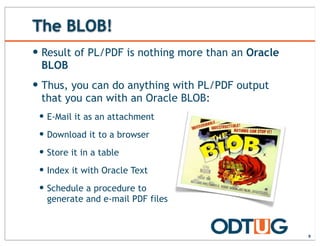
The BLOB!
— Result of PL/PDF is nothing more than an Oracle
BLOB
— Thus, you can do anything with PL/PDF output
that you can with an Oracle BLOB:
— E-Mail it as an attachment
— Download it to a browser
— Store it in a table
— Index it with Oracle Text
— Schedule a procedure to
generate and e-mail PDF files
9
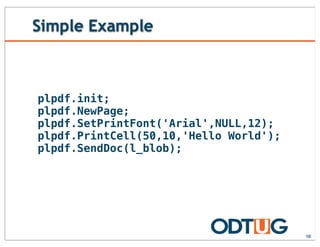
Simple Example
10
plpdf.init;
plpdf.NewPage;
plpdf.SetPrintFont('Arial',NULL,12);
plpdf.PrintCell(50,10,'Hello World');
plpdf.SendDoc(l_blob);
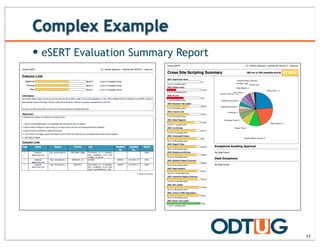
Complex Example
— eSERT Evaluation Summary Report
11
Layout & Control
12
— All layout is handled via API calls
— There is no GUI tool to design a PL/PDF report
— Seems limiting, and can be at times
— Template feature allows you to use any tool to create the
structure of a document and use PL/PDF APIs only to
populate the data
— Also, there are APIs that minimize the amount of code
required when creating reports
Extras
13
— In addition to its core APIs, PL/PDF offers a
number of extra features
— Templates
— Charts
— Bar, Line & Pie
— Bar Codes
— Encryption
— OpenOffice Forms
— TrueType Font Support
Templates
14
— PL/PDF allows you to include a PDF template as a
background for any page
— No need to use PL/PDF to create the structure of a
document; focus on filling in the data
— Any PDF document can be used
— Easy to create PDF documents from Word, Acrobat, etc.
Templates
15
Charts
16
— Support for three types of charts
— Line
— Bar
— Pie
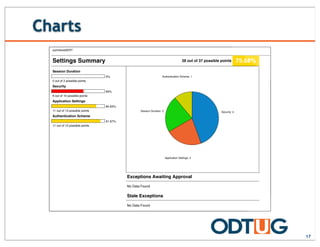
sumnevaSERT
Settings Summary 28 out of 37 possible points 75.68%
Session Duration
0%
0 out of 2 possible points
Security
60%
6 out of 10 possible points
Application Settings
84.62%
11 out of 13 possible points
Authentication Scheme
91.67%
11 out of 12 possible points
Security: 4
Application Settings: 2
Session Duration: 2
Authentication Scheme: 1
Exceptions Awaiting Approval
No Data Found
Stale Exceptions
No Data Found
Charts
17
Barcodes
18
— Support for a number of types of barcodes:
Feline Adult 20/22LB
8543
$36.99
101262640
Feline Adult 20/22LB
8543
$36.99
101262640
Feline Adult 20/22LB
8543
$36.99
101262640
Feline Adult 20/22LB
8543
$36.99
101262640
Feline Adult 20/22LB
8543
$36.99
101262640
Feline Adult 20/22LB
8543
$36.99
101262640
Feline Adult 20/22LB
8543
$36.99
101262640
Feline Adult 20/22LB
8543
$36.99
101262640
Feline Adult 20/22LB
8543
$36.99
101262640
Feline Adult 20/22LB
8543
$36.99
101262640
Feline Adult 20/22LB
8543
$36.99
101262640
Feline Adult 20/22LB
8543
$36.99
101262640
Feline Adult 20/22LB
8543
$36.99
101262640
Feline Adult 20/22LB
8543
$36.99
101262640
Feline Adult 20/22LB
8543
$36.99
101262640
Feline Adult 20/22LB
8543
$36.99
101262640
Feline Adult 20/22LB
8543
Feline Adult 20/22LB
8543
Feline Adult 20/22LB
8543
Feline Adult 20/22LB
8543
Other Features
19
— Ability to encrypt PDF files
— Support for OpenOffice PDF Forms
— LZW compression
— TrueType Font Support
Sweet Spots
— PL/PDF is the best solution when:
— The core report definition does not change often
— End Users do not need to create one-off reports
— You have an abundance of PL/SQL resources and little
money
20
INSTALLATION
21
Installation Options
22
— PL/PDF is installed by running a series of SQL
scripts
— Can use to install on any target OS
— Need to be able to connect to the target database via
SQL*Net
— Some additional features may need to be
manually installed
— Charts, Bar Codes, etc.
— Installation should take about 15 minutes
Where to Put It
— Since PL/PDF is a set of PL/SQL objects, you’ll
need to select a schema to put it in
— Typically use PLPDF, but can name the schema anything
— Best to use its own schema and then create
grants & synonyms to access from other schemas
— You’ll need to do this manually
— Start with just PLPDF & PLPDF_TYPE; synonyms for other
objects can be added as needed
23
INTEGRATION
24
APEX Integration
25
— Once installed and the corresponding grants are
created to your parse as schema, there is
NOTHING ADDITIONAL TO CONFIGURE in order to
integrate PL/PDF with APEX
— PL/PDF - like APEX - is PL/SQL
— Thus, as long as your parse-as schema can access the
PL/PDF objects, that’s all you’ll need
— Seriously.
— There’s nothing else to configure.
— Try it. You’ll see.
APEX Integration
— PL/PDF must be called as part of the Page
Rendering process in APEX
— And it must occur before anything else
— Best Practice:
— Create an On Load PL/SQL Process that calls PL/PDF
— Set the Condition to Request = Expression 1
— Add a button/link to that page which sets the Request to
trigger the PL/PDF call
26
PL/SQL Package
— It’s best to put the logic for a PL/PDF report into
a PL/SQL package
— Centralized
— Can re-use common functions
— More performant
— Easier to work with
— Be sure pass in parameters when possible so that
a single package may be called from multiple
pages or even outside of APEX
27
PL/SQL Process
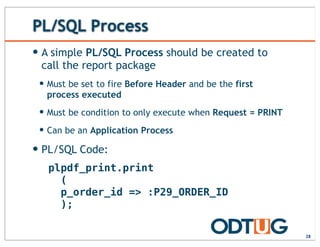
— A simple PL/SQL Process should be created to
call the report package
— Must be set to fire Before Header and be the first
process executed
— Must be condition to only execute when Request = PRINT
— Can be an Application Process
— PL/SQL Code:
28
plpdf_print.print
(
p_order_id => :P29_ORDER_ID
);
Button
29
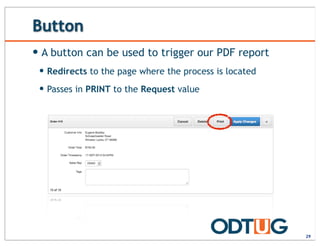
— A button can be used to trigger our PDF report
— Redirects to the page where the process is located
— Passes in PRINT to the Request value
Column Link
— A Column Link can also be used to print a report
— Redirects to the page where the process is located
— Passes in PRINT to the Request value
— Sets the value of the APEX Item which is passed to the
package
30
D E M O N S T R A T I O N
APEX INTEGRATION
31
IMPLEMENTATION
32
Goal
33
— To produce a Sales Receipt for an order
generated in the Sample Database Application
— Receipt will encompass a master-detail report
— Single row from the header
— Variable number of rows from the detail
— Should look professional and include a logo
Report Types
34
— PL/PDF can produce two “types” of reports
— Row/Column
— Produce rows & columns of data based on a SQL query
— Forms
— Fill in the data for a form, such as a Tax Form or Job Application
— It’s important to determine which type is needed
for a specific requirement up front
— OK to use both in a single report, if needed
Our Example
35
Form Report
Based on a single
row of data
across one or
more tables
Row/Column Report
Based on a SQL
Query returning
multiple rows of
data
Where to Start?
36
— PL/PDF can utilize a PDF
document as a template
— Simplifies code greatly, as
only the data needs to be
printed via the APIs
Eugene Bradley
Schoephoester Road
Windsor Locks, CT 06906
10/1/13 000003
00001 Business Shirt 1 $50 $50
00003 Trousers 2 $100 $200
$250
12345 Check
The ABCs of the APIs
37
— PL/PDF is nothing more than a set of PL/SQL APIs
— Like any other API set, there’s a learning curve
— Most APIs have default values on most
parameters
— Thus you only need to pass values to those you wish to set
— Use param => value notation for best results
— Refer to the documentation for full details
Where to Start
— Like any other problem, it all starts with the data
— Analyze the data required and determine the best way to get what you
need
— Create views where it makes sense to simplify SQL statements in APEX
or PL/SQL
38
DEMO_ORDERS
DEMO_ORDER_ITEMS
DEMO_CUSTOMERS
DEMO_ORDERS
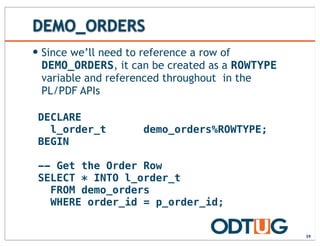
— Since we’ll need to reference a row of
DEMO_ORDERS, it can be created as a ROWTYPE
variable and referenced throughout in the
PL/PDF APIs
39
DECLARE
l_order_t demo_orders%ROWTYPE;
BEGIN
-- Get the Order Row
SELECT * INTO l_order_t
FROM demo_orders
WHERE order_id = p_order_id;
init
— Called once to initialize PL/PDF
— Parameters:
— p_orientation
— p_unit
— p_format
40
newPage
— Creates a new page
— Called anytime a new page is needed
— PL/PDF will automatically create a new page when
needed if data overflows the current page
— Parameters:
— p_orientation
41
Initializing PL/PDF
42
-- Get the Template
SELECT blob_content INTO l_template_pdf
FROM wwv_flow_files
WHERE filename = 'sales_receipt.pdf';
l_template :=
plpdf_parser.getTemplate(l_template_pdf,1);
-- Initialize PL/PDF
plpdf.init(p_format => 'letter');
l_template_id := plpdf.InsTemplate(l_template);
-- Create a new page
plpdf.NewPage;
-- Place the template on the page
plpdf.useTemplate(l_template_id);
-- Get the Template
SELECT blob_content INTO l_template_pdf
FROM wwv_flow_files
WHERE filename = 'sales_receipt.pdf';
l_template :=
plpdf_parser.getTemplate(l_template_pdf,1);
-- Initialize PL/PDF
plpdf.init(p_format => 'letter');
l_template_id := plpdf.InsTemplate(l_template);
-- Create a new page
plpdf.NewPage;
-- Place the template on the page
plpdf.useTemplate(l_template_id);
setCurrentXY
— Sets the position of the cursor
— Parameters:
— p_x
— p_y
— Similar:
— setCurrentX
— setCurrentY
43
setPrintFont
— Sets the font family and style used for text
— Parameters:
— p_family
— p_style
— p_size
44
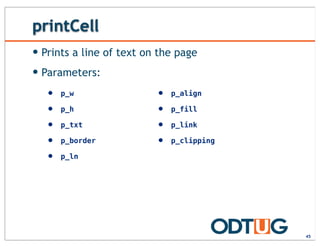
printCell
— Prints a line of text on the page
— Parameters:
45
• p_w
• p_h
• p_txt
• p_border
• p_ln
• p_align
• p_fill
• p_link
• p_clipping
lineBreak
— Places the cursor on the next line
— Parameters:
— p_h
46
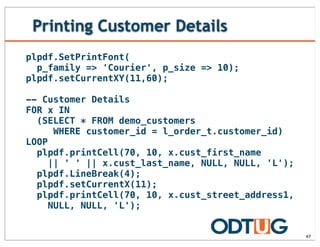
Printing Customer Details
47
plpdf.SetPrintFont(
p_family => 'Courier', p_size => 10);
plpdf.setCurrentXY(11,60);
-- Customer Details
FOR x IN
(SELECT * FROM demo_customers
WHERE customer_id = l_order_t.customer_id)
LOOP
plpdf.printCell(70, 10, x.cust_first_name
|| ' ' || x.cust_last_name, NULL, NULL, 'L');
plpdf.LineBreak(4);
plpdf.setCurrentX(11);
plpdf.printCell(70, 10, x.cust_street_address1,
NULL, NULL, 'L');
Printing Customer Details
48
plpdf.LineBreak(4);
plpdf.setCurrentX(11);
IF x.cust_street_address2 IS NOT NULL THEN
plpdf.printCell(70,10,
x.cust_street_address2, NULL, NULL, 'L');
plpdf.LineBreak(4);
plpdf.setCurrentX(11);
END IF;
plpdf.printCell(70, 10, x.cust_city || ','
|| x.cust_state || ' '
|| x.cust_postal_code, NULL, NULL, 'L');
END LOOP;
Other Details
49
-- Date and Order Number
plpdf.setCurrentXY(152,60);
plpdf.printCell(26, 10,
TO_CHAR(l_order_t.order_timestamp,
'DD-MON-YYYY'),NULL,NULL,'C');
plpdf.printCell(30,10,'0000'
|| p_order_id,NULL,NULL,'C');
-- Payment Method
plpdf.setCurrentXY(10,95);
plpdf.printCell(28,10,'n/a' ,NULL,NULL,'C');
plpdf.printCell(28,10,'Credit',NULL,NULL,'C');
-- Reset Cursor
plpdf.setCurrentXY(10,114);
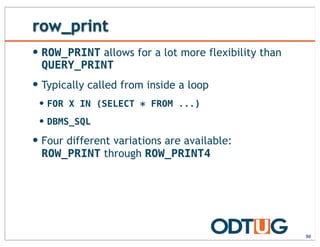
row_print
50
— ROW_PRINT allows for a lot more flexibility than
QUERY_PRINT
— Typically called from inside a loop
— FOR X IN (SELECT * FROM ...)
— DBMS_SQL
— Four different variations are available:
ROW_PRINT through ROW_PRINT4
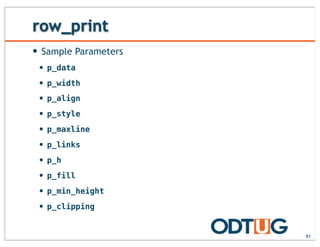
row_print
— Sample Parameters
— p_data
— p_width
— p_align
— p_style
— p_maxline
— p_links
— p_h
— p_fill
— p_min_height
— p_clipping
51
Order Lines
52
— ROW_PRINT may or may not suffice for what you
need
— Often times just looping through a query and printing the
individual columns is just as effective
— Take some time to become familiar with it and
what it can and can’t do
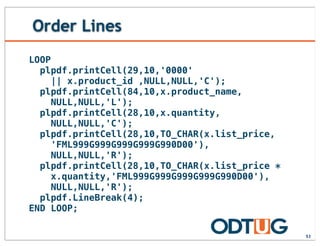
Order Lines
53
LOOP
plpdf.printCell(29,10,'0000'
|| x.product_id ,NULL,NULL,'C');
plpdf.printCell(84,10,x.product_name,
NULL,NULL,'L');
plpdf.printCell(28,10,x.quantity,
NULL,NULL,'C');
plpdf.printCell(28,10,TO_CHAR(x.list_price,
'FML999G999G999G999G990D00'),
NULL,NULL,'R');
plpdf.printCell(28,10,TO_CHAR(x.list_price *
x.quantity,'FML999G999G999G999G990D00'),
NULL,NULL,'R');
plpdf.LineBreak(4);
END LOOP;
sendDoc
— Returns the PDF document to a BLOB variable
— Parameters:
— p_blob
54
Download File API
— You can also create a single procedure to handle
file downloads
— Pass in the BLOB and filename
— All PL/PDF reports can call this procedure
— In fact, it is recommended that PL/PDF reports
be based on a package
— Reusability
— Security
55
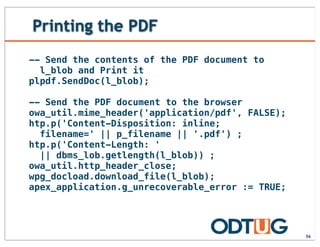
Printing the PDF
56
-- Send the contents of the PDF document to
l_blob and Print it
plpdf.SendDoc(l_blob);
-- Send the PDF document to the browser
owa_util.mime_header('application/pdf', FALSE);
htp.p('Content-Disposition: inline;
filename=' || p_filename || '.pdf') ;
htp.p('Content-Length: '
|| dbms_lob.getlength(l_blob)) ;
owa_util.http_header_close;
wpg_docload.download_file(l_blob);
apex_application.g_unrecoverable_error := TRUE;
Table of Contents
57
— PL/PDF allows you to automatically crete a Table
of Contents
— You can add “bookmarks” throughout your application that
link back to the main table of contents
— Fully automated; no need to calculate anything
SECURITY
58
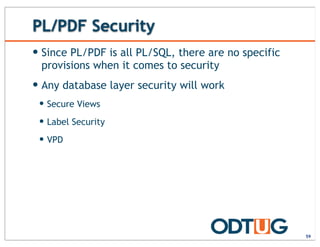
PL/PDF Security
59
— Since PL/PDF is all PL/SQL, there are no specific
provisions when it comes to security
— Any database layer security will work
— Secure Views
— Label Security
— VPD
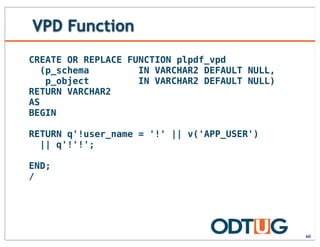
VPD Function
60
CREATE OR REPLACE FUNCTION plpdf_vpd
(p_schema IN VARCHAR2 DEFAULT NULL,
p_object IN VARCHAR2 DEFAULT NULL)
RETURN VARCHAR2
AS
BEGIN
RETURN q'!user_name = '!' || v('APP_USER')
|| q'!'!';
END;
/
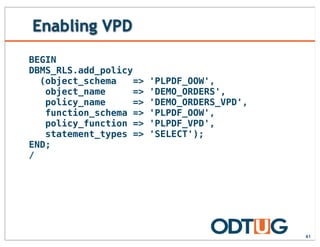
Enabling VPD
61
BEGIN
DBMS_RLS.add_policy
(object_schema => 'PLPDF_OOW',
object_name => 'DEMO_ORDERS',
policy_name => 'DEMO_ORDERS_VPD',
function_schema => 'PLPDF_OOW',
policy_function => 'PLPDF_VPD',
statement_types => 'SELECT');
END;
/
Disabling VPD
62
BEGIN
DBMS_RLS.drop_policy
(object_schema => 'PLPDF_OOW',
object_name => 'DEMO_ORDERS',
policy_name => 'DEMO_ORDERS_VPD');
END;
/
D E M O N S T R A T I O N
VPD & PL/PDF
63
SUMMARY
64
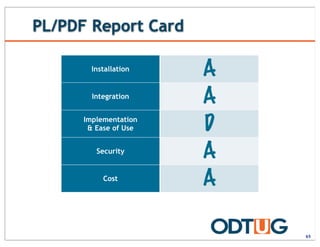
PL/PDF Report Card
65
Installation
Integration
Implementation
& Ease of Use
Security
Cost
A
A
D
A
A
Summary
66
— PL/PDF provides a robust, cost effective
solution for producing high quality PDF
documents from any APEX application
— Not always the right tool for every job; but in many cases,
it works quite well
— Low cost and zero footprint means that it should at least
be seriously considered
http://www.odtug.com
67

Printing with APEX: PL/PDF

  • 1.
    Printing with APEX:PL/PDF Scott Spendolini Executive Director, Enkitec 1
  • 2.
    — Scott Spendolini —scott.spendolini@enkitec.com — @sspendol — Ex-Oracle Employee of 10 years — Senior Product Manager for Oracle APEX from 2002 through 2005 — Founded Sumner Technologies in October 2005 — Co-Founded Sumneva in January 2010 — Joined Enkitec in June 2012 — Oracle Ace Director — Author, Expert Oracle Application Express Security — Co-Author, Pro Oracle Application Express — “Scott” on OTN Forums About the Presenter 2
  • 4.
    Agenda — Overview — Installation —Integration — Implementation — Security — Summary 4
  • 5.
  • 6.
    What is PL/PDF? 6 —Thirdparty product designed by Oranext —http://plpdf.com —Provides a set of PL/SQL based APIs that can generate PDF files from the Oracle database —Easy to securely integrate with APEX —Can be called from a Page or Application Process
  • 7.
    PL/PDF Features — Robustreporting engine — Charts — Bar, Line & Pie — Barcode Printing — Use Existing PDF files as Templates — TrueType Font Embedding — Encrypted PDF Documents — Native Support for PNG & JPEG images — Other types supported via Oracle InterMedia 7
  • 8.
    Licensing — Licensed perinstance of Oracle — $600 per instance — Can download a trial for free — 5 Page Maximum — Watermark Appears on all pages — No additional hardware is required — PL/PDF installs into the same database as APEX 8
  • 9.
    The BLOB! — Resultof PL/PDF is nothing more than an Oracle BLOB — Thus, you can do anything with PL/PDF output that you can with an Oracle BLOB: — E-Mail it as an attachment — Download it to a browser — Store it in a table — Index it with Oracle Text — Schedule a procedure to generate and e-mail PDF files 9
  • 10.
  • 11.
    Complex Example — eSERTEvaluation Summary Report 11
  • 12.
    Layout & Control 12 —All layout is handled via API calls — There is no GUI tool to design a PL/PDF report — Seems limiting, and can be at times — Template feature allows you to use any tool to create the structure of a document and use PL/PDF APIs only to populate the data — Also, there are APIs that minimize the amount of code required when creating reports
  • 13.
    Extras 13 — In additionto its core APIs, PL/PDF offers a number of extra features — Templates — Charts — Bar, Line & Pie — Bar Codes — Encryption — OpenOffice Forms — TrueType Font Support
  • 14.
    Templates 14 — PL/PDF allowsyou to include a PDF template as a background for any page — No need to use PL/PDF to create the structure of a document; focus on filling in the data — Any PDF document can be used — Easy to create PDF documents from Word, Acrobat, etc.
  • 15.
  • 16.
    Charts 16 — Support forthree types of charts — Line — Bar — Pie
  • 17.
    sumnevaSERT Settings Summary 28out of 37 possible points 75.68% Session Duration 0% 0 out of 2 possible points Security 60% 6 out of 10 possible points Application Settings 84.62% 11 out of 13 possible points Authentication Scheme 91.67% 11 out of 12 possible points Security: 4 Application Settings: 2 Session Duration: 2 Authentication Scheme: 1 Exceptions Awaiting Approval No Data Found Stale Exceptions No Data Found Charts 17
  • 18.
    Barcodes 18 — Support fora number of types of barcodes: Feline Adult 20/22LB 8543 $36.99 101262640 Feline Adult 20/22LB 8543 $36.99 101262640 Feline Adult 20/22LB 8543 $36.99 101262640 Feline Adult 20/22LB 8543 $36.99 101262640 Feline Adult 20/22LB 8543 $36.99 101262640 Feline Adult 20/22LB 8543 $36.99 101262640 Feline Adult 20/22LB 8543 $36.99 101262640 Feline Adult 20/22LB 8543 $36.99 101262640 Feline Adult 20/22LB 8543 $36.99 101262640 Feline Adult 20/22LB 8543 $36.99 101262640 Feline Adult 20/22LB 8543 $36.99 101262640 Feline Adult 20/22LB 8543 $36.99 101262640 Feline Adult 20/22LB 8543 $36.99 101262640 Feline Adult 20/22LB 8543 $36.99 101262640 Feline Adult 20/22LB 8543 $36.99 101262640 Feline Adult 20/22LB 8543 $36.99 101262640 Feline Adult 20/22LB 8543 Feline Adult 20/22LB 8543 Feline Adult 20/22LB 8543 Feline Adult 20/22LB 8543
  • 19.
    Other Features 19 — Abilityto encrypt PDF files — Support for OpenOffice PDF Forms — LZW compression — TrueType Font Support
  • 20.
    Sweet Spots — PL/PDFis the best solution when: — The core report definition does not change often — End Users do not need to create one-off reports — You have an abundance of PL/SQL resources and little money 20
  • 21.
  • 22.
    Installation Options 22 — PL/PDFis installed by running a series of SQL scripts — Can use to install on any target OS — Need to be able to connect to the target database via SQL*Net — Some additional features may need to be manually installed — Charts, Bar Codes, etc. — Installation should take about 15 minutes
  • 23.
    Where to PutIt — Since PL/PDF is a set of PL/SQL objects, you’ll need to select a schema to put it in — Typically use PLPDF, but can name the schema anything — Best to use its own schema and then create grants & synonyms to access from other schemas — You’ll need to do this manually — Start with just PLPDF & PLPDF_TYPE; synonyms for other objects can be added as needed 23
  • 24.
  • 25.
    APEX Integration 25 — Onceinstalled and the corresponding grants are created to your parse as schema, there is NOTHING ADDITIONAL TO CONFIGURE in order to integrate PL/PDF with APEX — PL/PDF - like APEX - is PL/SQL — Thus, as long as your parse-as schema can access the PL/PDF objects, that’s all you’ll need — Seriously. — There’s nothing else to configure. — Try it. You’ll see.
  • 26.
    APEX Integration — PL/PDFmust be called as part of the Page Rendering process in APEX — And it must occur before anything else — Best Practice: — Create an On Load PL/SQL Process that calls PL/PDF — Set the Condition to Request = Expression 1 — Add a button/link to that page which sets the Request to trigger the PL/PDF call 26
  • 27.
    PL/SQL Package — It’sbest to put the logic for a PL/PDF report into a PL/SQL package — Centralized — Can re-use common functions — More performant — Easier to work with — Be sure pass in parameters when possible so that a single package may be called from multiple pages or even outside of APEX 27
  • 28.
    PL/SQL Process — Asimple PL/SQL Process should be created to call the report package — Must be set to fire Before Header and be the first process executed — Must be condition to only execute when Request = PRINT — Can be an Application Process — PL/SQL Code: 28 plpdf_print.print ( p_order_id => :P29_ORDER_ID );
  • 29.
    Button 29 — A buttoncan be used to trigger our PDF report — Redirects to the page where the process is located — Passes in PRINT to the Request value
  • 30.
    Column Link — AColumn Link can also be used to print a report — Redirects to the page where the process is located — Passes in PRINT to the Request value — Sets the value of the APEX Item which is passed to the package 30
  • 31.
    D E MO N S T R A T I O N APEX INTEGRATION 31
  • 32.
  • 33.
    Goal 33 — To producea Sales Receipt for an order generated in the Sample Database Application — Receipt will encompass a master-detail report — Single row from the header — Variable number of rows from the detail — Should look professional and include a logo
  • 34.
    Report Types 34 — PL/PDFcan produce two “types” of reports — Row/Column — Produce rows & columns of data based on a SQL query — Forms — Fill in the data for a form, such as a Tax Form or Job Application — It’s important to determine which type is needed for a specific requirement up front — OK to use both in a single report, if needed
  • 35.
    Our Example 35 Form Report Basedon a single row of data across one or more tables Row/Column Report Based on a SQL Query returning multiple rows of data
  • 36.
    Where to Start? 36 —PL/PDF can utilize a PDF document as a template — Simplifies code greatly, as only the data needs to be printed via the APIs Eugene Bradley Schoephoester Road Windsor Locks, CT 06906 10/1/13 000003 00001 Business Shirt 1 $50 $50 00003 Trousers 2 $100 $200 $250 12345 Check
  • 37.
    The ABCs ofthe APIs 37 — PL/PDF is nothing more than a set of PL/SQL APIs — Like any other API set, there’s a learning curve — Most APIs have default values on most parameters — Thus you only need to pass values to those you wish to set — Use param => value notation for best results — Refer to the documentation for full details
  • 38.
    Where to Start —Like any other problem, it all starts with the data — Analyze the data required and determine the best way to get what you need — Create views where it makes sense to simplify SQL statements in APEX or PL/SQL 38 DEMO_ORDERS DEMO_ORDER_ITEMS DEMO_CUSTOMERS
  • 39.
    DEMO_ORDERS — Since we’llneed to reference a row of DEMO_ORDERS, it can be created as a ROWTYPE variable and referenced throughout in the PL/PDF APIs 39 DECLARE l_order_t demo_orders%ROWTYPE; BEGIN -- Get the Order Row SELECT * INTO l_order_t FROM demo_orders WHERE order_id = p_order_id;
  • 40.
    init — Called onceto initialize PL/PDF — Parameters: — p_orientation — p_unit — p_format 40
  • 41.
    newPage — Creates anew page — Called anytime a new page is needed — PL/PDF will automatically create a new page when needed if data overflows the current page — Parameters: — p_orientation 41
  • 42.
    Initializing PL/PDF 42 -- Getthe Template SELECT blob_content INTO l_template_pdf FROM wwv_flow_files WHERE filename = 'sales_receipt.pdf'; l_template := plpdf_parser.getTemplate(l_template_pdf,1); -- Initialize PL/PDF plpdf.init(p_format => 'letter'); l_template_id := plpdf.InsTemplate(l_template); -- Create a new page plpdf.NewPage; -- Place the template on the page plpdf.useTemplate(l_template_id); -- Get the Template SELECT blob_content INTO l_template_pdf FROM wwv_flow_files WHERE filename = 'sales_receipt.pdf'; l_template := plpdf_parser.getTemplate(l_template_pdf,1); -- Initialize PL/PDF plpdf.init(p_format => 'letter'); l_template_id := plpdf.InsTemplate(l_template); -- Create a new page plpdf.NewPage; -- Place the template on the page plpdf.useTemplate(l_template_id);
  • 43.
    setCurrentXY — Sets theposition of the cursor — Parameters: — p_x — p_y — Similar: — setCurrentX — setCurrentY 43
  • 44.
    setPrintFont — Sets thefont family and style used for text — Parameters: — p_family — p_style — p_size 44
  • 45.
    printCell — Prints aline of text on the page — Parameters: 45 • p_w • p_h • p_txt • p_border • p_ln • p_align • p_fill • p_link • p_clipping
  • 46.
    lineBreak — Places thecursor on the next line — Parameters: — p_h 46
  • 47.
    Printing Customer Details 47 plpdf.SetPrintFont( p_family=> 'Courier', p_size => 10); plpdf.setCurrentXY(11,60); -- Customer Details FOR x IN (SELECT * FROM demo_customers WHERE customer_id = l_order_t.customer_id) LOOP plpdf.printCell(70, 10, x.cust_first_name || ' ' || x.cust_last_name, NULL, NULL, 'L'); plpdf.LineBreak(4); plpdf.setCurrentX(11); plpdf.printCell(70, 10, x.cust_street_address1, NULL, NULL, 'L');
  • 48.
    Printing Customer Details 48 plpdf.LineBreak(4); plpdf.setCurrentX(11); IFx.cust_street_address2 IS NOT NULL THEN plpdf.printCell(70,10, x.cust_street_address2, NULL, NULL, 'L'); plpdf.LineBreak(4); plpdf.setCurrentX(11); END IF; plpdf.printCell(70, 10, x.cust_city || ',' || x.cust_state || ' ' || x.cust_postal_code, NULL, NULL, 'L'); END LOOP;
  • 49.
    Other Details 49 -- Dateand Order Number plpdf.setCurrentXY(152,60); plpdf.printCell(26, 10, TO_CHAR(l_order_t.order_timestamp, 'DD-MON-YYYY'),NULL,NULL,'C'); plpdf.printCell(30,10,'0000' || p_order_id,NULL,NULL,'C'); -- Payment Method plpdf.setCurrentXY(10,95); plpdf.printCell(28,10,'n/a' ,NULL,NULL,'C'); plpdf.printCell(28,10,'Credit',NULL,NULL,'C'); -- Reset Cursor plpdf.setCurrentXY(10,114);
  • 50.
    row_print 50 — ROW_PRINT allowsfor a lot more flexibility than QUERY_PRINT — Typically called from inside a loop — FOR X IN (SELECT * FROM ...) — DBMS_SQL — Four different variations are available: ROW_PRINT through ROW_PRINT4
  • 51.
    row_print — Sample Parameters —p_data — p_width — p_align — p_style — p_maxline — p_links — p_h — p_fill — p_min_height — p_clipping 51
  • 52.
    Order Lines 52 — ROW_PRINTmay or may not suffice for what you need — Often times just looping through a query and printing the individual columns is just as effective — Take some time to become familiar with it and what it can and can’t do
  • 53.
    Order Lines 53 LOOP plpdf.printCell(29,10,'0000' || x.product_id,NULL,NULL,'C'); plpdf.printCell(84,10,x.product_name, NULL,NULL,'L'); plpdf.printCell(28,10,x.quantity, NULL,NULL,'C'); plpdf.printCell(28,10,TO_CHAR(x.list_price, 'FML999G999G999G999G990D00'), NULL,NULL,'R'); plpdf.printCell(28,10,TO_CHAR(x.list_price * x.quantity,'FML999G999G999G999G990D00'), NULL,NULL,'R'); plpdf.LineBreak(4); END LOOP;
  • 54.
    sendDoc — Returns thePDF document to a BLOB variable — Parameters: — p_blob 54
  • 55.
    Download File API —You can also create a single procedure to handle file downloads — Pass in the BLOB and filename — All PL/PDF reports can call this procedure — In fact, it is recommended that PL/PDF reports be based on a package — Reusability — Security 55
  • 56.
    Printing the PDF 56 --Send the contents of the PDF document to l_blob and Print it plpdf.SendDoc(l_blob); -- Send the PDF document to the browser owa_util.mime_header('application/pdf', FALSE); htp.p('Content-Disposition: inline; filename=' || p_filename || '.pdf') ; htp.p('Content-Length: ' || dbms_lob.getlength(l_blob)) ; owa_util.http_header_close; wpg_docload.download_file(l_blob); apex_application.g_unrecoverable_error := TRUE;
  • 57.
    Table of Contents 57 —PL/PDF allows you to automatically crete a Table of Contents — You can add “bookmarks” throughout your application that link back to the main table of contents — Fully automated; no need to calculate anything
  • 58.
  • 59.
    PL/PDF Security 59 — SincePL/PDF is all PL/SQL, there are no specific provisions when it comes to security — Any database layer security will work — Secure Views — Label Security — VPD
  • 60.
    VPD Function 60 CREATE ORREPLACE FUNCTION plpdf_vpd (p_schema IN VARCHAR2 DEFAULT NULL, p_object IN VARCHAR2 DEFAULT NULL) RETURN VARCHAR2 AS BEGIN RETURN q'!user_name = '!' || v('APP_USER') || q'!'!'; END; /
  • 61.
    Enabling VPD 61 BEGIN DBMS_RLS.add_policy (object_schema =>'PLPDF_OOW', object_name => 'DEMO_ORDERS', policy_name => 'DEMO_ORDERS_VPD', function_schema => 'PLPDF_OOW', policy_function => 'PLPDF_VPD', statement_types => 'SELECT'); END; /
  • 62.
    Disabling VPD 62 BEGIN DBMS_RLS.drop_policy (object_schema =>'PLPDF_OOW', object_name => 'DEMO_ORDERS', policy_name => 'DEMO_ORDERS_VPD'); END; /
  • 63.
    D E MO N S T R A T I O N VPD & PL/PDF 63
  • 64.
  • 65.
  • 66.
    Summary 66 — PL/PDF providesa robust, cost effective solution for producing high quality PDF documents from any APEX application — Not always the right tool for every job; but in many cases, it works quite well — Low cost and zero footprint means that it should at least be seriously considered
  • 67.