©2013	
  Enkitec	
  
Mini	
  session	
  
Se2ng	
  up	
  and	
  using	
  gdb	
  for	
  profiling
Frits	
  Hoogland	
  
Collaborate	
  2014,	
  Las	
  Vegas
1
This is the font size used for showing screen output. Be sure this is readable for you.
`whoami`
• Frits	
  Hoogland	
  
• Working	
  with	
  Oracle	
  products	
  since	
  1996	
  
!
• Blog:	
  hLp://fritshoogland.wordpress.com	
  
• TwiLer:	
  @fritshoogland	
  
• Email:	
  frits.hoogland@enkitec.com	
  
• Oracle	
  ACE	
  Director	
  
• OakTable	
  Member
2
3
•  Early&bird&discount&expires&April&15,&2014.
•  Quick links:
–  Home: www.enkitec.com/e4
–  Registration: http://www.enkitec.com/e4/register
–  Location: http://www.enkitec.com/e4/location
–  Training Days Following E4:
http://www.enkitec.com/e4/training-days
Goals	
  &	
  prerequisites	
  
• Goal:	
  give	
  a	
  primer	
  on	
  using	
  gdb	
  for	
  profiling	
  C	
  
funcXon	
  sequences.	
  This	
  is	
  by	
  no	
  means	
  a	
  
comprehensive,	
  full	
  explanaXon.	
  
!
• Prerequisites:	
  
– Understanding	
  of	
  (internal)	
  execuXon	
  of	
  C	
  programs.	
  
– Understanding	
  of	
  Oracle	
  tracing	
  mechanisms.
4
Use	
  the	
  correct	
  tool!
• In	
  order	
  to	
  troubleshoot	
  performance	
  problems	
  
or	
  unexpected	
  behaviour,	
  sql_trace	
  at	
  level	
  8	
  is	
  a	
  
decent	
  starXng	
  point.	
  
!
• sql_trace,	
  level	
  8	
  
• system	
  calls:	
  strace	
  (combined	
  with	
  sql_trace)	
  
• funcXon	
  calls:	
  gdb	
  
!
• This	
  means	
  using	
  gdb	
  is	
  no	
  “one	
  size	
  fits	
  all”	
  res.
5
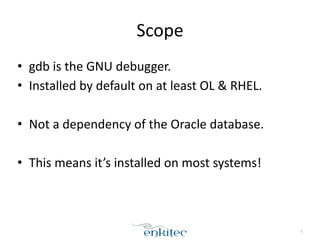
Scope
• gdb	
  is	
  the	
  GNU	
  debugger.	
  
• Installed	
  by	
  default	
  on	
  at	
  least	
  OL	
  &	
  RHEL.	
  
!
• Not	
  a	
  dependency	
  of	
  the	
  Oracle	
  database.	
  
!
• This	
  means	
  it’s	
  installed	
  on	
  most	
  systems!
6
Scope
• gdb	
  is	
  meant	
  for	
  debugging	
  C	
  programs.	
  
!
• in	
  order	
  to	
  do	
  so,	
  the	
  ‘-­‐g’	
  flag	
  must	
  be	
  added	
  
when	
  compiling	
  the	
  program	
  (gcc).	
  
– The	
  ‘-­‐g’	
  flag	
  adds	
  debug	
  info	
  to	
  the	
  executable.	
  
!
• The	
  oracle	
  database	
  executables	
  do	
  NOT	
  contain	
  
this	
  info!
7
Scope
• Normal	
  usage	
  of	
  gdb	
  is	
  to	
  start	
  gdb	
  with	
  the	
  
executable	
  to	
  be	
  debugged:	
  
– gdb	
  mycompiledprogram	
  
!
• This	
  can	
  not	
  be	
  done	
  with	
  the	
  oracle	
  database.
8
Symbol	
  table
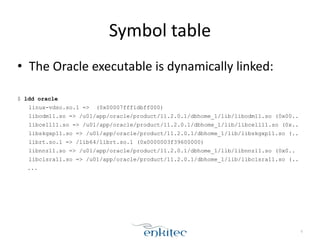
• The	
  Oracle	
  executable	
  is	
  dynamically	
  linked:	
  
!
$ ldd oracle
linux-vdso.so.1 => (0x00007fff1dbff000)
libodm11.so => /u01/app/oracle/product/11.2.0.1/dbhome_1/lib/libodm11.so (0x00..
libcell11.so => /u01/app/oracle/product/11.2.0.1/dbhome_1/lib/libcell11.so (0x..
libskgxp11.so => /u01/app/oracle/product/11.2.0.1/dbhome_1/lib/libskgxp11.so (..
librt.so.1 => /lib64/librt.so.1 (0x0000003f39600000)
libnnz11.so => /u01/app/oracle/product/11.2.0.1/dbhome_1/lib/libnnz11.so (0x0..
libclsra11.so => /u01/app/oracle/product/11.2.0.1/dbhome_1/lib/libclsra11.so (..
...
9
Symbol	
  table
• A	
  DL	
  executable	
  does	
  not	
  know	
  the	
  code	
  
locaXon	
  of	
  a	
  funcXon	
  in	
  a	
  library	
  upfront.	
  
– Think	
  new	
  version	
  of	
  library,	
  3rd	
  party,	
  etc.	
  
!
• In	
  order	
  to	
  find	
  these	
  funcXons,	
  there’s	
  a	
  table	
  of	
  
funcXon	
  to	
  code-­‐locaXon.
10
Symbol	
  table
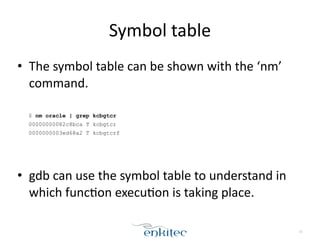
• The	
  symbol	
  table	
  can	
  be	
  shown	
  with	
  the	
  ‘nm’	
  
command.	
  
!
$ nm oracle | grep kcbgtcr
00000000082c8bca T kcbgtcr
0000000003ed68a2 T kcbgtcrf
!
!
• gdb	
  can	
  use	
  the	
  symbol	
  table	
  to	
  understand	
  in	
  
which	
  funcXon	
  execuXon	
  is	
  taking	
  place.
11
Using	
  gdb	
  on	
  processes
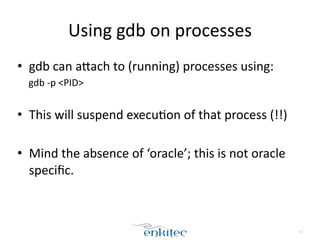
• gdb	
  can	
  aLach	
  to	
  (running)	
  processes	
  using:	
  
gdb	
  -­‐p	
  <PID>	
  
!
• This	
  will	
  suspend	
  execuXon	
  of	
  that	
  process	
  (!!)	
  
!
• Mind	
  the	
  absence	
  of	
  ‘oracle’;	
  this	
  is	
  not	
  oracle	
  
specific.
12
Warning
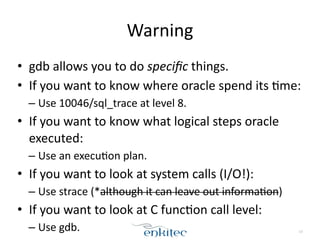
• gdb	
  allows	
  you	
  to	
  do	
  specific	
  things.	
  
• If	
  you	
  want	
  to	
  know	
  where	
  oracle	
  spend	
  its	
  Xme:	
  
– Use	
  10046/sql_trace	
  at	
  level	
  8.	
  
• If	
  you	
  want	
  to	
  know	
  what	
  logical	
  steps	
  oracle	
  
executed:	
  
– Use	
  an	
  execuXon	
  plan.	
  
• If	
  you	
  want	
  to	
  look	
  at	
  system	
  calls	
  (I/O!):	
  
– Use	
  strace	
  (*although	
  it	
  can	
  leave	
  out	
  informaXon)	
  
• If	
  you	
  want	
  to	
  look	
  at	
  C	
  funcXon	
  call	
  level:	
  
– Use	
  gdb. 13
using	
  gdb	
  on	
  oracle
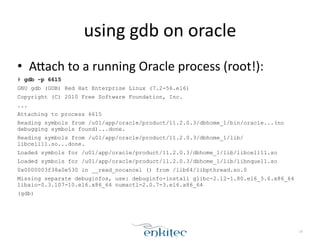
• ALach	
  to	
  a	
  running	
  Oracle	
  process	
  (root!):	
  
# gdb -p 6615
GNU gdb (GDB) Red Hat Enterprise Linux (7.2-56.el6)
Copyright (C) 2010 Free Software Foundation, Inc.
...
Attaching to process 6615
Reading symbols from /u01/app/oracle/product/11.2.0.3/dbhome_1/bin/oracle...(no
debugging symbols found)...done.
Reading symbols from /u01/app/oracle/product/11.2.0.3/dbhome_1/lib/
libcell11.so...done.
Loaded symbols for /u01/app/oracle/product/11.2.0.3/dbhome_1/lib/libcell11.so
Loaded symbols for /u01/app/oracle/product/11.2.0.3/dbhome_1/lib/libnque11.so
0x0000003f38a0e530 in __read_nocancel () from /lib64/libpthread.so.0
Missing separate debuginfos, use: debuginfo-install glibc-2.12-1.80.el6_3.6.x86_64
libaio-0.3.107-10.el6.x86_64 numactl-2.0.7-3.el6.x86_64
(gdb)
14
using	
  gdb	
  on	
  oracle
• The	
  database	
  session	
  is	
  stuck	
  now:	
  
$ sqlplus ts/ts@v11203
!
SQL*Plus: Release 11.2.0.3.0 Production on Mon Dec 9 15:51:05 2013
!
Copyright (c) 1982, 2011, Oracle. All rights reserved.
!
!
Connected to:
Oracle Database 11g Enterprise Edition Release 11.2.0.3.0 - 64bit Production
With the Partitioning, Automatic Storage Management, OLAP, Data Mining
and Real Application Testing options
!
TS@v11203 >
TS@v11203 > select * from dual;
15
using	
  gdb	
  on	
  oracle
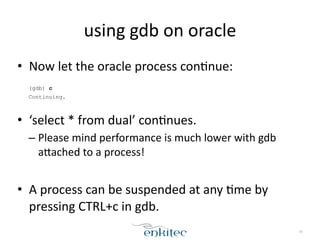
• Now	
  let	
  the	
  oracle	
  process	
  conXnue:	
  
!
(gdb) c
Continuing.
!
• ‘select	
  *	
  from	
  dual’	
  conXnues.	
  
– Please	
  mind	
  performance	
  is	
  much	
  lower	
  with	
  gdb	
  
aLached	
  to	
  a	
  process!	
  
!
• A	
  process	
  can	
  be	
  suspended	
  at	
  any	
  Xme	
  by	
  
pressing	
  CTRL+c	
  in	
  gdb.
16
• The	
  funcXonality	
  that	
  is	
  useful	
  for	
  profiling,	
  is	
  
using	
  the	
  ‘break’	
  funcXonality.	
  
!
• The	
  funcXon	
  of	
  break	
  is	
  to	
  ‘break’	
  execuXon	
  
when	
  a	
  certain	
  funcXon	
  is	
  entered.	
  
!
• Granularity	
  of	
  breaking	
  is	
  funcXon	
  call	
  level.
17
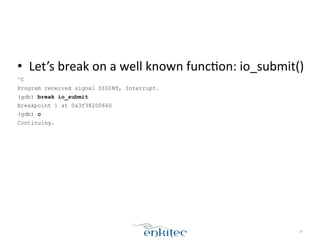
• Let’s	
  break	
  on	
  a	
  well	
  known	
  funcXon:	
  io_submit()	
  
^C
Program received signal SIGINT, Interrupt.
(gdb) break io_submit
Breakpoint 1 at 0x3f38200660
(gdb) c
Continuing.
18
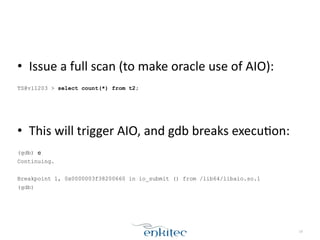
• Issue	
  a	
  full	
  scan	
  (to	
  make	
  oracle	
  use	
  of	
  AIO):	
  
!
TS@v11203 > select count(*) from t2;
!
!
• This	
  will	
  trigger	
  AIO,	
  and	
  gdb	
  breaks	
  execuXon:	
  
!
(gdb) c
Continuing.
!
Breakpoint 1, 0x0000003f38200660 in io_submit () from /lib64/libaio.so.1
(gdb)
19
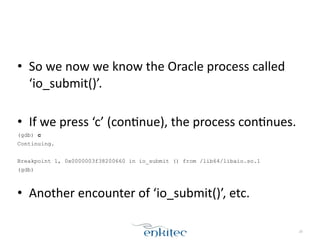
• So	
  we	
  now	
  we	
  know	
  the	
  Oracle	
  process	
  called	
  
‘io_submit()’.	
  	
  
!
• If	
  we	
  press	
  ‘c’	
  (conXnue),	
  the	
  process	
  conXnues.	
  
(gdb) c
Continuing.
!
Breakpoint 1, 0x0000003f38200660 in io_submit () from /lib64/libaio.so.1
(gdb)
!
• Another	
  encounter	
  of	
  ‘io_submit()’,	
  etc.
20
• The	
  conXnue	
  command	
  can	
  be	
  automated:	
  
(gdb) commands 1
Type commands for breakpoint(s) 1, one per line.
End with a line saying just "end".
>c
>end
(gdb) c
Continuing.
!
Breakpoint 1, 0x0000003f38200660 in io_submit () from /lib64/libaio.so.1
!
Breakpoint 1, 0x0000003f38200660 in io_submit () from /lib64/libaio.so.1
!
...
21
• Let’s	
  add	
  breaking	
  on	
  io_getevents()	
  too:	
  
^C
Program received signal SIGINT, Interrupt.
0x0000003f38a0e530 in __read_nocancel () from /lib64/libpthread.so.0
(gdb) break 'io_getevents@plt'
Breakpoint 2 at 0x3f382006a0
(gdb) commands
Type commands for breakpoint(s) 2, one per line.
End with a line saying just "end".
>c
>end
(gdb) c
Continuing.
22
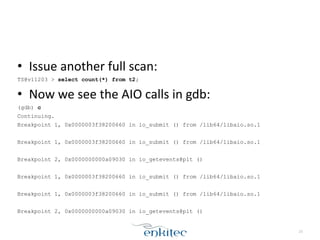
• Issue	
  another	
  full	
  scan:	
  
TS@v11203 > select count(*) from t2;
• Now	
  we	
  see	
  the	
  AIO	
  calls	
  in	
  gdb:	
  
(gdb) c
Continuing.
Breakpoint 1, 0x0000003f38200660 in io_submit () from /lib64/libaio.so.1
!
Breakpoint 1, 0x0000003f38200660 in io_submit () from /lib64/libaio.so.1
!
Breakpoint 2, 0x0000000000a09030 in io_getevents@plt ()
!
Breakpoint 1, 0x0000003f38200660 in io_submit () from /lib64/libaio.so.1
!
Breakpoint 1, 0x0000003f38200660 in io_submit () from /lib64/libaio.so.1
!
Breakpoint 2, 0x0000000000a09030 in io_getevents@plt ()
23
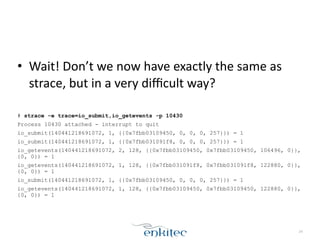
• Wait!	
  Don’t	
  we	
  now	
  have	
  exactly	
  the	
  same	
  as	
  
strace,	
  but	
  in	
  a	
  very	
  difficult	
  way?	
  
!
# strace -e trace=io_submit,io_getevents -p 10430
Process 10430 attached - interrupt to quit
io_submit(140441218691072, 1, {{0x7fbb03109450, 0, 0, 0, 257}}) = 1
io_submit(140441218691072, 1, {{0x7fbb031091f8, 0, 0, 0, 257}}) = 1
io_getevents(140441218691072, 2, 128, {{0x7fbb03109450, 0x7fbb03109450, 106496, 0}},
{0, 0}) = 1
io_getevents(140441218691072, 1, 128, {{0x7fbb031091f8, 0x7fbb031091f8, 122880, 0}},
{0, 0}) = 1
io_submit(140441218691072, 1, {{0x7fbb03109450, 0, 0, 0, 257}}) = 1
io_getevents(140441218691072, 1, 128, {{0x7fbb03109450, 0x7fbb03109450, 122880, 0}},
{0, 0}) = 1
24
• Yes.	
  
• But	
  once	
  you	
  add	
  in	
  (oracle)	
  user	
  land	
  funcXons,	
  
the	
  advantage	
  becomes	
  clear:	
  
!
• kslwtbctx	
  ()	
  :	
  start	
  a	
  wait	
  event*	
  
• kslwtectx	
  ()	
  :	
  end	
  a	
  wait	
  event*	
  
!
*Oracle	
  11	
  and	
  up
25
• Add	
  these	
  funcXons	
  to	
  the	
  breaks:	
  
(gdb) break io_submit
Breakpoint 1 at 0x3f38200660
(gdb) break 'io_getevents@plt'
Breakpoint 2 at 0xa09030
(gdb) rbreak ^kslwt[be]ctx
Breakpoint 3 at 0x8f9a652
<function, no debug info> kslwtbctx;
Breakpoint 4 at 0x8fa1334
<function, no debug info> kslwtectx;
(gdb) commands 1-4
Type commands for breakpoint(s) 1-4, one per line.
End with a line saying just "end".
>c
>end
(gdb) c
Continuing.
26
• And	
  issue	
  the	
  scan	
  again,	
  gdb	
  now	
  shows:	
  
Breakpoint 1, 0x0000003f38200660 in io_submit () from /lib64/libaio.so.1
!
Breakpoint 1, 0x0000003f38200660 in io_submit () from /lib64/libaio.so.1
!
Breakpoint 2, 0x0000000000a09030 in io_getevents@plt ()
!
Breakpoint 2, 0x0000000000a09030 in io_getevents@plt ()
!
Breakpoint 2, 0x0000000000a09030 in io_getevents@plt ()
!
Breakpoint 2, 0x0000000000a09030 in io_getevents@plt ()
!
Breakpoint 3, 0x0000000008f9a652 in kslwtbctx ()
!
Breakpoint 2, 0x0000000000a09030 in io_getevents@plt ()
27
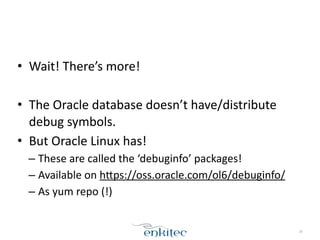
• Wait!	
  There’s	
  more!	
  
!
• The	
  Oracle	
  database	
  doesn’t	
  have/distribute	
  
debug	
  symbols.	
  
• But	
  Oracle	
  Linux	
  has!	
  
– These	
  are	
  called	
  the	
  ‘debuginfo’	
  packages!	
  
– Available	
  on	
  hLps://oss.oracle.com/ol6/debuginfo/	
  
– As	
  yum	
  repo	
  (!)
28
• Add	
  the	
  debuginfo	
  repository	
  to	
  your	
  yum	
  config:	
  
!
# vi /etc/yum.repos.d/debuginfo.repo
[ol6_debuginfo]
name=Oracle Linux 6 debuginfo
baseurl=http://oss.oracle.com/ol6/debuginfo
gpgkey=https://oss.oracle.com/ol6/RPM-GPG-KEY-oracle
gpgcheck=1
enabled=1
29
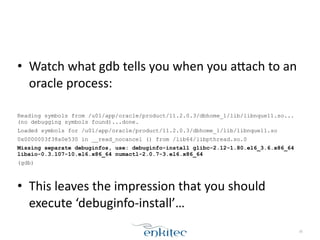
• Watch	
  what	
  gdb	
  tells	
  you	
  when	
  you	
  aLach	
  to	
  an	
  
oracle	
  process:	
  
!
Reading symbols from /u01/app/oracle/product/11.2.0.3/dbhome_1/lib/libnque11.so...
(no debugging symbols found)...done.
Loaded symbols for /u01/app/oracle/product/11.2.0.3/dbhome_1/lib/libnque11.so
0x0000003f38a0e530 in __read_nocancel () from /lib64/libpthread.so.0
Missing separate debuginfos, use: debuginfo-install glibc-2.12-1.80.el6_3.6.x86_64
libaio-0.3.107-10.el6.x86_64 numactl-2.0.7-3.el6.x86_64
(gdb)
!
• This	
  leaves	
  the	
  impression	
  that	
  you	
  should	
  
execute	
  ‘debuginfo-­‐install’…	
  
30
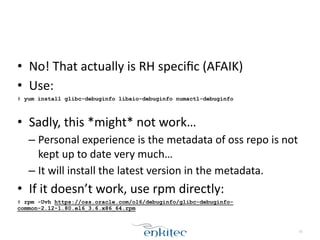
• No!	
  That	
  actually	
  is	
  RH	
  specific	
  (AFAIK)	
  
• Use:	
  
# yum install glibc-debuginfo libaio-debuginfo numactl-debuginfo
!
• Sadly,	
  this	
  *might*	
  not	
  work…	
  
– Personal	
  experience	
  is	
  the	
  metadata	
  of	
  oss	
  repo	
  is	
  not	
  
kept	
  up	
  to	
  date	
  very	
  much…	
  
– It	
  will	
  install	
  the	
  latest	
  version	
  in	
  the	
  metadata.	
  
• If	
  it	
  doesn’t	
  work,	
  use	
  rpm	
  directly:	
  
# rpm -Uvh https://oss.oracle.com/ol6/debuginfo/glibc-debuginfo-
common-2.12-1.80.el6_3.6.x86_64.rpm
31
• Now	
  aLach	
  to	
  an	
  Oracle	
  session	
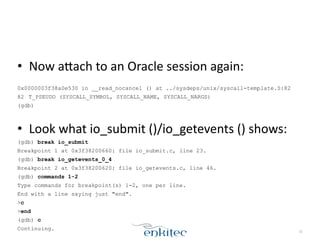
  again:	
  
!
0x0000003f38a0e530 in __read_nocancel () at ../sysdeps/unix/syscall-template.S:82
82 T_PSEUDO (SYSCALL_SYMBOL, SYSCALL_NAME, SYSCALL_NARGS)
(gdb)
!
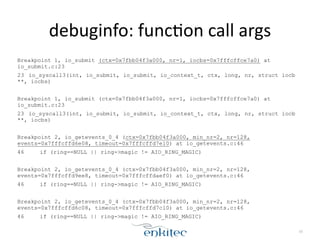
• Look	
  what	
  io_submit	
  ()/io_getevents	
  ()	
  shows:	
  
(gdb) break io_submit
Breakpoint 1 at 0x3f38200660: file io_submit.c, line 23.
(gdb) break io_getevents_0_4
Breakpoint 2 at 0x3f38200620: file io_getevents.c, line 46.
(gdb) commands 1-2
Type commands for breakpoint(s) 1-2, one per line.
End with a line saying just "end".
>c
>end
(gdb) c
Continuing. 32
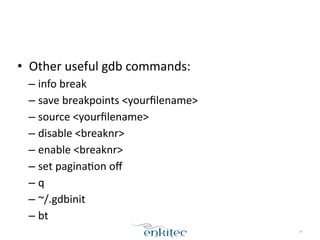
debuginfo:	
  funcXon	
  call	
  args
Breakpoint 1, io_submit (ctx=0x7fbb04f3a000, nr=1, iocbs=0x7fffcffce7a0) at
io_submit.c:23
23 io_syscall3(int, io_submit, io_submit, io_context_t, ctx, long, nr, struct iocb
**, iocbs)
!
Breakpoint 1, io_submit (ctx=0x7fbb04f3a000, nr=1, iocbs=0x7fffcffce7a0) at
io_submit.c:23
23 io_syscall3(int, io_submit, io_submit, io_context_t, ctx, long, nr, struct iocb
**, iocbs)
!
Breakpoint 2, io_getevents_0_4 (ctx=0x7fbb04f3a000, min_nr=2, nr=128,
events=0x7fffcffd6e08, timeout=0x7fffcffd7e10) at io_getevents.c:46
46 if (ring==NULL || ring->magic != AIO_RING_MAGIC)
!
Breakpoint 2, io_getevents_0_4 (ctx=0x7fbb04f3a000, min_nr=2, nr=128,
events=0x7fffcffd9ee8, timeout=0x7fffcffdaef0) at io_getevents.c:46
46 if (ring==NULL || ring->magic != AIO_RING_MAGIC)
!
Breakpoint 2, io_getevents_0_4 (ctx=0x7fbb04f3a000, min_nr=2, nr=128,
events=0x7fffcffd6c08, timeout=0x7fffcffd7c10) at io_getevents.c:46
46 if (ring==NULL || ring->magic != AIO_RING_MAGIC)
33
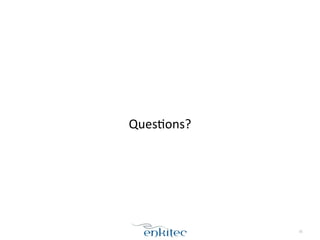
• Other	
  useful	
  gdb	
  commands:	
  
– info	
  break	
  
– save	
  breakpoints	
  <yourfilename>	
  
– source	
  <yourfilename>	
  
– disable	
  <breaknr>	
  
– enable	
  <breaknr>	
  
– set	
  paginaXon	
  off	
  
– q	
  
– ~/.gdbinit	
  
– bt
34
!
!
!
QuesXons?
35

Mini Session - Using GDB for Profiling

  • 1.
    ©2013  Enkitec   Mini  session   Se2ng  up  and  using  gdb  for  profiling Frits  Hoogland   Collaborate  2014,  Las  Vegas 1 This is the font size used for showing screen output. Be sure this is readable for you.
  • 2.
    `whoami` • Frits  Hoogland   • Working  with  Oracle  products  since  1996   ! • Blog:  hLp://fritshoogland.wordpress.com   • TwiLer:  @fritshoogland   • Email:  frits.hoogland@enkitec.com   • Oracle  ACE  Director   • OakTable  Member 2
  • 3.
    3 •  Early&bird&discount&expires&April&15,&2014. •  Quicklinks: –  Home: www.enkitec.com/e4 –  Registration: http://www.enkitec.com/e4/register –  Location: http://www.enkitec.com/e4/location –  Training Days Following E4: http://www.enkitec.com/e4/training-days
  • 4.
    Goals  &  prerequisites   • Goal:  give  a  primer  on  using  gdb  for  profiling  C   funcXon  sequences.  This  is  by  no  means  a   comprehensive,  full  explanaXon.   ! • Prerequisites:   – Understanding  of  (internal)  execuXon  of  C  programs.   – Understanding  of  Oracle  tracing  mechanisms. 4
  • 5.
    Use  the  correct  tool! • In  order  to  troubleshoot  performance  problems   or  unexpected  behaviour,  sql_trace  at  level  8  is  a   decent  starXng  point.   ! • sql_trace,  level  8   • system  calls:  strace  (combined  with  sql_trace)   • funcXon  calls:  gdb   ! • This  means  using  gdb  is  no  “one  size  fits  all”  res. 5
  • 6.
    Scope • gdb  is  the  GNU  debugger.   • Installed  by  default  on  at  least  OL  &  RHEL.   ! • Not  a  dependency  of  the  Oracle  database.   ! • This  means  it’s  installed  on  most  systems! 6
  • 7.
    Scope • gdb  is  meant  for  debugging  C  programs.   ! • in  order  to  do  so,  the  ‘-­‐g’  flag  must  be  added   when  compiling  the  program  (gcc).   – The  ‘-­‐g’  flag  adds  debug  info  to  the  executable.   ! • The  oracle  database  executables  do  NOT  contain   this  info! 7
  • 8.
    Scope • Normal  usage  of  gdb  is  to  start  gdb  with  the   executable  to  be  debugged:   – gdb  mycompiledprogram   ! • This  can  not  be  done  with  the  oracle  database. 8
  • 9.
    Symbol  table • The  Oracle  executable  is  dynamically  linked:   ! $ ldd oracle linux-vdso.so.1 => (0x00007fff1dbff000) libodm11.so => /u01/app/oracle/product/11.2.0.1/dbhome_1/lib/libodm11.so (0x00.. libcell11.so => /u01/app/oracle/product/11.2.0.1/dbhome_1/lib/libcell11.so (0x.. libskgxp11.so => /u01/app/oracle/product/11.2.0.1/dbhome_1/lib/libskgxp11.so (.. librt.so.1 => /lib64/librt.so.1 (0x0000003f39600000) libnnz11.so => /u01/app/oracle/product/11.2.0.1/dbhome_1/lib/libnnz11.so (0x0.. libclsra11.so => /u01/app/oracle/product/11.2.0.1/dbhome_1/lib/libclsra11.so (.. ... 9
  • 10.
    Symbol  table • A  DL  executable  does  not  know  the  code   locaXon  of  a  funcXon  in  a  library  upfront.   – Think  new  version  of  library,  3rd  party,  etc.   ! • In  order  to  find  these  funcXons,  there’s  a  table  of   funcXon  to  code-­‐locaXon. 10
  • 11.
    Symbol  table • The  symbol  table  can  be  shown  with  the  ‘nm’   command.   ! $ nm oracle | grep kcbgtcr 00000000082c8bca T kcbgtcr 0000000003ed68a2 T kcbgtcrf ! ! • gdb  can  use  the  symbol  table  to  understand  in   which  funcXon  execuXon  is  taking  place. 11
  • 12.
    Using  gdb  on  processes • gdb  can  aLach  to  (running)  processes  using:   gdb  -­‐p  <PID>   ! • This  will  suspend  execuXon  of  that  process  (!!)   ! • Mind  the  absence  of  ‘oracle’;  this  is  not  oracle   specific. 12
  • 13.
    Warning • gdb  allows  you  to  do  specific  things.   • If  you  want  to  know  where  oracle  spend  its  Xme:   – Use  10046/sql_trace  at  level  8.   • If  you  want  to  know  what  logical  steps  oracle   executed:   – Use  an  execuXon  plan.   • If  you  want  to  look  at  system  calls  (I/O!):   – Use  strace  (*although  it  can  leave  out  informaXon)   • If  you  want  to  look  at  C  funcXon  call  level:   – Use  gdb. 13
  • 14.
    using  gdb  on  oracle • ALach  to  a  running  Oracle  process  (root!):   # gdb -p 6615 GNU gdb (GDB) Red Hat Enterprise Linux (7.2-56.el6) Copyright (C) 2010 Free Software Foundation, Inc. ... Attaching to process 6615 Reading symbols from /u01/app/oracle/product/11.2.0.3/dbhome_1/bin/oracle...(no debugging symbols found)...done. Reading symbols from /u01/app/oracle/product/11.2.0.3/dbhome_1/lib/ libcell11.so...done. Loaded symbols for /u01/app/oracle/product/11.2.0.3/dbhome_1/lib/libcell11.so Loaded symbols for /u01/app/oracle/product/11.2.0.3/dbhome_1/lib/libnque11.so 0x0000003f38a0e530 in __read_nocancel () from /lib64/libpthread.so.0 Missing separate debuginfos, use: debuginfo-install glibc-2.12-1.80.el6_3.6.x86_64 libaio-0.3.107-10.el6.x86_64 numactl-2.0.7-3.el6.x86_64 (gdb) 14
  • 15.
    using  gdb  on  oracle • The  database  session  is  stuck  now:   $ sqlplus ts/ts@v11203 ! SQL*Plus: Release 11.2.0.3.0 Production on Mon Dec 9 15:51:05 2013 ! Copyright (c) 1982, 2011, Oracle. All rights reserved. ! ! Connected to: Oracle Database 11g Enterprise Edition Release 11.2.0.3.0 - 64bit Production With the Partitioning, Automatic Storage Management, OLAP, Data Mining and Real Application Testing options ! TS@v11203 > TS@v11203 > select * from dual; 15
  • 16.
    using  gdb  on  oracle • Now  let  the  oracle  process  conXnue:   ! (gdb) c Continuing. ! • ‘select  *  from  dual’  conXnues.   – Please  mind  performance  is  much  lower  with  gdb   aLached  to  a  process!   ! • A  process  can  be  suspended  at  any  Xme  by   pressing  CTRL+c  in  gdb. 16
  • 17.
    • The  funcXonality  that  is  useful  for  profiling,  is   using  the  ‘break’  funcXonality.   ! • The  funcXon  of  break  is  to  ‘break’  execuXon   when  a  certain  funcXon  is  entered.   ! • Granularity  of  breaking  is  funcXon  call  level. 17
  • 18.
    • Let’s  break  on  a  well  known  funcXon:  io_submit()   ^C Program received signal SIGINT, Interrupt. (gdb) break io_submit Breakpoint 1 at 0x3f38200660 (gdb) c Continuing. 18
  • 19.
    • Issue  a  full  scan  (to  make  oracle  use  of  AIO):   ! TS@v11203 > select count(*) from t2; ! ! • This  will  trigger  AIO,  and  gdb  breaks  execuXon:   ! (gdb) c Continuing. ! Breakpoint 1, 0x0000003f38200660 in io_submit () from /lib64/libaio.so.1 (gdb) 19
  • 20.
    • So  we  now  we  know  the  Oracle  process  called   ‘io_submit()’.     ! • If  we  press  ‘c’  (conXnue),  the  process  conXnues.   (gdb) c Continuing. ! Breakpoint 1, 0x0000003f38200660 in io_submit () from /lib64/libaio.so.1 (gdb) ! • Another  encounter  of  ‘io_submit()’,  etc. 20
  • 21.
    • The  conXnue  command  can  be  automated:   (gdb) commands 1 Type commands for breakpoint(s) 1, one per line. End with a line saying just "end". >c >end (gdb) c Continuing. ! Breakpoint 1, 0x0000003f38200660 in io_submit () from /lib64/libaio.so.1 ! Breakpoint 1, 0x0000003f38200660 in io_submit () from /lib64/libaio.so.1 ! ... 21
  • 22.
    • Let’s  add  breaking  on  io_getevents()  too:   ^C Program received signal SIGINT, Interrupt. 0x0000003f38a0e530 in __read_nocancel () from /lib64/libpthread.so.0 (gdb) break 'io_getevents@plt' Breakpoint 2 at 0x3f382006a0 (gdb) commands Type commands for breakpoint(s) 2, one per line. End with a line saying just "end". >c >end (gdb) c Continuing. 22
  • 23.
    • Issue  another  full  scan:   TS@v11203 > select count(*) from t2; • Now  we  see  the  AIO  calls  in  gdb:   (gdb) c Continuing. Breakpoint 1, 0x0000003f38200660 in io_submit () from /lib64/libaio.so.1 ! Breakpoint 1, 0x0000003f38200660 in io_submit () from /lib64/libaio.so.1 ! Breakpoint 2, 0x0000000000a09030 in io_getevents@plt () ! Breakpoint 1, 0x0000003f38200660 in io_submit () from /lib64/libaio.so.1 ! Breakpoint 1, 0x0000003f38200660 in io_submit () from /lib64/libaio.so.1 ! Breakpoint 2, 0x0000000000a09030 in io_getevents@plt () 23
  • 24.
    • Wait!  Don’t  we  now  have  exactly  the  same  as   strace,  but  in  a  very  difficult  way?   ! # strace -e trace=io_submit,io_getevents -p 10430 Process 10430 attached - interrupt to quit io_submit(140441218691072, 1, {{0x7fbb03109450, 0, 0, 0, 257}}) = 1 io_submit(140441218691072, 1, {{0x7fbb031091f8, 0, 0, 0, 257}}) = 1 io_getevents(140441218691072, 2, 128, {{0x7fbb03109450, 0x7fbb03109450, 106496, 0}}, {0, 0}) = 1 io_getevents(140441218691072, 1, 128, {{0x7fbb031091f8, 0x7fbb031091f8, 122880, 0}}, {0, 0}) = 1 io_submit(140441218691072, 1, {{0x7fbb03109450, 0, 0, 0, 257}}) = 1 io_getevents(140441218691072, 1, 128, {{0x7fbb03109450, 0x7fbb03109450, 122880, 0}}, {0, 0}) = 1 24
  • 25.
    • Yes.   •But  once  you  add  in  (oracle)  user  land  funcXons,   the  advantage  becomes  clear:   ! • kslwtbctx  ()  :  start  a  wait  event*   • kslwtectx  ()  :  end  a  wait  event*   ! *Oracle  11  and  up 25
  • 26.
    • Add  these  funcXons  to  the  breaks:   (gdb) break io_submit Breakpoint 1 at 0x3f38200660 (gdb) break 'io_getevents@plt' Breakpoint 2 at 0xa09030 (gdb) rbreak ^kslwt[be]ctx Breakpoint 3 at 0x8f9a652 <function, no debug info> kslwtbctx; Breakpoint 4 at 0x8fa1334 <function, no debug info> kslwtectx; (gdb) commands 1-4 Type commands for breakpoint(s) 1-4, one per line. End with a line saying just "end". >c >end (gdb) c Continuing. 26
  • 27.
    • And  issue  the  scan  again,  gdb  now  shows:   Breakpoint 1, 0x0000003f38200660 in io_submit () from /lib64/libaio.so.1 ! Breakpoint 1, 0x0000003f38200660 in io_submit () from /lib64/libaio.so.1 ! Breakpoint 2, 0x0000000000a09030 in io_getevents@plt () ! Breakpoint 2, 0x0000000000a09030 in io_getevents@plt () ! Breakpoint 2, 0x0000000000a09030 in io_getevents@plt () ! Breakpoint 2, 0x0000000000a09030 in io_getevents@plt () ! Breakpoint 3, 0x0000000008f9a652 in kslwtbctx () ! Breakpoint 2, 0x0000000000a09030 in io_getevents@plt () 27
  • 28.
    • Wait!  There’s  more!   ! • The  Oracle  database  doesn’t  have/distribute   debug  symbols.   • But  Oracle  Linux  has!   – These  are  called  the  ‘debuginfo’  packages!   – Available  on  hLps://oss.oracle.com/ol6/debuginfo/   – As  yum  repo  (!) 28
  • 29.
    • Add  the  debuginfo  repository  to  your  yum  config:   ! # vi /etc/yum.repos.d/debuginfo.repo [ol6_debuginfo] name=Oracle Linux 6 debuginfo baseurl=http://oss.oracle.com/ol6/debuginfo gpgkey=https://oss.oracle.com/ol6/RPM-GPG-KEY-oracle gpgcheck=1 enabled=1 29
  • 30.
    • Watch  what  gdb  tells  you  when  you  aLach  to  an   oracle  process:   ! Reading symbols from /u01/app/oracle/product/11.2.0.3/dbhome_1/lib/libnque11.so... (no debugging symbols found)...done. Loaded symbols for /u01/app/oracle/product/11.2.0.3/dbhome_1/lib/libnque11.so 0x0000003f38a0e530 in __read_nocancel () from /lib64/libpthread.so.0 Missing separate debuginfos, use: debuginfo-install glibc-2.12-1.80.el6_3.6.x86_64 libaio-0.3.107-10.el6.x86_64 numactl-2.0.7-3.el6.x86_64 (gdb) ! • This  leaves  the  impression  that  you  should   execute  ‘debuginfo-­‐install’…   30
  • 31.
    • No!  That  actually  is  RH  specific  (AFAIK)   • Use:   # yum install glibc-debuginfo libaio-debuginfo numactl-debuginfo ! • Sadly,  this  *might*  not  work…   – Personal  experience  is  the  metadata  of  oss  repo  is  not   kept  up  to  date  very  much…   – It  will  install  the  latest  version  in  the  metadata.   • If  it  doesn’t  work,  use  rpm  directly:   # rpm -Uvh https://oss.oracle.com/ol6/debuginfo/glibc-debuginfo- common-2.12-1.80.el6_3.6.x86_64.rpm 31
  • 32.
    • Now  aLach  to  an  Oracle  session  again:   ! 0x0000003f38a0e530 in __read_nocancel () at ../sysdeps/unix/syscall-template.S:82 82 T_PSEUDO (SYSCALL_SYMBOL, SYSCALL_NAME, SYSCALL_NARGS) (gdb) ! • Look  what  io_submit  ()/io_getevents  ()  shows:   (gdb) break io_submit Breakpoint 1 at 0x3f38200660: file io_submit.c, line 23. (gdb) break io_getevents_0_4 Breakpoint 2 at 0x3f38200620: file io_getevents.c, line 46. (gdb) commands 1-2 Type commands for breakpoint(s) 1-2, one per line. End with a line saying just "end". >c >end (gdb) c Continuing. 32
  • 33.
    debuginfo:  funcXon  call  args Breakpoint 1, io_submit (ctx=0x7fbb04f3a000, nr=1, iocbs=0x7fffcffce7a0) at io_submit.c:23 23 io_syscall3(int, io_submit, io_submit, io_context_t, ctx, long, nr, struct iocb **, iocbs) ! Breakpoint 1, io_submit (ctx=0x7fbb04f3a000, nr=1, iocbs=0x7fffcffce7a0) at io_submit.c:23 23 io_syscall3(int, io_submit, io_submit, io_context_t, ctx, long, nr, struct iocb **, iocbs) ! Breakpoint 2, io_getevents_0_4 (ctx=0x7fbb04f3a000, min_nr=2, nr=128, events=0x7fffcffd6e08, timeout=0x7fffcffd7e10) at io_getevents.c:46 46 if (ring==NULL || ring->magic != AIO_RING_MAGIC) ! Breakpoint 2, io_getevents_0_4 (ctx=0x7fbb04f3a000, min_nr=2, nr=128, events=0x7fffcffd9ee8, timeout=0x7fffcffdaef0) at io_getevents.c:46 46 if (ring==NULL || ring->magic != AIO_RING_MAGIC) ! Breakpoint 2, io_getevents_0_4 (ctx=0x7fbb04f3a000, min_nr=2, nr=128, events=0x7fffcffd6c08, timeout=0x7fffcffd7c10) at io_getevents.c:46 46 if (ring==NULL || ring->magic != AIO_RING_MAGIC) 33
  • 34.
    • Other  useful  gdb  commands:   – info  break   – save  breakpoints  <yourfilename>   – source  <yourfilename>   – disable  <breaknr>   – enable  <breaknr>   – set  paginaXon  off   – q   – ~/.gdbinit   – bt 34
  • 35.