May 18, 2012

     Data Visualization in SharePoint 2010
     with Visio Services and Excel
     PowerPivot
     PRESENTED BY:

                     JASON TRENT
                     TECHNICAL SPECIALIST
                        E: JASONT@K2.COM
                         : SOONERTRENT


K2 Confidential                             WWW.K2.COM
K2 Confidential   WWW.K2.COM
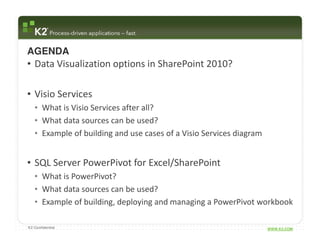
AGENDA
• Data Visualization options in SharePoint 2010?

• Visio Services
   • What is Visio Services after all?
   • What data sources can be used?
   • Example of building and use cases of a Visio Services diagram


• SQL Server PowerPivot for Excel/SharePoint
   • What is PowerPivot?
   • What data sources can be used?
   • Example of building, deploying and managing a PowerPivot workbook

K2 Confidential                                                      WWW.K2.COM
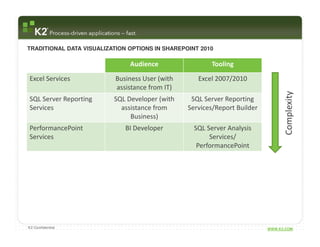
TRADITIONAL DATA VISUALIZATION OPTIONS IN SHAREPOINT 2010

                               Audience                 Tooling

Excel Services
Visio Services            Business User (with
                             Business User          Excel 2007/2010
                                                       Visio 2010
                           assistance from IT)


                                                                                 Complexity
SQL Server PowerPivot
SQL Server Reporting      SQLBusiness User
                               Developer (with    SQL Server2010
                                                       Excel Reporting
Services                    assistance from      Services/Report Builder
                               Business)
PerformancePoint              BI Developer         SQL Server Analysis
Services                                                Services/
                                                    PerformancePoint


K2 Confidential                                                            WWW.K2.COM
Visio Services for SharePoint


K2 Confidential                                   WWW.K2.COM
VISIO SERVICES IN SHAREPOINT 2010 – WHAT IS VISIO SERVICES ANYWAY?


Basically, Visio Services is a way to:

   • View Visio diagrams in the browser without having
     Visio installed locally

   • Refresh data-driven diagrams in the browser

   • Integrate Visio diagrams into SharePoint


K2 Confidential                                                      WWW.K2.COM
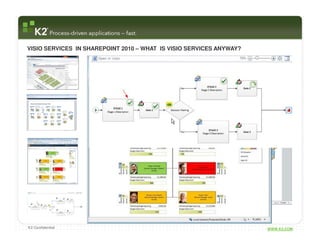
VISIO SERVICES IN SHAREPOINT 2010 – WHAT IS VISIO SERVICES ANYWAY?


K2 Confidential                                                      WWW.K2.COM
VISIO SERVICES IN SHAREPOINT 2010 – VIEWING VISIO DIAGRAMS IN THE BROWSER


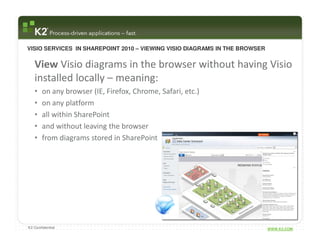
   View Visio diagrams in the browser without having Visio
   installed locally – meaning:
   •   on any browser (IE, Firefox, Chrome, Safari, etc.)
   •   on any platform
   •   all within SharePoint
   •   and without leaving the browser
   •   from diagrams stored in SharePoint


K2 Confidential                                                             WWW.K2.COM
VISIO SERVICES IN SHAREPOINT 2010 – UTILIZING DATA WITHIN DIAGRAMS


   Refresh data-driven diagrams in the browser – meaning
   that data from external sources can be automagically
   refreshed within a browser based Visio diagram

   Supported Visio data sources:
   •   SQL Server (7.0 to 2008 R2)
   •   Excel Services Workbooks
   •   SharePoint Lists
   •   OLE DB or ODBC connections
   •   Custom Data Providers


K2 Confidential                                                      WWW.K2.COM
VISIO SERVICES IN SHAREPOINT 2010 – UTILIZING DATA WITHIN DIAGRAMS

   • Within each Visio Diagram, 2 properties are managed:
       • How to access the data
       • Data Provider to facilitate the data access


   • Data Refresh Frequency is managed either within the Visio Web
     Drawing web part and/or at the Farm Level within Central Admin

   • Data displayed within Visio Web drawings are CACHED – the lower
     the cache level the more automatic data refreshes are applied (and
     more real time) but also the higher the resource load

   • While the Visio Diagram will be backed up within a normal SharePoint
     backup strategy, any data external to SharePoint may not

K2 Confidential                                                      WWW.K2.COM
VISIO SERVICES IN SHAREPOINT 2010 – INTEGRATING INTO SHAREPOINT 2010


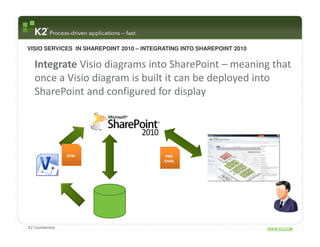
   Integrate Visio diagrams into SharePoint – meaning that
   once a Visio diagram is built it can be deployed into
   SharePoint and configured for display


                  VDW                      PNG
                                          XAML


K2 Confidential                                                        WWW.K2.COM
QUICK DEMONSTRATION

                  BUILDING VISIO SERVICES DIAGRAM


K2 Confidential                                     WWW.K2.COM
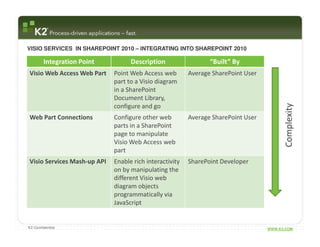
VISIO SERVICES IN SHAREPOINT 2010 – INTEGRATING INTO SHAREPOINT 2010

        Integration Point          Description                  “Built” By
Visio Web Access Web Part    Point Web Access web        Average SharePoint User
                             part to a Visio diagram
                             in a SharePoint
                             Document Library,


                                                                                         Complexity
                             configure and go
Web Part Connections         Configure other web         Average SharePoint User
                             parts in a SharePoint
                             page to manipulate
                             Visio Web Access web
                             part
Visio Services Mash-up API   Enable rich interactivity   SharePoint Developer
                             on by manipulating the
                             different Visio web
                             diagram objects
                             programmatically via
                             JavaScript


K2 Confidential                                                                    WWW.K2.COM
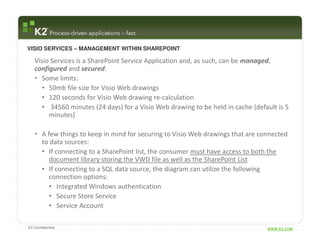
VISIO SERVICES – MANAGEMENT WITHIN SHAREPOINT

   Visio Services is a SharePoint Service Application and, as such, can be managed,
   configured and secured:
   • Some limits:
      • 50mb file size for Visio Web drawings
      • 120 seconds for Visio Web drawing re-calculation
      • 34560 minutes (24 days) for a Visio Web drawing to be held in cache (default is 5
        minutes)

   • A few things to keep in mind for securing to Visio Web drawings that are connected
     to data sources:
     • If connecting to a SharePoint list, the consumer must have access to both the
        document library storing the VWD file as well as the SharePoint List
     • If connecting to a SQL data source, the diagram can utilize the following
        connection options:
        • Integrated Windows authentication
        • Secure Store Service
        • Service Account

K2 Confidential                                                                  WWW.K2.COM
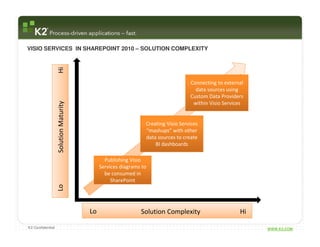
VISIO SERVICES IN SHAREPOINT 2010 – SOLUTION COMPLEXITY

                  Hi

                                                                                 Connecting to external
                                                                                   data sources using
                                                                                 Custom Data Providers
                                                                                  within Visio Services
                  Solution Maturity


                                                              Creating Visio Services
                                                              “mashups” with other
                                                              data sources to create
                                                                  BI dashboards

                                             Publishing Visio
                                           Services diagrams to
                                             be consumed in
                                                SharePoint
                  Lo


                                      Lo                    Solution Complexity                      Hi

K2 Confidential                                                                                           WWW.K2.COM
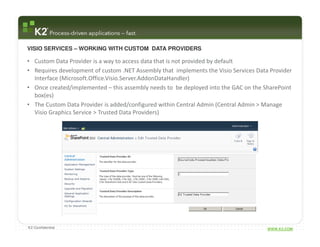
VISIO SERVICES – WORKING WITH CUSTOM DATA PROVIDERS

• Custom Data Provider is a way to access data that is not provided by default
• Requires development of custom .NET Assembly that implements the Visio Services Data Provider
  Interface (Microsoft.Office.Visio.Server.AddonDataHandler)
• Once created/implemented – this assembly needs to be deployed into the GAC on the SharePoint
  box(es)
• The Custom Data Provider is added/configured within Central Admin (Central Admin > Manage
  Visio Graphics Service > Trusted Data Providers)


K2 Confidential                                                                       WWW.K2.COM
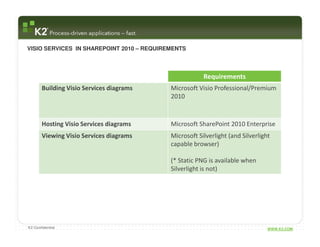
VISIO SERVICES IN SHAREPOINT 2010 – REQUIREMENTS


                                                       Requirements
       Building Visio Services diagrams    Microsoft Visio Professional/Premium
                                           2010


       Hosting Visio Services diagrams     Microsoft SharePoint 2010 Enterprise
       Viewing Visio Services diagrams     Microsoft Silverlight (and Silverlight
                                           capable browser)

                                           (* Static PNG is available when
                                           Silverlight is not)


K2 Confidential                                                                 WWW.K2.COM
QUESTIONS?


K2 Confidential                WWW.K2.COM
SQL Server PowerPivot for Excel/SharePoint


K2 Confidential                                 WWW.K2.COM
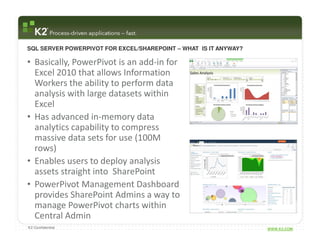
SQL SERVER POWERPIVOT FOR EXCEL/SHAREPOINT – WHAT IS IT ANYWAY?

• Basically, PowerPivot is an add-in for
  Excel 2010 that allows Information
  Workers the ability to perform data
  analysis with large datasets within
  Excel
• Has advanced in-memory data
  analytics capability to compress
  massive data sets for use (100M
  rows)
• Enables users to deploy analysis
  assets straight into SharePoint
• PowerPivot Management Dashboard
  provides SharePoint Admins a way to
  manage PowerPivot charts within
  Central Admin
K2 Confidential                                                   WWW.K2.COM
SQL SERVER POWERPIVOT FOR EXCEL/SHAREPOINT – WHAT DOES THAT REALLY MEAN THOUGH?


• Non-traditional BI Users can now:
  • Work with large and varied data sets in tooling they
    understand
  • Create self-service ad-hoc BI “solutions” and share
    across the enterprise
  • Solve problems not currently/traditionally
    supported by IT
  • Start RAD lifecycle around BI that can ultimately be
    transitioned to IT


K2 Confidential                                                          WWW.K2.COM
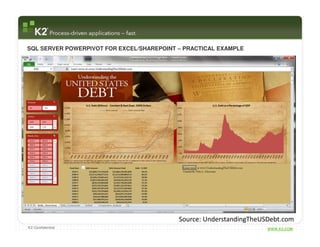
SQL SERVER POWERPIVOT FOR EXCEL/SHAREPOINT – PRACTICAL EXAMPLE


                                           Source: UnderstandingTheUSDebt.com
K2 Confidential                                                      WWW.K2.COM
SQL SERVER POWERPIVOT FOR EXCEL/SHAREPOINT – DATA SOURCES


   Supported PowerPivot data sources:
   • Microsoft SQL Server (2005 to 2008 R2)
   • Microsoft SQL Azure
   • Microsoft SQL Server Analysis Services Cubes
   • Microsoft SQL Server Reporting Services Reports
   • Microsoft Office Access
   • Microsoft Excel workbooks
   • Other PowerPivot workbooks
   • Data Feeds (ATOM)
   • Non MS relational data sources (Oracle, Teradata, Sybase, Informaix, IBM
     DB2)
   • Text


K2 Confidential                                                         WWW.K2.COM
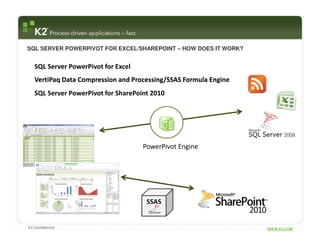
SQL SERVER POWERPIVOT FOR EXCEL/SHAREPOINT – HOW DOES IT WORK?


   SQL Server PowerPivot for Excel
   VertiPaq Data Compression and Processing/SSAS Formula Engine
   SQL Server PowerPivot for SharePoint 2010


                                     PowerPivot Engine


                                      SSAS


K2 Confidential                                                   WWW.K2.COM
QUICK DEMONSTRATION

                  BUILDING POWERPIVOT WORKBOOK


K2 Confidential                                  WWW.K2.COM
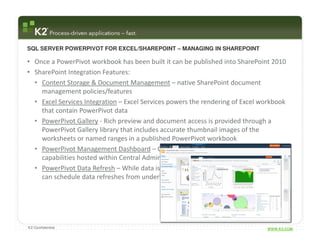
SQL SERVER POWERPIVOT FOR EXCEL/SHAREPOINT – MANAGING IN SHAREPOINT

• Once a PowerPivot workbook has been built it can be published into SharePoint 2010
• SharePoint Integration Features:
  • Content Storage & Document Management – native SharePoint document
    management policies/features
  • Excel Services Integration – Excel Services powers the rendering of Excel workbook
    that contain PowerPivot data
  • PowerPivot Gallery - Rich preview and document access is provided through a
    PowerPivot Gallery library that includes accurate thumbnail images of the
    worksheets or named ranges in a published PowerPivot workbook
  • PowerPivot Management Dashboard – Consolidate management and reporting
    capabilities hosted within Central Admin
  • PowerPivot Data Refresh – While data is initially stored within the workbook, users
    can schedule data refreshes from underlying data sources


K2 Confidential                                                                 WWW.K2.COM
QUICK DEMONSTRATION

                  MANAGING IN SHAREPOINT


K2 Confidential                            WWW.K2.COM
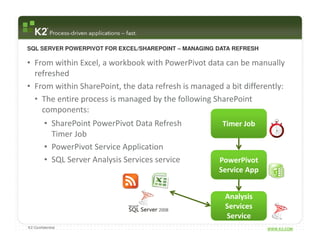
SQL SERVER POWERPIVOT FOR EXCEL/SHAREPOINT – MANAGING DATA REFRESH

• From within Excel, a workbook with PowerPivot data can be manually
  refreshed
• From within SharePoint, the data refresh is managed a bit differently:
  • The entire process is managed by the following SharePoint
    components:
         • SharePoint PowerPivot Data Refresh          Timer Job
           Timer Job
         • PowerPivot Service Application
         • SQL Server Analysis Services service       PowerPivot
                                                      Service App


                                                        Analysis
                                                        Services
                                                        Service
K2 Confidential                                                      WWW.K2.COM
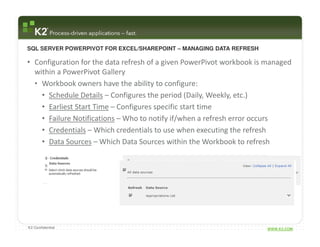
SQL SERVER POWERPIVOT FOR EXCEL/SHAREPOINT – MANAGING DATA REFRESH

• Configuration for the data refresh of a given PowerPivot workbook is managed
  within a PowerPivot Gallery
  • Workbook owners have the ability to configure:
    • Schedule Details – Configures the period (Daily, Weekly, etc.)
    • Earliest Start Time – Configures specific start time
    • Failure Notifications – Who to notify if/when a refresh error occurs
    • Credentials – Which credentials to use when executing the refresh
    • Data Sources – Which Data Sources within the Workbook to refresh


K2 Confidential                                                       WWW.K2.COM
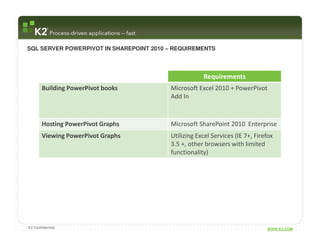
SQL SERVER POWERPIVOT IN SHAREPOINT 2010 – REQUIREMENTS


                                                     Requirements
       Building PowerPivot books         Microsoft Excel 2010 + PowerPivot
                                         Add In


       Hosting PowerPivot Graphs         Microsoft SharePoint 2010 Enterprise
       Viewing PowerPivot Graphs         Utilizing Excel Services (IE 7+, Firefox
                                         3.5 +, other browsers with limited
                                         functionality)


K2 Confidential                                                               WWW.K2.COM
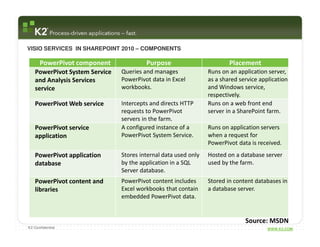
VISIO SERVICES IN SHAREPOINT 2010 – COMPONENTS

      PowerPivot component              Purpose                         Placement
   PowerPivot System Service   Queries and manages              Runs on an application server,
   and Analysis Services       PowerPivot data in Excel         as a shared service application
   service                     workbooks.                       and Windows service,
                                                                respectively.
   PowerPivot Web service      Intercepts and directs HTTP      Runs on a web front end
                               requests to PowerPivot           server in a SharePoint farm.
                               servers in the farm.
   PowerPivot service          A configured instance of a       Runs on application servers
   application                 PowerPivot System Service.       when a request for
                                                                PowerPivot data is received.
   PowerPivot application      Stores internal data used only   Hosted on a database server
   database                    by the application in a SQL      used by the farm.
                               Server database.
   PowerPivot content and      PowerPivot content includes      Stored in content databases in
   libraries                   Excel workbooks that contain     a database server.
                               embedded PowerPivot data.


                                                                              Source: MSDN
K2 Confidential                                                                        WWW.K2.COM
QUESTIONS?


K2 Confidential                WWW.K2.COM

Data Visualization Made Easier in SharePoint 2010

  • 1.
    May 18, 2012 Data Visualization in SharePoint 2010 with Visio Services and Excel PowerPivot PRESENTED BY: JASON TRENT TECHNICAL SPECIALIST E: JASONT@K2.COM : SOONERTRENT K2 Confidential WWW.K2.COM
  • 2.
    K2 Confidential WWW.K2.COM
  • 3.
    AGENDA • Data Visualizationoptions in SharePoint 2010? • Visio Services • What is Visio Services after all? • What data sources can be used? • Example of building and use cases of a Visio Services diagram • SQL Server PowerPivot for Excel/SharePoint • What is PowerPivot? • What data sources can be used? • Example of building, deploying and managing a PowerPivot workbook K2 Confidential WWW.K2.COM
  • 4.
    TRADITIONAL DATA VISUALIZATIONOPTIONS IN SHAREPOINT 2010 Audience Tooling Excel Services Visio Services Business User (with Business User Excel 2007/2010 Visio 2010 assistance from IT) Complexity SQL Server PowerPivot SQL Server Reporting SQLBusiness User Developer (with SQL Server2010 Excel Reporting Services assistance from Services/Report Builder Business) PerformancePoint BI Developer SQL Server Analysis Services Services/ PerformancePoint K2 Confidential WWW.K2.COM
  • 5.
    Visio Services forSharePoint K2 Confidential WWW.K2.COM
  • 6.
    VISIO SERVICES INSHAREPOINT 2010 – WHAT IS VISIO SERVICES ANYWAY? Basically, Visio Services is a way to: • View Visio diagrams in the browser without having Visio installed locally • Refresh data-driven diagrams in the browser • Integrate Visio diagrams into SharePoint K2 Confidential WWW.K2.COM
  • 7.
    VISIO SERVICES INSHAREPOINT 2010 – WHAT IS VISIO SERVICES ANYWAY? K2 Confidential WWW.K2.COM
  • 8.
    VISIO SERVICES INSHAREPOINT 2010 – VIEWING VISIO DIAGRAMS IN THE BROWSER View Visio diagrams in the browser without having Visio installed locally – meaning: • on any browser (IE, Firefox, Chrome, Safari, etc.) • on any platform • all within SharePoint • and without leaving the browser • from diagrams stored in SharePoint K2 Confidential WWW.K2.COM
  • 9.
    VISIO SERVICES INSHAREPOINT 2010 – UTILIZING DATA WITHIN DIAGRAMS Refresh data-driven diagrams in the browser – meaning that data from external sources can be automagically refreshed within a browser based Visio diagram Supported Visio data sources: • SQL Server (7.0 to 2008 R2) • Excel Services Workbooks • SharePoint Lists • OLE DB or ODBC connections • Custom Data Providers K2 Confidential WWW.K2.COM
  • 10.
    VISIO SERVICES INSHAREPOINT 2010 – UTILIZING DATA WITHIN DIAGRAMS • Within each Visio Diagram, 2 properties are managed: • How to access the data • Data Provider to facilitate the data access • Data Refresh Frequency is managed either within the Visio Web Drawing web part and/or at the Farm Level within Central Admin • Data displayed within Visio Web drawings are CACHED – the lower the cache level the more automatic data refreshes are applied (and more real time) but also the higher the resource load • While the Visio Diagram will be backed up within a normal SharePoint backup strategy, any data external to SharePoint may not K2 Confidential WWW.K2.COM
  • 11.
    VISIO SERVICES INSHAREPOINT 2010 – INTEGRATING INTO SHAREPOINT 2010 Integrate Visio diagrams into SharePoint – meaning that once a Visio diagram is built it can be deployed into SharePoint and configured for display VDW PNG XAML K2 Confidential WWW.K2.COM
  • 12.
    QUICK DEMONSTRATION BUILDING VISIO SERVICES DIAGRAM K2 Confidential WWW.K2.COM
  • 13.
    VISIO SERVICES INSHAREPOINT 2010 – INTEGRATING INTO SHAREPOINT 2010 Integration Point Description “Built” By Visio Web Access Web Part Point Web Access web Average SharePoint User part to a Visio diagram in a SharePoint Document Library, Complexity configure and go Web Part Connections Configure other web Average SharePoint User parts in a SharePoint page to manipulate Visio Web Access web part Visio Services Mash-up API Enable rich interactivity SharePoint Developer on by manipulating the different Visio web diagram objects programmatically via JavaScript K2 Confidential WWW.K2.COM
  • 14.
    VISIO SERVICES –MANAGEMENT WITHIN SHAREPOINT Visio Services is a SharePoint Service Application and, as such, can be managed, configured and secured: • Some limits: • 50mb file size for Visio Web drawings • 120 seconds for Visio Web drawing re-calculation • 34560 minutes (24 days) for a Visio Web drawing to be held in cache (default is 5 minutes) • A few things to keep in mind for securing to Visio Web drawings that are connected to data sources: • If connecting to a SharePoint list, the consumer must have access to both the document library storing the VWD file as well as the SharePoint List • If connecting to a SQL data source, the diagram can utilize the following connection options: • Integrated Windows authentication • Secure Store Service • Service Account K2 Confidential WWW.K2.COM
  • 15.
    VISIO SERVICES INSHAREPOINT 2010 – SOLUTION COMPLEXITY Hi Connecting to external data sources using Custom Data Providers within Visio Services Solution Maturity Creating Visio Services “mashups” with other data sources to create BI dashboards Publishing Visio Services diagrams to be consumed in SharePoint Lo Lo Solution Complexity Hi K2 Confidential WWW.K2.COM
  • 16.
    VISIO SERVICES –WORKING WITH CUSTOM DATA PROVIDERS • Custom Data Provider is a way to access data that is not provided by default • Requires development of custom .NET Assembly that implements the Visio Services Data Provider Interface (Microsoft.Office.Visio.Server.AddonDataHandler) • Once created/implemented – this assembly needs to be deployed into the GAC on the SharePoint box(es) • The Custom Data Provider is added/configured within Central Admin (Central Admin > Manage Visio Graphics Service > Trusted Data Providers) K2 Confidential WWW.K2.COM
  • 17.
    VISIO SERVICES INSHAREPOINT 2010 – REQUIREMENTS Requirements Building Visio Services diagrams Microsoft Visio Professional/Premium 2010 Hosting Visio Services diagrams Microsoft SharePoint 2010 Enterprise Viewing Visio Services diagrams Microsoft Silverlight (and Silverlight capable browser) (* Static PNG is available when Silverlight is not) K2 Confidential WWW.K2.COM
  • 18.
  • 19.
    SQL Server PowerPivotfor Excel/SharePoint K2 Confidential WWW.K2.COM
  • 20.
    SQL SERVER POWERPIVOTFOR EXCEL/SHAREPOINT – WHAT IS IT ANYWAY? • Basically, PowerPivot is an add-in for Excel 2010 that allows Information Workers the ability to perform data analysis with large datasets within Excel • Has advanced in-memory data analytics capability to compress massive data sets for use (100M rows) • Enables users to deploy analysis assets straight into SharePoint • PowerPivot Management Dashboard provides SharePoint Admins a way to manage PowerPivot charts within Central Admin K2 Confidential WWW.K2.COM
  • 21.
    SQL SERVER POWERPIVOTFOR EXCEL/SHAREPOINT – WHAT DOES THAT REALLY MEAN THOUGH? • Non-traditional BI Users can now: • Work with large and varied data sets in tooling they understand • Create self-service ad-hoc BI “solutions” and share across the enterprise • Solve problems not currently/traditionally supported by IT • Start RAD lifecycle around BI that can ultimately be transitioned to IT K2 Confidential WWW.K2.COM
  • 22.
    SQL SERVER POWERPIVOTFOR EXCEL/SHAREPOINT – PRACTICAL EXAMPLE Source: UnderstandingTheUSDebt.com K2 Confidential WWW.K2.COM
  • 23.
    SQL SERVER POWERPIVOTFOR EXCEL/SHAREPOINT – DATA SOURCES Supported PowerPivot data sources: • Microsoft SQL Server (2005 to 2008 R2) • Microsoft SQL Azure • Microsoft SQL Server Analysis Services Cubes • Microsoft SQL Server Reporting Services Reports • Microsoft Office Access • Microsoft Excel workbooks • Other PowerPivot workbooks • Data Feeds (ATOM) • Non MS relational data sources (Oracle, Teradata, Sybase, Informaix, IBM DB2) • Text K2 Confidential WWW.K2.COM
  • 24.
    SQL SERVER POWERPIVOTFOR EXCEL/SHAREPOINT – HOW DOES IT WORK? SQL Server PowerPivot for Excel VertiPaq Data Compression and Processing/SSAS Formula Engine SQL Server PowerPivot for SharePoint 2010 PowerPivot Engine SSAS K2 Confidential WWW.K2.COM
  • 25.
    QUICK DEMONSTRATION BUILDING POWERPIVOT WORKBOOK K2 Confidential WWW.K2.COM
  • 26.
    SQL SERVER POWERPIVOTFOR EXCEL/SHAREPOINT – MANAGING IN SHAREPOINT • Once a PowerPivot workbook has been built it can be published into SharePoint 2010 • SharePoint Integration Features: • Content Storage & Document Management – native SharePoint document management policies/features • Excel Services Integration – Excel Services powers the rendering of Excel workbook that contain PowerPivot data • PowerPivot Gallery - Rich preview and document access is provided through a PowerPivot Gallery library that includes accurate thumbnail images of the worksheets or named ranges in a published PowerPivot workbook • PowerPivot Management Dashboard – Consolidate management and reporting capabilities hosted within Central Admin • PowerPivot Data Refresh – While data is initially stored within the workbook, users can schedule data refreshes from underlying data sources K2 Confidential WWW.K2.COM
  • 27.
    QUICK DEMONSTRATION MANAGING IN SHAREPOINT K2 Confidential WWW.K2.COM
  • 28.
    SQL SERVER POWERPIVOTFOR EXCEL/SHAREPOINT – MANAGING DATA REFRESH • From within Excel, a workbook with PowerPivot data can be manually refreshed • From within SharePoint, the data refresh is managed a bit differently: • The entire process is managed by the following SharePoint components: • SharePoint PowerPivot Data Refresh Timer Job Timer Job • PowerPivot Service Application • SQL Server Analysis Services service PowerPivot Service App Analysis Services Service K2 Confidential WWW.K2.COM
  • 29.
    SQL SERVER POWERPIVOTFOR EXCEL/SHAREPOINT – MANAGING DATA REFRESH • Configuration for the data refresh of a given PowerPivot workbook is managed within a PowerPivot Gallery • Workbook owners have the ability to configure: • Schedule Details – Configures the period (Daily, Weekly, etc.) • Earliest Start Time – Configures specific start time • Failure Notifications – Who to notify if/when a refresh error occurs • Credentials – Which credentials to use when executing the refresh • Data Sources – Which Data Sources within the Workbook to refresh K2 Confidential WWW.K2.COM
  • 30.
    SQL SERVER POWERPIVOTIN SHAREPOINT 2010 – REQUIREMENTS Requirements Building PowerPivot books Microsoft Excel 2010 + PowerPivot Add In Hosting PowerPivot Graphs Microsoft SharePoint 2010 Enterprise Viewing PowerPivot Graphs Utilizing Excel Services (IE 7+, Firefox 3.5 +, other browsers with limited functionality) K2 Confidential WWW.K2.COM
  • 31.
    VISIO SERVICES INSHAREPOINT 2010 – COMPONENTS PowerPivot component Purpose Placement PowerPivot System Service Queries and manages Runs on an application server, and Analysis Services PowerPivot data in Excel as a shared service application service workbooks. and Windows service, respectively. PowerPivot Web service Intercepts and directs HTTP Runs on a web front end requests to PowerPivot server in a SharePoint farm. servers in the farm. PowerPivot service A configured instance of a Runs on application servers application PowerPivot System Service. when a request for PowerPivot data is received. PowerPivot application Stores internal data used only Hosted on a database server database by the application in a SQL used by the farm. Server database. PowerPivot content and PowerPivot content includes Stored in content databases in libraries Excel workbooks that contain a database server. embedded PowerPivot data. Source: MSDN K2 Confidential WWW.K2.COM
  • 32.