Primavera Project Management
Presents
CADD Centre Training Services
Himayatnagar
HYDERABAD
caddcentre_himayatnagar@yahoo.com
What is Project ?
What is Project Management?
Introducing P6
The Best Thing That’s Happened to
Project Management
Countdown to launch date: 73 days
We Want to Eliminate Project Failure
Primavera is the leading solution for corporations and
public agencies to propose, prioritize and select
strategic project investments, and then to plan,
manage and control the entire portfolio of projects
through to a successful completion.
We Want to Eliminate Project Failure
Primavera which is designed to assist
project managers in developing plans, assigning
resources to tasks, tracking progress, managing
budgets and analyzing workloads.
Primavera Today
• Customers in 108 countries
• 40% of revenue is outside US/Canada
• 510 employees
• Offices: Philadelphia, San Francisco, Chicago,
Houston, Portland, London, Jerusalem
• In market since 1983
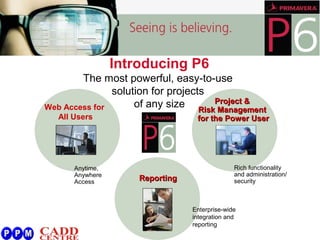
Introducing P6
The most powerful, easy-to-use
solution for projects
of any sizeWeb Access for
All Users
Anytime,
Anywhere
Access ReportingReporting
Enterprise-wide
integration and
reporting
Project &Project &
Risk ManagementRisk Management
for the Power Userfor the Power User
Rich functionality
and administration/
security
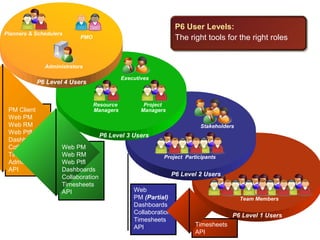
P6 Level 1 Users
Team Members
P6 Level 2 Users
Project Participants
Stakeholders
P6 Level 3 Users
Executives
Project
Managers
Resource
Managers
Resource
Managers
Program Managers
P6 Level 4 Users
Administrators
PMO
Planners & Schedulers
Project Managers
P6 User Levels:
The right tools for the right roles
PM Client
Web PM
Web RM
Web Ptfl
Dashboards
Collaboration
Timesheets
Admin
API
Web PM
Web RM
Web Ptfl
Dashboards
Collaboration
Timesheets
API Web
PM (Partial)
Dashboards
Collaboration
Timesheets
API Timesheets
API
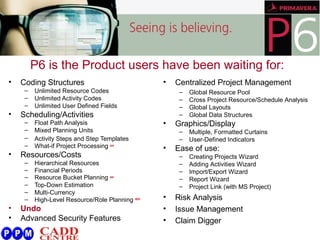
• Coding Structures
– Unlimited Resource Codes
– Unlimited Activity Codes
– Unlimited User Defined Fields
• Scheduling/Activities
– Float Path Analysis
– Mixed Planning Units
– Activity Steps and Step Templates
– What-if Project Processing NEW!
• Resources/Costs
– Hierarchical Resources
– Financial Periods
– Resource Bucket Planning NEW!
– Top-Down Estimation
– Multi-Currency
– High-Level Resource/Role Planning NEW!
• Undo
• Advanced Security Features
• Centralized Project Management
– Global Resource Pool
– Cross Project Resource/Schedule Analysis
– Global Layouts
– Global Data Structures
• Graphics/Display
– Multiple, Formatted Curtains
– User-Defined Indicators
• Ease of use:
– Creating Projects Wizard
– Adding Activities Wizard
– Import/Export Wizard
– Report Wizard
– Project Link (with MS Project)
• Risk Analysis
• Issue Management
• Claim Digger
P6 is the Product users have been waiting for:
User Defined Field Indicators
Centralized Project Management
User Defined Field Indicators
Portfolio Management
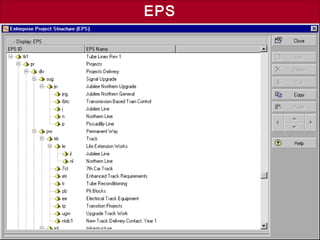
EPS
Resource Management
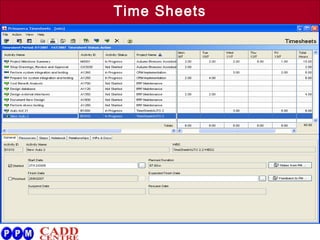
Time Sheets
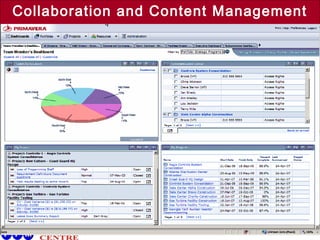
Collaboration and Content Management
Activity Steps
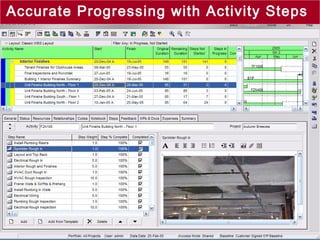
Accurate Progressing with Activity Steps
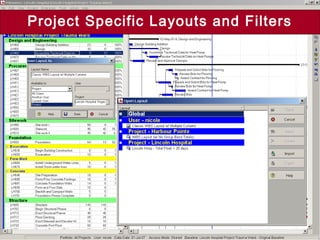
Project Specific Layouts and Filters
Improved Graphics
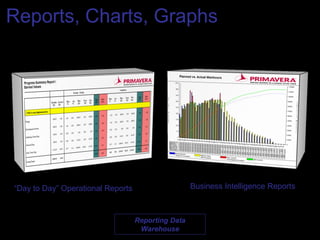
Reports, Charts, Graphs
“Day to Day” Operational Reports Business Intelligence Reports
Reporting Data
Warehouse
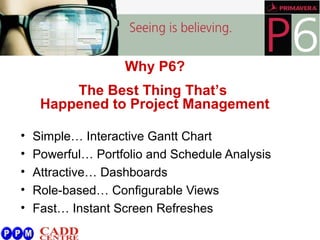
• Simple… Interactive Gantt Chart
• Powerful… Portfolio and Schedule Analysis
• Attractive… Dashboards
• Role-based… Configurable Views
• Fast… Instant Screen Refreshes
Why P6?
The Best Thing That’s
Happened to Project Management
World’s Most Challenging
Projects on Primavera
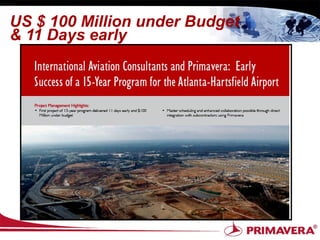
US $ 100 Million under Budget
& 11 Days early
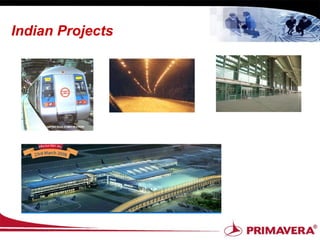
Indian Projects
Primavera – Manpower requirement.
• 2009 Turnkey Projects by PMP’s.
• Industries are looking for institutional tie-up for their employees
training.
• Requirement of 11334 Primavera experts - Today
(carrierjet.com)
• BHEL – 1000 Licenses.
• Users Around the world by more than 78 thousand companies
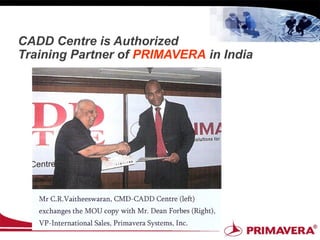
CADD Centre is Authorized
Training Partner of PRIMAVERA in India
For more details on
Primavera Training
contact :
caddcentre_himayatnaar@yahoo.com

Primavera Project Management

  • 1.
    Primavera Project Management Presents CADDCentre Training Services Himayatnagar HYDERABAD caddcentre_himayatnagar@yahoo.com
  • 2.
  • 3.
    What is ProjectManagement?
  • 4.
    Introducing P6 The BestThing That’s Happened to Project Management Countdown to launch date: 73 days
  • 5.
    We Want toEliminate Project Failure Primavera is the leading solution for corporations and public agencies to propose, prioritize and select strategic project investments, and then to plan, manage and control the entire portfolio of projects through to a successful completion.
  • 6.
    We Want toEliminate Project Failure Primavera which is designed to assist project managers in developing plans, assigning resources to tasks, tracking progress, managing budgets and analyzing workloads.
  • 7.
    Primavera Today • Customersin 108 countries • 40% of revenue is outside US/Canada • 510 employees • Offices: Philadelphia, San Francisco, Chicago, Houston, Portland, London, Jerusalem • In market since 1983
  • 8.
    Introducing P6 The mostpowerful, easy-to-use solution for projects of any sizeWeb Access for All Users Anytime, Anywhere Access ReportingReporting Enterprise-wide integration and reporting Project &Project & Risk ManagementRisk Management for the Power Userfor the Power User Rich functionality and administration/ security
  • 9.
    P6 Level 1Users Team Members P6 Level 2 Users Project Participants Stakeholders P6 Level 3 Users Executives Project Managers Resource Managers Resource Managers Program Managers P6 Level 4 Users Administrators PMO Planners & Schedulers Project Managers P6 User Levels: The right tools for the right roles PM Client Web PM Web RM Web Ptfl Dashboards Collaboration Timesheets Admin API Web PM Web RM Web Ptfl Dashboards Collaboration Timesheets API Web PM (Partial) Dashboards Collaboration Timesheets API Timesheets API
  • 10.
    • Coding Structures –Unlimited Resource Codes – Unlimited Activity Codes – Unlimited User Defined Fields • Scheduling/Activities – Float Path Analysis – Mixed Planning Units – Activity Steps and Step Templates – What-if Project Processing NEW! • Resources/Costs – Hierarchical Resources – Financial Periods – Resource Bucket Planning NEW! – Top-Down Estimation – Multi-Currency – High-Level Resource/Role Planning NEW! • Undo • Advanced Security Features • Centralized Project Management – Global Resource Pool – Cross Project Resource/Schedule Analysis – Global Layouts – Global Data Structures • Graphics/Display – Multiple, Formatted Curtains – User-Defined Indicators • Ease of use: – Creating Projects Wizard – Adding Activities Wizard – Import/Export Wizard – Report Wizard – Project Link (with MS Project) • Risk Analysis • Issue Management • Claim Digger P6 is the Product users have been waiting for:
  • 11.
    User Defined FieldIndicators Centralized Project Management
  • 12.
    User Defined FieldIndicators Portfolio Management
  • 13.
  • 14.
  • 15.
  • 16.
  • 17.
  • 18.
  • 19.
  • 20.
    Reports, Charts, Graphs “Dayto Day” Operational Reports Business Intelligence Reports Reporting Data Warehouse
  • 21.
    • Simple… InteractiveGantt Chart • Powerful… Portfolio and Schedule Analysis • Attractive… Dashboards • Role-based… Configurable Views • Fast… Instant Screen Refreshes Why P6? The Best Thing That’s Happened to Project Management
  • 22.
  • 23.
    US $ 100Million under Budget & 11 Days early
  • 24.
  • 25.
    Primavera – Manpowerrequirement. • 2009 Turnkey Projects by PMP’s. • Industries are looking for institutional tie-up for their employees training. • Requirement of 11334 Primavera experts - Today (carrierjet.com) • BHEL – 1000 Licenses. • Users Around the world by more than 78 thousand companies
  • 26.
    CADD Centre isAuthorized Training Partner of PRIMAVERA in India
  • 27.
    For more detailson Primavera Training contact : caddcentre_himayatnaar@yahoo.com

Editor's Notes

  • #5 Introducing yourself, co-presenters. Introduce P6 – we think it is the best thing that’s happened to project management Feature set is based on customer feedback, enhancements and uses innovative technology to improve how you do business We believe at the end of this presentation you will feel so too.
  • #9 P6 is the most powerful, easy-to-use solution for projects of any and all sizes. Think of P6 as a tool box with the tools you and your team needs to get their job done. We have a powerful Project and risk management solution for the power user that is rich in functionality. Our web access is available for all users to access anytime, anywhere. And a new reporting solution that allows your organization to get the information they need when the need it.
  • #10 Construct Plans Allocate Resources Develop Schedules & Milestones See Project Status Assign Resources Report Time & Progress Configure System Manage Users & Permissions
  • #11 For those in the audience using P5 please be patient. We want to explain to P3 customers… why you will love P6. (Spend 2 minutes on this slide… goal is to point out most salient features, not every bullet… unless you have a majority of P3 customers in the room.) Centralized Project Management with global resource pool to understand if resources are over or under allocated. We also provide ability to create cross program relationships. Unlimited codes and user defined fields Superior schedule analysis. P3’s was great but now its even better. And not to mention… we now have “UNDO!”
  • #12 This slide is to illustrate the concept of multiple projects in one database. This database holds all of the projects that are being performed by a general contractor. The enterprise project structure or the band organizes the projects and controls access to the projects. Notice that the green bands organize projects into divisions, Facilities and Infrastructure. The Facilities division is further broken down into the types of projects, Health Care, Education & Commercial. We are currently working on 2 Commercial Projects, Condos & Office Building Addition. Also notice that there are indicators for cost and schedule. The UDFs are similar to custom defined fields in P3. They are unlimited and different types of custom indicators.
  • #13 This slide is to illustrate the concept of multiple projects in one database. This database holds all of the projects that are being performed by a general contractor. The enterprise project structure or the band organizes the projects and controls access to the projects. Notice that the green bands organize projects into divisions, Facilities and Infrastructure. The Facilities division is further broken down into the types of projects, Health Care, Education & Commercial. We are currently working on 2 Commercial Projects, Condos & Office Building Addition. Also notice that there are indicators for cost and schedule. The UDFs are similar to custom defined fields in P3. They are unlimited and different types of custom indicators.
  • #14 Before we dive into our scenarios, anyone notice anything different about this layout? Answer: Narrow vertical bands & band totals turned off. In this scenario, we are working on a hospital project & we were award a similar hospital project. We want to ensure that this project has all of the layouts we need before we copy it. Let’s create new layout. See Page 5, Steps 1 -5. Mention the type ahead and arrow capabilities in all dropdown menus. Four different ways to save a layout, user, another user, global, and new to P6 project. Having project specific layouts is important because you want everyone accessing the project to see the information in the same manner and use the same filters and the same key performance indicators. See Page 7, Steps 6 – 10. Select Another user and demonstrate the search functionality. All pop-ups in P6 have search capabilities. See Page 8, Step 11 – 12.
  • #15 Before we dive into our scenarios, anyone notice anything different about this layout? Answer: Narrow vertical bands & band totals turned off. In this scenario, we are working on a hospital project & we were award a similar hospital project. We want to ensure that this project has all of the layouts we need before we copy it. Let’s create new layout. See Page 5, Steps 1 -5. Mention the type ahead and arrow capabilities in all dropdown menus. Four different ways to save a layout, user, another user, global, and new to P6 project. Having project specific layouts is important because you want everyone accessing the project to see the information in the same manner and use the same filters and the same key performance indicators. See Page 7, Steps 6 – 10. Select Another user and demonstrate the search functionality. All pop-ups in P6 have search capabilities. See Page 8, Step 11 – 12.
  • #16 Before we dive into our scenarios, anyone notice anything different about this layout? Answer: Narrow vertical bands & band totals turned off. In this scenario, we are working on a hospital project & we were award a similar hospital project. We want to ensure that this project has all of the layouts we need before we copy it. Let’s create new layout. See Page 5, Steps 1 -5. Mention the type ahead and arrow capabilities in all dropdown menus. Four different ways to save a layout, user, another user, global, and new to P6 project. Having project specific layouts is important because you want everyone accessing the project to see the information in the same manner and use the same filters and the same key performance indicators. See Page 7, Steps 6 – 10. Select Another user and demonstrate the search functionality. All pop-ups in P6 have search capabilities. See Page 8, Step 11 – 12.
  • #17 Before we dive into our scenarios, anyone notice anything different about this layout? Answer: Narrow vertical bands & band totals turned off. In this scenario, we are working on a hospital project & we were award a similar hospital project. We want to ensure that this project has all of the layouts we need before we copy it. Let’s create new layout. See Page 5, Steps 1 -5. Mention the type ahead and arrow capabilities in all dropdown menus. Four different ways to save a layout, user, another user, global, and new to P6 project. Having project specific layouts is important because you want everyone accessing the project to see the information in the same manner and use the same filters and the same key performance indicators. See Page 7, Steps 6 – 10. Select Another user and demonstrate the search functionality. All pop-ups in P6 have search capabilities. See Page 8, Step 11 – 12.
  • #18 What does 33% complete of a 20 day activity mean? Steps are sub activities similar to a To Do list or punch list. Each Step is weighted so that when steps are completed, the percent complete & earned value is automatically calculated. No longer subject – PCT is objective.
  • #19 Before we dive into our scenarios, anyone notice anything different about this layout? Answer: Narrow vertical bands & band totals turned off. In this scenario, we are working on a hospital project & we were award a similar hospital project. We want to ensure that this project has all of the layouts we need before we copy it. Let’s create new layout. See Page 5, Steps 1 -5. Mention the type ahead and arrow capabilities in all dropdown menus. Four different ways to save a layout, user, another user, global, and new to P6 project. Having project specific layouts is important because you want everyone accessing the project to see the information in the same manner and use the same filters and the same key performance indicators. See Page 7, Steps 6 – 10. Select Another user and demonstrate the search functionality. All pop-ups in P6 have search capabilities. See Page 8, Step 11 – 12.
  • #20 And it has the graphics that you expect from P3. As you can see – this a TSL graphic. 3 line timescale – combining calendar and ordinal dates. Unlimited curtains that can be formatted.
  • #21 Two components the ODS and Star Schema databases.
  • #23 A brief word on us – Founded in 1983 by current CEO and CTO Joel Koppelman and Dick Faris, Primavera has established itself as the industry leader for planning, scheduling and project & program management solutions in the architecture, engineering and construction industry. Our solutions are adopted around the world by more than 60 thousand companies, and our global user community is very active and strong. For the past 6 years we have been recognized as a leader in project & program management in the Gartner Magic Quadrant. And we serve all primary sectors in the AEC space:
  • #24 Internal Note: At this position insert an appropriate case study, ideally with metrics/ROI Script:And not do we say this, but it is exemplified by our successful clients. As for example Hill International which were able to save 200,000 labor hours at the executive level alone throughout a large program for the NJ School Board.