Resources, Equipment and
Software
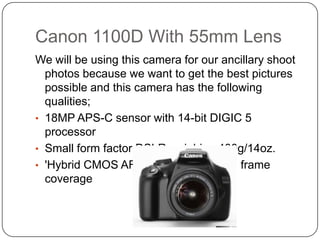
Canon 1100D With 55mm Lens
We will be using this camera for our ancillary shoot
photos because we want to get the best pictures
possible and this camera has the following
qualities;
• 18MP APS-C sensor with 14-bit DIGIC 5
processor
• Small form factor DSLR weighing 400g/14oz.
• 'Hybrid CMOS AF II' system with 80% frame
coverage
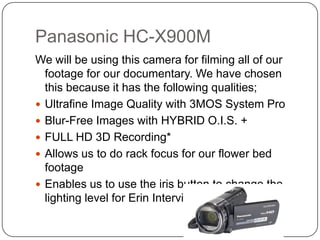
Panasonic HC-X900M
We will be using this camera for filming all of our
footage for our documentary. We have chosen
this because it has the following qualities;
 Ultrafine Image Quality with 3MOS System Pro
 Blur-Free Images with HYBRID O.I.S. +
 FULL HD 3D Recording*
 Allows us to do rack focus for our flower bed
footage
 Enables us to use the iris button to change the
lighting level for Erin Interview.
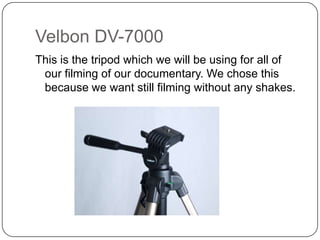
Velbon DV-7000
This is the tripod which we will be using for all of
our filming of our documentary. We chose this
because we want still filming without any shakes.
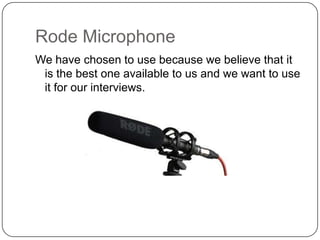
Rode Microphone
We have chosen to use because we believe that it
is the best one available to us and we want to use
it for our interviews.
Prezi
 We have chosen to use prezi as one of our ways

of presenting our work on the blog. We have
chosen prezi because it is reliable and we know
how to use it.
 Prezi is a US software company and it is a data
based presentation software and storytelling tool
for presenting on a virtual canvas.
Slideshare
 Slideshare is a software again like prezi where we

can present information onto our blog. It is very
much like Microsoft PowerPoint and it is a great
way of presenting information in a professional
manor.
 Slideshare is the worlds largest community for
sharing PowerPoint's.
Adobe photoshop – CS4
 Adobe Photoshop will be the software which we

will be using to create our poster for our ancillary
task. We will be using Photoshop because it
allows us to do the following things.
 Edit images that we have taken
 Have multiple layers intersecting one another
 Text over the top of images and still remain a high
25mp quality image.
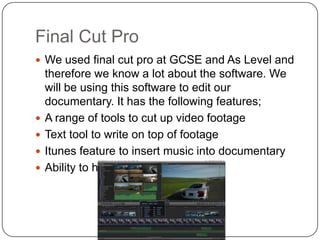
Final Cut Pro
 We used final cut pro at GCSE and As Level and






therefore we know a lot about the software. We
will be using this software to edit our
documentary. It has the following features;
A range of tools to cut up video footage
Text tool to write on top of footage
Itunes feature to insert music into documentary
Ability to have multicam feature
InDesign
 Indesign is the leading software for design

elements for reviews. We have chosen to do it for
the following reason;
 It enables us to have a two page spread
 It allows us to combine text and images in a
professional, neat manor
 It allows us to create columns for our review
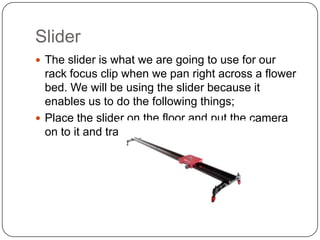
Slider
 The slider is what we are going to use for our

rack focus clip when we pan right across a flower
bed. We will be using the slider because it
enables us to do the following things;
 Place the slider on the floor and put the camera
on to it and track right.
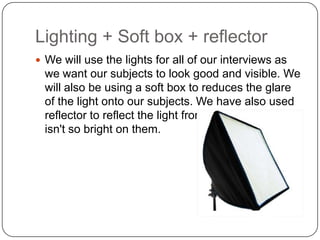
Lighting + Soft box + reflector
 We will use the lights for all of our interviews as

we want our subjects to look good and visible. We
will also be using a soft box to reduces the glare
of the light onto our subjects. We have also used
reflector to reflect the light from our subjects so it
isn't so bright on them.

Presentation1

  • 1.
  • 2.
    Canon 1100D With55mm Lens We will be using this camera for our ancillary shoot photos because we want to get the best pictures possible and this camera has the following qualities; • 18MP APS-C sensor with 14-bit DIGIC 5 processor • Small form factor DSLR weighing 400g/14oz. • 'Hybrid CMOS AF II' system with 80% frame coverage
  • 3.
    Panasonic HC-X900M We willbe using this camera for filming all of our footage for our documentary. We have chosen this because it has the following qualities;  Ultrafine Image Quality with 3MOS System Pro  Blur-Free Images with HYBRID O.I.S. +  FULL HD 3D Recording*  Allows us to do rack focus for our flower bed footage  Enables us to use the iris button to change the lighting level for Erin Interview.
  • 4.
    Velbon DV-7000 This isthe tripod which we will be using for all of our filming of our documentary. We chose this because we want still filming without any shakes.
  • 5.
    Rode Microphone We havechosen to use because we believe that it is the best one available to us and we want to use it for our interviews.
  • 6.
    Prezi  We havechosen to use prezi as one of our ways of presenting our work on the blog. We have chosen prezi because it is reliable and we know how to use it.  Prezi is a US software company and it is a data based presentation software and storytelling tool for presenting on a virtual canvas.
  • 7.
    Slideshare  Slideshare isa software again like prezi where we can present information onto our blog. It is very much like Microsoft PowerPoint and it is a great way of presenting information in a professional manor.  Slideshare is the worlds largest community for sharing PowerPoint's.
  • 8.
    Adobe photoshop –CS4  Adobe Photoshop will be the software which we will be using to create our poster for our ancillary task. We will be using Photoshop because it allows us to do the following things.  Edit images that we have taken  Have multiple layers intersecting one another  Text over the top of images and still remain a high 25mp quality image.
  • 9.
    Final Cut Pro We used final cut pro at GCSE and As Level and     therefore we know a lot about the software. We will be using this software to edit our documentary. It has the following features; A range of tools to cut up video footage Text tool to write on top of footage Itunes feature to insert music into documentary Ability to have multicam feature
  • 10.
    InDesign  Indesign isthe leading software for design elements for reviews. We have chosen to do it for the following reason;  It enables us to have a two page spread  It allows us to combine text and images in a professional, neat manor  It allows us to create columns for our review
  • 11.
    Slider  The slideris what we are going to use for our rack focus clip when we pan right across a flower bed. We will be using the slider because it enables us to do the following things;  Place the slider on the floor and put the camera on to it and track right.
  • 12.
    Lighting + Softbox + reflector  We will use the lights for all of our interviews as we want our subjects to look good and visible. We will also be using a soft box to reduces the glare of the light onto our subjects. We have also used reflector to reflect the light from our subjects so it isn't so bright on them.