What have you learnt about
technologies from the process
of constructing this product?
Evaluation Activity 6
Maria Kinash
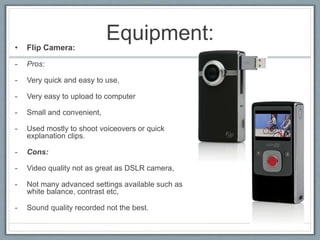
Equipment:• Flip Camera:
- Pros:
- Very quick and easy to use,
- Very easy to upload to computer
- Small and convenient,
- Used mostly to shoot voiceovers or quick
explanation clips.
- Cons:
- Video quality not as great as DSLR camera,
- Not many advanced settings available such as
white balance, contrast etc,
- Sound quality recorded not the best.
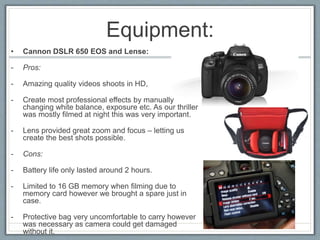
Equipment:
• Cannon DSLR 650 EOS and Lense:
- Pros:
- Amazing quality videos shoots in HD,
- Create most professional effects by manually
changing white balance, exposure etc. As our thriller
was mostly filmed at night this was very important.
- Lens provided great zoom and focus – letting us
create the best shots possible.
- Cons:
- Battery life only lasted around 2 hours.
- Limited to 16 GB memory when filming due to
memory card however we brought a spare just in
case.
- Protective bag very uncomfortable to carry however
was necessary as camera could get damaged
without it.
Equipment:
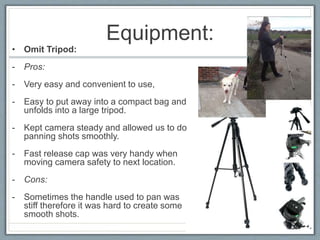
• Omit Tripod:
- Pros:
- Very easy and convenient to use,
- Easy to put away into a compact bag and
unfolds into a large tripod.
- Kept camera steady and allowed us to do
panning shots smoothly.
- Fast release cap was very handy when
moving camera safety to next location.
- Cons:
- Sometimes the handle used to pan was
stiff therefore it was hard to create some
smooth shots.
Equipment:
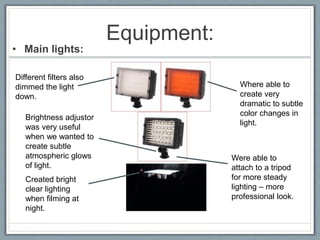
• Main lights:
Created bright
clear lighting
when filming at
night.
Brightness adjustor
was very useful
when we wanted to
create subtle
atmospheric glows
of light.
Different filters also
dimmed the light
down.
Where able to
create very
dramatic to subtle
color changes in
light.
Were able to
attach to a tripod
for more steady
lighting – more
professional look.
Equipment:
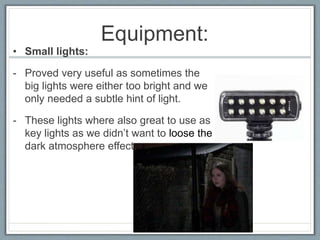
• Small lights:
- Proved very useful as sometimes the
big lights were either too bright and we
only needed a subtle hint of light.
- These lights where also great to use as
key lights as we didn’t want to loose the
dark atmosphere effect.
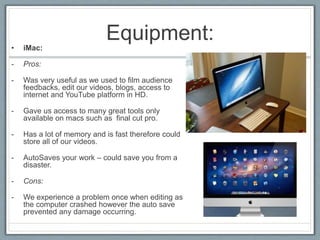
Equipment:• iMac:
- Pros:
- Was very useful as we used to film audience
feedbacks, edit our videos, blogs, access to
internet and YouTube platform in HD.
- Gave us access to many great tools only
available on macs such as final cut pro.
- Has a lot of memory and is fast therefore could
store all of our videos.
- AutoSaves your work – could save you from a
disaster.
- Cons:
- We experience a problem once when editing as
the computer crashed however the auto save
prevented any damage occurring.
Software:
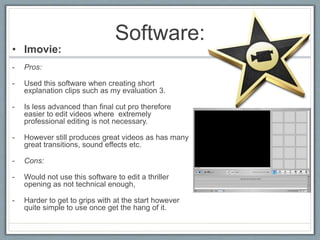
• Imovie:
- Pros:
- Used this software when creating short
explanation clips such as my evaluation 3.
- Is less advanced than final cut pro therefore
easier to edit videos where extremely
professional editing is not necessary.
- However still produces great videos as has many
great transitions, sound effects etc.
- Cons:
- Would not use this software to edit a thriller
opening as not technical enough,
- Harder to get to grips with at the start however
quite simple to use once get the hang of it.
Software:
• Final cut Pro X:
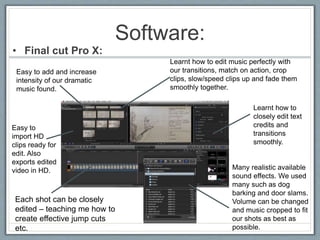
Each shot can be closely
edited – teaching me how to
create effective jump cuts
etc.
Easy to
import HD
clips ready for
edit. Also
exports edited
video in HD. Many realistic available
sound effects. We used
many such as dog
barking and door slams.
Volume can be changed
and music cropped to fit
our shots as best as
possible.
Learnt how to
closely edit text
credits and
transitions
smoothly.
Learnt how to edit music perfectly with
our transitions, match on action, crop
clips, slow/speed clips up and fade them
smoothly together.
Easy to add and increase
intensity of our dramatic
music found.
Software:
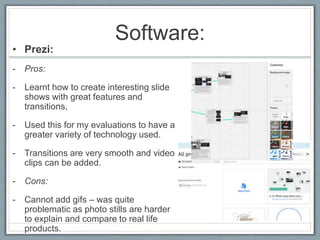
• Prezi:
- Pros:
- Learnt how to create interesting slide
shows with great features and
transitions,
- Used this for my evaluations to have a
greater variety of technology used.
- Transitions are very smooth and video
clips can be added.
- Cons:
- Cannot add gifs – was quite
problematic as photo stills are harder
to explain and compare to real life
products.
Software:
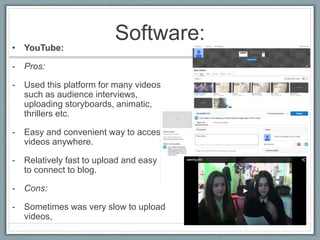
• YouTube:
- Pros:
- Used this platform for many videos
such as audience interviews,
uploading storyboards, animatic,
thrillers etc.
- Easy and convenient way to access
videos anywhere.
- Relatively fast to upload and easy
to connect to blog.
- Cons:
- Sometimes was very slow to upload
videos,
Software:
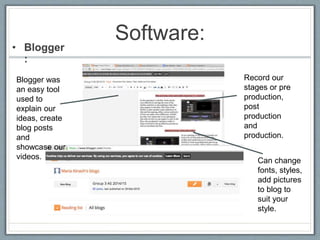
• Blogger
:
Blogger was
an easy tool
used to
explain our
ideas, create
blog posts
and
showcase our
videos. Can change
fonts, styles,
add pictures
to blog to
suit your
style.
Record our
stages or pre
production,
post
production
and
production.
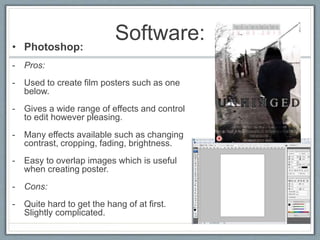
Software:• Photoshop:
- Pros:
- Used to create film posters such as one
below.
- Gives a wide range of effects and control
to edit however pleasing.
- Many effects available such as changing
contrast, cropping, fading, brightness.
- Easy to overlap images which is useful
when creating poster.
- Cons:
- Quite hard to get the hang of at first.
Slightly complicated.

Evaluation 6

  • 1.
    What have youlearnt about technologies from the process of constructing this product? Evaluation Activity 6 Maria Kinash
  • 2.
    Equipment:• Flip Camera: -Pros: - Very quick and easy to use, - Very easy to upload to computer - Small and convenient, - Used mostly to shoot voiceovers or quick explanation clips. - Cons: - Video quality not as great as DSLR camera, - Not many advanced settings available such as white balance, contrast etc, - Sound quality recorded not the best.
  • 3.
    Equipment: • Cannon DSLR650 EOS and Lense: - Pros: - Amazing quality videos shoots in HD, - Create most professional effects by manually changing white balance, exposure etc. As our thriller was mostly filmed at night this was very important. - Lens provided great zoom and focus – letting us create the best shots possible. - Cons: - Battery life only lasted around 2 hours. - Limited to 16 GB memory when filming due to memory card however we brought a spare just in case. - Protective bag very uncomfortable to carry however was necessary as camera could get damaged without it.
  • 4.
    Equipment: • Omit Tripod: -Pros: - Very easy and convenient to use, - Easy to put away into a compact bag and unfolds into a large tripod. - Kept camera steady and allowed us to do panning shots smoothly. - Fast release cap was very handy when moving camera safety to next location. - Cons: - Sometimes the handle used to pan was stiff therefore it was hard to create some smooth shots.
  • 5.
    Equipment: • Main lights: Createdbright clear lighting when filming at night. Brightness adjustor was very useful when we wanted to create subtle atmospheric glows of light. Different filters also dimmed the light down. Where able to create very dramatic to subtle color changes in light. Were able to attach to a tripod for more steady lighting – more professional look.
  • 6.
    Equipment: • Small lights: -Proved very useful as sometimes the big lights were either too bright and we only needed a subtle hint of light. - These lights where also great to use as key lights as we didn’t want to loose the dark atmosphere effect.
  • 7.
    Equipment:• iMac: - Pros: -Was very useful as we used to film audience feedbacks, edit our videos, blogs, access to internet and YouTube platform in HD. - Gave us access to many great tools only available on macs such as final cut pro. - Has a lot of memory and is fast therefore could store all of our videos. - AutoSaves your work – could save you from a disaster. - Cons: - We experience a problem once when editing as the computer crashed however the auto save prevented any damage occurring.
  • 8.
    Software: • Imovie: - Pros: -Used this software when creating short explanation clips such as my evaluation 3. - Is less advanced than final cut pro therefore easier to edit videos where extremely professional editing is not necessary. - However still produces great videos as has many great transitions, sound effects etc. - Cons: - Would not use this software to edit a thriller opening as not technical enough, - Harder to get to grips with at the start however quite simple to use once get the hang of it.
  • 9.
    Software: • Final cutPro X: Each shot can be closely edited – teaching me how to create effective jump cuts etc. Easy to import HD clips ready for edit. Also exports edited video in HD. Many realistic available sound effects. We used many such as dog barking and door slams. Volume can be changed and music cropped to fit our shots as best as possible. Learnt how to closely edit text credits and transitions smoothly. Learnt how to edit music perfectly with our transitions, match on action, crop clips, slow/speed clips up and fade them smoothly together. Easy to add and increase intensity of our dramatic music found.
  • 10.
    Software: • Prezi: - Pros: -Learnt how to create interesting slide shows with great features and transitions, - Used this for my evaluations to have a greater variety of technology used. - Transitions are very smooth and video clips can be added. - Cons: - Cannot add gifs – was quite problematic as photo stills are harder to explain and compare to real life products.
  • 11.
    Software: • YouTube: - Pros: -Used this platform for many videos such as audience interviews, uploading storyboards, animatic, thrillers etc. - Easy and convenient way to access videos anywhere. - Relatively fast to upload and easy to connect to blog. - Cons: - Sometimes was very slow to upload videos,
  • 12.
    Software: • Blogger : Blogger was aneasy tool used to explain our ideas, create blog posts and showcase our videos. Can change fonts, styles, add pictures to blog to suit your style. Record our stages or pre production, post production and production.
  • 13.
    Software:• Photoshop: - Pros: -Used to create film posters such as one below. - Gives a wide range of effects and control to edit however pleasing. - Many effects available such as changing contrast, cropping, fading, brightness. - Easy to overlap images which is useful when creating poster. - Cons: - Quite hard to get the hang of at first. Slightly complicated.