What have you learnt about
technologies from constructing
         this project?
HD Camera
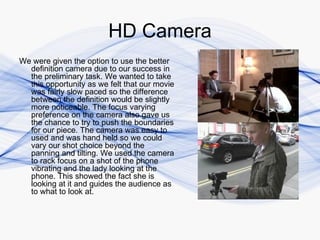
We were given the option to use the better
  definition camera due to our success in
  the preliminary task. We wanted to take
  this opportunity as we felt that our movie
  was fairly slow paced so the difference
  between the definition would be slightly
  more noticeable. The focus varying
  preference on the camera also gave us
  the chance to try to push the boundaries
  for our piece. The camera was easy to
  used and was hand held so we could
  vary our shot choice beyond the
  panning and tilting. We used the camera
  to rack focus on a shot of the phone
  vibrating and the lady looking at the
  phone. This showed the fact she is
  looking at it and guides the audience as
  to what to look at.
Extras
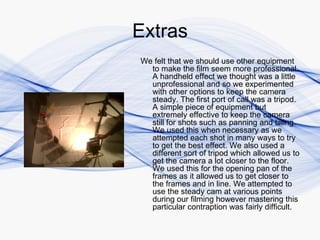
We felt that we should use other equipment
  to make the film seem more professional.
  A handheld effect we thought was a little
  unprofessional and so we experimented
  with other options to keep the camera
  steady. The first port of call was a tripod.
  A simple piece of equipment but
  extremely effective to keep the camera
  still for shots such as panning and tilting.
  We used this when necessary as we
  attempted each shot in many ways to try
  to get the best effect. We also used a
  different sort of tripod which allowed us to
  get the camera a lot closer to the floor.
  We used this for the opening pan of the
  frames as it allowed us to get closer to
  the frames and in line. We attempted to
  use the steady cam at various points
  during our filming however mastering this
  particular contraption was fairly difficult.
Microphones
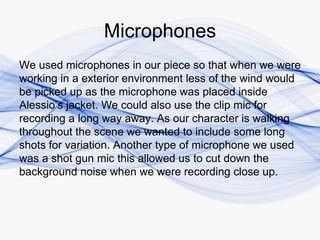
We used microphones in our piece so that when we were
working in a exterior environment less of the wind would
be picked up as the microphone was placed inside
Alessio’s jacket. We could also use the clip mic for
recording a long way away. As our character is walking
throughout the scene we wanted to include some long
shots for variation. Another type of microphone we used
was a shot gun mic this allowed us to cut down the
background noise when we were recording close up.
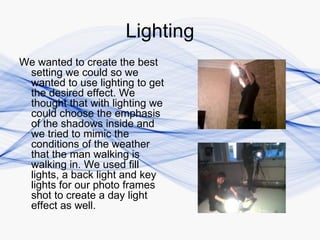
Lighting
We wanted to create the best
 setting we could so we
 wanted to use lighting to get
 the desired effect. We
 thought that with lighting we
 could choose the emphasis
 of the shadows inside and
 we tried to mimic the
 conditions of the weather
 that the man walking is
 walking in. We used fill
 lights, a back light and key
 lights for our photo frames
 shot to create a day light
 effect as well.
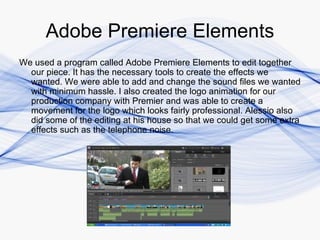
Adobe Premiere Elements
We used a program called Adobe Premiere Elements to edit together
  our piece. It has the necessary tools to create the effects we
  wanted. We were able to add and change the sound files we wanted
  with minimum hassle. I also created the logo animation for our
  production company with Premier and was able to create a
  movement for the logo which looks fairly professional. Alessio also
  did some of the editing at his house so that we could get some extra
  effects such as the telephone noise.
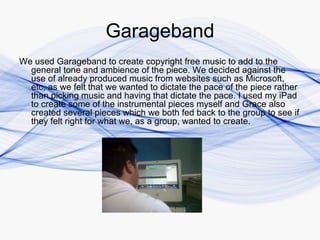
Garageband
We used Garageband to create copyright free music to add to the
  general tone and ambience of the piece. We decided against the
  use of already produced music from websites such as Microsoft,
  etc, as we felt that we wanted to dictate the pace of the piece rather
  than picking music and having that dictate the pace. I used my iPad
  to create some of the instrumental pieces myself and Grace also
  created several pieces which we both fed back to the group to see if
  they felt right for what we, as a group, wanted to create.

Evaluation Question 6

  • 1.
    What have youlearnt about technologies from constructing this project?
  • 2.
    HD Camera We weregiven the option to use the better definition camera due to our success in the preliminary task. We wanted to take this opportunity as we felt that our movie was fairly slow paced so the difference between the definition would be slightly more noticeable. The focus varying preference on the camera also gave us the chance to try to push the boundaries for our piece. The camera was easy to used and was hand held so we could vary our shot choice beyond the panning and tilting. We used the camera to rack focus on a shot of the phone vibrating and the lady looking at the phone. This showed the fact she is looking at it and guides the audience as to what to look at.
  • 3.
    Extras We felt thatwe should use other equipment to make the film seem more professional. A handheld effect we thought was a little unprofessional and so we experimented with other options to keep the camera steady. The first port of call was a tripod. A simple piece of equipment but extremely effective to keep the camera still for shots such as panning and tilting. We used this when necessary as we attempted each shot in many ways to try to get the best effect. We also used a different sort of tripod which allowed us to get the camera a lot closer to the floor. We used this for the opening pan of the frames as it allowed us to get closer to the frames and in line. We attempted to use the steady cam at various points during our filming however mastering this particular contraption was fairly difficult.
  • 4.
    Microphones We used microphonesin our piece so that when we were working in a exterior environment less of the wind would be picked up as the microphone was placed inside Alessio’s jacket. We could also use the clip mic for recording a long way away. As our character is walking throughout the scene we wanted to include some long shots for variation. Another type of microphone we used was a shot gun mic this allowed us to cut down the background noise when we were recording close up.
  • 5.
    Lighting We wanted tocreate the best setting we could so we wanted to use lighting to get the desired effect. We thought that with lighting we could choose the emphasis of the shadows inside and we tried to mimic the conditions of the weather that the man walking is walking in. We used fill lights, a back light and key lights for our photo frames shot to create a day light effect as well.
  • 6.
    Adobe Premiere Elements Weused a program called Adobe Premiere Elements to edit together our piece. It has the necessary tools to create the effects we wanted. We were able to add and change the sound files we wanted with minimum hassle. I also created the logo animation for our production company with Premier and was able to create a movement for the logo which looks fairly professional. Alessio also did some of the editing at his house so that we could get some extra effects such as the telephone noise.
  • 7.
    Garageband We used Garagebandto create copyright free music to add to the general tone and ambience of the piece. We decided against the use of already produced music from websites such as Microsoft, etc, as we felt that we wanted to dictate the pace of the piece rather than picking music and having that dictate the pace. I used my iPad to create some of the instrumental pieces myself and Grace also created several pieces which we both fed back to the group to see if they felt right for what we, as a group, wanted to create.