© dbi services
dbi services
Cloud Control 12c
1 25.04.2012www.dbi-services.com
Pierre Sicot
Senior Consultant
Mobile +41 79 961 29 61
Pierre.sicot@dbi-services.com
www.dbi-services.com
© dbi services
Agenda
Cloud Control 12c
i. Introduction
ii. Installation
iii. Agent deployment
iv. Architecture
v. New Features
vi. Core messages
Agenda
26.04.20122 www.dbi-services.com
© dbi services
 Grid Control became Cloud Control (by the way, beta releases
were named Grid Control 12g)
 Cloud Control 12c is the Oracle Management platform, also called
“Enterprise Manager” Cloud Control 12c
 Next generation of the Grid Control 10g/11g
 It allows to operate/monitor the following components and much
more:
 Databases & Middleware infrastructures
 Exadata infrastructures
 Monitoring of SQL Server
 Oracle VM infrastructures
 etc.
Cloud Control 12c
Introduction
www.dbi-services.com3 26.04.2012
© dbi services
 Cloud Control 12c demo
 Environment
 Oracle Cloud Control 12c
 Oracle Enterprise Linux
 Demo 1
 New login and console “Welcome” pages
 New menus
 Configurable layout
Cloud Control 12c
Interface presentation
www.dbi-services.com4 26.04.2012
© dbi services
Agenda
dbi services
i. Introduction
ii. Installation
iii. Agent deployment
iv. Architecture
v. New Features
vi. Core messages
Agenda
26.04.20125 www.dbi-services.com
© dbi services
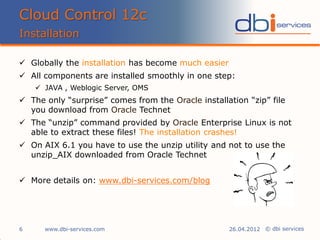
 Globally the installation has become much easier
 All components are installed smoothly in one step:
 JAVA , Weblogic Server, OMS
 The only “surprise” comes from the Oracle installation “zip” file
you download from Oracle Technet
 The “unzip” command provided by Oracle Enterprise Linux is not
able to extract these files! The installation crashes!
 On AIX 6.1 you have to use the unzip utility and not to use the
unzip_AIX downloaded from Oracle Technet
 More details on: www.dbi-services.com/blog
Cloud Control 12c
Installation
www.dbi-services.com6 26.04.2012
© dbi services
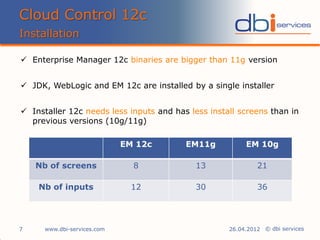
 Enterprise Manager 12c binaries are bigger than 11g version
 JDK, WebLogic and EM 12c are installed by a single installer
 Installer 12c needs less inputs and has less install screens than in
previous versions (10g/11g)
Cloud Control 12c
Installation
www.dbi-services.com7 26.04.2012
EM 12c EM11g EM 10g
Nb of screens 8 13 21
Nb of inputs 12 30 36
© dbi services
Cloud Control 12c
Installation
www.dbi-services.com8 26.04.2012
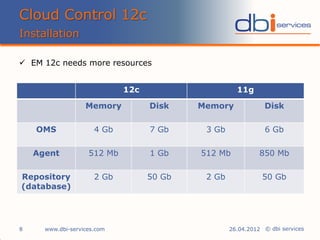
 EM 12c needs more resources
12c 11g
Memory Disk Memory Disk
OMS 4 Gb 7 Gb 3 Gb 6 Gb
Agent 512 Mb 1 Gb 512 Mb 850 Mb
Repository
(database)
2 Gb 50 Gb 2 Gb 50 Gb
© dbi services
Cloud Control 12c
Installation
www.dbi-services.com9 26.04.2012
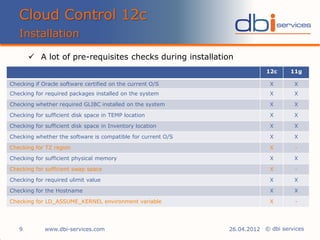
 A lot of pre-requisites checks during installation
12c 11g
Checking if Oracle software certified on the current O/S X X
Checking for required packages installed on the system X X
Checking whether required GLIBC installed on the system X X
Checking for sufficient disk space in TEMP location X X
Checking for sufficient disk space in Inventory location X X
Checking whether the software is compatible for current O/S X X
Checking for TZ region X -
Checking for sufficient physical memory X X
Checking for sufficient swap space X -
Checking for required ulimit value X X
Checking for the Hostname X X
Checking for LD_ASSUME_KERNEL environment variable X -
© dbi services
 Installation of Cloud Control 12c became much easier than Grid
Control 11g
 Weblogic Server fully integrated (no need to install a WLS server
before), even better no need to Patch!
 8 installation screens instead of 13 (for Grid Control 11g)
 Lots of prerequisites checks
 Grid Control 12c needs more resources
Cloud Control 12c
Installation summary
www.dbi-services.com10 26.04.2012
© dbi services
Agenda
dbi services
i. Introduction
ii. Installation
iii. Agent deployment
iv. Architecture
v. New Features
vi. Core messages
Agenda
26.04.201211 www.dbi-services.com
© dbi services
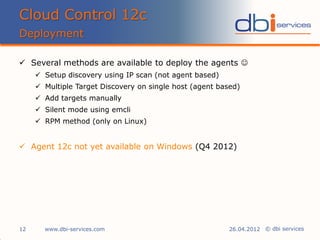
 Several methods are available to deploy the agents 
 Setup discovery using IP scan (not agent based)
 Multiple Target Discovery on single host (agent based)
 Add targets manually
 Silent mode using emcli
 RPM method (only on Linux)
 Agent 12c not yet available on Windows (Q4 2012)
Cloud Control 12c
Deployment
www.dbi-services.com12 26.04.2012
© dbi services
Cloud Control 12c
Deployment GUI
www.dbi-services.com13 26.04.2012
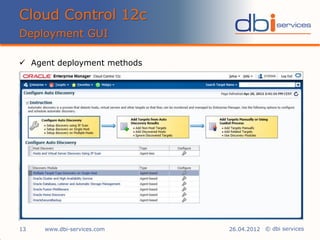
 Agent deployment methods
© dbi services
Cloud Control 12c
Deployment GUI
www.dbi-services.com14 26.04.2012
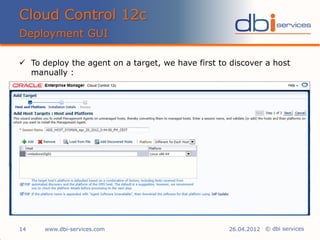
 To deploy the agent on a target, we have first to discover a host
manually :
© dbi services
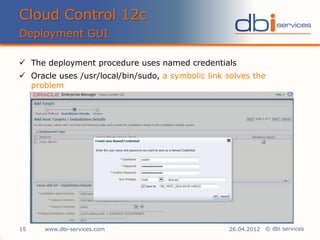
 The deployment procedure uses named credentials
 Oracle uses /usr/local/bin/sudo, a symbolic link solves the
problem
Cloud Control 12c
Deployment GUI
www.dbi-services.com15 26.04.2012
© dbi services
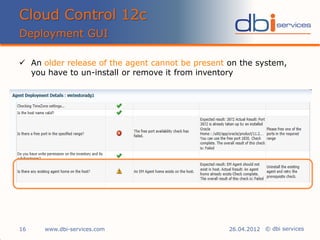
 An older release of the agent cannot be present on the system,
you have to un-install or remove it from inventory
Cloud Control 12c
Deployment GUI
www.dbi-services.com16 26.04.2012
© dbi services
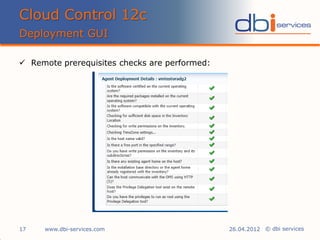
 Remote prerequisites checks are performed:
Cloud Control 12c
Deployment GUI
www.dbi-services.com17 26.04.2012
© dbi services
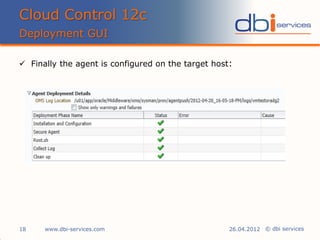
 Finally the agent is configured on the target host:
Cloud Control 12c
Deployment GUI
www.dbi-services.com18 26.04.2012
© dbi services
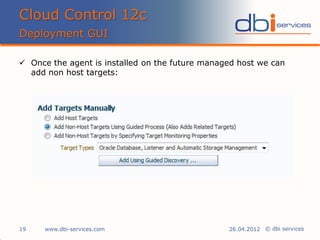
 Once the agent is installed on the future managed host we can
add non host targets:
Cloud Control 12c
Deployment GUI
www.dbi-services.com19 26.04.2012
© dbi services
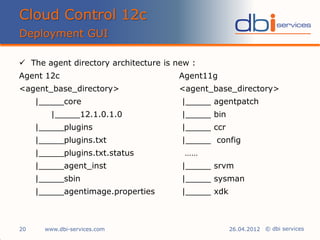
 The agent directory architecture is new :
Agent 12c Agent11g
<agent_base_directory> <agent_base_directory>
|_____core |_____ agentpatch
|_____12.1.0.1.0 |_____ bin
|_____plugins |_____ ccr
|_____plugins.txt |_____ config
|_____plugins.txt.status ……
|_____agent_inst |_____ srvm
|_____sbin |_____ sysman
|_____agentimage.properties |_____ xdk
Cloud Control 12c
Deployment GUI
www.dbi-services.com20 26.04.2012
© dbi services
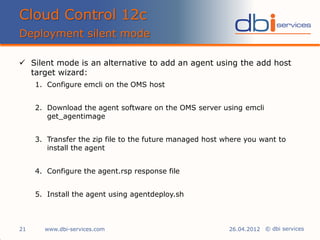
 Silent mode is an alternative to add an agent using the add host
target wizard:
1. Configure emcli on the OMS host
2. Download the agent software on the OMS server using emcli
get_agentimage
3. Transfer the zip file to the future managed host where you want to
install the agent
4. Configure the agent.rsp response file
5. Install the agent using agentdeploy.sh
Cloud Control 12c
Deployment silent mode
www.dbi-services.com21 26.04.2012
© dbi services
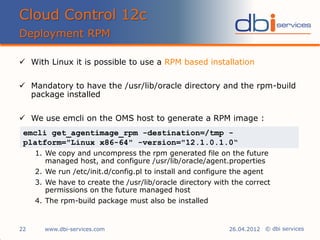
 With Linux it is possible to use a RPM based installation
 Mandatory to have the /usr/lib/oracle directory and the rpm-build
package installed
 We use emcli on the OMS host to generate a RPM image :
1. We copy and uncompress the rpm generated file on the future
managed host, and configure /usr/lib/oracle/agent.properties
2. We run /etc/init.d/config.pl to install and configure the agent
3. We have to create the /usr/lib/oracle directory with the correct
permissions on the future managed host
4. The rpm-build package must also be installed
Cloud Control 12c
Deployment RPM
www.dbi-services.com22 26.04.2012
emcli get_agentimage_rpm -destination=/tmp -
platform="Linux x86-64" -version="12.1.0.1.0“
© dbi services
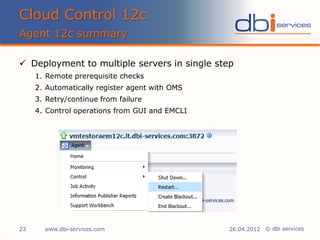
 Deployment to multiple servers in single step
1. Remote prerequisite checks
2. Automatically register agent with OMS
3. Retry/continue from failure
4. Control operations from GUI and EMCLI
Cloud Control 12c
Agent 12c summary
www.dbi-services.com23 26.04.2012
© dbi services
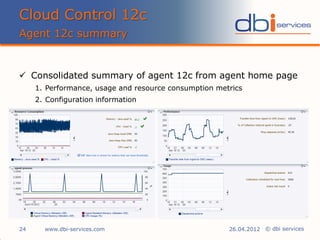
 Consolidated summary of agent 12c from agent home page
1. Performance, usage and resource consumption metrics
2. Configuration information
Cloud Control 12c
Agent 12c summary
www.dbi-services.com24 26.04.2012
© dbi services
Agenda
dbi services
i. Introduction
ii. Installation
iii. Agent deployment
iv. Architecture
v. New Features
vi. Core messages
Agenda
26.04.201225 www.dbi-services.com
© dbi services
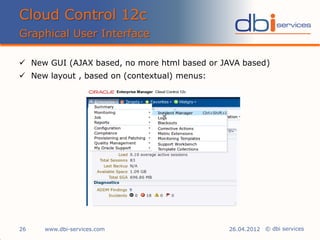
 New GUI (AJAX based, no more html based or JAVA based)
 New layout , based on (contextual) menus:
Cloud Control 12c
Graphical User Interface
www.dbi-services.com26 26.04.2012
© dbi services
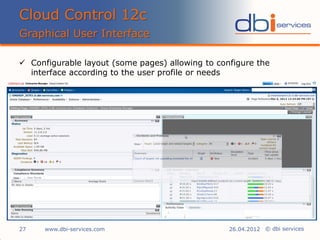
 Configurable layout (some pages) allowing to configure the
interface according to the user profile or needs
Cloud Control 12c
Graphical User Interface
www.dbi-services.com27 26.04.2012
© dbi services
 Service Management Oriented features and layout (i.e. Incident
and problem management), see demo later on
 Better integration with My Oracle Support (i.e. ORA-XXX errors
are directly linked to corresponding My Oracle Support notes)
 Improved help and documentation
Cloud Control 12c
Service Management
www.dbi-services.com28 26.04.2012
© dbi services
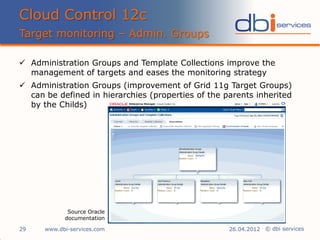
 Administration Groups and Template Collections improve the
management of targets and eases the monitoring strategy
 Administration Groups (improvement of Grid 11g Target Groups)
can be defined in hierarchies (properties of the parents inherited
by the Childs)
Cloud Control 12c
Target monitoring – Admin. Groups
www.dbi-services.com29 26.04.2012
Source Oracle
documentation
© dbi services
 Templates collections are composed of “monitoring templates” (of
several types), “compliance standards” and “cloud policies”
 Both together provide default monitoring and management
settings to the deployed targets
 They allow to remain targets in sync (i.e. no monitoring metrics
differences)
 Template collections can be affected to any level of the
Administration Group Hierarchy
 45 default Oracle monitoring templates are provided with Cloud
Control 12c (HTTP server, agent, Weblogic, aso …)
 Several templates can be “loaded” within one template collection
Cloud Control 12c
Target monitoring – Templ. Collections
www.dbi-services.com30 26.04.2012
© dbi services
 Cloud Control 12c introduces some basics of the Service
Management requirement
 Incident, problem management are covered based on the adrci
naming convention : “ORA-XXXX is a problem
 Possibility to assign, monitor, acknowledge incidents
 Possibility to create custom incidents
 Possibility to create custom incident views
Cloud Control 12c
Service Management integration
www.dbi-services.com31 26.04.2012
© dbi services
 Cloud Control 12c demo
 Environment
 Oracle Cloud Control 12c
 Oracle Enterprise Linux
 Demo 2
 Incident generation
 Incident assignment
Cloud Control 12c
Service Management integration
www.dbi-services.com32 26.04.2012
© dbi services
 Brand new interface
 Monitoring/management of additional products (i.e. Exadata)
 Improved security features with new privileges and fine grained
security policies
 Creation of Oracle Database from Cloud Control 12c
 Patch Oracle Database with minimum downtime
 Better integration of Oracle VM 3.0
Cloud Control 12c
Top new features
www.dbi-services.com33 26.04.2012
© dbi services
 Compare ADDM periods
 ASH analytics permits to dig more with better graphics
 New concept for User Defined Metrics called : "Metrics extensions"
allowing you to create full-fledged metrics for a multitude of
target types
 Multi Channel Access (iPhone, iPod)
 Service Management Integration
Cloud Control 12c
Top new features
www.dbi-services.com34 26.04.2012
© dbi services
Agenda
dbi services
i. Introduction
ii. Installation
iii. Agent deployment
iv. Architecture
v. New Features
vi. Core messages
Agenda
26.04.201235 www.dbi-services.com
© dbi services
+ Cloud Control 12c is a real new milestone for the
Enterprise Manager product suite
+ GUI improvement, usage of menus and configurable pages
+ Service management orientation
+ Oracle support integration
+ Many new functionalities
- New product which will need time to get stabilized
- Cost of several packs
- High resource usage compared to 10g and 11g
Cloud Control 12c
Core messages
www.dbi-services.com36 26.04.2012
© dbi services
 Some very interesting References to get started with Cloud
Control 12c
 Basic Cloud Control 12c installation :
http://www.oracle-base.com/articles/12c/
CloudControl12cR1InstallationOnOracleLinux5And6.php
 TechNet Oracle :
http://www.oracle.com/technetwork/oem/
enterprise-manager/overview/index.html
 Online Demos on YouTube! accessible from TechNet :
http://www.oracle.com/technetwork/oem/em12c-screenwatches-512013.html
Cloud Control 12c
References
www.dbi-services.com37 26.04.2012
© dbi services
Cloud Control 12c
Any Questions? Please Do Ask!
38 26.04.2012www.dbi-services.com
„Have fun with Cloud Control 12c!“

Presentation cloud control 12c

  • 1.
    © dbi services dbiservices Cloud Control 12c 1 25.04.2012www.dbi-services.com Pierre Sicot Senior Consultant Mobile +41 79 961 29 61 Pierre.sicot@dbi-services.com www.dbi-services.com
  • 2.
    © dbi services Agenda CloudControl 12c i. Introduction ii. Installation iii. Agent deployment iv. Architecture v. New Features vi. Core messages Agenda 26.04.20122 www.dbi-services.com
  • 3.
    © dbi services Grid Control became Cloud Control (by the way, beta releases were named Grid Control 12g)  Cloud Control 12c is the Oracle Management platform, also called “Enterprise Manager” Cloud Control 12c  Next generation of the Grid Control 10g/11g  It allows to operate/monitor the following components and much more:  Databases & Middleware infrastructures  Exadata infrastructures  Monitoring of SQL Server  Oracle VM infrastructures  etc. Cloud Control 12c Introduction www.dbi-services.com3 26.04.2012
  • 4.
    © dbi services Cloud Control 12c demo  Environment  Oracle Cloud Control 12c  Oracle Enterprise Linux  Demo 1  New login and console “Welcome” pages  New menus  Configurable layout Cloud Control 12c Interface presentation www.dbi-services.com4 26.04.2012
  • 5.
    © dbi services Agenda dbiservices i. Introduction ii. Installation iii. Agent deployment iv. Architecture v. New Features vi. Core messages Agenda 26.04.20125 www.dbi-services.com
  • 6.
    © dbi services Globally the installation has become much easier  All components are installed smoothly in one step:  JAVA , Weblogic Server, OMS  The only “surprise” comes from the Oracle installation “zip” file you download from Oracle Technet  The “unzip” command provided by Oracle Enterprise Linux is not able to extract these files! The installation crashes!  On AIX 6.1 you have to use the unzip utility and not to use the unzip_AIX downloaded from Oracle Technet  More details on: www.dbi-services.com/blog Cloud Control 12c Installation www.dbi-services.com6 26.04.2012
  • 7.
    © dbi services Enterprise Manager 12c binaries are bigger than 11g version  JDK, WebLogic and EM 12c are installed by a single installer  Installer 12c needs less inputs and has less install screens than in previous versions (10g/11g) Cloud Control 12c Installation www.dbi-services.com7 26.04.2012 EM 12c EM11g EM 10g Nb of screens 8 13 21 Nb of inputs 12 30 36
  • 8.
    © dbi services CloudControl 12c Installation www.dbi-services.com8 26.04.2012  EM 12c needs more resources 12c 11g Memory Disk Memory Disk OMS 4 Gb 7 Gb 3 Gb 6 Gb Agent 512 Mb 1 Gb 512 Mb 850 Mb Repository (database) 2 Gb 50 Gb 2 Gb 50 Gb
  • 9.
    © dbi services CloudControl 12c Installation www.dbi-services.com9 26.04.2012  A lot of pre-requisites checks during installation 12c 11g Checking if Oracle software certified on the current O/S X X Checking for required packages installed on the system X X Checking whether required GLIBC installed on the system X X Checking for sufficient disk space in TEMP location X X Checking for sufficient disk space in Inventory location X X Checking whether the software is compatible for current O/S X X Checking for TZ region X - Checking for sufficient physical memory X X Checking for sufficient swap space X - Checking for required ulimit value X X Checking for the Hostname X X Checking for LD_ASSUME_KERNEL environment variable X -
  • 10.
    © dbi services Installation of Cloud Control 12c became much easier than Grid Control 11g  Weblogic Server fully integrated (no need to install a WLS server before), even better no need to Patch!  8 installation screens instead of 13 (for Grid Control 11g)  Lots of prerequisites checks  Grid Control 12c needs more resources Cloud Control 12c Installation summary www.dbi-services.com10 26.04.2012
  • 11.
    © dbi services Agenda dbiservices i. Introduction ii. Installation iii. Agent deployment iv. Architecture v. New Features vi. Core messages Agenda 26.04.201211 www.dbi-services.com
  • 12.
    © dbi services Several methods are available to deploy the agents   Setup discovery using IP scan (not agent based)  Multiple Target Discovery on single host (agent based)  Add targets manually  Silent mode using emcli  RPM method (only on Linux)  Agent 12c not yet available on Windows (Q4 2012) Cloud Control 12c Deployment www.dbi-services.com12 26.04.2012
  • 13.
    © dbi services CloudControl 12c Deployment GUI www.dbi-services.com13 26.04.2012  Agent deployment methods
  • 14.
    © dbi services CloudControl 12c Deployment GUI www.dbi-services.com14 26.04.2012  To deploy the agent on a target, we have first to discover a host manually :
  • 15.
    © dbi services The deployment procedure uses named credentials  Oracle uses /usr/local/bin/sudo, a symbolic link solves the problem Cloud Control 12c Deployment GUI www.dbi-services.com15 26.04.2012
  • 16.
    © dbi services An older release of the agent cannot be present on the system, you have to un-install or remove it from inventory Cloud Control 12c Deployment GUI www.dbi-services.com16 26.04.2012
  • 17.
    © dbi services Remote prerequisites checks are performed: Cloud Control 12c Deployment GUI www.dbi-services.com17 26.04.2012
  • 18.
    © dbi services Finally the agent is configured on the target host: Cloud Control 12c Deployment GUI www.dbi-services.com18 26.04.2012
  • 19.
    © dbi services Once the agent is installed on the future managed host we can add non host targets: Cloud Control 12c Deployment GUI www.dbi-services.com19 26.04.2012
  • 20.
    © dbi services The agent directory architecture is new : Agent 12c Agent11g <agent_base_directory> <agent_base_directory> |_____core |_____ agentpatch |_____12.1.0.1.0 |_____ bin |_____plugins |_____ ccr |_____plugins.txt |_____ config |_____plugins.txt.status …… |_____agent_inst |_____ srvm |_____sbin |_____ sysman |_____agentimage.properties |_____ xdk Cloud Control 12c Deployment GUI www.dbi-services.com20 26.04.2012
  • 21.
    © dbi services Silent mode is an alternative to add an agent using the add host target wizard: 1. Configure emcli on the OMS host 2. Download the agent software on the OMS server using emcli get_agentimage 3. Transfer the zip file to the future managed host where you want to install the agent 4. Configure the agent.rsp response file 5. Install the agent using agentdeploy.sh Cloud Control 12c Deployment silent mode www.dbi-services.com21 26.04.2012
  • 22.
    © dbi services With Linux it is possible to use a RPM based installation  Mandatory to have the /usr/lib/oracle directory and the rpm-build package installed  We use emcli on the OMS host to generate a RPM image : 1. We copy and uncompress the rpm generated file on the future managed host, and configure /usr/lib/oracle/agent.properties 2. We run /etc/init.d/config.pl to install and configure the agent 3. We have to create the /usr/lib/oracle directory with the correct permissions on the future managed host 4. The rpm-build package must also be installed Cloud Control 12c Deployment RPM www.dbi-services.com22 26.04.2012 emcli get_agentimage_rpm -destination=/tmp - platform="Linux x86-64" -version="12.1.0.1.0“
  • 23.
    © dbi services Deployment to multiple servers in single step 1. Remote prerequisite checks 2. Automatically register agent with OMS 3. Retry/continue from failure 4. Control operations from GUI and EMCLI Cloud Control 12c Agent 12c summary www.dbi-services.com23 26.04.2012
  • 24.
    © dbi services Consolidated summary of agent 12c from agent home page 1. Performance, usage and resource consumption metrics 2. Configuration information Cloud Control 12c Agent 12c summary www.dbi-services.com24 26.04.2012
  • 25.
    © dbi services Agenda dbiservices i. Introduction ii. Installation iii. Agent deployment iv. Architecture v. New Features vi. Core messages Agenda 26.04.201225 www.dbi-services.com
  • 26.
    © dbi services New GUI (AJAX based, no more html based or JAVA based)  New layout , based on (contextual) menus: Cloud Control 12c Graphical User Interface www.dbi-services.com26 26.04.2012
  • 27.
    © dbi services Configurable layout (some pages) allowing to configure the interface according to the user profile or needs Cloud Control 12c Graphical User Interface www.dbi-services.com27 26.04.2012
  • 28.
    © dbi services Service Management Oriented features and layout (i.e. Incident and problem management), see demo later on  Better integration with My Oracle Support (i.e. ORA-XXX errors are directly linked to corresponding My Oracle Support notes)  Improved help and documentation Cloud Control 12c Service Management www.dbi-services.com28 26.04.2012
  • 29.
    © dbi services Administration Groups and Template Collections improve the management of targets and eases the monitoring strategy  Administration Groups (improvement of Grid 11g Target Groups) can be defined in hierarchies (properties of the parents inherited by the Childs) Cloud Control 12c Target monitoring – Admin. Groups www.dbi-services.com29 26.04.2012 Source Oracle documentation
  • 30.
    © dbi services Templates collections are composed of “monitoring templates” (of several types), “compliance standards” and “cloud policies”  Both together provide default monitoring and management settings to the deployed targets  They allow to remain targets in sync (i.e. no monitoring metrics differences)  Template collections can be affected to any level of the Administration Group Hierarchy  45 default Oracle monitoring templates are provided with Cloud Control 12c (HTTP server, agent, Weblogic, aso …)  Several templates can be “loaded” within one template collection Cloud Control 12c Target monitoring – Templ. Collections www.dbi-services.com30 26.04.2012
  • 31.
    © dbi services Cloud Control 12c introduces some basics of the Service Management requirement  Incident, problem management are covered based on the adrci naming convention : “ORA-XXXX is a problem  Possibility to assign, monitor, acknowledge incidents  Possibility to create custom incidents  Possibility to create custom incident views Cloud Control 12c Service Management integration www.dbi-services.com31 26.04.2012
  • 32.
    © dbi services Cloud Control 12c demo  Environment  Oracle Cloud Control 12c  Oracle Enterprise Linux  Demo 2  Incident generation  Incident assignment Cloud Control 12c Service Management integration www.dbi-services.com32 26.04.2012
  • 33.
    © dbi services Brand new interface  Monitoring/management of additional products (i.e. Exadata)  Improved security features with new privileges and fine grained security policies  Creation of Oracle Database from Cloud Control 12c  Patch Oracle Database with minimum downtime  Better integration of Oracle VM 3.0 Cloud Control 12c Top new features www.dbi-services.com33 26.04.2012
  • 34.
    © dbi services Compare ADDM periods  ASH analytics permits to dig more with better graphics  New concept for User Defined Metrics called : "Metrics extensions" allowing you to create full-fledged metrics for a multitude of target types  Multi Channel Access (iPhone, iPod)  Service Management Integration Cloud Control 12c Top new features www.dbi-services.com34 26.04.2012
  • 35.
    © dbi services Agenda dbiservices i. Introduction ii. Installation iii. Agent deployment iv. Architecture v. New Features vi. Core messages Agenda 26.04.201235 www.dbi-services.com
  • 36.
    © dbi services +Cloud Control 12c is a real new milestone for the Enterprise Manager product suite + GUI improvement, usage of menus and configurable pages + Service management orientation + Oracle support integration + Many new functionalities - New product which will need time to get stabilized - Cost of several packs - High resource usage compared to 10g and 11g Cloud Control 12c Core messages www.dbi-services.com36 26.04.2012
  • 37.
    © dbi services Some very interesting References to get started with Cloud Control 12c  Basic Cloud Control 12c installation : http://www.oracle-base.com/articles/12c/ CloudControl12cR1InstallationOnOracleLinux5And6.php  TechNet Oracle : http://www.oracle.com/technetwork/oem/ enterprise-manager/overview/index.html  Online Demos on YouTube! accessible from TechNet : http://www.oracle.com/technetwork/oem/em12c-screenwatches-512013.html Cloud Control 12c References www.dbi-services.com37 26.04.2012
  • 38.
    © dbi services CloudControl 12c Any Questions? Please Do Ask! 38 26.04.2012www.dbi-services.com „Have fun with Cloud Control 12c!“