Welcome to
Database Cloud Services
Office Hours
We will begin shortly!
Thank you for joining us!
Database Cloud Services
Office Hours
How to migrate AWS RDS Oracle DBs to OCI using OCI Backup Service
Sriram Vr
Principal Product Manager
Enterprise Manager
2
April 22, 2020
Tammy Bednar
Sr. Director of Product Management
Database Cloud Services
Marco Calmasini
Sr. Principal Product Manager
Database Backup
The following is intended to outline our general product direction. It is intended for information purposes only, and
may not be incorporated into any contract. It is not a commitment to deliver any material, code, or functionality,
and should not be relied upon in making purchasing decisions. The development, release, timing, and pricing of
any features or functionality described for Oracle’s products may change and remains at the sole discretion of
Oracle Corporation.
Safe harbor statement
Copyright © 2020, Oracle and/or its affiliates3
Why moving from RDS to OCI
1 Best Cloud Infrastructure for Oracle Databases
2 All the Oracle Database Options are available
3 Runs on VM, Bare Metal or Exadata Cloud Service
4 Real Application Cluster
5 Easier Hybrid Deployments
4 Copyright © 2020, Oracle and/or its affiliates |
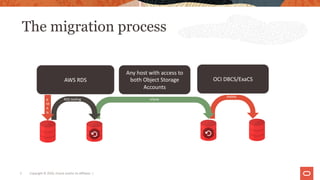
The migration process
5 Copyright © 2020, Oracle and/or its affiliates |
AWS RDS
Any host with access to
both Object Storage
Accounts
OCI DBCS/ExaCS
R
M
A
N
RDS tooling rclone
RMAN
Environments used in this exercise
AWS RDS Configuration
Engine version 19.0.0.0.ru-2020-01.rur-2020-01.r1
Multi-Tenant NON-CDB
Character set AL32UTF8
Option groups s3-integration-db2
Parameter group default.oracle-ee-19 (in-sync)
Instance class Instance classdb.t3.small
vCPU2
RAM2 GB
Storage
Encryption Enabled (NO TDE)
Oracle Database Cloud Service Configuration
Shape: VM.Standard2.1
Oracle Database Software Edition: Enterprise
Edition High Performance
Storage Management Software: Logical Volume
Manager
Database Version: 19.6.0.0.200114
Patch History: Jan 2020 19c Database patch
TDE Encryption: ON (Mandatory)
Multi-Tenant: YES (Mandatory)
Make sure the RDS DBNAME is not currently
used by the CDB or any PDB
6 Copyright © 2020, Oracle and/or its affiliates |
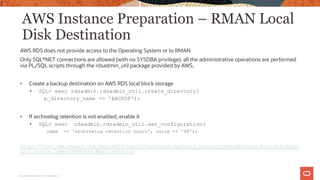
AWS Instance Preparation – RMAN Local
Disk Destination
AWS RDS does not provide access to the Operating System or to RMAN
Only SQL*NET connections are allowed (with no SYSDBA privilege), all the administrative operations are performed
via PL/SQL scripts through the rdsadmin_util package provided by AWS.
• Create a backup destination on AWS RDS local block storage
• SQL> exec rdsadmin.rdsadmin_util.create_directory(
p_directory_name => 'BACKUP');
• If archivelog retention is not enabled, enable it
• SQL> exec rdsadmin.rdsadmin_util.set_configuration(
name => 'archivelog retention hours', value => '48');
https://docs.aws.amazon.com/AmazonRDS/latest/UserGuide/Appendix.Oracle.CommonDBATasks.Misc.html#Appe
ndix.Oracle.CommonDBATasks.NewDirectories
7
Copyright © 2020, Oracle and/or its affiliates |
AWS Instance Preparation – AWS RDS
Integration
Create the S3 bucket where the backup files will be copied and configure the RDS S3 integration so the RDS instance
can write to it
• Create the bucket using the RDS CLI or the S3 Console
• Create an IAM Policy to allow RDS to access the S3 bucket with the appropriate action
• Create an IAM role
• Associate the IAM role with the RDS instance
• Associate the RDS instance with an option group including the S3_INTEGRATION option
https://docs.aws.amazon.com/AmazonRDS/latest/UserGuide/oracle-s3-integration.html
8
Copyright © 2020, Oracle and/or its affiliates |
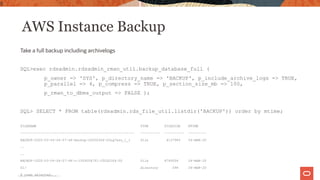
AWS Instance Backup
Take a full backup including archivelogs
SQL>exec rdsadmin.rdsadmin_rman_util.backup_database_full (
p_owner => 'SYS', p_directory_name => 'BACKUP', p_include_archive_logs => TRUE,
p_parallel => 4, p_compress => TRUE, p_section_size_mb => 100,
p_rman_to_dbms_output => FALSE );
SQL> SELECT * FROM table(rdsadmin.rds_file_util.listdir('BACKUP')) order by mtime;
FILENAME TYPE FILESIZE MTIME
--------------------------------------------------------- ---------- ---------- ---------
BACKUP-2020-03-04-04-07-46-backup-20200304-03uq7aso_1_1 file 4137984 04-MAR-20
..
..
BACKUP-2020-03-04-04-07-46-c-1559204751-20200304-00 file 8749056 04-MAR-20
01/ directory 096 04-MAR-20
8 rows selected.
9
Copyright © 2020, Oracle and/or its affiliates |
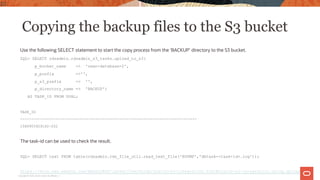
Copying the backup files to the S3 bucket
Use the following SELECT statement to start the copy process from the ‘BACKUP’ directory to the S3 bucket.
SQL> SELECT rdsadmin.rdsadmin_s3_tasks.upload_to_s3(
p_bucket_name => 'rman-database-2',
p_prefix =>'',
p_s3_prefix => '',
p_directory_name => 'BACKUP')
AS TASK_ID FROM DUAL;
TASK_ID
--------------------------------------------------------------------------------
1586903929162-202
The task-id can be used to check the result.
SQL> SELECT text FROM table(rdsadmin.rds_file_util.read_text_file('BDUMP','dbtask-<task-id>.log'));
https://docs.aws.amazon.com/AmazonRDS/latest/UserGuide/oracle-s3-integration.html#oracle-s3-integration.using.upload
10
Copyright © 2020, Oracle and/or its affiliates |
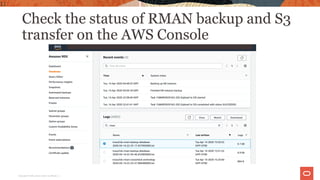
Check the status of RMAN backup and S3
transfer on the AWS Console
11
Copyright © 2020, Oracle and/or its affiliates |
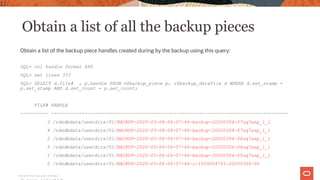
Obtain a list of all the backup pieces
Obtain a list of the backup piece handles created during by the backup using this query:
SQL> col handle format A90
SQL> set lines 333
SQL> SELECT d.file# , p.handle FROM v$backup_piece p, v$backup_datafile d WHERE d.set_stamp =
p.set_stamp AND d.set_count = p.set_count;
FILE# HANDLE
---------- -------------------------------------------------------------------------------------
3 /rdsdbdata/userdirs/01/BACKUP-2020-03-04-04-07-46-backup-20200304-07uq7asp_1_1
4 /rdsdbdata/userdirs/01/BACKUP-2020-03-04-04-07-46-backup-20200304-07uq7asp_1_1
2 /rdsdbdata/userdirs/01/BACKUP-2020-03-04-04-07-46-backup-20200304-06uq7asp_1_1
5 /rdsdbdata/userdirs/01/BACKUP-2020-03-04-04-07-46-backup-20200304-06uq7asp_1_1
1 /rdsdbdata/userdirs/01/BACKUP-2020-03-04-04-07-46-backup-20200304-05uq7asp_1_1
0 /rdsdbdata/userdirs/01/BACKUP-2020-03-04-04-07-46-c-1559204751-20200304-00
12
Copyright © 2020, Oracle and/or its affiliates |
Transfer the files to OCI Object Storage
and prepare for restore
Follow the instructions in this MAA blog to transfer the backup pieces from the AWS S3 bucket to an OCI one and
prepare for restore by installing the DB Cloud Backup Module on the OCI DBCS instance
https://blogs.oracle.com/maa/migrating-rman-backups-from-aws-s3-to-oci
• Copy the backup pieces from the S3 bucket to the OCI bucket using rclone as explained in the MAA blog above.
• Disable DBCS automatic backups (you can re-enable them at the end)
• Install the DB Cloud Backup Module for OCI
• For the next example we assume using /home/oracle/ocilib as the sbt library location and
/home/oracle/database-2.cfg as OPC_PFILE configuration file
NOTE: The blog post outlines the steps to copy backups created by RMAN directly into the S3 bucket, which is still
applicable. There will be an additional step (covered on the next slide) in this workflow before RMAN can leverage
these backups directly from the OCI object storage.
13
Copyright © 2020, Oracle and/or its affiliates |
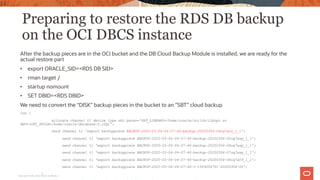
Preparing to restore the RDS DB backup
on the OCI DBCS instance
After the backup pieces are in the OCI bucket and the DB Cloud Backup Module is installed, we are ready for the
actual restore part
• export ORACLE_SID=<RDS DB SID>
• rman target /
• startup nomount
• SET DBID=<RDS DBID>
We need to convert the “DISK” backup pieces in the bucket to an ”SBT” cloud backup
run {
allocate channel t1 device type sbt parms='SBT_LIBRARY=/home/oracle/ocilib/libopc.so
ENV=(OPC_PFILE=/home/oracle/database-2.cfg)';
send channel t1 'export backuppiece BACKUP-2020-03-04-04-07-46-backup-20200304-04uq7aso_1_1';
send channel t1 'export backuppiece BACKUP-2020-03-04-04-07-46-backup-20200304-05uq7asp_1_1';
send channel t1 'export backuppiece BACKUP-2020-03-04-04-07-46-backup-20200304-06uq7asp_1_1';
send channel t1 'export backuppiece BACKUP-2020-03-04-04-07-46-backup-20200304-07uq7asp_1_1';
send channel t1 'export backuppiece BACKUP-2020-03-04-04-07-46-backup-20200304-08uq7at9_1_1';
send channel t1 'export backuppiece BACKUP-2020-03-04-04-07-46-c-1559204751-20200304-00';
}
14
Copyright © 2020, Oracle and/or its affiliates |
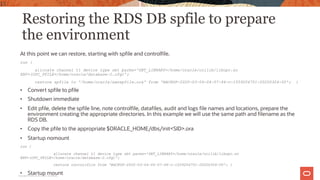
Restoring the RDS DB spfile to prepare
the environment
At this point we can restore, starting with spfile and controlfile.
run {
allocate channel t1 device type sbt parms='SBT_LIBRARY=/home/oracle/ocilib/libopc.so
ENV=(OPC_PFILE=/home/oracle/database-2.cfg)';
restore spfile to '/home/oracle/awsspfile.ora' from 'BACKUP-2020-03-04-04-07-46-c-1559204751-20200304-00'; }
• Convert spfile to pfile
• Shutdown immediate
• Edit pfile, delete the spfile line, note controlfile, datafiles, audit and logs file names and locations, prepare the
environment creating the appropriate directories. In this example we will use the same path and filename as the
RDS DB.
• Copy the pfile to the appropriate $ORACLE_HOME/dbs/init<SID>.ora
• Startup nomount
run {
allocate channel t1 device type sbt parms='SBT_LIBRARY=/home/oracle/ocilib/libopc.so
ENV=(OPC_PFILE=/home/oracle/database-2.cfg)';
restore controlfile from 'BACKUP-2020-03-04-04-07-46-c-1559204751-20200304-00'; }
• Startup mount
15
Copyright © 2020, Oracle and/or its affiliates
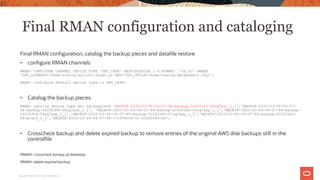
Final RMAN configuration and cataloging
Final RMAN configuration, catalog the backup pieces and datafile restore
• configure RMAN channels
RMAN> CONFIGURE CHANNEL DEVICE TYPE 'SBT_TAPE' MAXPIECESIZE 2 G FORMAT '%d_%U' PARMS
'SBT_LIBRARY=/home/oracle/ocilib/libopc.so ENV=(OPC_PFILE=/home/oracle/database-2.cfg)';
RMAN> configure default device type to SBT_TAPE;
• Catalog the backup pieces
RMAN> catalog device type sbt backuppiece 'BACKUP-2020-03-04-04-07-46-backup-20200304-03uq7aso_1_1','BACKUP-2020-03-04-04-07-
46-backup-20200304-04uq7aso_1_1', 'BACKUP-2020-03-04-04-07-46-backup-20200304-05uq7asp_1_1','BACKUP-2020-03-04-04-07-46-backup-
20200304-06uq7asp_1_1','BACKUP-2020-03-04-04-07-46-backup-20200304-07uq7asp_1_1','BACKUP-2020-03-04-04-07-46-backup-20200304-
08uq7at9_1_1','BACKUP-2020-03-04-04-07-46-c-1559204751-20200304-00';
• Crosscheck backup and delete expired backup to remove entries of the original AWS disk backups still in the
controlfile
RMAN> crosscheck backup of database;
RMAN> delete expired backup;
16
Copyright © 2020, Oracle and/or its affiliates |
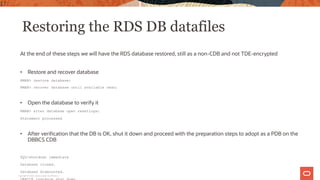
Restoring the RDS DB datafiles
At the end of these steps we will have the RDS database restored, still as a non-CDB and not TDE-encrypted
• Restore and recover database
RMAN> restore database;
RMAN> recover database until available redo;
• Open the database to verify it
RMAN> alter database open resetlogs;
Statement processed
• After verification that the DB is OK, shut it down and proceed with the preparation steps to adopt as a PDB on the
DBBCS CDB
SQL>shutdown immediate
Database closed.
Database dismounted.
17
Copyright © 2020, Oracle and/or its affiliates |
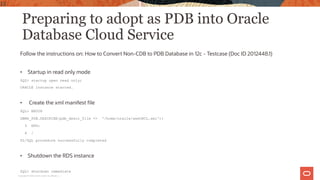
Preparing to adopt as PDB into Oracle
Database Cloud Service
Follow the instructions on: How to Convert Non-CDB to PDB Database in 12c - Testcase (Doc ID 2012448.1)
• Startup in read only mode
SQL> startup open read only;
ORACLE instance started.
• Create the xml manifest file
SQL> BEGIN
DBMS_PDB.DESCRIBE(pdb_descr_file => '/home/oracle/awsORCL.xml');
3 END;
4 /
PL/SQL procedure successfully completed
• Shutdown the RDS instance
SQL> shutdown immediate
18
Copyright © 2020, Oracle and/or its affiliates |
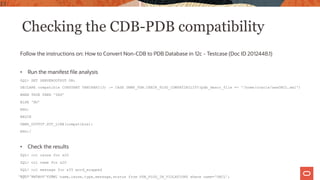
Checking the CDB-PDB compatibility
Follow the instructions on: How to Convert Non-CDB to PDB Database in 12c - Testcase (Doc ID 2012448.1)
• Run the manifest file analysis
SQL> SET SERVEROUTPUT ON;
DECLARE compatible CONSTANT VARCHAR2(3) := CASE DBMS_PDB.CHECK_PLUG_COMPATIBILITY(pdb_descr_file => '/home/oracle/awsORCL.xml')
WHEN TRUE THEN 'YES’
ELSE 'NO’
END;
BEGIN
DBMS_OUTPUT.PUT_LINE(compatible);
END;/
• Check the results
SQL> col cause for a20
SQL> col name for a20
SQL> col message for a35 word_wrapped
SQL> select time, name,cause,type,message,status from PDB_PLUG_IN_VIOLATIONS where name='ORCL';
19
Copyright © 2020, Oracle and/or its affiliates |
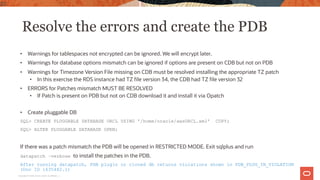
Resolve the errors and create the PDB
• Warnings for tablespaces not encrypted can be ignored. We will encrypt later.
• Warnings for database options mismatch can be ignored if options are present on CDB but not on PDB
• Warnings for Timezone Version File missing on CDB must be resolved installing the appropriate TZ patch
• In this exercise the RDS instance had TZ file version 34, the CDB had TZ file version 32
• ERRORS for Patches mismatch MUST BE RESOLVED
• If Patch is present on PDB but not on CDB download it and install it via Opatch
• Create pluggable DB
SQL> CREATE PLUGGABLE DATABASE ORCL USING '/home/oracle/awsORCL.xml' COPY;
SQL> ALTER PLUGGABLE DATABASE OPEN;
If there was a patch mismatch the PDB will be opened in RESTRICTED MODE. Exit sqlplus and run
datapatch –verbose to install the patches in the PDB.
After running datapatch, PDB plugin or cloned db returns violations shown in PDB_PLUG_IN_VIOLATION
(Doc ID 1635482.1)
20
Copyright © 2020, Oracle and/or its affiliates |
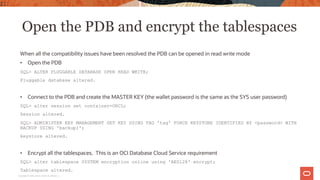
Open the PDB and encrypt the tablespaces
When all the compatibility issues have been resolved the PDB can be opened in read write mode
• Open the PDB
SQL> ALTER PLUGGABLE DATABASE OPEN READ WRITE;
Pluggable database altered.
• Connect to the PDB and create the MASTER KEY (the wallet password is the same as the SYS user password)
SQL> alter session set container=ORCL;
Session altered.
SQL> ADMINISTER KEY MANAGEMENT SET KEY USING TAG 'tag' FORCE KEYSTORE IDENTIFIED BY <password> WITH
BACKUP USING 'backup1';
keystore altered.
• Encrypt all the tablespaces. This is an OCI Database Cloud Service requirement
SQL> alter tablespace SYSTEM encryption online using 'AES128' encrypt;
Tablespace altered.
21
Copyright © 2020, Oracle and/or its affiliates |
Summary
• We physically migrated an AWS RDS Oracle Database to Oracle Database Cloud Service via
RMAN
• AWS Data Migration Service is an alternative approach that uses logical migration, requires
a complicated setup, and it has associated costs
• We used an LVM target, but ASM can also be used via filename conversion when creating
the PDB
• Recording will be posted on AskTom website
• Blog post will be published on http://blogs.oracle.com/maa/backuprecovery
22
Copyright © 2020, Oracle and/or its affiliates |
Next time on Database Cloud Services
Office Hours:
Look for an exciting upcoming topic in May 2020
What topic would you like to hear from us?
Previous recordings can be found at:
https://asktom.oracle.com
23
Questions
24
25
to Database Cloud Service Office Hours today!
Thank you for
attending….

Database Cloud Services Office Hours - 0421 - Migrate AWS to OCI

  • 1.
    Welcome to Database CloudServices Office Hours We will begin shortly! Thank you for joining us!
  • 2.
    Database Cloud Services OfficeHours How to migrate AWS RDS Oracle DBs to OCI using OCI Backup Service Sriram Vr Principal Product Manager Enterprise Manager 2 April 22, 2020 Tammy Bednar Sr. Director of Product Management Database Cloud Services Marco Calmasini Sr. Principal Product Manager Database Backup
  • 3.
    The following isintended to outline our general product direction. It is intended for information purposes only, and may not be incorporated into any contract. It is not a commitment to deliver any material, code, or functionality, and should not be relied upon in making purchasing decisions. The development, release, timing, and pricing of any features or functionality described for Oracle’s products may change and remains at the sole discretion of Oracle Corporation. Safe harbor statement Copyright © 2020, Oracle and/or its affiliates3
  • 4.
    Why moving fromRDS to OCI 1 Best Cloud Infrastructure for Oracle Databases 2 All the Oracle Database Options are available 3 Runs on VM, Bare Metal or Exadata Cloud Service 4 Real Application Cluster 5 Easier Hybrid Deployments 4 Copyright © 2020, Oracle and/or its affiliates |
  • 5.
    The migration process 5Copyright © 2020, Oracle and/or its affiliates | AWS RDS Any host with access to both Object Storage Accounts OCI DBCS/ExaCS R M A N RDS tooling rclone RMAN
  • 6.
    Environments used inthis exercise AWS RDS Configuration Engine version 19.0.0.0.ru-2020-01.rur-2020-01.r1 Multi-Tenant NON-CDB Character set AL32UTF8 Option groups s3-integration-db2 Parameter group default.oracle-ee-19 (in-sync) Instance class Instance classdb.t3.small vCPU2 RAM2 GB Storage Encryption Enabled (NO TDE) Oracle Database Cloud Service Configuration Shape: VM.Standard2.1 Oracle Database Software Edition: Enterprise Edition High Performance Storage Management Software: Logical Volume Manager Database Version: 19.6.0.0.200114 Patch History: Jan 2020 19c Database patch TDE Encryption: ON (Mandatory) Multi-Tenant: YES (Mandatory) Make sure the RDS DBNAME is not currently used by the CDB or any PDB 6 Copyright © 2020, Oracle and/or its affiliates |
  • 7.
    AWS Instance Preparation– RMAN Local Disk Destination AWS RDS does not provide access to the Operating System or to RMAN Only SQL*NET connections are allowed (with no SYSDBA privilege), all the administrative operations are performed via PL/SQL scripts through the rdsadmin_util package provided by AWS. • Create a backup destination on AWS RDS local block storage • SQL> exec rdsadmin.rdsadmin_util.create_directory( p_directory_name => 'BACKUP'); • If archivelog retention is not enabled, enable it • SQL> exec rdsadmin.rdsadmin_util.set_configuration( name => 'archivelog retention hours', value => '48'); https://docs.aws.amazon.com/AmazonRDS/latest/UserGuide/Appendix.Oracle.CommonDBATasks.Misc.html#Appe ndix.Oracle.CommonDBATasks.NewDirectories 7 Copyright © 2020, Oracle and/or its affiliates |
  • 8.
    AWS Instance Preparation– AWS RDS Integration Create the S3 bucket where the backup files will be copied and configure the RDS S3 integration so the RDS instance can write to it • Create the bucket using the RDS CLI or the S3 Console • Create an IAM Policy to allow RDS to access the S3 bucket with the appropriate action • Create an IAM role • Associate the IAM role with the RDS instance • Associate the RDS instance with an option group including the S3_INTEGRATION option https://docs.aws.amazon.com/AmazonRDS/latest/UserGuide/oracle-s3-integration.html 8 Copyright © 2020, Oracle and/or its affiliates |
  • 9.
    AWS Instance Backup Takea full backup including archivelogs SQL>exec rdsadmin.rdsadmin_rman_util.backup_database_full ( p_owner => 'SYS', p_directory_name => 'BACKUP', p_include_archive_logs => TRUE, p_parallel => 4, p_compress => TRUE, p_section_size_mb => 100, p_rman_to_dbms_output => FALSE ); SQL> SELECT * FROM table(rdsadmin.rds_file_util.listdir('BACKUP')) order by mtime; FILENAME TYPE FILESIZE MTIME --------------------------------------------------------- ---------- ---------- --------- BACKUP-2020-03-04-04-07-46-backup-20200304-03uq7aso_1_1 file 4137984 04-MAR-20 .. .. BACKUP-2020-03-04-04-07-46-c-1559204751-20200304-00 file 8749056 04-MAR-20 01/ directory 096 04-MAR-20 8 rows selected. 9 Copyright © 2020, Oracle and/or its affiliates |
  • 10.
    Copying the backupfiles to the S3 bucket Use the following SELECT statement to start the copy process from the ‘BACKUP’ directory to the S3 bucket. SQL> SELECT rdsadmin.rdsadmin_s3_tasks.upload_to_s3( p_bucket_name => 'rman-database-2', p_prefix =>'', p_s3_prefix => '', p_directory_name => 'BACKUP') AS TASK_ID FROM DUAL; TASK_ID -------------------------------------------------------------------------------- 1586903929162-202 The task-id can be used to check the result. SQL> SELECT text FROM table(rdsadmin.rds_file_util.read_text_file('BDUMP','dbtask-<task-id>.log')); https://docs.aws.amazon.com/AmazonRDS/latest/UserGuide/oracle-s3-integration.html#oracle-s3-integration.using.upload 10 Copyright © 2020, Oracle and/or its affiliates |
  • 11.
    Check the statusof RMAN backup and S3 transfer on the AWS Console 11 Copyright © 2020, Oracle and/or its affiliates |
  • 12.
    Obtain a listof all the backup pieces Obtain a list of the backup piece handles created during by the backup using this query: SQL> col handle format A90 SQL> set lines 333 SQL> SELECT d.file# , p.handle FROM v$backup_piece p, v$backup_datafile d WHERE d.set_stamp = p.set_stamp AND d.set_count = p.set_count; FILE# HANDLE ---------- ------------------------------------------------------------------------------------- 3 /rdsdbdata/userdirs/01/BACKUP-2020-03-04-04-07-46-backup-20200304-07uq7asp_1_1 4 /rdsdbdata/userdirs/01/BACKUP-2020-03-04-04-07-46-backup-20200304-07uq7asp_1_1 2 /rdsdbdata/userdirs/01/BACKUP-2020-03-04-04-07-46-backup-20200304-06uq7asp_1_1 5 /rdsdbdata/userdirs/01/BACKUP-2020-03-04-04-07-46-backup-20200304-06uq7asp_1_1 1 /rdsdbdata/userdirs/01/BACKUP-2020-03-04-04-07-46-backup-20200304-05uq7asp_1_1 0 /rdsdbdata/userdirs/01/BACKUP-2020-03-04-04-07-46-c-1559204751-20200304-00 12 Copyright © 2020, Oracle and/or its affiliates |
  • 13.
    Transfer the filesto OCI Object Storage and prepare for restore Follow the instructions in this MAA blog to transfer the backup pieces from the AWS S3 bucket to an OCI one and prepare for restore by installing the DB Cloud Backup Module on the OCI DBCS instance https://blogs.oracle.com/maa/migrating-rman-backups-from-aws-s3-to-oci • Copy the backup pieces from the S3 bucket to the OCI bucket using rclone as explained in the MAA blog above. • Disable DBCS automatic backups (you can re-enable them at the end) • Install the DB Cloud Backup Module for OCI • For the next example we assume using /home/oracle/ocilib as the sbt library location and /home/oracle/database-2.cfg as OPC_PFILE configuration file NOTE: The blog post outlines the steps to copy backups created by RMAN directly into the S3 bucket, which is still applicable. There will be an additional step (covered on the next slide) in this workflow before RMAN can leverage these backups directly from the OCI object storage. 13 Copyright © 2020, Oracle and/or its affiliates |
  • 14.
    Preparing to restorethe RDS DB backup on the OCI DBCS instance After the backup pieces are in the OCI bucket and the DB Cloud Backup Module is installed, we are ready for the actual restore part • export ORACLE_SID=<RDS DB SID> • rman target / • startup nomount • SET DBID=<RDS DBID> We need to convert the “DISK” backup pieces in the bucket to an ”SBT” cloud backup run { allocate channel t1 device type sbt parms='SBT_LIBRARY=/home/oracle/ocilib/libopc.so ENV=(OPC_PFILE=/home/oracle/database-2.cfg)'; send channel t1 'export backuppiece BACKUP-2020-03-04-04-07-46-backup-20200304-04uq7aso_1_1'; send channel t1 'export backuppiece BACKUP-2020-03-04-04-07-46-backup-20200304-05uq7asp_1_1'; send channel t1 'export backuppiece BACKUP-2020-03-04-04-07-46-backup-20200304-06uq7asp_1_1'; send channel t1 'export backuppiece BACKUP-2020-03-04-04-07-46-backup-20200304-07uq7asp_1_1'; send channel t1 'export backuppiece BACKUP-2020-03-04-04-07-46-backup-20200304-08uq7at9_1_1'; send channel t1 'export backuppiece BACKUP-2020-03-04-04-07-46-c-1559204751-20200304-00'; } 14 Copyright © 2020, Oracle and/or its affiliates |
  • 15.
    Restoring the RDSDB spfile to prepare the environment At this point we can restore, starting with spfile and controlfile. run { allocate channel t1 device type sbt parms='SBT_LIBRARY=/home/oracle/ocilib/libopc.so ENV=(OPC_PFILE=/home/oracle/database-2.cfg)'; restore spfile to '/home/oracle/awsspfile.ora' from 'BACKUP-2020-03-04-04-07-46-c-1559204751-20200304-00'; } • Convert spfile to pfile • Shutdown immediate • Edit pfile, delete the spfile line, note controlfile, datafiles, audit and logs file names and locations, prepare the environment creating the appropriate directories. In this example we will use the same path and filename as the RDS DB. • Copy the pfile to the appropriate $ORACLE_HOME/dbs/init<SID>.ora • Startup nomount run { allocate channel t1 device type sbt parms='SBT_LIBRARY=/home/oracle/ocilib/libopc.so ENV=(OPC_PFILE=/home/oracle/database-2.cfg)'; restore controlfile from 'BACKUP-2020-03-04-04-07-46-c-1559204751-20200304-00'; } • Startup mount 15 Copyright © 2020, Oracle and/or its affiliates
  • 16.
    Final RMAN configurationand cataloging Final RMAN configuration, catalog the backup pieces and datafile restore • configure RMAN channels RMAN> CONFIGURE CHANNEL DEVICE TYPE 'SBT_TAPE' MAXPIECESIZE 2 G FORMAT '%d_%U' PARMS 'SBT_LIBRARY=/home/oracle/ocilib/libopc.so ENV=(OPC_PFILE=/home/oracle/database-2.cfg)'; RMAN> configure default device type to SBT_TAPE; • Catalog the backup pieces RMAN> catalog device type sbt backuppiece 'BACKUP-2020-03-04-04-07-46-backup-20200304-03uq7aso_1_1','BACKUP-2020-03-04-04-07- 46-backup-20200304-04uq7aso_1_1', 'BACKUP-2020-03-04-04-07-46-backup-20200304-05uq7asp_1_1','BACKUP-2020-03-04-04-07-46-backup- 20200304-06uq7asp_1_1','BACKUP-2020-03-04-04-07-46-backup-20200304-07uq7asp_1_1','BACKUP-2020-03-04-04-07-46-backup-20200304- 08uq7at9_1_1','BACKUP-2020-03-04-04-07-46-c-1559204751-20200304-00'; • Crosscheck backup and delete expired backup to remove entries of the original AWS disk backups still in the controlfile RMAN> crosscheck backup of database; RMAN> delete expired backup; 16 Copyright © 2020, Oracle and/or its affiliates |
  • 17.
    Restoring the RDSDB datafiles At the end of these steps we will have the RDS database restored, still as a non-CDB and not TDE-encrypted • Restore and recover database RMAN> restore database; RMAN> recover database until available redo; • Open the database to verify it RMAN> alter database open resetlogs; Statement processed • After verification that the DB is OK, shut it down and proceed with the preparation steps to adopt as a PDB on the DBBCS CDB SQL>shutdown immediate Database closed. Database dismounted. 17 Copyright © 2020, Oracle and/or its affiliates |
  • 18.
    Preparing to adoptas PDB into Oracle Database Cloud Service Follow the instructions on: How to Convert Non-CDB to PDB Database in 12c - Testcase (Doc ID 2012448.1) • Startup in read only mode SQL> startup open read only; ORACLE instance started. • Create the xml manifest file SQL> BEGIN DBMS_PDB.DESCRIBE(pdb_descr_file => '/home/oracle/awsORCL.xml'); 3 END; 4 / PL/SQL procedure successfully completed • Shutdown the RDS instance SQL> shutdown immediate 18 Copyright © 2020, Oracle and/or its affiliates |
  • 19.
    Checking the CDB-PDBcompatibility Follow the instructions on: How to Convert Non-CDB to PDB Database in 12c - Testcase (Doc ID 2012448.1) • Run the manifest file analysis SQL> SET SERVEROUTPUT ON; DECLARE compatible CONSTANT VARCHAR2(3) := CASE DBMS_PDB.CHECK_PLUG_COMPATIBILITY(pdb_descr_file => '/home/oracle/awsORCL.xml') WHEN TRUE THEN 'YES’ ELSE 'NO’ END; BEGIN DBMS_OUTPUT.PUT_LINE(compatible); END;/ • Check the results SQL> col cause for a20 SQL> col name for a20 SQL> col message for a35 word_wrapped SQL> select time, name,cause,type,message,status from PDB_PLUG_IN_VIOLATIONS where name='ORCL'; 19 Copyright © 2020, Oracle and/or its affiliates |
  • 20.
    Resolve the errorsand create the PDB • Warnings for tablespaces not encrypted can be ignored. We will encrypt later. • Warnings for database options mismatch can be ignored if options are present on CDB but not on PDB • Warnings for Timezone Version File missing on CDB must be resolved installing the appropriate TZ patch • In this exercise the RDS instance had TZ file version 34, the CDB had TZ file version 32 • ERRORS for Patches mismatch MUST BE RESOLVED • If Patch is present on PDB but not on CDB download it and install it via Opatch • Create pluggable DB SQL> CREATE PLUGGABLE DATABASE ORCL USING '/home/oracle/awsORCL.xml' COPY; SQL> ALTER PLUGGABLE DATABASE OPEN; If there was a patch mismatch the PDB will be opened in RESTRICTED MODE. Exit sqlplus and run datapatch –verbose to install the patches in the PDB. After running datapatch, PDB plugin or cloned db returns violations shown in PDB_PLUG_IN_VIOLATION (Doc ID 1635482.1) 20 Copyright © 2020, Oracle and/or its affiliates |
  • 21.
    Open the PDBand encrypt the tablespaces When all the compatibility issues have been resolved the PDB can be opened in read write mode • Open the PDB SQL> ALTER PLUGGABLE DATABASE OPEN READ WRITE; Pluggable database altered. • Connect to the PDB and create the MASTER KEY (the wallet password is the same as the SYS user password) SQL> alter session set container=ORCL; Session altered. SQL> ADMINISTER KEY MANAGEMENT SET KEY USING TAG 'tag' FORCE KEYSTORE IDENTIFIED BY <password> WITH BACKUP USING 'backup1'; keystore altered. • Encrypt all the tablespaces. This is an OCI Database Cloud Service requirement SQL> alter tablespace SYSTEM encryption online using 'AES128' encrypt; Tablespace altered. 21 Copyright © 2020, Oracle and/or its affiliates |
  • 22.
    Summary • We physicallymigrated an AWS RDS Oracle Database to Oracle Database Cloud Service via RMAN • AWS Data Migration Service is an alternative approach that uses logical migration, requires a complicated setup, and it has associated costs • We used an LVM target, but ASM can also be used via filename conversion when creating the PDB • Recording will be posted on AskTom website • Blog post will be published on http://blogs.oracle.com/maa/backuprecovery 22 Copyright © 2020, Oracle and/or its affiliates |
  • 23.
    Next time onDatabase Cloud Services Office Hours: Look for an exciting upcoming topic in May 2020 What topic would you like to hear from us? Previous recordings can be found at: https://asktom.oracle.com 23
  • 24.
  • 25.
    25 to Database CloudService Office Hours today! Thank you for attending….