Practical Pig
Preventing Perilous Programming Pitfalls for Prestige & Profit


Jameson Lopp
Software Engineer
Bronto Software, Inc


March 20, 2012
Why Pig?
●   High level language
●   Small learning curve
●   Increases productivity
●   Insulates you from
    complexity of
    MapReduce
    ○ Job configuration tuning
    ○ Mapper / Reducer optimization
    ○ Data re-use
    ○ Job Chains
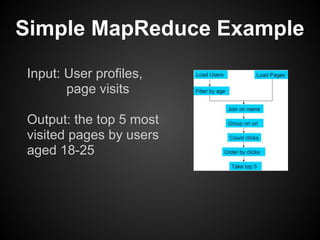
Simple MapReduce Example
Input: User profiles,
       page visits

Output: the top 5 most
visited pages by users
aged 18-25
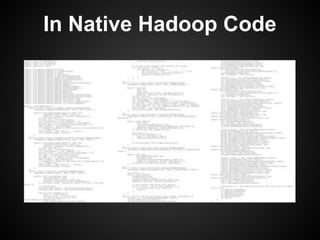
In Native Hadoop Code
In Pig
users = LOAD ‘users’ AS (name, age);
users = FILTER users BY age >= 18 AND age <= 25;
pages = LOAD ‘pages’ AS (user, url);
joined = JOIN users BY name, pages BY user;
grouped = group JOINED BY url;
summed = FOREACH grouped GENERATE group,
                                   COUNT(joined) AS clicks;
sorted = ORDER summed BY clicks DESC;
top5 = LIMIT sorted 5;
STORE top5 INTO ‘/data/top5sites’;
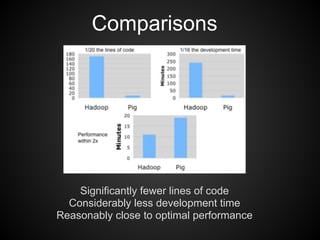
Comparisons


    Significantly fewer lines of code
  Considerably less development time
Reasonably close to optimal performance
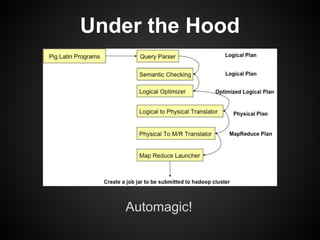
Under the Hood


   Automagic!
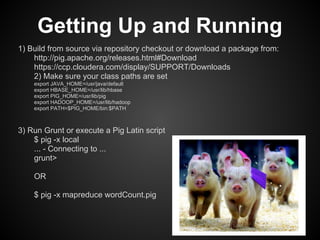
Getting Up and Running
1) Build from source via repository checkout or download a package from:
    http://pig.apache.org/releases.html#Download
    https://ccp.cloudera.com/display/SUPPORT/Downloads
    2) Make sure your class paths are set
    export JAVA_HOME=/usr/java/default
    export HBASE_HOME=/usr/lib/hbase
    export PIG_HOME=/usr/lib/pig
    export HADOOP_HOME=/usr/lib/hadoop
    export PATH=$PIG_HOME/bin:$PATH


3) Run Grunt or execute a Pig Latin script
    $ pig -x local
    ... - Connecting to ...
    grunt>

    OR

    $ pig -x mapreduce wordCount.pig
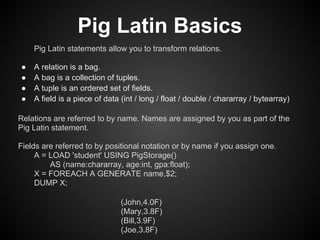
Pig Latin Basics
    Pig Latin statements allow you to transform relations.

●   A relation is a bag.
●   A bag is a collection of tuples.
●   A tuple is an ordered set of fields.
●   A field is a piece of data (int / long / float / double / chararray / bytearray)

Relations are referred to by name. Names are assigned by you as part of the
Pig Latin statement.

Fields are referred to by positional notation or by name if you assign one.
     A = LOAD 'student' USING PigStorage()
         AS (name:chararray, age:int, gpa:float);
     X = FOREACH A GENERATE name,$2;
     DUMP X;

                               (John,4.0F)
                               (Mary,3.8F)
                               (Bill,3.9F)
                               (Joe,3.8F)
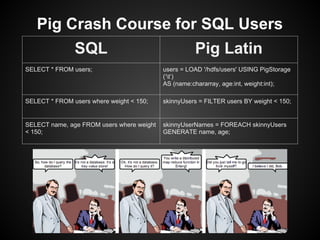
Pig Crash Course for SQL Users
               SQL                                   Pig Latin
SELECT * FROM users;                       users = LOAD '/hdfs/users' USING PigStorage
                                           (‘t’)
                                           AS (name:chararray, age:int, weight:int);

SELECT * FROM users where weight < 150;    skinnyUsers = FILTER users BY weight < 150;


SELECT name, age FROM users where weight   skinnyUserNames = FOREACH skinnyUsers
< 150;                                     GENERATE name, age;
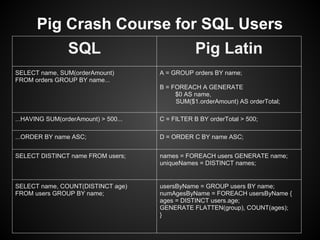
Pig Crash Course for SQL Users
                 SQL                             Pig Latin
SELECT name, SUM(orderAmount)         A = GROUP orders BY name;
FROM orders GROUP BY name...
                                      B = FOREACH A GENERATE
                                           $0 AS name,
                                           SUM($1.orderAmount) AS orderTotal;

...HAVING SUM(orderAmount) > 500...   C = FILTER B BY orderTotal > 500;

...ORDER BY name ASC;                 D = ORDER C BY name ASC;


SELECT DISTINCT name FROM users;      names = FOREACH users GENERATE name;
                                      uniqueNames = DISTINCT names;


SELECT name, COUNT(DISTINCT age)      usersByName = GROUP users BY name;
FROM users GROUP BY name;             numAgesByName = FOREACH usersByName {
                                      ages = DISTINCT users.age;
                                      GENERATE FLATTEN(group), COUNT(ages);
                                      }
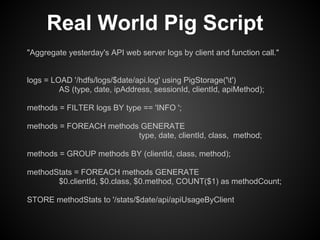
Real World Pig Script
"Aggregate yesterday's API web server logs by client and function call."


logs = LOAD '/hdfs/logs/$date/api.log' using PigStorage('t')
         AS (type, date, ipAddress, sessionId, clientId, apiMethod);

methods = FILTER logs BY type == 'INFO ';

methods = FOREACH methods GENERATE
                         type, date, clientId, class, method;

methods = GROUP methods BY (clientId, class, method);

methodStats = FOREACH methods GENERATE
       $0.clientId, $0.class, $0.method, COUNT($1) as methodCount;

STORE methodStats to '/stats/$date/api/apiUsageByClient
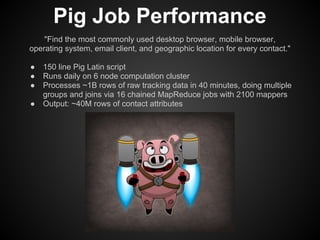
Pig Job Performance
    "Find the most commonly used desktop browser, mobile browser,
operating system, email client, and geographic location for every contact."

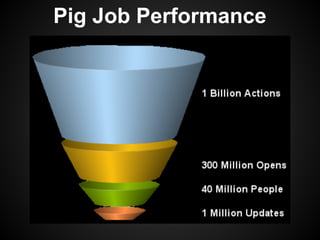
●   150 line Pig Latin script
●   Runs daily on 6 node computation cluster
●   Processes ~1B rows of raw tracking data in 40 minutes, doing multiple
    groups and joins via 16 chained MapReduce jobs with 2100 mappers
●   Output: ~40M rows of contact attributes
Pig Job Performance
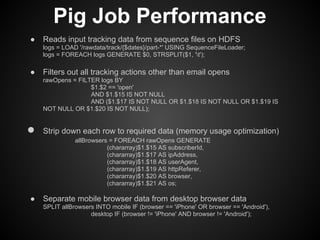
●   Reads input tracking data from sequence files on HDFS
    logs = LOAD '/rawdata/track/{$dates}/part-*' USING SequenceFileLoader;
    logs = FOREACH logs GENERATE $0, STRSPLIT($1, 't');

●   Filters out all tracking actions other than email opens
    rawOpens = FILTER logs BY
                   $1.$2 == 'open'
                   AND $1.$15 IS NOT NULL
                   AND ($1.$17 IS NOT NULL OR $1.$18 IS NOT NULL OR $1.$19 IS
    NOT NULL OR $1.$20 IS NOT NULL);


●   Strip down each row to required data (memory usage optimization)
               allBrowsers = FOREACH rawOpens GENERATE
                          (chararray)$1.$15 AS subscriberId,
                          (chararray)$1.$17 AS ipAddress,
                          (chararray)$1.$18 AS userAgent,
                          (chararray)$1.$19 AS httpReferer,
                          (chararray)$1.$20 AS browser,
                          (chararray)$1.$21 AS os;

●   Separate mobile browser data from desktop browser data
    SPLIT allBrowsers INTO mobile IF (browser == 'iPhone' OR browser == 'Android'),
                    desktop IF (browser != 'iPhone' AND browser != 'Android');
Pig Job Performance
                                        OMGWTFBBQ

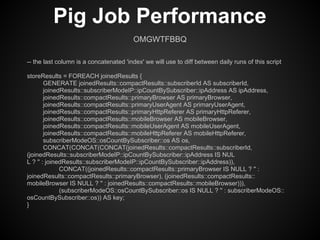
-- the last column is a concatenated 'index' we will use to diff between daily runs of this script

storeResults = FOREACH joinedResults {
        GENERATE joinedResults::compactResults::subscriberId AS subscriberId,
        joinedResults::subscriberModeIP::ipCountBySubscriber::ipAddress AS ipAddress,
        joinedResults::compactResults::primaryBrowser AS primaryBrowser,
        joinedResults::compactResults::primaryUserAgent AS primaryUserAgent,
        joinedResults::compactResults::primaryHttpReferer AS primaryHttpReferer,
        joinedResults::compactResults::mobileBrowser AS mobileBrowser,
        joinedResults::compactResults::mobileUserAgent AS mobileUserAgent,
        joinedResults::compactResults::mobileHttpReferer AS mobileHttpReferer,
        subscriberModeOS::osCountBySubscriber::os AS os,
        CONCAT(CONCAT(CONCAT(joinedResults::compactResults::subscriberId,
(joinedResults::subscriberModeIP::ipCountBySubscriber::ipAddress IS NUL
L ? '' : joinedResults::subscriberModeIP::ipCountBySubscriber::ipAddress)),
              CONCAT((joinedResults::compactResults::primaryBrowser IS NULL ? '' :
joinedResults::compactResults::primaryBrowser), (joinedResults::compactResults::
mobileBrowser IS NULL ? '' : joinedResults::compactResults::mobileBrowser))),
              (subscriberModeOS::osCountBySubscriber::os IS NULL ? '' : subscriberModeOS::
osCountBySubscriber::os)) AS key;
}
Pig Job Performance
User Defined Functions
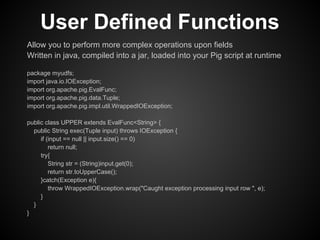
Allow you to perform more complex operations upon fields
Written in java, compiled into a jar, loaded into your Pig script at runtime

package myudfs;
import java.io.IOException;
import org.apache.pig.EvalFunc;
import org.apache.pig.data.Tuple;
import org.apache.pig.impl.util.WrappedIOException;

public class UPPER extends EvalFunc<String> {
  public String exec(Tuple input) throws IOException {
     if (input == null || input.size() == 0)
         return null;
     try{
         String str = (String)input.get(0);
         return str.toUpperCase();
     }catch(Exception e){
         throw WrappedIOException.wrap("Caught exception processing input row ", e);
     }
  }
}
User Defined Functions
Making use of your UDF in a Pig Script:

REGISTER myudfs.jar;
students = LOAD 'student_data' AS (name: chararray, age: int, gpa: float);
upperNames = FOREACH students GENERATE myudfs.UPPER(name);
DUMP upperNames;
UDF Pitfalls
UDFs are limited; can only operate on fields, not on groups of fields. A
given UDF can only return a single data type (integer / float / chararray /
etc).

To build a jar file that contains all available UDFs, follow these steps:
 ● Checkout UDF code: svn co http://svn.apache.org/repos/asf/pig/trunk/contrib/piggybank
 ● Add pig.jar to your ClassPath: export CLASSPATH=$CLASSPATH:/path/to/pig.jar
 ● Build the jar file: cd trunk/contrib/piggybank/java; run "ant"
    This will generate piggybank.jar in the same directory.

You must build piggybank in order to read UDF documentation - run "ant
javadoc" from directory trunk/contrib/piggybank/java. The documentation is
generated in directory trunk/contrib/piggybank/java/build/javadoc.

How to compile a custom UDF isn’t obvious. After writing your UDF, you
must place your java code in an appropriate directory inside a checkout of
the piggybank code and build the piggybank jar with ant.
Common Pig Pitfalls
Trying to match pig version with hadoop / hbase versions. There is very
little documentation on what is compatible with what.

A few snippets from the mailing list:

“Are you using Pig 8 distribution or Pig 8 from svn? You want the latter (soon-to-be-Pig 0.8.1)”

“Please upgrade your pig version to the latest in the 0.8 branch. The 0.8 release is not
compatible with 0.20+ versions of hbase; we bumped up the support in 0.8.1, which is nearing
release. Cloudera's latest CDH3 GA might have these patches (it was just released today) but
CDH3B4 didn't.”
Common Pig Pitfalls
Bugs in older versions of pig requiring you to register jars. Indicated by MapReduce job failure
due to java.lang.ClassNotFoundException:

I finally resolved the problem by manually registering jars:
        REGISTER /path/to/pig_0.8/lib/google-collections-1.0.jar;
        REGISTER /path/to/pig_0.8/lib/hbase-0.20.3-1.cloudera.jar;
        REGISTER /path/to/pig_0.8/lib/zookeeper-hbase-1329.jar

From the mailing list: “If you are using Hbase 0.91 and Pig 0.8.1, the hbaseStorage code in Pig
is supposed to auto-register the hbase, zookeeper, and google-collections jars, so you won't
have to do that.” No more registering jars, though they do need to be on your classpath.
Obscure Pig Pitfalls
HBaseLoader bug requiring disabling input splits. Pig versions prior to
0.8.1 will only load a single HBase region unless you disable input splits.
         Fix via: SET pig.splitCombination 'false';
Obscure Pig Pitfalls
visitors = LOAD 'hbase://tracking' USING HBaseStorage( 'open:browser
open:ip open:os open:createdDate') as (browser:chararray, ipAddress:
chararray, os:chararray, createdDate:chararray);

Resulted in:
     java.lang.RuntimeException: Failed to create DataStorage at org.
apache.pig.backend.hadoop.datastorage.HDataStorage.init(HDataStorage.
java:75)
     Caused by: Call to hadoopMaster failed on java.io.EOFException
Recommendations
Join the pig-user mailing list: user@pig.apache.org

Use (the latest) complete cloudera distribution to avoid
version compatibility issues.

Learn the quick & dirty rules for optimizing performance.
http://pig.apache.org/docs/r0.9.2/perf.html#performance-enhancers

Use the “set” command to tune your MapReduce jobs.
http://pig.apache.org/docs/r0.9.2/cmds.html#set

Test & re-test. Walk through your pig script int the Grunt shell and use
DUMP/ DESCRIBE / EXPLAIN / ILLUSTRATE on your variables /
operations. Once you’re happy with how the script looks on paper, run it on
your cluster and examine for places you can tweak the Map/Reduce job
config.
Recommendations
Variable input requires passing arguments from an
external wrapper script; we use groovy scripts to kick
start pig jobs.

def day = new Date()
def dateString = (2..31).collect{day.minus(it).format("yyyy-MM-dd")}.join(",")
def pig = "/usr/bin/pig -l /dev/null -param dates=${dateString}
/path/to/pig/job.pig".execute()


Remember to filter out null data or you'll have wonky
results when grouping by that field.

Tell pig to parallelize reducers; tune for your cluster.
    ○ SET default_parallel 30;
Recommendations
Increase acceptable mapper failure rate (tweak for your cluster size)
     SET mapred.reduce.max.attempts 10;
     SET mapred.max.tracker.failures 10;
     SET mapred.max.map.failures.percent 20;
That's All, Folks!
Credits
Example code & charts from "Practical Problem Solving with Hadoop and
Pig" by Milind Bhandarkar (milindb@yahoo-inc.com)
Sample log aggregation script by Jeff Turner (jeff@bronto.com)
"Nerdy Pig" cartoon by http://artistahinworks.deviantart.com/
"Pig with Goggles" photo via http://funnyanimalsite.com
"Cinderella" photo via
      http://www.telegraph.co.uk/news/newstopics/howaboutthat/2105763/Meet-Cinderella-Pig-in-Boots.html
"Racing Piglets" via http://marshalltx.us/2012/01/l-a-racing-pig-show-to-be-in-marshall-texas/
"Flying Pig" cartoon via http://veil1.deviantart.com/art/Flying-Pig-198309604
"Fault Tolerance" comic by John Muellerleile (@jrecursive)
"Pug Pig" photo via http://dogswearinghats.tumblr.com/post/8831901318/pug-or-pig
"Angry Birds Pig" via http://samspratt.com
"Oh Bother" cartoon via http://suckerfordragons.deviantart.com/art/Oh-bother-289816100
"Trojan Pig" cartoon http://www.forbes.com/sites/stevensalzberg/2011/12/29/the-skeptical-optimist/
"Drunk Man Rides Pig" via http://www.youtube.com/watch?v=XA-CSqTTvnM
"Redundancy" via http://www.fakeposters.com/posters/redundancy-you-can-never-be-too-sure/
"That's All, Folks" cartoon via
                    http://www.digitalbusstop.com/pop-culture-illustrations/thats-all-folks/

Practical pig

  • 1.
    Practical Pig Preventing PerilousProgramming Pitfalls for Prestige & Profit Jameson Lopp Software Engineer Bronto Software, Inc March 20, 2012
  • 2.
    Why Pig? ● High level language ● Small learning curve ● Increases productivity ● Insulates you from complexity of MapReduce ○ Job configuration tuning ○ Mapper / Reducer optimization ○ Data re-use ○ Job Chains
  • 3.
    Simple MapReduce Example Input:User profiles, page visits Output: the top 5 most visited pages by users aged 18-25
  • 4.
  • 5.
    In Pig users =LOAD ‘users’ AS (name, age); users = FILTER users BY age >= 18 AND age <= 25; pages = LOAD ‘pages’ AS (user, url); joined = JOIN users BY name, pages BY user; grouped = group JOINED BY url; summed = FOREACH grouped GENERATE group, COUNT(joined) AS clicks; sorted = ORDER summed BY clicks DESC; top5 = LIMIT sorted 5; STORE top5 INTO ‘/data/top5sites’;
  • 6.
    Comparisons Significantly fewer lines of code Considerably less development time Reasonably close to optimal performance
  • 7.
    Under the Hood Automagic!
  • 8.
    Getting Up andRunning 1) Build from source via repository checkout or download a package from: http://pig.apache.org/releases.html#Download https://ccp.cloudera.com/display/SUPPORT/Downloads 2) Make sure your class paths are set export JAVA_HOME=/usr/java/default export HBASE_HOME=/usr/lib/hbase export PIG_HOME=/usr/lib/pig export HADOOP_HOME=/usr/lib/hadoop export PATH=$PIG_HOME/bin:$PATH 3) Run Grunt or execute a Pig Latin script $ pig -x local ... - Connecting to ... grunt> OR $ pig -x mapreduce wordCount.pig
  • 9.
    Pig Latin Basics Pig Latin statements allow you to transform relations. ● A relation is a bag. ● A bag is a collection of tuples. ● A tuple is an ordered set of fields. ● A field is a piece of data (int / long / float / double / chararray / bytearray) Relations are referred to by name. Names are assigned by you as part of the Pig Latin statement. Fields are referred to by positional notation or by name if you assign one. A = LOAD 'student' USING PigStorage() AS (name:chararray, age:int, gpa:float); X = FOREACH A GENERATE name,$2; DUMP X; (John,4.0F) (Mary,3.8F) (Bill,3.9F) (Joe,3.8F)
  • 10.
    Pig Crash Coursefor SQL Users SQL Pig Latin SELECT * FROM users; users = LOAD '/hdfs/users' USING PigStorage (‘t’) AS (name:chararray, age:int, weight:int); SELECT * FROM users where weight < 150; skinnyUsers = FILTER users BY weight < 150; SELECT name, age FROM users where weight skinnyUserNames = FOREACH skinnyUsers < 150; GENERATE name, age;
  • 11.
    Pig Crash Coursefor SQL Users SQL Pig Latin SELECT name, SUM(orderAmount) A = GROUP orders BY name; FROM orders GROUP BY name... B = FOREACH A GENERATE $0 AS name, SUM($1.orderAmount) AS orderTotal; ...HAVING SUM(orderAmount) > 500... C = FILTER B BY orderTotal > 500; ...ORDER BY name ASC; D = ORDER C BY name ASC; SELECT DISTINCT name FROM users; names = FOREACH users GENERATE name; uniqueNames = DISTINCT names; SELECT name, COUNT(DISTINCT age) usersByName = GROUP users BY name; FROM users GROUP BY name; numAgesByName = FOREACH usersByName { ages = DISTINCT users.age; GENERATE FLATTEN(group), COUNT(ages); }
  • 12.
    Real World PigScript "Aggregate yesterday's API web server logs by client and function call." logs = LOAD '/hdfs/logs/$date/api.log' using PigStorage('t') AS (type, date, ipAddress, sessionId, clientId, apiMethod); methods = FILTER logs BY type == 'INFO '; methods = FOREACH methods GENERATE type, date, clientId, class, method; methods = GROUP methods BY (clientId, class, method); methodStats = FOREACH methods GENERATE $0.clientId, $0.class, $0.method, COUNT($1) as methodCount; STORE methodStats to '/stats/$date/api/apiUsageByClient
  • 13.
    Pig Job Performance "Find the most commonly used desktop browser, mobile browser, operating system, email client, and geographic location for every contact." ● 150 line Pig Latin script ● Runs daily on 6 node computation cluster ● Processes ~1B rows of raw tracking data in 40 minutes, doing multiple groups and joins via 16 chained MapReduce jobs with 2100 mappers ● Output: ~40M rows of contact attributes
  • 14.
    Pig Job Performance ● Reads input tracking data from sequence files on HDFS logs = LOAD '/rawdata/track/{$dates}/part-*' USING SequenceFileLoader; logs = FOREACH logs GENERATE $0, STRSPLIT($1, 't'); ● Filters out all tracking actions other than email opens rawOpens = FILTER logs BY $1.$2 == 'open' AND $1.$15 IS NOT NULL AND ($1.$17 IS NOT NULL OR $1.$18 IS NOT NULL OR $1.$19 IS NOT NULL OR $1.$20 IS NOT NULL); ● Strip down each row to required data (memory usage optimization) allBrowsers = FOREACH rawOpens GENERATE (chararray)$1.$15 AS subscriberId, (chararray)$1.$17 AS ipAddress, (chararray)$1.$18 AS userAgent, (chararray)$1.$19 AS httpReferer, (chararray)$1.$20 AS browser, (chararray)$1.$21 AS os; ● Separate mobile browser data from desktop browser data SPLIT allBrowsers INTO mobile IF (browser == 'iPhone' OR browser == 'Android'), desktop IF (browser != 'iPhone' AND browser != 'Android');
  • 15.
    Pig Job Performance OMGWTFBBQ -- the last column is a concatenated 'index' we will use to diff between daily runs of this script storeResults = FOREACH joinedResults { GENERATE joinedResults::compactResults::subscriberId AS subscriberId, joinedResults::subscriberModeIP::ipCountBySubscriber::ipAddress AS ipAddress, joinedResults::compactResults::primaryBrowser AS primaryBrowser, joinedResults::compactResults::primaryUserAgent AS primaryUserAgent, joinedResults::compactResults::primaryHttpReferer AS primaryHttpReferer, joinedResults::compactResults::mobileBrowser AS mobileBrowser, joinedResults::compactResults::mobileUserAgent AS mobileUserAgent, joinedResults::compactResults::mobileHttpReferer AS mobileHttpReferer, subscriberModeOS::osCountBySubscriber::os AS os, CONCAT(CONCAT(CONCAT(joinedResults::compactResults::subscriberId, (joinedResults::subscriberModeIP::ipCountBySubscriber::ipAddress IS NUL L ? '' : joinedResults::subscriberModeIP::ipCountBySubscriber::ipAddress)), CONCAT((joinedResults::compactResults::primaryBrowser IS NULL ? '' : joinedResults::compactResults::primaryBrowser), (joinedResults::compactResults:: mobileBrowser IS NULL ? '' : joinedResults::compactResults::mobileBrowser))), (subscriberModeOS::osCountBySubscriber::os IS NULL ? '' : subscriberModeOS:: osCountBySubscriber::os)) AS key; }
  • 16.
  • 17.
    User Defined Functions Allowyou to perform more complex operations upon fields Written in java, compiled into a jar, loaded into your Pig script at runtime package myudfs; import java.io.IOException; import org.apache.pig.EvalFunc; import org.apache.pig.data.Tuple; import org.apache.pig.impl.util.WrappedIOException; public class UPPER extends EvalFunc<String> { public String exec(Tuple input) throws IOException { if (input == null || input.size() == 0) return null; try{ String str = (String)input.get(0); return str.toUpperCase(); }catch(Exception e){ throw WrappedIOException.wrap("Caught exception processing input row ", e); } } }
  • 18.
    User Defined Functions Makinguse of your UDF in a Pig Script: REGISTER myudfs.jar; students = LOAD 'student_data' AS (name: chararray, age: int, gpa: float); upperNames = FOREACH students GENERATE myudfs.UPPER(name); DUMP upperNames;
  • 19.
    UDF Pitfalls UDFs arelimited; can only operate on fields, not on groups of fields. A given UDF can only return a single data type (integer / float / chararray / etc). To build a jar file that contains all available UDFs, follow these steps: ● Checkout UDF code: svn co http://svn.apache.org/repos/asf/pig/trunk/contrib/piggybank ● Add pig.jar to your ClassPath: export CLASSPATH=$CLASSPATH:/path/to/pig.jar ● Build the jar file: cd trunk/contrib/piggybank/java; run "ant" This will generate piggybank.jar in the same directory. You must build piggybank in order to read UDF documentation - run "ant javadoc" from directory trunk/contrib/piggybank/java. The documentation is generated in directory trunk/contrib/piggybank/java/build/javadoc. How to compile a custom UDF isn’t obvious. After writing your UDF, you must place your java code in an appropriate directory inside a checkout of the piggybank code and build the piggybank jar with ant.
  • 20.
    Common Pig Pitfalls Tryingto match pig version with hadoop / hbase versions. There is very little documentation on what is compatible with what. A few snippets from the mailing list: “Are you using Pig 8 distribution or Pig 8 from svn? You want the latter (soon-to-be-Pig 0.8.1)” “Please upgrade your pig version to the latest in the 0.8 branch. The 0.8 release is not compatible with 0.20+ versions of hbase; we bumped up the support in 0.8.1, which is nearing release. Cloudera's latest CDH3 GA might have these patches (it was just released today) but CDH3B4 didn't.”
  • 21.
    Common Pig Pitfalls Bugsin older versions of pig requiring you to register jars. Indicated by MapReduce job failure due to java.lang.ClassNotFoundException: I finally resolved the problem by manually registering jars: REGISTER /path/to/pig_0.8/lib/google-collections-1.0.jar; REGISTER /path/to/pig_0.8/lib/hbase-0.20.3-1.cloudera.jar; REGISTER /path/to/pig_0.8/lib/zookeeper-hbase-1329.jar From the mailing list: “If you are using Hbase 0.91 and Pig 0.8.1, the hbaseStorage code in Pig is supposed to auto-register the hbase, zookeeper, and google-collections jars, so you won't have to do that.” No more registering jars, though they do need to be on your classpath.
  • 22.
    Obscure Pig Pitfalls HBaseLoaderbug requiring disabling input splits. Pig versions prior to 0.8.1 will only load a single HBase region unless you disable input splits. Fix via: SET pig.splitCombination 'false';
  • 23.
    Obscure Pig Pitfalls visitors= LOAD 'hbase://tracking' USING HBaseStorage( 'open:browser open:ip open:os open:createdDate') as (browser:chararray, ipAddress: chararray, os:chararray, createdDate:chararray); Resulted in: java.lang.RuntimeException: Failed to create DataStorage at org. apache.pig.backend.hadoop.datastorage.HDataStorage.init(HDataStorage. java:75) Caused by: Call to hadoopMaster failed on java.io.EOFException
  • 24.
    Recommendations Join the pig-usermailing list: user@pig.apache.org Use (the latest) complete cloudera distribution to avoid version compatibility issues. Learn the quick & dirty rules for optimizing performance. http://pig.apache.org/docs/r0.9.2/perf.html#performance-enhancers Use the “set” command to tune your MapReduce jobs. http://pig.apache.org/docs/r0.9.2/cmds.html#set Test & re-test. Walk through your pig script int the Grunt shell and use DUMP/ DESCRIBE / EXPLAIN / ILLUSTRATE on your variables / operations. Once you’re happy with how the script looks on paper, run it on your cluster and examine for places you can tweak the Map/Reduce job config.
  • 25.
    Recommendations Variable input requirespassing arguments from an external wrapper script; we use groovy scripts to kick start pig jobs. def day = new Date() def dateString = (2..31).collect{day.minus(it).format("yyyy-MM-dd")}.join(",") def pig = "/usr/bin/pig -l /dev/null -param dates=${dateString} /path/to/pig/job.pig".execute() Remember to filter out null data or you'll have wonky results when grouping by that field. Tell pig to parallelize reducers; tune for your cluster. ○ SET default_parallel 30;
  • 26.
    Recommendations Increase acceptable mapperfailure rate (tweak for your cluster size) SET mapred.reduce.max.attempts 10; SET mapred.max.tracker.failures 10; SET mapred.max.map.failures.percent 20;
  • 27.
  • 28.
    Credits Example code &charts from "Practical Problem Solving with Hadoop and Pig" by Milind Bhandarkar (milindb@yahoo-inc.com) Sample log aggregation script by Jeff Turner (jeff@bronto.com) "Nerdy Pig" cartoon by http://artistahinworks.deviantart.com/ "Pig with Goggles" photo via http://funnyanimalsite.com "Cinderella" photo via http://www.telegraph.co.uk/news/newstopics/howaboutthat/2105763/Meet-Cinderella-Pig-in-Boots.html "Racing Piglets" via http://marshalltx.us/2012/01/l-a-racing-pig-show-to-be-in-marshall-texas/ "Flying Pig" cartoon via http://veil1.deviantart.com/art/Flying-Pig-198309604 "Fault Tolerance" comic by John Muellerleile (@jrecursive) "Pug Pig" photo via http://dogswearinghats.tumblr.com/post/8831901318/pug-or-pig "Angry Birds Pig" via http://samspratt.com "Oh Bother" cartoon via http://suckerfordragons.deviantart.com/art/Oh-bother-289816100 "Trojan Pig" cartoon http://www.forbes.com/sites/stevensalzberg/2011/12/29/the-skeptical-optimist/ "Drunk Man Rides Pig" via http://www.youtube.com/watch?v=XA-CSqTTvnM "Redundancy" via http://www.fakeposters.com/posters/redundancy-you-can-never-be-too-sure/ "That's All, Folks" cartoon via http://www.digitalbusstop.com/pop-culture-illustrations/thats-all-folks/