
PIG STATEMENTS IN HADOOP
What is Pig in hadoop ?
Pig is a platform for analyzing large dataset that
consist of high-level language for expressing data
analysis programs.
Originally Created by Yahoo! to answer an in-house data analysis
requirement.
 Pig is a Dataflow language
•Language is called Pig Latin.
•Relatively simple syntax
•Very easy for SQL developers to learn and understand the
language.
•Under the cover, Pig Latin Scripts are converted into Map-
Reduce job and executed on the cluster.
data = <1 , {<2,3>,<4,5>,<6,7>},["key":"value"]>
Method Example Result
Position $0 1
Name field2 bag{<2,3>,<4,5>,<6,7>}
Projection field2.$1 bag{<3>,<5>,<7>}
Function AVG(field2.$0) (2+4+6)/3=4
Conditional field1 == 1? 'yes' : 'no' yes
Lookup field3#'key' value
• Collection of statements
• Statements built using operators,
expressions and return relations.
• Data in Relations:
• Atom * Tuple * Bag * Map –
Field
DATA PROCESS COMBINE VIEW
LOAD FILTER JOIN ORDER
DUMP FOREACH GROUP LIMIT
STORE DISTINCT COGROUP UNION
SAMPLE CROSS SPLIT
Common Operations
Pig Latin
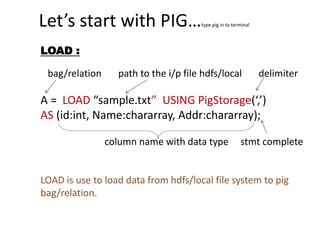
Let’s start with PIG…type pig in to terminal
LOAD :
bag/relation path to the i/p file hdfs/local delimiter
A = LOAD “sample.txt” USING PigStorage(‘,’)
AS (id:int, Name:chararray, Addr:chararray);
column name with data type stmt complete
LOAD is use to load data from hdfs/local file system to pig
bag/relation.
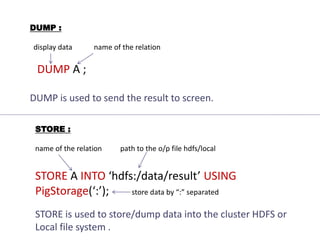
DUMP :
display data name of the relation
DUMP A ;
DUMP is used to send the result to screen.
STORE :
name of the relation path to the o/p file hdfs/local
STORE A INTO ‘hdfs:/data/result’ USING
PigStorage(‘:’); store data by “:” separated
STORE is used to store/dump data into the cluster HDFS or
Local file system .
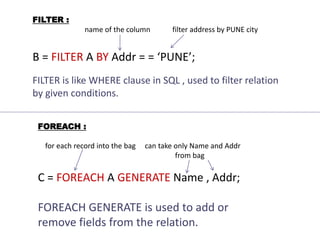
FILTER :
name of the column filter address by PUNE city
B = FILTER A BY Addr = = ‘PUNE’;
FILTER is like WHERE clause in SQL , used to filter relation
by given conditions.
FOREACH :
for each record into the bag can take only Name and Addr
from bag
C = FOREACH A GENERATE Name , Addr;
FOREACH GENERATE is used to add or
remove fields from the relation.
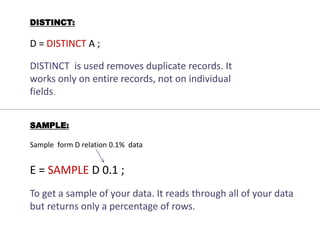
DISTINCT:
D = DISTINCT A ;
DISTINCT is used removes duplicate records. It
works only on entire records, not on individual
fields.
SAMPLE:
Sample form D relation 0.1% data
E = SAMPLE D 0.1 ;
To get a sample of your data. It reads through all of your data
but returns only a percentage of rows.
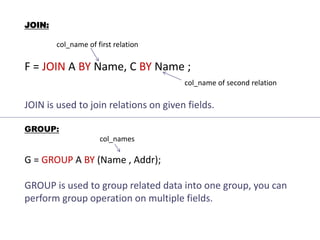
JOIN:
col_name of first relation
F = JOIN A BY Name, C BY Name ;
col_name of second relation
JOIN is used to join relations on given fields.
GROUP:
col_names
G = GROUP A BY (Name , Addr);
GROUP is used to group related data into one group, you can
perform group operation on multiple fields.
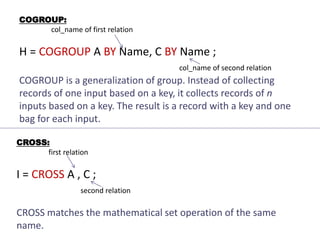
COGROUP:
col_name of first relation
H = COGROUP A BY Name, C BY Name ;
col_name of second relation
COGROUP is a generalization of group. Instead of collecting
records of one input based on a key, it collects records of n
inputs based on a key. The result is a record with a key and one
bag for each input.
CROSS:
first relation
I = CROSS A , C ;
second relation
CROSS matches the mathematical set operation of the same
name.
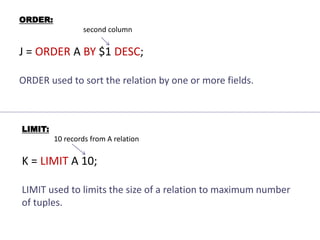
ORDER:
second column
J = ORDER A BY $1 DESC;
ORDER used to sort the relation by one or more fields.
LIMIT:
10 records from A relation
K = LIMIT A 10;
LIMIT used to limits the size of a relation to maximum number
of tuples.
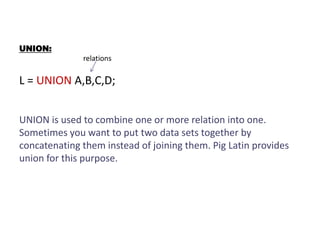
UNION:
relations
L = UNION A,B,C,D;
UNION is used to combine one or more relation into one.
Sometimes you want to put two data sets together by
concatenating them instead of joining them. Pig Latin provides
union for this purpose.
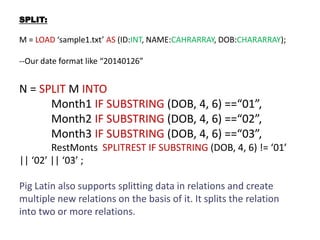
SPLIT:
M = LOAD ‘sample1.txt’ AS (ID:INT, NAME:CAHRARRAY, DOB:CHARARRAY);
--Our date format like “20140126”
N = SPLIT M INTO
Month1 IF SUBSTRING (DOB, 4, 6) ==“01”,
Month2 IF SUBSTRING (DOB, 4, 6) ==“02”,
Month3 IF SUBSTRING (DOB, 4, 6) ==“03”,
RestMonts SPLITREST IF SUBSTRING (DOB, 4, 6) != ‘01’
|| ‘02’ || ‘03’ ;
Pig Latin also supports splitting data in relations and create
multiple new relations on the basis of it. It splits the relation
into two or more relations.
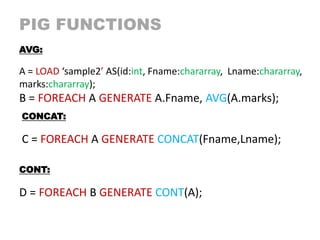
PIG FUNCTIONS
AVG:
A = LOAD ‘sample2’ AS(id:int, Fname:chararray, Lname:chararray,
marks:chararray);
B = FOREACH A GENERATE A.Fname, AVG(A.marks);
CONCAT:
C = FOREACH A GENERATE CONCAT(Fname,Lname);
CONT:
D = FOREACH B GENERATE CONT(A);
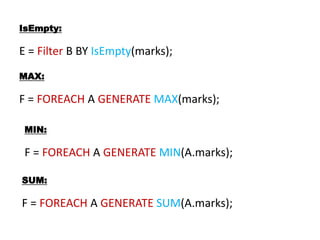
IsEmpty:
E = Filter B BY IsEmpty(marks);
MAX:
F = FOREACH A GENERATE MAX(marks);
MIN:
F = FOREACH A GENERATE MIN(A.marks);
SUM:
F = FOREACH A GENERATE SUM(A.marks);
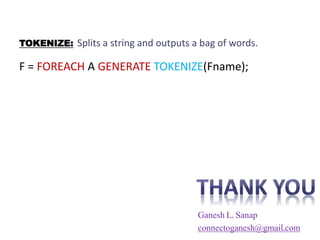
TOKENIZE: Splits a string and outputs a bag of words.
F = FOREACH A GENERATE TOKENIZE(Fname);
Ganesh L. Sanap
connectoganesh@gmail.com

Pig statements

  • 1.
  • 2.
    What is Pigin hadoop ? Pig is a platform for analyzing large dataset that consist of high-level language for expressing data analysis programs. Originally Created by Yahoo! to answer an in-house data analysis requirement.  Pig is a Dataflow language •Language is called Pig Latin. •Relatively simple syntax •Very easy for SQL developers to learn and understand the language. •Under the cover, Pig Latin Scripts are converted into Map- Reduce job and executed on the cluster.
  • 3.
    data = <1, {<2,3>,<4,5>,<6,7>},["key":"value"]> Method Example Result Position $0 1 Name field2 bag{<2,3>,<4,5>,<6,7>} Projection field2.$1 bag{<3>,<5>,<7>} Function AVG(field2.$0) (2+4+6)/3=4 Conditional field1 == 1? 'yes' : 'no' yes Lookup field3#'key' value • Collection of statements • Statements built using operators, expressions and return relations. • Data in Relations: • Atom * Tuple * Bag * Map – Field DATA PROCESS COMBINE VIEW LOAD FILTER JOIN ORDER DUMP FOREACH GROUP LIMIT STORE DISTINCT COGROUP UNION SAMPLE CROSS SPLIT Common Operations Pig Latin
  • 4.
    Let’s start withPIG…type pig in to terminal LOAD : bag/relation path to the i/p file hdfs/local delimiter A = LOAD “sample.txt” USING PigStorage(‘,’) AS (id:int, Name:chararray, Addr:chararray); column name with data type stmt complete LOAD is use to load data from hdfs/local file system to pig bag/relation.
  • 5.
    DUMP : display dataname of the relation DUMP A ; DUMP is used to send the result to screen. STORE : name of the relation path to the o/p file hdfs/local STORE A INTO ‘hdfs:/data/result’ USING PigStorage(‘:’); store data by “:” separated STORE is used to store/dump data into the cluster HDFS or Local file system .
  • 6.
    FILTER : name ofthe column filter address by PUNE city B = FILTER A BY Addr = = ‘PUNE’; FILTER is like WHERE clause in SQL , used to filter relation by given conditions. FOREACH : for each record into the bag can take only Name and Addr from bag C = FOREACH A GENERATE Name , Addr; FOREACH GENERATE is used to add or remove fields from the relation.
  • 7.
    DISTINCT: D = DISTINCTA ; DISTINCT is used removes duplicate records. It works only on entire records, not on individual fields. SAMPLE: Sample form D relation 0.1% data E = SAMPLE D 0.1 ; To get a sample of your data. It reads through all of your data but returns only a percentage of rows.
  • 8.
    JOIN: col_name of firstrelation F = JOIN A BY Name, C BY Name ; col_name of second relation JOIN is used to join relations on given fields. GROUP: col_names G = GROUP A BY (Name , Addr); GROUP is used to group related data into one group, you can perform group operation on multiple fields.
  • 9.
    COGROUP: col_name of firstrelation H = COGROUP A BY Name, C BY Name ; col_name of second relation COGROUP is a generalization of group. Instead of collecting records of one input based on a key, it collects records of n inputs based on a key. The result is a record with a key and one bag for each input. CROSS: first relation I = CROSS A , C ; second relation CROSS matches the mathematical set operation of the same name.
  • 10.
    ORDER: second column J =ORDER A BY $1 DESC; ORDER used to sort the relation by one or more fields. LIMIT: 10 records from A relation K = LIMIT A 10; LIMIT used to limits the size of a relation to maximum number of tuples.
  • 11.
    UNION: relations L = UNIONA,B,C,D; UNION is used to combine one or more relation into one. Sometimes you want to put two data sets together by concatenating them instead of joining them. Pig Latin provides union for this purpose.
  • 12.
    SPLIT: M = LOAD‘sample1.txt’ AS (ID:INT, NAME:CAHRARRAY, DOB:CHARARRAY); --Our date format like “20140126” N = SPLIT M INTO Month1 IF SUBSTRING (DOB, 4, 6) ==“01”, Month2 IF SUBSTRING (DOB, 4, 6) ==“02”, Month3 IF SUBSTRING (DOB, 4, 6) ==“03”, RestMonts SPLITREST IF SUBSTRING (DOB, 4, 6) != ‘01’ || ‘02’ || ‘03’ ; Pig Latin also supports splitting data in relations and create multiple new relations on the basis of it. It splits the relation into two or more relations.
  • 13.
    PIG FUNCTIONS AVG: A =LOAD ‘sample2’ AS(id:int, Fname:chararray, Lname:chararray, marks:chararray); B = FOREACH A GENERATE A.Fname, AVG(A.marks); CONCAT: C = FOREACH A GENERATE CONCAT(Fname,Lname); CONT: D = FOREACH B GENERATE CONT(A);
  • 14.
    IsEmpty: E = FilterB BY IsEmpty(marks); MAX: F = FOREACH A GENERATE MAX(marks); MIN: F = FOREACH A GENERATE MIN(A.marks); SUM: F = FOREACH A GENERATE SUM(A.marks);
  • 15.
    TOKENIZE: Splits astring and outputs a bag of words. F = FOREACH A GENERATE TOKENIZE(Fname); Ganesh L. Sanap connectoganesh@gmail.com

Editor's Notes

  • #3  Pig is much helpful for Data Analysts, BI Developers or even SQL developers who have no or limited knowledge of Java.
  • #4 Atom = record, Tuple = row , Bag = table …in SQL.
  • #5 Note :- All the relations/bag in pig are temporary , If you close GRUNT/TERMINAL you lost your relations.
  • #6 When you use DUMP result is not stored , it’s simply display on your screen. If you use store stmt then result is store into the given file. Make sure your o/p dir is not already present in your file system. It get created automatically. STORE or DUMP statements may invoke a Map Reduce job execution.
  • #7 Data in pig is case sensitive, so you need to take care of it. But statements may or may not be case sensitive. You can use also $1,$2 for name and Addr field . It store the name and address into the relation C , it not store id .