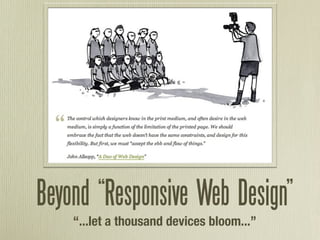
Beyond “Responsive Web Design”
    “...let a thousand devices bloom...”
Who am I?
Responsive Web Design?
Ethan Marcotte (@beep),
     “On Being Responsive”

“A responsive design is
composed of three
distinct parts:”
1. A flexible grid.
1. A flexible grid.

  2. Flexible images.
 Or more specifically, images
that work in a flexible context.
1. A flexible grid.

  2. Flexible images.
 Or more specifically, images
that work in a flexible context.

   3. Media queries.
Great.
So what do Responsive
Web Designs look like?
Colly.com?
Flexible grid Flexible images Media queries
“Switchy” design
Not responsive design
Hicksdesign.co.uk?
Flexible grid Flexible images Media queries
Awesome.
So why do I care?
“RWD is just fancy tricks
 for mobile, and no one
  uses mobile anyway.”
“iPhones and Android phones can
browse the current web just fine.”
Really? Think again.
What is “mobile?”
2010: 38% of US cell
         phone users access the
         Internet on their phones
         (about 89 million)
         53% of cell phone
         Internet users access
         websites at least once
         per day
         In 2009, only 17% of US
         cell phone users owned
         smartphones
http://goo.gl/YMtgf
So how do we do
   this thing?
It all starts with planning.
Luke Wroblewski (@lukew):


  http://goo.gl/0kTal
More space shouldn’t
 mean more stuff.
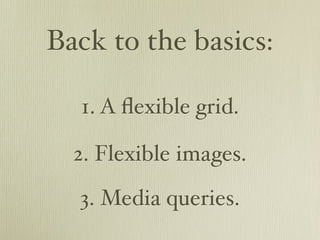
Back to the basics:

  1. A flexible grid.

  2. Flexible images.
  3. Media queries.
Flexible / Fluid Grids
• Size everything in ems
 or percentages

• Flexible: Ems for
 everything

• Fluid: Percentages for
 width, ems for height

• The Golden Formula:
 target ÷ context = result
You’re already halfway there...
Flexible Images

    Two methods:
 foreground (<img>)
and background (CSS)
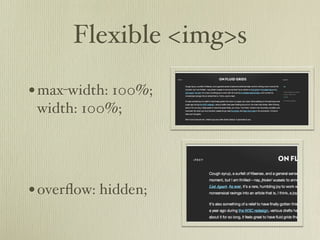
Flexible <img>s

• max-width: 100%;
 width: 100%;


• overflow: hidden;
Flexible backgrounds
Use background-position to selectively crop your backgrounds


 http://goo.gl/YLLC3
Responsive Images
   • Uses .htaccess to look
    for “responsive” image
    requests, and feeds
    them a 1px
    transparent .gif

   • Then, uses JS to
    detect browser width
    and load the
    appropriate-size image
    accordingly

http://goo.gl/Eu3zA
And now, the moment you’ve
     been waiting for...
Media Queries

• Ever make a print stylesheet before?
• <link rel=”stylesheet” href=”#”
 media=”screen” />

• <link rel=”stylesheet” href=”#”
 media=”print” />
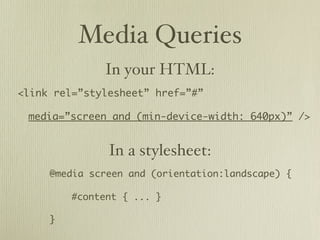
Media Queries
              In your HTML:
<link rel=”stylesheet” href=”#”

 media=”screen and (min-device-width: 640px)” />


               In a stylesheet:
     @media screen and (orientation:landscape) {

         #content { ... }

     }
• height                • color
• width                 • color-index
• device-height         • monochrome
• device-width          • resolution
• orientation           • scan
• aspect-ratio          • grid
• device-aspect-ratio
Remember: Mobile First!
  • No support for media queries
   is the first media query


  • Mobile stylesheet
   + media queries
   = desktop site
Mobile Viewports

• Newer smartphones
 pretend to be much
 larger than they actually
 are (980px for iPhone)...

• ...meaning they get your
 desktop stylesheet.
Mobile Viewports


<meta name=”viewport”
    content=”width=device-width,
            initial-scale=1.0” />
Going “beyond...”
CSS3 Transforms

    • rotate
    • skew
    • scale
    • -transform-origin
CSS3 Transitions
-transition: property duration easing

             • all             • ease
             • opacity         • ease-in
             • font-size       • ease-out
             • text-shadow     • ease-in-out
             • color           • linear
             • height          • cubic-bezier
             • width
             • left
             • top...
CSS3 Transitions
nav li a {
    color: rgb(0,0,0);
    -webkit-transition: all 1s ease-out;
}
nav li a:hover {
    color: rgb(200,0,0);
    -webkit-transition: all 1s ease-in;
}
CSS3 Animation

• Define keyframes in CSS
• Set duration, number of iterations,
 animation direction, timing function

• only works in webkit
What if my phone
 can’t do that?
Modernizr.js
yepnope.js
“The choice is not between
using media queries and creating
a dedicated mobile site; the
choice is between using media
queries and doing nothing at all.”

                  - Jeremy Keith,
             “A responsive mind”
That’s about it...
      Questions?


          @kzurawel
http://arborwebsolutions.com

(Practical) Beyond Responsive Web Design (WordCamp Miami 2011)