1
Ι
©
Dassault
Systèmes
Ι
Confidential
Information
Ι
SolidWorks Simulation Training
SolidWorks 2012
2
Ι
©
Dassault
Systèmes
Ι
Confidential
Information
Ι
 Prerequisites
 Course Design Philosophy
 Using this book
 A note about files
 Conventions used in this book
 Class Introductions
About this course
3
Ι
©
Dassault
Systèmes
Ι
Confidential
Information
Ι
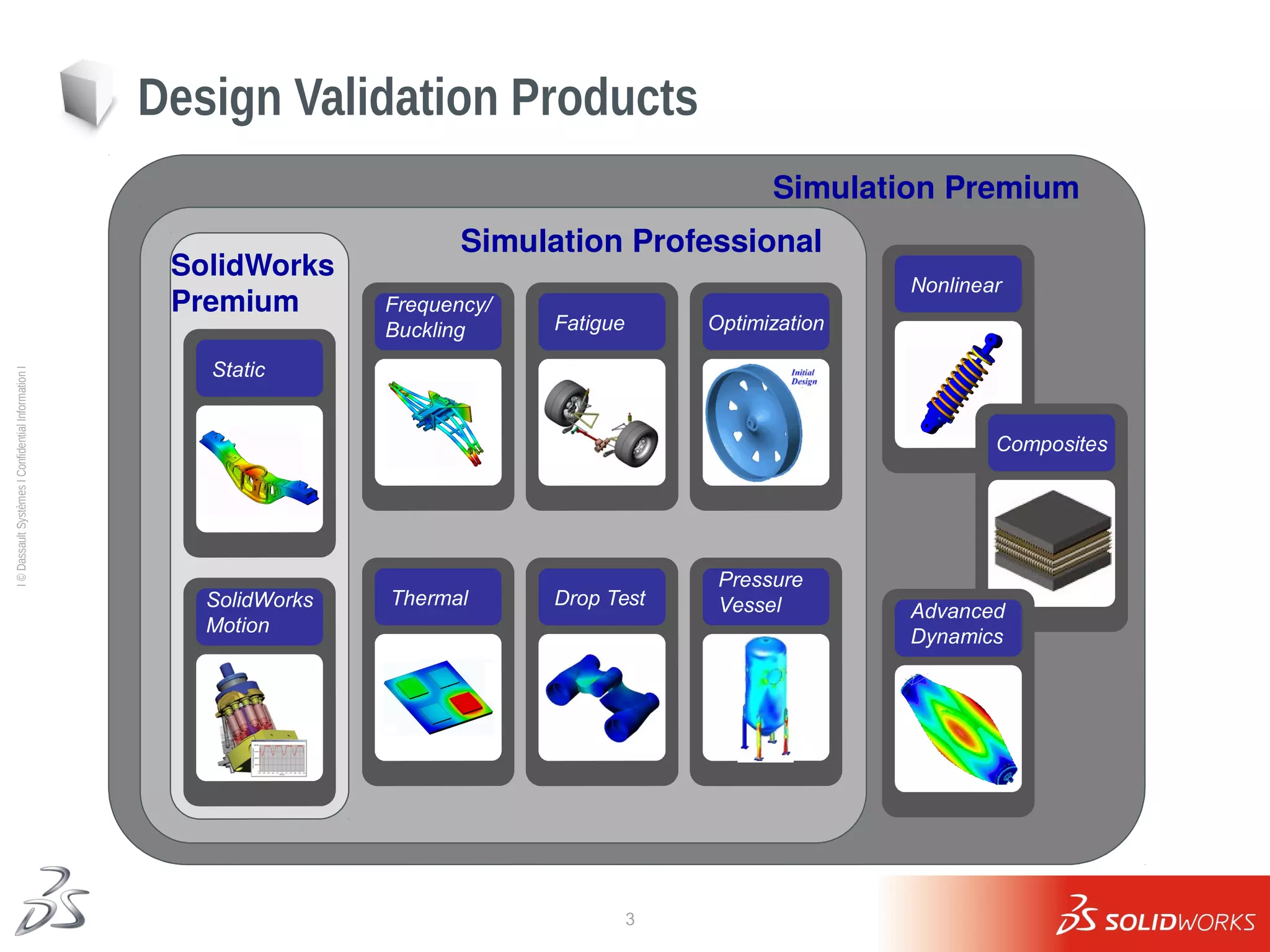
Simulation Premium
Simulation Professional
Design Validation Products
Frequency/
Buckling
Thermal
SolidWorks
Premium
Static
SolidWorks
Motion
Drop Test
Fatigue
Nonlinear
Optimization
Pressure
Vessel
Composites
Advanced
Dynamics
4
Ι
©
Dassault
Systèmes
Ι
Confidential
Information
Ι
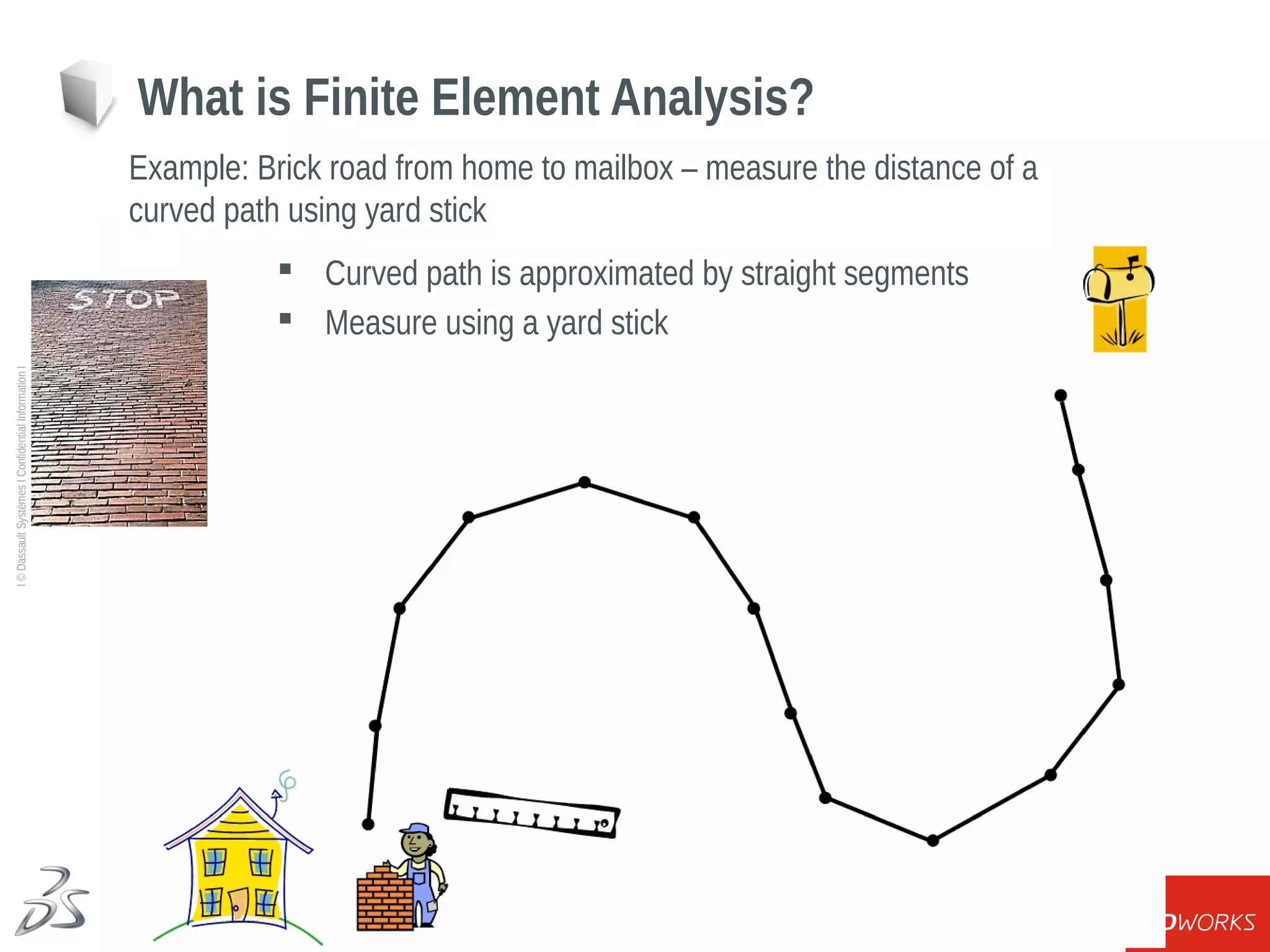
What is Finite Element Analysis?
Example: Brick road from home to mailbox – measure the distance of a
curved path using yard stick
 Curved path is approximated by straight segments
 Measure using a yard stick
5
Ι
©
Dassault
Systèmes
Ι
Confidential
Information
Ι
Building the FEA Model
CAD Model Stress Results
6
Ι
©
Dassault
Systèmes
Ι
Confidential
Information
Ι
 Represent how the given model is attached to the rest of the world
 Fixed on a Surface or Edge or Point
 Allow Sliding or Rotation
 Fixtures used to reduce the size of the problem to a component
level or subassembly level
Building the FEA Model - Fixtures
7
Ι
©
Dassault
Systèmes
Ι
Confidential
Information
Ι
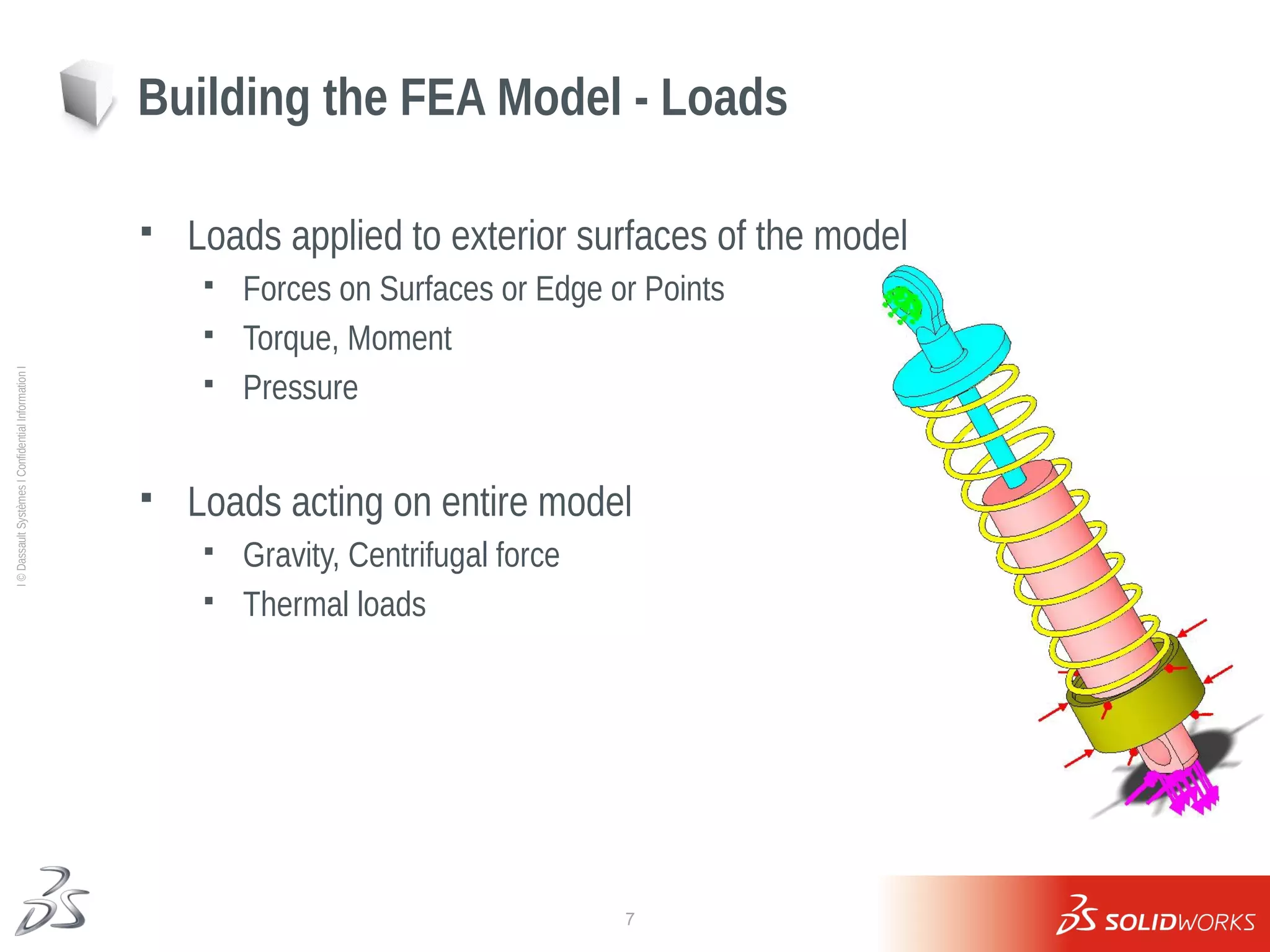
 Loads applied to exterior surfaces of the model
 Forces on Surfaces or Edge or Points
 Torque, Moment
 Pressure
 Loads acting on entire model
 Gravity, Centrifugal force
 Thermal loads
Building the FEA Model - Loads
8
Ι
©
Dassault
Systèmes
Ι
Confidential
Information
Ι
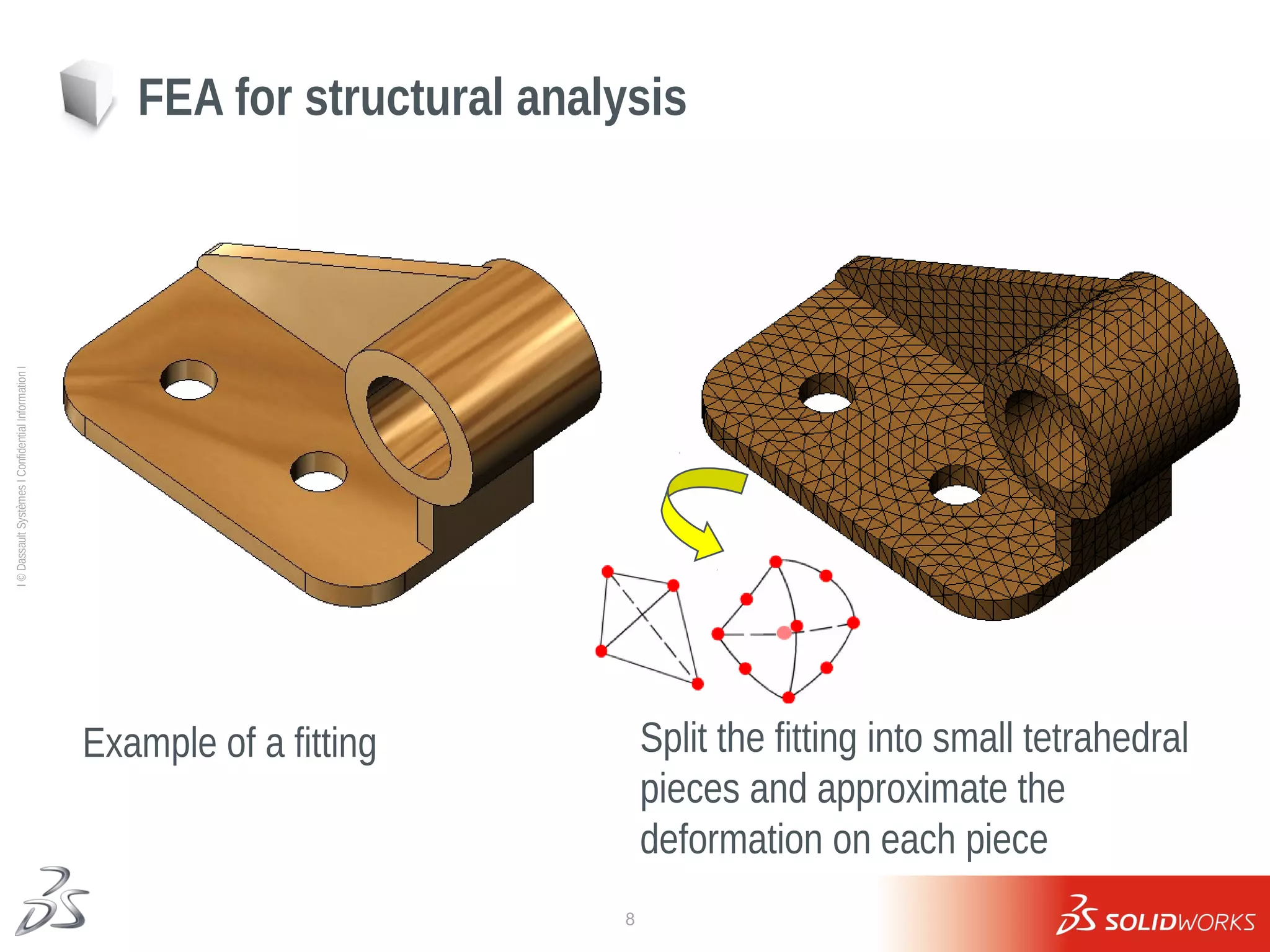
FEA for structural analysis
Example of a fitting Split the fitting into small tetrahedral
pieces and approximate the
deformation on each piece
9
Ι
©
Dassault
Systèmes
Ι
Confidential
Information
Ι
FEA for structural analysis
Example of a bracket Split the surfaces of bracket into small
triangular pieces and approximate the
deformation on each piece
10
Ι
©
Dassault
Systèmes
Ι
Confidential
Information
Ι
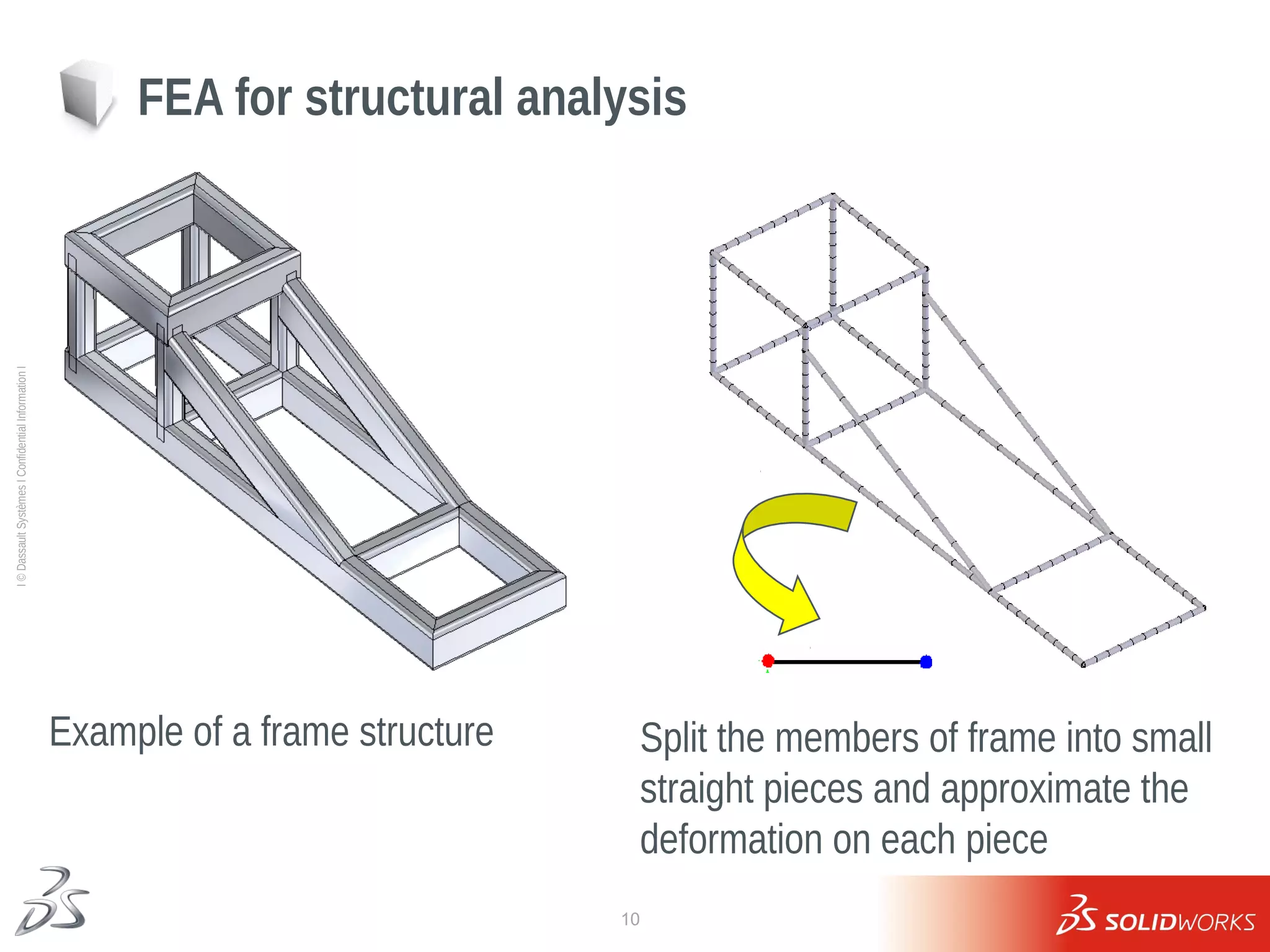
FEA for structural analysis
Example of a frame structure Split the members of frame into small
straight pieces and approximate the
deformation on each piece
11
Ι
©
Dassault
Systèmes
Ι
Confidential
Information
Ι
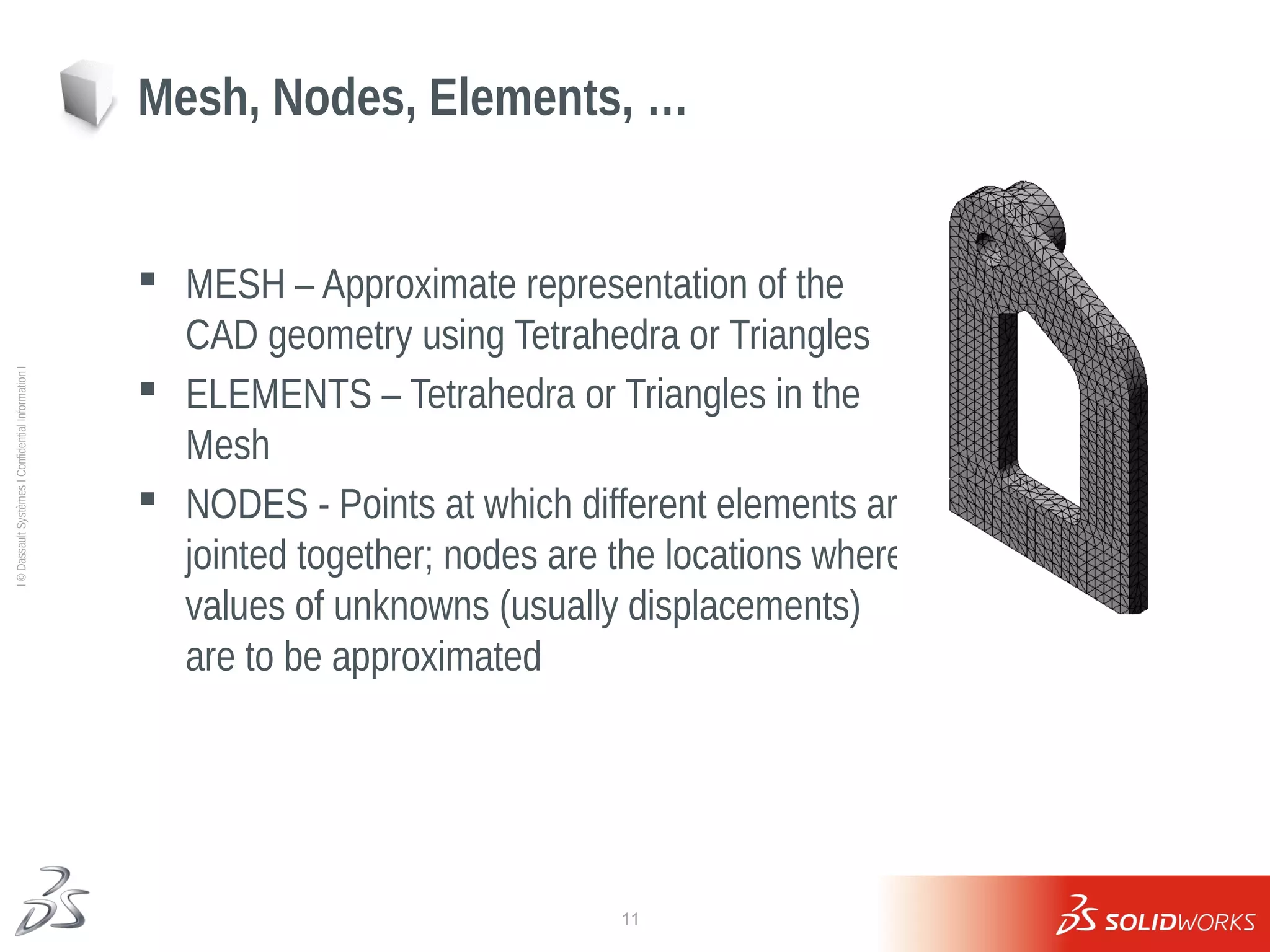
 MESH – Approximate representation of the
CAD geometry using Tetrahedra or Triangles
 ELEMENTS – Tetrahedra or Triangles in the
Mesh
 NODES - Points at which different elements are
jointed together; nodes are the locations where
values of unknowns (usually displacements)
are to be approximated
Mesh, Nodes, Elements, …
12
Ι
©
Dassault
Systèmes
Ι
Confidential
Information
Ι
 Stresses at a point are defined by 6 quantities – 3 normal stress and
3 shear stresses – depend on orientation of coordinate system
 Von Mises “Equivalent” Stress =
VON is independent of coordinate system
 Principal Stresses – 3 normal stresses specified in a
special coordinate system for which shear stresses
are zero
 Factor of Safety =
Using Stress Results to Validate Design
13
Ι
©
Dassault
Systèmes
Ι
Confidential
Information
Ι
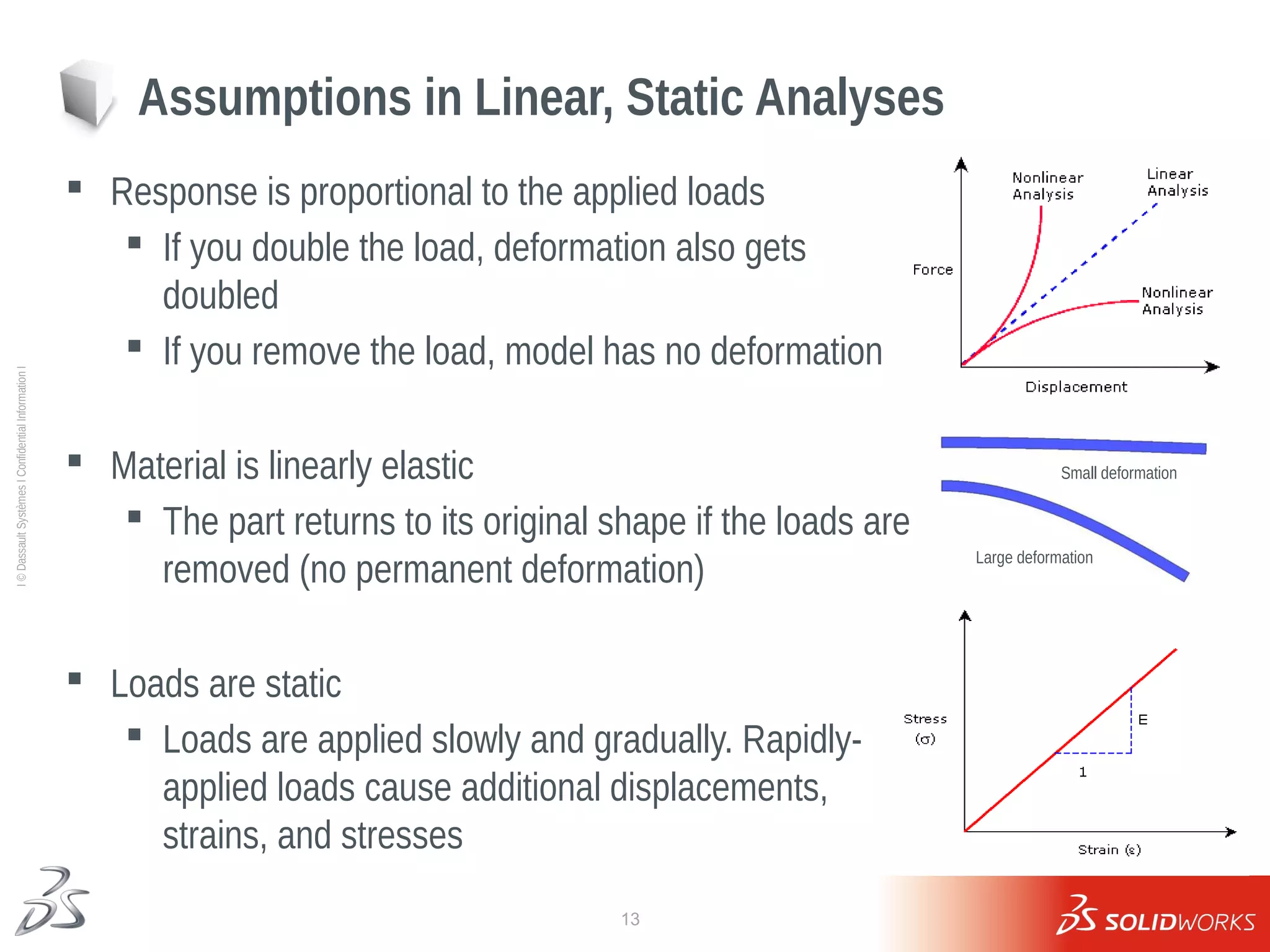
 Response is proportional to the applied loads
 If you double the load, deformation also gets
doubled
 If you remove the load, model has no deformation
 Material is linearly elastic
 The part returns to its original shape if the loads are
removed (no permanent deformation)
 Loads are static
 Loads are applied slowly and gradually. Rapidly-
applied loads cause additional displacements,
strains, and stresses
Assumptions in Linear, Static Analyses
Small deformation
Large deformation
14
Ι
©
Dassault
Systèmes
Ι
Confidential
Information
Ι
1. Material?
 Steel 1040
2. Physical Working Condition?
 Pressure or force
 Bolted or Welded
3. Modeling in SolidWorks Simulation
 TRAINING
4. Is my Design OK (Results)
 Factor of Safety
 Stress
Check list for SolidWorks Simulation
15
Ι
©
Dassault
Systèmes
Ι
Confidential
Information
Ι
Lesson 1
The Analysis Process
16
Ι
©
Dassault
Systèmes
Ι
Confidential
Information
Ι
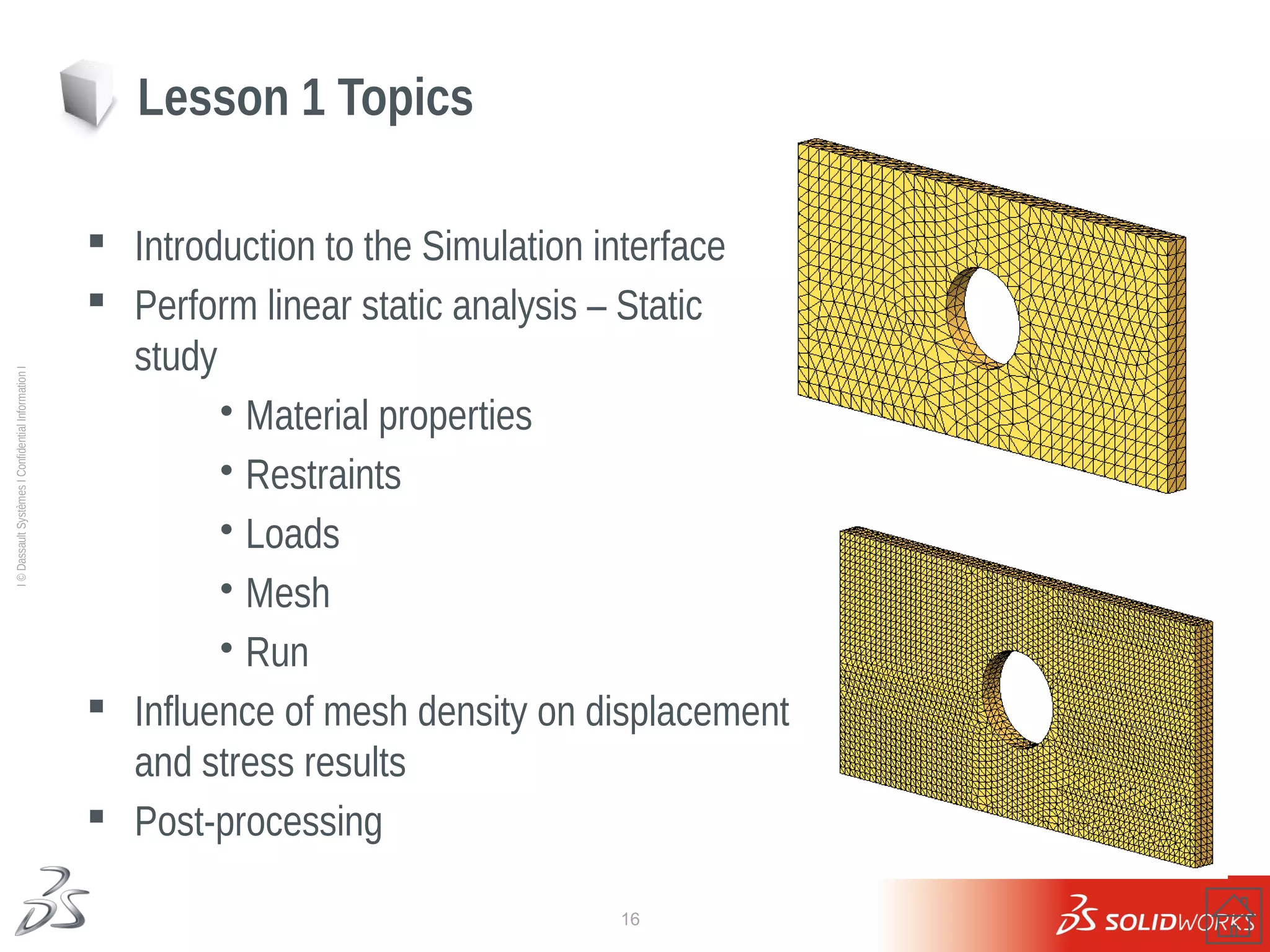
 Introduction to the Simulation interface
 Perform linear static analysis – Static
study
•Material properties
•Restraints
•Loads
•Mesh
•Run
 Influence of mesh density on displacement
and stress results
 Post-processing
Lesson 1 Topics
17
Ι
©
Dassault
Systèmes
Ι
Confidential
Information
Ι
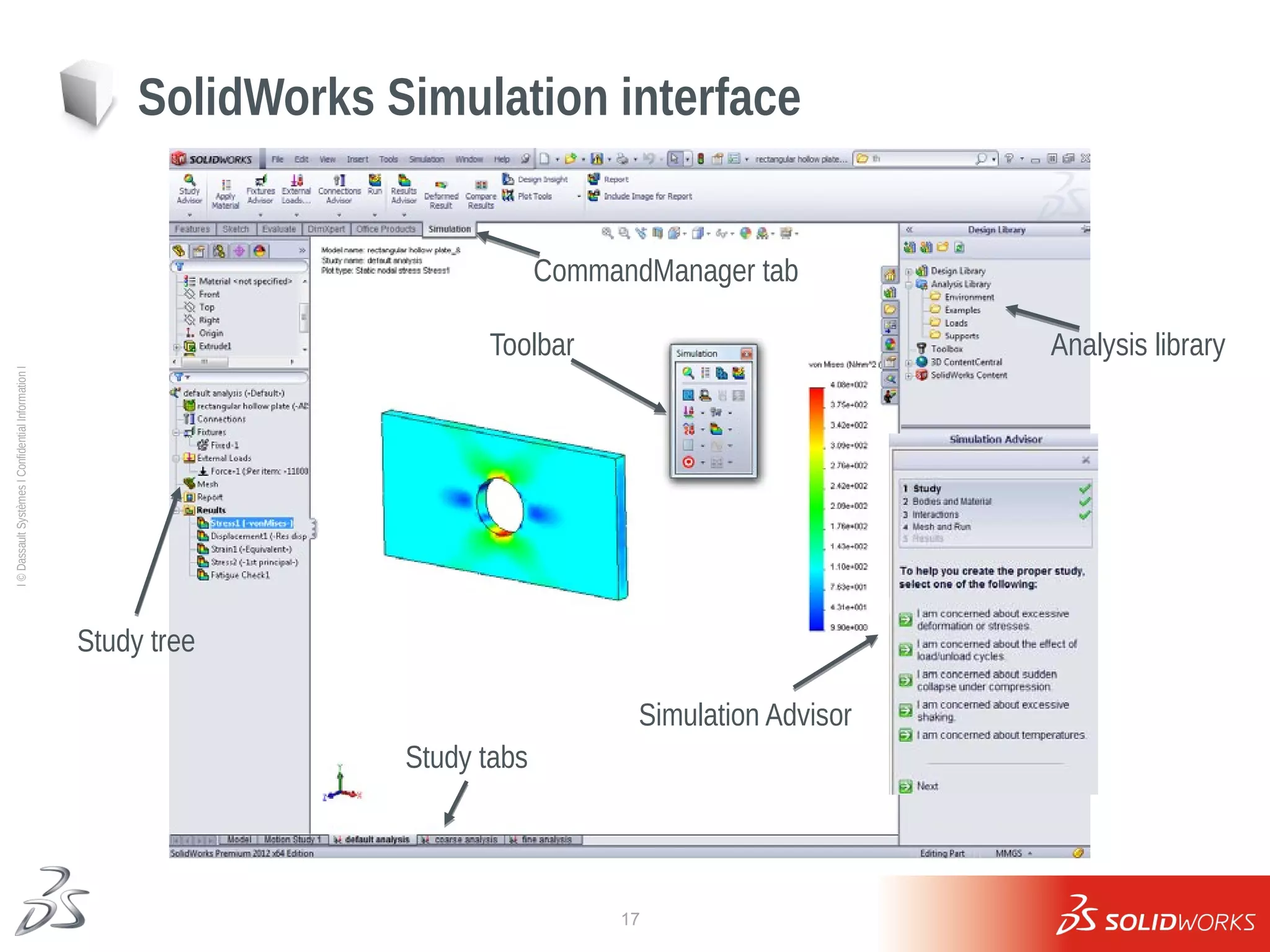
SolidWorks Simulation interface
Study tree
Study tabs
Toolbar
Simulation Advisor
CommandManager tab
Analysis library
18
Ι
©
Dassault
Systèmes
Ι
Confidential
Information
Ι
Loads and restraints
19
Ι
©
Dassault
Systèmes
Ι
Confidential
Information
Ι
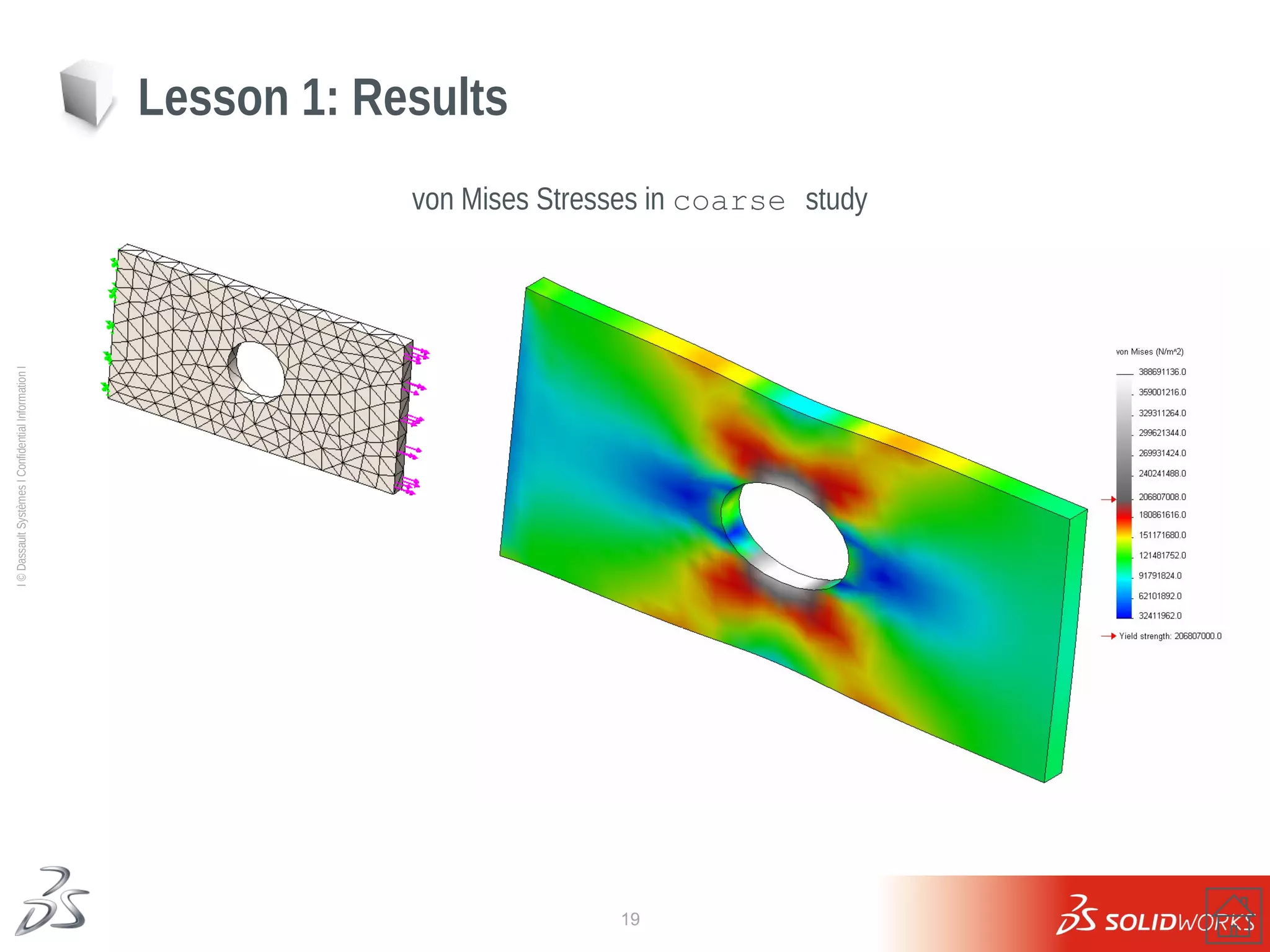
von Mises Stresses in coarse study
Lesson 1: Results
20
Ι
©
Dassault
Systèmes
Ι
Confidential
Information
Ι
Lesson 1: Results
von Mises Stresses in default study
21
Ι
©
Dassault
Systèmes
Ι
Confidential
Information
Ι
Lesson 1: Results
von Mises Stresses in fine study
22
Ι
©
Dassault
Systèmes
Ι
Confidential
Information
Ι
Finer mesh More accurate results More computational time
Lesson 1: Results
Summary of results – convergence study
23
Ι
©
Dassault
Systèmes
Ι
Confidential
Information
Ι
 Comparison with analytical
 Which result is correct???
Lesson 1 Results
24
Ι
©
Dassault
Systèmes
Ι
Confidential
Information
Ι
Exercise 1: Bracket
25
Ι
©
Dassault
Systèmes
Ι
Confidential
Information
Ι
Exercise 2: Compressive Spring Stiffness
m
N
u
F
k 7
.
234
10
426
.
0
1
.
0
3



 
26
Ι
©
Dassault
Systèmes
Ι
Confidential
Information
Ι
Exercise 3: Container Handle
27
Ι
©
Dassault
Systèmes
Ι
Confidential
Information
Ι
Lesson 1: Questions
28
Ι
©
Dassault
Systèmes
Ι
Confidential
Information
Ι
Lesson 2
Mesh Controls, Stress Concentrations and Boundary Conditions
29
Ι
©
Dassault
Systèmes
Ι
Confidential
Information
Ι
no fillet configuration
 Using SolidWorks Configurations
 Use of mesh controls, automatic transition
 FEA Convergence issues
 Different boundary conditions
Lesson 2: Topics
fillet configuration
30
Ι
©
Dassault
Systèmes
Ι
Confidential
Information
Ι
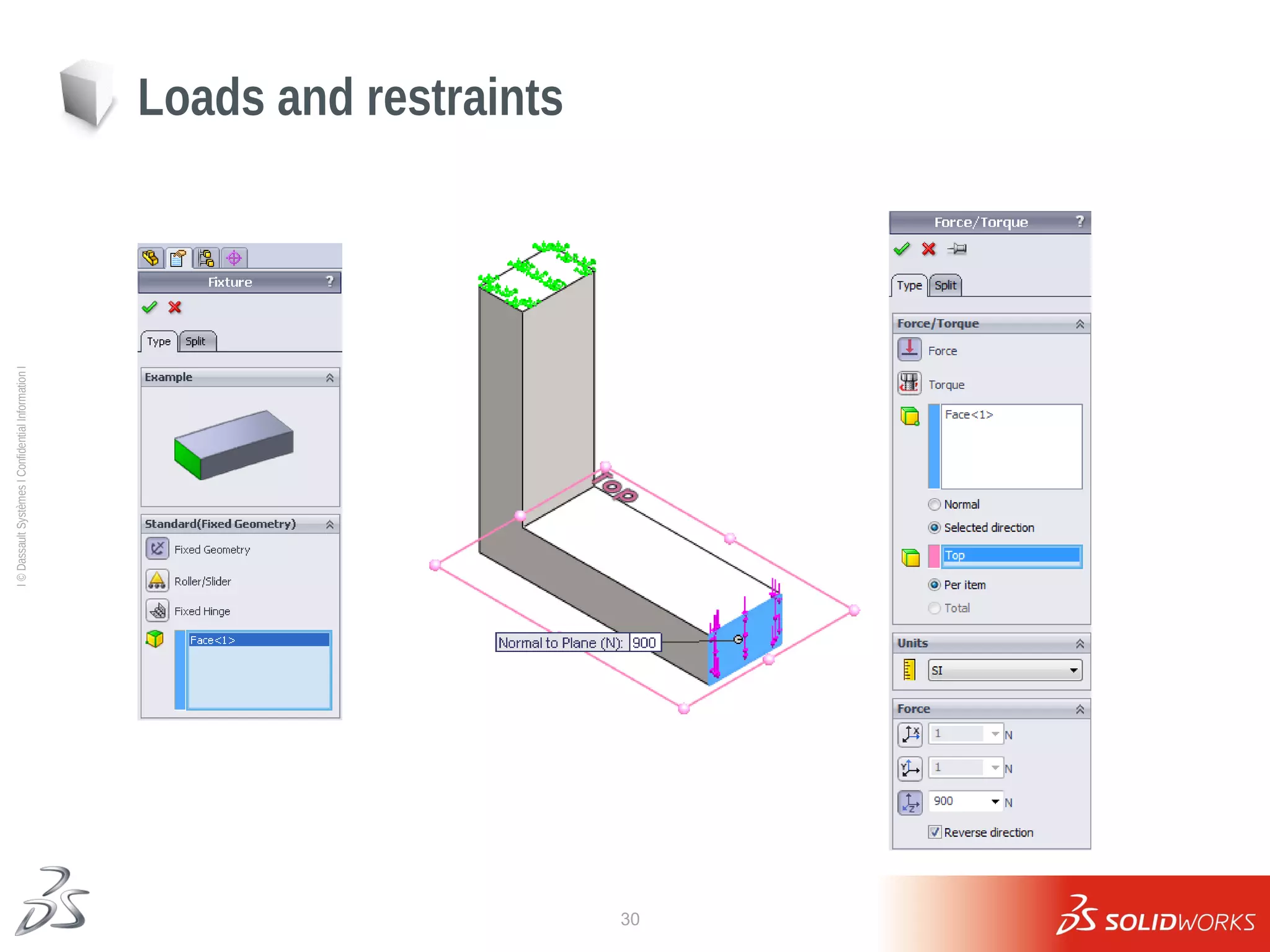
Loads and restraints
31
Ι
©
Dassault
Systèmes
Ι
Confidential
Information
Ι
Lesson 2: Results
No fillet configuration
32
Ι
©
Dassault
Systèmes
Ι
Confidential
Information
Ι
1- When increasing the number of elements, will the stresses converge?
2- Why?
Lesson 2: Results
Stress Results – mesh1, mesh2 and mesh3
33
Ι
©
Dassault
Systèmes
Ι
Confidential
Information
Ι
No Mesh Control
Lesson 2: Results
Fillet, Mesh Control
Mesh Control
34
Ι
©
Dassault
Systèmes
Ι
Confidential
Information
Ι
Fixed edge produces unrealistic stresses at the support location.
Lesson 2: Results
Welded boundary condition
35
Ι
©
Dassault
Systèmes
Ι
Confidential
Information
Ι
 Can greatly simplify the model
 Can also affect results
 Know your assumptions
Lesson 2: Boundary Conditions
36
Ι
©
Dassault
Systèmes
Ι
Confidential
Information
Ι
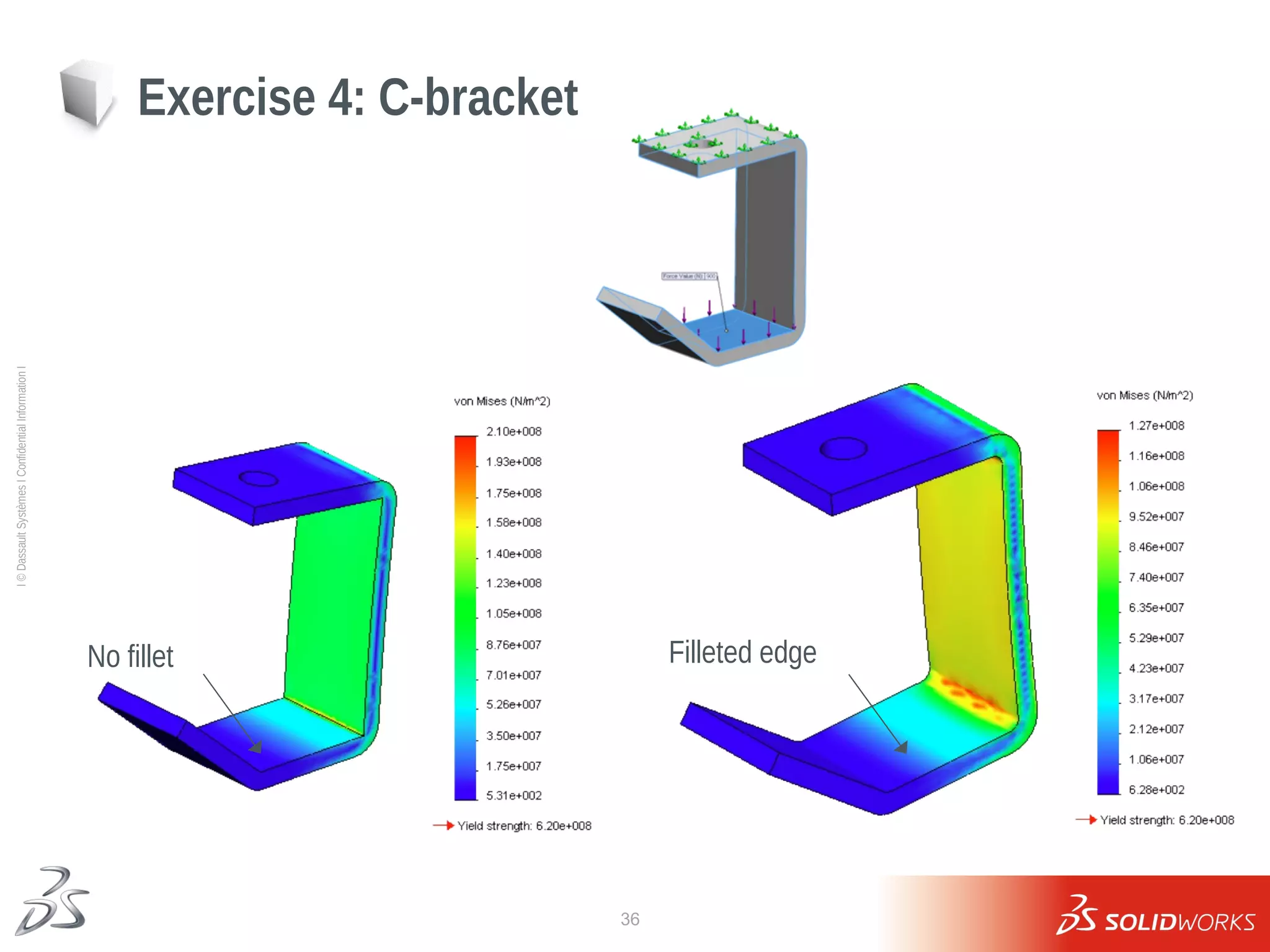
Exercise 4: C-bracket
No fillet Filleted edge
37
Ι
©
Dassault
Systèmes
Ι
Confidential
Information
Ι
Exercise 4
Stress concentrations
Fixed hole
38
Ι
©
Dassault
Systèmes
Ι
Confidential
Information
Ι
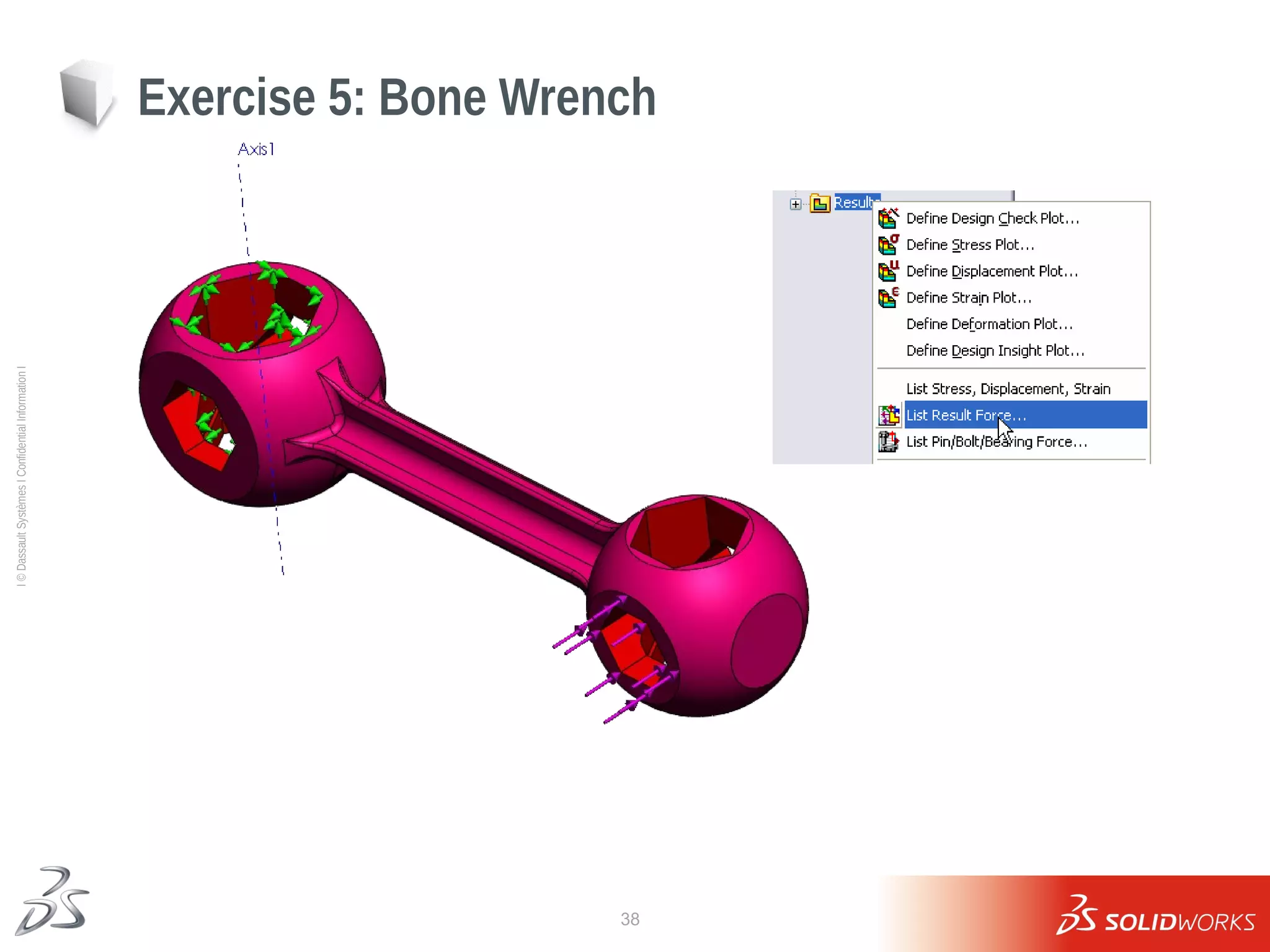
Exercise 5: Bone Wrench
39
Ι
©
Dassault
Systèmes
Ι
Confidential
Information
Ι
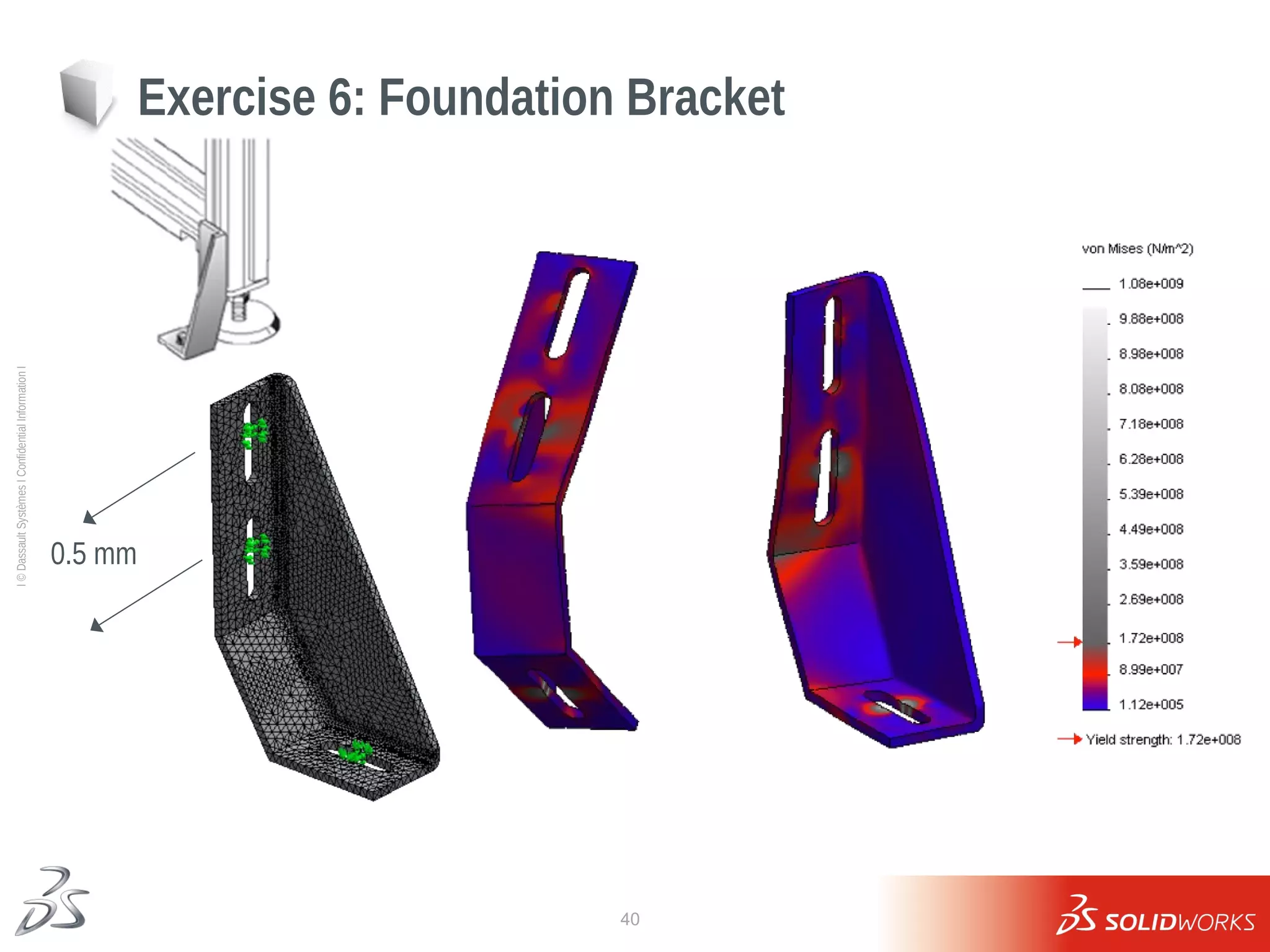
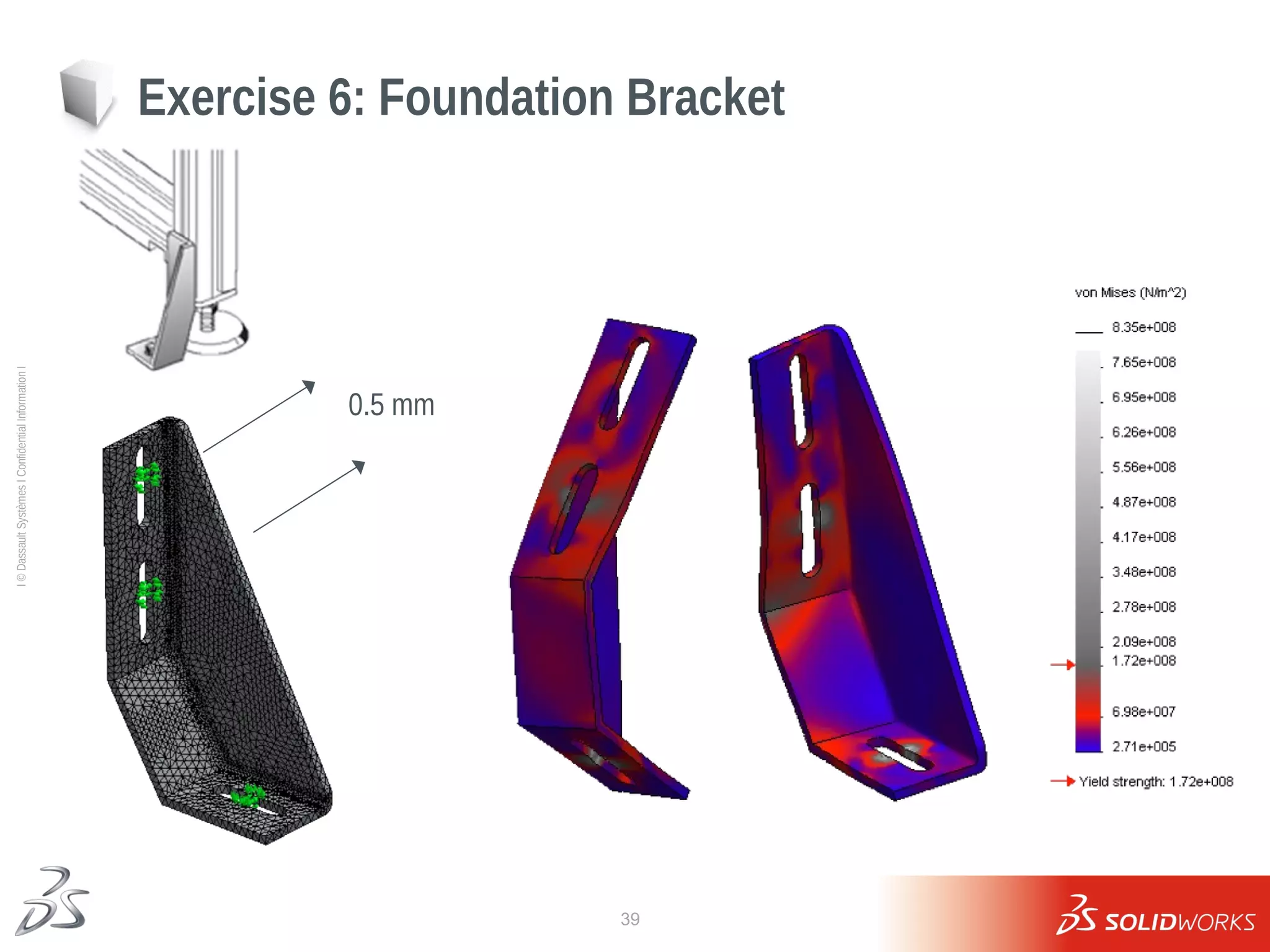
Exercise 6: Foundation Bracket
0.5 mm
40
Ι
©
Dassault
Systèmes
Ι
Confidential
Information
Ι
Exercise 6: Foundation Bracket
0.5 mm
41
Ι
©
Dassault
Systèmes
Ι
Confidential
Information
Ι
Lesson 2: Questions
42
Ι
©
Dassault
Systèmes
Ι
Confidential
Information
Ι
Lesson 3
Assembly Analysis with Contact
43
Ι
©
Dassault
Systèmes
Ι
Confidential
Information
Ι
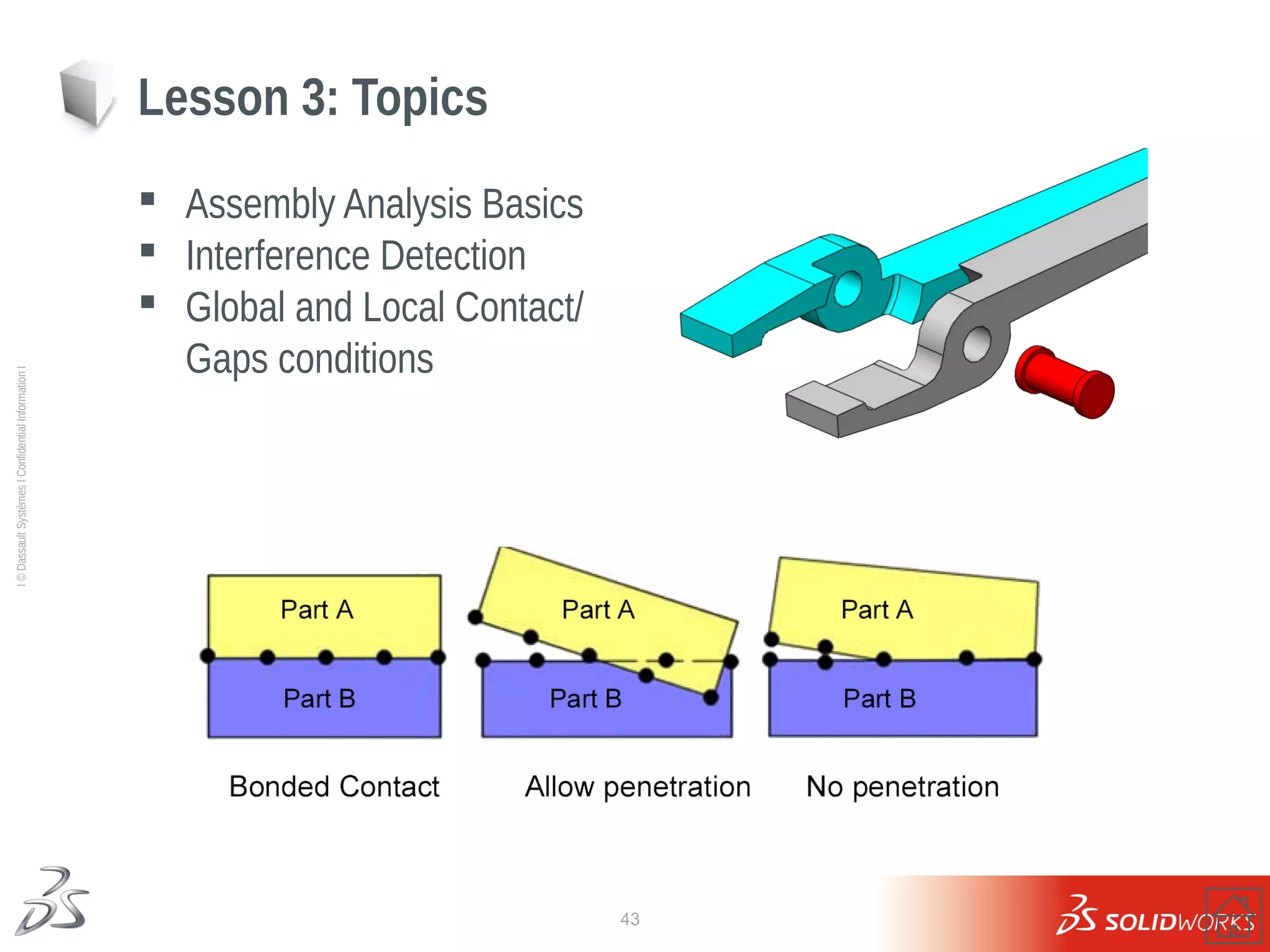
 Assembly Analysis Basics
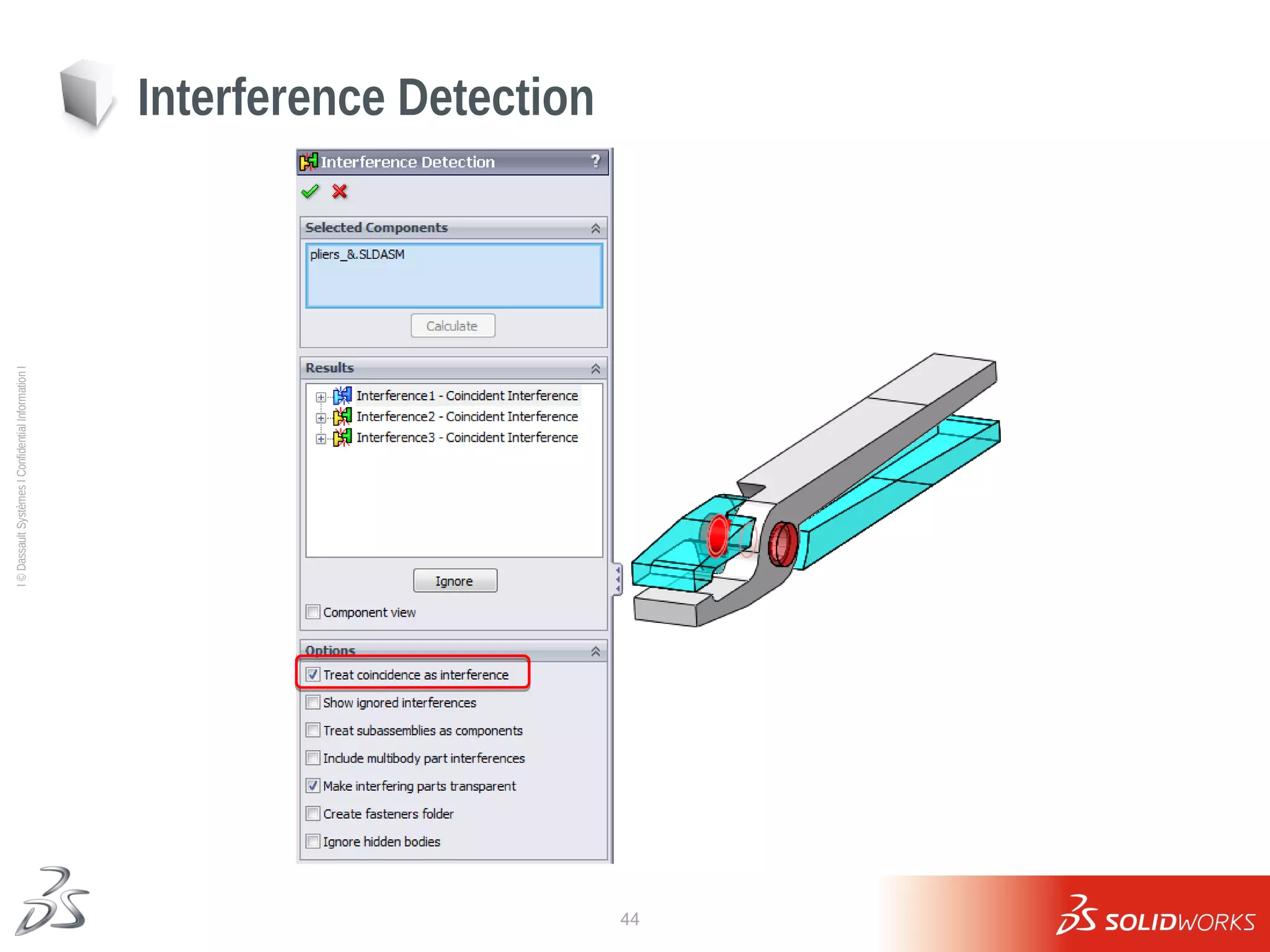
 Interference Detection
 Global and Local Contact/
Gaps conditions
Lesson 3: Topics
44
Ι
©
Dassault
Systèmes
Ι
Confidential
Information
Ι
Interference Detection
45
Ι
©
Dassault
Systèmes
Ι
Confidential
Information
Ι
 Default: Bonded
 Global contact conditions
 No penetration
 Bonded (No clearance)
 Allow Penetration
 Component Contact
 Uncheck Global Contact box
 Overrides Global Contact
Global contact
46
Ι
©
Dassault
Systèmes
Ι
Confidential
Information
Ι
Contact/Gap Hierarchy
 Global and Component contact apply only to initial touching areas
 Global contact for most common condition, component and local
contact as needed
47
Ι
©
Dassault
Systèmes
Ι
Confidential
Information
Ι
 For structural studies
 No Penetration
 Bonded
 Allow Penetration
 Shrink Fit
 Virtual Wall
 For thermal studies
 Insulated (similar to Free in a static study)
 Thermal contact resistance
 Friction at the local level for touching entities
 Initial gap (clearance) can be ignored or accounted for by specifying it
here
Local Contact Conditions
48
Ι
©
Dassault
Systèmes
Ι
Confidential
Information
Ι
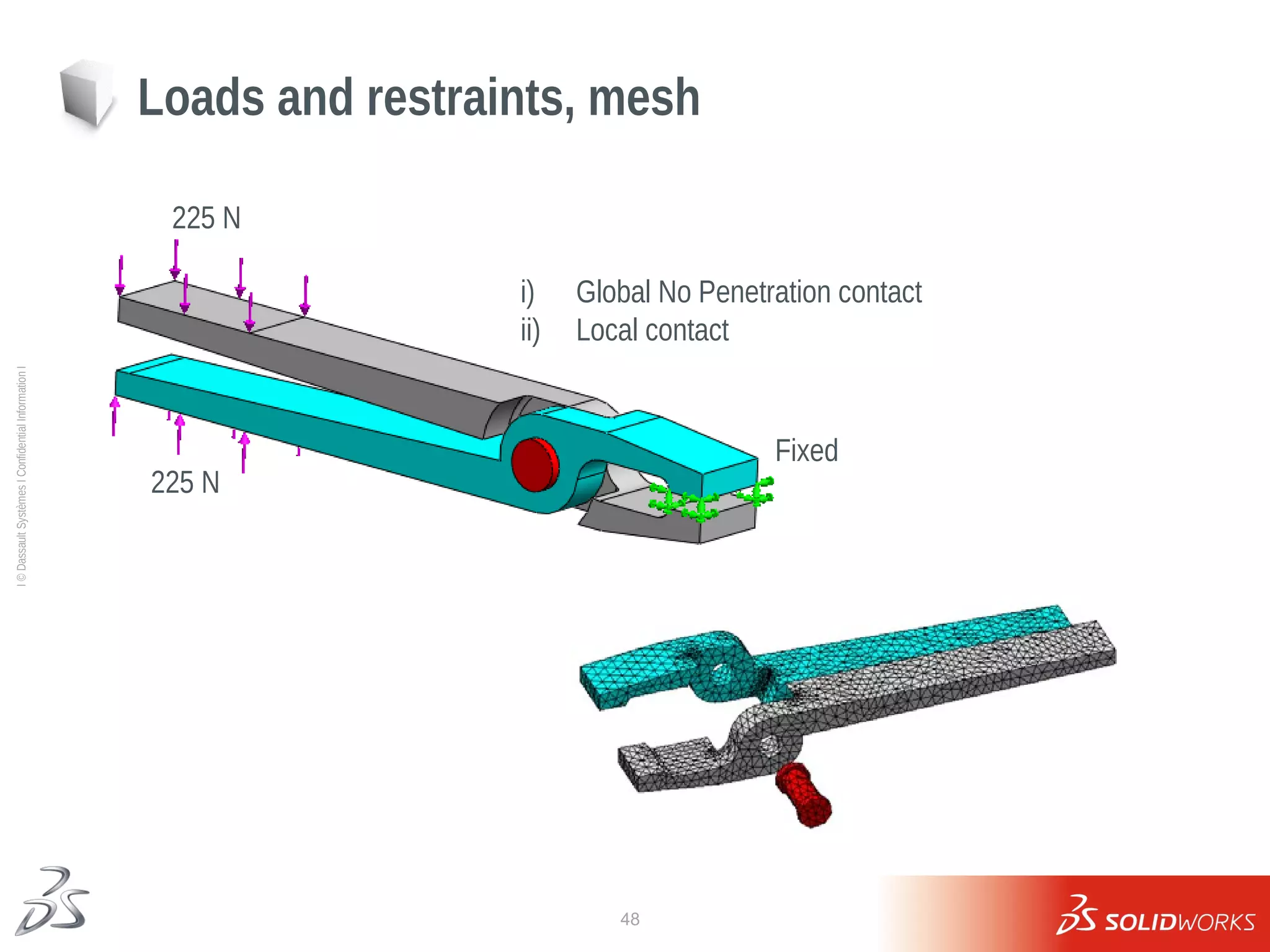
Loads and restraints, mesh
225 N
225 N
Fixed
i) Global No Penetration contact
ii) Local contact
49
Ι
©
Dassault
Systèmes
Ι
Confidential
Information
Ι
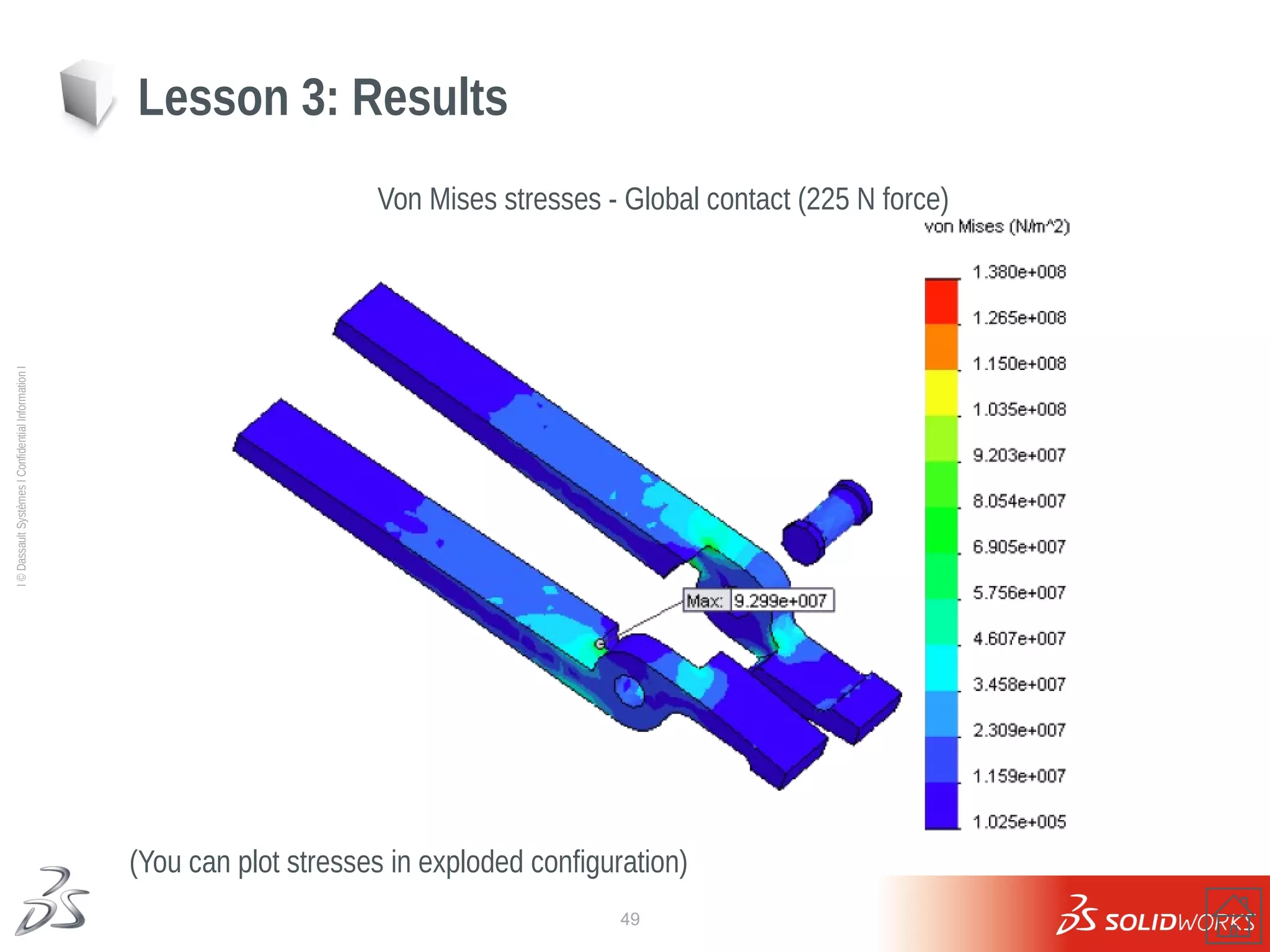
Von Mises stresses - Global contact (225 N force)
(You can plot stresses in exploded configuration)
Lesson 3: Results
50
Ι
©
Dassault
Systèmes
Ι
Confidential
Information
Ι
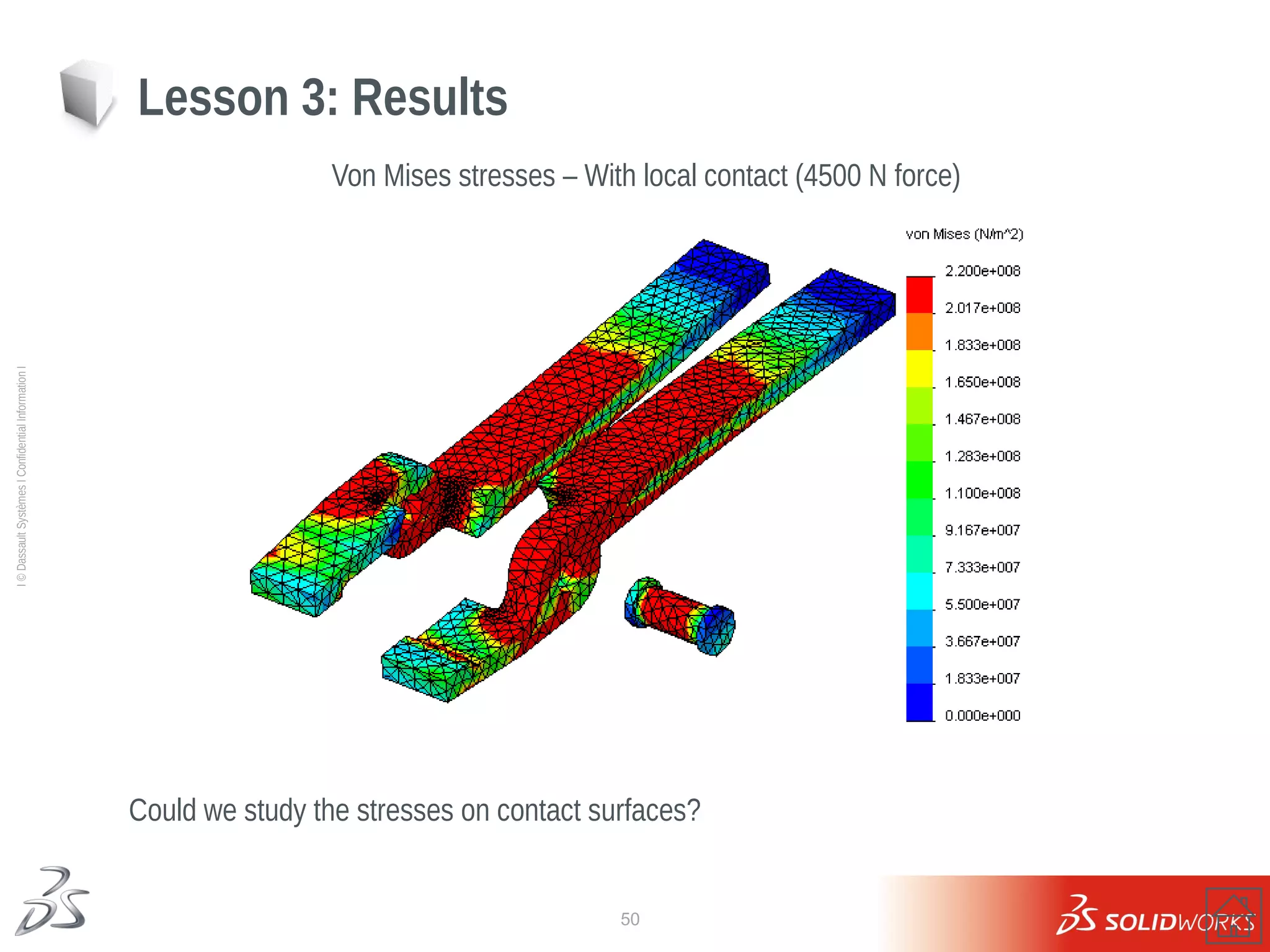
Could we study the stresses on contact surfaces?
Von Mises stresses – With local contact (4500 N force)
Lesson 3: Results
51
Ι
©
Dassault
Systèmes
Ι
Confidential
Information
Ι
Exercise 7: Two Ring Assembly
52
Ι
©
Dassault
Systèmes
Ι
Confidential
Information
Ι
Lesson 3: Questions
53
Ι
©
Dassault
Systèmes
Ι
Confidential
Information
Ι
Lesson 4
Symmetrical and Free Self-Equilibrated Assemblies
54
Ι
©
Dassault
Systèmes
Ι
Confidential
Information
Ι
 Analyze shrink-fit problem
 Use of symmetry
 Review stress results in local coordinate
systems
 Solver options to eliminate rigid body
modes
Lesson 4: Topics
55
Ι
©
Dassault
Systèmes
Ι
Confidential
Information
Ι
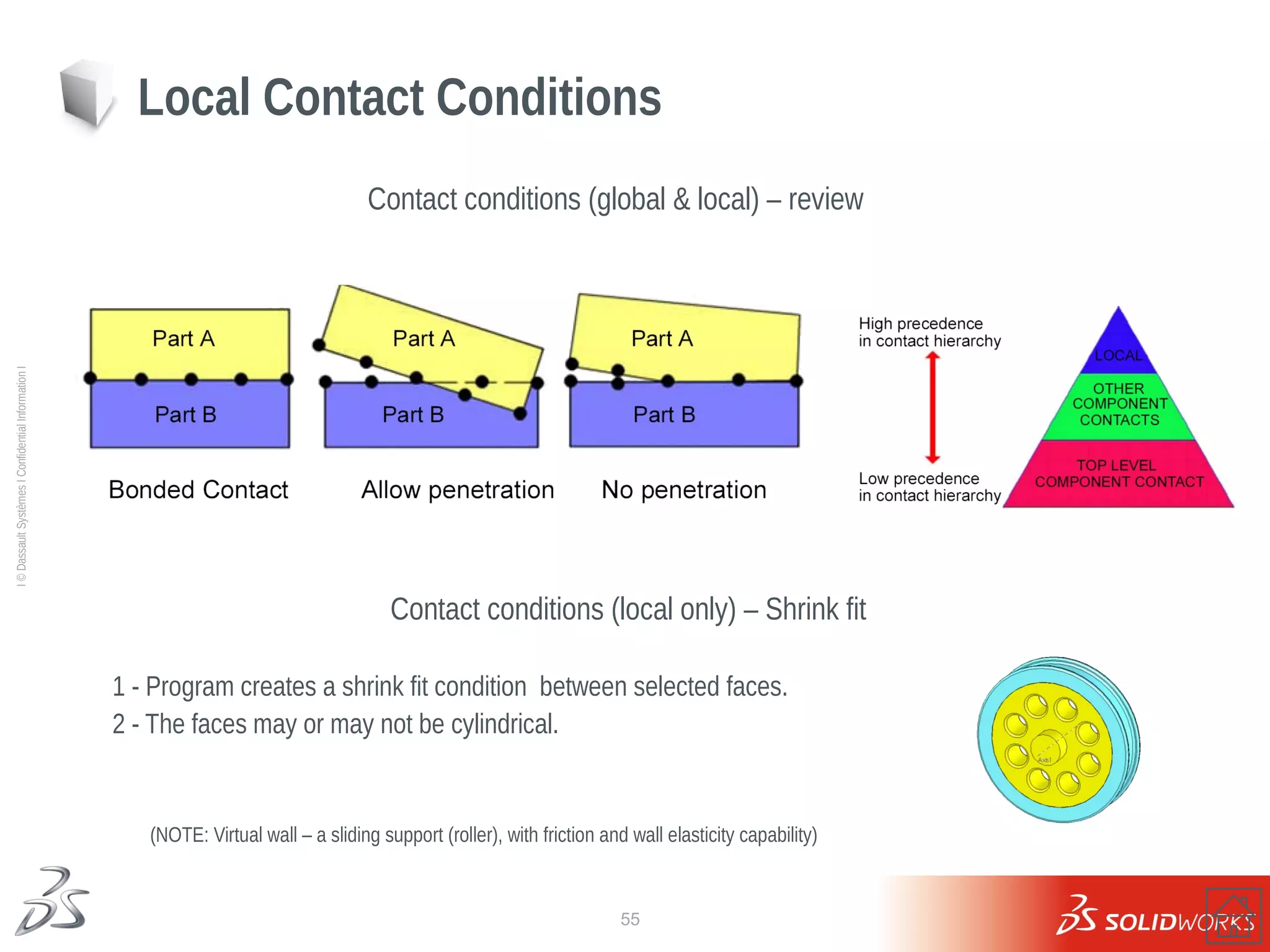
Local Contact Conditions
Contact conditions (global & local) – review
Contact conditions (local only) – Shrink fit
1 - Program creates a shrink fit condition between selected faces.
2 - The faces may or may not be cylindrical.
(NOTE: Virtual wall – a sliding support (roller), with friction and wall elasticity capability)
56
Ι
©
Dassault
Systèmes
Ι
Confidential
Information
Ι
Boundary conditions
57
Ι
©
Dassault
Systèmes
Ι
Confidential
Information
Ι
Contact and Mesh
58
Ι
©
Dassault
Systèmes
Ι
Confidential
Information
Ι
Lesson 4: Results
Why is there a jump in the hoop stress value across the interface?
Would the assembly experience a similar jump in radial stresses?
Hoop stress (using local cylindrical coordinates)
59
Ι
©
Dassault
Systèmes
Ι
Confidential
Information
Ι
Exercise 8: Chain Link
60
Ι
©
Dassault
Systèmes
Ι
Confidential
Information
Ι
Exercise 9: Chain Link 2
Incorrect solution
Correct solution
61
Ι
©
Dassault
Systèmes
Ι
Confidential
Information
Ι
Lesson 5
Assembly Analysis with Connectors
62
Ι
©
Dassault
Systèmes
Ι
Confidential
Information
Ι
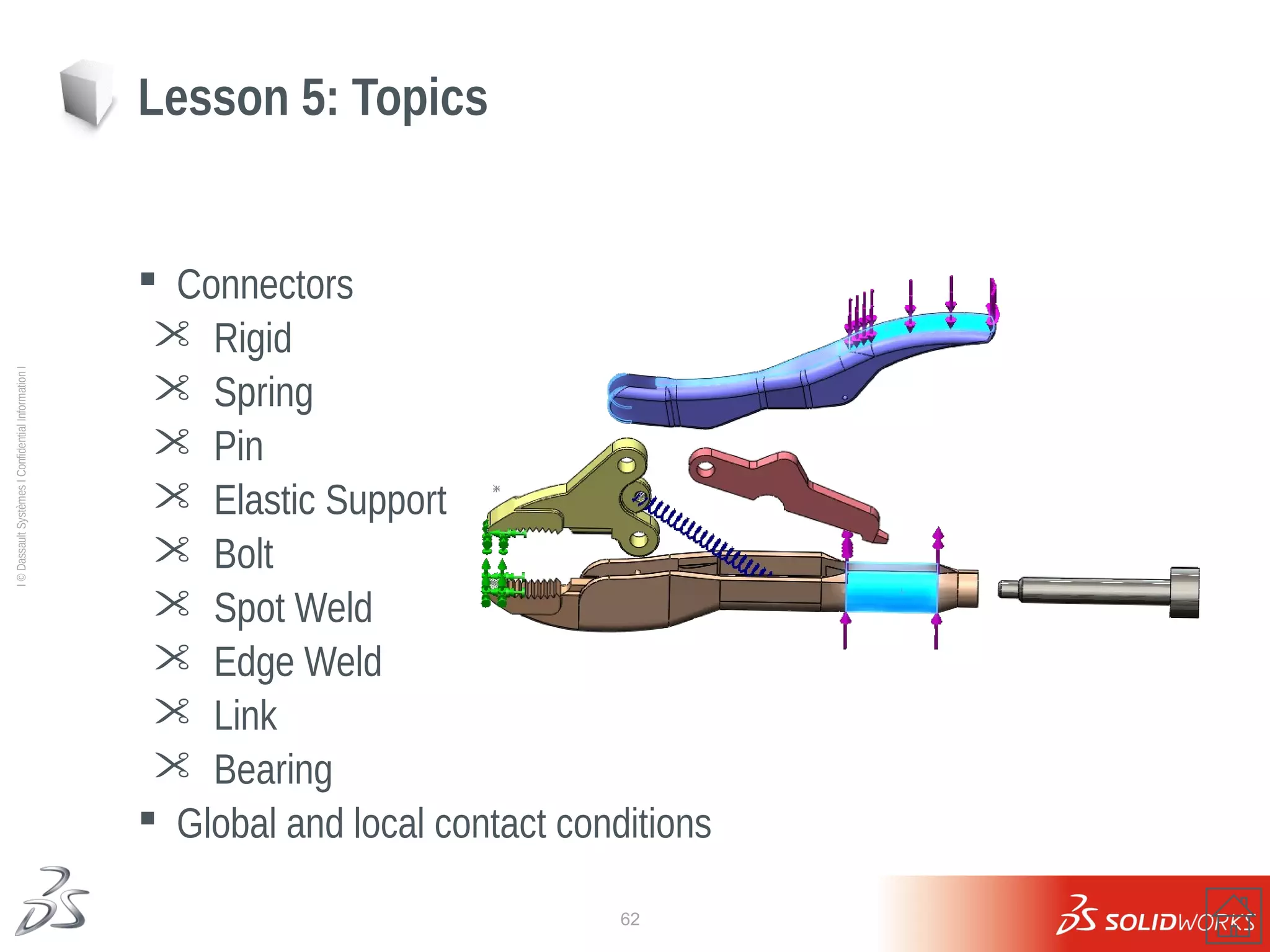
 Connectors
 Rigid
 Spring
 Pin
 Elastic Support
 Bolt
 Spot Weld
 Edge Weld
 Link
 Bearing
 Global and local contact conditions
Lesson 5: Topics
63
Ι
©
Dassault
Systèmes
Ι
Confidential
Information
Ι
Connectors
Spring Pins (three in all)
64
Ι
©
Dassault
Systèmes
Ι
Confidential
Information
Ι
Boundary conditions and Mesh
225 N
225 N
Fixed
65
Ι
©
Dassault
Systèmes
Ι
Confidential
Information
Ι
Lesson 5: Results
66
Ι
©
Dassault
Systèmes
Ι
Confidential
Information
Ι
Exercise 10 & 11
67
Ι
©
Dassault
Systèmes
Ι
Confidential
Information
Ι
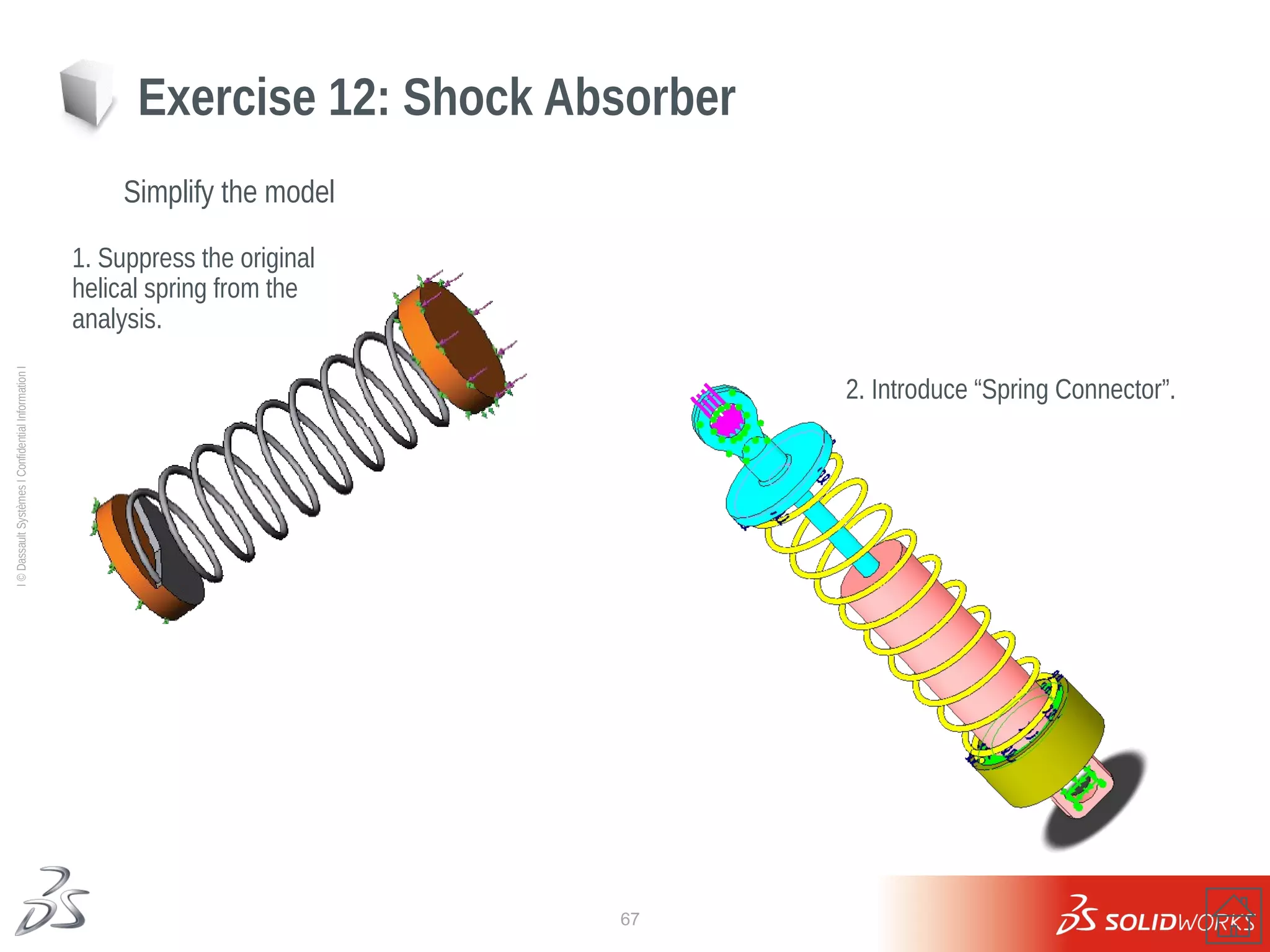
Exercise 12: Shock Absorber
Simplify the model
1. Suppress the original
helical spring from the
analysis.
2. Introduce “Spring Connector”.
68
Ι
©
Dassault
Systèmes
Ι
Confidential
Information
Ι
Exercise 12: Shock Absorber
69
Ι
©
Dassault
Systèmes
Ι
Confidential
Information
Ι
Exercise 13: Spot Welds
Connector types – Spot Welds
Spot Welds
Spot Welds
70
Ι
©
Dassault
Systèmes
Ι
Confidential
Information
Ι
Exercise 13: Spot Welds
Spot Welds - solid models - stress results
We notice high stresses in the vicinity of welds. Would the subsequent mesh refinement in these regions
bring more accurate stress distribution?
71
Ι
©
Dassault
Systèmes
Ι
Confidential
Information
Ι
Lesson 6
Compatible/Incompatible Meshing
72
Ι
©
Dassault
Systèmes
Ι
Confidential
Information
Ι
 Compatible solid element mesh with Bonded contacts
 Incompatible solid element mesh with Bonded contacts
 Simplified bonding for incompatible solid meshes
Lesson 6: Topics
73
Ι
©
Dassault
Systèmes
Ι
Confidential
Information
Ι
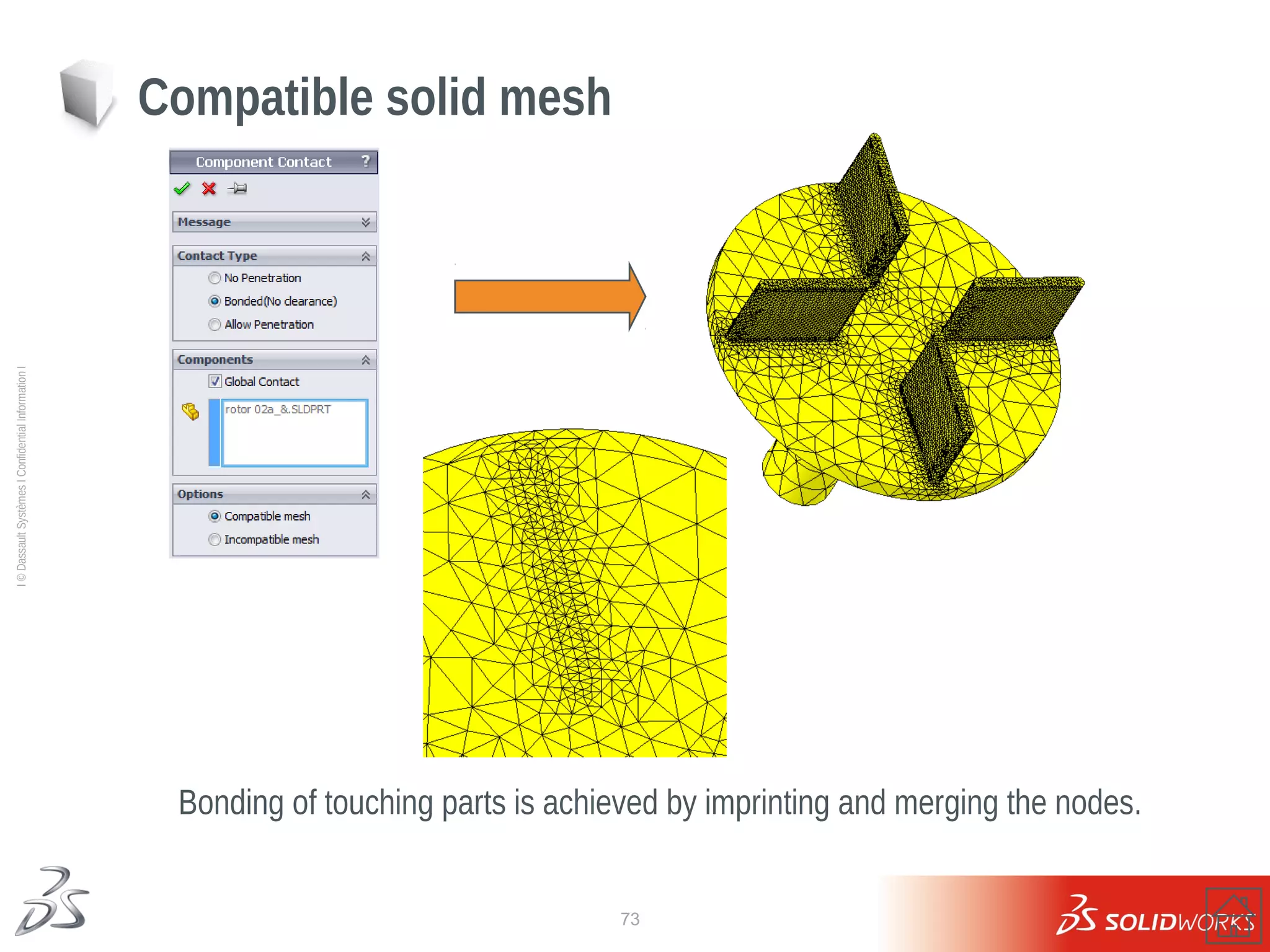
Bonding of touching parts is achieved by imprinting and merging the nodes.
Compatible solid mesh
74
Ι
©
Dassault
Systèmes
Ι
Confidential
Information
Ι
Bonding of touching parts is achieved by additional constraint equations.
Incompatible solid mesh
75
Ι
©
Dassault
Systèmes
Ι
Confidential
Information
Ι
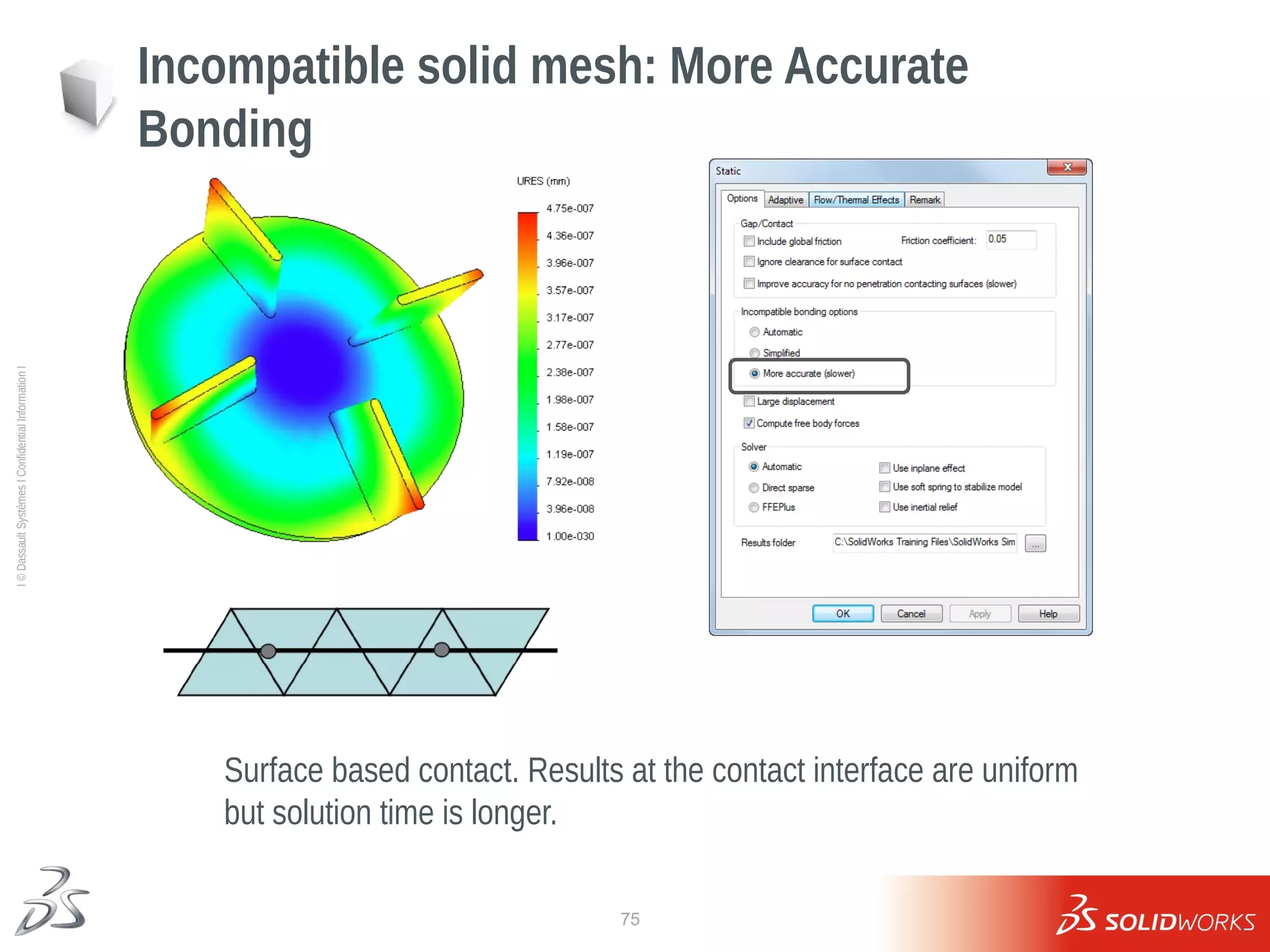
Incompatible solid mesh: More Accurate
Bonding
Surface based contact. Results at the contact interface are uniform
but solution time is longer.
76
Ι
©
Dassault
Systèmes
Ι
Confidential
Information
Ι
Incompatible solid mesh: Simplified
Bonding
Node based contact. Results at the contact interface may be
patchy but solution time is lower.
77
Ι
©
Dassault
Systèmes
Ι
Confidential
Information
Ι
Lesson 7
Assembly Analysis Mesh Refinement
78
Ι
©
Dassault
Systèmes
Ι
Confidential
Information
Ι
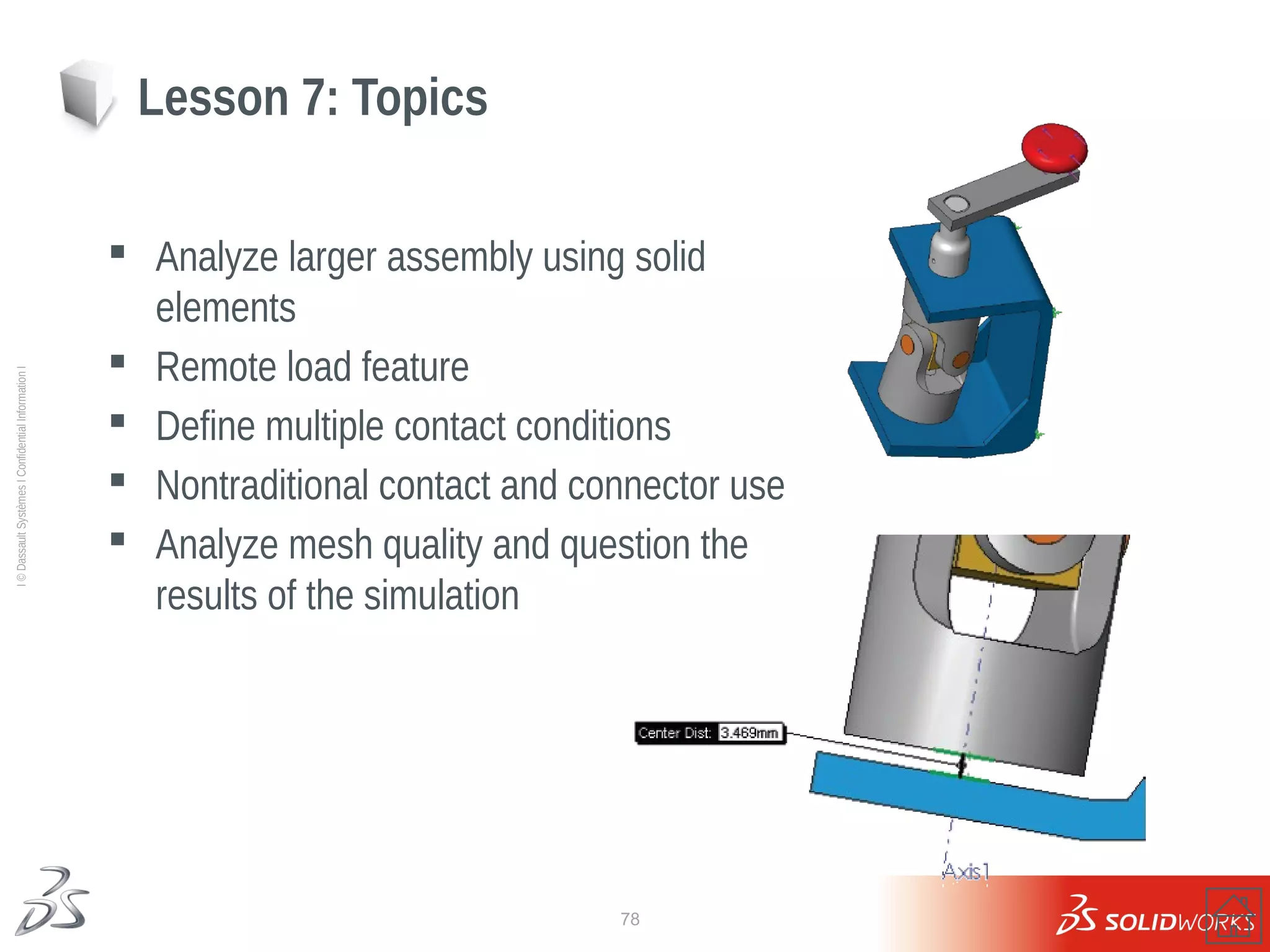
 Analyze larger assembly using solid
elements
 Remote load feature
 Define multiple contact conditions
 Nontraditional contact and connector use
 Analyze mesh quality and question the
results of the simulation
Lesson 7: Topics
79
Ι
©
Dassault
Systèmes
Ι
Confidential
Information
Ι
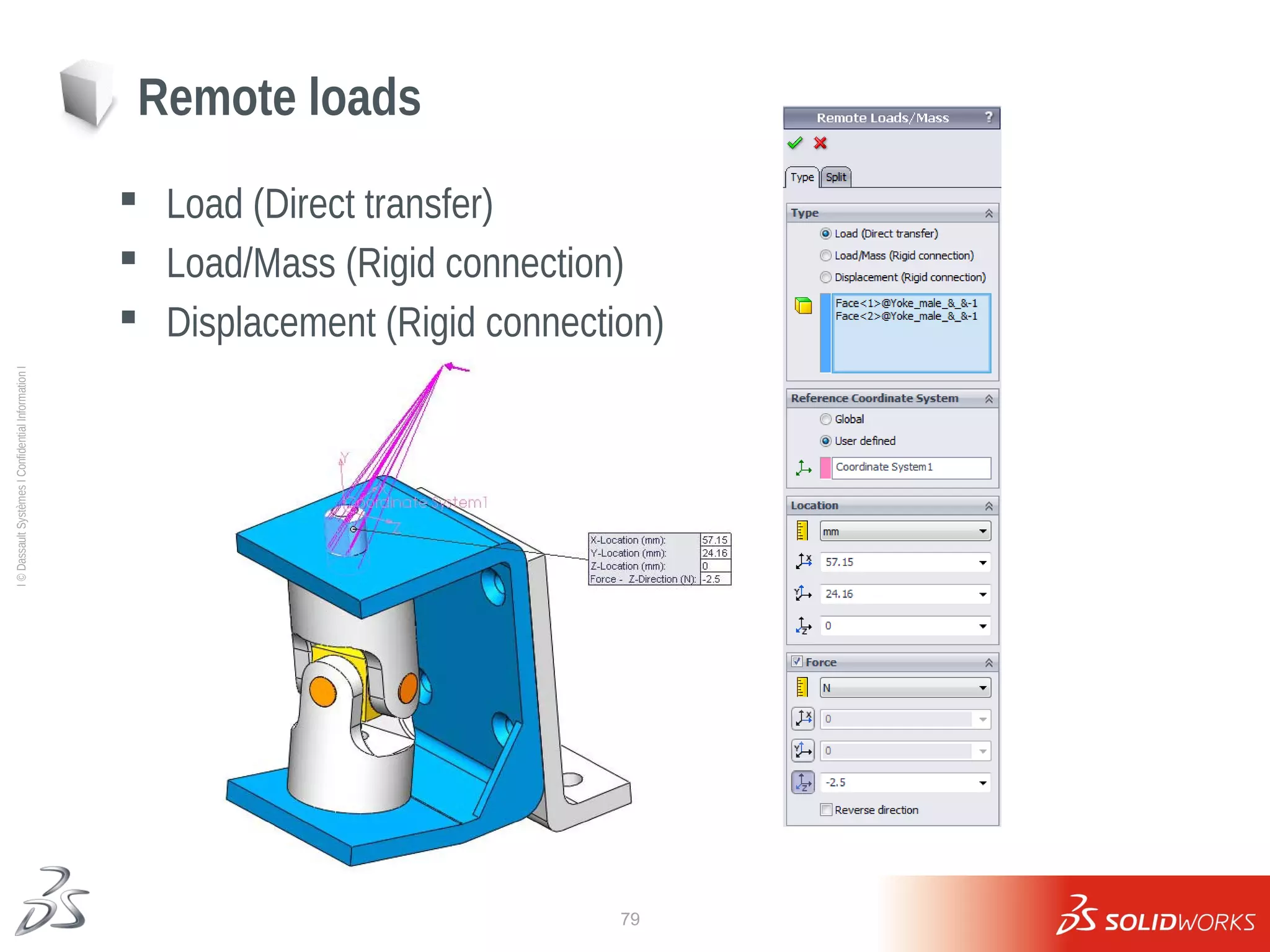
 Load (Direct transfer)
 Load/Mass (Rigid connection)
 Displacement (Rigid connection)
Remote loads
80
Ι
©
Dassault
Systèmes
Ι
Confidential
Information
Ι
 Bolt type
 Tight fit
 Material
 Pre-load
 Bolt series
Bolt connectors
81
Ι
©
Dassault
Systèmes
Ι
Confidential
Information
Ι
 Type of contact that replaces modeling a
component
 Rigid or Flexible
Virtual wall
82
Ι
©
Dassault
Systèmes
Ι
Confidential
Information
Ι
Lesson 7: Results
Draft mesh: mesh parameters and results
Mesh parameters are not ideal leading to
excessive von Mises stress results
83
Ι
©
Dassault
Systèmes
Ι
Confidential
Information
Ι
High mesh: mesh parameters and results
Mesh parameters improved, so did the results of
the simulation.
(NOTE: The time required to complete the simulation increased as well.)
Lesson 7: Results
84
Ι
©
Dassault
Systèmes
Ι
Confidential
Information
Ι
Exercise 14: Bolt Connectors
85
Ι
©
Dassault
Systèmes
Ι
Confidential
Information
Ι
Exercise 15: Awning
86
Ι
©
Dassault
Systèmes
Ι
Confidential
Information
Ι
Lesson 7: Questions
87
Ι
©
Dassault
Systèmes
Ι
Confidential
Information
Ι
Lesson 8
Analysis of Thin Components
88
Ι
©
Dassault
Systèmes
Ι
Confidential
Information
Ι
 Shell Elements
 Mid-plane and surface shell element meshing
 Alignment of shell mesh
 Evaluating mesh sizes
 Evaluating results for shell elements
 Reaction forces
 Solid vs. Shell meshing
Lesson 8: Topics
89
Ι
©
Dassault
Systèmes
Ι
Confidential
Information
Ι
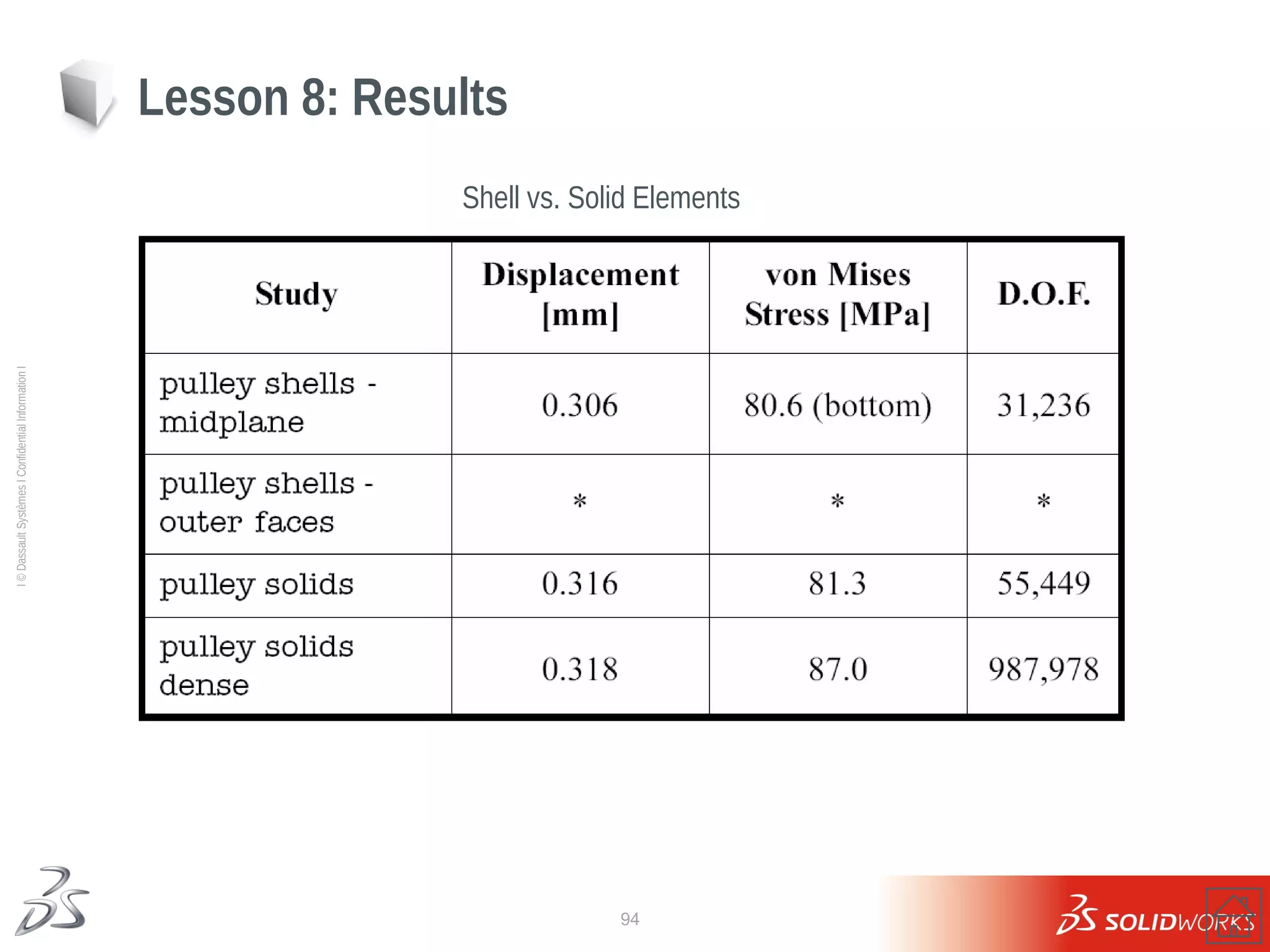
55449 DOF
Lesson 8: Results
Solid Elements – Von Mises Stress
987978 DOF
(1 element per thickness) (2 element per thickness)
90
Ι
©
Dassault
Systèmes
Ι
Confidential
Information
Ι
Defined by:
 Existing surface or sheet metal
bodies
 Mid-plane surfaces
 Outside/inside faces of solid bodies
Shell elements
Outside faces
Mid-plane surface
91
Ι
©
Dassault
Systèmes
Ι
Confidential
Information
Ι
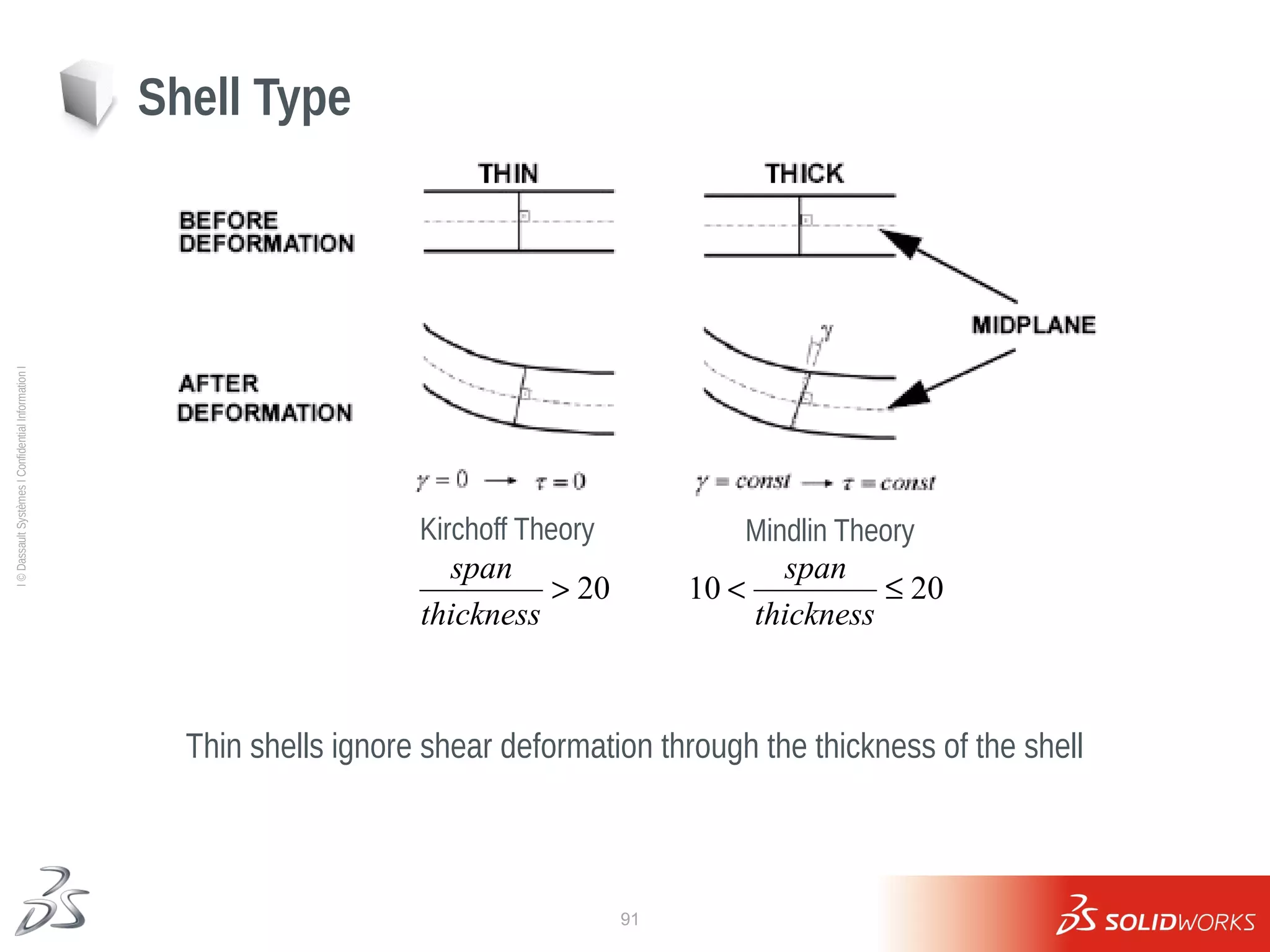
Shell Type
Kirchoff Theory Mindlin Theory
Thin shells ignore shear deformation through the thickness of the shell
20

thickness
span
20
10 

thickness
span
92
Ι
©
Dassault
Systèmes
Ι
Confidential
Information
Ι
Misaligned shell elements
Shell Element Alignment
Shell Elements - Alignment
Incorrect stress result representation
93
Ι
©
Dassault
Systèmes
Ι
Confidential
Information
Ι
Shell Elements (midplane) – Von Mises Stress Bottom
(orange)
Top (gray)
Lesson 8: Results
94
Ι
©
Dassault
Systèmes
Ι
Confidential
Information
Ι
Shell elements can greatly decrease the required computational time.
Modeling with shell elements is more demanding than with solids.
* See results of Exercise 16
Lesson 8: Results
Shell vs. Solid Elements
95
Ι
©
Dassault
Systèmes
Ι
Confidential
Information
Ι
Case Study: Joist Hanger
Shell elements generated
automatically for sheet metal
features
96
Ι
©
Dassault
Systèmes
Ι
Confidential
Information
Ι
Exercise 16: Bracket
97
Ι
©
Dassault
Systèmes
Ι
Confidential
Information
Ι
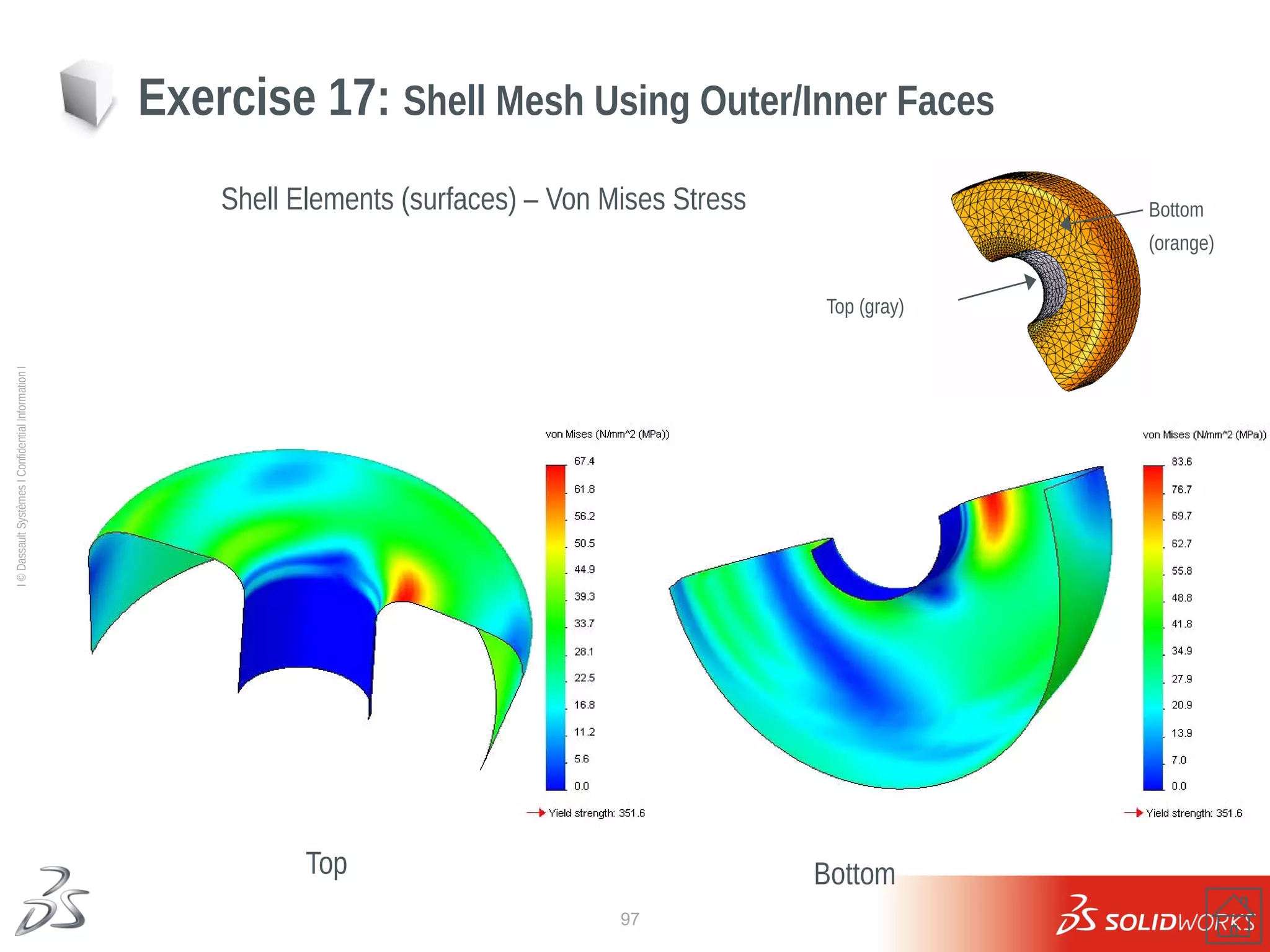
Top
Exercise 17: Shell Mesh Using Outer/Inner Faces
Shell Elements (surfaces) – Von Mises Stress
Bottom
Bottom
(orange)
Top (gray)
98
Ι
©
Dassault
Systèmes
Ι
Confidential
Information
Ι
Exercise 18: Spot Welds - Shell mesh
Spot Welds - shell model - stress results
Both solid and shell models predict similar behavior. Which one would you choose?
99
Ι
©
Dassault
Systèmes
Ι
Confidential
Information
Ι
Exercise 19: Edge Weld Connector
Edge Welds - shell model – weld bead sizes
Design the size of the edge weld beads.
100
Ι
©
Dassault
Systèmes
Ι
Confidential
Information
Ι
Exercise 20: Container Handle Weld
Self-guided exercise
Design double sided fillet welds connecting the container handle to the square plates.
101
Ι
©
Dassault
Systèmes
Ι
Confidential
Information
Ι
Lesson 8: Questions
102
Ι
©
Dassault
Systèmes
Ι
Confidential
Information
Ι
Lesson 8: Questions
103
Ι
©
Dassault
Systèmes
Ι
Confidential
Information
Ι
Lesson 9
Mixed Meshing Shells & Solids
104
Ι
©
Dassault
Systèmes
Ι
Confidential
Information
Ι
 Mixed meshing
 Solid-shell bonding
 Shell offset
 Mesh failure diagnostics
Lesson 9: Topics
105
Ι
©
Dassault
Systèmes
Ι
Confidential
Information
Ι
Mixed meshing
Why Mixed Meshing?
Some design assemblies may contain “bulky” parts suitable for solid mesh, as well as thin
parts ideal for shell elements.
106
Ι
©
Dassault
Systèmes
Ι
Confidential
Information
Ι
 Compatibility problems in mixed solid and shell element meshing
 Use of mixed mesh in simulation
Solid and Shell Elements
How many DOF does a solid
element have?
How many DOF does a shell
element have?
107
Ι
©
Dassault
Systèmes
Ι
Confidential
Information
Ι
 Hinge formed at the connecting edge
 May introduce rigid body modes if not
handled properly
 Mesh incompatible at the interface
 Bond generated through multi-point
constraints internally (mortar bonding)
Bonding between solids and shells
Hinge
108
Ι
©
Dassault
Systèmes
Ι
Confidential
Information
Ι
 Mid-surface
 Top surface
 Bottom surface
 Ratio
Shell offset
 By default, mesh located at mid-plane
 Orientation important when defining
shells with different thickness
109
Ι
©
Dassault
Systèmes
Ι
Confidential
Information
Ι
 Incompatible mesh
 Mesh control
 Auto-looping
 Check geometry
 Switch mesher
Mesh failure diagnostics
110
Ι
©
Dassault
Systèmes
Ι
Confidential
Information
Ι
Lesson 9: Results
Why are the stresses highest at the base near the support and bonded contacts?
111
Ι
©
Dassault
Systèmes
Ι
Confidential
Information
Ι
Exercise 21: Mixed Mesh Analysis
112
Ι
©
Dassault
Systèmes
Ι
Confidential
Information
Ι
Lesson 9: Questions
113
Ι
©
Dassault
Systèmes
Ι
Confidential
Information
Ι
Lesson 10
Mixed Meshing Solids, Beams & Shells
114
Ι
©
Dassault
Systèmes
Ι
Confidential
Information
Ι
 Beam elements
 Joints
 Bonding of beams
 Post-processing of beam elements
Lesson 10: Topics
115
Ι
©
Dassault
Systèmes
Ι
Confidential
Information
Ι
6 DOFs
Beam elements
116
Ι
©
Dassault
Systèmes
Ι
Confidential
Information
Ι
 joints are connected to two or more beam members.
 joints are connected to a single member only
Joints
117
Ι
©
Dassault
Systèmes
Ι
Confidential
Information
Ι
Bonding of beams
Bond joints or entire beam to
target entities
• Beam profile imprinted on target entities
• Accurate results at the interface
118
Ι
©
Dassault
Systèmes
Ι
Confidential
Information
Ι
Lesson 10: Results
119
Ι
©
Dassault
Systèmes
Ι
Confidential
Information
Ι
 Stress: Axial, bending,
worst-case, torsional, shear
 Displacement
 Axial force diagrams
 Shear & bending moment
diagrams
 Reaction forces & moments
Results for beam elements
Simply supported with uniform distributed loading
120
Ι
©
Dassault
Systèmes
Ι
Confidential
Information
Ι
Exercise 22: Beam Elements
121
Ι
©
Dassault
Systèmes
Ι
Confidential
Information
Ι
Exercise 23: Cabinet
122
Ι
©
Dassault
Systèmes
Ι
Confidential
Information
Ι
Exercise 24: Frame Rigidity
123
Ι
©
Dassault
Systèmes
Ι
Confidential
Information
Ι
Exercise 24: Frame Rigidity
124
Ι
©
Dassault
Systèmes
Ι
Confidential
Information
Ι
Lesson 11
Design Study
125
Ι
©
Dassault
Systèmes
Ι
Confidential
Information
Ι
Lesson 11: Topics
 Design Study – performing several studies for different
input data (model geometry or loads)
 Stresses in vehicle suspension when vehicle is:
 Stationary and loaded
 Moving at constant acceleration on a smooth road
 Moving on a bumpy road
 Moving at a constant speed on a banking road
 Different loads in different directions
 Review different connectors and fixtures
126
Ι
©
Dassault
Systèmes
Ι
Confidential
Information
Ι
Design Scenario with loads input
127
Ι
©
Dassault
Systèmes
Ι
Confidential
Information
Ι
Lesson 11: Results (Loads input)
128
Ι
©
Dassault
Systèmes
Ι
Confidential
Information
Ι
Design Scenario with geometry input
129
Ι
©
Dassault
Systèmes
Ι
Confidential
Information
Ι
Lesson 11: Results (Geometry input)
130
Ι
©
Dassault
Systèmes
Ι
Confidential
Information
Ι
Exercise 25: Design Scenarios
131
Ι
©
Dassault
Systèmes
Ι
Confidential
Information
Ι
Lesson 12
Thermal Stress Analysis
132
Ι
©
Dassault
Systèmes
Ι
Confidential
Information
Ι
 Static analysis with temperature load
 Use of various contact conditions
 Temperature dependent material properties
 Soft spring and Inertia relief options
Lesson 12: Topics
133
Ι
©
Dassault
Systèmes
Ι
Confidential
Information
Ι
Averaging across boundaries ON Averaging across boundaries OFF
Lesson 12: Results
134
Ι
©
Dassault
Systèmes
Ι
Confidential
Information
Ι
Axial strain at the sensor locations
Lesson 12: Results
135
Ι
©
Dassault
Systèmes
Ι
Confidential
Information
Ι
Lesson 12: Results
136
Ι
©
Dassault
Systèmes
Ι
Confidential
Information
Ι
Lesson 13
Adaptive Meshing
137
Ι
©
Dassault
Systèmes
Ι
Confidential
Information
Ι
Lesson 13: Topics
Why and What is Adaptivity?
What do FEM results depend on?
1. Mesh
2. Type and order of the elements used (Draft or High quality)
3. Other phenomena (numerical errors, modeling errors etc.)
What is our Goal? Is it just to obtain a solution?
How to achieve it?
Make sure our results are close to some defined accurate solution.
(typical parameter is strain energy density)
1. Modify and refine the mesh topology
2. Modify the “order” of elements
h-adaptivity
p-adaptivity
138
Ι
©
Dassault
Systèmes
Ι
Confidential
Information
Ι
Adaptive Finite Element Analysis
h-Adaptivity, p-Adaptivity
Refining the mesh (h-Adaptivity)
Changing the “order” of elements (p-Adaptivity)
1st
order
(Draft Quality)
2nd
order
(High Quality)
… 5th
order
139
Ι
©
Dassault
Systèmes
Ι
Confidential
Information
Ι
Lesson 13: Results
h-Adaptivity - results
98% convergence criteria (2% accuracy) was achieved in 6 iterations
140
Ι
©
Dassault
Systèmes
Ι
Confidential
Information
Ι
Lesson 13: Results
p-Adaptivity - results
0.05% convergence criteria was/was not achieved in 4 iterations
141
Ι
©
Dassault
Systèmes
Ι
Confidential
Information
Ι
Summary
Max. displacement difference: 0.2%
Max. Von Misses stress difference:10%
Which method would you use?
Lesson 13: Results
142
Ι
©
Dassault
Systèmes
Ι
Confidential
Information
Ι
Lesson 14
Large Displacement Analysis
143
Ι
©
Dassault
Systèmes
Ι
Confidential
Information
Ι
 Surface contact
 Contact analysis with the large
displacement option
 Evaluate mesh adequacy for modeling
bending stresses
 Limitations of the linear material model
Lesson 14: Topics
144
Ι
©
Dassault
Systèmes
Ι
Confidential
Information
Ι
Lesson 14: Results
Small displacement contact analysis – Incorrect Displacements
145
Ι
©
Dassault
Systèmes
Ι
Confidential
Information
Ι
Lesson 14: Results
Large displacement contact analysis – Correct Displacements
146
Ι
©
Dassault
Systèmes
Ι
Confidential
Information
Ι
Lesson 14: Questions

PPT SolidWorks Simulation Training.PDF