Govt. Institute of
Forensic Science, Nagpur
Applied Digital & Cyber Forensics
B.Sc. IIIrd year
Sem.-Vth
Academic Session:- 2018-19
Creation & Verification of Digital Signature
using Digisigner
Presented by,
Rituja R. Gharote
Mamta A. Barmase
Palash A. Mehar
Digital Signature
It is a type of electronic signature that encrypts
documents with digital codes that are particularly
difficult to duplicate.
A digital signature is an authentication
mechanism that enables the creator of message to
attach a code that acts as a signature. The
signature is formed by taking the hash of the
message and encrypting the message with the
creator’s private key .
Digital signature cryptographically bind an
electronic identity to an electronic document and
the signature can not be copied to another
document.
Working of Digital Signatgure
Digital signatures, like handwritten signatures are unique to
each signer. Digital signature solution providers such as Docusign,
follow a specific protocol, called PKI.
The digital signature can be considered as a numerical value
that is represented as a sequence of characters. The creation of a
digital signature is a complex mathematical process that can only be
created by a computer.
Working of Digital Signatgure
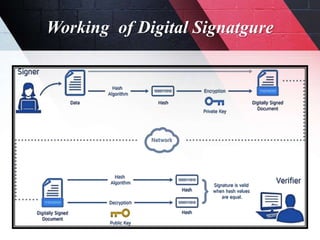
Consider a scenario where Alice has to digitally sign a file or an email and send it to bob.
Alice selects the file to be digitally signed or click on the ‘sign in’ her email application.
The hash value of the file content or the message is calculated by Alice’s computer.
This hash value encrypted with Alice signing key (which is private key) to create the digital
signature.
Now the original file or email message along with its digital signature are sent to Bob.
After Bob receives the sign message associated applications ( Email applications) identifies that
the message has been signed, Bob’s computer then proceed to,
Decrypt the digital signature using Alice’s public key
Calculate the hash of original message
Compare the (a) hash it has computed from the received message with the (b) decrypted
hash received with Alice’s message.
Working of Digital Signatgure
Attributes of Digital Signature
Digital signature ensures the confidentiality via. The
following three attributes,
1. Authentication
2. Integrity
3. Non-repudiation
Attributes of Digital Signature
1) Authentication:- Authentication means the act of proving who you say you are.
Authentication means that you know who created and sent the message. Digital
signature is used to authenticate the source of message. It ensures the user of sender.
2) Integrity:- Integrity ensures that when a message is sent over a network, the data
that arrives is the same as the data that was originally sent. Integrity is the assurance
that the information is trustworthy and accurate. Digital signature ensures the
integrity of the message.
3) Non-repudiation:- This is an important criteria of digital signature. As digital
signature ensures the authentication of the message, so the sender can’t repudiate it
later. At the same time it also ensures the identity of the receiver can’t repudiate it
later.
Controller of Certifying Authority(CCA)
The IT Act provides for the Controller of
Certifying Authorities (CCA) to license and
regulate the working of Certifying Authorities
and also to ensure that none of the provisions of
the Act are violated. The Certifying Authorities
(CAs) issue Digital Signature Certificates(DSC)
for electronic authentication of users.
The Controller of Certifying Authorities (CCA)
has been appointed by the Central Government
under section 17 of the Act for purposes of the
IT Act. The Office of the CCA came into
existence on November 1, 2000. It aims at
promoting the growth of E-Commerce and E-
Governance through the wide use of digital
signatures.
Sections related to digital signature
Section 47A in The Indian Evidence Act, 1872
47A Opinion as to electronic signature when relevant
When the Court has to form an opinion as to the electronic signature of
any person, the opinion of the Certifying Authority which has issued the Electronic
Signature Certificate is a relevant fact.
Section 73A in The Indian Evidence Act, 1872
Proof as to verification of digital signature.
In order to ascertain whether a digital signature is that of the person by
whom it purports to have been affixed, the Court may direct73A.
Digisigner 4.0
Size :- 8.41 MB
License:- Freeware
Publisher:- Listed programs
Released Date:- 2013/10/21
Operating system:- Windows 2000/XP/Vista/7/8/10
• Features:-
 Audit trail
 Authentication
 Auto reminders
 Customized templates
 Document Analytics
 E-signature
 Mobile signature
 Multi-party signing
 Task progress tracking
Steps of creation of digital signature using
Digisigner
Open a pdf with a Digisigner.
Once the pdf is open, select on signature menu.
Drag the mouse wherever you want to place your sign, Right click on mouse
Either you can use default signature or you can generate your own signature by using the
option generate your own certificate.
Fill your necessary information like name, email, organization’s unit, organization, two-
letter country code etc.
The destination of scoring the key obtained from digital signature should be document
file only.
Give suitable password and click on generate
Once you have generated your own signaturem, you can sign any pdf file click on sign.
Save it with desired name on desired destination.
Steps of Validation of Digital signature using
Digisigner
 Open the pdf you want to validate
with Digisigner
 Either right click on the signature you
want to validate or select validate
signature menu on the extreme right
corner
 This will show whether the signature
is valid or not
Mamta Barmase
Date: 25/07/18
]
Mamta Barmase
Date: 25/07/18
Creation & Verification of Digital Signature using Digisigner

Creation & Verification of Digital Signature using Digisigner

  • 1.
    Govt. Institute of ForensicScience, Nagpur Applied Digital & Cyber Forensics B.Sc. IIIrd year Sem.-Vth Academic Session:- 2018-19
  • 2.
    Creation & Verificationof Digital Signature using Digisigner Presented by, Rituja R. Gharote Mamta A. Barmase Palash A. Mehar
  • 3.
    Digital Signature It isa type of electronic signature that encrypts documents with digital codes that are particularly difficult to duplicate. A digital signature is an authentication mechanism that enables the creator of message to attach a code that acts as a signature. The signature is formed by taking the hash of the message and encrypting the message with the creator’s private key . Digital signature cryptographically bind an electronic identity to an electronic document and the signature can not be copied to another document.
  • 4.
    Working of DigitalSignatgure Digital signatures, like handwritten signatures are unique to each signer. Digital signature solution providers such as Docusign, follow a specific protocol, called PKI. The digital signature can be considered as a numerical value that is represented as a sequence of characters. The creation of a digital signature is a complex mathematical process that can only be created by a computer.
  • 5.
    Working of DigitalSignatgure Consider a scenario where Alice has to digitally sign a file or an email and send it to bob. Alice selects the file to be digitally signed or click on the ‘sign in’ her email application. The hash value of the file content or the message is calculated by Alice’s computer. This hash value encrypted with Alice signing key (which is private key) to create the digital signature. Now the original file or email message along with its digital signature are sent to Bob. After Bob receives the sign message associated applications ( Email applications) identifies that the message has been signed, Bob’s computer then proceed to, Decrypt the digital signature using Alice’s public key Calculate the hash of original message Compare the (a) hash it has computed from the received message with the (b) decrypted hash received with Alice’s message.
  • 6.
  • 7.
    Attributes of DigitalSignature Digital signature ensures the confidentiality via. The following three attributes, 1. Authentication 2. Integrity 3. Non-repudiation
  • 8.
    Attributes of DigitalSignature 1) Authentication:- Authentication means the act of proving who you say you are. Authentication means that you know who created and sent the message. Digital signature is used to authenticate the source of message. It ensures the user of sender. 2) Integrity:- Integrity ensures that when a message is sent over a network, the data that arrives is the same as the data that was originally sent. Integrity is the assurance that the information is trustworthy and accurate. Digital signature ensures the integrity of the message. 3) Non-repudiation:- This is an important criteria of digital signature. As digital signature ensures the authentication of the message, so the sender can’t repudiate it later. At the same time it also ensures the identity of the receiver can’t repudiate it later.
  • 9.
    Controller of CertifyingAuthority(CCA) The IT Act provides for the Controller of Certifying Authorities (CCA) to license and regulate the working of Certifying Authorities and also to ensure that none of the provisions of the Act are violated. The Certifying Authorities (CAs) issue Digital Signature Certificates(DSC) for electronic authentication of users. The Controller of Certifying Authorities (CCA) has been appointed by the Central Government under section 17 of the Act for purposes of the IT Act. The Office of the CCA came into existence on November 1, 2000. It aims at promoting the growth of E-Commerce and E- Governance through the wide use of digital signatures.
  • 10.
    Sections related todigital signature Section 47A in The Indian Evidence Act, 1872 47A Opinion as to electronic signature when relevant When the Court has to form an opinion as to the electronic signature of any person, the opinion of the Certifying Authority which has issued the Electronic Signature Certificate is a relevant fact. Section 73A in The Indian Evidence Act, 1872 Proof as to verification of digital signature. In order to ascertain whether a digital signature is that of the person by whom it purports to have been affixed, the Court may direct73A.
  • 11.
    Digisigner 4.0 Size :-8.41 MB License:- Freeware Publisher:- Listed programs Released Date:- 2013/10/21 Operating system:- Windows 2000/XP/Vista/7/8/10
  • 12.
    • Features:-  Audittrail  Authentication  Auto reminders  Customized templates  Document Analytics  E-signature  Mobile signature  Multi-party signing  Task progress tracking
  • 13.
    Steps of creationof digital signature using Digisigner Open a pdf with a Digisigner. Once the pdf is open, select on signature menu. Drag the mouse wherever you want to place your sign, Right click on mouse Either you can use default signature or you can generate your own signature by using the option generate your own certificate. Fill your necessary information like name, email, organization’s unit, organization, two- letter country code etc. The destination of scoring the key obtained from digital signature should be document file only. Give suitable password and click on generate Once you have generated your own signaturem, you can sign any pdf file click on sign. Save it with desired name on desired destination.
  • 14.
    Steps of Validationof Digital signature using Digisigner  Open the pdf you want to validate with Digisigner  Either right click on the signature you want to validate or select validate signature menu on the extreme right corner  This will show whether the signature is valid or not Mamta Barmase Date: 25/07/18 ] Mamta Barmase Date: 25/07/18