PPC: Back To Basics
What Is It? 
Why Use it? 
What Are the Advantages?
? Paid Search ?? 
? PPC ? 
? Pay Per Click ?? 
? SEM ? 
?? CTR ?? 
? CPC ? 
? CPM ? 
?? CPA ?? 
?? QS ??
The Language of PPC 
SPONSORED SEARCH: Pay-per-click distribution tactic that displays 
your ads in the sponsored search results at the top, along the side, and 
across the bottom of search results pages for searches that relate to your 
keywords. 
CONTENT PLACEMENT TARGETING: Pay-per-click distribution tactic 
that displays your ads alongside relevant articles such as product reviews, 
news articles, etc. on the Yahoo and Google distribution network. 
AD TEXT: The marketing message displayed to prospective customers. 
An ad contains a title, description, and URL. 
Definitions are from Online Marketing Mavens. 
Additional Reference: Google AdWords Glossary
The Language of PPC 
LANDING PAGE: The page on a web site where one is taken after clicking 
on a advertisement. While this can be any page, it is often a page designed 
to expand on the service or product mentioned in the initial advertisement. 
CAMPAIGN: A campaign contains one or more ad groups sharing the 
same budget, schedule and geo-targeting criteria. A campaign is typically 
created to support a particular marketing goal. 
KEYWORD: A word or phrase that relates to the products or services you 
wish to advertise. When prospective customers are looking for information 
related to what you sell, and they type your keywords into a search box, 
your ads may be displayed. 
Definitions are from Online Marketing Mavens. 
Additional Reference: Google AdWords Glossary
The Language of PPC 
CONVERSIONS: The completion of an action that you value, such as a 
purchase, registration, or sign-up. 
IMPRESSIONS: The number of times an ad is displayed in search results 
or on sites. 
CLICK-THROUGH RATE (CTR): The number of clicks received divided 
by the number of impressions generated. Example: An ad that is displayed 
100 times and receives 10 clicks has a click-through rate of 10%. 
AVE CPC: Average cost per click. The average price you paid each time 
your ad was clicked. 
Definitions are from Online Marketing Mavens. 
Additional Reference: Google AdWords Glossary
Google Adwords Basics 
• Google's Advertising Product - 
https://adwords.google.com 
• Create Ads - Text, Image, Video 
• Ads Appear on Google Search Engine and 
Google Partner Sites 
• Pay for Ads when someone "clicks" on them, 
(ie. Pay-Per-Click or PPC) but there are other 
alternative bidding options in some cases.
Yahoo! Sponsored Search Marketing Basics 
• Yahoo!'s Advertising Product - 
http://advertising.yahoo.com/smallbusiness/ysm 
• Create Ads – Text 
• Ads Appear on Yahoo! Search Engine and Yahoo! 
Partner Sites 
• Pay for Ads when someone "clicks" on them. (ie. 
Pay-Per-Click or PPC)
Microsoft Adcenter Basics 
• Microsoft's Advertising Product - 
https://adcenter.microsoft.com 
• Create Ads – Text 
• Ads Appear on Bing Search Engine and 
Microsoft Owned Sites and Partner Websites 
• Pay for Ads when someone "clicks" on them. 
(ie. Pay-Per-Click or PPC)
Search Network - Best Practices 
• Separate keywords into different ad groups 
by similar core words. 
• Ads should be highly relevant to searched 
term. 
• Landing Pages should be highly relevant to 
Ad clicked. 
• Be more specific using "negative keyword 
matching" or other match options besides 
"broad matching."
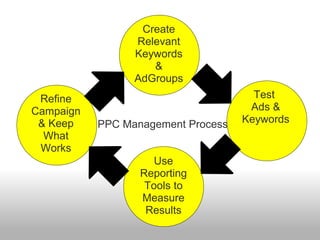
Create 
Relevant 
Keywords 
& 
AdGroups 
Test 
Ads & 
Keywords 
Refine 
Campaign 
& Keep 
What 
Works 
PPC Management Process 
Use 
Reporting 
Tools to 
Measure 
Results
What Else Can 
You Do With 
Paid Search?
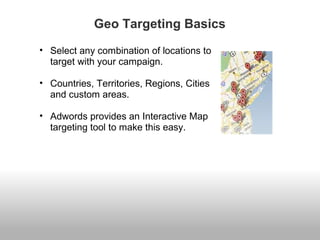
Geo Targeting Basics 
• Select any combination of locations to 
target with your campaign. 
• Countries, Territories, Regions, Cities 
and custom areas. 
• Adwords provides an Interactive Map 
targeting tool to make this easy.
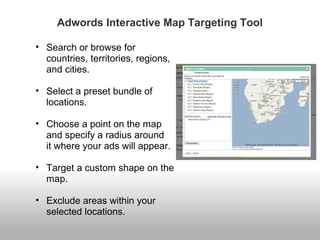
Adwords Interactive Map Targeting Tool 
• Search or browse for 
countries, territories, regions, 
and cities. 
• Select a preset bundle of 
locations. 
• Choose a point on the map 
and specify a radius around 
it where your ads will appear. 
• Target a custom shape on the 
map. 
• Exclude areas within your 
selected locations.
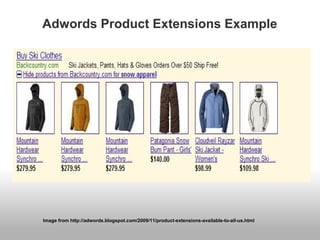
Adwords Product Extensions 
• New feature that can highlight your products 
directly in your Google.com search ads. 
• Your Google Merchant Center account must 
contain a product that is relevant to the 
searcher's query. 
• Shows the images, titles, and prices of your 
closest matching products with your ad. 
• When the user clicks a product image, they 
will be taken to the destination page listed for 
that product.
Adwords Product Extensions Example 
Image from http://adwords.blogspot.com/2009/11/product-extensions-available-to-all-us.html
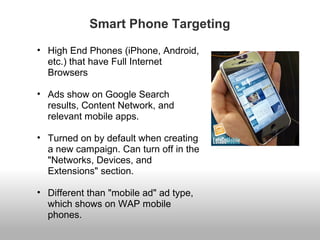
Smart Phone Targeting 
• High End Phones (iPhone, Android, 
etc.) that have Full Internet 
Browsers 
• Ads show on Google Search 
results, Content Network, and 
relevant mobile apps. 
• Turned on by default when creating 
a new campaign. Can turn off in the 
"Networks, Devices, and 
Extensions" section. 
• Different than "mobile ad" ad type, 
which shows on WAP mobile 
phones.
Smart Phone Targeting Best Practices 
• Create a separate campaign that only targets 
these devices. 
• Do not use Flash since most of these devices 
do not support it currently. 
• Make sure your "Call To Action" is in an 
easily seen spot on the landing page since it 
is much more difficult to navigate on these 
devices. 
• Consider shortening your conversion 
checkout process.
Paid Search on the Content Network
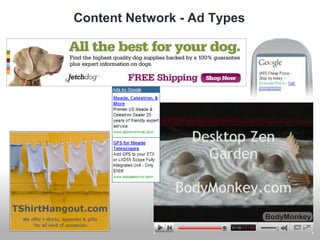
Content Network - Ad Types
How Much Would You Pay For A Click?
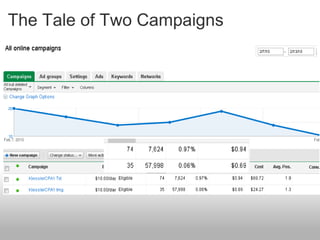
The Tale of Two Campaigns
Content Network - Best Practices 
• Separate search and content - they don't play 
well together. 
• Ads should distract the reader's attention. 
• Use keyword themed campaigns (automatic 
placements) and general/high traffic 
managed placement campaigns to mine for 
targeted placements. 
• Start with smaller budgets. 
• Run placement performance reports.
Content Network - Targeting With Keywords 
• Campaign settings = relevant pages across 
the entire network. 
• Use small groups of themed keywords 
(match doesn't matter). 
• Set up filtering to minimize unwanted traffic 
(negative keywords, standard category 
filtering, site exclusions).
Content Network - Targeting Placements 
• Campaign settings = relevant pages only on 
the placements I manage. 
• Use small groups of themed placements with 
appropriate ads and landing pages 
• When targeting high traffic sites, add one or 
two keywords for better targeting
Pay Per Click Resources 
• Keyword Tools 
o Google's Keyword Tool 
o Keyword Rockstar 
o *VisualThesaurus.com 
• Placement Tools 
o *Ad Planner 
o Shoemoney AdSense Crawler Tools 
o AdWords Digger 
o Site Sniper Pro 
o Keyword Rockstar
Pay Per Click Resources 
• Ad Builders (free and paid) 
o BoostCTR.com 
o MiniBannersZen.com 
o Keyword Rockstar 
o *AdLab.MSN.com/Ad-Text-Writer 
• Competitive Research & Forecasting 
o SpyFu 
o Compete.com 
o KeywordSpy 
o Enquisite Auditor 
o *Adlab.MSN.com/Keyword-Forecast 
o *Google Insights
Pay Per Click Resources 
• Reporting 
o *Google conversion coding/tracking 
o *Google Analytics
Pay Per Click Resources 
• Campaign Management 
o *MCC (for managing multiple AdWords 
accounts) 
o *AdWords Editor 
o *MSN Adcenter Desktop 
• Bid Management 
o ClickSweeper.com
Free 30 Day Trial for Keyword Rockstar 
Go to: 
http://www.KeywordRockstar.com/dfwsem
For more information on content network strategies: 
ShelleyEllis.com/Training/ 
Twitter.com/ItsJustShelley

All about Adwords(PPC) for beginners, Adwords ppt, PPC

  • 1.
  • 2.
    What Is It? Why Use it? What Are the Advantages?
  • 3.
    ? Paid Search?? ? PPC ? ? Pay Per Click ?? ? SEM ? ?? CTR ?? ? CPC ? ? CPM ? ?? CPA ?? ?? QS ??
  • 4.
    The Language ofPPC SPONSORED SEARCH: Pay-per-click distribution tactic that displays your ads in the sponsored search results at the top, along the side, and across the bottom of search results pages for searches that relate to your keywords. CONTENT PLACEMENT TARGETING: Pay-per-click distribution tactic that displays your ads alongside relevant articles such as product reviews, news articles, etc. on the Yahoo and Google distribution network. AD TEXT: The marketing message displayed to prospective customers. An ad contains a title, description, and URL. Definitions are from Online Marketing Mavens. Additional Reference: Google AdWords Glossary
  • 5.
    The Language ofPPC LANDING PAGE: The page on a web site where one is taken after clicking on a advertisement. While this can be any page, it is often a page designed to expand on the service or product mentioned in the initial advertisement. CAMPAIGN: A campaign contains one or more ad groups sharing the same budget, schedule and geo-targeting criteria. A campaign is typically created to support a particular marketing goal. KEYWORD: A word or phrase that relates to the products or services you wish to advertise. When prospective customers are looking for information related to what you sell, and they type your keywords into a search box, your ads may be displayed. Definitions are from Online Marketing Mavens. Additional Reference: Google AdWords Glossary
  • 6.
    The Language ofPPC CONVERSIONS: The completion of an action that you value, such as a purchase, registration, or sign-up. IMPRESSIONS: The number of times an ad is displayed in search results or on sites. CLICK-THROUGH RATE (CTR): The number of clicks received divided by the number of impressions generated. Example: An ad that is displayed 100 times and receives 10 clicks has a click-through rate of 10%. AVE CPC: Average cost per click. The average price you paid each time your ad was clicked. Definitions are from Online Marketing Mavens. Additional Reference: Google AdWords Glossary
  • 7.
    Google Adwords Basics • Google's Advertising Product - https://adwords.google.com • Create Ads - Text, Image, Video • Ads Appear on Google Search Engine and Google Partner Sites • Pay for Ads when someone "clicks" on them, (ie. Pay-Per-Click or PPC) but there are other alternative bidding options in some cases.
  • 8.
    Yahoo! Sponsored SearchMarketing Basics • Yahoo!'s Advertising Product - http://advertising.yahoo.com/smallbusiness/ysm • Create Ads – Text • Ads Appear on Yahoo! Search Engine and Yahoo! Partner Sites • Pay for Ads when someone "clicks" on them. (ie. Pay-Per-Click or PPC)
  • 9.
    Microsoft Adcenter Basics • Microsoft's Advertising Product - https://adcenter.microsoft.com • Create Ads – Text • Ads Appear on Bing Search Engine and Microsoft Owned Sites and Partner Websites • Pay for Ads when someone "clicks" on them. (ie. Pay-Per-Click or PPC)
  • 10.
    Search Network -Best Practices • Separate keywords into different ad groups by similar core words. • Ads should be highly relevant to searched term. • Landing Pages should be highly relevant to Ad clicked. • Be more specific using "negative keyword matching" or other match options besides "broad matching."
  • 11.
    Create Relevant Keywords & AdGroups Test Ads & Keywords Refine Campaign & Keep What Works PPC Management Process Use Reporting Tools to Measure Results
  • 12.
    What Else Can You Do With Paid Search?
  • 13.
    Geo Targeting Basics • Select any combination of locations to target with your campaign. • Countries, Territories, Regions, Cities and custom areas. • Adwords provides an Interactive Map targeting tool to make this easy.
  • 14.
    Adwords Interactive MapTargeting Tool • Search or browse for countries, territories, regions, and cities. • Select a preset bundle of locations. • Choose a point on the map and specify a radius around it where your ads will appear. • Target a custom shape on the map. • Exclude areas within your selected locations.
  • 15.
    Adwords Product Extensions • New feature that can highlight your products directly in your Google.com search ads. • Your Google Merchant Center account must contain a product that is relevant to the searcher's query. • Shows the images, titles, and prices of your closest matching products with your ad. • When the user clicks a product image, they will be taken to the destination page listed for that product.
  • 16.
    Adwords Product ExtensionsExample Image from http://adwords.blogspot.com/2009/11/product-extensions-available-to-all-us.html
  • 17.
    Smart Phone Targeting • High End Phones (iPhone, Android, etc.) that have Full Internet Browsers • Ads show on Google Search results, Content Network, and relevant mobile apps. • Turned on by default when creating a new campaign. Can turn off in the "Networks, Devices, and Extensions" section. • Different than "mobile ad" ad type, which shows on WAP mobile phones.
  • 18.
    Smart Phone TargetingBest Practices • Create a separate campaign that only targets these devices. • Do not use Flash since most of these devices do not support it currently. • Make sure your "Call To Action" is in an easily seen spot on the landing page since it is much more difficult to navigate on these devices. • Consider shortening your conversion checkout process.
  • 19.
    Paid Search onthe Content Network
  • 20.
  • 21.
    How Much WouldYou Pay For A Click?
  • 22.
    The Tale ofTwo Campaigns
  • 23.
    Content Network -Best Practices • Separate search and content - they don't play well together. • Ads should distract the reader's attention. • Use keyword themed campaigns (automatic placements) and general/high traffic managed placement campaigns to mine for targeted placements. • Start with smaller budgets. • Run placement performance reports.
  • 24.
    Content Network -Targeting With Keywords • Campaign settings = relevant pages across the entire network. • Use small groups of themed keywords (match doesn't matter). • Set up filtering to minimize unwanted traffic (negative keywords, standard category filtering, site exclusions).
  • 25.
    Content Network -Targeting Placements • Campaign settings = relevant pages only on the placements I manage. • Use small groups of themed placements with appropriate ads and landing pages • When targeting high traffic sites, add one or two keywords for better targeting
  • 26.
    Pay Per ClickResources • Keyword Tools o Google's Keyword Tool o Keyword Rockstar o *VisualThesaurus.com • Placement Tools o *Ad Planner o Shoemoney AdSense Crawler Tools o AdWords Digger o Site Sniper Pro o Keyword Rockstar
  • 27.
    Pay Per ClickResources • Ad Builders (free and paid) o BoostCTR.com o MiniBannersZen.com o Keyword Rockstar o *AdLab.MSN.com/Ad-Text-Writer • Competitive Research & Forecasting o SpyFu o Compete.com o KeywordSpy o Enquisite Auditor o *Adlab.MSN.com/Keyword-Forecast o *Google Insights
  • 28.
    Pay Per ClickResources • Reporting o *Google conversion coding/tracking o *Google Analytics
  • 29.
    Pay Per ClickResources • Campaign Management o *MCC (for managing multiple AdWords accounts) o *AdWords Editor o *MSN Adcenter Desktop • Bid Management o ClickSweeper.com
  • 30.
    Free 30 DayTrial for Keyword Rockstar Go to: http://www.KeywordRockstar.com/dfwsem
  • 31.
    For more informationon content network strategies: ShelleyEllis.com/Training/ Twitter.com/ItsJustShelley