2
• SQL operatorsare reserved keywords used in the WHERE clause of a SQL
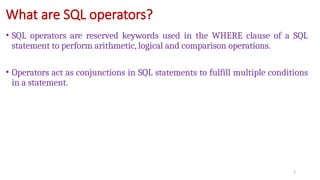
statement to perform arithmetic, logical and comparison operations.
• Operators act as conjunctions in SQL statements to fulfill multiple conditions
in a statement.
What are SQL operators?
3.
3
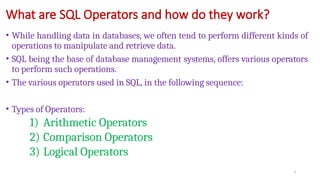
• While handlingdata in databases, we often tend to perform different kinds of
operations to manipulate and retrieve data.
• SQL being the base of database management systems, offers various operators
to perform such operations.
• The various operators used in SQL, in the following sequence:
• Types of Operators:
1) Arithmetic Operators
2) Comparison Operators
3) Logical Operators
What are SQL Operators and how do they work?
4.
4
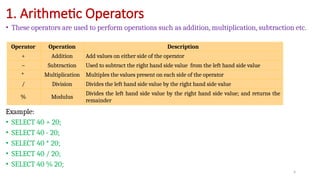
• These operatorsare used to perform operations such as addition, multiplication, subtraction etc.
Example:
• SELECT 40 + 20;
• SELECT 40 - 20;
• SELECT 40 * 20;
• SELECT 40 / 20;
• SELECT 40 % 20;
1. Arithmetic Operators
Operator Operation Description
+ Addition Add values on either side of the operator
– Subtraction Used to subtract the right hand side value from the left hand side value
* Multiplication Multiples the values present on each side of the operator
/ Division Divides the left hand side value by the right hand side value
% Modulus
Divides the left hand side value by the right hand side value; and returns the
remainder
5.
5
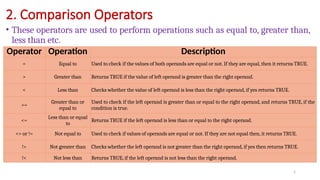
• These operatorsare used to perform operations such as equal to, greater than,
less than etc.
2. Comparison Operators
Operator Operation Description
= Equal to Used to check if the values of both operands are equal or not. If they are equal, then it returns TRUE.
> Greater than Returns TRUE if the value of left operand is greater than the right operand.
< Less than Checks whether the value of left operand is less than the right operand, if yes returns TRUE.
>=
Greater than or
equal to
Used to check if the left operand is greater than or equal to the right operand, and returns TRUE, if the
condition is true.
<=
Less than or equal
to
Returns TRUE if the left operand is less than or equal to the right operand.
<> or != Not equal to Used to check if values of operands are equal or not. If they are not equal then, it returns TRUE.
!> Not greater than Checks whether the left operand is not greater than the right operand, if yes then returns TRUE.
!< Not less than Returns TRUE, if the left operand is not less than the right operand.
6.
6
• For betterunderstanding, the following table to perform various operations.
• Example[Use equal to]:
SELECT * FROM Students
WHERE Age = 20;
• Output:
2. Comparison Operators : Example
StudentID FirstName LastName Age
1 Atul Mishra 23
2 Priya Kapoor 21
3 Rohan Singhania 21
4 Akanksha Jain 20
5 Vaibhav Gupta 25
StudentID FirstName LastName Age
4 Akanksha Jain 20
7.
7
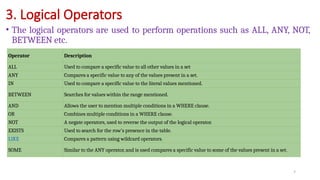
• The logicaloperators are used to perform operations such as ALL, ANY, NOT,
BETWEEN etc.
3. Logical Operators
Operator Description
ALL Used to compare a specific value to all other values in a set
ANY Compares a specific value to any of the values present in a set.
IN Used to compare a specific value to the literal values mentioned.
BETWEEN Searches for values within the range mentioned.
AND Allows the user to mention multiple conditions in a WHERE clause.
OR Combines multiple conditions in a WHERE clause.
NOT A negate operators, used to reverse the output of the logical operator.
EXISTS Used to search for the row’s presence in the table.
LIKE Compares a pattern using wildcard operators.
SOME Similar to the ANY operator, and is used compares a specific value to some of the values present in a set.
8.
3. Logical Operators: Examples
8
SELECT * FROM Students WHERE Age > ANY (SELECT Age FROM Students WHERE Age > 21);
StudentID FirstName LastName Age
1 Atul Mishra 23
5 Vaibhav Gupta 25
Example[ANY]
Output:
9.
9
3. Logical Operators: Examples
SELECT * FROM Students WHERE Age BETWEEN 22 AND 25;
StudentID FirstName LastName Age
1 Atul Mishra 23
Example[BETWEEN & AND]
Output:
10.
10
3. Logical Operators: Examples
SELECT * FROM Students WHERE Age IN('23', '20');
StudentID FirstName LastName Age
1 Atul Mishra 23
4 Akanksha Jain 20
Example[IN]
Output:
11.
11
• When youquery data from a table, PostgreSQL returns the rows in an unspecified order.
• To sort the result set, you use the ORDER BY clause in the SELECT statement.
• The ORDER BY clause allows you to sort rows returned from a SELECT statement in
ascending or descending order based on the specified criteria.
• The following illustrates the syntax of the ORDER BY clause:
4. ORDER BY clause
SELECT
column_1,
column_2
FROM
table_name
ORDER BY
column_1 [ASC | DESC],
column_2 [ASC | DESC];
12.
12
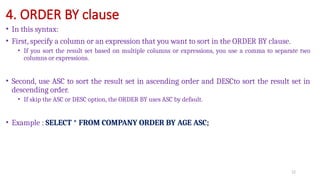
• In thissyntax:
• First, specify a column or an expression that you want to sort in the ORDER BY clause.
• If you sort the result set based on multiple columns or expressions, you use a comma to separate two
columns or expressions.
• Second, use ASC to sort the result set in ascending order and DESCto sort the result set in
descending order.
• If skip the ASC or DESC option, the ORDER BY uses ASC by default.
• Example : SELECT * FROM COMPANY ORDER BY AGE ASC;
4. ORDER BY clause
![6
• For better understanding, the following table to perform various operations.
• Example[Use equal to]:
SELECT * FROM Students
WHERE Age = 20;
• Output:
2. Comparison Operators : Example
StudentID FirstName LastName Age
1 Atul Mishra 23
2 Priya Kapoor 21
3 Rohan Singhania 21
4 Akanksha Jain 20
5 Vaibhav Gupta 25
StudentID FirstName LastName Age
4 Akanksha Jain 20](https://image.slidesharecdn.com/0102postgresqlmathematicaloperators-250806070333-8237e68b/85/PostgreSQL-PostgreSQL-is-a-versatile-open-source-object-relational-database-system-Mathematical-Operators-pptx-6-320.jpg)
![3. Logical Operators : Examples
8
SELECT * FROM Students WHERE Age > ANY (SELECT Age FROM Students WHERE Age > 21);
StudentID FirstName LastName Age
1 Atul Mishra 23
5 Vaibhav Gupta 25
Example[ANY]
Output:](https://image.slidesharecdn.com/0102postgresqlmathematicaloperators-250806070333-8237e68b/85/PostgreSQL-PostgreSQL-is-a-versatile-open-source-object-relational-database-system-Mathematical-Operators-pptx-8-320.jpg)
![9
3. Logical Operators : Examples
SELECT * FROM Students WHERE Age BETWEEN 22 AND 25;
StudentID FirstName LastName Age
1 Atul Mishra 23
Example[BETWEEN & AND]
Output:](https://image.slidesharecdn.com/0102postgresqlmathematicaloperators-250806070333-8237e68b/85/PostgreSQL-PostgreSQL-is-a-versatile-open-source-object-relational-database-system-Mathematical-Operators-pptx-9-320.jpg)
![10
3. Logical Operators : Examples
SELECT * FROM Students WHERE Age IN('23', '20');
StudentID FirstName LastName Age
1 Atul Mishra 23
4 Akanksha Jain 20
Example[IN]
Output:](https://image.slidesharecdn.com/0102postgresqlmathematicaloperators-250806070333-8237e68b/85/PostgreSQL-PostgreSQL-is-a-versatile-open-source-object-relational-database-system-Mathematical-Operators-pptx-10-320.jpg)
![11
• When you query data from a table, PostgreSQL returns the rows in an unspecified order.
• To sort the result set, you use the ORDER BY clause in the SELECT statement.
• The ORDER BY clause allows you to sort rows returned from a SELECT statement in
ascending or descending order based on the specified criteria.
• The following illustrates the syntax of the ORDER BY clause:
4. ORDER BY clause
SELECT
column_1,
column_2
FROM
table_name
ORDER BY
column_1 [ASC | DESC],
column_2 [ASC | DESC];](https://image.slidesharecdn.com/0102postgresqlmathematicaloperators-250806070333-8237e68b/85/PostgreSQL-PostgreSQL-is-a-versatile-open-source-object-relational-database-system-Mathematical-Operators-pptx-11-320.jpg)


![Logic operators [Slides].pdf introductory](https://cdn.slidesharecdn.com/ss_thumbnails/logicoperatorsslides-241027214044-f1a65760-thumbnail.jpg?width=640&height=640&fit=bounds)


