1
Output Primitives
Computer Graphics
2
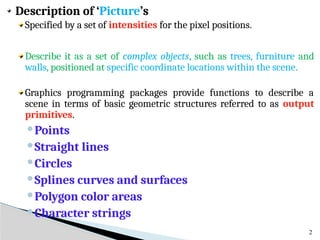
Description of ‘Picture’s
Specified by a set of intensities for the pixel positions.
Describe it as a set of complex objects, such as trees, furniture and
walls, positioned at specific coordinate locations within the scene.
Graphics programming packages provide functions to describe a
scene in terms of basic geometric structures referred to as output
primitives.
Points
Straight lines
Circles
Splines curves and surfaces
Polygon color areas
Character strings
Implementing Application programs
3
Description of objects in terms of
primitives and attributes and converts
them to the pixels on the screen.
Primitives – what is to be generated
Attributes – how primitives are to be generated
Points
4
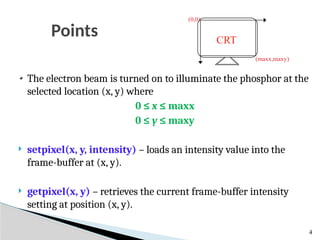
The electron beam is turned on to illuminate the phosphor at the
selected location (x, y) where
0 ≤ x ≤ maxx
0 ≤ y ≤ maxy
 setpixel(x, y, intensity) – loads an intensity value into the
frame-buffer at (x, y).
 getpixel(x, y) – retrieves the current frame-buffer intensity
setting at position (x, y).
(0,0)
(maxx,maxy)
CRT
Lines
5
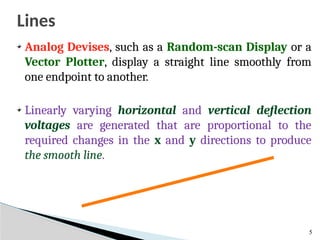
Analog Devises, such as a Random-scan Display or a
Vector Plotter, display a straight line smoothly from
one endpoint to another.
Linearly varying horizontal and vertical deflection
voltages are generated that are proportional to the
required changes in the x and y directions to produce
the smooth line.
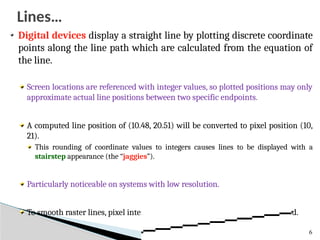
Digital devices display a straight line by plotting discrete coordinate
points along the line path which are calculated from the equation of
the line.
Screen locations are referenced with integer values, so plotted positions may only
approximate actual line positions between two specific endpoints.
A computed line position of (10.48, 20.51) will be converted to pixel position (10,
21).
This rounding of coordinate values to integers causes lines to be displayed with a
stairstep appearance (the “jaggies”).
Particularly noticeable on systems with low resolution.
To smooth raster lines, pixel intensities along the line paths must be adjusted.
6
Lines…
7
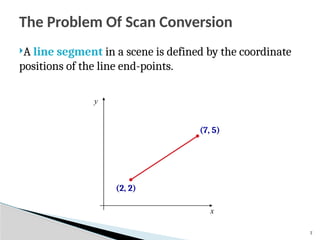
The Problem Of Scan Conversion
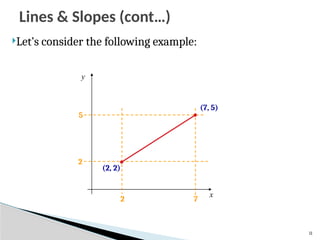
A line segment in a scene is defined by the coordinate
positions of the line end-points.
x
y
(2, 2)
(7, 5)
8
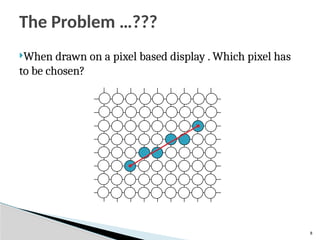
The Problem …???
When drawn on a pixel based display . Which pixel has
to be chosen?
9
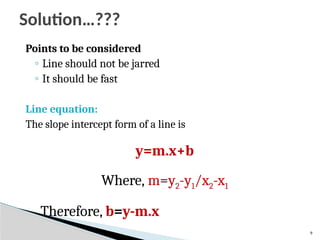
Points to be considered
◦ Line should not be jarred
◦ It should be fast
Line equation:
The slope intercept form of a line is
y=m.x+b
Where, m=y2-y1/x2-x1
Therefore, b=y-m.x
Solution…???
10
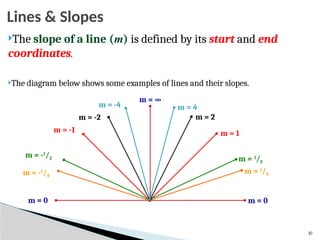
Lines & Slopes
The slope of a line (m) is defined by its start and end
coordinates.
The diagram below shows some examples of lines and their slopes.
m = 0
m = -1
/3
m = -1
/2
m = -1
m = -2
m = -4
m = ∞
m = 1
/3
m = 1
/2
m = 1
m = 2
m = 4
m = 0
11
Let’s consider the following example:
x
y
(2, 2)
(7, 5)
2 7
2
5
Lines & Slopes (cont…)
x
y
(2, 2)
(7, 5)
2 3 4 5 6 7
2
5
5
3
2
7
2
5




m
5
4
2
5
3
2 



b
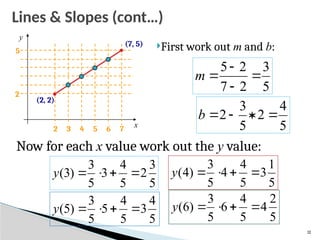
First work out m and b:
Now for each x value work out the y value:
5
3
2
5
4
3
5
3
)
3
( 



y
5
1
3
5
4
4
5
3
)
4
( 



y
5
4
3
5
4
5
5
3
)
5
( 



y
5
2
4
5
4
6
5
3
)
6
( 



y
12
Lines & Slopes (cont…)
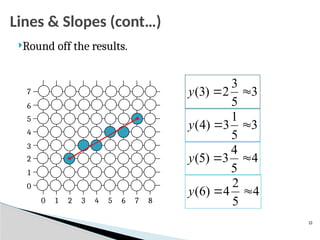
Round off the results.
3
5
3
2
)
3
( 

y
3
5
1
3
)
4
( 

y
4
5
4
3
)
5
( 

y
4
5
2
4
)
6
( 

y
0 1 2 3 4 5 6 7 8
0
1
2
3
4
5
6
7
13
Lines & Slopes (cont…)
14
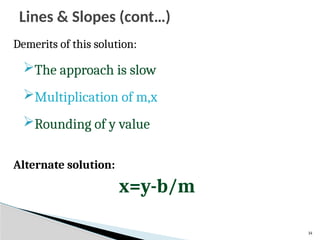
Demerits of this solution:
The approach is slow
Multiplication of m,x
Rounding of y value
Alternate solution:
x=y-b/m
Lines & Slopes (cont…)
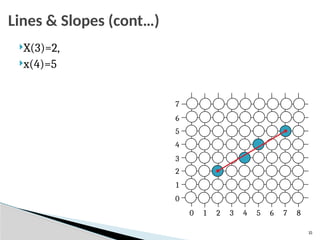
X(3)=2,
x(4)=5
0 1 2 3 4 5 6 7 8
0
1
2
3
4
5
6
7
15
Lines & Slopes (cont…)
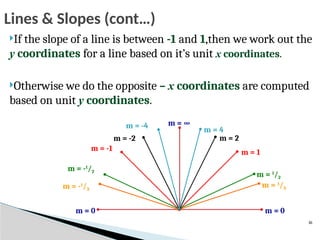
If the slope of a line is between -1 and 1,then we work out the
y coordinates for a line based on it’s unit x coordinates.
Otherwise we do the opposite – x coordinates are computed
based on unit y coordinates.
m = 0
m = -1
/3
m = -1
/2
m = -1
m = -2
m = -4 m = ∞
m = 1
/3
m = 1
/2
m = 1
m = 2
m = 4
m = 0
16
Lines & Slopes (cont…)
17
The DDA Algorithm
The Digital Differential
Analyzer (DDA) algorithm takes
an incremental approach in order
to speed up scan conversion.
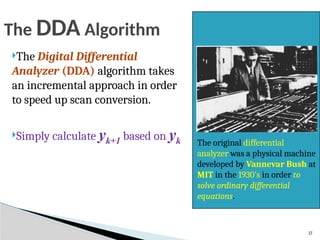
Simply calculate yk+1 based on yk The original differential
analyzer was a physical machine
developed by Vannevar Bush at
MIT in the 1930’s in order to
solve ordinary differential
equations.
18
Consider the list of points that we determined for the
line in our previous example:
(2, 2), (3, 23
/5), (4, 31
/5), (5, 34
/5), (6, 42
/5), (7, 5)
Notice that as the x coordinates go up by one, the y
coordinates simply go up by the slope of the line.
This is the key insight in the symmetrical DDA algorithm
The symmetrical DDA
19
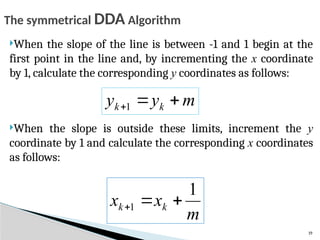
When the slope of the line is between -1 and 1 begin at the
first point in the line and, by incrementing the x coordinate
by 1, calculate the corresponding y coordinates as follows:
When the slope is outside these limits, increment the y
coordinate by 1 and calculate the corresponding x coordinates
as follows:
m
y
y k
k 

1
m
x
x k
k
1
1 


The symmetrical DDA Algorithm
The symmetrical DDA Algorithm (cont…)
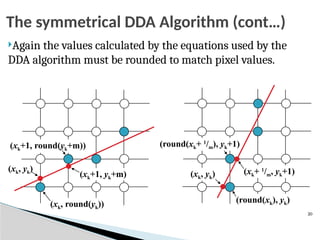
Again the values calculated by the equations used by the
DDA algorithm must be rounded to match pixel values.
(xk, yk)
(xk+1, yk+m)
(xk, round(yk))
(xk+1, round(yk+m))
(xk, yk) (xk+ 1
/m, yk+1)
(round(xk), yk)
(round(xk+ 1
/m), yk+1)
20
21
 Try out the following
◦ A(2,2) B(7,5)
◦ C(3,2),D(2,7)
The symmetrical DDA Algorithm (cont…)
22
The simple DDA
For the simple DDA ,
◦ So that, either Δx or Δy is of a unit length.
 The simple DDA therefore generates unit steps in the
direction of greatest motion.
length of the line = larger of the magnitudes of Δx and Δy
23
The simple DDA Algorithm
1. Input the 2 endpoints (x1,y1) and (x2,y2)
2. Calculate the constants dx and dy
dx= x2-x1 and dy= y2-y1
3. [Obtain the length(or the number of steps)]
if (abs(dx)> abs(dy)) then
length=abs(dx)
else
length=abs(dy)
4. [Determine the increment values of x and y]
xinc =dx/length and yinc =dy/length
24
The simple DDA Algorithm
5. Plot the starting point
6. For i=1 to length[i=i+1]
7. [Plot the next point by generating it]
x=x+xinc
y=y+yinc
[End FOR]
8. Stop
25
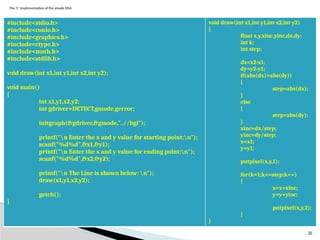
The ‘C’ implementation of the simple DDA
#include<stdio.h>
#include<conio.h>
#include<graphics.h>
#include<ctype.h>
#include<math.h>
#include<stdlib.h>
void draw(int x1,int y1,int x2,int y2);
void main()
{
int x1,y1,x2,y2;
int gdriver=DETECT,gmode,gerror;
initgraph(&gdriver,&gmode,"..//bgi");
printf("n Enter the x and y value for starting point:n");
scanf("%d%d",&x1,&y1);
printf("n Enter the x and y value for ending point:n");
scanf("%d%d",&x2,&y2);
printf("n The Line is shown below: n");
draw(x1,y1,x2,y2);
getch();
}
void draw(int x1,int y1,int x2,int y2)
{
float x,y,xinc,yinc,dx,dy;
int k;
int step;
dx=x2-x1;
dy=y2-y1;
if(abs(dx)>abs(dy))
{
step=abs(dx);
}
else
{
step=abs(dy);
}
xinc=dx/step;
yinc=dy/step;
x=x1;
y=y1;
putpixel(x,y,1);
for(k=1;k<=step;k++)
{
x=x+xinc;
y=y+yinc;
putpixel(x,y,2);
}
}
26
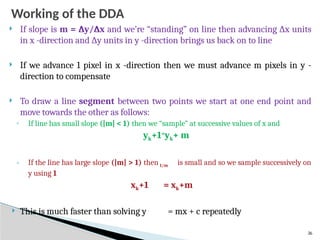
Working of the DDA
 If slope is m = ∆y/∆x and we’re “standing” on line then advancing ∆x units
in x -direction and ∆y units in y -direction brings us back on to line
 If we advance 1 pixel in x -direction then we must advance m pixels in y -
direction to compensate
 To draw a line segment between two points we start at one end point and
move towards the other as follows:
◦ If line has small slope (|m| < 1) then we “sample” at successive values of x and
yk+1=
yk+ m
◦ If the line has large slope (|m| > 1) then 1/m is small and so we sample successively on
y using 1
xk+1 = xk+m
 This is much faster than solving y = mx + c repeatedly
27
The DDA Algorithm Summary
 Walk through the line, starting at (x0,y0)
◦ Constrain x, y increments to values in [0,1] range
◦ Case a: x is incrementing faster (m < 1)
 Step in x=1 increments, compute and round y
◦ Case b: y is incrementing faster (m > 1)
 Step in y=1 increments, compute and round x
28
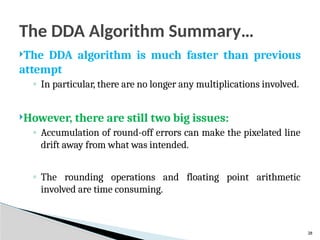
The DDA Algorithm Summary…
The DDA algorithm is much faster than previous
attempt
◦ In particular, there are no longer any multiplications involved.
However, there are still two big issues:
◦ Accumulation of round-off errors can make the pixelated line
drift away from what was intended.
◦ The rounding operations and floating point arithmetic
involved are time consuming.
29
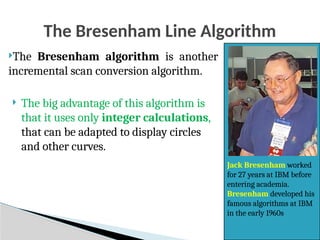
The Bresenham Line Algorithm
The Bresenham algorithm is another
incremental scan conversion algorithm.
 The big advantage of this algorithm is
that it uses only integer calculations,
that can be adapted to display circles
and other curves.
Jack Bresenham worked
for 27 years at IBM before
entering academia.
Bresenham developed his
famous algorithms at IBM
in the early 1960s
30
The Bresenham Line Algorithm : Working
The Bresenham’s algorithm is designed such that each
iteration changes one of the coordinate values by + or -1.
◦The other coordinate may or may change depending on the error
term.
This error e; records the distance, measured perpendicular
to the axis between the exact path and the actual dots
generated.
31
The Bresenham Line Algorithm : Working …
Bresenham’s line drawing technique can be illustrated for a
line with a positive slope less than 1, i.e. 0<m<1
The points are generated by increasing the x values by 1.
Starting from LHS say at the point (x1,y1), the values of x
increases by 1 with each step.
◦The values of y are determined such that they are closest to the
specified path.
32
The Bresenham Line Algorithm : Working …
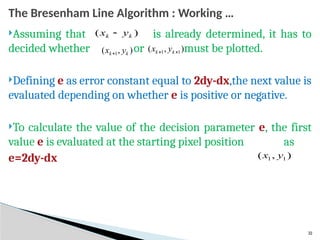
Assuming that is already determined, it has to
decided whether or must be plotted.
Defining e as error constant equal to 2dy-dx,the next value is
evaluated depending on whether e is positive or negative.
To calculate the value of the decision parameter e, the first
value e is evaluated at the starting pixel position as
e=2dy-dx
)
( k
k y
x 
)
,
( 1 k
k y
x 
)
,
( 1
1 
 k
k y
x
)
,
( 1
1 y
x
33
The Bresenham Line Algorithm : Working …
At every value of x along the line y value is incremented if
e>0 and
◦the new error value is computed by using the equation,
e=e+2dy-2dx
Otherwise, y does not change and the new error value is
given by e=e+2dy
34
1. [Input] endpoints (x1,y1) and (x2,y2)
2. [Calculate] dx=x2-x1 and dy=y2-y1
3. [Obtain starting decision parameter] e=2dy-dx
4. If (x2>x1)then
x=x1,
y=y1,
xend=x2
Else
x=x2,
y=y2,
xend=x1
[End If]
The Bresenham Line Algorithm for |m|<1
35
5. While (x<xend)
6. If (e>0)then
y=y+1
e=e+2(dy-dx)
Else
e=e+2dy [End if]
7. x=x+1
[End while]
8. Stop
The Bresenham Line Algorithm for |m|<1
36
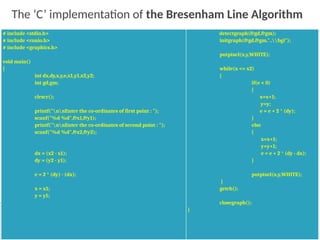
# include <stdio.h>
# include <conio.h>
# include <graphics.h>
void main()
{
int dx,dy,x,y,e,x1,y1,x2,y2;
int gd,gm;
clrscr();
printf("nnEnter the co-ordinates of first point : ");
scanf("%d %d",&x1,&y1);
printf("nnEnter the co-ordinates of second point : ");
scanf("%d %d",&x2,&y2);
dx = (x2 - x1);
dy = (y2 - y1);
e = 2 * (dy) - (dx);
x = x1;
y = y1;
detectgraph(&gd,&gm);
initgraph(&gd,&gm,"..bgi");
putpixel(x,y,WHITE);
while(x <= x2)
{
if(e < 0)
{
x=x+1;
y=y;
e = e + 2 * (dy);
}
else
{
x=x+1;
y=y+1;
e = e + 2 * (dy - dx);
}
putpixel(x,y,WHITE);
}
getch();
closegraph();
}
The ‘C’ implementation of the Bresenham Line Algorithm
37
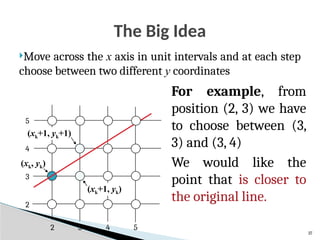
The Big Idea
Move across the x axis in unit intervals and at each step
choose between two different y coordinates
2 3 4 5
2
4
3
5
For example, from
position (2, 3) we have
to choose between (3,
3) and (3, 4)
We would like the
point that is closer to
the original line.
(xk, yk)
(xk+1, yk)
(xk+1, yk+1)
38
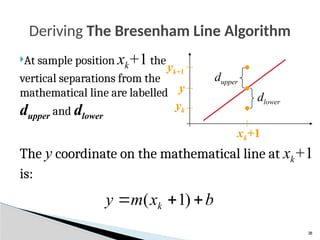
The y coordinate on the mathematical line at xk+1
is:
Deriving The Bresenham Line Algorithm
At sample position xk+1 the
vertical separations from the
mathematical line are labelled
dupper and dlower
b
x
m
y k 

 )
1
(
y
yk
yk+1
xk+1
dlower
dupper
39
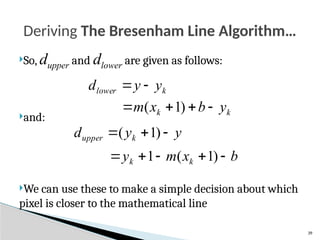
So, dupper and dlower are given as follows:
and:
We can use these to make a simple decision about which
pixel is closer to the mathematical line
Deriving The Bresenham Line Algorithm…
k
lower y
y
d 

k
k y
b
x
m 


 )
1
(
y
y
d k
upper 

 )
1
(
b
x
m
y k
k 



 )
1
(
1
40
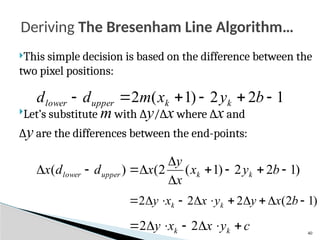
This simple decision is based on the difference between the
two pixel positions:
Let’s substitute m with ∆y/∆x where ∆x and
∆y are the differences between the end-points:
Deriving The Bresenham Line Algorithm…
1
2
2
)
1
(
2 




 b
y
x
m
d
d k
k
upper
lower
)
1
2
2
)
1
(
2
(
)
( 








 b
y
x
x
y
x
d
d
x k
k
upper
lower
)
1
2
(
2
2
2 









 b
x
y
y
x
x
y k
k
c
y
x
x
y k
k 





 2
2
41
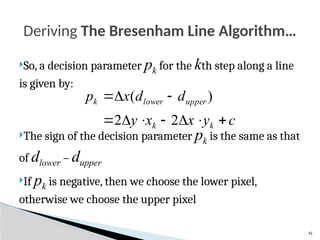
So, a decision parameter pk for the kth step along a line
is given by:
The sign of the decision parameter pk is the same as that
of dlower – dupper
If pk is negative, then we choose the lower pixel,
otherwise we choose the upper pixel
Deriving The Bresenham Line Algorithm…
c
y
x
x
y
d
d
x
p
k
k
upper
lower
k










2
2
)
(
42
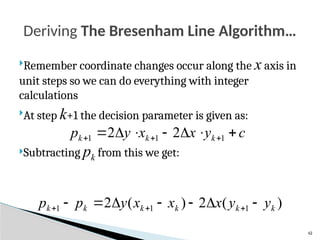
Remember coordinate changes occur along the x axis in
unit steps so we can do everything with integer
calculations
At step k+1 the decision parameter is given as:
Subtracting pk from this we get:
Deriving The Bresenham Line Algorithm…
c
y
x
x
y
p k
k
k 





 

 1
1
1 2
2
)
(
2
)
(
2 1
1
1 k
k
k
k
k
k y
y
x
x
x
y
p
p 





 


43
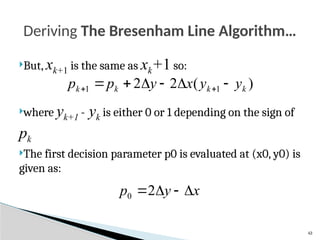
But, xk+1 is the same as xk+1 so:
where yk+1 - yk is either 0 or 1 depending on the sign of
pk
The first decision parameter p0 is evaluated at (x0, y0) is
given as:
Deriving The Bresenham Line Algorithm…
)
(
2
2 1
1 k
k
k
k y
y
x
y
p
p 




 

x
y
p 


2
0
44
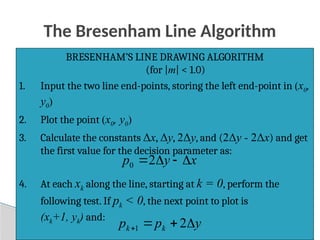
The Bresenham Line Algorithm
BRESENHAM’S LINE DRAWING ALGORITHM
(for |m| < 1.0)
1. Input the two line end-points, storing the left end-point in (x0,
y0)
2. Plot the point (x0, y0)
3. Calculate the constants Δx, Δy, 2Δy, and (2Δy - 2Δx) and get
the first value for the decision parameter as:
4. At each xk along the line, starting at k = 0, perform the
following test. If pk < 0, the next point to plot is
(xk+1, yk) and:
x
y
p 


2
0
y
p
p k
k 


 2
1
45
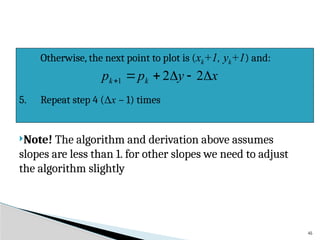
Note! The algorithm and derivation above assumes
slopes are less than 1. for other slopes we need to adjust
the algorithm slightly
Otherwise, the next point to plot is (xk+1, yk+1) and:
5. Repeat step 4 (Δx – 1) times
x
y
p
p k
k 




 2
2
1
46
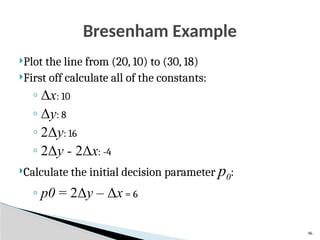
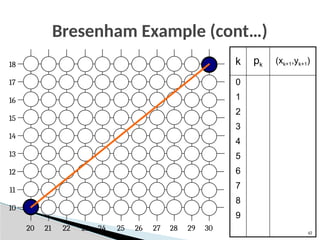
Bresenham Example
Plot the line from (20, 10) to (30, 18)
First off calculate all of the constants:
◦ Δx: 10
◦ Δy: 8
◦ 2Δy: 16
◦ 2Δy - 2Δx: -4
Calculate the initial decision parameter p0:
◦ p0 = 2Δy – Δx = 6
47
Bresenham Example (cont…)
17
16
15
14
13
12
11
10
18
29
27
26
25
24
23
22
21
20 28 30
k pk
(xk+1,yk+1)
0
1
2
3
4
5
6
7
8
9
48
Bresenham Exercise
Go through the steps of the Bresenham line drawing
algorithm for a line going from (21,12) to (29,16)
49
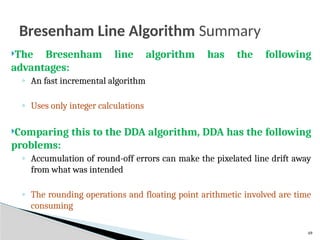
Bresenham Line Algorithm Summary
The Bresenham line algorithm has the following
advantages:
◦ An fast incremental algorithm
◦ Uses only integer calculations
Comparing this to the DDA algorithm, DDA has the following
problems:
◦ Accumulation of round-off errors can make the pixelated line drift away
from what was intended
◦ The rounding operations and floating point arithmetic involved are time
consuming
50
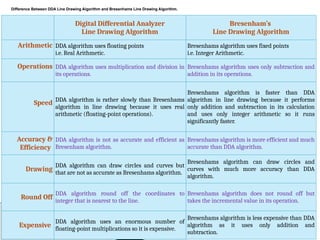
Digital Differential Analyzer
Line Drawing Algorithm
Bresenham’s
Line Drawing Algorithm
Arithmetic DDA algorithm uses floating points
i.e. Real Arithmetic.
Bresenhams algorithm uses fixed points
i.e. Integer Arithmetic.
Operations DDA algorithm uses multiplication and division in
its operations.
Bresenhams algorithm uses only subtraction and
addition in its operations.
Speed DDA algorithm is rather slowly than Bresenhams
algorithm in line drawing because it uses real
arithmetic (floating-point operations).
Bresenhams algorithm is faster than DDA
algorithm in line drawing because it performs
only addition and subtraction in its calculation
and uses only integer arithmetic so it runs
significantly faster.
Accuracy &
Efficiency
DDA algorithm is not as accurate and efficient as
Bresenham algorithm.
Bresenhams algorithm is more efficient and much
accurate than DDA algorithm.
Drawing
DDA algorithm can draw circles and curves but
that are not as accurate as Bresenhams algorithm.
Bresenhams algorithm can draw circles and
curves with much more accuracy than DDA
algorithm.
Round Off
DDA algorithm round off the coordinates to
integer that is nearest to the line.
Bresenhams algorithm does not round off but
takes the incremental value in its operation.
Expensive
DDA algorithm uses an enormous number of
floating-point multiplications so it is expensive.
Bresenhams algorithm is less expensive than DDA
algorithm as it uses only addition and
subtraction.
Difference Between DDA Line Drawing Algorithm and Bresenhams Line Drawing Algorithm.
Circle Generating Algorithms
51
 Circles and ellipses are common components in
many pictures.
 Circle generation routines are often included in
packages.
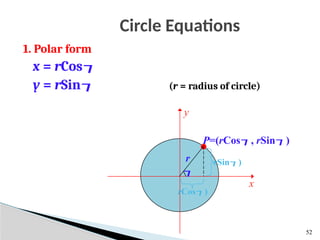
Circle Equations
52
1. Polar form
x = rCos
y = rSin (r = radius of circle)

P=(rCos, rSin)
rSin)
rCos)
x
y
r
Drawing a circle
53
Disadvantages
 To find a complete circle  varies from 0° to 360°
 The calculation of trigonometric functions is very slow.
 = 0°
while ( < 360°)
x = rCos
y = rSin
setPixel(x,y)
 =  + 1°
[End while]
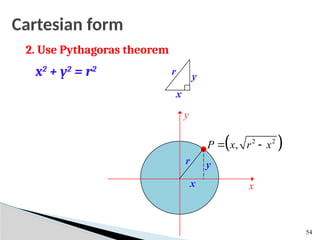
Cartesian form
2. Use Pythagoras theorem
x2
+ y2
= r2
54
x
r y
y
x x
y
r
 
2 2
,
P x r x
 
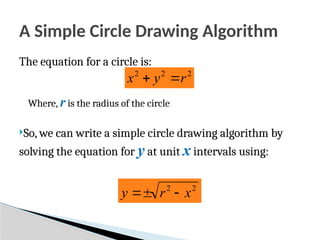
A Simple Circle Drawing Algorithm
The equation for a circle is:
Where, r is the radius of the circle
So, we can write a simple circle drawing algorithm by
solving the equation for y at unit x intervals using:
2
2
2
r
y
x 

2
2
x
r
y 


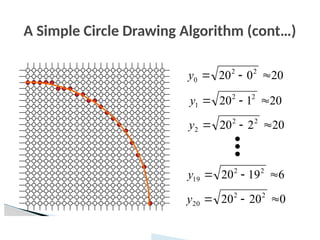
A Simple Circle Drawing Algorithm (cont…)
20
0
20 2
2
0 


y
20
1
20 2
2
1 


y
20
2
20 2
2
2 


y
6
19
20 2
2
19 


y
0
20
20 2
2
20 


y
A Simple Circle Drawing Algorithm (cont…)
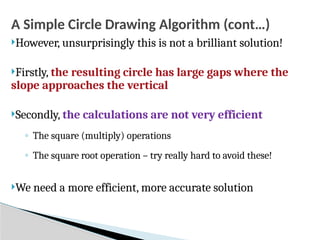
However, unsurprisingly this is not a brilliant solution!
Firstly, the resulting circle has large gaps where the
slope approaches the vertical
Secondly, the calculations are not very efficient
◦ The square (multiply) operations
◦ The square root operation – try really hard to avoid these!
We need a more efficient, more accurate solution
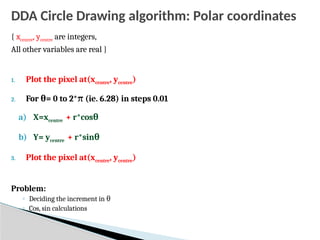
DDA Circle Drawing algorithm: Polar coordinates
{ xcentre, ycentre are integers,
All other variables are real }
1. Plot the pixel at(xcentre, ycentre)
2. For θ= 0 to 2*π (ie. 6.28) in steps 0.01
a) X=xcentre + r*cosθ
b) Y= ycentre + r*sinθ
3. Plot the pixel at(xcentre, ycentre)
Problem:
◦ Deciding the increment in θ
◦ Cos, sin calculations
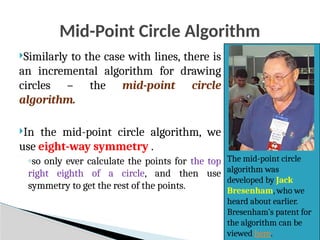
Mid-Point Circle Algorithm
Similarly to the case with lines, there is
an incremental algorithm for drawing
circles – the mid-point circle
algorithm.
In the mid-point circle algorithm, we
use eight-way symmetry .
◦so only ever calculate the points for the top
right eighth of a circle, and then use
symmetry to get the rest of the points.
The mid-point circle
algorithm was
developed by Jack
Bresenham, who we
heard about earlier.
Bresenham’s patent for
the algorithm can be
viewed here.
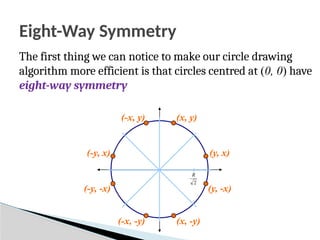
Eight-Way Symmetry
The first thing we can notice to make our circle drawing
algorithm more efficient is that circles centred at (0, 0) have
eight-way symmetry
(x, y)
(y, x)
(y, -x)
(x, -y)
(-x, -y)
(-y, -x)
(-y, x)
(-x, y)
2
R
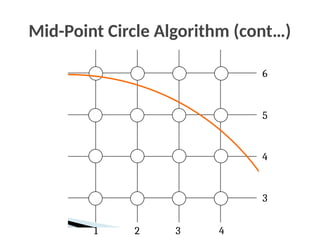
Mid-Point Circle Algorithm (cont…)
6
2 3 4
1
5
4
3
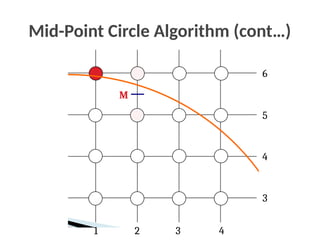
Mid-Point Circle Algorithm (cont…)
M
6
2 3 4
1
5
4
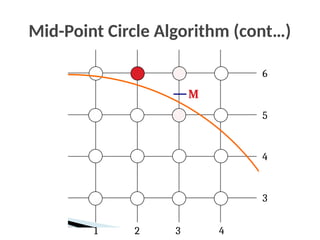
3
Mid-Point Circle Algorithm (cont…)
M
6
2 3 4
1
5
4
3
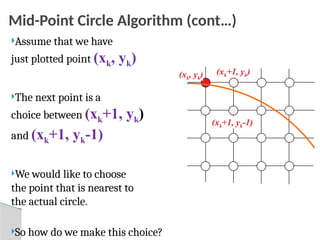
Mid-Point Circle Algorithm (cont…)
(xk+1, yk)
(xk+1, yk-1)
(xk, yk)
Assume that we have
just plotted point (xk, yk)
The next point is a
choice between (xk+1, yk)
and (xk+1, yk-1)
We would like to choose
the point that is nearest to
the actual circle.
So how do we make this choice?
Mid-Point Circle Algorithm (cont…)
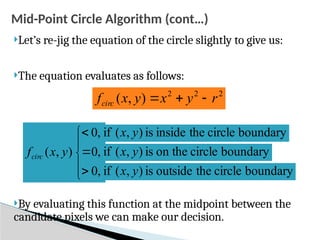
Let’s re-jig the equation of the circle slightly to give us:
The equation evaluates as follows:
By evaluating this function at the midpoint between the
candidate pixels we can make our decision.
2
2
2
)
,
( r
y
x
y
x
fcirc 










,
0
,
0
,
0
)
,
( y
x
fcirc
boundary
circle
the
inside
is
)
,
(
if y
x
boundary
circle
on the
is
)
,
(
if y
x
boundary
circle
the
outside
is
)
,
(
if y
x
Mid-Point Circle Algorithm (cont…)

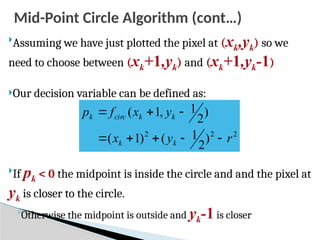
Assuming we have just plotted the pixel at (xk,yk) so we
need to choose between (xk+1,yk) and (xk+1,yk-1)
Our decision variable can be defined as:

If pk < 0 the midpoint is inside the circle and and the pixel at
yk is closer to the circle.
◦Otherwise the midpoint is outside and yk-1is closer
2
2
2
)
2
1
(
)
1
(
)
2
1
,
1
(
r
y
x
y
x
f
p
k
k
k
k
circ
k








Mid-Point Circle Algorithm (cont…)
To ensure things are as efficient as possible we can do all of
our calculations incrementally
First consider:
Or:

where yk+1 is either yk or yk-1 depending on the sign of pk
 
  2
2
1
2
1
1
1
2
1
]
1
)
1
[(
2
1
,
1
r
y
x
y
x
f
p
k
k
k
k
circ
k













1
)
(
)
(
)
1
(
2 1
2
2
1
1 






 

 k
k
k
k
k
k
k y
y
y
y
x
p
p
Mid-Point Circle Algorithm (cont…)
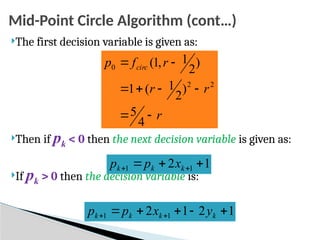
The first decision variable is given as:
Then if pk < 0 then the next decision variable is given as:
If pk > 0 then the decision variable is:
r
r
r
r
f
p circ








4
5
)
2
1
(
1
)
2
1
,
1
(
2
2
0
1
2 1
1 

 
 k
k
k x
p
p
1
2
1
2 1
1 



 
 k
k
k
k y
x
p
p
The Mid-Point Circle Algorithm
1. [Input] radius r and circle centre (xc, yc), then set the coordinates for
the first point on the circumference of a circle centred on the
origin as:
2. [Calculate] the initial value of the decision parameter as:
3. Starting with k = 0 at each position xk, perform the following test. If
pk < 0, the next point along the circle centred on (0, 0) is (xk+1, yk)
and:
)
,
0
(
)
,
( 0
0 r
y
x 
r
p 

4
5
0
1
2 1
1 

 
 k
k
k x
p
p
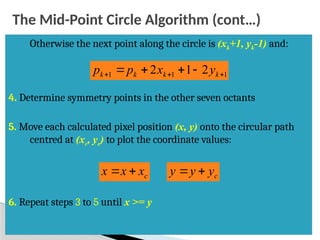
The Mid-Point Circle Algorithm (cont…)
Otherwise the next point along the circle is (xk+1, yk-1) and:
4. Determine symmetry points in the other seven octants
5. Move each calculated pixel position (x, y) onto the circular path
centred at (xc, yc) to plot the coordinate values:
6. Repeat steps 3 to 5 until x >= y
1
1
1 2
1
2 

 


 k
k
k
k y
x
p
p
c
x
x
x 
 c
y
y
y 

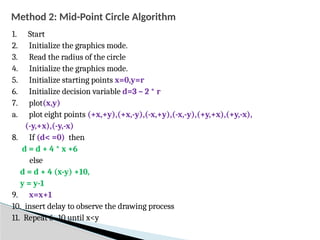
Method 2: Mid-Point Circle Algorithm
1. Start
2. Initialize the graphics mode.
3. Read the radius of the circle
4. Initialize the graphics mode.
5. Initialize starting points x=0,y=r
6. Initialize decision variable d=3 – 2 * r
7. plot(x,y)
a. plot eight points (+x,+y),(+x,-y),(-x,+y),(-x,-y),(+y,+x),(+y,-x),
(-y,+x),(-y,-x)
8. If (d< =0) then
d = d + 4 * x +6
else
d = d + 4 (x-y) +10,
y = y-1
9. x=x+1
10. insert delay to observe the drawing process
11. Repeat 6- 10 until x<y
72
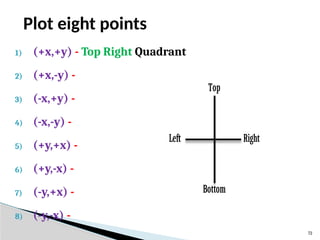
Plot eight points
Top
Left Right
Bottom
1) (+x,+y) - Top Right Quadrant
2) (+x,-y) -
3) (-x,+y) -
4) (-x,-y) -
5) (+y,+x) -
6) (+y,-x) -
7) (-y,+x) -
8) (-y,-x) -
Mid-Point Circle Algorithm Example
To see the mid-point circle algorithm in action lets use it
to draw a circle centred at (0,0) with radius 10
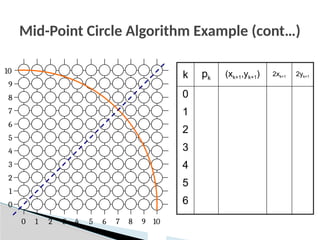
Mid-Point Circle Algorithm Example (cont…)
9
7
6
5
4
3
2
1
0
8
9
7
6
5
4
3
2
1
0 8 10
10
k pk
(xk+1,yk+1) 2xk+1 2yk+1
0
1
2
3
4
5
6
Mid-Point Circle Algorithm Exercise
Use the mid-point circle algorithm to draw the circle
centred at (0,0) with radius 15
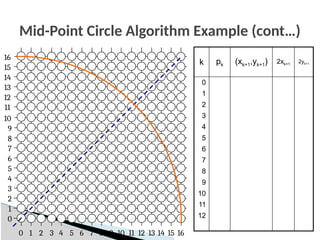
Mid-Point Circle Algorithm Example (cont…)
k pk (xk+1,yk+1) 2xk+1
2yk+1
0
1
2
3
4
5
6
7
8
9
10
11
12
9
7
6
5
4
3
2
1
0
8
9
7
6
5
4
3
2
1
0 8 10
10
13
12
11 14
15
13
12
14
11
16
15 16
Mid-Point Circle Algorithm Summary
The key insights in the mid-point circle algorithm are:
◦ Eight-way symmetry can hugely reduce the
work in drawing a circle.
◦ Moving in unit steps along the x axis at each
point along the circle’s edge we need to
choose between two possible y coordinates.
Filling Polygons
So we can figure out how to draw lines and circles
How do we go about drawing polygons?
We use an incremental algorithm known as the scan-line
algorithm
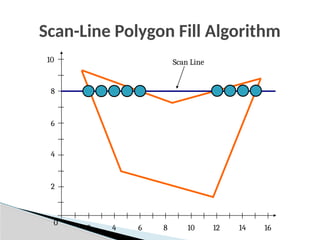
Scan-Line Polygon Fill Algorithm
2
4
6
8
10 Scan Line
0
2 4 6 8 10 12 14 16
Scan-Line Polygon Fill Algorithm
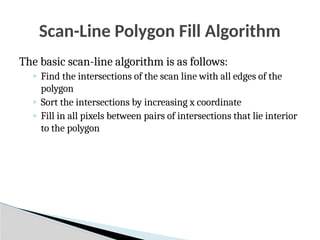
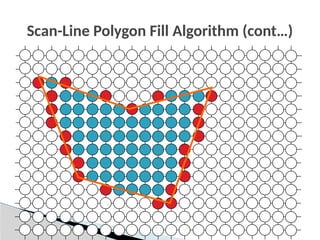
The basic scan-line algorithm is as follows:
◦ Find the intersections of the scan line with all edges of the
polygon
◦ Sort the intersections by increasing x coordinate
◦ Fill in all pixels between pairs of intersections that lie interior
to the polygon
Scan-Line Polygon Fill Algorithm (cont…)
Line Drawing Summary
Over the last couple of lectures we have looked at the idea
of scan converting lines
The key thing to remember is this has to be FAST
For lines we have either DDA or Bresenham
For circles the mid-point algorithm
Blank Grid
Blank Grid
Blank Grid
9
7
6
5
4
3
2
1
0
8
9
7
6
5
4
3
2
1
0 8 10
10
Blank Grid

Output Primitives in Computer Graphics .pptx

  • 1.
  • 2.
    2 Description of ‘Picture’s Specifiedby a set of intensities for the pixel positions. Describe it as a set of complex objects, such as trees, furniture and walls, positioned at specific coordinate locations within the scene. Graphics programming packages provide functions to describe a scene in terms of basic geometric structures referred to as output primitives. Points Straight lines Circles Splines curves and surfaces Polygon color areas Character strings
  • 3.
    Implementing Application programs 3 Descriptionof objects in terms of primitives and attributes and converts them to the pixels on the screen. Primitives – what is to be generated Attributes – how primitives are to be generated
  • 4.
    Points 4 The electron beamis turned on to illuminate the phosphor at the selected location (x, y) where 0 ≤ x ≤ maxx 0 ≤ y ≤ maxy  setpixel(x, y, intensity) – loads an intensity value into the frame-buffer at (x, y).  getpixel(x, y) – retrieves the current frame-buffer intensity setting at position (x, y). (0,0) (maxx,maxy) CRT
  • 5.
    Lines 5 Analog Devises, suchas a Random-scan Display or a Vector Plotter, display a straight line smoothly from one endpoint to another. Linearly varying horizontal and vertical deflection voltages are generated that are proportional to the required changes in the x and y directions to produce the smooth line.
  • 6.
    Digital devices displaya straight line by plotting discrete coordinate points along the line path which are calculated from the equation of the line. Screen locations are referenced with integer values, so plotted positions may only approximate actual line positions between two specific endpoints. A computed line position of (10.48, 20.51) will be converted to pixel position (10, 21). This rounding of coordinate values to integers causes lines to be displayed with a stairstep appearance (the “jaggies”). Particularly noticeable on systems with low resolution. To smooth raster lines, pixel intensities along the line paths must be adjusted. 6 Lines…
  • 7.
    7 The Problem OfScan Conversion A line segment in a scene is defined by the coordinate positions of the line end-points. x y (2, 2) (7, 5)
  • 8.
    8 The Problem …??? Whendrawn on a pixel based display . Which pixel has to be chosen?
  • 9.
    9 Points to beconsidered ◦ Line should not be jarred ◦ It should be fast Line equation: The slope intercept form of a line is y=m.x+b Where, m=y2-y1/x2-x1 Therefore, b=y-m.x Solution…???
  • 10.
    10 Lines & Slopes Theslope of a line (m) is defined by its start and end coordinates. The diagram below shows some examples of lines and their slopes. m = 0 m = -1 /3 m = -1 /2 m = -1 m = -2 m = -4 m = ∞ m = 1 /3 m = 1 /2 m = 1 m = 2 m = 4 m = 0
  • 11.
    11 Let’s consider thefollowing example: x y (2, 2) (7, 5) 2 7 2 5 Lines & Slopes (cont…)
  • 12.
    x y (2, 2) (7, 5) 23 4 5 6 7 2 5 5 3 2 7 2 5     m 5 4 2 5 3 2     b First work out m and b: Now for each x value work out the y value: 5 3 2 5 4 3 5 3 ) 3 (     y 5 1 3 5 4 4 5 3 ) 4 (     y 5 4 3 5 4 5 5 3 ) 5 (     y 5 2 4 5 4 6 5 3 ) 6 (     y 12 Lines & Slopes (cont…)
  • 13.
    Round off theresults. 3 5 3 2 ) 3 (   y 3 5 1 3 ) 4 (   y 4 5 4 3 ) 5 (   y 4 5 2 4 ) 6 (   y 0 1 2 3 4 5 6 7 8 0 1 2 3 4 5 6 7 13 Lines & Slopes (cont…)
  • 14.
    14 Demerits of thissolution: The approach is slow Multiplication of m,x Rounding of y value Alternate solution: x=y-b/m Lines & Slopes (cont…)
  • 15.
    X(3)=2, x(4)=5 0 1 23 4 5 6 7 8 0 1 2 3 4 5 6 7 15 Lines & Slopes (cont…)
  • 16.
    If the slopeof a line is between -1 and 1,then we work out the y coordinates for a line based on it’s unit x coordinates. Otherwise we do the opposite – x coordinates are computed based on unit y coordinates. m = 0 m = -1 /3 m = -1 /2 m = -1 m = -2 m = -4 m = ∞ m = 1 /3 m = 1 /2 m = 1 m = 2 m = 4 m = 0 16 Lines & Slopes (cont…)
  • 17.
    17 The DDA Algorithm TheDigital Differential Analyzer (DDA) algorithm takes an incremental approach in order to speed up scan conversion. Simply calculate yk+1 based on yk The original differential analyzer was a physical machine developed by Vannevar Bush at MIT in the 1930’s in order to solve ordinary differential equations.
  • 18.
    18 Consider the listof points that we determined for the line in our previous example: (2, 2), (3, 23 /5), (4, 31 /5), (5, 34 /5), (6, 42 /5), (7, 5) Notice that as the x coordinates go up by one, the y coordinates simply go up by the slope of the line. This is the key insight in the symmetrical DDA algorithm The symmetrical DDA
  • 19.
    19 When the slopeof the line is between -1 and 1 begin at the first point in the line and, by incrementing the x coordinate by 1, calculate the corresponding y coordinates as follows: When the slope is outside these limits, increment the y coordinate by 1 and calculate the corresponding x coordinates as follows: m y y k k   1 m x x k k 1 1    The symmetrical DDA Algorithm
  • 20.
    The symmetrical DDAAlgorithm (cont…) Again the values calculated by the equations used by the DDA algorithm must be rounded to match pixel values. (xk, yk) (xk+1, yk+m) (xk, round(yk)) (xk+1, round(yk+m)) (xk, yk) (xk+ 1 /m, yk+1) (round(xk), yk) (round(xk+ 1 /m), yk+1) 20
  • 21.
    21  Try outthe following ◦ A(2,2) B(7,5) ◦ C(3,2),D(2,7) The symmetrical DDA Algorithm (cont…)
  • 22.
    22 The simple DDA Forthe simple DDA , ◦ So that, either Δx or Δy is of a unit length.  The simple DDA therefore generates unit steps in the direction of greatest motion. length of the line = larger of the magnitudes of Δx and Δy
  • 23.
    23 The simple DDAAlgorithm 1. Input the 2 endpoints (x1,y1) and (x2,y2) 2. Calculate the constants dx and dy dx= x2-x1 and dy= y2-y1 3. [Obtain the length(or the number of steps)] if (abs(dx)> abs(dy)) then length=abs(dx) else length=abs(dy) 4. [Determine the increment values of x and y] xinc =dx/length and yinc =dy/length
  • 24.
    24 The simple DDAAlgorithm 5. Plot the starting point 6. For i=1 to length[i=i+1] 7. [Plot the next point by generating it] x=x+xinc y=y+yinc [End FOR] 8. Stop
  • 25.
    25 The ‘C’ implementationof the simple DDA #include<stdio.h> #include<conio.h> #include<graphics.h> #include<ctype.h> #include<math.h> #include<stdlib.h> void draw(int x1,int y1,int x2,int y2); void main() { int x1,y1,x2,y2; int gdriver=DETECT,gmode,gerror; initgraph(&gdriver,&gmode,"..//bgi"); printf("n Enter the x and y value for starting point:n"); scanf("%d%d",&x1,&y1); printf("n Enter the x and y value for ending point:n"); scanf("%d%d",&x2,&y2); printf("n The Line is shown below: n"); draw(x1,y1,x2,y2); getch(); } void draw(int x1,int y1,int x2,int y2) { float x,y,xinc,yinc,dx,dy; int k; int step; dx=x2-x1; dy=y2-y1; if(abs(dx)>abs(dy)) { step=abs(dx); } else { step=abs(dy); } xinc=dx/step; yinc=dy/step; x=x1; y=y1; putpixel(x,y,1); for(k=1;k<=step;k++) { x=x+xinc; y=y+yinc; putpixel(x,y,2); } }
  • 26.
    26 Working of theDDA  If slope is m = ∆y/∆x and we’re “standing” on line then advancing ∆x units in x -direction and ∆y units in y -direction brings us back on to line  If we advance 1 pixel in x -direction then we must advance m pixels in y - direction to compensate  To draw a line segment between two points we start at one end point and move towards the other as follows: ◦ If line has small slope (|m| < 1) then we “sample” at successive values of x and yk+1= yk+ m ◦ If the line has large slope (|m| > 1) then 1/m is small and so we sample successively on y using 1 xk+1 = xk+m  This is much faster than solving y = mx + c repeatedly
  • 27.
    27 The DDA AlgorithmSummary  Walk through the line, starting at (x0,y0) ◦ Constrain x, y increments to values in [0,1] range ◦ Case a: x is incrementing faster (m < 1)  Step in x=1 increments, compute and round y ◦ Case b: y is incrementing faster (m > 1)  Step in y=1 increments, compute and round x
  • 28.
    28 The DDA AlgorithmSummary… The DDA algorithm is much faster than previous attempt ◦ In particular, there are no longer any multiplications involved. However, there are still two big issues: ◦ Accumulation of round-off errors can make the pixelated line drift away from what was intended. ◦ The rounding operations and floating point arithmetic involved are time consuming.
  • 29.
    29 The Bresenham LineAlgorithm The Bresenham algorithm is another incremental scan conversion algorithm.  The big advantage of this algorithm is that it uses only integer calculations, that can be adapted to display circles and other curves. Jack Bresenham worked for 27 years at IBM before entering academia. Bresenham developed his famous algorithms at IBM in the early 1960s
  • 30.
    30 The Bresenham LineAlgorithm : Working The Bresenham’s algorithm is designed such that each iteration changes one of the coordinate values by + or -1. ◦The other coordinate may or may change depending on the error term. This error e; records the distance, measured perpendicular to the axis between the exact path and the actual dots generated.
  • 31.
    31 The Bresenham LineAlgorithm : Working … Bresenham’s line drawing technique can be illustrated for a line with a positive slope less than 1, i.e. 0<m<1 The points are generated by increasing the x values by 1. Starting from LHS say at the point (x1,y1), the values of x increases by 1 with each step. ◦The values of y are determined such that they are closest to the specified path.
  • 32.
    32 The Bresenham LineAlgorithm : Working … Assuming that is already determined, it has to decided whether or must be plotted. Defining e as error constant equal to 2dy-dx,the next value is evaluated depending on whether e is positive or negative. To calculate the value of the decision parameter e, the first value e is evaluated at the starting pixel position as e=2dy-dx ) ( k k y x  ) , ( 1 k k y x  ) , ( 1 1   k k y x ) , ( 1 1 y x
  • 33.
    33 The Bresenham LineAlgorithm : Working … At every value of x along the line y value is incremented if e>0 and ◦the new error value is computed by using the equation, e=e+2dy-2dx Otherwise, y does not change and the new error value is given by e=e+2dy
  • 34.
    34 1. [Input] endpoints(x1,y1) and (x2,y2) 2. [Calculate] dx=x2-x1 and dy=y2-y1 3. [Obtain starting decision parameter] e=2dy-dx 4. If (x2>x1)then x=x1, y=y1, xend=x2 Else x=x2, y=y2, xend=x1 [End If] The Bresenham Line Algorithm for |m|<1
  • 35.
    35 5. While (x<xend) 6.If (e>0)then y=y+1 e=e+2(dy-dx) Else e=e+2dy [End if] 7. x=x+1 [End while] 8. Stop The Bresenham Line Algorithm for |m|<1
  • 36.
    36 # include <stdio.h> #include <conio.h> # include <graphics.h> void main() { int dx,dy,x,y,e,x1,y1,x2,y2; int gd,gm; clrscr(); printf("nnEnter the co-ordinates of first point : "); scanf("%d %d",&x1,&y1); printf("nnEnter the co-ordinates of second point : "); scanf("%d %d",&x2,&y2); dx = (x2 - x1); dy = (y2 - y1); e = 2 * (dy) - (dx); x = x1; y = y1; detectgraph(&gd,&gm); initgraph(&gd,&gm,"..bgi"); putpixel(x,y,WHITE); while(x <= x2) { if(e < 0) { x=x+1; y=y; e = e + 2 * (dy); } else { x=x+1; y=y+1; e = e + 2 * (dy - dx); } putpixel(x,y,WHITE); } getch(); closegraph(); } The ‘C’ implementation of the Bresenham Line Algorithm
  • 37.
    37 The Big Idea Moveacross the x axis in unit intervals and at each step choose between two different y coordinates 2 3 4 5 2 4 3 5 For example, from position (2, 3) we have to choose between (3, 3) and (3, 4) We would like the point that is closer to the original line. (xk, yk) (xk+1, yk) (xk+1, yk+1)
  • 38.
    38 The y coordinateon the mathematical line at xk+1 is: Deriving The Bresenham Line Algorithm At sample position xk+1 the vertical separations from the mathematical line are labelled dupper and dlower b x m y k    ) 1 ( y yk yk+1 xk+1 dlower dupper
  • 39.
    39 So, dupper anddlower are given as follows: and: We can use these to make a simple decision about which pixel is closer to the mathematical line Deriving The Bresenham Line Algorithm… k lower y y d   k k y b x m     ) 1 ( y y d k upper    ) 1 ( b x m y k k      ) 1 ( 1
  • 40.
    40 This simple decisionis based on the difference between the two pixel positions: Let’s substitute m with ∆y/∆x where ∆x and ∆y are the differences between the end-points: Deriving The Bresenham Line Algorithm… 1 2 2 ) 1 ( 2       b y x m d d k k upper lower ) 1 2 2 ) 1 ( 2 ( ) (           b y x x y x d d x k k upper lower ) 1 2 ( 2 2 2            b x y y x x y k k c y x x y k k        2 2
  • 41.
    41 So, a decisionparameter pk for the kth step along a line is given by: The sign of the decision parameter pk is the same as that of dlower – dupper If pk is negative, then we choose the lower pixel, otherwise we choose the upper pixel Deriving The Bresenham Line Algorithm… c y x x y d d x p k k upper lower k           2 2 ) (
  • 42.
    42 Remember coordinate changesoccur along the x axis in unit steps so we can do everything with integer calculations At step k+1 the decision parameter is given as: Subtracting pk from this we get: Deriving The Bresenham Line Algorithm… c y x x y p k k k           1 1 1 2 2 ) ( 2 ) ( 2 1 1 1 k k k k k k y y x x x y p p          
  • 43.
    43 But, xk+1 isthe same as xk+1 so: where yk+1 - yk is either 0 or 1 depending on the sign of pk The first decision parameter p0 is evaluated at (x0, y0) is given as: Deriving The Bresenham Line Algorithm… ) ( 2 2 1 1 k k k k y y x y p p         x y p    2 0
  • 44.
    44 The Bresenham LineAlgorithm BRESENHAM’S LINE DRAWING ALGORITHM (for |m| < 1.0) 1. Input the two line end-points, storing the left end-point in (x0, y0) 2. Plot the point (x0, y0) 3. Calculate the constants Δx, Δy, 2Δy, and (2Δy - 2Δx) and get the first value for the decision parameter as: 4. At each xk along the line, starting at k = 0, perform the following test. If pk < 0, the next point to plot is (xk+1, yk) and: x y p    2 0 y p p k k     2 1
  • 45.
    45 Note! The algorithmand derivation above assumes slopes are less than 1. for other slopes we need to adjust the algorithm slightly Otherwise, the next point to plot is (xk+1, yk+1) and: 5. Repeat step 4 (Δx – 1) times x y p p k k       2 2 1
  • 46.
    46 Bresenham Example Plot theline from (20, 10) to (30, 18) First off calculate all of the constants: ◦ Δx: 10 ◦ Δy: 8 ◦ 2Δy: 16 ◦ 2Δy - 2Δx: -4 Calculate the initial decision parameter p0: ◦ p0 = 2Δy – Δx = 6
  • 47.
  • 48.
    48 Bresenham Exercise Go throughthe steps of the Bresenham line drawing algorithm for a line going from (21,12) to (29,16)
  • 49.
    49 Bresenham Line AlgorithmSummary The Bresenham line algorithm has the following advantages: ◦ An fast incremental algorithm ◦ Uses only integer calculations Comparing this to the DDA algorithm, DDA has the following problems: ◦ Accumulation of round-off errors can make the pixelated line drift away from what was intended ◦ The rounding operations and floating point arithmetic involved are time consuming
  • 50.
    50 Digital Differential Analyzer LineDrawing Algorithm Bresenham’s Line Drawing Algorithm Arithmetic DDA algorithm uses floating points i.e. Real Arithmetic. Bresenhams algorithm uses fixed points i.e. Integer Arithmetic. Operations DDA algorithm uses multiplication and division in its operations. Bresenhams algorithm uses only subtraction and addition in its operations. Speed DDA algorithm is rather slowly than Bresenhams algorithm in line drawing because it uses real arithmetic (floating-point operations). Bresenhams algorithm is faster than DDA algorithm in line drawing because it performs only addition and subtraction in its calculation and uses only integer arithmetic so it runs significantly faster. Accuracy & Efficiency DDA algorithm is not as accurate and efficient as Bresenham algorithm. Bresenhams algorithm is more efficient and much accurate than DDA algorithm. Drawing DDA algorithm can draw circles and curves but that are not as accurate as Bresenhams algorithm. Bresenhams algorithm can draw circles and curves with much more accuracy than DDA algorithm. Round Off DDA algorithm round off the coordinates to integer that is nearest to the line. Bresenhams algorithm does not round off but takes the incremental value in its operation. Expensive DDA algorithm uses an enormous number of floating-point multiplications so it is expensive. Bresenhams algorithm is less expensive than DDA algorithm as it uses only addition and subtraction. Difference Between DDA Line Drawing Algorithm and Bresenhams Line Drawing Algorithm.
  • 51.
    Circle Generating Algorithms 51 Circles and ellipses are common components in many pictures.  Circle generation routines are often included in packages.
  • 52.
    Circle Equations 52 1. Polarform x = rCos y = rSin (r = radius of circle)  P=(rCos, rSin) rSin) rCos) x y r
  • 53.
    Drawing a circle 53 Disadvantages To find a complete circle  varies from 0° to 360°  The calculation of trigonometric functions is very slow.  = 0° while ( < 360°) x = rCos y = rSin setPixel(x,y)  =  + 1° [End while]
  • 54.
    Cartesian form 2. UsePythagoras theorem x2 + y2 = r2 54 x r y y x x y r   2 2 , P x r x  
  • 55.
    A Simple CircleDrawing Algorithm The equation for a circle is: Where, r is the radius of the circle So, we can write a simple circle drawing algorithm by solving the equation for y at unit x intervals using: 2 2 2 r y x   2 2 x r y   
  • 56.
    A Simple CircleDrawing Algorithm (cont…) 20 0 20 2 2 0    y 20 1 20 2 2 1    y 20 2 20 2 2 2    y 6 19 20 2 2 19    y 0 20 20 2 2 20    y
  • 57.
    A Simple CircleDrawing Algorithm (cont…) However, unsurprisingly this is not a brilliant solution! Firstly, the resulting circle has large gaps where the slope approaches the vertical Secondly, the calculations are not very efficient ◦ The square (multiply) operations ◦ The square root operation – try really hard to avoid these! We need a more efficient, more accurate solution
  • 58.
    DDA Circle Drawingalgorithm: Polar coordinates { xcentre, ycentre are integers, All other variables are real } 1. Plot the pixel at(xcentre, ycentre) 2. For θ= 0 to 2*π (ie. 6.28) in steps 0.01 a) X=xcentre + r*cosθ b) Y= ycentre + r*sinθ 3. Plot the pixel at(xcentre, ycentre) Problem: ◦ Deciding the increment in θ ◦ Cos, sin calculations
  • 59.
    Mid-Point Circle Algorithm Similarlyto the case with lines, there is an incremental algorithm for drawing circles – the mid-point circle algorithm. In the mid-point circle algorithm, we use eight-way symmetry . ◦so only ever calculate the points for the top right eighth of a circle, and then use symmetry to get the rest of the points. The mid-point circle algorithm was developed by Jack Bresenham, who we heard about earlier. Bresenham’s patent for the algorithm can be viewed here.
  • 60.
    Eight-Way Symmetry The firstthing we can notice to make our circle drawing algorithm more efficient is that circles centred at (0, 0) have eight-way symmetry (x, y) (y, x) (y, -x) (x, -y) (-x, -y) (-y, -x) (-y, x) (-x, y) 2 R
  • 61.
    Mid-Point Circle Algorithm(cont…) 6 2 3 4 1 5 4 3
  • 62.
    Mid-Point Circle Algorithm(cont…) M 6 2 3 4 1 5 4 3
  • 63.
    Mid-Point Circle Algorithm(cont…) M 6 2 3 4 1 5 4 3
  • 64.
    Mid-Point Circle Algorithm(cont…) (xk+1, yk) (xk+1, yk-1) (xk, yk) Assume that we have just plotted point (xk, yk) The next point is a choice between (xk+1, yk) and (xk+1, yk-1) We would like to choose the point that is nearest to the actual circle. So how do we make this choice?
  • 65.
    Mid-Point Circle Algorithm(cont…) Let’s re-jig the equation of the circle slightly to give us: The equation evaluates as follows: By evaluating this function at the midpoint between the candidate pixels we can make our decision. 2 2 2 ) , ( r y x y x fcirc            , 0 , 0 , 0 ) , ( y x fcirc boundary circle the inside is ) , ( if y x boundary circle on the is ) , ( if y x boundary circle the outside is ) , ( if y x
  • 66.
    Mid-Point Circle Algorithm(cont…)  Assuming we have just plotted the pixel at (xk,yk) so we need to choose between (xk+1,yk) and (xk+1,yk-1) Our decision variable can be defined as:  If pk < 0 the midpoint is inside the circle and and the pixel at yk is closer to the circle. ◦Otherwise the midpoint is outside and yk-1is closer 2 2 2 ) 2 1 ( ) 1 ( ) 2 1 , 1 ( r y x y x f p k k k k circ k        
  • 67.
    Mid-Point Circle Algorithm(cont…) To ensure things are as efficient as possible we can do all of our calculations incrementally First consider: Or:  where yk+1 is either yk or yk-1 depending on the sign of pk     2 2 1 2 1 1 1 2 1 ] 1 ) 1 [( 2 1 , 1 r y x y x f p k k k k circ k              1 ) ( ) ( ) 1 ( 2 1 2 2 1 1            k k k k k k k y y y y x p p
  • 68.
    Mid-Point Circle Algorithm(cont…) The first decision variable is given as: Then if pk < 0 then the next decision variable is given as: If pk > 0 then the decision variable is: r r r r f p circ         4 5 ) 2 1 ( 1 ) 2 1 , 1 ( 2 2 0 1 2 1 1      k k k x p p 1 2 1 2 1 1        k k k k y x p p
  • 69.
    The Mid-Point CircleAlgorithm 1. [Input] radius r and circle centre (xc, yc), then set the coordinates for the first point on the circumference of a circle centred on the origin as: 2. [Calculate] the initial value of the decision parameter as: 3. Starting with k = 0 at each position xk, perform the following test. If pk < 0, the next point along the circle centred on (0, 0) is (xk+1, yk) and: ) , 0 ( ) , ( 0 0 r y x  r p   4 5 0 1 2 1 1      k k k x p p
  • 70.
    The Mid-Point CircleAlgorithm (cont…) Otherwise the next point along the circle is (xk+1, yk-1) and: 4. Determine symmetry points in the other seven octants 5. Move each calculated pixel position (x, y) onto the circular path centred at (xc, yc) to plot the coordinate values: 6. Repeat steps 3 to 5 until x >= y 1 1 1 2 1 2        k k k k y x p p c x x x   c y y y  
  • 71.
    Method 2: Mid-PointCircle Algorithm 1. Start 2. Initialize the graphics mode. 3. Read the radius of the circle 4. Initialize the graphics mode. 5. Initialize starting points x=0,y=r 6. Initialize decision variable d=3 – 2 * r 7. plot(x,y) a. plot eight points (+x,+y),(+x,-y),(-x,+y),(-x,-y),(+y,+x),(+y,-x), (-y,+x),(-y,-x) 8. If (d< =0) then d = d + 4 * x +6 else d = d + 4 (x-y) +10, y = y-1 9. x=x+1 10. insert delay to observe the drawing process 11. Repeat 6- 10 until x<y
  • 72.
    72 Plot eight points Top LeftRight Bottom 1) (+x,+y) - Top Right Quadrant 2) (+x,-y) - 3) (-x,+y) - 4) (-x,-y) - 5) (+y,+x) - 6) (+y,-x) - 7) (-y,+x) - 8) (-y,-x) -
  • 73.
    Mid-Point Circle AlgorithmExample To see the mid-point circle algorithm in action lets use it to draw a circle centred at (0,0) with radius 10
  • 74.
    Mid-Point Circle AlgorithmExample (cont…) 9 7 6 5 4 3 2 1 0 8 9 7 6 5 4 3 2 1 0 8 10 10 k pk (xk+1,yk+1) 2xk+1 2yk+1 0 1 2 3 4 5 6
  • 75.
    Mid-Point Circle AlgorithmExercise Use the mid-point circle algorithm to draw the circle centred at (0,0) with radius 15
  • 76.
    Mid-Point Circle AlgorithmExample (cont…) k pk (xk+1,yk+1) 2xk+1 2yk+1 0 1 2 3 4 5 6 7 8 9 10 11 12 9 7 6 5 4 3 2 1 0 8 9 7 6 5 4 3 2 1 0 8 10 10 13 12 11 14 15 13 12 14 11 16 15 16
  • 77.
    Mid-Point Circle AlgorithmSummary The key insights in the mid-point circle algorithm are: ◦ Eight-way symmetry can hugely reduce the work in drawing a circle. ◦ Moving in unit steps along the x axis at each point along the circle’s edge we need to choose between two possible y coordinates.
  • 78.
    Filling Polygons So wecan figure out how to draw lines and circles How do we go about drawing polygons? We use an incremental algorithm known as the scan-line algorithm
  • 79.
    Scan-Line Polygon FillAlgorithm 2 4 6 8 10 Scan Line 0 2 4 6 8 10 12 14 16
  • 80.
    Scan-Line Polygon FillAlgorithm The basic scan-line algorithm is as follows: ◦ Find the intersections of the scan line with all edges of the polygon ◦ Sort the intersections by increasing x coordinate ◦ Fill in all pixels between pairs of intersections that lie interior to the polygon
  • 81.
    Scan-Line Polygon FillAlgorithm (cont…)
  • 82.
    Line Drawing Summary Overthe last couple of lectures we have looked at the idea of scan converting lines The key thing to remember is this has to be FAST For lines we have either DDA or Bresenham For circles the mid-point algorithm
  • 83.
  • 84.
  • 85.
  • 86.