SQL Operators
By: Ms. Rubab
Rubab.itc@suk-iba.edu.pk
IBA ITC Sobhodero
Managed By Khairpur Campus,
IBA Sukkur University
By: Ms. Rubab For DIT
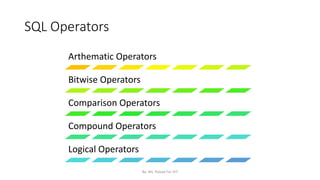
SQL Operators
Arthematic Operators
Bitwise Operators
Comparison Operators
Compound Operators
Logical Operators
By: Ms. Rubab For DIT
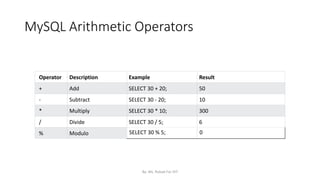
MySQL Arithmetic Operators
Operator Description Example Result
+ Add SELECT 30 + 20; 50
- Subtract SELECT 30 - 20; 10
* Multiply SELECT 30 * 10; 300
/ Divide SELECT 30 / 5; 6
% Modulo SELECT 30 % 5; 0
By: Ms. Rubab For DIT
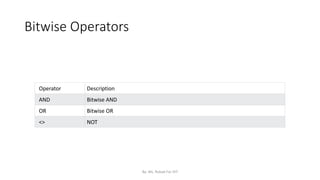
Bitwise Operators
Operator Description
AND Bitwise AND
OR Bitwise OR
<> NOT
By: Ms. Rubab For DIT
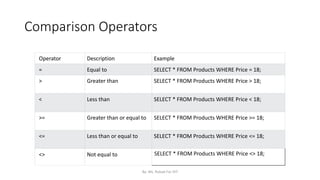
Comparison Operators
Operator Description Example
= Equal to SELECT * FROM Products WHERE Price = 18;
> Greater than SELECT * FROM Products WHERE Price > 18;
< Less than SELECT * FROM Products WHERE Price < 18;
>= Greater than or equal to SELECT * FROM Products WHERE Price >= 18;
<= Less than or equal to SELECT * FROM Products WHERE Price <= 18;
<> Not equal to SELECT * FROM Products WHERE Price <> 18;
By: Ms. Rubab For DIT
MySQL
Compound
Operators
Operator Description
+= Add equals
-= Subtract equals
*= Multiply equals
/= Divide equals
%= Modulo equals
&= Bitwise AND equals
^-= Bitwise exclusive equals
|*= Bitwise OR equals
By: Ms. Rubab For DIT
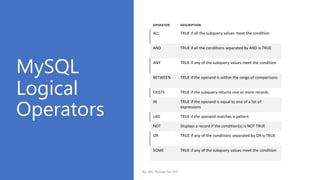
MySQL
Logical
Operators
OPERATOR DESCRIPTION
ALL TRUE if all the subquery values meet the condition
AND TRUE if all the conditions separated by AND is TRUE
ANY TRUE if any of the subquery values meet the condition
BETWEEN TRUE if the operand is within the range of comparisons
EXISTS TRUE if the subquery returns one or more records
IN TRUE if the operand is equal to one of a list of
expressions
LIKE TRUE if the operand matches a pattern
NOT Displays a record if the condition(s) is NOT TRUE
OR TRUE if any of the conditions separated by OR is TRUE
SOME TRUE if any of the subquery values meet the condition
By: Ms. Rubab For DIT
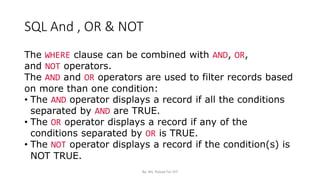
SQL And , OR & NOT
The WHERE clause can be combined with AND, OR,
and NOT operators.
The AND and OR operators are used to filter records based
on more than one condition:
• The AND operator displays a record if all the conditions
separated by AND are TRUE.
• The OR operator displays a record if any of the
conditions separated by OR is TRUE.
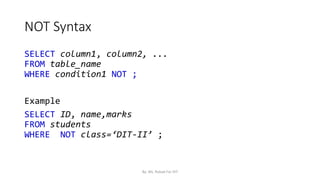
• The NOT operator displays a record if the condition(s) is
NOT TRUE.
By: Ms. Rubab For DIT
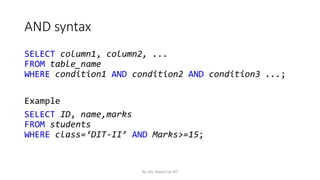
AND syntax
SELECT column1, column2, ...
FROM table_name
WHERE condition1 AND condition2 AND condition3 ...;
Example
SELECT ID, name,marks
FROM students
WHERE class=‘DIT-II’ AND Marks>=15;
By: Ms. Rubab For DIT
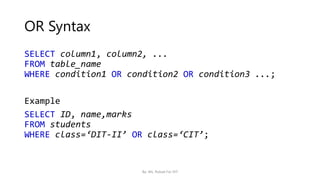
OR Syntax
SELECT column1, column2, ...
FROM table_name
WHERE condition1 OR condition2 OR condition3 ...;
Example
SELECT ID, name,marks
FROM students
WHERE class=‘DIT-II’ OR class=‘CIT’;
By: Ms. Rubab For DIT
NOT Syntax
SELECT column1, column2, ...
FROM table_name
WHERE condition1 NOT ;
Example
SELECT ID, name,marks
FROM students
WHERE NOT class=‘DIT-II’ ;
By: Ms. Rubab For DIT
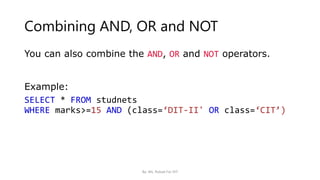
Combining AND, OR and NOT
You can also combine the AND, OR and NOT operators.
Example:
SELECT * FROM studnets
WHERE marks>=15 AND (class=‘DIT-II' OR class=‘CIT’)
By: Ms. Rubab For DIT
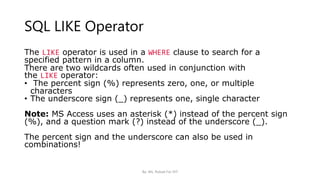
SQL LIKE Operator
The LIKE operator is used in a WHERE clause to search for a
specified pattern in a column.
There are two wildcards often used in conjunction with
the LIKE operator:
• The percent sign (%) represents zero, one, or multiple
characters
• The underscore sign (_) represents one, single character
Note: MS Access uses an asterisk (*) instead of the percent sign
(%), and a question mark (?) instead of the underscore (_).
The percent sign and the underscore can also be used in
combinations!
By: Ms. Rubab For DIT
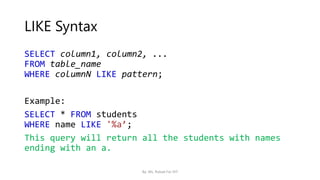
LIKE Syntax
SELECT column1, column2, ...
FROM table_name
WHERE columnN LIKE pattern;
Example:
SELECT * FROM students
WHERE name LIKE '%a’;
This query will return all the students with names
ending with an a.
By: Ms. Rubab For DIT
More examples
SELECT * FROM students
WHERE name LIKE'%or%’;
This SQL statement selects all students with a name that
have "or" in any position
SELECT * FROM students
WHERE name LIKE’_a’;
This SQL statement selects all students with a name that
have “a" in the second position of their name
By: Ms. Rubab For DIT
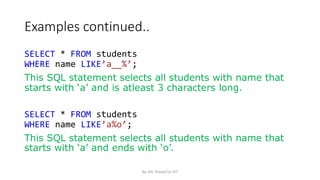
Examples continued..
SELECT * FROM students
WHERE name LIKE’a__%’;
This SQL statement selects all students with name that
starts with ‘a’ and is atleast 3 characters long.
SELECT * FROM students
WHERE name LIKE’a%o’;
This SQL statement selects all students with name that
starts with ‘a’ and ends with ‘o’.
By: Ms. Rubab For DIT
More examples..
SELECT * FROM students
WHERE name NOT LIKE ‘a%’;
This SQL statement selects all students with name that
doesn't starts with ‘a’.
By: Ms. Rubab For DIT
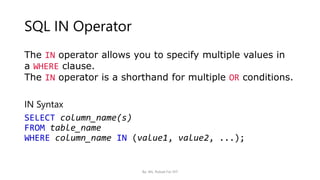
SQL IN Operator
The IN operator allows you to specify multiple values in
a WHERE clause.
The IN operator is a shorthand for multiple OR conditions.
IN Syntax
SELECT column_name(s)
FROM table_name
WHERE column_name IN (value1, value2, ...);
By: Ms. Rubab For DIT
Examples
SELECT * FROM studets
WHERE address IN (‘sobhodero’,‘hinjorja’,’Naogoth’);
The above SQL statement selects all student that are
located in ‘sobhodero’, ‘hinjorja’, ’Naogoth’
SELECT * FROM students
WHERE address
NOT IN (‘sobhodero’,‘hinjorja’,’Naogoth’);
The above SQL statement selects all customers that are
not located in ‘sobhodero’, ‘hinjorja’, ’Naogoth’:
By: Ms. Rubab For DIT
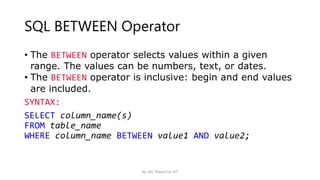
SQL BETWEEN Operator
• The BETWEEN operator selects values within a given
range. The values can be numbers, text, or dates.
• The BETWEEN operator is inclusive: begin and end values
are included.
SYNTAX:
SELECT column_name(s)
FROM table_name
WHERE column_name BETWEEN value1 AND value2;
By: Ms. Rubab For DIT
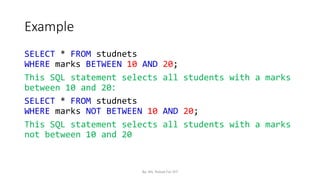
Example
SELECT * FROM studnets
WHERE marks BETWEEN 10 AND 20;
This SQL statement selects all students with a marks
between 10 and 20:
SELECT * FROM studnets
WHERE marks NOT BETWEEN 10 AND 20;
This SQL statement selects all students with a marks
not between 10 and 20
By: Ms. Rubab For DIT
BETWEEN Text Values Example
SELECT * FROM students
WHERE name BETWEEN ’Amir’ AND ‘Zaheer’ ORDER BY ID;
The above query selects all the students names
between Amir and Zaheer and orders them by their ID
Number
By: Ms. Rubab For DIT
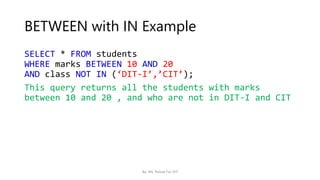
BETWEEN with IN Example
SELECT * FROM students
WHERE marks BETWEEN 10 AND 20
AND class NOT IN (‘DIT-I’,’CIT’);
This query returns all the students with marks
between 10 and 20 , and who are not in DIT-I and CIT
By: Ms. Rubab For DIT

SQL Operators.pptx

  • 1.
    SQL Operators By: Ms.Rubab Rubab.itc@suk-iba.edu.pk IBA ITC Sobhodero Managed By Khairpur Campus, IBA Sukkur University By: Ms. Rubab For DIT
  • 2.
    SQL Operators Arthematic Operators BitwiseOperators Comparison Operators Compound Operators Logical Operators By: Ms. Rubab For DIT
  • 3.
    MySQL Arithmetic Operators OperatorDescription Example Result + Add SELECT 30 + 20; 50 - Subtract SELECT 30 - 20; 10 * Multiply SELECT 30 * 10; 300 / Divide SELECT 30 / 5; 6 % Modulo SELECT 30 % 5; 0 By: Ms. Rubab For DIT
  • 4.
    Bitwise Operators Operator Description ANDBitwise AND OR Bitwise OR <> NOT By: Ms. Rubab For DIT
  • 5.
    Comparison Operators Operator DescriptionExample = Equal to SELECT * FROM Products WHERE Price = 18; > Greater than SELECT * FROM Products WHERE Price > 18; < Less than SELECT * FROM Products WHERE Price < 18; >= Greater than or equal to SELECT * FROM Products WHERE Price >= 18; <= Less than or equal to SELECT * FROM Products WHERE Price <= 18; <> Not equal to SELECT * FROM Products WHERE Price <> 18; By: Ms. Rubab For DIT
  • 6.
    MySQL Compound Operators Operator Description += Addequals -= Subtract equals *= Multiply equals /= Divide equals %= Modulo equals &= Bitwise AND equals ^-= Bitwise exclusive equals |*= Bitwise OR equals By: Ms. Rubab For DIT
  • 7.
    MySQL Logical Operators OPERATOR DESCRIPTION ALL TRUEif all the subquery values meet the condition AND TRUE if all the conditions separated by AND is TRUE ANY TRUE if any of the subquery values meet the condition BETWEEN TRUE if the operand is within the range of comparisons EXISTS TRUE if the subquery returns one or more records IN TRUE if the operand is equal to one of a list of expressions LIKE TRUE if the operand matches a pattern NOT Displays a record if the condition(s) is NOT TRUE OR TRUE if any of the conditions separated by OR is TRUE SOME TRUE if any of the subquery values meet the condition By: Ms. Rubab For DIT
  • 8.
    SQL And ,OR & NOT The WHERE clause can be combined with AND, OR, and NOT operators. The AND and OR operators are used to filter records based on more than one condition: • The AND operator displays a record if all the conditions separated by AND are TRUE. • The OR operator displays a record if any of the conditions separated by OR is TRUE. • The NOT operator displays a record if the condition(s) is NOT TRUE. By: Ms. Rubab For DIT
  • 9.
    AND syntax SELECT column1,column2, ... FROM table_name WHERE condition1 AND condition2 AND condition3 ...; Example SELECT ID, name,marks FROM students WHERE class=‘DIT-II’ AND Marks>=15; By: Ms. Rubab For DIT
  • 10.
    OR Syntax SELECT column1,column2, ... FROM table_name WHERE condition1 OR condition2 OR condition3 ...; Example SELECT ID, name,marks FROM students WHERE class=‘DIT-II’ OR class=‘CIT’; By: Ms. Rubab For DIT
  • 11.
    NOT Syntax SELECT column1,column2, ... FROM table_name WHERE condition1 NOT ; Example SELECT ID, name,marks FROM students WHERE NOT class=‘DIT-II’ ; By: Ms. Rubab For DIT
  • 12.
    Combining AND, ORand NOT You can also combine the AND, OR and NOT operators. Example: SELECT * FROM studnets WHERE marks>=15 AND (class=‘DIT-II' OR class=‘CIT’) By: Ms. Rubab For DIT
  • 13.
    SQL LIKE Operator TheLIKE operator is used in a WHERE clause to search for a specified pattern in a column. There are two wildcards often used in conjunction with the LIKE operator: • The percent sign (%) represents zero, one, or multiple characters • The underscore sign (_) represents one, single character Note: MS Access uses an asterisk (*) instead of the percent sign (%), and a question mark (?) instead of the underscore (_). The percent sign and the underscore can also be used in combinations! By: Ms. Rubab For DIT
  • 14.
    LIKE Syntax SELECT column1,column2, ... FROM table_name WHERE columnN LIKE pattern; Example: SELECT * FROM students WHERE name LIKE '%a’; This query will return all the students with names ending with an a. By: Ms. Rubab For DIT
  • 15.
    More examples SELECT *FROM students WHERE name LIKE'%or%’; This SQL statement selects all students with a name that have "or" in any position SELECT * FROM students WHERE name LIKE’_a’; This SQL statement selects all students with a name that have “a" in the second position of their name By: Ms. Rubab For DIT
  • 16.
    Examples continued.. SELECT *FROM students WHERE name LIKE’a__%’; This SQL statement selects all students with name that starts with ‘a’ and is atleast 3 characters long. SELECT * FROM students WHERE name LIKE’a%o’; This SQL statement selects all students with name that starts with ‘a’ and ends with ‘o’. By: Ms. Rubab For DIT
  • 17.
    More examples.. SELECT *FROM students WHERE name NOT LIKE ‘a%’; This SQL statement selects all students with name that doesn't starts with ‘a’. By: Ms. Rubab For DIT
  • 18.
    SQL IN Operator TheIN operator allows you to specify multiple values in a WHERE clause. The IN operator is a shorthand for multiple OR conditions. IN Syntax SELECT column_name(s) FROM table_name WHERE column_name IN (value1, value2, ...); By: Ms. Rubab For DIT
  • 19.
    Examples SELECT * FROMstudets WHERE address IN (‘sobhodero’,‘hinjorja’,’Naogoth’); The above SQL statement selects all student that are located in ‘sobhodero’, ‘hinjorja’, ’Naogoth’ SELECT * FROM students WHERE address NOT IN (‘sobhodero’,‘hinjorja’,’Naogoth’); The above SQL statement selects all customers that are not located in ‘sobhodero’, ‘hinjorja’, ’Naogoth’: By: Ms. Rubab For DIT
  • 20.
    SQL BETWEEN Operator •The BETWEEN operator selects values within a given range. The values can be numbers, text, or dates. • The BETWEEN operator is inclusive: begin and end values are included. SYNTAX: SELECT column_name(s) FROM table_name WHERE column_name BETWEEN value1 AND value2; By: Ms. Rubab For DIT
  • 21.
    Example SELECT * FROMstudnets WHERE marks BETWEEN 10 AND 20; This SQL statement selects all students with a marks between 10 and 20: SELECT * FROM studnets WHERE marks NOT BETWEEN 10 AND 20; This SQL statement selects all students with a marks not between 10 and 20 By: Ms. Rubab For DIT
  • 22.
    BETWEEN Text ValuesExample SELECT * FROM students WHERE name BETWEEN ’Amir’ AND ‘Zaheer’ ORDER BY ID; The above query selects all the students names between Amir and Zaheer and orders them by their ID Number By: Ms. Rubab For DIT
  • 23.
    BETWEEN with INExample SELECT * FROM students WHERE marks BETWEEN 10 AND 20 AND class NOT IN (‘DIT-I’,’CIT’); This query returns all the students with marks between 10 and 20 , and who are not in DIT-I and CIT By: Ms. Rubab For DIT