Topic Name :
SQL Operators
Presented By:
Mrs. U. S. Patil
Assistant Professor,
SIT COE Yadrav Ichalkranji.
SQL Operators:
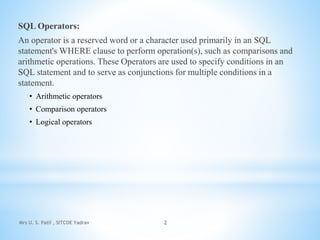
An operator is a reserved word or a character used primarily in an SQL
statement's WHERE clause to perform operation(s), such as comparisons and
arithmetic operations. These Operators are used to specify conditions in an
SQL statement and to serve as conjunctions for multiple conditions in a
statement.
• Arithmetic operators
• Comparison operators
• Logical operators
Mrs U. S. Patil , SITCOE Yadrav 2
Arithmetic Operators:
These operators are used to perform operations such as addition, multiplication,
subtraction etc
Mrs U. S. Patil , SITCOE Yadrav 3
Operator Operation Description
+ Addition Add values on either side of the operator
– Subtraction
Used to subtract the right hand side value from the left hand
side value
* Multiplication Multiples the values present on each side of the operator
/ Division Divides the left hand side value by the right hand side value
% Modulus
Divides the left hand side value by the right hand side value;
and returns the remainder
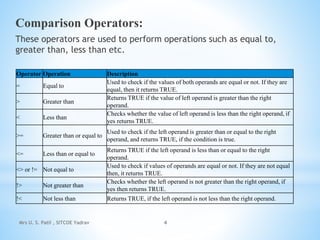
Comparison Operators:
These operators are used to perform operations such as equal to,
greater than, less than etc.
Mrs U. S. Patil , SITCOE Yadrav 4
Operator Operation Description
= Equal to
Used to check if the values of both operands are equal or not. If they are
equal, then it returns TRUE.
> Greater than
Returns TRUE if the value of left operand is greater than the right
operand.
< Less than
Checks whether the value of left operand is less than the right operand, if
yes returns TRUE.
>= Greater than or equal to
Used to check if the left operand is greater than or equal to the right
operand, and returns TRUE, if the condition is true.
<= Less than or equal to
Returns TRUE if the left operand is less than or equal to the right
operand.
<> or != Not equal to
Used to check if values of operands are equal or not. If they are not equal
then, it returns TRUE.
!> Not greater than
Checks whether the left operand is not greater than the right operand, if
yes then returns TRUE.
!< Not less than Returns TRUE, if the left operand is not less than the right operand.
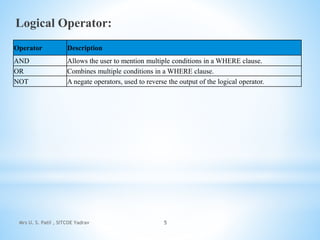
Logical Operator:
Mrs U. S. Patil , SITCOE Yadrav 5
Operator Description
AND Allows the user to mention multiple conditions in a WHERE clause.
OR Combines multiple conditions in a WHERE clause.
NOT A negate operators, used to reverse the output of the logical operator.
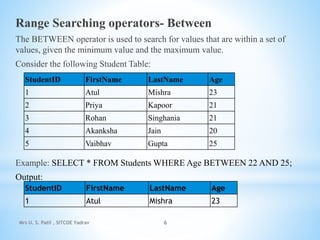
Range Searching operators- Between
The BETWEEN operator is used to search for values that are within a set of
values, given the minimum value and the maximum value.
Consider the following Student Table:
Example: SELECT * FROM Students WHERE Age BETWEEN 22 AND 25;
Output:
Mrs U. S. Patil , SITCOE Yadrav 6
StudentID FirstName LastName Age
1 Atul Mishra 23
2 Priya Kapoor 21
3 Rohan Singhania 21
4 Akanksha Jain 20
5 Vaibhav Gupta 25
StudentID FirstName LastName Age
1 Atul Mishra 23
Pattern Matching Operator- Like
This operator is used along with the WHERE clause to retrieve the data
according to a specific pattern. There are two wildcards which are used along
with the LIKE operator to retrieve data. They are:
• %[Percentage Sign] – It matches 0 or more character.
• _ [Underscore]– It matches exactly one character.
Syntax:
SELECT column1, coulmn2, . . ., columnN FROM tablename
WHERE columnName LIKE pattern;
Mrs U. S. Patil , SITCOE Yadrav 7
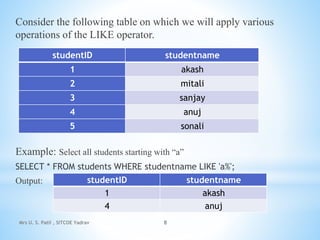
Consider the following table on which we will apply various
operations of the LIKE operator.
Example: Select all students starting with “a”
SELECT * FROM students WHERE studentname LIKE 'a%';
Output:
Mrs U. S. Patil , SITCOE Yadrav 8
studentID studentname
1 akash
2 mitali
3 sanjay
4 anuj
5 sonali
studentID studentname
1 akash
4 anuj
Mrs U. S. Patil , SITCOE Yadrav 9
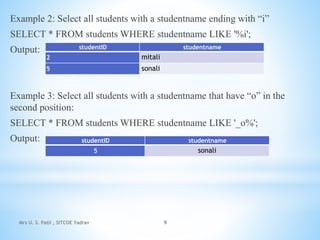
Example 2: Select all students with a studentname ending with “i”
SELECT * FROM students WHERE studentname LIKE '%i';
Output:
Example 3: Select all students with a studentname that have “o” in the
second position:
SELECT * FROM students WHERE studentname LIKE '_o%';
Output:
studentID studentname
2 mitali
5 sonali
studentID studentname
5 sonali
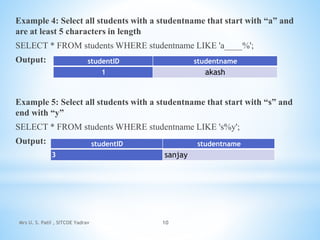
Example 4: Select all students with a studentname that start with “a” and
are at least 5 characters in length
SELECT * FROM students WHERE studentname LIKE 'a____%';
Output:
Example 5: Select all students with a studentname that start with “s” and
end with “y”
SELECT * FROM students WHERE studentname LIKE 's%y';
Output:
Mrs U. S. Patil , SITCOE Yadrav 10
studentID studentname
1 akash
studentID studentname
3 sanjay
Mrs U. S. Patil , SITCOE Yadrav 11

SQL Operators.pptx

  • 1.
    Topic Name : SQLOperators Presented By: Mrs. U. S. Patil Assistant Professor, SIT COE Yadrav Ichalkranji.
  • 2.
    SQL Operators: An operatoris a reserved word or a character used primarily in an SQL statement's WHERE clause to perform operation(s), such as comparisons and arithmetic operations. These Operators are used to specify conditions in an SQL statement and to serve as conjunctions for multiple conditions in a statement. • Arithmetic operators • Comparison operators • Logical operators Mrs U. S. Patil , SITCOE Yadrav 2
  • 3.
    Arithmetic Operators: These operatorsare used to perform operations such as addition, multiplication, subtraction etc Mrs U. S. Patil , SITCOE Yadrav 3 Operator Operation Description + Addition Add values on either side of the operator – Subtraction Used to subtract the right hand side value from the left hand side value * Multiplication Multiples the values present on each side of the operator / Division Divides the left hand side value by the right hand side value % Modulus Divides the left hand side value by the right hand side value; and returns the remainder
  • 4.
    Comparison Operators: These operatorsare used to perform operations such as equal to, greater than, less than etc. Mrs U. S. Patil , SITCOE Yadrav 4 Operator Operation Description = Equal to Used to check if the values of both operands are equal or not. If they are equal, then it returns TRUE. > Greater than Returns TRUE if the value of left operand is greater than the right operand. < Less than Checks whether the value of left operand is less than the right operand, if yes returns TRUE. >= Greater than or equal to Used to check if the left operand is greater than or equal to the right operand, and returns TRUE, if the condition is true. <= Less than or equal to Returns TRUE if the left operand is less than or equal to the right operand. <> or != Not equal to Used to check if values of operands are equal or not. If they are not equal then, it returns TRUE. !> Not greater than Checks whether the left operand is not greater than the right operand, if yes then returns TRUE. !< Not less than Returns TRUE, if the left operand is not less than the right operand.
  • 5.
    Logical Operator: Mrs U.S. Patil , SITCOE Yadrav 5 Operator Description AND Allows the user to mention multiple conditions in a WHERE clause. OR Combines multiple conditions in a WHERE clause. NOT A negate operators, used to reverse the output of the logical operator.
  • 6.
    Range Searching operators-Between The BETWEEN operator is used to search for values that are within a set of values, given the minimum value and the maximum value. Consider the following Student Table: Example: SELECT * FROM Students WHERE Age BETWEEN 22 AND 25; Output: Mrs U. S. Patil , SITCOE Yadrav 6 StudentID FirstName LastName Age 1 Atul Mishra 23 2 Priya Kapoor 21 3 Rohan Singhania 21 4 Akanksha Jain 20 5 Vaibhav Gupta 25 StudentID FirstName LastName Age 1 Atul Mishra 23
  • 7.
    Pattern Matching Operator-Like This operator is used along with the WHERE clause to retrieve the data according to a specific pattern. There are two wildcards which are used along with the LIKE operator to retrieve data. They are: • %[Percentage Sign] – It matches 0 or more character. • _ [Underscore]– It matches exactly one character. Syntax: SELECT column1, coulmn2, . . ., columnN FROM tablename WHERE columnName LIKE pattern; Mrs U. S. Patil , SITCOE Yadrav 7
  • 8.
    Consider the followingtable on which we will apply various operations of the LIKE operator. Example: Select all students starting with “a” SELECT * FROM students WHERE studentname LIKE 'a%'; Output: Mrs U. S. Patil , SITCOE Yadrav 8 studentID studentname 1 akash 2 mitali 3 sanjay 4 anuj 5 sonali studentID studentname 1 akash 4 anuj
  • 9.
    Mrs U. S.Patil , SITCOE Yadrav 9 Example 2: Select all students with a studentname ending with “i” SELECT * FROM students WHERE studentname LIKE '%i'; Output: Example 3: Select all students with a studentname that have “o” in the second position: SELECT * FROM students WHERE studentname LIKE '_o%'; Output: studentID studentname 2 mitali 5 sonali studentID studentname 5 sonali
  • 10.
    Example 4: Selectall students with a studentname that start with “a” and are at least 5 characters in length SELECT * FROM students WHERE studentname LIKE 'a____%'; Output: Example 5: Select all students with a studentname that start with “s” and end with “y” SELECT * FROM students WHERE studentname LIKE 's%y'; Output: Mrs U. S. Patil , SITCOE Yadrav 10 studentID studentname 1 akash studentID studentname 3 sanjay
  • 11.
    Mrs U. S.Patil , SITCOE Yadrav 11