PostgreSQL - VIEWS ( Postgres view is a virtual table in Postgres).pptx
PostgreSQL views are virtual tables that represent the results of a query. They do not store data themselves but provide a named, reusable abstraction over one or more underlying tables or even other views.
2
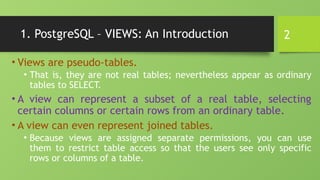
1. PostgreSQL –VIEWS: An Introduction
• Views are pseudo-tables.
• That is, they are not real tables; nevertheless appear as ordinary
tables to SELECT.
• A view can represent a subset of a real table, selecting
certain columns or certain rows from an ordinary table.
• A view can even represent joined tables.
• Because views are assigned separate permissions, you can use
them to restrict table access so that the users see only specific
rows or columns of a table.
3.
3
1. PostgreSQL –VIEWS: An Introduction …
• A view can contain all rows of a table or selected rows from one or more tables.
• A view can be created from one or many tables, which depends on the written PostgreSQL query to create a view.
• Views, which are kind of virtual tables, allow users to do the following −
• Structure data in a way that users or classes of users find natural or intuitive.
• Restrict access to the data such that a user can only see limited data instead of complete table.
• Summarize data from various tables, which can be used to generate reports.
• Since views are not ordinary tables, you may not be able to execute a DELETE, INSERT, or UPDATE
statement on a view.
• However, you can create a RULE to correct this problem of using DELETE, INSERT or UPDATE on a view.
4.
4
1.1 Creating Views
•The PostgreSQL views are created using the CREATE VIEW statement.
• The PostgreSQL views can be created from a single table, multiple tables, or another view.
• The basic CREATE VIEW syntax is as follows −
• You can include multiple tables in your SELECT statement in very similar way as you
use them in normal PostgreSQL SELECT query.
• If the optional TEMP or TEMPORARY keyword is present, the view will be created in the temporary
space.
• Temporary views are automatically dropped at the end of the current session.
CREATE [TEMP | TEMPORARY] VIEW view_name AS
SELECT column1, column2.....
FROM table_name
WHERE [condition];
5.
5
1.1 Creating Views:Example
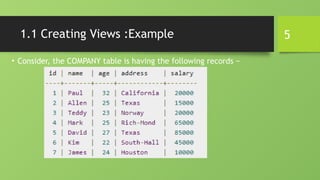
• Consider, the COMPANY table is having the following records −
6.
6
1.1 Creating Views:Example …
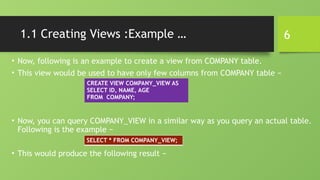
• Now, following is an example to create a view from COMPANY table.
• This view would be used to have only few columns from COMPANY table −
• Now, you can query COMPANY_VIEW in a similar way as you query an actual table.
Following is the example −
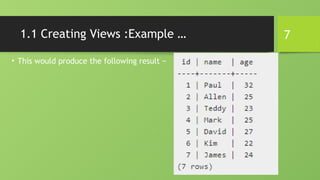
• This would produce the following result −
CREATE VIEW COMPANY_VIEW AS
SELECT ID, NAME, AGE
FROM COMPANY;
SELECT * FROM COMPANY_VIEW;
8
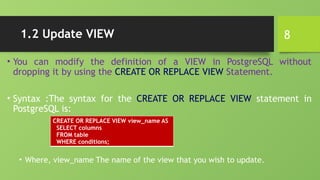
1.2 Update VIEW
•You can modify the definition of a VIEW in PostgreSQL without
dropping it by using the CREATE OR REPLACE VIEW Statement.
• Syntax :The syntax for the CREATE OR REPLACE VIEW statement in
PostgreSQL is:
• Where, view_name The name of the view that you wish to update.
CREATE OR REPLACE VIEW view_name AS
SELECT columns
FROM table
WHERE conditions;
9.
9
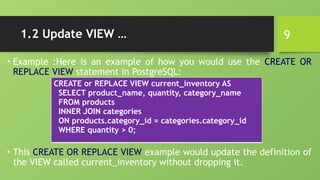
1.2 Update VIEW…
• Example :Here is an example of how you would use the CREATE OR
REPLACE VIEW statement in PostgreSQL:
• This CREATE OR REPLACE VIEW example would update the definition of
the VIEW called current_inventory without dropping it.
CREATE or REPLACE VIEW current_inventory AS
SELECT product_name, quantity, category_name
FROM products
INNER JOIN categories
ON products.category_id = categories.category_id
WHERE quantity > 0;
10.
10
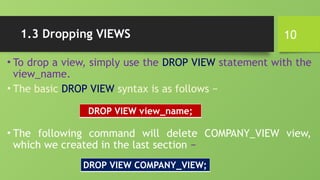
1.3 Dropping VIEWS
•To drop a view, simply use the DROP VIEW statement with the
view_name.
• The basic DROP VIEW syntax is as follows −
• The following command will delete COMPANY_VIEW view,
which we created in the last section −
DROP VIEW view_name;
DROP VIEW COMPANY_VIEW;
11.
11
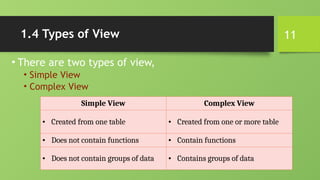
1.4 Types ofView
• There are two types of view,
• Simple View
• Complex View
Simple View Complex View
• Created from one table • Created from one or more table
• Does not contain functions • Contain functions
• Does not contain groups of data • Contains groups of data
12.
12
2. What isa sequence ?
• A sequence is simply a list of numbers, in which their orders
are important.
• For example, the {1,2,3} is a sequence while the {3,2,1} is an
entirely different sequence.
• In SQL Server, a sequence is a user-defined schema-bound
object that generates a sequence of numbers according to a
specified specification.
• A sequence of numeric values can be in ascending or descending
order at a defined interval and may cycle if requested.
13.
13
2. What isa sequence ? …
• Sequence is a feature supported by some database systems to
produce unique values on demand.
• Some DBMS like MySQL supports AUTO_INCREMENT in place of
Sequence.
• AUTO_INCREMENT is applied on columns, it automatically
increments the column value by 1 each time a new record is
inserted into the table.
• Sequence is also some what similar to AUTO_INCREMENT but it has
some additional features too.
14.
14
2.1 How DoI Use A Sequence In A Table?
• Sequences are most commonly used via the serial pseudotype.
• A serial is a special data type that encodes the following information:
it indicates that the values for the column will be generated by consulting the
sequence
therefore, it creates a new sequence object, and sets the default value for the column
to be the next value produced by the sequence
since a sequence always produces non-NULL values, it adds a NOT NULL constraint to
the column
since the sequence that is produced is created "behind the scenes", PostgreSQL
assumes that the sequence is only used to generate values for the table containing the
serial column.
Therefore, if this column is dropped, the sequence will be automatically removed.
15.
15
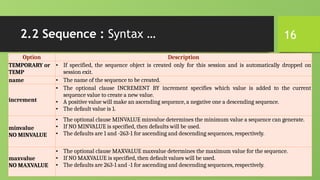
2.2 Sequence :Syntax
CREATE [ TEMPORARY | TEMP ]
SEQUENCE name
[ INCREMENT [ BY ] increment ]
[ MINVALUE minvalue | NO MINVALUE ]
[ MAXVALUE maxvalue | NO MAXVALUE ]
[ START [ WITH ] start ]
[ CACHE cache ]
[ [ NO ] CYCLE ]
[ OWNED BY { table_name.column_name | NONE } ]
16.
16
2.2 Sequence :Syntax …
Option Description
TEMPORARY or
TEMP
• If specified, the sequence object is created only for this session and is automatically dropped on
session exit.
name • The name of the sequence to be created.
increment
• The optional clause INCREMENT BY increment specifies which value is added to the current
sequence value to create a new value.
• A positive value will make an ascending sequence, a negative one a descending sequence.
• The default value is 1.
minvalue
NO MINVALUE
• The optional clause MINVALUE minvalue determines the minimum value a sequence can generate.
• If NO MINVALUE is specified, then defaults will be used.
• The defaults are 1 and -263-1 for ascending and descending sequences, respectively.
maxvalue
NO MAXVALUE
• The optional clause MAXVALUE maxvalue determines the maximum value for the sequence.
• If NO MAXVALUE is specified, then default values will be used.
• The defaults are 263-1 and -1 for ascending and descending sequences, respectively.
17.
17
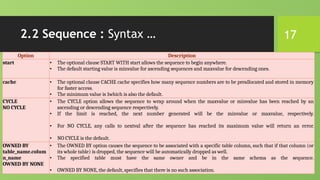
2.2 Sequence :Syntax …
Option Description
start • The optional clause START WITH start allows the sequence to begin anywhere.
• The default starting value is minvalue for ascending sequences and maxvalue for descending ones.
cache • The optional clause CACHE cache specifies how many sequence numbers are to be preallocated and stored in memory
for faster access.
• The minimum value is 1which is also the default.
CYCLE
NO CYCLE
• The CYCLE option allows the sequence to wrap around when the maxvalue or minvalue has been reached by an
ascending or descending sequence respectively.
• If the limit is reached, the next number generated will be the minvalue or maxvalue, respectively.
• For NO CYCLE, any calls to nextval after the sequence has reached its maximum value will return an error.
• NO CYCLE is the default.
OWNED BY
table_name.colum
n_name
OWNED BY NONE
• The OWNED BY option causes the sequence to be associated with a specific table column, such that if that column (or
its whole table) is dropped, the sequence will be automatically dropped as well.
• The specified table must have the same owner and be in the same schema as the sequence.
• OWNED BY NONE, the default, specifies that there is no such association.
18.
18
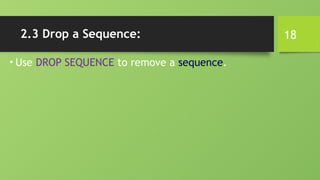
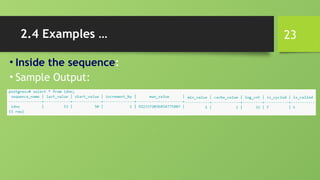
2.3 Drop aSequence:
• Use DROP SEQUENCE to remove a sequence.
20
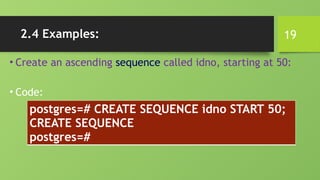
2.4 Examples …
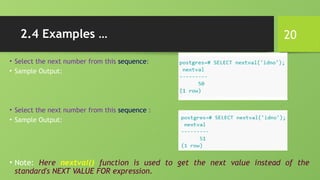
•Select the next number from this sequence:
• Sample Output:
• Select the next number from this sequence :
• Sample Output:
• Note: Here nextval() function is used to get the next value instead of the
standard's NEXT VALUE FOR expression.
21.
21
2.4 Examples …
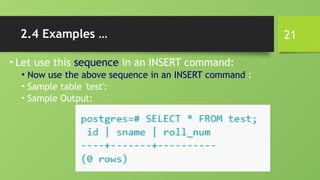
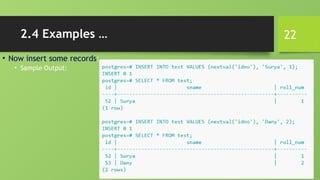
•Let use this sequence in an INSERT command:
• Now use the above sequence in an INSERT command :
• Sample table 'test':
• Sample Output:
24
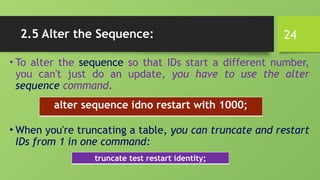
2.5 Alter theSequence:
• To alter the sequence so that IDs start a different number,
you can't just do an update, you have to use the alter
sequence command.
• When you're truncating a table, you can truncate and restart
IDs from 1 in one command:
alter sequence idno restart with 1000;
truncate test restart identity;
![4
1.1 Creating Views
• The PostgreSQL views are created using the CREATE VIEW statement.
• The PostgreSQL views can be created from a single table, multiple tables, or another view.
• The basic CREATE VIEW syntax is as follows −
• You can include multiple tables in your SELECT statement in very similar way as you
use them in normal PostgreSQL SELECT query.
• If the optional TEMP or TEMPORARY keyword is present, the view will be created in the temporary
space.
• Temporary views are automatically dropped at the end of the current session.
CREATE [TEMP | TEMPORARY] VIEW view_name AS
SELECT column1, column2.....
FROM table_name
WHERE [condition];](https://image.slidesharecdn.com/0202postgresql-views-251021111837-600bac02/85/PostgreSQL-VIEWS-Postgres-view-is-a-virtual-table-in-Postgres-pptx-4-320.jpg)
![15
2.2 Sequence : Syntax
CREATE [ TEMPORARY | TEMP ]
SEQUENCE name
[ INCREMENT [ BY ] increment ]
[ MINVALUE minvalue | NO MINVALUE ]
[ MAXVALUE maxvalue | NO MAXVALUE ]
[ START [ WITH ] start ]
[ CACHE cache ]
[ [ NO ] CYCLE ]
[ OWNED BY { table_name.column_name | NONE } ]](https://image.slidesharecdn.com/0202postgresql-views-251021111837-600bac02/85/PostgreSQL-VIEWS-Postgres-view-is-a-virtual-table-in-Postgres-pptx-15-320.jpg)