PolyChrome
A Cross-Device Framework for Collaborative
Web Visualization
Sriram Karthik Badam, Niklas Elmqvist
sbadam@umd.edu
1
“The most profound technologies are those that disappear.
They weave themselves into the fabric of everyday life until
they are indistinguishable from it.”… Mark Weiser
Ubiquitous Computing
2
Ubiquitous Computing
3
Ubiquitous Analytics
Massive heterogeneous data
Ubiquitous analytics: Interacting with big data anywhere, anytime (Elmqvist and Irani, 2013)
Interaction with data anywhere and anytime
4
Mobile Visualization
Visualizing information on mobile devices (Chittaro, 2006)
A Mobile Visual Analytics Approach for Law Enforcement Situation Awareness (Razip et al., 2014)
5
Collaborative Visualization
Interactive Tree Comparison for co-located collaborative visualization (Isenberg and Carpendale, 2007)
Hugin (Kim et al., 2010)
Lark (Tobiasz et al., 2011)
Collaborative Visualization (Isenberg et al., 2011)
“Collaborative visualization is the shared use of computer-supported,
(interactive,) visual representations of data by more than one person
with the common goal of contribution to joint information processing
activities”
6
Emergency Situation
Heterogeneous Information sources
Multiple analysts/ stakeholders
Ensemble of devices
7
Interaction With Data
Let’s see how the
spread of this fire
is different from
two years ago.
Sam, look
at this!
Wait, Linda,
let me
visualize the
sensor data
here!
Aha!! that’s
why it
happened!
Siri, capture
screenshot.
8
Requirements
Supporting CollaborationMultiple and Networked Devices
Post-WIMP interaction
WIMP – Windows, Icons, Menus, Pointers
Supporting Visualization
Collaboration over the Web
Cross-Device Interaction over the Web
Collaborative Web Visualization
9
PolyChrome
• Middleware Framework for developing web-based collaborative visualizations
• JavaScript and Node.js
• Three components
• Proxy server modules (Node.js)
• Interaction/operation sharing and view management
• Interaction recording, concurrency, and conflict management
10
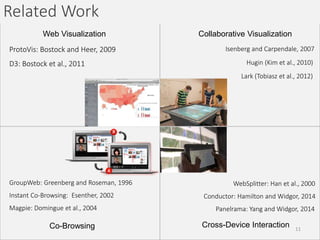
Web Visualization Collaborative Visualization
Cross-Device Interaction
Related Work
ProtoVis: Bostock and Heer, 2009
D3: Bostock et al., 2011
Collaborative Visualization
Isenberg and Carpendale, 2007
Hugin (Kim et al., 2010)
Lark (Tobiasz et al., 2012)
GroupWeb: Greenberg and Roseman, 1996
Instant Co-Browsing: Esenther, 2002
Magpie: Domingue et al., 2004
Co-Browsing Cross-Device Interaction
WebSplitter: Han et al., 2000
Conductor: Hamilton and Widgor, 2014
Panelrama: Yang and Widgor, 2014
11
Design Choices: Operation Sharing
Implicit Explicit
Synchronite (Thum and Schwind, 2010) Branch-explore-merge (McGrath et al., 2012)
GroupWeb (Greenberg and Roseman, 1996)
PlugByPlay (Wiltse and Nichols, 2009)WebSplitter (Han et al., 2000)
CoLab (Hoyos-Rivera et al., 2005)
12
Design Choices: Operation Definition
Data-centric operationInteraction-centric operation
Represented as an action Represented as a change in
the data driving the view
Mouse, touch, and gestures
Mouse events in Synchronite
(Thum and Schwind, 2010)
State changes, selection, and
filtering
Dynamic screenshots in CoFox
(Rodriguez Perez et al., 2011)
State variables in Panelrama
(Yang and Widgor, 2014)
Instrument changes in Shared Substance
(Gjerlufsen et al., 2011)
Event sharing in XICE windowing toolkit
(Arthur and Olsen, 2011)
Tap, side, knuckle events in Duet
(Chen et al., 2014)
13
PolyChrome API: Explicit Sharing
DOM Events: mousedown, mousemove, mouseup
element.click(function handler() {
});
Capture
Recycle
PolyChromeEventHandler.wrapEvent(event);
PolyChromeEventHandler.shareEvent();
PolyChromeEventHandler.applyEvent();
Handle
makeSelection(event)
Share with a P2P connection1,2 to all devices
Share with a server using web sockets
Apply event
Handle event based on application logic
1http://peerjs.com/
2http://w3c.github.io/webrtc-pc/
Traditional JS event handling routine
14
PolyChrome API: Implicit Sharing
DOM Events: mousedown, mousemove, mouseup
Capture
Recycle
Handle
Event captured and the underlying elements identified by PolyChrome browser modules
Event wrapped in a PolyChrome Event class and shared automatically
Event handled by the client logic
15
Design Choices: Display Configuration
Traffic trends across the world
?
? 16
Design Choices: Display Configuration
A B A B
A B
Stitching Replication
Nesting
Exploring the design space of composite visualization (Javed and Elmqvist, 2012) 17
PolyChrome API: Display Configuration
PolyChrome API: CSS Transforms
Unified Display Space
Surface 1 Surface 2
….
Surface *
element.css({'-webkit-transform-origin': x y});
Offset
element.css({'-webkit-transform': scale(s, u)});
Scale factors
18
Other Design Requirements
Persistence
Interaction log/ replay
Many Eyes
Consistency/Conflict Management
Operation Transformation
19
Legacy Applications
Distributed Web browser
Proxy server to load existing webpages
Implicit sharing
Display Management
D3 is awesome!!!
20
Application Examples
Scatterplot Matrix Exploration
Geographical Map Exploration
Legacy Application
21
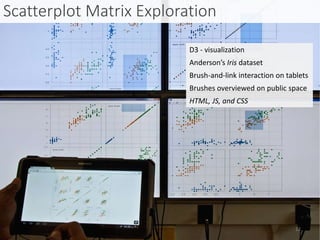
Scatterplot Matrix Exploration
Anderson’s Iris dataset
Brush-and-link interaction on tablets
Brushes overviewed on public space
D3 - visualization
HTML, JS, and CSS
22
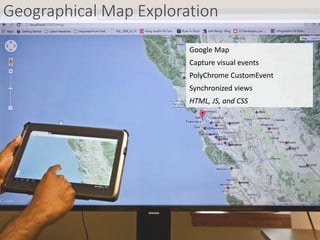
Geographical Map Exploration
Capture visual events
PolyChrome CustomEvent
Synchronized views
Google Map
HTML, JS, and CSS
23
Limitations/ Future Work
• Implicit sharing expensive due to the need to find the DOM target
capture Recycle Handle
• Display management currently limited to transformation
• Embedding operation transformation into the framework
• Developer evaluation and more tutorials
• Lack of underlying structure in the collaborative web visualizations
But many advantages,
• Works with existing SVG visualization frameworks: D3
• Abstracts communication, operation management, and space configuration
• Easy to deploy!
• Supports wide range of collaboration scenarios
24
Conclusion
PolyChrome Framework
Implicit Explicit
A B
AB
Application Examples
25
Acknowledgment
S. Karthik Badam
sbadam@umd.edu
Questions?
IIS-1253863
PolyChrome
https://github.com/karthikbadam/PolyChrome
VisDock framework developed by Jungu Choi available on Github
26

PolyChrome: A Cross-Device Framework for Collaborative Web Visualization

  • 1.
    PolyChrome A Cross-Device Frameworkfor Collaborative Web Visualization Sriram Karthik Badam, Niklas Elmqvist sbadam@umd.edu 1
  • 2.
    “The most profoundtechnologies are those that disappear. They weave themselves into the fabric of everyday life until they are indistinguishable from it.”… Mark Weiser Ubiquitous Computing 2
  • 3.
  • 4.
    Ubiquitous Analytics Massive heterogeneousdata Ubiquitous analytics: Interacting with big data anywhere, anytime (Elmqvist and Irani, 2013) Interaction with data anywhere and anytime 4
  • 5.
    Mobile Visualization Visualizing informationon mobile devices (Chittaro, 2006) A Mobile Visual Analytics Approach for Law Enforcement Situation Awareness (Razip et al., 2014) 5
  • 6.
    Collaborative Visualization Interactive TreeComparison for co-located collaborative visualization (Isenberg and Carpendale, 2007) Hugin (Kim et al., 2010) Lark (Tobiasz et al., 2011) Collaborative Visualization (Isenberg et al., 2011) “Collaborative visualization is the shared use of computer-supported, (interactive,) visual representations of data by more than one person with the common goal of contribution to joint information processing activities” 6
  • 7.
    Emergency Situation Heterogeneous Informationsources Multiple analysts/ stakeholders Ensemble of devices 7
  • 8.
    Interaction With Data Let’ssee how the spread of this fire is different from two years ago. Sam, look at this! Wait, Linda, let me visualize the sensor data here! Aha!! that’s why it happened! Siri, capture screenshot. 8
  • 9.
    Requirements Supporting CollaborationMultiple andNetworked Devices Post-WIMP interaction WIMP – Windows, Icons, Menus, Pointers Supporting Visualization Collaboration over the Web Cross-Device Interaction over the Web Collaborative Web Visualization 9
  • 10.
    PolyChrome • Middleware Frameworkfor developing web-based collaborative visualizations • JavaScript and Node.js • Three components • Proxy server modules (Node.js) • Interaction/operation sharing and view management • Interaction recording, concurrency, and conflict management 10
  • 11.
    Web Visualization CollaborativeVisualization Cross-Device Interaction Related Work ProtoVis: Bostock and Heer, 2009 D3: Bostock et al., 2011 Collaborative Visualization Isenberg and Carpendale, 2007 Hugin (Kim et al., 2010) Lark (Tobiasz et al., 2012) GroupWeb: Greenberg and Roseman, 1996 Instant Co-Browsing: Esenther, 2002 Magpie: Domingue et al., 2004 Co-Browsing Cross-Device Interaction WebSplitter: Han et al., 2000 Conductor: Hamilton and Widgor, 2014 Panelrama: Yang and Widgor, 2014 11
  • 12.
    Design Choices: OperationSharing Implicit Explicit Synchronite (Thum and Schwind, 2010) Branch-explore-merge (McGrath et al., 2012) GroupWeb (Greenberg and Roseman, 1996) PlugByPlay (Wiltse and Nichols, 2009)WebSplitter (Han et al., 2000) CoLab (Hoyos-Rivera et al., 2005) 12
  • 13.
    Design Choices: OperationDefinition Data-centric operationInteraction-centric operation Represented as an action Represented as a change in the data driving the view Mouse, touch, and gestures Mouse events in Synchronite (Thum and Schwind, 2010) State changes, selection, and filtering Dynamic screenshots in CoFox (Rodriguez Perez et al., 2011) State variables in Panelrama (Yang and Widgor, 2014) Instrument changes in Shared Substance (Gjerlufsen et al., 2011) Event sharing in XICE windowing toolkit (Arthur and Olsen, 2011) Tap, side, knuckle events in Duet (Chen et al., 2014) 13
  • 14.
    PolyChrome API: ExplicitSharing DOM Events: mousedown, mousemove, mouseup element.click(function handler() { }); Capture Recycle PolyChromeEventHandler.wrapEvent(event); PolyChromeEventHandler.shareEvent(); PolyChromeEventHandler.applyEvent(); Handle makeSelection(event) Share with a P2P connection1,2 to all devices Share with a server using web sockets Apply event Handle event based on application logic 1http://peerjs.com/ 2http://w3c.github.io/webrtc-pc/ Traditional JS event handling routine 14
  • 15.
    PolyChrome API: ImplicitSharing DOM Events: mousedown, mousemove, mouseup Capture Recycle Handle Event captured and the underlying elements identified by PolyChrome browser modules Event wrapped in a PolyChrome Event class and shared automatically Event handled by the client logic 15
  • 16.
    Design Choices: DisplayConfiguration Traffic trends across the world ? ? 16
  • 17.
    Design Choices: DisplayConfiguration A B A B A B Stitching Replication Nesting Exploring the design space of composite visualization (Javed and Elmqvist, 2012) 17
  • 18.
    PolyChrome API: DisplayConfiguration PolyChrome API: CSS Transforms Unified Display Space Surface 1 Surface 2 …. Surface * element.css({'-webkit-transform-origin': x y}); Offset element.css({'-webkit-transform': scale(s, u)}); Scale factors 18
  • 19.
    Other Design Requirements Persistence Interactionlog/ replay Many Eyes Consistency/Conflict Management Operation Transformation 19
  • 20.
    Legacy Applications Distributed Webbrowser Proxy server to load existing webpages Implicit sharing Display Management D3 is awesome!!! 20
  • 21.
    Application Examples Scatterplot MatrixExploration Geographical Map Exploration Legacy Application 21
  • 22.
    Scatterplot Matrix Exploration Anderson’sIris dataset Brush-and-link interaction on tablets Brushes overviewed on public space D3 - visualization HTML, JS, and CSS 22
  • 23.
    Geographical Map Exploration Capturevisual events PolyChrome CustomEvent Synchronized views Google Map HTML, JS, and CSS 23
  • 24.
    Limitations/ Future Work •Implicit sharing expensive due to the need to find the DOM target capture Recycle Handle • Display management currently limited to transformation • Embedding operation transformation into the framework • Developer evaluation and more tutorials • Lack of underlying structure in the collaborative web visualizations But many advantages, • Works with existing SVG visualization frameworks: D3 • Abstracts communication, operation management, and space configuration • Easy to deploy! • Supports wide range of collaboration scenarios 24
  • 25.
  • 26.

Editor's Notes

  • #10 Why not use web as the medium for ubiquity!?