Visualizing Data
in Realtime with
WebSocket and
D3
2017 NC Dev Con

October 7th, 2017

Brian Greig
Who am I
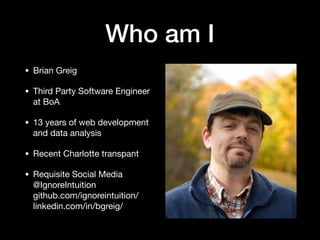
• Brian Greig

• Third Party Software Engineer
at BoA

• 13 years of web development
and data analysis

• Recent Charlotte transpant
@IgnoreIntuition

github.com/ignoreintuition

linkedin.com/in/bgreig/

youtube.com/user/ignoreintuition2

medium.com/@IgnoreIntuition/
Who am I
Requisite Social Media
Web Sockets and Data
Visualization
Today we’ll look at:

• Data Collection and Consumption

• Data Analytics and Visualization

• Event Driven, bi-directional data via Websocket

• Data Visualization via DOM manipulation

• Case Study: Creating a simulation
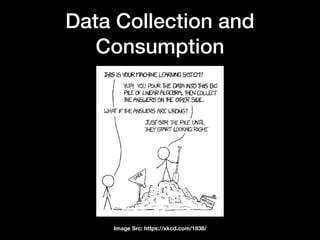
Data Collection and
Consumption
Image Src: https://xkcd.com/1838/
Data Collection and
Consumption
• Devices that connect to the Internet are constantly
sending and receiving data. 

• You should ask yourself:

• What do we collect?

• What do we present to the user?

• How do we influence user behavior?

• How do we allow for user feedback?
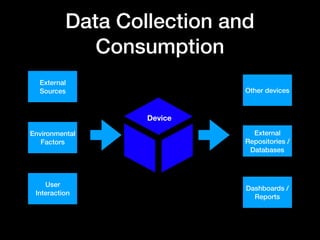
Data Collection and
Consumption
User
Interaction
External
Sources Other devices
Environmental
Factors
External
Repositories /
Databases
Dashboards /
Reports
Device
Data Collection and
Consumption
• User focus is on tactical / real-time data

• Data should be bi-directional

• Expend your resources wisely 

• Breadth < Speed < Data Quality
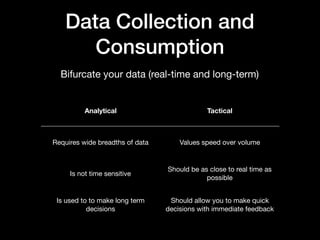
Data Collection and
Consumption
Analytical Tactical
Requires wide breadths of data Values speed over volume
Is not time sensitive
Should be as close to real time as
possible
Is used to to make long term
decisions
Should allow you to make quick
decisions with immediate feedback
Bifurcate your data (real-time and long-term)
Data Analytics and
Visualization
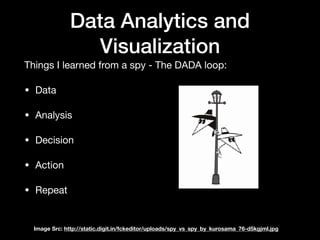
Things I learned from a spy - The DADA loop:

• Data

• Analysis

• Decision

• Action

• Repeat
Image Src: http://static.digit.in/fckeditor/uploads/spy_vs_spy_by_kurosama_76-d5kgjml.jpg
Data Analytics and
Visualization
• Data: API, server

• Analysis: visualizations, analytics, dashboards

• Decision: indicators, color, alerts, messages

• Action: interactive elements

• Repeat: data returned to the server, new data sent
Websocket and bi-
directional data
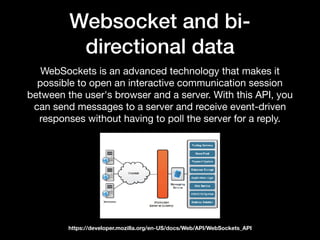
WebSockets is an advanced technology that makes it
possible to open an interactive communication session
between the user's browser and a server. With this API, you
can send messages to a server and receive event-driven
responses without having to poll the server for a reply.
https://developer.mozilla.org/en-US/docs/Web/API/WebSockets_API
Websocket and bi-
directional data
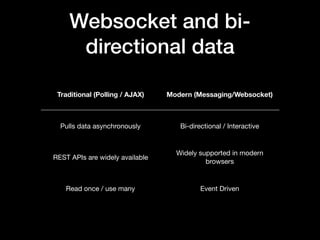
Traditional (Polling / AJAX) Modern (Messaging/Websocket)
Pulls data asynchronously Bi-directional / Interactive
REST APIs are widely available
Widely supported in modern
browsers
Read once / use many Event Driven
Websocket and bi-
directional data
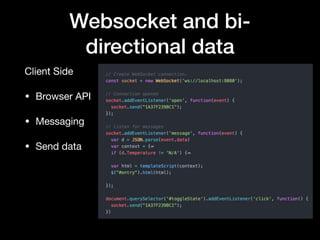
Client Side

• Browser API

• Messaging

• Send data
Websocket and bi-
directional data
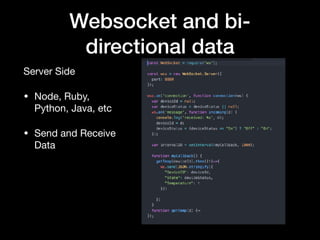
Server Side

• Node, Ruby,
Python, Java, etc

• Send and Receive
Data
Data Visualization via DOM
Manipulation
D3.js

• Uses SVG, HTML, and CSS

• Bind data to the DOM

• Web Standards based
Data Visualization via DOM
Manipulation
Structuring your application

• init: This is where you create your scales, ranges, domains, as well
as binding your data to the DOM element that is going to use it. 

• enter: This is the initial, static visualization.  Here you will assign
attributes and values to the different components of your element. 

• update: Here you will update any of the dynamic attributes of your
graph if the user changes the context or scope of your data. 

• exit: Any cleanup.
Data Visualization via DOM
Manipulation
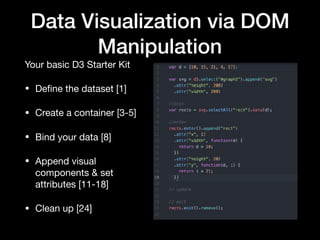
Your basic D3 Starter Kit

• Define the dataset [1]

• Create a container [3-5]

• Bind your data [8]

• Append visual
components & set
attributes [11-18]

• Clean up [24]
Data Visualization via DOM
Manipulation
Data Visualization via DOM
Manipulation
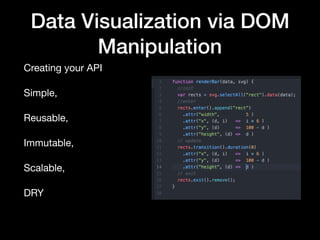
Creating your API

Simple, 

Reusable,

Immutable,

Scalable,

DRY
Data Visualization via DOM
Manipulation
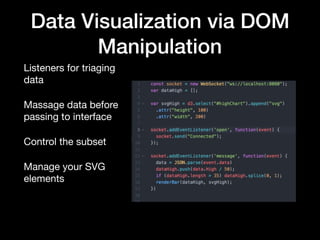
Listeners for triaging
data

Massage data before
passing to interface

Control the subset

Manage your SVG
elements
Data Visualization via DOM
Manipulation
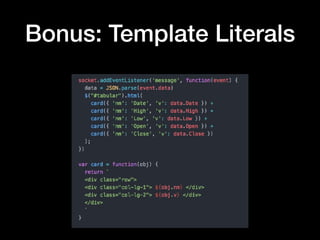
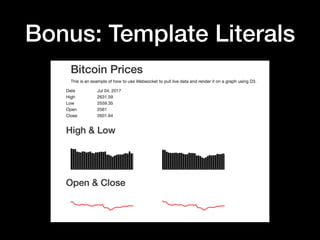
Bonus: Template Literals
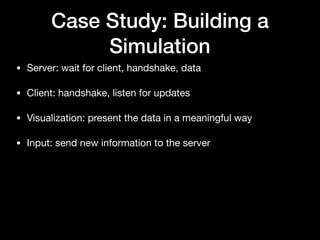
Case Study: Building a
Simulation
• Server: wait for client, handshake, data

• Client: handshake, listen for updates

• Visualization: present the data in a meaningful way

• Input: send new information to the server
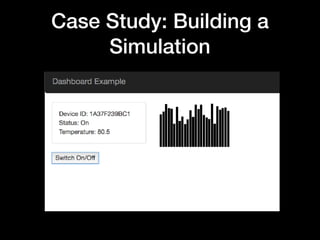
Case Study: Building a
Simulation
Questions
Appendix
• D3 API Reference: https://d3js.org/

• Websocket API on MDN: https://developer.mozilla.org/en-
US/docs/Web/API/WebSockets_API 

• Bitcoin Demo: https://github.com/ignoreintuition/
ncdevcon_ws_d3

• Simulation Demo: https://github.com/ignoreintuition/
websocket 

• ws: https://www.npmjs.com/package/ws

Data Collection and Consumption

  • 1.
    Visualizing Data in Realtimewith WebSocket and D3 2017 NC Dev Con October 7th, 2017 Brian Greig
  • 2.
    Who am I •Brian Greig • Third Party Software Engineer at BoA • 13 years of web development and data analysis • Recent Charlotte transpant
  • 3.
  • 4.
    Web Sockets andData Visualization Today we’ll look at: • Data Collection and Consumption • Data Analytics and Visualization • Event Driven, bi-directional data via Websocket • Data Visualization via DOM manipulation • Case Study: Creating a simulation
  • 5.
    Data Collection and Consumption ImageSrc: https://xkcd.com/1838/
  • 6.
    Data Collection and Consumption •Devices that connect to the Internet are constantly sending and receiving data. • You should ask yourself: • What do we collect? • What do we present to the user? • How do we influence user behavior? • How do we allow for user feedback?
  • 7.
    Data Collection and Consumption User Interaction External SourcesOther devices Environmental Factors External Repositories / Databases Dashboards / Reports Device
  • 8.
    Data Collection and Consumption •User focus is on tactical / real-time data • Data should be bi-directional • Expend your resources wisely • Breadth < Speed < Data Quality
  • 9.
    Data Collection and Consumption AnalyticalTactical Requires wide breadths of data Values speed over volume Is not time sensitive Should be as close to real time as possible Is used to to make long term decisions Should allow you to make quick decisions with immediate feedback Bifurcate your data (real-time and long-term)
  • 10.
    Data Analytics and Visualization ThingsI learned from a spy - The DADA loop: • Data • Analysis • Decision • Action • Repeat Image Src: http://static.digit.in/fckeditor/uploads/spy_vs_spy_by_kurosama_76-d5kgjml.jpg
  • 11.
    Data Analytics and Visualization •Data: API, server • Analysis: visualizations, analytics, dashboards • Decision: indicators, color, alerts, messages • Action: interactive elements • Repeat: data returned to the server, new data sent
  • 12.
    Websocket and bi- directionaldata WebSockets is an advanced technology that makes it possible to open an interactive communication session between the user's browser and a server. With this API, you can send messages to a server and receive event-driven responses without having to poll the server for a reply. https://developer.mozilla.org/en-US/docs/Web/API/WebSockets_API
  • 13.
    Websocket and bi- directionaldata Traditional (Polling / AJAX) Modern (Messaging/Websocket) Pulls data asynchronously Bi-directional / Interactive REST APIs are widely available Widely supported in modern browsers Read once / use many Event Driven
  • 14.
    Websocket and bi- directionaldata Client Side • Browser API • Messaging • Send data
  • 15.
    Websocket and bi- directionaldata Server Side • Node, Ruby, Python, Java, etc • Send and Receive Data
  • 16.
    Data Visualization viaDOM Manipulation D3.js • Uses SVG, HTML, and CSS • Bind data to the DOM • Web Standards based
  • 17.
    Data Visualization viaDOM Manipulation Structuring your application • init: This is where you create your scales, ranges, domains, as well as binding your data to the DOM element that is going to use it. • enter: This is the initial, static visualization.  Here you will assign attributes and values to the different components of your element. • update: Here you will update any of the dynamic attributes of your graph if the user changes the context or scope of your data. • exit: Any cleanup.
  • 18.
    Data Visualization viaDOM Manipulation Your basic D3 Starter Kit • Define the dataset [1] • Create a container [3-5] • Bind your data [8] • Append visual components & set attributes [11-18] • Clean up [24]
  • 19.
    Data Visualization viaDOM Manipulation
  • 20.
    Data Visualization viaDOM Manipulation Creating your API Simple, Reusable, Immutable, Scalable, DRY
  • 21.
    Data Visualization viaDOM Manipulation Listeners for triaging data Massage data before passing to interface Control the subset Manage your SVG elements
  • 22.
    Data Visualization viaDOM Manipulation
  • 23.
  • 24.
    Case Study: Buildinga Simulation • Server: wait for client, handshake, data • Client: handshake, listen for updates • Visualization: present the data in a meaningful way • Input: send new information to the server
  • 25.
  • 26.
  • 27.
    Appendix • D3 APIReference: https://d3js.org/ • Websocket API on MDN: https://developer.mozilla.org/en- US/docs/Web/API/WebSockets_API • Bitcoin Demo: https://github.com/ignoreintuition/ ncdevcon_ws_d3 • Simulation Demo: https://github.com/ignoreintuition/ websocket • ws: https://www.npmjs.com/package/ws