Political Science: An Adventure in Research Beaman Library Fall 2007
Research is a process… It is ORGANIZED It is METHODICAL It is COMPREHENSIVE
The Researcher’s 2 questions… WHAT do I want to know? WHERE do I find that information?
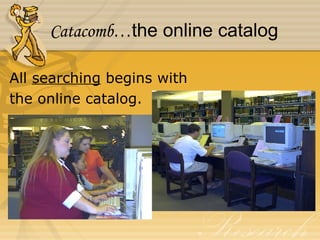
Catacomb… the online catalog All  searching  begins with the online catalog.
Information Resources in  Beaman Library Reference books Periodicals Indexes Databases/Websites
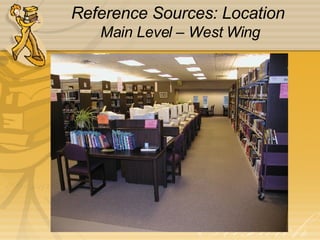
Reference Sources: Location  Main Level – West Wing
Reference Sources: Types Encyclopedias General Subject Dictionaries Handbooks Directories Indexes Statistical Sources
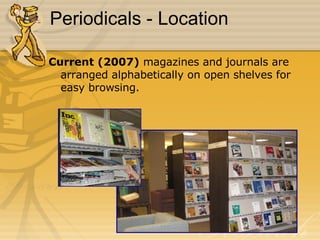
Periodicals - Location Current (2007)  magazines and journals are arranged alphabetically on open shelves for easy browsing.
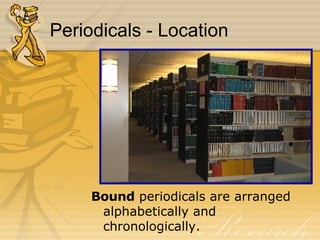
Periodicals - Location Bound  periodicals are arranged alphabetically and chronologically.
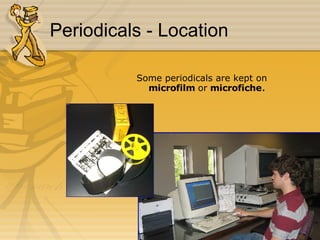
Periodicals - Location Some periodicals are kept on  microfilm  or  microfiche .
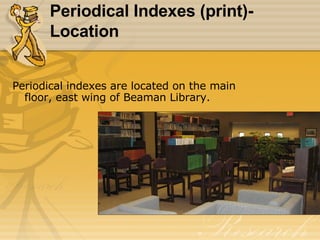
Periodical Indexes (print)- Location Periodical indexes are located on the main floor, east wing of Beaman Library.
Periodical Indexes Print Biography Index Business Periodicals Index General Science Index PAIS International Index Social Sciences Index
Periodical Indexes Online Tennessee Electronic Library (TEL) Powersearch Academic OneFile Expanded Academic ASAP InfoTrac OneFile National Newspaper Index America: History & Life and Historical Abstracts Biography Resource Center Lexis-Nexis
World Wide Web Resources Academic .edu Government .gov Specialized/commercial .com/.org/.net
Online Indexes/Databases:  Government U. S. Government Library of Congress http://marvel.loc.gov Congressional Directory http:// www.gpoaccess.gov/cdirectory/index.html
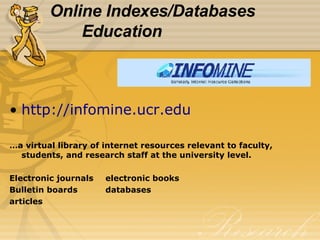
Online Indexes/Databases Education http://infomine.ucr.edu … a virtual library of internet resources relevant to faculty, students, and research staff at the university level. Electronic journals electronic books Bulletin boards databases articles
Online Indexes/Databases Commercial Search specifically for scholarly literature: theses peer reviewed papers books abstracts technical reports preprints http:// scholar.google.com /
Evaluating Information from monographs (books) from periodicals (journals) from databases/websites
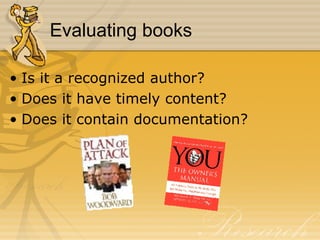
Evaluating books Is it a recognized author? Does it have timely content? Does it contain documentation?
What is a Scholarly Journal? For scholars or researchers in a specialized field (e.g. medicine, psychology) Cites research Peer review (refereed) Includes notes and/or bibliography Usually quarterly or monthly Mostly print with graphs and/or tables Few or no ads
Web Site Evaluation—the WWW’s Who  says it? Author or sponsor Credentials of responsible party
Web Site Evaluation—the WWW’s What  does it claim, assert, etc.? Purpose of web site Biased, objective, fair Factual…in depth Correct grammar, spelling, etc.
Web Site Evaluation—the WWW’s When  was it said? Publication date Revisions Links up-to-date
Interlibrary Loan Question:  What do I do if a resource I need is not  available in the Beaman Library? Answer:   Use the Interlibrary loan service  provided by Beaman Library
Interlibrary Loan Facts about Interlibrary Loan: Interlibrary Loan is a  service  provided by Beaman Library to obtain materials NOT owned by Beaman Library. The conditions of this service are set by the  National Interlibrary Loan Code . The  loan period  is determined by the  lending  library. Athena  is an area consortium of local libraries who loan and borrow from one another without charge. Applications are available at the Reference desk or online   in  Catacomb . Access form online:  http:// library.lipscomb.edu
SAIL S earch – indexes/databases (evaluate) A nalyze – compare, contrast; separate fact from opinion I nventory – Do I have enough, too  much, too little? L earn – new information and new  information skills
Your mission... Come up with a suitable topic (not too broad, not too narrow) Be able to find resources in all formats (books, articles, websites, etc.) Incorporate & cite these sources correctly (be careful not to plagiarize!) Remember: librarians are here to help you with your mission!

Political Science Senior Seminar

  • 1.
    Political Science: AnAdventure in Research Beaman Library Fall 2007
  • 2.
    Research is aprocess… It is ORGANIZED It is METHODICAL It is COMPREHENSIVE
  • 3.
    The Researcher’s 2questions… WHAT do I want to know? WHERE do I find that information?
  • 4.
    Catacomb… the onlinecatalog All searching begins with the online catalog.
  • 5.
    Information Resources in Beaman Library Reference books Periodicals Indexes Databases/Websites
  • 6.
    Reference Sources: Location Main Level – West Wing
  • 7.
    Reference Sources: TypesEncyclopedias General Subject Dictionaries Handbooks Directories Indexes Statistical Sources
  • 8.
    Periodicals - LocationCurrent (2007) magazines and journals are arranged alphabetically on open shelves for easy browsing.
  • 9.
    Periodicals - LocationBound periodicals are arranged alphabetically and chronologically.
  • 10.
    Periodicals - LocationSome periodicals are kept on microfilm or microfiche .
  • 11.
    Periodical Indexes (print)-Location Periodical indexes are located on the main floor, east wing of Beaman Library.
  • 12.
    Periodical Indexes PrintBiography Index Business Periodicals Index General Science Index PAIS International Index Social Sciences Index
  • 13.
    Periodical Indexes OnlineTennessee Electronic Library (TEL) Powersearch Academic OneFile Expanded Academic ASAP InfoTrac OneFile National Newspaper Index America: History & Life and Historical Abstracts Biography Resource Center Lexis-Nexis
  • 14.
    World Wide WebResources Academic .edu Government .gov Specialized/commercial .com/.org/.net
  • 15.
    Online Indexes/Databases: Government U. S. Government Library of Congress http://marvel.loc.gov Congressional Directory http:// www.gpoaccess.gov/cdirectory/index.html
  • 16.
    Online Indexes/Databases Educationhttp://infomine.ucr.edu … a virtual library of internet resources relevant to faculty, students, and research staff at the university level. Electronic journals electronic books Bulletin boards databases articles
  • 17.
    Online Indexes/Databases CommercialSearch specifically for scholarly literature: theses peer reviewed papers books abstracts technical reports preprints http:// scholar.google.com /
  • 18.
    Evaluating Information frommonographs (books) from periodicals (journals) from databases/websites
  • 19.
    Evaluating books Isit a recognized author? Does it have timely content? Does it contain documentation?
  • 20.
    What is aScholarly Journal? For scholars or researchers in a specialized field (e.g. medicine, psychology) Cites research Peer review (refereed) Includes notes and/or bibliography Usually quarterly or monthly Mostly print with graphs and/or tables Few or no ads
  • 21.
    Web Site Evaluation—theWWW’s Who says it? Author or sponsor Credentials of responsible party
  • 22.
    Web Site Evaluation—theWWW’s What does it claim, assert, etc.? Purpose of web site Biased, objective, fair Factual…in depth Correct grammar, spelling, etc.
  • 23.
    Web Site Evaluation—theWWW’s When was it said? Publication date Revisions Links up-to-date
  • 24.
    Interlibrary Loan Question: What do I do if a resource I need is not available in the Beaman Library? Answer: Use the Interlibrary loan service provided by Beaman Library
  • 25.
    Interlibrary Loan Factsabout Interlibrary Loan: Interlibrary Loan is a service provided by Beaman Library to obtain materials NOT owned by Beaman Library. The conditions of this service are set by the National Interlibrary Loan Code . The loan period is determined by the lending library. Athena is an area consortium of local libraries who loan and borrow from one another without charge. Applications are available at the Reference desk or online in Catacomb . Access form online: http:// library.lipscomb.edu
  • 26.
    SAIL S earch– indexes/databases (evaluate) A nalyze – compare, contrast; separate fact from opinion I nventory – Do I have enough, too much, too little? L earn – new information and new information skills
  • 27.
    Your mission... Comeup with a suitable topic (not too broad, not too narrow) Be able to find resources in all formats (books, articles, websites, etc.) Incorporate & cite these sources correctly (be careful not to plagiarize!) Remember: librarians are here to help you with your mission!