An Adventure in Research Using Beaman Library Services and Resources Summer 2008
Beaman Library is your starting point for research Research materials at your fingertips!  Computers for your convenience! Study Rooms available to study by yourself or for a group to gather! Our Library Staff is here for you!
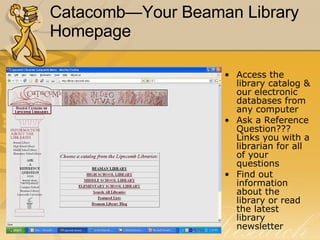
Catacomb—Your Beaman Library Homepage Access the library catalog & our electronic databases from any computer Ask a Reference Question??? Links you with a librarian for all of your questions Find out information about the library or read the latest library newsletter
The Research Process The research process requires a knowledge of  The  locations  of information resources How information resources are    organized The  tools   needed for  accessing information regardless of its  format The  criteria for evaluating     information retrieved
Information Resources in   Beaman Library - Organization Library of Congress Classification System  (LB 2806 .R38) Designators  (Ref, Oversize, Buffington…) Local Collections   (Special Collections, Restoration Collection…)
Information Resources in  Beaman Library – access tools Books Articles (print & electronic) -Scholarly journal articles -Popular magazine articles -Newspaper articles Websites
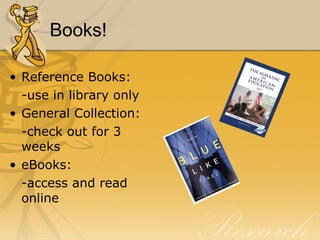
Books! Reference Books: -use in library only General Collection: -check out for 3 weeks eBooks: -access and read online
To find a Book… Use  CATACOMB… The online catalog Author Search Title Search Subject Search Keyword Search http:// library.lipscomb.edu
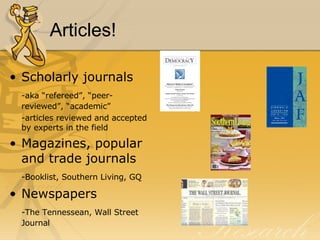
Articles! Scholarly journals -aka “refereed”, “peer-reviewed”, “academic” -articles reviewed and accepted by experts in the field Magazines, popular and trade journals -Booklist, Southern Living, GQ Newspapers -The Tennessean, Wall Street Journal
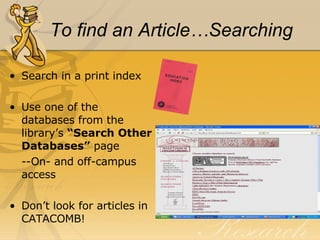
To find an Article…Searching Search in a print index Use one of the databases from the library’s  “Search Other Databases”  page --On- and off-campus access Don’t look for articles in CATACOMB!
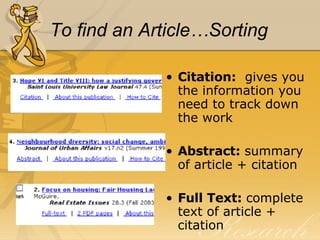
To find an Article…Sorting Citation:   gives you the information you need to track down the work Abstract:  summary of article + citation Full Text:  complete text of article + citation
To find an Article…Locating Found sources in a print index or database?  Now, how do you find them?
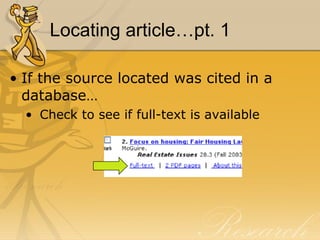
Locating article…pt. 1 If the source located was cited in a database… Check to see if full-text is available
Locating article…pt. 2 If the source located was cited in a print index or full-text was not available in a database… Check the journal title in CATACOMB by doing a Title Search to see if Beaman has the journal in print
Locating articles…pt. 3 If the source is not available in print in Beaman Library or full-text via database… Check other local libraries (in WorldCat or Athena) to see if they have the journal in print Request the article through Interlibrary Loan (Allow 2 weeks)
Websites! Government   http://www.epa.gov http://www.senate.gov Military  http://www.navy.mil http://www.defenselink.mil Commercial http://www.ebay.com http://www.sears.com Education http://www.lipscomb.edu http://www.ttu.edu
To find a Website…Search Engines Vast quantities of information Over 2 billion websites and growing daily You find it all…the good, the bad and the ugly…you must EVALUATE! Refine your search whenever possible Use relevant search terms Use phrases when possible Use quotation marks Try Boolean searches (and, or, not, +, -)
To find a Website…via CATACOMB Approximately 150 links to databases and web sites are cataloged in  Catacomb. 	 http:// library.lipscomb.edu
Web Site Evaluation—the WWW’s Who  says it? Author or sponsor? Credentials of responsible party? “ Google” the author or sponsor for more information Is there a way to determine the origin? Look at the header or footer Look at the URL Look at the domain Example:   Wikipedia
Web Site Evaluation—the WWW’s What  does it claim, assert, etc.? Purpose of web site Informational? Are they trying to sell something? Biased, objective, fair Is there a political or business agenda? Factual…in depth Correct grammar, spelling, etc. Example: DHMO Example: Greenpeace
Web Site Evaluation—the WWW’s When  was it said? Publication date Revisions Links up-to-date Example:  Oncolink
Review: The Power of Five What does scholarly research require? A knowledge of 1.  The  locations   of information resources 2.   Organization  of information resources 3.  The  access tools  needed for obtaining   information  regardless of its format 4.  The  criteria for evaluating  information    located 5.  The  rules of scholarly research   (proper citing/respect for copyright)
SAIL… through Research S earch – indexes/databases (evaluate) A nalyze – compare, contrast; separate fact from opinion I nventory – Do I have enough, too  much, too little? L earn – new information and new  information skills
Your mission... Come up with a suitable topic (not too broad, not too narrow) Be able to find resources in all formats (books, articles, websites, etc.) Incorporate & cite these sources correctly (be careful not to plagiarize!) Remember: librarians are here to help you with your mission!

Beginning Research

  • 1.
    An Adventure inResearch Using Beaman Library Services and Resources Summer 2008
  • 2.
    Beaman Library isyour starting point for research Research materials at your fingertips! Computers for your convenience! Study Rooms available to study by yourself or for a group to gather! Our Library Staff is here for you!
  • 3.
    Catacomb—Your Beaman LibraryHomepage Access the library catalog & our electronic databases from any computer Ask a Reference Question??? Links you with a librarian for all of your questions Find out information about the library or read the latest library newsletter
  • 4.
    The Research ProcessThe research process requires a knowledge of The locations of information resources How information resources are organized The tools needed for accessing information regardless of its format The criteria for evaluating information retrieved
  • 5.
    Information Resources in Beaman Library - Organization Library of Congress Classification System (LB 2806 .R38) Designators (Ref, Oversize, Buffington…) Local Collections (Special Collections, Restoration Collection…)
  • 6.
    Information Resources in Beaman Library – access tools Books Articles (print & electronic) -Scholarly journal articles -Popular magazine articles -Newspaper articles Websites
  • 7.
    Books! Reference Books:-use in library only General Collection: -check out for 3 weeks eBooks: -access and read online
  • 8.
    To find aBook… Use CATACOMB… The online catalog Author Search Title Search Subject Search Keyword Search http:// library.lipscomb.edu
  • 9.
    Articles! Scholarly journals-aka “refereed”, “peer-reviewed”, “academic” -articles reviewed and accepted by experts in the field Magazines, popular and trade journals -Booklist, Southern Living, GQ Newspapers -The Tennessean, Wall Street Journal
  • 10.
    To find anArticle…Searching Search in a print index Use one of the databases from the library’s “Search Other Databases” page --On- and off-campus access Don’t look for articles in CATACOMB!
  • 11.
    To find anArticle…Sorting Citation: gives you the information you need to track down the work Abstract: summary of article + citation Full Text: complete text of article + citation
  • 12.
    To find anArticle…Locating Found sources in a print index or database? Now, how do you find them?
  • 13.
    Locating article…pt. 1If the source located was cited in a database… Check to see if full-text is available
  • 14.
    Locating article…pt. 2If the source located was cited in a print index or full-text was not available in a database… Check the journal title in CATACOMB by doing a Title Search to see if Beaman has the journal in print
  • 15.
    Locating articles…pt. 3If the source is not available in print in Beaman Library or full-text via database… Check other local libraries (in WorldCat or Athena) to see if they have the journal in print Request the article through Interlibrary Loan (Allow 2 weeks)
  • 16.
    Websites! Government http://www.epa.gov http://www.senate.gov Military http://www.navy.mil http://www.defenselink.mil Commercial http://www.ebay.com http://www.sears.com Education http://www.lipscomb.edu http://www.ttu.edu
  • 17.
    To find aWebsite…Search Engines Vast quantities of information Over 2 billion websites and growing daily You find it all…the good, the bad and the ugly…you must EVALUATE! Refine your search whenever possible Use relevant search terms Use phrases when possible Use quotation marks Try Boolean searches (and, or, not, +, -)
  • 18.
    To find aWebsite…via CATACOMB Approximately 150 links to databases and web sites are cataloged in Catacomb. http:// library.lipscomb.edu
  • 19.
    Web Site Evaluation—theWWW’s Who says it? Author or sponsor? Credentials of responsible party? “ Google” the author or sponsor for more information Is there a way to determine the origin? Look at the header or footer Look at the URL Look at the domain Example: Wikipedia
  • 20.
    Web Site Evaluation—theWWW’s What does it claim, assert, etc.? Purpose of web site Informational? Are they trying to sell something? Biased, objective, fair Is there a political or business agenda? Factual…in depth Correct grammar, spelling, etc. Example: DHMO Example: Greenpeace
  • 21.
    Web Site Evaluation—theWWW’s When was it said? Publication date Revisions Links up-to-date Example: Oncolink
  • 22.
    Review: The Powerof Five What does scholarly research require? A knowledge of 1. The locations of information resources 2. Organization of information resources 3. The access tools needed for obtaining information regardless of its format 4. The criteria for evaluating information located 5. The rules of scholarly research (proper citing/respect for copyright)
  • 23.
    SAIL… through ResearchS earch – indexes/databases (evaluate) A nalyze – compare, contrast; separate fact from opinion I nventory – Do I have enough, too much, too little? L earn – new information and new information skills
  • 24.
    Your mission... Comeup with a suitable topic (not too broad, not too narrow) Be able to find resources in all formats (books, articles, websites, etc.) Incorporate & cite these sources correctly (be careful not to plagiarize!) Remember: librarians are here to help you with your mission!