An Adventure in ResearchUsing Beaman LibraryServices and ResourcesFall 2010
Beaman Library is your starting point for researchResearch materials at your fingertips! Computers for your convenience!Study Rooms available to study by yourself or for a group to gather!Our Library Staff is here for you!
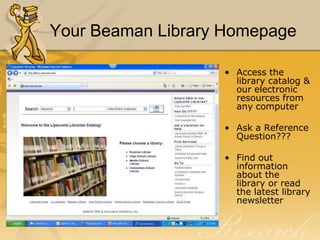
Your Beaman Library Homepage	Access the library catalog & our electronic resources from any computerAsk a Reference Question??? Find out information about the library or read the latest library newsletter
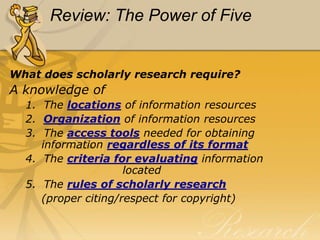
The Research ProcessThe research process requires a knowledge of  The locations of information resources How information resources are  			    organized The toolsneeded for accessing         information regardless of its format The criteria for evaluating			 	    information retrieved
Information Resources in  Beaman Library - OrganizationLibrary of Congress Classification System  (LB 2806 .R38)
Designators (Ref, Oversize, Buffington…)
Local Collections(Special Collections, Restoration Collection…)Information Resources in  Beaman Library – access tools Books Articles (print & electronic)		-Scholarly journal articles		-Popular magazine articles		-Newspaper articlesWebsites
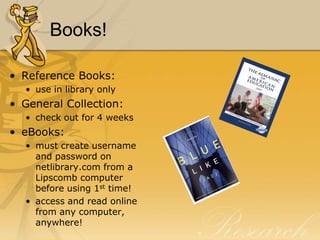
Books!Reference Books:use in library onlyGeneral Collection:check out for 4 weekseBooks:must create username and password on netlibrary.com from a Lipscomb computer before using 1st time!access and read online from any computer, anywhere!
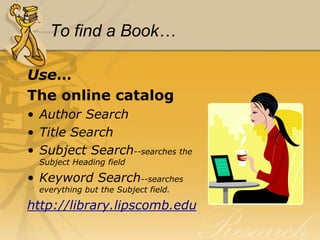
To find a Book…Use…The online catalogAuthor SearchTitle SearchSubject Search--searches the Subject Heading fieldKeyword Search--searches everything but the Subject field.http://library.lipscomb.edu
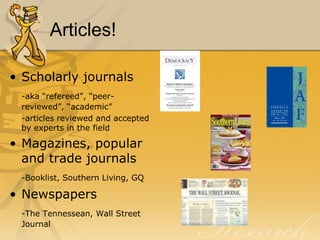
Articles!Scholarly journals-aka “refereed”, “peer-reviewed”, “academic”	-articles reviewed and accepted by experts in the fieldMagazines, popular and trade journals-Booklist, Southern Living, GQNewspapers-The Tennessean, Wall Street Journal
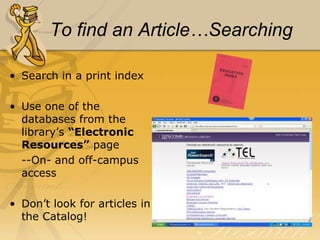
To find an Article…SearchingSearch in a print indexUse one of the databases from the library’s “Electronic Resources” page	--On- and off-campus accessDon’t look for articles in the Catalog!
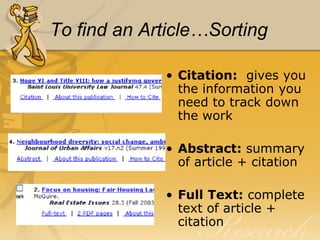
To find an Article…SortingCitation:  gives you the information you need to track down the workAbstract: summary of article + citationFull Text: complete text of article + citation
To find an Article…LocatingFound sources in a print index or database?  Now, how do you find them?
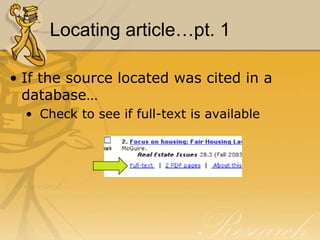
Locating article…pt. 1If the source located was cited in a database… Check to see if full-text is available
Locating article…pt. 2If the source located was cited in a print index or full-text was not available in a database…Check the journal title in the Catalog by doing a Title Search to see if Beaman has the journal in printSearch the journal title in Ebsco A to Z
Locating articles…pt. 3If the source is not available in print in Beaman Library or full-text via database…Check other local libraries (in WorldCat or Athena) to see if they have the journal in printRequest the article through Interlibrary Loan (Allow 2 weeks)
Websites!Governmenthttp://www.epa.govhttp://www.senate.govMilitary http://www.navy.milhttp://www.defenselink.milCommercialhttp://www.ebay.comhttp://www.sears.comEducationhttp://www.lipscomb.eduhttp://www.ttu.edu
To find a Website…Search EnginesVast quantities of informationOver 2 billion websites and growing dailyYou find it all…the good, the bad and the ugly…you must EVALUATE!Refine your search whenever possibleUse relevant search termsUse phrases when possibleUse quotation marksTry Boolean searches (and, or, not, +, -)
Web Site Evaluation—the WWW’sWho says it?Author or sponsor?
Credentials of responsible party?
“Google” the author or sponsor for more information
Is there a way to determine the origin?

Graduate Education Fall 2010

  • 1.
    An Adventure inResearchUsing Beaman LibraryServices and ResourcesFall 2010
  • 2.
    Beaman Library isyour starting point for researchResearch materials at your fingertips! Computers for your convenience!Study Rooms available to study by yourself or for a group to gather!Our Library Staff is here for you!
  • 3.
    Your Beaman LibraryHomepage Access the library catalog & our electronic resources from any computerAsk a Reference Question??? Find out information about the library or read the latest library newsletter
  • 4.
    The Research ProcessTheresearch process requires a knowledge of The locations of information resources How information resources are organized The toolsneeded for accessing information regardless of its format The criteria for evaluating information retrieved
  • 5.
    Information Resources in Beaman Library - OrganizationLibrary of Congress Classification System (LB 2806 .R38)
  • 6.
    Designators (Ref, Oversize,Buffington…)
  • 7.
    Local Collections(Special Collections,Restoration Collection…)Information Resources in Beaman Library – access tools Books Articles (print & electronic) -Scholarly journal articles -Popular magazine articles -Newspaper articlesWebsites
  • 8.
    Books!Reference Books:use inlibrary onlyGeneral Collection:check out for 4 weekseBooks:must create username and password on netlibrary.com from a Lipscomb computer before using 1st time!access and read online from any computer, anywhere!
  • 9.
    To find aBook…Use…The online catalogAuthor SearchTitle SearchSubject Search--searches the Subject Heading fieldKeyword Search--searches everything but the Subject field.http://library.lipscomb.edu
  • 10.
    Articles!Scholarly journals-aka “refereed”,“peer-reviewed”, “academic” -articles reviewed and accepted by experts in the fieldMagazines, popular and trade journals-Booklist, Southern Living, GQNewspapers-The Tennessean, Wall Street Journal
  • 11.
    To find anArticle…SearchingSearch in a print indexUse one of the databases from the library’s “Electronic Resources” page --On- and off-campus accessDon’t look for articles in the Catalog!
  • 12.
    To find anArticle…SortingCitation: gives you the information you need to track down the workAbstract: summary of article + citationFull Text: complete text of article + citation
  • 13.
    To find anArticle…LocatingFound sources in a print index or database? Now, how do you find them?
  • 14.
    Locating article…pt. 1Ifthe source located was cited in a database… Check to see if full-text is available
  • 15.
    Locating article…pt. 2Ifthe source located was cited in a print index or full-text was not available in a database…Check the journal title in the Catalog by doing a Title Search to see if Beaman has the journal in printSearch the journal title in Ebsco A to Z
  • 16.
    Locating articles…pt. 3Ifthe source is not available in print in Beaman Library or full-text via database…Check other local libraries (in WorldCat or Athena) to see if they have the journal in printRequest the article through Interlibrary Loan (Allow 2 weeks)
  • 17.
  • 18.
    To find aWebsite…Search EnginesVast quantities of informationOver 2 billion websites and growing dailyYou find it all…the good, the bad and the ugly…you must EVALUATE!Refine your search whenever possibleUse relevant search termsUse phrases when possibleUse quotation marksTry Boolean searches (and, or, not, +, -)
  • 19.
    Web Site Evaluation—theWWW’sWho says it?Author or sponsor?
  • 20.
  • 21.
    “Google” the authoror sponsor for more information
  • 22.
    Is there away to determine the origin?