An Adventure in ResearchUsing Beaman LibraryServices and ResourcesSpring 2010
Beaman Library is your starting point for researchResearch materials at your fingertips! Computers for your convenience!Study Rooms available to study by yourself or for a group to gather!Our Library Staff is here for you!
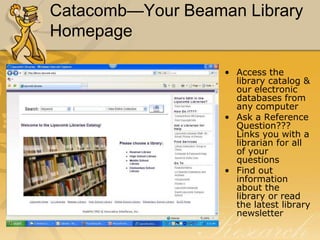
Catacomb—Your Beaman Library Homepage	Access the library catalog & our electronic databases from any computerAsk a Reference Question??? Links you with a librarian for all of your questionsFind out information about the library or read the latest library newsletter
The Research ProcessThe research process requires a knowledge of  The locations of information resources How information resources are  			    organized The toolsneeded for accessing         information regardless of its format The criteria for evaluating			 	    information retrieved
Information Resources in  Beaman Library - OrganizationLibrary of Congress Classification System  (LB 2806 .R38)—Read the call number alphabetically and numerically.  Any number after the decimal point is treated like a decimal number.
Designators (Ref, Oversize, Buffington…)—Gives you a clue as to where these books are physically located in library.  They are special sections unto themselves.
Local Collections(Special Collections, Restoration Collection…)Information Resources in  Beaman Library – access tools Books Articles (print & electronic)		-Scholarly journal articles		-Popular magazine articles		-Newspaper articlesWebsites
Books!Reference Books:	-use in library onlyGeneral Collection:	-check out for 3 weeks for undergrads.eBooks:	-access and read online.  You must create your own username and password at netlibrary.com from a Lipscomb computer and then you can access them from anywhere.
To find a Book…Use…The online catalogAuthor SearchTitle SearchSubject Search—very specific only searches subject line (which are Library of Congress approved subject headings)Keyword Search--searches all lines in the record except for Subjects.http://library.lipscomb.edu
Articles!Scholarly journals-aka “refereed”, “peer-reviewed”, “academic”	-articles reviewed and accepted by experts in the fieldMagazines, popular and trade journals-Booklist, Southern Living, GQNewspapers-The Tennessean, Wall Street Journal
To find an Article…SearchingSearch in a print index			ORUse one of the databases from the library’s “Electronic Resources” page	--On- and off-campus accessDon’t look for articles in the Catalog!
Periodical Indexes- LocationPeriodical indexes are located on the main floor, east wing of Beaman Library.
Periodical Indexes In Print -	Subject and general:  access toolsProvides citations to articles in magazines, journals, and newspapersRemember: citations only - no full-textExamples of subject indexesGeneral Science IndexSocial Sciences Index Education IndexExample of general indexReaders Guide to Periodical Literature
Periodical Index Citations – Subject examplesSocial Sciences IndexSoc Forces =Social Forces
To find an Article…SearchingSearch in a print index			ORUse one of the databases from the library’s “Electronic Resources”page	--On- and off-campus accessDon’t look for articles in CATACOMB!
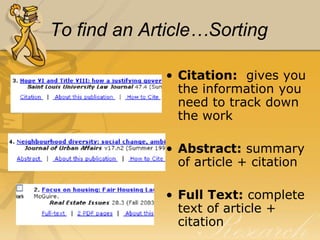
To find an Article…SortingCitation:  gives you the information you need to track down the workAbstract: summary of article + citationFull Text: complete text of article + citation
To find an Article…LocatingFound sources in a print index or database?  Now, how do you find them?
Locating article…pt. 1If the source located was cited in a database… Check to see if full-text is available
Locating article…pt. 2If the source located was cited in a print index or full-text was not available in a database…Check the journal title in the Catalog by doing a Title Search to see if Beaman has the journal in print
Locating articles…pt. 3If the source is not available in print in Beaman Library or full-text via database…Check other local libraries (in WorldCat or Athena) to see if they have the journal in printRequest the article through Interlibrary Loan (Allow 2 weeks)
Periodicals - LocationCurrent (2010)magazines and journals are arranged alphabetically on open shelves for easy browsing.
Periodicals - LocationBound periodicals are arranged alphabetically and chronologically.
Periodicals - LocationSome periodicals are kept on microfilm or microfiche.
Electronic/ Online Resources: TypesGeneralSubject specificGovernmentMilitary CommercialEducation
DatabasesTennessee Electronic LibraryAcademic OneFileExpanded AcademicScience DatabasePowerSearch
DatabasesAlso try…America: History and LifeBiography Resource CenterBusiness Source PremierEBSCOhostFacts on FileLearningExpress Library (for practice tests and Entrance Exams)LexisNexis
Search engineshttp://scholar.google.com/search specifically for scholarly literature:       peer-reviewed papers 		theses	 books	preprints  abstracts	     technical reportsarranges search results by relevancy Search engineshttp://infomine.ucr.edu/… a virtual library of Internet resources relevant to faculty, students, and research staff at the university level. 	electronic journals	electronic books	bulletin boards		databases	articles
Evaluating Informationfrom monographs [books]
from periodicals
from databasesEvaluating booksA recognized authorTimely contentDocumentationPhysical appearance
Evaluating Journal ArticlesScholarly Journal CharacteristicsWritten for scholars or researchers in a specialized field (medicine, psychology, education)
Evaluating Journal Articlesfound in specialized (subject) indexes [Social Sciences Index]usually published quarterly or monthlymostly print graphs and/or tablesfew or no ads
Evaluating Journal ArticlesScholarly Journal Characteristicscites researchincludes notes and/or bibliographypasses review by panel of expertspeer reviewedrefereed
DatabasesAcademic		.eduGovernment		.govSpecialized/commercial	.com/.org/.net
Web Site Evaluation—the WWW’sWho says it?Author or sponsor
Credentials of responsible party
Example:  AMDOCWeb Site Evaluation—the WWW’sWhat does it claim, assert, etc.?Purpose of web site
Biased, objective, fair
Factual…in depth
Correct grammar, spelling, etc.

Beginning Research Spring2010

  • 1.
    An Adventure inResearchUsing Beaman LibraryServices and ResourcesSpring 2010
  • 2.
    Beaman Library isyour starting point for researchResearch materials at your fingertips! Computers for your convenience!Study Rooms available to study by yourself or for a group to gather!Our Library Staff is here for you!
  • 3.
    Catacomb—Your Beaman LibraryHomepage Access the library catalog & our electronic databases from any computerAsk a Reference Question??? Links you with a librarian for all of your questionsFind out information about the library or read the latest library newsletter
  • 4.
    The Research ProcessTheresearch process requires a knowledge of The locations of information resources How information resources are organized The toolsneeded for accessing information regardless of its format The criteria for evaluating information retrieved
  • 5.
    Information Resources in Beaman Library - OrganizationLibrary of Congress Classification System (LB 2806 .R38)—Read the call number alphabetically and numerically. Any number after the decimal point is treated like a decimal number.
  • 6.
    Designators (Ref, Oversize,Buffington…)—Gives you a clue as to where these books are physically located in library. They are special sections unto themselves.
  • 7.
    Local Collections(Special Collections,Restoration Collection…)Information Resources in Beaman Library – access tools Books Articles (print & electronic) -Scholarly journal articles -Popular magazine articles -Newspaper articlesWebsites
  • 8.
    Books!Reference Books: -use inlibrary onlyGeneral Collection: -check out for 3 weeks for undergrads.eBooks: -access and read online. You must create your own username and password at netlibrary.com from a Lipscomb computer and then you can access them from anywhere.
  • 9.
    To find aBook…Use…The online catalogAuthor SearchTitle SearchSubject Search—very specific only searches subject line (which are Library of Congress approved subject headings)Keyword Search--searches all lines in the record except for Subjects.http://library.lipscomb.edu
  • 10.
    Articles!Scholarly journals-aka “refereed”,“peer-reviewed”, “academic” -articles reviewed and accepted by experts in the fieldMagazines, popular and trade journals-Booklist, Southern Living, GQNewspapers-The Tennessean, Wall Street Journal
  • 11.
    To find anArticle…SearchingSearch in a print index ORUse one of the databases from the library’s “Electronic Resources” page --On- and off-campus accessDon’t look for articles in the Catalog!
  • 12.
    Periodical Indexes- LocationPeriodicalindexes are located on the main floor, east wing of Beaman Library.
  • 13.
    Periodical Indexes InPrint - Subject and general: access toolsProvides citations to articles in magazines, journals, and newspapersRemember: citations only - no full-textExamples of subject indexesGeneral Science IndexSocial Sciences Index Education IndexExample of general indexReaders Guide to Periodical Literature
  • 14.
    Periodical Index Citations– Subject examplesSocial Sciences IndexSoc Forces =Social Forces
  • 15.
    To find anArticle…SearchingSearch in a print index ORUse one of the databases from the library’s “Electronic Resources”page --On- and off-campus accessDon’t look for articles in CATACOMB!
  • 16.
    To find anArticle…SortingCitation: gives you the information you need to track down the workAbstract: summary of article + citationFull Text: complete text of article + citation
  • 17.
    To find anArticle…LocatingFound sources in a print index or database? Now, how do you find them?
  • 18.
    Locating article…pt. 1Ifthe source located was cited in a database… Check to see if full-text is available
  • 19.
    Locating article…pt. 2Ifthe source located was cited in a print index or full-text was not available in a database…Check the journal title in the Catalog by doing a Title Search to see if Beaman has the journal in print
  • 20.
    Locating articles…pt. 3Ifthe source is not available in print in Beaman Library or full-text via database…Check other local libraries (in WorldCat or Athena) to see if they have the journal in printRequest the article through Interlibrary Loan (Allow 2 weeks)
  • 21.
    Periodicals - LocationCurrent(2010)magazines and journals are arranged alphabetically on open shelves for easy browsing.
  • 22.
    Periodicals - LocationBoundperiodicals are arranged alphabetically and chronologically.
  • 23.
    Periodicals - LocationSomeperiodicals are kept on microfilm or microfiche.
  • 24.
    Electronic/ Online Resources:TypesGeneralSubject specificGovernmentMilitary CommercialEducation
  • 25.
    DatabasesTennessee Electronic LibraryAcademicOneFileExpanded AcademicScience DatabasePowerSearch
  • 26.
    DatabasesAlso try…America: Historyand LifeBiography Resource CenterBusiness Source PremierEBSCOhostFacts on FileLearningExpress Library (for practice tests and Entrance Exams)LexisNexis
  • 27.
    Search engineshttp://scholar.google.com/search specificallyfor scholarly literature: peer-reviewed papers theses books preprints abstracts technical reportsarranges search results by relevancy Search engineshttp://infomine.ucr.edu/… a virtual library of Internet resources relevant to faculty, students, and research staff at the university level. electronic journals electronic books bulletin boards databases articles
  • 28.
  • 29.
  • 30.
    from databasesEvaluating booksArecognized authorTimely contentDocumentationPhysical appearance
  • 31.
    Evaluating Journal ArticlesScholarlyJournal CharacteristicsWritten for scholars or researchers in a specialized field (medicine, psychology, education)
  • 32.
    Evaluating Journal Articlesfoundin specialized (subject) indexes [Social Sciences Index]usually published quarterly or monthlymostly print graphs and/or tablesfew or no ads
  • 33.
    Evaluating Journal ArticlesScholarlyJournal Characteristicscites researchincludes notes and/or bibliographypasses review by panel of expertspeer reviewedrefereed
  • 34.
  • 35.
    Web Site Evaluation—theWWW’sWho says it?Author or sponsor
  • 36.
  • 37.
    Example: AMDOCWebSite Evaluation—the WWW’sWhat does it claim, assert, etc.?Purpose of web site
  • 38.
  • 39.
  • 40.