Pre-Production
Harry Allinson
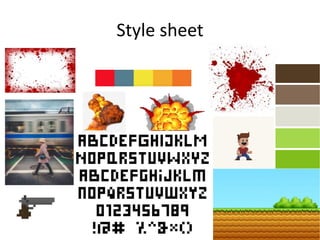
Style sheet
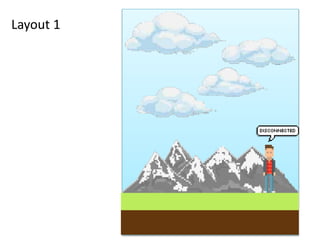
Layout 1
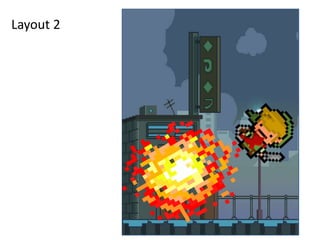
Layout 2
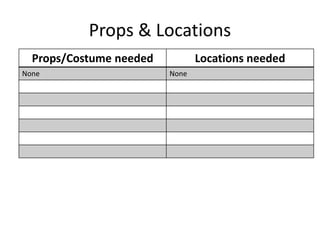
Props & Locations
Props/Costume needed Locations needed
None None
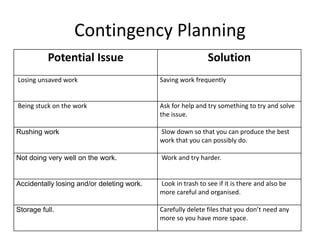
Contingency Planning
Potential Issue Solution
Losing unsaved work Saving work frequently
Being stuck on the work Ask for help and try something to try and solve
the issue.
Rushing work Slow down so that you can produce the best
work that you can possibly do.
Not doing very well on the work. Work and try harder.
Accidentally losing and/or deleting work. Look in trash to see if it is there and also be
more careful and organised.
Storage full. Carefully delete files that you don’t need any
more so you have more space.
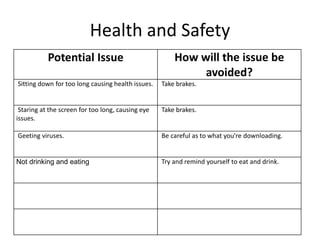
Health and Safety
Potential Issue How will the issue be
avoided?
Sitting down for too long causing health issues. Take brakes.
Staring at the screen for too long, causing eye
issues.
Take brakes.
Geeting viruses. Be careful as to what you're downloading.
Not drinking and eating Try and remind yourself to eat and drink.
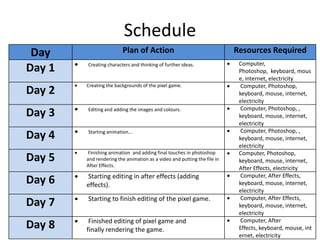
Schedule
Day Plan of Action Resources Required
Day 1  Creating characters and thinking of further ideas.  Computer,
Photoshop, keyboard, mous
e, internet, electricity
Day 2
 Creating the backgrounds of the pixel game.  Computer, Photoshop,
keyboard, mouse, internet,
electricity
Day 3  Editing and adding the images and colours.  Computer, Photoshop, ,
keyboard, mouse, internet,
electricity
Day 4  Starting animation...  Computer, Photoshop, ,
keyboard, mouse, internet,
electricity
Day 5
 Finishing animation and adding final touches in photoshop
and rendering the animation as a video and putting the file in
After Effects.
 Computer, Photoshop,
keyboard, mouse, internet,
After Effects, electricity
Day 6  Starting editing in after effects (adding
effects).
 Computer, After Effects,
keyboard, mouse, internet,
electricity
Day 7  Starting to finish editing of the pixel game.  Computer, After Effects,
keyboard, mouse, internet,
electricity
Day 8  Finished editing of pixel game and
finally rendering the game.
 Computer, After
Effects, keyboard, mouse, int
ernet, electricity

Pod handler (2) (1)

  • 1.
  • 2.
  • 3.
  • 4.
  • 5.
    Props & Locations Props/Costumeneeded Locations needed None None
  • 6.
    Contingency Planning Potential IssueSolution Losing unsaved work Saving work frequently Being stuck on the work Ask for help and try something to try and solve the issue. Rushing work Slow down so that you can produce the best work that you can possibly do. Not doing very well on the work. Work and try harder. Accidentally losing and/or deleting work. Look in trash to see if it is there and also be more careful and organised. Storage full. Carefully delete files that you don’t need any more so you have more space.
  • 7.
    Health and Safety PotentialIssue How will the issue be avoided? Sitting down for too long causing health issues. Take brakes. Staring at the screen for too long, causing eye issues. Take brakes. Geeting viruses. Be careful as to what you're downloading. Not drinking and eating Try and remind yourself to eat and drink.
  • 8.
    Schedule Day Plan ofAction Resources Required Day 1  Creating characters and thinking of further ideas.  Computer, Photoshop, keyboard, mous e, internet, electricity Day 2  Creating the backgrounds of the pixel game.  Computer, Photoshop, keyboard, mouse, internet, electricity Day 3  Editing and adding the images and colours.  Computer, Photoshop, , keyboard, mouse, internet, electricity Day 4  Starting animation...  Computer, Photoshop, , keyboard, mouse, internet, electricity Day 5  Finishing animation and adding final touches in photoshop and rendering the animation as a video and putting the file in After Effects.  Computer, Photoshop, keyboard, mouse, internet, After Effects, electricity Day 6  Starting editing in after effects (adding effects).  Computer, After Effects, keyboard, mouse, internet, electricity Day 7  Starting to finish editing of the pixel game.  Computer, After Effects, keyboard, mouse, internet, electricity Day 8  Finished editing of pixel game and finally rendering the game.  Computer, After Effects, keyboard, mouse, int ernet, electricity

Editor's Notes

  • #3 Explore colours, fonts and image styles similar to what you want to produce. Discuss all three elements in relation to why you chose them and where you may use them in your project. Go over as many pages as you need to
  • #4 Mock up of a potential design using the colours and fonts established in your style sheet and sourced images
  • #5 Mock up of a potential design using the colours and fonts established in your style sheet and sourced images