Pre-Production
Luke Young
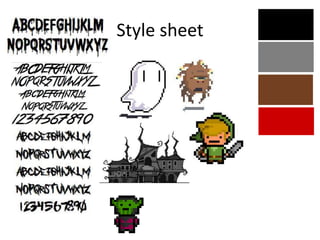
Style sheet
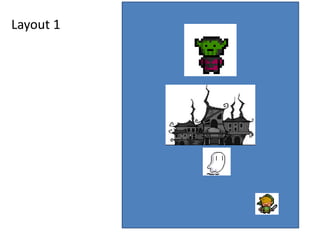
Layout 1
v
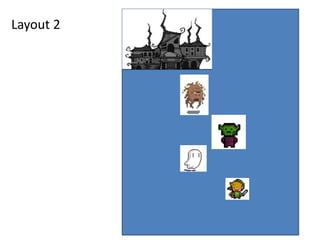
Layout 2
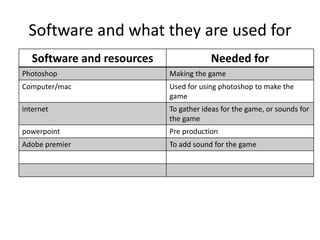
Software and what they are used for
Software and resources Needed for
Photoshop Making the game
Computer/mac Used for using photoshop to make the
game
internet To gather ideas for the game, or sounds for
the game
powerpoint Pre production
Adobe premier To add sound for the game
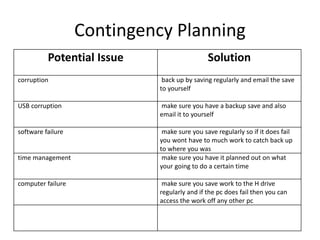
Contingency Planning
Potential Issue Solution
corruption back up by saving regularly and email the save
to yourself
USB corruption make sure you have a backup save and also
email it to yourself
software failure make sure you save regularly so if it does fail
you wont have to much work to catch back up
to where you was
time management make sure you have it planned out on what
your going to do a certain time
computer failure make sure you save work to the H drive
regularly and if the pc does fail then you can
access the work off any other pc
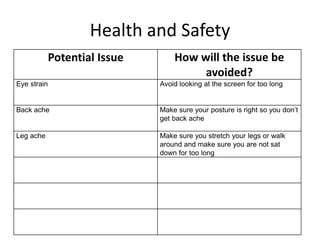
Health and Safety
Potential Issue How will the issue be
avoided?
Eye strain Avoid looking at the screen for too long
Back ache Make sure your posture is right so you don’t
get back ache
Leg ache Make sure you stretch your legs or walk
around and make sure you are not sat
down for too long
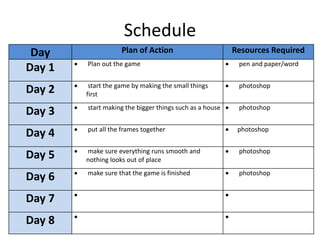
Schedule
Day Plan of Action Resources Required
Day 1  Plan out the game  pen and paper/word
Day 2  start the game by making the small things
first
 photoshop
Day 3  start making the bigger things such as a house  photoshop
Day 4  put all the frames together  photoshop
Day 5  make sure everything runs smooth and
nothing looks out of place
 photoshop
Day 6  make sure that the game is finished  photoshop
Day 7  
Day 8  

5. pre production(2)

  • 1.
  • 2.
  • 3.
  • 4.
  • 5.
    Software and whatthey are used for Software and resources Needed for Photoshop Making the game Computer/mac Used for using photoshop to make the game internet To gather ideas for the game, or sounds for the game powerpoint Pre production Adobe premier To add sound for the game
  • 6.
    Contingency Planning Potential IssueSolution corruption back up by saving regularly and email the save to yourself USB corruption make sure you have a backup save and also email it to yourself software failure make sure you save regularly so if it does fail you wont have to much work to catch back up to where you was time management make sure you have it planned out on what your going to do a certain time computer failure make sure you save work to the H drive regularly and if the pc does fail then you can access the work off any other pc
  • 7.
    Health and Safety PotentialIssue How will the issue be avoided? Eye strain Avoid looking at the screen for too long Back ache Make sure your posture is right so you don’t get back ache Leg ache Make sure you stretch your legs or walk around and make sure you are not sat down for too long
  • 8.
    Schedule Day Plan ofAction Resources Required Day 1  Plan out the game  pen and paper/word Day 2  start the game by making the small things first  photoshop Day 3  start making the bigger things such as a house  photoshop Day 4  put all the frames together  photoshop Day 5  make sure everything runs smooth and nothing looks out of place  photoshop Day 6  make sure that the game is finished  photoshop Day 7   Day 8  

Editor's Notes

  • #3 Explore colours, fonts and image styles similar to what you want to produce. Discuss all three elements in relation to why you chose them and where you may use them in your project. Go over as many pages as you need to
  • #4 Mock up of a potential design using the colours and fonts established in your style sheet and sourced images
  • #5 Mock up of a potential design using the colours and fonts established in your style sheet and sourced images