PHP: Hypertext Preprocessor
- SHIVI TOMER
PHP Introduction
 PHP stands for Hypertext Preprocessors.
 PHP is a server side scripting language i.e., it is executed on servers.
 PHP is originally created by Rasmus Lerdorf in 1994.
 PHP is a open source language i.e., free to download and use.
 PHP is used to develop attractive, dynamic and interactive web pages.
 PHP is the widely-used, free, and efficient alternative to Microsoft’s ASP.
 PHP is platform independent.
 PHP file is saved with .php , .php3 , .phtml, etc. extensions.
 PHP files can contain text, HTML, CSS, JavaScript, and PHP codes.
 Latest version of PHP is 7.0.8 released on 23 June 2016.
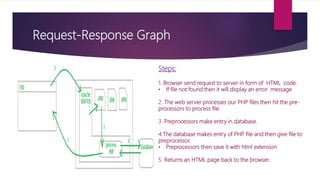
Request-Response Graph
Steps:
1. Browser send request to server in form of HTML code.
• If file not found then it will display an error message
2. The web server processes our PHP files then hit the pre-
processors to process file.
3. Preprocessors make entry in database.
4.The database makes entry of PHP file and then give file to
preprocessor.
• Preprocessors then save it with html extension
5. Returns an HTML page back to the browser.
What Can PHP Do?
 PHP can generate dynamic page content
 PHP can create, open, read, write, delete, and close files on the server
 PHP can collect form data
 PHP can send and receive cookies
 PHP can add, delete, modify data in your database
 PHP can be used to control user-access
 PHP can encrypt data
PHP Install
What do I need? 4 Types of PHP Compaq software
 Find a web host with PHP and MySQL support WAMP ( Windows Apache Mysql PHP)
 Install a web server LAMP (Linux Apache Mysql PHP)
 Install PHP XAMP (X- os: cross platform Apache Mysql PHP)
 Install a database, such as MySQL MAMP (MAC os Apache Mysql PHP)
Basic PHP Syntax
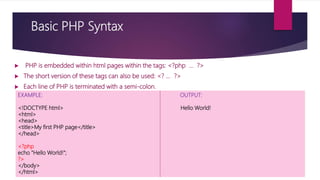
 PHP is embedded within html pages within the tags: <?php … ?>
 The short version of these tags can also be used: <? … ?>
 Each line of PHP is terminated with a semi-colon.
EXAMPLE: OUTPUT:
<!DOCTYPE html> Hello World!
<html>
<head>
<title>My first PHP page</title>
</head>
<?php
echo "Hello World!";
?>
</body>
</html>
Comments in PHP
 A comment in PHP code is a line that is not read/executed as part of the program.
 Comments can be used to:
- Let others understand what you are doing
- Remind yourself of what you did
 In PHP, we use
// to make a single-line comment
/* and */ to make a multi- line comment
EXAMPLE:
<?php
// this is a comment
echo ‘hello world!’;
/* another
multi-line comment */
?>
OUTPUT:
hello world!
PHP Case Sensitivity
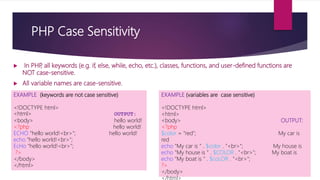
 In PHP, all keywords (e.g. if, else, while, echo, etc.), classes, functions, and user-defined functions are
NOT case-sensitive.
 All variable names are case-sensitive.
EXAMPLE (keywords are not case sensitive)
<!DOCTYPE html>
<html> OUTPUT:
<body> hello world!
<?php hello world!
ECHO “hello world!<br>"; hello world!
echo “hello world!<br>";
EcHo “hello world!<br>";
?>
</body>
</html>
EXAMPLE (variables are case sensitive)
<!DOCTYPE html>
<html>
<body> OUTPUT:
<?php
$color = "red"; My car is
red
echo "My car is " . $color . "<br>"; My house is
echo "My house is " . $COLOR . "<br>"; My boat is
echo "My boat is " . $coLOR . "<br>";
?>
</body>
</html>
 In PHP there are two basic ways to get output :
- Echo
- Print
SIMILARITY
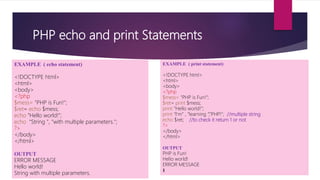
 echo and print are more or less the same. They are both used to output data to the screen.
 The echo and print statement can be used with or without parentheses: echo or echo().and print or
print().
DIFFERENCES
 echo has no return value while print has a return value of 1 so it can be used in expressions.
 echo can take multiple parameters while print can take one argument.
 echo is marginally faster than print.
PHP echo and print Statements
EXAMPLE ( echo statement)
<!DOCTYPE html>
<html>
<body>
<?php
$mess= "PHP is Fun!";
$ret= echo $mess;
echo "Hello world!";
echo “String ", "with multiple parameters.";
?>
</body>
</html>
OUTPUT
ERROR MESSAGE
Hello world!
String with multiple parameters.
EXAMPLE ( print statement)
<!DOCTYPE html>
<html>
<body>
<?php
$mess= "PHP is Fun!";
$ret= print $mess;
print "Hello world!";
print “I‘m” , “learning ”,“PHP!"; //multiple string
echo $ret; //to check it return 1 or not
?>
</body>
</html>
OUTPUT
PHP is Fun!
Hello world!
ERROR MESSAGE
1
PHP Variables
 Variables are "containers" for storing information.
 PHP has no command for declaring a variable. It is created the moment you first assign a value to it.
 When you assign a text value to a variable, put quotes around the value.
 PHP variable names are case-sensitive
 No need to assign datatype as it automatically covert according to value hence PHP is loosely typed language.
RULES OF PHP VARIABLES
 A variable starts with the $ sign, followed by the name of the variable
 A variable name must start with a letter or the underscore character
 A variable name cannot start with a number
 A variable name can only contain alpha-numeric characters & underscores (A-z, 0-9, and _ )
 Variable names are case-sensitive ($age and $AGE are two different variables)
PHP Variables
EXAMPLE: ( to print variables statement)
<!DOCTYPE html>
<html>
<body>
<?php
$txt = “hello!";
echo $txt.”friends";
?>
</body>
</html>
Output :
Hello friends
EXAMPLE :( to print numbers statement)
<!DOCTYPE html>
<html>
<body>
<?php
$x = 5;
$y = 4;
echo $x + $y;
?>
</body>
</html>
Output :
9
PHP Constants
 Constants (unchangeable variables) can also be defined.
 Each constant is given a name
 By convention, constant names are usually in UPPERCASE
 To create a constant, use the define() function.
SYNTAX : define(name, value, case-insensitive)
Parameters:
 name: Specifies the name of the constant
 value: Specifies the value of the constant
 case-insensitive: Specifies whether the constant name should be case-insensitive. Default is false
PHP Constants
EXAMPLE : ( to create a constant)
<!DOCTYPE html>
<html>
<body>
<?php
// case-sensitive constant name
define("GREETING", "Welcome to Web page!");
echo GREETING;
?>
</body>
</html>
OUTPUT :
Welcome to Web page!
EXAMPLE : ( to create a constant)
<!DOCTYPE html>
<html>
<body>
<?php
// case-insensitive constant name
define("GREETING", "Welcome to W3Schools.com!", true);
echo greeting;
?>
</body>
</html>
OUTPUT:
Welcome to W3Schools.com!
“Double quotes” and ‘Single quotes’
 There is a difference between strings written in single and double quotes.
 In a double-quoted string any variable names are expanded to their values.
 In a single-quoted string, no variable expansion takes place.
Example: (using (“) to print statement)
<!DOCTYPE html>
<html>
<body>
<?php
$name = ‘Phil’;
$age = 23;
echo “$name is $age”;
?>
</body>
</html>
Output:
Phil is 23
Example: (using (‘) to print statement)
<!DOCTYPE html>
<html>
<body>
<?php
$name = ‘Phil’;
$age = 23;
echo ‘$name is $age’;
?>
</body>
</html>
Output:
$name is $age
PHP Datatypes
 Variables can store data of different types, and different data types can do different
things.
PHP supports the following data types:
 String
 Integer
 Float (floating point numbers - also called double)
 Boolean
 Array
PHP: STRING
 A string is a sequence of characters, like "Hello world!".
 A string can be any text inside quotes. You can use single or double quotes:
Example-12 (to print string value)
<!DOCTYPE html>
<html>
<body>
<?php
$x = "Hello world!";
$y = 'Hello world!';
echo $x;
echo $y;
?>
</body>
</html>
OUTPUT:
Hello world!
Hello world!
PHP: INTEGER
 An integer data type is a non-decimal number between
-2,147,483,648 and 2,147,483,647.
Rules for integers:
 An integer must have at least one digit
 An integer must not have a decimal point
 An integer can be either positive or negative
 Integers can be specified in three formats:
-decimal (10-based),
-hexadecimal (16-based - prefixed with 0x)
-octal (8-based - prefixed with 0)
The PHP var_dump() function returns the data type and value.
Example: (to print integer value)
<!DOCTYPE html>
<html>
<body>
<?php
$x = 5985;
var_dump($x);
?>
</body>
</html>
Output:
int (5985)
PHP: FLOAT
 A float (floating point number) is a number with a decimal point or a number in exponential form.
 In the following example $x is a float. The PHP var_dump() function returns the data type and value.
Example: (to print float value)
<!DOCTYPE html>
<html>
<body>
Output:
<?php float(10.365)
$x = 10.365;
var_dump($x);
?>
</body>
</html>
PHP: BOOLEAN
 A Boolean represents two possible states: TRUE or FALSE.
$x = true;
$y = false;
 Booleans are often used in conditional testing.
PHP: ARRAY
What is an Array?
 An array is a special variable, which can hold more than one value at a time.
 An Array can store dissimilar datatypes.
 If you have a list of items (a list of car names, for example), storing the cars in single variables could look like this:
$cars1 = "Volvo";
$cars2 = "BMW";
$cars3 = "Toyota";
However, what if you want to loop through the cars and find a specific one? And what if you had not 3 cars, but 300?
The solution is to create an array!
An array can hold many values under a single name, and you can access the values by referring to an index number.
CREATE AN ARRAY IN PHP
 In PHP, the array() function is used to create an array:
In PHP, there are three types of arrays:
 Indexed arrays - Arrays with a numeric index starting with 0
 Associative arrays - Arrays with named keys
 Multidimensional arrays - Arrays containing one or more arrays
PHP: INDEXED ARRAY
 There are two ways to create indexed arrays:
 The index can be assigned automatically (index
always starts at 0), like this:
$cars = array("Volvo", "BMW", "Toyota");
 The index can be assigned manually:
$cars[0] = "Volvo";
$cars[1] = "BMW";
$cars[2] = "Toyota";
Example:(to print index array value)
<!DOCTYPE html>
<html>
<body>
<?php
$cars = array("Volvo", "BMW", "Toyota");
echo "I like " . $cars[0] . ", " . $cars[1] . " and " . $cars[2] . ".";
?>
</body>
</html>
Output:
I like Volvo, BMW and Toyota.
PHP: ASSOCIATIVE ARRAY
 Associative arrays are arrays that use named keys
that you assign to them.
There are two ways to create an associative array:
$age = array("Peter"=>"35", "Ben"=>"37", "Joe"=>"43");
or:
$age['Peter'] = "35";
$age['Ben'] = "37";
$age['Joe'] = "43";
Example:(to print Associative array value)
<!DOCTYPE html>
<html>
<body>
<?php
$age = array("Peter"=>"35", "Ben"=>"37", "Joe"=>"43");
echo "Peter is " . $age['Peter'] . " years old.";
?>
</body>
</html>
Output:
Peter is 35 years old.
PHP OPERATORS
Operators are used to operate on values. There are four classifications of operators:
 Arithmetic
 Assignment
 Comparison
 Logical
PHP: AIRTHMETIC OPERATOR
Operator Name Example Result Show it
+ Addition $x + $y Sum of $x and $y
<?php output=16
$x = 10;
$y = 6;
echo $x + $y;
?>
- Subtraction $x - $y
Difference of $x and
$y
<?php output=4
$x = 10;
$y = 6;
echo $x - $y;
?>
The PHP arithmetic operators are used with numeric values to perform common arithmetical operations, such as
addition, subtraction, multiplication etc.
PHP: AIRTHMETIC OPERATOR
Operator Name Example Result Show it
* Multiplication $x * $y Product of $x and $y
<?php output=60
$x = 10;
$y = 6;
echo $x * $y;
?>
/ Division $x / $y Quotient of $x and $y
<?php output=1.67
$x = 10;
$y = 6;
echo $x / $y;
?>
% Modulus $x % $y
Remainder of $x divided by
$y
<?php output=4
$x = 10;
$y = 6;
echo $x % $y;
?>
PHP: ASSIGNMENT OPERATORS
Assignment Same as... Description Show it
x = y x = y
The left operand gets set to the value of the expression on the
right
<?php
$x = 10; output=10
echo $x;
?>
x += y x = x + y Addition
<?php
$x = 20; output=120
$x += 100;
echo $x;
?>
x -= y x = x - y Subtraction
<?php
$x = 50;
$x -= 30;
echo $x; output=20
?>
 The PHP assignment operators are used with numeric values to write a value to a variable.
 The basic assignment operator in PHP is "=". It means that the left operand gets set to the
value of the assignment expression on the right.
PHP: ASSIGNMENT OPERATORS
Assignment Same as... Description Show it
x *= y x = x * y Multiplication
<?php
$x = 10; output-60
$y = 6;
echo $x * $y;
?>
x /= y x = x / y Division
<?php
$x = 10;
$x /= 5; output-2
echo $x;
?>
x %= y x = x % y Modulus
<?php
$x = 15;
$x %= 4;
echo $x; output=3
?>
PHP: LOGICAL OPERATORS
Operator Name Example Result Show it
xor xor $x xor $y
True if either $x or $y is true, but not
both
<?php output;- Hello world!
$x = 100;
$y = 50;
if ($x == 100 xor $y == 50)
{ echo "Hello world!";}
?>
|| Or $x || $y True if either $x or $y is true
<?php output:- Hello world!
$x = 100;
$y = 50;
if ($x == 100 or $y == 50)
{ echo "Hello world!";}
?>
! Not !$x True if $x is not true
<?php output:- Hello world!
$x = 100;
if ($x !== 90)
{ echo "Hello world!";}
?>
PHP Increment / Decrement Operators
 The PHP increment operators are used to increment a variable's value.
 The PHP decrement operators are used to decrement a variable's value.
Operator Name Description Show it
++$x Pre-increment Increments $x by one, then returns
<?php output= 11
$x = 10;
echo ++$x;
?>
$x++ Post-increment
Returns $x, then increments $x by
one
<?php output= 10
$x = 10;
echo $x++;
?>
PHP Increment / Decrement Operators
Operator Name Description Show it
--$x Pre-decrement
Decrements $x by one, then
returns $x
<?php output= 9
$x = 10;
echo --$x;
?>
$x-- Post-decrement
Returns $x, then decrements $x
one
<?php output= 10
$x = 10;
echo $x--;
?>
PHP: CONDITIONAL STATEMENTS
 Conditional statements are used to perform different actions based on different conditions.
In PHP we have the following conditional statements:
 if statement - executes some code if one condition is true
 if...else statement - executes some code if a condition is true and another code if that condition is false
 if...elseif....else statement - executes different codes for more than two conditions
 switch statement - selects one of many blocks of code to be executed
PHP: IF STATEMENT
 The if statement executes some code if one condition is
true.
SYNTAX:
if (condition)
{ code to be executed if condition is true;
}
Example:
(to print for current time message)
<!DOCTYPE html>
<html>
<body>
<?php
$t = date("H");
if ($t < "20") {
echo "Have a good day!";
}
?>
</body>
</html>
Output:
Have a good day!
PHP: IF…ELSE STATEMENT
 The if....else statement executes some code if a
condition is true and another code if that
condition is false.
SYNTAX:
if (condition) {
code to be executed if condition is true;
} else {
code to be executed if condition is false;
}
Example:
(to print for current time message)
<!DOCTYPE html>
<html>
<body>
<?php
$t = date("H");
if ($t < "20") {
echo "Have a good day!";
} else {
echo "Have a good night!";
}
?>
</body>
</html>
Output:
Have a good day!
PHP: IF…ELSEIF…ELSE STATEMENT
 The if....elseif...else statement executes different codes
for more than two conditions.
SYNTAX:
if (condition) {
code to be executed if this condition is true;
} elseif (condition) {
code to be executed if this condition is true;
} else {
code to be executed if all conditions are false;
}
Example:
(to print for current time message)
<!DOCTYPE html>
<html>
<body>
<?php
$t = date("H");
echo "<p>The hour (of the server) is " . $t;
echo ", and will give the following message:</p>";
if ($t < "10") {
echo "Have a good morning!";
} elseif ($t < "20") {
echo "Have a good day!";
} else {
echo "Have a good night!";
}
?>
</body>
</html>
Output:
The hour (of the server) is 12,
and will give the following message:
Have a good day!
PHP: SWITCH STATEMENT
 Use the switch statement to select one of many
blocks of code to be executed.
SYNTAX:
switch (n) {
case label1:
code to be executed if n=label1;
break;
case label2:
code to be executed if n=label2;
break;
case label3:
code to be executed if n=label3;
break;
...
default:
code to be executed if n is different from all labels;
}
Example: (to print the favourite color)
<!DOCTYPE html>
<html>
<body>
<?php
$favcolor = "red";
switch ($favcolor) {
case "red":
echo "Your favorite color is red!“; break;
case "blue":
echo "Your favorite color is blue!"; break;
case "green":
echo "Your favorite color is green!”; break;
default:
echo "Your favorite color is neither red, blue, nor green!";
}
?>
</body>
</html>
Output:
Your favorite color is red!
PHP FORMS
 The PHP superglobals $_GET and $_POST are used to collect form-data.
GET vs. POST
Similarity:
 Both GET and POST create an array (e.g. array( key => value, key2 => value2, key3 => value3, ...)).
This array holds key/value pairs, where keys are the names of the form controls and values are the
input data from the user.
 Both GET and POST are treated as $_GET and $_POST. These are superglobals, which means that they
are always accessible, regardless of scope - and you can access them from any function, class or file
without having to do anything special.
Difference:
 $_GET is an array of variables passed to the current script via the URL parameters.
 $_POST is an array of variables passed to the current script via the HTTP POST method.
When to use GET?
 Information sent from a form with the GET method is visible to
everyone (all variable names and values are displayed in the URL).
 GET also has limits on the amount of information to send. The
limitation is about 2000 characters.
 However, because the variables are displayed in the URL, it is
possible to bookmark the page. This can be useful in some cases.
 GET may be used for sending non-sensitive data.
 Note: GET should NEVER be used for sending passwords or other
sensitive information!
Example:
<!DOCTYPE HTML>
<html>
<body>
<form method="get">
Name: <input type="text" name="name"><br>
E-mail: <input type="text" name="email"><br>
<input type="submit">
</form>
</body>
</html>
When to use POST?
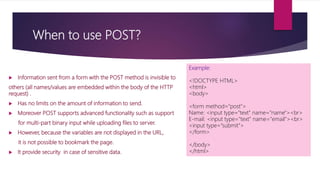
 Information sent from a form with the POST method is invisible to
others (all names/values are embedded within the body of the HTTP
request) .
 Has no limits on the amount of information to send.
 Moreover POST supports advanced functionality such as support
for multi-part binary input while uploading files to server.
 However, because the variables are not displayed in the URL,
it is not possible to bookmark the page.
 It provide security in case of sensitive data.
Example:
<!DOCTYPE HTML>
<html>
<body>
<form method=“post">
Name: <input type="text" name="name"><br>
E-mail: <input type="text" name="email"><br>
<input type="submit">
</form>
</body>
</html>
PHP INCLUDE FILES
 The include (or require) statement takes all the text/code/markup that exists in the specified file and
copies it into the file that uses the include statement.
 Including files is very useful when you want to include the same PHP, HTML, or text on multiple pages
of a website.
 Including files saves a lot of work. This means that you can create a standard header, footer, or menu
file for all your web pages. Then, when the header needs to be updated, you can only update the
header include file.
 It is possible to insert the content of one PHP file into another PHP file (before the server executes it),
with the include or require statement.
SYNTAX:
include 'filename';
PHP INCLUDE FILES
Example:
<!DOCTYPE html>
<html>
<body>
<h1>Welcome to my home page!</h1>
<p>Some text.</p>
<p>Some more text.</p>
<?php
include ‘footer.php';
?>
</body>
</html>
Output:
Welcome to my home page!
Some text.
Some more text.
Copyright © 1999-2016 W3Schools.com
//Assume we have a standard footer file
called "footer.php", that looks like this:
<?php
echo
"<p>Copyright &copy; 1999-" . date("Y") .
" W3Schools.com</p>";
?>

Php by shivitomer

  • 1.
  • 2.
    PHP Introduction  PHPstands for Hypertext Preprocessors.  PHP is a server side scripting language i.e., it is executed on servers.  PHP is originally created by Rasmus Lerdorf in 1994.  PHP is a open source language i.e., free to download and use.  PHP is used to develop attractive, dynamic and interactive web pages.  PHP is the widely-used, free, and efficient alternative to Microsoft’s ASP.  PHP is platform independent.  PHP file is saved with .php , .php3 , .phtml, etc. extensions.  PHP files can contain text, HTML, CSS, JavaScript, and PHP codes.  Latest version of PHP is 7.0.8 released on 23 June 2016.
  • 3.
    Request-Response Graph Steps: 1. Browsersend request to server in form of HTML code. • If file not found then it will display an error message 2. The web server processes our PHP files then hit the pre- processors to process file. 3. Preprocessors make entry in database. 4.The database makes entry of PHP file and then give file to preprocessor. • Preprocessors then save it with html extension 5. Returns an HTML page back to the browser.
  • 4.
    What Can PHPDo?  PHP can generate dynamic page content  PHP can create, open, read, write, delete, and close files on the server  PHP can collect form data  PHP can send and receive cookies  PHP can add, delete, modify data in your database  PHP can be used to control user-access  PHP can encrypt data
  • 5.
    PHP Install What doI need? 4 Types of PHP Compaq software  Find a web host with PHP and MySQL support WAMP ( Windows Apache Mysql PHP)  Install a web server LAMP (Linux Apache Mysql PHP)  Install PHP XAMP (X- os: cross platform Apache Mysql PHP)  Install a database, such as MySQL MAMP (MAC os Apache Mysql PHP)
  • 6.
    Basic PHP Syntax PHP is embedded within html pages within the tags: <?php … ?>  The short version of these tags can also be used: <? … ?>  Each line of PHP is terminated with a semi-colon. EXAMPLE: OUTPUT: <!DOCTYPE html> Hello World! <html> <head> <title>My first PHP page</title> </head> <?php echo "Hello World!"; ?> </body> </html>
  • 7.
    Comments in PHP A comment in PHP code is a line that is not read/executed as part of the program.  Comments can be used to: - Let others understand what you are doing - Remind yourself of what you did  In PHP, we use // to make a single-line comment /* and */ to make a multi- line comment EXAMPLE: <?php // this is a comment echo ‘hello world!’; /* another multi-line comment */ ?> OUTPUT: hello world!
  • 8.
    PHP Case Sensitivity In PHP, all keywords (e.g. if, else, while, echo, etc.), classes, functions, and user-defined functions are NOT case-sensitive.  All variable names are case-sensitive. EXAMPLE (keywords are not case sensitive) <!DOCTYPE html> <html> OUTPUT: <body> hello world! <?php hello world! ECHO “hello world!<br>"; hello world! echo “hello world!<br>"; EcHo “hello world!<br>"; ?> </body> </html> EXAMPLE (variables are case sensitive) <!DOCTYPE html> <html> <body> OUTPUT: <?php $color = "red"; My car is red echo "My car is " . $color . "<br>"; My house is echo "My house is " . $COLOR . "<br>"; My boat is echo "My boat is " . $coLOR . "<br>"; ?> </body> </html>
  • 9.
     In PHPthere are two basic ways to get output : - Echo - Print SIMILARITY  echo and print are more or less the same. They are both used to output data to the screen.  The echo and print statement can be used with or without parentheses: echo or echo().and print or print(). DIFFERENCES  echo has no return value while print has a return value of 1 so it can be used in expressions.  echo can take multiple parameters while print can take one argument.  echo is marginally faster than print. PHP echo and print Statements
  • 10.
    PHP echo andprint Statements EXAMPLE ( echo statement) <!DOCTYPE html> <html> <body> <?php $mess= "PHP is Fun!"; $ret= echo $mess; echo "Hello world!"; echo “String ", "with multiple parameters."; ?> </body> </html> OUTPUT ERROR MESSAGE Hello world! String with multiple parameters. EXAMPLE ( print statement) <!DOCTYPE html> <html> <body> <?php $mess= "PHP is Fun!"; $ret= print $mess; print "Hello world!"; print “I‘m” , “learning ”,“PHP!"; //multiple string echo $ret; //to check it return 1 or not ?> </body> </html> OUTPUT PHP is Fun! Hello world! ERROR MESSAGE 1
  • 11.
    PHP Variables  Variablesare "containers" for storing information.  PHP has no command for declaring a variable. It is created the moment you first assign a value to it.  When you assign a text value to a variable, put quotes around the value.  PHP variable names are case-sensitive  No need to assign datatype as it automatically covert according to value hence PHP is loosely typed language. RULES OF PHP VARIABLES  A variable starts with the $ sign, followed by the name of the variable  A variable name must start with a letter or the underscore character  A variable name cannot start with a number  A variable name can only contain alpha-numeric characters & underscores (A-z, 0-9, and _ )  Variable names are case-sensitive ($age and $AGE are two different variables)
  • 12.
    PHP Variables EXAMPLE: (to print variables statement) <!DOCTYPE html> <html> <body> <?php $txt = “hello!"; echo $txt.”friends"; ?> </body> </html> Output : Hello friends EXAMPLE :( to print numbers statement) <!DOCTYPE html> <html> <body> <?php $x = 5; $y = 4; echo $x + $y; ?> </body> </html> Output : 9
  • 13.
    PHP Constants  Constants(unchangeable variables) can also be defined.  Each constant is given a name  By convention, constant names are usually in UPPERCASE  To create a constant, use the define() function. SYNTAX : define(name, value, case-insensitive) Parameters:  name: Specifies the name of the constant  value: Specifies the value of the constant  case-insensitive: Specifies whether the constant name should be case-insensitive. Default is false
  • 14.
    PHP Constants EXAMPLE :( to create a constant) <!DOCTYPE html> <html> <body> <?php // case-sensitive constant name define("GREETING", "Welcome to Web page!"); echo GREETING; ?> </body> </html> OUTPUT : Welcome to Web page! EXAMPLE : ( to create a constant) <!DOCTYPE html> <html> <body> <?php // case-insensitive constant name define("GREETING", "Welcome to W3Schools.com!", true); echo greeting; ?> </body> </html> OUTPUT: Welcome to W3Schools.com!
  • 15.
    “Double quotes” and‘Single quotes’  There is a difference between strings written in single and double quotes.  In a double-quoted string any variable names are expanded to their values.  In a single-quoted string, no variable expansion takes place. Example: (using (“) to print statement) <!DOCTYPE html> <html> <body> <?php $name = ‘Phil’; $age = 23; echo “$name is $age”; ?> </body> </html> Output: Phil is 23 Example: (using (‘) to print statement) <!DOCTYPE html> <html> <body> <?php $name = ‘Phil’; $age = 23; echo ‘$name is $age’; ?> </body> </html> Output: $name is $age
  • 16.
    PHP Datatypes  Variablescan store data of different types, and different data types can do different things. PHP supports the following data types:  String  Integer  Float (floating point numbers - also called double)  Boolean  Array
  • 17.
    PHP: STRING  Astring is a sequence of characters, like "Hello world!".  A string can be any text inside quotes. You can use single or double quotes: Example-12 (to print string value) <!DOCTYPE html> <html> <body> <?php $x = "Hello world!"; $y = 'Hello world!'; echo $x; echo $y; ?> </body> </html> OUTPUT: Hello world! Hello world!
  • 18.
    PHP: INTEGER  Aninteger data type is a non-decimal number between -2,147,483,648 and 2,147,483,647. Rules for integers:  An integer must have at least one digit  An integer must not have a decimal point  An integer can be either positive or negative  Integers can be specified in three formats: -decimal (10-based), -hexadecimal (16-based - prefixed with 0x) -octal (8-based - prefixed with 0) The PHP var_dump() function returns the data type and value. Example: (to print integer value) <!DOCTYPE html> <html> <body> <?php $x = 5985; var_dump($x); ?> </body> </html> Output: int (5985)
  • 19.
    PHP: FLOAT  Afloat (floating point number) is a number with a decimal point or a number in exponential form.  In the following example $x is a float. The PHP var_dump() function returns the data type and value. Example: (to print float value) <!DOCTYPE html> <html> <body> Output: <?php float(10.365) $x = 10.365; var_dump($x); ?> </body> </html>
  • 20.
    PHP: BOOLEAN  ABoolean represents two possible states: TRUE or FALSE. $x = true; $y = false;  Booleans are often used in conditional testing.
  • 21.
    PHP: ARRAY What isan Array?  An array is a special variable, which can hold more than one value at a time.  An Array can store dissimilar datatypes.  If you have a list of items (a list of car names, for example), storing the cars in single variables could look like this: $cars1 = "Volvo"; $cars2 = "BMW"; $cars3 = "Toyota"; However, what if you want to loop through the cars and find a specific one? And what if you had not 3 cars, but 300? The solution is to create an array! An array can hold many values under a single name, and you can access the values by referring to an index number.
  • 22.
    CREATE AN ARRAYIN PHP  In PHP, the array() function is used to create an array: In PHP, there are three types of arrays:  Indexed arrays - Arrays with a numeric index starting with 0  Associative arrays - Arrays with named keys  Multidimensional arrays - Arrays containing one or more arrays
  • 23.
    PHP: INDEXED ARRAY There are two ways to create indexed arrays:  The index can be assigned automatically (index always starts at 0), like this: $cars = array("Volvo", "BMW", "Toyota");  The index can be assigned manually: $cars[0] = "Volvo"; $cars[1] = "BMW"; $cars[2] = "Toyota"; Example:(to print index array value) <!DOCTYPE html> <html> <body> <?php $cars = array("Volvo", "BMW", "Toyota"); echo "I like " . $cars[0] . ", " . $cars[1] . " and " . $cars[2] . "."; ?> </body> </html> Output: I like Volvo, BMW and Toyota.
  • 24.
    PHP: ASSOCIATIVE ARRAY Associative arrays are arrays that use named keys that you assign to them. There are two ways to create an associative array: $age = array("Peter"=>"35", "Ben"=>"37", "Joe"=>"43"); or: $age['Peter'] = "35"; $age['Ben'] = "37"; $age['Joe'] = "43"; Example:(to print Associative array value) <!DOCTYPE html> <html> <body> <?php $age = array("Peter"=>"35", "Ben"=>"37", "Joe"=>"43"); echo "Peter is " . $age['Peter'] . " years old."; ?> </body> </html> Output: Peter is 35 years old.
  • 25.
    PHP OPERATORS Operators areused to operate on values. There are four classifications of operators:  Arithmetic  Assignment  Comparison  Logical
  • 26.
    PHP: AIRTHMETIC OPERATOR OperatorName Example Result Show it + Addition $x + $y Sum of $x and $y <?php output=16 $x = 10; $y = 6; echo $x + $y; ?> - Subtraction $x - $y Difference of $x and $y <?php output=4 $x = 10; $y = 6; echo $x - $y; ?> The PHP arithmetic operators are used with numeric values to perform common arithmetical operations, such as addition, subtraction, multiplication etc.
  • 27.
    PHP: AIRTHMETIC OPERATOR OperatorName Example Result Show it * Multiplication $x * $y Product of $x and $y <?php output=60 $x = 10; $y = 6; echo $x * $y; ?> / Division $x / $y Quotient of $x and $y <?php output=1.67 $x = 10; $y = 6; echo $x / $y; ?> % Modulus $x % $y Remainder of $x divided by $y <?php output=4 $x = 10; $y = 6; echo $x % $y; ?>
  • 28.
    PHP: ASSIGNMENT OPERATORS AssignmentSame as... Description Show it x = y x = y The left operand gets set to the value of the expression on the right <?php $x = 10; output=10 echo $x; ?> x += y x = x + y Addition <?php $x = 20; output=120 $x += 100; echo $x; ?> x -= y x = x - y Subtraction <?php $x = 50; $x -= 30; echo $x; output=20 ?>  The PHP assignment operators are used with numeric values to write a value to a variable.  The basic assignment operator in PHP is "=". It means that the left operand gets set to the value of the assignment expression on the right.
  • 29.
    PHP: ASSIGNMENT OPERATORS AssignmentSame as... Description Show it x *= y x = x * y Multiplication <?php $x = 10; output-60 $y = 6; echo $x * $y; ?> x /= y x = x / y Division <?php $x = 10; $x /= 5; output-2 echo $x; ?> x %= y x = x % y Modulus <?php $x = 15; $x %= 4; echo $x; output=3 ?>
  • 30.
    PHP: LOGICAL OPERATORS OperatorName Example Result Show it xor xor $x xor $y True if either $x or $y is true, but not both <?php output;- Hello world! $x = 100; $y = 50; if ($x == 100 xor $y == 50) { echo "Hello world!";} ?> || Or $x || $y True if either $x or $y is true <?php output:- Hello world! $x = 100; $y = 50; if ($x == 100 or $y == 50) { echo "Hello world!";} ?> ! Not !$x True if $x is not true <?php output:- Hello world! $x = 100; if ($x !== 90) { echo "Hello world!";} ?>
  • 31.
    PHP Increment /Decrement Operators  The PHP increment operators are used to increment a variable's value.  The PHP decrement operators are used to decrement a variable's value. Operator Name Description Show it ++$x Pre-increment Increments $x by one, then returns <?php output= 11 $x = 10; echo ++$x; ?> $x++ Post-increment Returns $x, then increments $x by one <?php output= 10 $x = 10; echo $x++; ?>
  • 32.
    PHP Increment /Decrement Operators Operator Name Description Show it --$x Pre-decrement Decrements $x by one, then returns $x <?php output= 9 $x = 10; echo --$x; ?> $x-- Post-decrement Returns $x, then decrements $x one <?php output= 10 $x = 10; echo $x--; ?>
  • 33.
    PHP: CONDITIONAL STATEMENTS Conditional statements are used to perform different actions based on different conditions. In PHP we have the following conditional statements:  if statement - executes some code if one condition is true  if...else statement - executes some code if a condition is true and another code if that condition is false  if...elseif....else statement - executes different codes for more than two conditions  switch statement - selects one of many blocks of code to be executed
  • 34.
    PHP: IF STATEMENT The if statement executes some code if one condition is true. SYNTAX: if (condition) { code to be executed if condition is true; } Example: (to print for current time message) <!DOCTYPE html> <html> <body> <?php $t = date("H"); if ($t < "20") { echo "Have a good day!"; } ?> </body> </html> Output: Have a good day!
  • 35.
    PHP: IF…ELSE STATEMENT The if....else statement executes some code if a condition is true and another code if that condition is false. SYNTAX: if (condition) { code to be executed if condition is true; } else { code to be executed if condition is false; } Example: (to print for current time message) <!DOCTYPE html> <html> <body> <?php $t = date("H"); if ($t < "20") { echo "Have a good day!"; } else { echo "Have a good night!"; } ?> </body> </html> Output: Have a good day!
  • 36.
    PHP: IF…ELSEIF…ELSE STATEMENT The if....elseif...else statement executes different codes for more than two conditions. SYNTAX: if (condition) { code to be executed if this condition is true; } elseif (condition) { code to be executed if this condition is true; } else { code to be executed if all conditions are false; } Example: (to print for current time message) <!DOCTYPE html> <html> <body> <?php $t = date("H"); echo "<p>The hour (of the server) is " . $t; echo ", and will give the following message:</p>"; if ($t < "10") { echo "Have a good morning!"; } elseif ($t < "20") { echo "Have a good day!"; } else { echo "Have a good night!"; } ?> </body> </html> Output: The hour (of the server) is 12, and will give the following message: Have a good day!
  • 37.
    PHP: SWITCH STATEMENT Use the switch statement to select one of many blocks of code to be executed. SYNTAX: switch (n) { case label1: code to be executed if n=label1; break; case label2: code to be executed if n=label2; break; case label3: code to be executed if n=label3; break; ... default: code to be executed if n is different from all labels; } Example: (to print the favourite color) <!DOCTYPE html> <html> <body> <?php $favcolor = "red"; switch ($favcolor) { case "red": echo "Your favorite color is red!“; break; case "blue": echo "Your favorite color is blue!"; break; case "green": echo "Your favorite color is green!”; break; default: echo "Your favorite color is neither red, blue, nor green!"; } ?> </body> </html> Output: Your favorite color is red!
  • 38.
    PHP FORMS  ThePHP superglobals $_GET and $_POST are used to collect form-data. GET vs. POST Similarity:  Both GET and POST create an array (e.g. array( key => value, key2 => value2, key3 => value3, ...)). This array holds key/value pairs, where keys are the names of the form controls and values are the input data from the user.  Both GET and POST are treated as $_GET and $_POST. These are superglobals, which means that they are always accessible, regardless of scope - and you can access them from any function, class or file without having to do anything special. Difference:  $_GET is an array of variables passed to the current script via the URL parameters.  $_POST is an array of variables passed to the current script via the HTTP POST method.
  • 39.
    When to useGET?  Information sent from a form with the GET method is visible to everyone (all variable names and values are displayed in the URL).  GET also has limits on the amount of information to send. The limitation is about 2000 characters.  However, because the variables are displayed in the URL, it is possible to bookmark the page. This can be useful in some cases.  GET may be used for sending non-sensitive data.  Note: GET should NEVER be used for sending passwords or other sensitive information! Example: <!DOCTYPE HTML> <html> <body> <form method="get"> Name: <input type="text" name="name"><br> E-mail: <input type="text" name="email"><br> <input type="submit"> </form> </body> </html>
  • 40.
    When to usePOST?  Information sent from a form with the POST method is invisible to others (all names/values are embedded within the body of the HTTP request) .  Has no limits on the amount of information to send.  Moreover POST supports advanced functionality such as support for multi-part binary input while uploading files to server.  However, because the variables are not displayed in the URL, it is not possible to bookmark the page.  It provide security in case of sensitive data. Example: <!DOCTYPE HTML> <html> <body> <form method=“post"> Name: <input type="text" name="name"><br> E-mail: <input type="text" name="email"><br> <input type="submit"> </form> </body> </html>
  • 41.
    PHP INCLUDE FILES The include (or require) statement takes all the text/code/markup that exists in the specified file and copies it into the file that uses the include statement.  Including files is very useful when you want to include the same PHP, HTML, or text on multiple pages of a website.  Including files saves a lot of work. This means that you can create a standard header, footer, or menu file for all your web pages. Then, when the header needs to be updated, you can only update the header include file.  It is possible to insert the content of one PHP file into another PHP file (before the server executes it), with the include or require statement. SYNTAX: include 'filename';
  • 42.
    PHP INCLUDE FILES Example: <!DOCTYPEhtml> <html> <body> <h1>Welcome to my home page!</h1> <p>Some text.</p> <p>Some more text.</p> <?php include ‘footer.php'; ?> </body> </html> Output: Welcome to my home page! Some text. Some more text. Copyright © 1999-2016 W3Schools.com //Assume we have a standard footer file called "footer.php", that looks like this: <?php echo "<p>Copyright &copy; 1999-" . date("Y") . " W3Schools.com</p>"; ?>