J   M Githeko
1. The Tools
2. LAMP or WAMP
3. Other Web Application Tools
4. Download and Install WAMP server –
MySQL root password, phpMyAdmin
5. Creating a database, securing the
database
6. Uploading data into the database
7. Simple database lookup with PHP
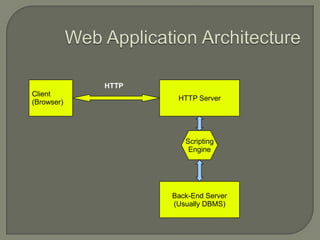
HTTP
Client
                    HTTP Server
(Browser)


                      Scripting
                       Engine


                   Back-End Server
                   (Usually DBMS)
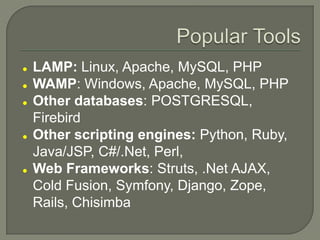
   LAMP: Linux, Apache, MySQL, PHP
   WAMP: Windows, Apache, MySQL, PHP
   Other databases: POSTGRESQL,
    Firebird
   Other scripting engines: Python, Ruby,
    Java/JSP, C#/.Net, Perl,
   Web Frameworks: Struts, .Net AJAX,
    Cold Fusion, Symfony, Django, Zope,
    Rails, Chisimba
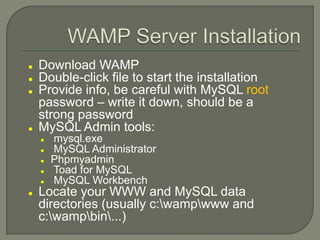
   Download WAMP
   Double-click file to start the installation
   Provide info, be careful with MySQL root
    password – write it down, should be a
    strong password
   MySQL Admin tools:
       mysql.exe
       MySQL Administrator
       Phpmyadmin
       Toad for MySQL
       MySQL Workbench
   Locate your WWW and MySQL data
    directories (usually c:wampwww and
    c:wampbin...)
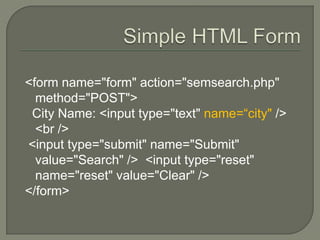
<form name="form" action="semsearch.php"
  method="POST">
 City Name: <input type="text" name=“city" />
  <br />
<input type="submit" name="Submit"
  value="Search" /> <input type="reset"
  name="reset" value="Clear" />
</form>
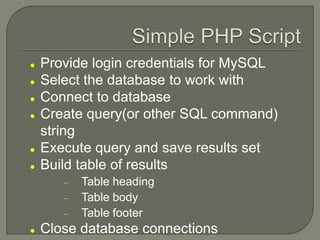
   Provide login credentials for MySQL
   Select the database to work with
   Connect to database
   Create query(or other SQL command)
    string
   Execute query and save results set
   Build table of results
          Table heading
          Table body
          Table footer
   Close database connections
   Validation of user input
   Security measures – remove dangerous
    code
   Display results using multiple pages for
    large result sets
   Manager user privileges for maximum
    security
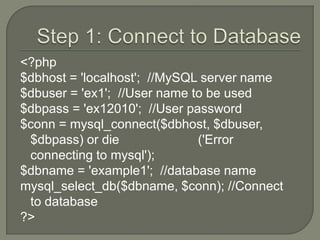
<?php
$dbhost = 'localhost'; //MySQL server name
$dbuser = 'ex1'; //User name to be used
$dbpass = 'ex12010'; //User password
$conn = mysql_connect($dbhost, $dbuser,
 $dbpass) or die              ('Error
 connecting to mysql');
$dbname = 'example1'; //database name
mysql_select_db($dbname, $conn); //Connect
 to database
?>
$para=$_POST[„city']
$queryx1= "SELECT sem, code,   title
 FROM courses
  WHERE sem =' $para'"
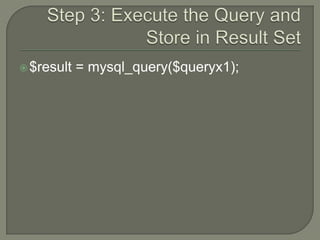
 $result   = mysql_query($queryx1);
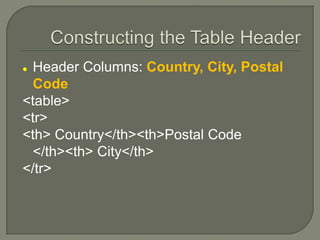
 Header Columns: Country, City, Postal
  Code
<table>
<tr>
<th> Country</th><th>Postal Code
  </th><th> City</th>
</tr>
 Loop through the rows and use records to
  construct the rows:
<?php
while ($row = mysql_fetch_assoc($result)) {
     print "<tr><td>$row[„country']</td>";
     print "<td>$row[code]</td>";
     print "<td>$row[city]</td></tr>";
          }
} ?>
</table>
//fetch tha data from the database

while ($row = mysql_fetch_array($result))
{

    print("<tr><td>".$row[0]."</td><td>".$row[1].
    "</td><td>".$row[2]."</td></tr>“); //display
    the results one table row at a time
}
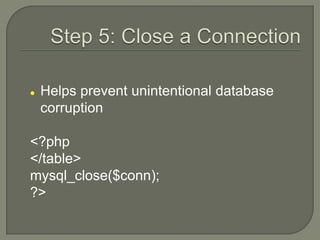
   Helps prevent unintentional database
    corruption

<?php
</table>
mysql_close($conn);
?>
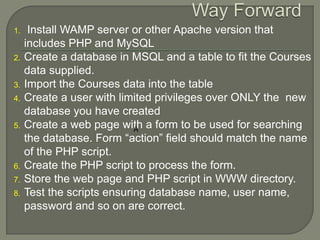
1.    Install WAMP server or other Apache version that
     includes PHP and MySQL
2.   Create a database in MSQL and a table to fit the Courses
     data supplied.
3.   Import the Courses data into the table
4.   Create a user with limited privileges over ONLY the new
     database you have created
5.   Create a web page with a form to be used for searching
                            A
     the database. Form “action” field should match the name
     of the PHP script.
6.   Create the PHP script to process the form.
7.   Store the web page and PHP script in WWW directory.
8.   Test the scripts ensuring database name, user name,
     password and so on are correct.
Php basics

Php basics

  • 1.
    J M Githeko
  • 2.
    1. The Tools 2.LAMP or WAMP 3. Other Web Application Tools 4. Download and Install WAMP server – MySQL root password, phpMyAdmin 5. Creating a database, securing the database 6. Uploading data into the database 7. Simple database lookup with PHP
  • 3.
    HTTP Client HTTP Server (Browser) Scripting Engine Back-End Server (Usually DBMS)
  • 4.
    LAMP: Linux, Apache, MySQL, PHP  WAMP: Windows, Apache, MySQL, PHP  Other databases: POSTGRESQL, Firebird  Other scripting engines: Python, Ruby, Java/JSP, C#/.Net, Perl,  Web Frameworks: Struts, .Net AJAX, Cold Fusion, Symfony, Django, Zope, Rails, Chisimba
  • 5.
    Download WAMP  Double-click file to start the installation  Provide info, be careful with MySQL root password – write it down, should be a strong password  MySQL Admin tools:  mysql.exe  MySQL Administrator  Phpmyadmin  Toad for MySQL  MySQL Workbench  Locate your WWW and MySQL data directories (usually c:wampwww and c:wampbin...)
  • 6.
    <form name="form" action="semsearch.php" method="POST"> City Name: <input type="text" name=“city" /> <br /> <input type="submit" name="Submit" value="Search" /> <input type="reset" name="reset" value="Clear" /> </form>
  • 7.
    Provide login credentials for MySQL  Select the database to work with  Connect to database  Create query(or other SQL command) string  Execute query and save results set  Build table of results Table heading Table body Table footer  Close database connections
  • 8.
    Validation of user input  Security measures – remove dangerous code  Display results using multiple pages for large result sets  Manager user privileges for maximum security
  • 9.
    <?php $dbhost = 'localhost';//MySQL server name $dbuser = 'ex1'; //User name to be used $dbpass = 'ex12010'; //User password $conn = mysql_connect($dbhost, $dbuser, $dbpass) or die ('Error connecting to mysql'); $dbname = 'example1'; //database name mysql_select_db($dbname, $conn); //Connect to database ?>
  • 10.
    $para=$_POST[„city'] $queryx1= "SELECT sem,code, title FROM courses WHERE sem =' $para'"
  • 11.
     $result = mysql_query($queryx1);
  • 13.
     Header Columns:Country, City, Postal Code <table> <tr> <th> Country</th><th>Postal Code </th><th> City</th> </tr>
  • 14.
     Loop throughthe rows and use records to construct the rows: <?php while ($row = mysql_fetch_assoc($result)) { print "<tr><td>$row[„country']</td>"; print "<td>$row[code]</td>"; print "<td>$row[city]</td></tr>"; } } ?> </table>
  • 15.
    //fetch tha datafrom the database while ($row = mysql_fetch_array($result)) { print("<tr><td>".$row[0]."</td><td>".$row[1]. "</td><td>".$row[2]."</td></tr>“); //display the results one table row at a time }
  • 16.
    Helps prevent unintentional database corruption <?php </table> mysql_close($conn); ?>
  • 17.
    1. Install WAMP server or other Apache version that includes PHP and MySQL 2. Create a database in MSQL and a table to fit the Courses data supplied. 3. Import the Courses data into the table 4. Create a user with limited privileges over ONLY the new database you have created 5. Create a web page with a form to be used for searching A the database. Form “action” field should match the name of the PHP script. 6. Create the PHP script to process the form. 7. Store the web page and PHP script in WWW directory. 8. Test the scripts ensuring database name, user name, password and so on are correct.