System Performance Tuning
What is Performance Tuning
• Performance tuning can involve configuration
changes to software components.
• Performance tuning can also include tuning SQL
queries and tuning an applications underlying code
to cater for concurrency and to improve efficiency.
Common Problems in SQL Queries
Pagination
• Fetching lots of records can cause slow down
the speed of system but its necessary because
database is systematically organized or
structure repository of indexed information.
Pagination
Example:
Without pagination fetching all data
SELECT * FROM cats
Pagination
Two things you must do:
• Decide on the maximum number of database
rows that can be included in each page. You
may hard code this value, or (my preferred
method) you can define it in a variable so that
the value may be changed at runtime.
Pagination
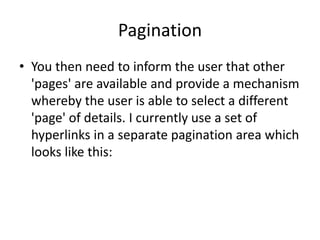
• You then need to inform the user that other
'pages' are available and provide a mechanism
whereby the user is able to select a different
'page' of details. I currently use a set of
hyperlinks in a separate pagination area which
looks like this:
Pagination
How to do it :
1. Obtain the required page number.
- if(isset($_GET[‘pageno’])) {
$pageno = $_GET[‘pageno’];
} else {
$pageno = 1;
}
Pagination
2. Identify how many database rows are
available:
-$query = “SELECT count(1) FROM table
WHERE…”;
$result = mysql_query($query, $db);
$query_data = mysql_fetch_row($result);
$numrows = $query_data[0];
Pagination
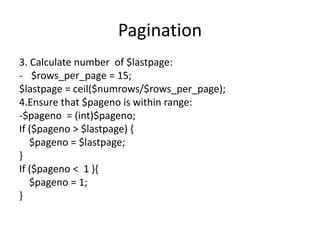
3. Calculate number of $lastpage:
- $rows_per_page = 15;
$lastpage = ceil($numrows/$rows_per_page);
4.Ensure that $pageno is within range:
-$pageno = (int)$pageno;
If ($pageno > $lastpage) {
$pageno = $lastpage;
}
If ($pageno < 1 ){
$pageno = 1;
}
Pagination
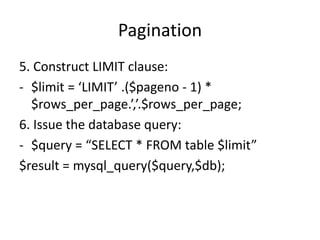
5. Construct LIMIT clause:
- $limit = ‘LIMIT’ .($pageno - 1) *
$rows_per_page.’,’.$rows_per_page;
6. Issue the database query:
- $query = “SELECT * FROM table $limit”
$result = mysql_query($query,$db);
Pagination
7. Construct pagination hyperlinks:
- If ($pageno == 1) {
echo “PREV”;
} else {
echo " <a href='{$_SERVER['PHP_SELF']}?pageno=1'>FIRST</a> ";
$prevpage = $pageno-1;
echo " <a href='{$_SERVER['PHP_SELF']}?pageno=$prevpage'>PREV</a> ";
}
Pagination
if ($pageno == $lastpage) {
echo " NEXT";
} else {
$nextpage = $pageno+1;
echo " <a
href='{$_SERVER['PHP_SELF']}?pageno=$nextpage'>NEXT
</a> ";
echo " <a
href='{$_SERVER['PHP_SELF']}?pageno=$lastpage'>LAST<
/a> ";
}
Performance: N+1 Query Problem
• Select N+1 is a data access anti-pattern
where the database is accessed in a
suboptimal way.
• Detecting Select N+1 problem usually means
that the data fetch strategy of the application
can be optimized.
Performance: N+1 Query Problem
Example:
$test = new test();
$hats = $test->getHats();
$cats = [];
foreach ($hats as $value) {
$cats[] = $test->getCats($value['id']);
}
Performance: N+1 Query Problem
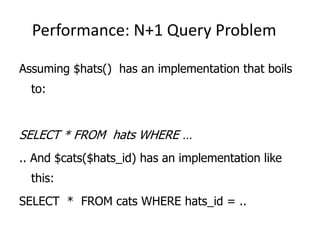
Assuming $hats() has an implementation that boils
to:
SELECT * FROM hats WHERE …
.. And $cats($hats_id) has an implementation like
this:
SELECT * FROM cats WHERE hats_id = ..
Performance: N+1 Query Problem
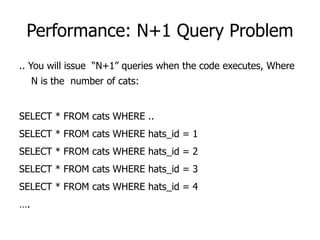
.. You will issue “N+1” queries when the code executes, Where
N is the number of cats:
SELECT * FROM cats WHERE ..
SELECT * FROM cats WHERE hats_id = 1
SELECT * FROM cats WHERE hats_id = 2
SELECT * FROM cats WHERE hats_id = 3
SELECT * FROM cats WHERE hats_id = 4
….
Performance: N+1 Query Problem
Solution :
Batching Queries
$cats=getCats();
Performance: N+1 Query Problem
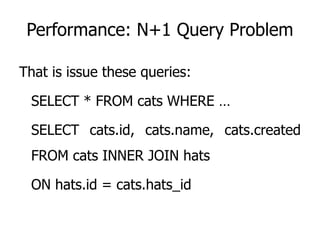
That is issue these queries:
SELECT * FROM cats WHERE …
SELECT cats.id, cats.name, cats.created
FROM cats INNER JOIN hats
ON hats.id = cats.hats_id
Performance: N+1 Query Problem
• It is much faster to issue 1 query which
returns thousands results than to issue t
queries which each thousands return 1
result.
Thank You

System performance tuning

  • 1.
  • 2.
    What is PerformanceTuning • Performance tuning can involve configuration changes to software components. • Performance tuning can also include tuning SQL queries and tuning an applications underlying code to cater for concurrency and to improve efficiency.
  • 3.
    Common Problems inSQL Queries
  • 4.
    Pagination • Fetching lotsof records can cause slow down the speed of system but its necessary because database is systematically organized or structure repository of indexed information.
  • 5.
  • 6.
    Pagination Two things youmust do: • Decide on the maximum number of database rows that can be included in each page. You may hard code this value, or (my preferred method) you can define it in a variable so that the value may be changed at runtime.
  • 7.
    Pagination • You thenneed to inform the user that other 'pages' are available and provide a mechanism whereby the user is able to select a different 'page' of details. I currently use a set of hyperlinks in a separate pagination area which looks like this:
  • 8.
    Pagination How to doit : 1. Obtain the required page number. - if(isset($_GET[‘pageno’])) { $pageno = $_GET[‘pageno’]; } else { $pageno = 1; }
  • 9.
    Pagination 2. Identify howmany database rows are available: -$query = “SELECT count(1) FROM table WHERE…”; $result = mysql_query($query, $db); $query_data = mysql_fetch_row($result); $numrows = $query_data[0];
  • 10.
    Pagination 3. Calculate numberof $lastpage: - $rows_per_page = 15; $lastpage = ceil($numrows/$rows_per_page); 4.Ensure that $pageno is within range: -$pageno = (int)$pageno; If ($pageno > $lastpage) { $pageno = $lastpage; } If ($pageno < 1 ){ $pageno = 1; }
  • 11.
    Pagination 5. Construct LIMITclause: - $limit = ‘LIMIT’ .($pageno - 1) * $rows_per_page.’,’.$rows_per_page; 6. Issue the database query: - $query = “SELECT * FROM table $limit” $result = mysql_query($query,$db);
  • 12.
    Pagination 7. Construct paginationhyperlinks: - If ($pageno == 1) { echo “PREV”; } else { echo " <a href='{$_SERVER['PHP_SELF']}?pageno=1'>FIRST</a> "; $prevpage = $pageno-1; echo " <a href='{$_SERVER['PHP_SELF']}?pageno=$prevpage'>PREV</a> "; }
  • 13.
    Pagination if ($pageno ==$lastpage) { echo " NEXT"; } else { $nextpage = $pageno+1; echo " <a href='{$_SERVER['PHP_SELF']}?pageno=$nextpage'>NEXT </a> "; echo " <a href='{$_SERVER['PHP_SELF']}?pageno=$lastpage'>LAST< /a> "; }
  • 14.
    Performance: N+1 QueryProblem • Select N+1 is a data access anti-pattern where the database is accessed in a suboptimal way. • Detecting Select N+1 problem usually means that the data fetch strategy of the application can be optimized.
  • 15.
    Performance: N+1 QueryProblem Example: $test = new test(); $hats = $test->getHats(); $cats = []; foreach ($hats as $value) { $cats[] = $test->getCats($value['id']); }
  • 16.
    Performance: N+1 QueryProblem Assuming $hats() has an implementation that boils to: SELECT * FROM hats WHERE … .. And $cats($hats_id) has an implementation like this: SELECT * FROM cats WHERE hats_id = ..
  • 17.
    Performance: N+1 QueryProblem .. You will issue “N+1” queries when the code executes, Where N is the number of cats: SELECT * FROM cats WHERE .. SELECT * FROM cats WHERE hats_id = 1 SELECT * FROM cats WHERE hats_id = 2 SELECT * FROM cats WHERE hats_id = 3 SELECT * FROM cats WHERE hats_id = 4 ….
  • 18.
    Performance: N+1 QueryProblem Solution : Batching Queries $cats=getCats();
  • 19.
    Performance: N+1 QueryProblem That is issue these queries: SELECT * FROM cats WHERE … SELECT cats.id, cats.name, cats.created FROM cats INNER JOIN hats ON hats.id = cats.hats_id
  • 20.
    Performance: N+1 QueryProblem • It is much faster to issue 1 query which returns thousands results than to issue t queries which each thousands return 1 result.
  • 21.