Node –MySQL
presentation
By Harry Mapengo
My Duties
 Create new NodeJS instance on your local
machine
 Integrate into the NodeJS MySQL module
 Execute SQL statements via the NodeJS
MySQL module
 Execute stored procedures via the NodeJS
MySQL module
an instance is a concrete occurrence of
any object, existing usually during the runtime of
a computer program
What’s Node.js ?
 Node.js is an open-source, cross-platform runtime
environment for developing server-side web applications.
Node.js applications are written in JavaScript and can be
run within the Node.js runtime on a wide variety of
platforms,including OS
X, MicrosoftWindows, Linux, FreeBSD, NonStop, IBM AIX
, IBM System z and IBM i. Its work is hosted and
supported by the Node.js Foundation, a collaborative
project at the Linux Foundation.
 var mysql = require("mysql");
What’s SQL
 SQL is used to communicate with a database.
According to ANSI (American National
Standards Institute), it is the standard
language for relational database management
systems. SQL statements are used to perform
tasks such as update data on a database, or
retrieve data from a database.
 SELECT * FROM employees
What’s MySQL ?
MySQL is a popular choice of database for use
in web applications, and is a central component
of the widely used LAMP open source web
application software stack (and other "AMP"
stacks). LAMP is an acronym for "Linux,
Apache, MySQL, Perl/PHP/Python."
What’s does MAMP do ?
 MAMP installs a local server environment in a
matter of seconds on your computer. It comes free
of charge, and is easily installed. MAMP will not
compromise any existing Apache installation
already running on your system. You can install
Apache, PHP and MySQL without starting a script
or having to change any configuration files!
Furthermore,
 MAMP is an acronym of Mac OS X, the operating
system; Apache, the Web server; MySQL,
the database management system;
and P for PHP, Perl, or Python, all programming
languages used for web development.
What’s is phpMyAdmin ?
 phpMyAdmin is a free and open source tool
written in PHP intended to handle the
administration of MySQL with the use of
a web browser. It can perform various tasks
such as creating, modifying or
deleting databases, tables, fields orrows;
executing SQL statements; or managing
users and permissions.
What’s Apache ?
 Apache is a freely available Web server that
is distributed under an "open source" license.
Version 2.0 runs on most UNIX-based
operating systems (such as Linux, Solaris,
Digital UNIX, and AIX), on other UNIX/POSIX-
derived systems (such as Rhapsody, BeOS,
and BS2000/OSD), on AmigaOS, and on
Windows 2000.
CREATING TABLES AND INSERTING DATA USING SQL
STATEMENT
CREATE TABLE employees(
id int(11) NOT NULL AUTO_INCREMENT,
name varchar(50),
location varchar(50),
PRIMARY KEY (id)
) ENGINE = INNODB DEFAULT CHARSET = utf8
AUTO_INCREMENT = 5;
INSERT INTO employees (id,name,location)
VALUES
(1,'Thembhani','South Africa'),
(2,'Khensani','England'),
(3,'Tebogo','Germany');
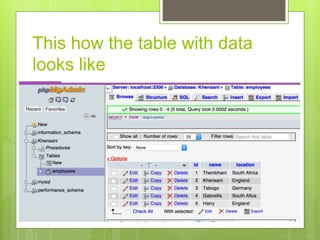
This how the table with data
looks like
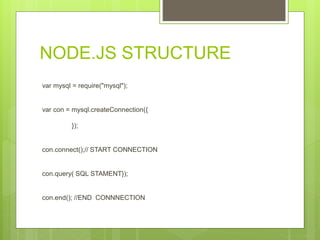
NODE.JS STRUCTURE
var mysql = require("mysql");
var con = mysql.createConnection({
});
con.connect();// START CONNECTION
con.query( SQL STAMENT});
con.end(); //END CONNNECTION
REQUIRE THE MODULE BEFORE CREATING THE
CONNECTION
var mysql = require("mysql");
FIRST YOU NEED TO CREATE A CONNECTION TO THE
DB
var con = mysql.createConnection({
host :'localhost',
user :'root',
password :'root',
database :'Khensani'
});
var mysql = require('mysql');
var con = mysql.createConnection({
host :'localhost',
user :'root',
password :'root',
database :'Khensani'
});
con.connect();
con.query('SELECT * FROM employees', function(err,rows){
if(err) throw err;
console.log('Data received from Db:n:');
console.log(rows)
});
con.end();
How data is returned from
MySQL database
Data returned from the MySQL database can be
parsed by simply lopping over the rows object.
for (var i = 0; i < rows.length; i++) {
console.log(rows[i].name);
};
How to execute an insert query
against a database
using node.js
INSERT STATEMENT
var employee = { name: 'Winnie', location: 'Australia' };
con.query('INSERT INTO employees SET ?', employee,
function(err,res){
if(err) throw err;
console.log('Last insert ID:', res.insertId);
});
How to execute an update query
against a database
using node.js
when executing an update query, the number of rows
affected can be retrieved using result.affectedRows:
con.query( 'UPDATE employees SET location = ? Where
ID = ?', ["South Africa", 5], function (err, result) {
if (err) throw err;
console.log('Changed ' + result.changedRows + ' rows');
} );
How to execute a delete query
against a database
using node.js
con.query( 'DELETE FROM employees WHERE id =
?', [5], function (err, result) {
if (err) throw err;
console.log('Deleted ' + result.affectedRows + '
rows');
} );
Stored Procedures
 a stored procedure is a procedure (written in,
for example, SQL) stored in a database which
can be called by the database engine and
connected programming languages.
How to create a select store
procedure on phpMyAdmin
DELIMITER $$
CREATE PROCEDURE kg_getall()
BEGIN
SELECT * from employees;
END
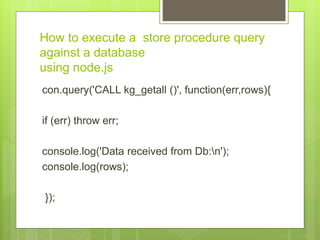
How to execute a store procedure query
against a database
using node.js
con.query('CALL kg_getall ()', function(err,rows){
if (err) throw err;
console.log('Data received from Db:n');
console.log(rows);
});
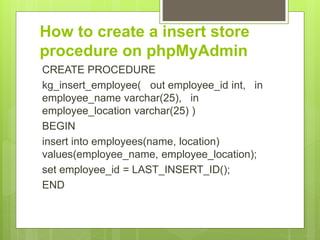
How to create a insert store
procedure on phpMyAdmin
CREATE PROCEDURE
kg_insert_employee( out employee_id int, in
employee_name varchar(25), in
employee_location varchar(25) )
BEGIN
insert into employees(name, location)
values(employee_name, employee_location);
set employee_id = LAST_INSERT_ID();
END
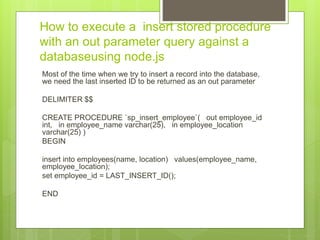
How to execute a insert stored procedure
with an out parameter query against a
databaseusing node.js
Most of the time when we try to insert a record into the database,
we need the last inserted ID to be returned as an out parameter
DELIMITER $$
CREATE PROCEDURE `sp_insert_employee`( out employee_id
int, in employee_name varchar(25), in employee_location
varchar(25) )
BEGIN
insert into employees(name, location) values(employee_name,
employee_location);
set employee_id = LAST_INSERT_ID();
END
To make a procedure call with an out parameter,
we first need to enable multiple calls while
creating the connection. So, modify the connection
by setting the multiple statement execution to true.
var con = mysql.createConnection({
host :'localhost',
user :'root',
password :'root',
database :'Khensani'
multipleStatements: true
});
when making a call to the procedure, set an out
parameter and pass it in.
con.query( 'SET @employee_id = 0; CALL
kg_insert_employee2(@employee_id, "Ron",
"USA"); SELECT @employee_id',
function(err,rows){
if (err) throw err;
console.log('Data received from Db:n');
console.log(rows);
} );
I have set an out parameter @employee_id and
passed it while making a call to the stored
procedure. Once the call has been made we
need to select the out parameter to access the
returned ID.
On successful execution you should be able to
see the selected out parameter along with
various other information. rows[2] should give
you access to the selected out parameter.
[ { '@employee_id': 12 } ]
Diploma: Computer Systems
Engineering
Internet of things developer
hobbyist
Arduino & Electronics hobbyist
Thank You

harry presentation

  • 1.
  • 2.
    My Duties  Createnew NodeJS instance on your local machine  Integrate into the NodeJS MySQL module  Execute SQL statements via the NodeJS MySQL module  Execute stored procedures via the NodeJS MySQL module an instance is a concrete occurrence of any object, existing usually during the runtime of a computer program
  • 3.
    What’s Node.js ? Node.js is an open-source, cross-platform runtime environment for developing server-side web applications. Node.js applications are written in JavaScript and can be run within the Node.js runtime on a wide variety of platforms,including OS X, MicrosoftWindows, Linux, FreeBSD, NonStop, IBM AIX , IBM System z and IBM i. Its work is hosted and supported by the Node.js Foundation, a collaborative project at the Linux Foundation.  var mysql = require("mysql");
  • 4.
    What’s SQL  SQLis used to communicate with a database. According to ANSI (American National Standards Institute), it is the standard language for relational database management systems. SQL statements are used to perform tasks such as update data on a database, or retrieve data from a database.  SELECT * FROM employees
  • 5.
    What’s MySQL ? MySQLis a popular choice of database for use in web applications, and is a central component of the widely used LAMP open source web application software stack (and other "AMP" stacks). LAMP is an acronym for "Linux, Apache, MySQL, Perl/PHP/Python."
  • 6.
    What’s does MAMPdo ?  MAMP installs a local server environment in a matter of seconds on your computer. It comes free of charge, and is easily installed. MAMP will not compromise any existing Apache installation already running on your system. You can install Apache, PHP and MySQL without starting a script or having to change any configuration files! Furthermore,  MAMP is an acronym of Mac OS X, the operating system; Apache, the Web server; MySQL, the database management system; and P for PHP, Perl, or Python, all programming languages used for web development.
  • 7.
    What’s is phpMyAdmin?  phpMyAdmin is a free and open source tool written in PHP intended to handle the administration of MySQL with the use of a web browser. It can perform various tasks such as creating, modifying or deleting databases, tables, fields orrows; executing SQL statements; or managing users and permissions.
  • 8.
    What’s Apache ? Apache is a freely available Web server that is distributed under an "open source" license. Version 2.0 runs on most UNIX-based operating systems (such as Linux, Solaris, Digital UNIX, and AIX), on other UNIX/POSIX- derived systems (such as Rhapsody, BeOS, and BS2000/OSD), on AmigaOS, and on Windows 2000.
  • 9.
    CREATING TABLES ANDINSERTING DATA USING SQL STATEMENT CREATE TABLE employees( id int(11) NOT NULL AUTO_INCREMENT, name varchar(50), location varchar(50), PRIMARY KEY (id) ) ENGINE = INNODB DEFAULT CHARSET = utf8 AUTO_INCREMENT = 5; INSERT INTO employees (id,name,location) VALUES (1,'Thembhani','South Africa'), (2,'Khensani','England'), (3,'Tebogo','Germany');
  • 10.
    This how thetable with data looks like
  • 11.
    NODE.JS STRUCTURE var mysql= require("mysql"); var con = mysql.createConnection({ }); con.connect();// START CONNECTION con.query( SQL STAMENT}); con.end(); //END CONNNECTION
  • 12.
    REQUIRE THE MODULEBEFORE CREATING THE CONNECTION var mysql = require("mysql"); FIRST YOU NEED TO CREATE A CONNECTION TO THE DB var con = mysql.createConnection({ host :'localhost', user :'root', password :'root', database :'Khensani' });
  • 13.
    var mysql =require('mysql'); var con = mysql.createConnection({ host :'localhost', user :'root', password :'root', database :'Khensani' }); con.connect(); con.query('SELECT * FROM employees', function(err,rows){ if(err) throw err; console.log('Data received from Db:n:'); console.log(rows) }); con.end();
  • 14.
    How data isreturned from MySQL database Data returned from the MySQL database can be parsed by simply lopping over the rows object. for (var i = 0; i < rows.length; i++) { console.log(rows[i].name); };
  • 15.
    How to executean insert query against a database using node.js INSERT STATEMENT var employee = { name: 'Winnie', location: 'Australia' }; con.query('INSERT INTO employees SET ?', employee, function(err,res){ if(err) throw err; console.log('Last insert ID:', res.insertId); });
  • 16.
    How to executean update query against a database using node.js when executing an update query, the number of rows affected can be retrieved using result.affectedRows: con.query( 'UPDATE employees SET location = ? Where ID = ?', ["South Africa", 5], function (err, result) { if (err) throw err; console.log('Changed ' + result.changedRows + ' rows'); } );
  • 17.
    How to executea delete query against a database using node.js con.query( 'DELETE FROM employees WHERE id = ?', [5], function (err, result) { if (err) throw err; console.log('Deleted ' + result.affectedRows + ' rows'); } );
  • 18.
    Stored Procedures  astored procedure is a procedure (written in, for example, SQL) stored in a database which can be called by the database engine and connected programming languages.
  • 19.
    How to createa select store procedure on phpMyAdmin DELIMITER $$ CREATE PROCEDURE kg_getall() BEGIN SELECT * from employees; END
  • 20.
    How to executea store procedure query against a database using node.js con.query('CALL kg_getall ()', function(err,rows){ if (err) throw err; console.log('Data received from Db:n'); console.log(rows); });
  • 21.
    How to createa insert store procedure on phpMyAdmin CREATE PROCEDURE kg_insert_employee( out employee_id int, in employee_name varchar(25), in employee_location varchar(25) ) BEGIN insert into employees(name, location) values(employee_name, employee_location); set employee_id = LAST_INSERT_ID(); END
  • 22.
    How to executea insert stored procedure with an out parameter query against a databaseusing node.js Most of the time when we try to insert a record into the database, we need the last inserted ID to be returned as an out parameter DELIMITER $$ CREATE PROCEDURE `sp_insert_employee`( out employee_id int, in employee_name varchar(25), in employee_location varchar(25) ) BEGIN insert into employees(name, location) values(employee_name, employee_location); set employee_id = LAST_INSERT_ID(); END
  • 23.
    To make aprocedure call with an out parameter, we first need to enable multiple calls while creating the connection. So, modify the connection by setting the multiple statement execution to true. var con = mysql.createConnection({ host :'localhost', user :'root', password :'root', database :'Khensani' multipleStatements: true });
  • 24.
    when making acall to the procedure, set an out parameter and pass it in. con.query( 'SET @employee_id = 0; CALL kg_insert_employee2(@employee_id, "Ron", "USA"); SELECT @employee_id', function(err,rows){ if (err) throw err; console.log('Data received from Db:n'); console.log(rows); } );
  • 25.
    I have setan out parameter @employee_id and passed it while making a call to the stored procedure. Once the call has been made we need to select the out parameter to access the returned ID. On successful execution you should be able to see the selected out parameter along with various other information. rows[2] should give you access to the selected out parameter. [ { '@employee_id': 12 } ]
  • 26.
    Diploma: Computer Systems Engineering Internetof things developer hobbyist Arduino & Electronics hobbyist Thank You