Petrel Fundamentals: An Overview
Monye Vivian Amalaonye
Industrial Trainee-Geology
Agenda:
Overview of Petrel Fundamentals
• Introduction
• Petrel Basics
• Data Import
• Interface-Visualization
• Make/Edit Surfaces
• Make Simple Grid
• Geometrical Modeling
• Plotting
• Conclusion
• Q&A
What is Petrel?
• A Windows PC software application
intended to aggregate oil reservoir
data from multiple sources.
• In summary, it addresses the need
for a single application to support the
‘Seismic-to-Simulation’ workflow,
reducing the need or a multitude of
highly specialized tools.
Uses
• To interpret seismic data
• Perform well correlation
• Build reservoir models
• Calculate volumes
• Produce maps
• Etc. simulate
A Geological model?
• A computerized representation of portions of the Earth’s crust(reality).
Hardware and Application Needed:
• A PC with a minimum of: For Petrel 64-bit:4GB of RAM; however
16GB of RAM is recommended for optimum performance.(6GB)
• For Petrel 64-bit:Microsoft Windows 7,Vista 64 or XP 64
• A graphic card compatible with Petrel
• A Petrel license and license key
• Petrel Seismic to Simulation Software with the latest updates(Petrel
2012.5)
• Training datasets
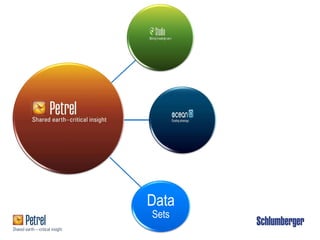
Data
Sets
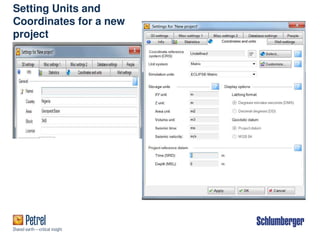
Setting Units and
Coordinates for a new
project
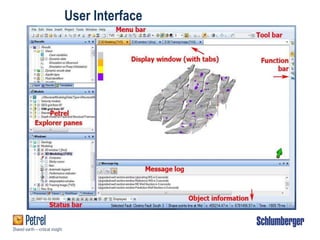
User Interface
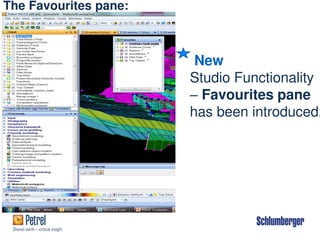
The Favourites pane:
New
Studio Functionality
– Favourites pane
has been introduced.
Petrel Interface: Help Manual:
Search tab simplifies the use of the online
manual
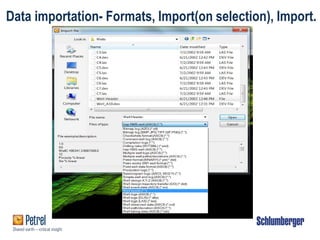
Data importation- Formats, Import(on selection), Import.
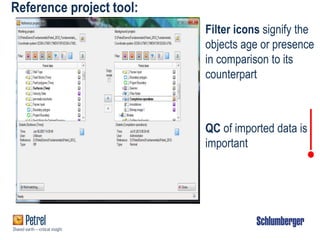
Reference project tool:
Filter icons signify the
objects age or presence
in comparison to its
counterpart
QC of imported data is
important
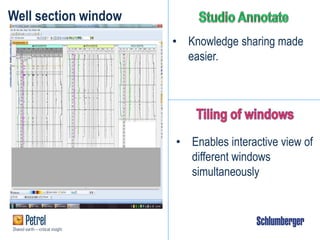
Well section window
• Knowledge sharing made
easier.
• Enables interactive view of
different windows
simultaneously
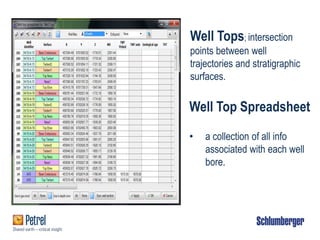
Well Top Spreadsheet
• a collection of all info
associated with each well
bore.
Well Tops; intersection
points between well
trajectories and stratigraphic
surfaces.
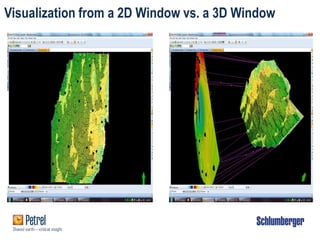
Visualization from a 2D Window vs. a 3D Window
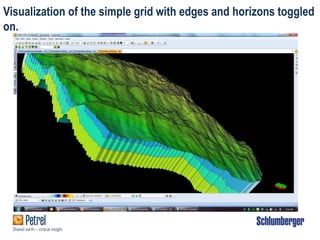
Visualization of the simple grid with edges and horizons toggled
on.
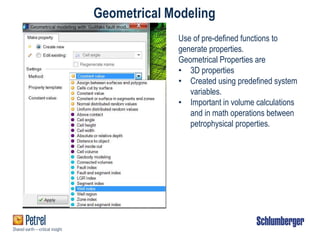
Geometrical Modeling
Use of pre-defined functions to
generate properties.
Geometrical Properties are
• 3D properties
• Created using predefined system
variables.
• Important in volume calculations
and in math operations between
petrophysical properties.
 Montage Plot-
viewed from a
Plot window,
showing
histogram, two
intersection
and a map
window.
Plotting
Conclusion
Petrel Fundamentals:
• Essential for beginners of the Petrel courses
• Teaches the elementary usage of Petrel
• Wide range of functionality was not introduced,
hence
• Basic courses should be taken in order to have in-
depth understanding of the software.
Thank you for listening…

Petrel_Fundamentals_An_Overview_Geology.pdf

  • 1.
    Petrel Fundamentals: AnOverview Monye Vivian Amalaonye Industrial Trainee-Geology
  • 2.
    Agenda: Overview of PetrelFundamentals • Introduction • Petrel Basics • Data Import • Interface-Visualization • Make/Edit Surfaces • Make Simple Grid • Geometrical Modeling • Plotting • Conclusion • Q&A
  • 3.
    What is Petrel? •A Windows PC software application intended to aggregate oil reservoir data from multiple sources. • In summary, it addresses the need for a single application to support the ‘Seismic-to-Simulation’ workflow, reducing the need or a multitude of highly specialized tools. Uses • To interpret seismic data • Perform well correlation • Build reservoir models • Calculate volumes • Produce maps • Etc. simulate A Geological model? • A computerized representation of portions of the Earth’s crust(reality).
  • 4.
    Hardware and ApplicationNeeded: • A PC with a minimum of: For Petrel 64-bit:4GB of RAM; however 16GB of RAM is recommended for optimum performance.(6GB) • For Petrel 64-bit:Microsoft Windows 7,Vista 64 or XP 64 • A graphic card compatible with Petrel • A Petrel license and license key • Petrel Seismic to Simulation Software with the latest updates(Petrel 2012.5) • Training datasets
  • 5.
  • 6.
  • 7.
  • 8.
    The Favourites pane: New StudioFunctionality – Favourites pane has been introduced.
  • 9.
    Petrel Interface: HelpManual: Search tab simplifies the use of the online manual
  • 10.
    Data importation- Formats,Import(on selection), Import.
  • 11.
    Reference project tool: Filtericons signify the objects age or presence in comparison to its counterpart QC of imported data is important
  • 12.
    Well section window •Knowledge sharing made easier. • Enables interactive view of different windows simultaneously
  • 13.
    Well Top Spreadsheet •a collection of all info associated with each well bore. Well Tops; intersection points between well trajectories and stratigraphic surfaces.
  • 14.
    Visualization from a2D Window vs. a 3D Window
  • 15.
    Visualization of thesimple grid with edges and horizons toggled on.
  • 16.
    Geometrical Modeling Use ofpre-defined functions to generate properties. Geometrical Properties are • 3D properties • Created using predefined system variables. • Important in volume calculations and in math operations between petrophysical properties.
  • 17.
     Montage Plot- viewedfrom a Plot window, showing histogram, two intersection and a map window. Plotting
  • 18.
    Conclusion Petrel Fundamentals: • Essentialfor beginners of the Petrel courses • Teaches the elementary usage of Petrel • Wide range of functionality was not introduced, hence • Basic courses should be taken in order to have in- depth understanding of the software.
  • 19.
    Thank you forlistening…