Perl 6 Command Line Scripting
A few tips
Hi
● Simon Proctor
● Scimon most places (Twitter etc)
● Senior Developer at Zoopla
● Addicted to Perl6
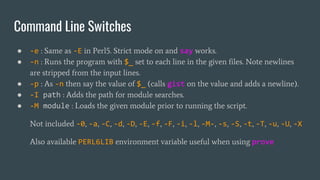
Command Line Switches
● -e : Same as -E in Perl5. Strict mode on and say works.
● -n : Runs the program with $_ set to each line in the given files. Note newlines
are stripped from the input lines.
● -p : As -n then say the value of $_ (calls gist on the value and adds a newline).
● -I path : Adds the path for module searches.
● -M module : Loads the given module prior to running the script.
Not included -0, -a, -C, -d, -D, -E, -f, -F, -i, -l, -M-, -s, -S, -t, -T, -u, -U, -X
Also available PERL6LIB environment variable useful when using prove
@*ARGS and $*ARGFILES
● @*ARGS is an Array of all the arguments passed to the programme.
● All arguments are type Str but the Array itself is not typed.
● $*ARGFILES is an IO::CatHandle (actually IO::ArgFiles) object that treats
all the values in @*ARGS as paths to files and allows you to iterate over all of them.
● $*ARGFILES is lazily evaluated. It will throw an Exception if the paths do not
exist.
● $*ARGFILES is set to $*IN if there are no arguments passed.
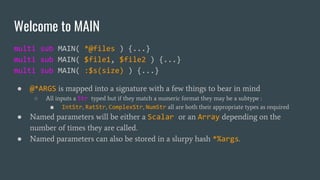
Welcome to MAIN
multi sub MAIN( *@files ) {...}
multi sub MAIN( $file1, $file2 ) {...}
multi sub MAIN( :$s(size) ) {...}
● @*ARGS is mapped into a signature with a few things to bear in mind
○ All inputs a Str typed but if they match a numeric format they may be a subtype :
■ IntStr, RatStr, ComplexStr, NumStr all are both their appropriate types as required
● Named parameters will be either a Scalar or an Array depending on the
number of times they are called.
● Named parameters can also be stored in a slurpy hash *%args.
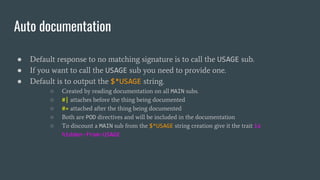
Auto documentation
● Default response to no matching signature is to call the USAGE sub.
● If you want to call the USAGE sub you need to provide one.
● Default is to output the $*USAGE string.
○ Created by reading documentation on all MAIN subs.
○ #| attaches before the thing being documented
○ #= attached after the thing being documented
○ Both are POD directives and will be included in the documentation
○ To discount a MAIN sub from the $*USAGE string creation give it the trait is
hidden-from-USAGE
Auto documentation : Example
multi sub MAIN( :$h? ) is hidden-from-USAGE {
USAGE();
}
multi sub MAIN( :$h!, *@ ) is hidden-from-USAGE {
USAGE();
}
#| Sum up some numbers
multi sub MAIN(
*@nums #= A list of numbers
) {
say [+] @nums;
}
sub USAGE() {
say "Highly useful summing thing";
say $*USAGE;
}
Highly useful summing thing
Usage:
doc.pl6 [<nums> ...] -- Sum up some numbers
[<nums> ...] A list of numbers
Tips and Tricks
● END and BEGIN phasers and state variables can be very useful with -n and -p
● my %*SUB-MAIN-OPTS = :named-anywhere;
○ Allows named arguments anywhere in the parsing order.
● subtype Single of Any where * !~~ Positional;
○ Use on a named parameter to ensure only one can be passed.
● Subsets::IO includes a number of useful predefined IO subsets
○ E.G. IO::Path::dw for a writable directory
● For larger scripts move the core code into a module and use you script as a
launcher

Perl 6 command line scripting

  • 1.
    Perl 6 CommandLine Scripting A few tips
  • 2.
    Hi ● Simon Proctor ●Scimon most places (Twitter etc) ● Senior Developer at Zoopla ● Addicted to Perl6
  • 3.
    Command Line Switches ●-e : Same as -E in Perl5. Strict mode on and say works. ● -n : Runs the program with $_ set to each line in the given files. Note newlines are stripped from the input lines. ● -p : As -n then say the value of $_ (calls gist on the value and adds a newline). ● -I path : Adds the path for module searches. ● -M module : Loads the given module prior to running the script. Not included -0, -a, -C, -d, -D, -E, -f, -F, -i, -l, -M-, -s, -S, -t, -T, -u, -U, -X Also available PERL6LIB environment variable useful when using prove
  • 4.
    @*ARGS and $*ARGFILES ●@*ARGS is an Array of all the arguments passed to the programme. ● All arguments are type Str but the Array itself is not typed. ● $*ARGFILES is an IO::CatHandle (actually IO::ArgFiles) object that treats all the values in @*ARGS as paths to files and allows you to iterate over all of them. ● $*ARGFILES is lazily evaluated. It will throw an Exception if the paths do not exist. ● $*ARGFILES is set to $*IN if there are no arguments passed.
  • 5.
    Welcome to MAIN multisub MAIN( *@files ) {...} multi sub MAIN( $file1, $file2 ) {...} multi sub MAIN( :$s(size) ) {...} ● @*ARGS is mapped into a signature with a few things to bear in mind ○ All inputs a Str typed but if they match a numeric format they may be a subtype : ■ IntStr, RatStr, ComplexStr, NumStr all are both their appropriate types as required ● Named parameters will be either a Scalar or an Array depending on the number of times they are called. ● Named parameters can also be stored in a slurpy hash *%args.
  • 6.
    Auto documentation ● Defaultresponse to no matching signature is to call the USAGE sub. ● If you want to call the USAGE sub you need to provide one. ● Default is to output the $*USAGE string. ○ Created by reading documentation on all MAIN subs. ○ #| attaches before the thing being documented ○ #= attached after the thing being documented ○ Both are POD directives and will be included in the documentation ○ To discount a MAIN sub from the $*USAGE string creation give it the trait is hidden-from-USAGE
  • 7.
    Auto documentation :Example multi sub MAIN( :$h? ) is hidden-from-USAGE { USAGE(); } multi sub MAIN( :$h!, *@ ) is hidden-from-USAGE { USAGE(); } #| Sum up some numbers multi sub MAIN( *@nums #= A list of numbers ) { say [+] @nums; } sub USAGE() { say "Highly useful summing thing"; say $*USAGE; } Highly useful summing thing Usage: doc.pl6 [<nums> ...] -- Sum up some numbers [<nums> ...] A list of numbers
  • 8.
    Tips and Tricks ●END and BEGIN phasers and state variables can be very useful with -n and -p ● my %*SUB-MAIN-OPTS = :named-anywhere; ○ Allows named arguments anywhere in the parsing order. ● subtype Single of Any where * !~~ Positional; ○ Use on a named parameter to ensure only one can be passed. ● Subsets::IO includes a number of useful predefined IO subsets ○ E.G. IO::Path::dw for a writable directory ● For larger scripts move the core code into a module and use you script as a launcher