E-Learning Development Team
elearningyork.wordpress.com
Matt Cornock
ELDT Lunchtime Webinar
1 June 2016
Peer Assessment with Yorkshare
Blackboard VLE
E-Learning Development Team
elearningyork.wordpress.com
Three approaches +1
peer-assessment tool
peer feedback using blogs
adaptive release for
model answers
alternative approach with
Google docs
E-Learning Development Team
elearningyork.wordpress.com
Student perceptions
It is hard to judge other people’s work. It is always
the lecturers who judge whose work is better. It is
a very good idea to get students to think about
how hard it is to judge people’s work.
Sometimes we as students think we understand,
but we have to make sure that if someone else
reads who has no clue what the concept is, by
looking at the question they should be convinced
it answers the question. So it is important to
write in a good way. It is an improvement for my
future writing.
It is a good experience for me.
Jones and Alcock (2013)
“
E-Learning Development Team
elearningyork.wordpress.com
Learning through peer-assessment
critically supportive dialogue…
this approach places a greater onus
on the student to take responsibility
for their own learning and the
learning of others.
“
McGarr and Clifford (2013)
E-Learning Development Team
elearningyork.wordpress.com
Learning through peer-assessment
Walker (2015) explored the lack of
utilisation of peer-feedback by students.
problem with feedback / criteria?
or down to the recipient?
E-Learning Development Team
elearningyork.wordpress.com
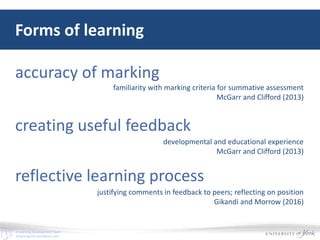
Forms of learning
accuracy of marking
creating useful feedback
reflective learning process
familiarity with marking criteria for summative assessment
McGarr and Clifford (2013)
developmental and educational experience
McGarr and Clifford (2013)
justifying comments in feedback to peers; reflecting on position
Gikandi and Morrow (2016)
E-Learning Development Team
elearningyork.wordpress.com
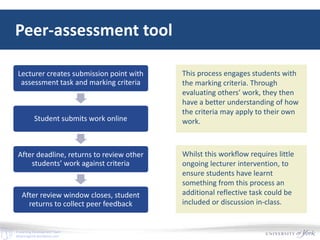
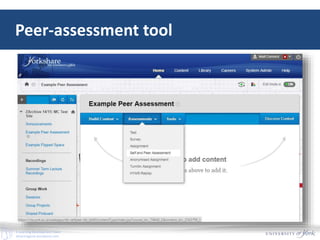
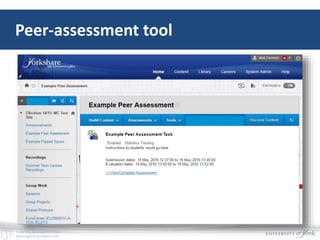
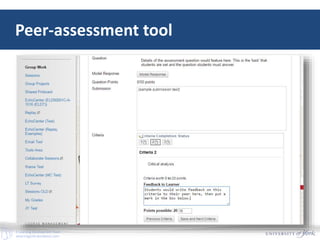
Peer-assessment tool
Lecturer creates submission point with
assessment task and marking criteria
Student submits work online
After deadline, returns to review other
students’ work against criteria
After review window closes, student
returns to collect peer feedback
This process engages students with
the marking criteria. Through
evaluating others’ work, they then
have a better understanding of how
the criteria may apply to their own
work.
Whilst this workflow requires little
ongoing lecturer intervention, to
ensure students have learnt
something from this process an
additional reflective task could be
included or discussion in-class.
E-Learning Development Team
elearningyork.wordpress.com
Peer-assessment tool
E-Learning Development Team
elearningyork.wordpress.com
Peer-assessment tool
E-Learning Development Team
elearningyork.wordpress.com
Peer-assessment tool
E-Learning Development Team
elearningyork.wordpress.com
Peer-assessment tool
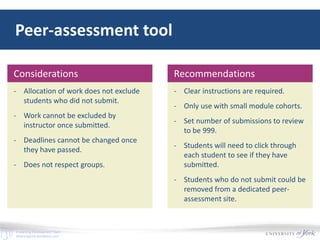
- Allocation of work does not exclude
students who did not submit.
- Work cannot be excluded by
instructor once submitted.
- Deadlines cannot be changed once
they have passed.
- Does not respect groups.
Considerations
- Clear instructions are required.
- Only use with small module cohorts.
- Set number of submissions to review
to be 999.
- Students will need to click through
each student to see if they have
submitted.
- Students who do not submit could be
removed from a dedicated peer-
assessment site.
Recommendations
E-Learning Development Team
elearningyork.wordpress.com
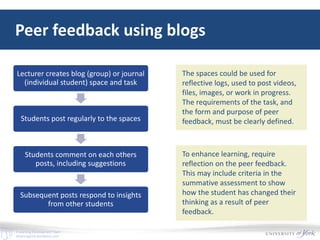
Peer feedback using blogs
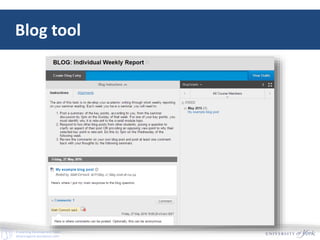
Lecturer creates blog (group) or journal
(individual student) space and task
Students post regularly to the spaces
Students comment on each others
posts, including suggestions
Subsequent posts respond to insights
from other students
The spaces could be used for
reflective logs, used to post videos,
files, images, or work in progress.
The requirements of the task, and
the form and purpose of peer
feedback, must be clearly defined.
To enhance learning, require
reflection on the peer feedback.
This may include criteria in the
summative assessment to show
how the student has changed their
thinking as a result of peer
feedback.
E-Learning Development Team
elearningyork.wordpress.com
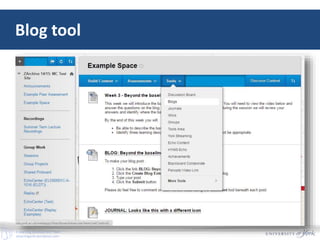
Blog tool
E-Learning Development Team
elearningyork.wordpress.com
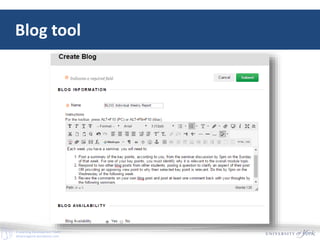
Blog tool
E-Learning Development Team
elearningyork.wordpress.com
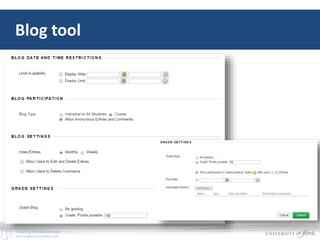
Blog tool
E-Learning Development Team
elearningyork.wordpress.com
Blog tool
E-Learning Development Team
elearningyork.wordpress.com
Blog tool
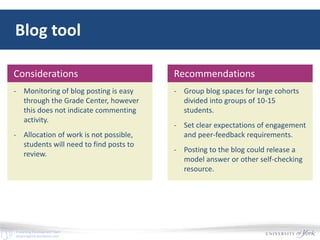
- Monitoring of blog posting is easy
through the Grade Center, however
this does not indicate commenting
activity.
- Allocation of work is not possible,
students will need to find posts to
review.
Considerations
- Group blog spaces for large cohorts
divided into groups of 10-15
students.
- Set clear expectations of engagement
and peer-feedback requirements.
- Posting to the blog could release a
model answer or other self-checking
resource.
Recommendations
E-Learning Development Team
elearningyork.wordpress.com
Adaptive release
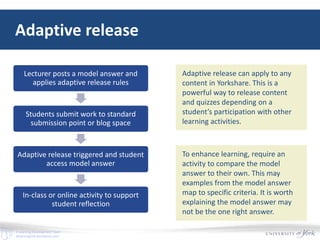
Lecturer posts a model answer and
applies adaptive release rules
Students submit work to standard
submission point or blog space
Adaptive release triggered and student
access model answer
In-class or online activity to support
student reflection
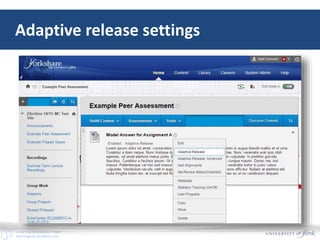
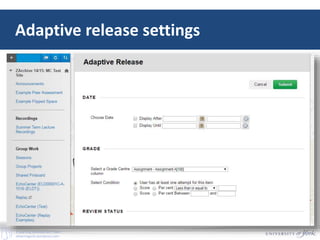
Adaptive release can apply to any
content in Yorkshare. This is a
powerful way to release content
and quizzes depending on a
student’s participation with other
learning activities.
To enhance learning, require an
activity to compare the model
answer to their own. This may
examples from the model answer
map to specific criteria. It is worth
explaining the model answer may
not be the one right answer.
E-Learning Development Team
elearningyork.wordpress.com
Adaptive release settings
E-Learning Development Team
elearningyork.wordpress.com
Adaptive release settings
E-Learning Development Team
elearningyork.wordpress.com
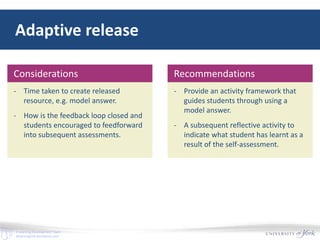
Adaptive release
- Time taken to create released
resource, e.g. model answer.
- How is the feedback loop closed and
students encouraged to feedforward
into subsequent assessments.
Considerations
- Provide an activity framework that
guides students through using a
model answer.
- A subsequent reflective activity to
indicate what student has learnt as a
result of the self-assessment.
Recommendations
E-Learning Development Team
elearningyork.wordpress.com
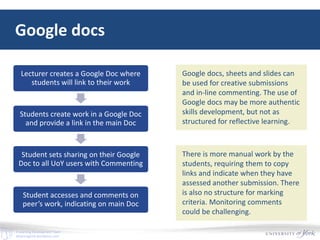
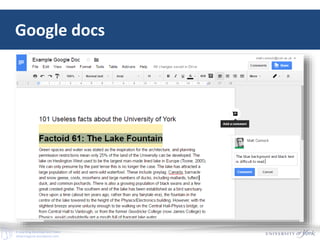
Google docs
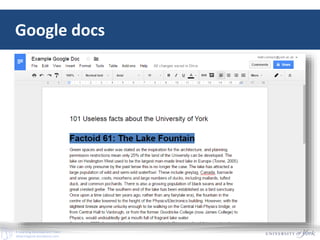
Lecturer creates a Google Doc where
students will link to their work
Students create work in a Google Doc
and provide a link in the main Doc
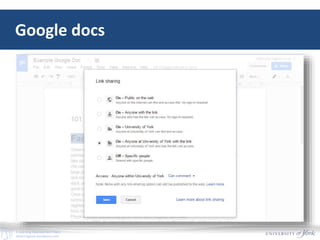
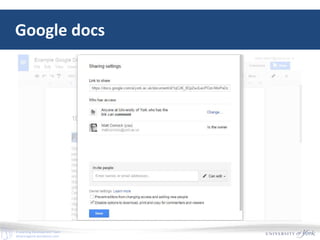
Student sets sharing on their Google
Doc to all UoY users with Commenting
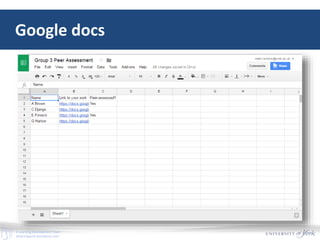
Student accesses and comments on
peer’s work, indicating on main Doc
Google docs, sheets and slides can
be used for creative submissions
and in-line commenting. The use of
Google docs may be more authentic
skills development, but not as
structured for reflective learning.
There is more manual work by the
students, requiring them to copy
links and indicate when they have
assessed another submission. There
is also no structure for marking
criteria. Monitoring comments
could be challenging.
E-Learning Development Team
elearningyork.wordpress.com
Google docs
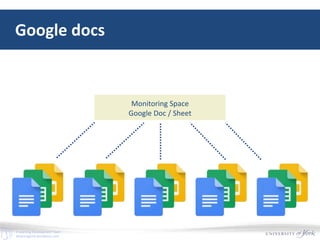
Monitoring Space
Google Doc / Sheet
E-Learning Development Team
elearningyork.wordpress.com
Google docs
E-Learning Development Team
elearningyork.wordpress.com
Google docs
E-Learning Development Team
elearningyork.wordpress.com
Google docs
E-Learning Development Team
elearningyork.wordpress.com
Google docs
E-Learning Development Team
elearningyork.wordpress.com
Google docs
E-Learning Development Team
elearningyork.wordpress.com
Google docs
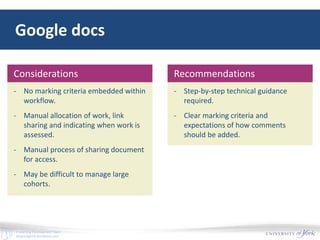
- No marking criteria embedded within
workflow.
- Manual allocation of work, link
sharing and indicating when work is
assessed.
- Manual process of sharing document
for access.
- May be difficult to manage large
cohorts.
Considerations
- Step-by-step technical guidance
required.
- Clear marking criteria and
expectations of how comments
should be added.
Recommendations
E-Learning Development Team
elearningyork.wordpress.com
Recommendations for peer assessment
1. Avoid using very large numbers of peers per assessment group.
2. Conduct peer assessment studies in traditional academic settings and
involve students in peer assessment of academic products and processes.
3. Do not expect student assessors to rate many individual dimensions. It is
better to use an overall global mark with well understood criteria.
4. Involve your students in discussions about criteria.
5. Peer assessment can be successful in any discipline area and at any level.
Falchikov and Goldfinch (2000)
“
E-Learning Development Team
elearningyork.wordpress.com
Recommendations for peer assessment
Three further considerations arise from
Jones and Alcock (2013)
• Technical training is required.
• Students need to be motivated and reassured.
• Conceptual understanding may need checking.
E-Learning Development Team
elearningyork.wordpress.com
Summary
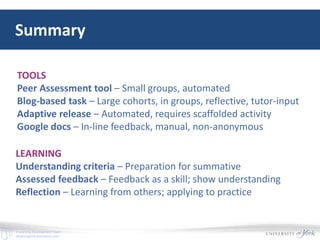
TOOLS
Peer Assessment tool – Small groups, automated
Blog-based task – Large cohorts, in groups, reflective, tutor-input
Adaptive release – Automated, requires scaffolded activity
Google docs – In-line feedback, manual, non-anonymous
LEARNING
Understanding criteria – Preparation for summative
Assessed feedback – Feedback as a skill; show understanding
Reflection – Learning from others; applying to practice
E-Learning Development Team
elearningyork.wordpress.com
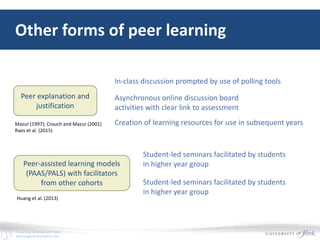
Other forms of peer learning
Peer explanation and
justification
Peer-assisted learning models
(PAAS/PALS) with facilitators
from other cohorts
In-class discussion prompted by use of polling tools
Asynchronous online discussion board
activities with clear link to assessment
Creation of learning resources for use in subsequent years
Student-led seminars facilitated by students
in higher year group
Student-led seminars facilitated by students
in higher year group
Huang et al. (2013)
Mazur (1997); Crouch and Mazur (2001)
Raes et al. (2015)
E-Learning Development Team
elearningyork.wordpress.com
References
Crouch, C. and Mazur, E. (2001). Peer Instruction: Ten Years of Experience and Results, American Journal of Physics, 69, 970-977.
Gikandi, J.W. and Morrow, D. (2016). Designing and implementing peer formative feedback within online learning environments,
Technology, Pedagogy and Education, 25(2), 153-170.
Huang, T.K., Pepper, M.P.J., Cortese, C.L., and Rogan, S. (2013). Faculty and academic staff perceptions, experiences and
expectations of the PASS Program: A case study, Journal of Peer Learning, 6(1). http://ro.uow.edu.au/ajpl/vol6/iss1/10
Jones, I. and Alcock, L. (2014). Peer assessment without assessment criteria, Studies in Higher Education, 39(10), 1774-1787.
Mazur, E. (1997). Peer Instruction: A User's Manual, Series in Educational Innovation. Prentice Hall, Upper Saddle River, NJ.
McGarr, O. and Clifford, A.M. (2013). ‘Just enough to make you take it seriously’: exploring student attitudes towards peer
assessment, Higher Education, 65, 677-693.
Raes, A., Vanderhoven, E. and Schellens, T. (2015). Increasing anonymity in peer assessment by using classroom response
technology within face-to-face higher education, Studies in Higher Education, 40(1), 178-193.
University of Reading (ND). An A-Z of Assessment Methods. Centre for the Development of Teaching and Learning, University of
Reading. https://www.reading.ac.uk/web/FILES/eia/A-Z_of_Assessment_Methods_FINAL_table.pdf
Walker, M. (2015). The quality of written peer feedback on undergraduates’ draft answers to an assignment, and the use made of
the feedback, Assessment & Evaluation in Higher Education, 40(2), 232-247.

Peer Assessment with Yorkshare Blackboard Learn VLE

  • 1.
    E-Learning Development Team elearningyork.wordpress.com MattCornock ELDT Lunchtime Webinar 1 June 2016 Peer Assessment with Yorkshare Blackboard VLE
  • 2.
    E-Learning Development Team elearningyork.wordpress.com Threeapproaches +1 peer-assessment tool peer feedback using blogs adaptive release for model answers alternative approach with Google docs
  • 3.
    E-Learning Development Team elearningyork.wordpress.com Studentperceptions It is hard to judge other people’s work. It is always the lecturers who judge whose work is better. It is a very good idea to get students to think about how hard it is to judge people’s work. Sometimes we as students think we understand, but we have to make sure that if someone else reads who has no clue what the concept is, by looking at the question they should be convinced it answers the question. So it is important to write in a good way. It is an improvement for my future writing. It is a good experience for me. Jones and Alcock (2013) “
  • 4.
    E-Learning Development Team elearningyork.wordpress.com Learningthrough peer-assessment critically supportive dialogue… this approach places a greater onus on the student to take responsibility for their own learning and the learning of others. “ McGarr and Clifford (2013)
  • 5.
    E-Learning Development Team elearningyork.wordpress.com Learningthrough peer-assessment Walker (2015) explored the lack of utilisation of peer-feedback by students. problem with feedback / criteria? or down to the recipient?
  • 6.
    E-Learning Development Team elearningyork.wordpress.com Formsof learning accuracy of marking creating useful feedback reflective learning process familiarity with marking criteria for summative assessment McGarr and Clifford (2013) developmental and educational experience McGarr and Clifford (2013) justifying comments in feedback to peers; reflecting on position Gikandi and Morrow (2016)
  • 7.
    E-Learning Development Team elearningyork.wordpress.com Peer-assessmenttool Lecturer creates submission point with assessment task and marking criteria Student submits work online After deadline, returns to review other students’ work against criteria After review window closes, student returns to collect peer feedback This process engages students with the marking criteria. Through evaluating others’ work, they then have a better understanding of how the criteria may apply to their own work. Whilst this workflow requires little ongoing lecturer intervention, to ensure students have learnt something from this process an additional reflective task could be included or discussion in-class.
  • 8.
  • 9.
  • 10.
  • 11.
    E-Learning Development Team elearningyork.wordpress.com Peer-assessmenttool - Allocation of work does not exclude students who did not submit. - Work cannot be excluded by instructor once submitted. - Deadlines cannot be changed once they have passed. - Does not respect groups. Considerations - Clear instructions are required. - Only use with small module cohorts. - Set number of submissions to review to be 999. - Students will need to click through each student to see if they have submitted. - Students who do not submit could be removed from a dedicated peer- assessment site. Recommendations
  • 12.
    E-Learning Development Team elearningyork.wordpress.com Peerfeedback using blogs Lecturer creates blog (group) or journal (individual student) space and task Students post regularly to the spaces Students comment on each others posts, including suggestions Subsequent posts respond to insights from other students The spaces could be used for reflective logs, used to post videos, files, images, or work in progress. The requirements of the task, and the form and purpose of peer feedback, must be clearly defined. To enhance learning, require reflection on the peer feedback. This may include criteria in the summative assessment to show how the student has changed their thinking as a result of peer feedback.
  • 13.
  • 14.
  • 15.
  • 16.
  • 17.
    E-Learning Development Team elearningyork.wordpress.com Blogtool - Monitoring of blog posting is easy through the Grade Center, however this does not indicate commenting activity. - Allocation of work is not possible, students will need to find posts to review. Considerations - Group blog spaces for large cohorts divided into groups of 10-15 students. - Set clear expectations of engagement and peer-feedback requirements. - Posting to the blog could release a model answer or other self-checking resource. Recommendations
  • 18.
    E-Learning Development Team elearningyork.wordpress.com Adaptiverelease Lecturer posts a model answer and applies adaptive release rules Students submit work to standard submission point or blog space Adaptive release triggered and student access model answer In-class or online activity to support student reflection Adaptive release can apply to any content in Yorkshare. This is a powerful way to release content and quizzes depending on a student’s participation with other learning activities. To enhance learning, require an activity to compare the model answer to their own. This may examples from the model answer map to specific criteria. It is worth explaining the model answer may not be the one right answer.
  • 19.
  • 20.
  • 21.
    E-Learning Development Team elearningyork.wordpress.com Adaptiverelease - Time taken to create released resource, e.g. model answer. - How is the feedback loop closed and students encouraged to feedforward into subsequent assessments. Considerations - Provide an activity framework that guides students through using a model answer. - A subsequent reflective activity to indicate what student has learnt as a result of the self-assessment. Recommendations
  • 22.
    E-Learning Development Team elearningyork.wordpress.com Googledocs Lecturer creates a Google Doc where students will link to their work Students create work in a Google Doc and provide a link in the main Doc Student sets sharing on their Google Doc to all UoY users with Commenting Student accesses and comments on peer’s work, indicating on main Doc Google docs, sheets and slides can be used for creative submissions and in-line commenting. The use of Google docs may be more authentic skills development, but not as structured for reflective learning. There is more manual work by the students, requiring them to copy links and indicate when they have assessed another submission. There is also no structure for marking criteria. Monitoring comments could be challenging.
  • 23.
  • 24.
  • 25.
  • 26.
  • 27.
  • 28.
  • 29.
    E-Learning Development Team elearningyork.wordpress.com Googledocs - No marking criteria embedded within workflow. - Manual allocation of work, link sharing and indicating when work is assessed. - Manual process of sharing document for access. - May be difficult to manage large cohorts. Considerations - Step-by-step technical guidance required. - Clear marking criteria and expectations of how comments should be added. Recommendations
  • 30.
    E-Learning Development Team elearningyork.wordpress.com Recommendationsfor peer assessment 1. Avoid using very large numbers of peers per assessment group. 2. Conduct peer assessment studies in traditional academic settings and involve students in peer assessment of academic products and processes. 3. Do not expect student assessors to rate many individual dimensions. It is better to use an overall global mark with well understood criteria. 4. Involve your students in discussions about criteria. 5. Peer assessment can be successful in any discipline area and at any level. Falchikov and Goldfinch (2000) “
  • 31.
    E-Learning Development Team elearningyork.wordpress.com Recommendationsfor peer assessment Three further considerations arise from Jones and Alcock (2013) • Technical training is required. • Students need to be motivated and reassured. • Conceptual understanding may need checking.
  • 32.
    E-Learning Development Team elearningyork.wordpress.com Summary TOOLS PeerAssessment tool – Small groups, automated Blog-based task – Large cohorts, in groups, reflective, tutor-input Adaptive release – Automated, requires scaffolded activity Google docs – In-line feedback, manual, non-anonymous LEARNING Understanding criteria – Preparation for summative Assessed feedback – Feedback as a skill; show understanding Reflection – Learning from others; applying to practice
  • 33.
    E-Learning Development Team elearningyork.wordpress.com Otherforms of peer learning Peer explanation and justification Peer-assisted learning models (PAAS/PALS) with facilitators from other cohorts In-class discussion prompted by use of polling tools Asynchronous online discussion board activities with clear link to assessment Creation of learning resources for use in subsequent years Student-led seminars facilitated by students in higher year group Student-led seminars facilitated by students in higher year group Huang et al. (2013) Mazur (1997); Crouch and Mazur (2001) Raes et al. (2015)
  • 34.
    E-Learning Development Team elearningyork.wordpress.com References Crouch,C. and Mazur, E. (2001). Peer Instruction: Ten Years of Experience and Results, American Journal of Physics, 69, 970-977. Gikandi, J.W. and Morrow, D. (2016). Designing and implementing peer formative feedback within online learning environments, Technology, Pedagogy and Education, 25(2), 153-170. Huang, T.K., Pepper, M.P.J., Cortese, C.L., and Rogan, S. (2013). Faculty and academic staff perceptions, experiences and expectations of the PASS Program: A case study, Journal of Peer Learning, 6(1). http://ro.uow.edu.au/ajpl/vol6/iss1/10 Jones, I. and Alcock, L. (2014). Peer assessment without assessment criteria, Studies in Higher Education, 39(10), 1774-1787. Mazur, E. (1997). Peer Instruction: A User's Manual, Series in Educational Innovation. Prentice Hall, Upper Saddle River, NJ. McGarr, O. and Clifford, A.M. (2013). ‘Just enough to make you take it seriously’: exploring student attitudes towards peer assessment, Higher Education, 65, 677-693. Raes, A., Vanderhoven, E. and Schellens, T. (2015). Increasing anonymity in peer assessment by using classroom response technology within face-to-face higher education, Studies in Higher Education, 40(1), 178-193. University of Reading (ND). An A-Z of Assessment Methods. Centre for the Development of Teaching and Learning, University of Reading. https://www.reading.ac.uk/web/FILES/eia/A-Z_of_Assessment_Methods_FINAL_table.pdf Walker, M. (2015). The quality of written peer feedback on undergraduates’ draft answers to an assignment, and the use made of the feedback, Assessment & Evaluation in Higher Education, 40(2), 232-247.