‫أكاديمية الحكومة اإللكترونية الفلسطينية‬
              The Palestinian eGovernment Academy
                          www.egovacademy.ps

Tutorial II: Data Integration and Open Information Systems


                            Session 15.2

                           RDFa

                    Dr. Mustafa Jarrar
                       University of Birzeit
                       mjarrar@birzeit.edu
                         www.jarrar.info


                             PalGov © 2011                1
About

This tutorial is part of the PalGov project, funded by the TEMPUS IV program of the
Commission of the European Communities, grant agreement 511159-TEMPUS-1-
2010-1-PS-TEMPUS-JPHES. The project website: www.egovacademy.ps
Project Consortium:
             Birzeit University, Palestine
                                                           University of Trento, Italy
             (Coordinator )


             Palestine Polytechnic University, Palestine   Vrije Universiteit Brussel, Belgium


             Palestine Technical University, Palestine
                                                           Université de Savoie, France

             Ministry of Telecom and IT, Palestine
                                                           University of Namur, Belgium
             Ministry of Interior, Palestine
                                                           TrueTrust, UK
             Ministry of Local Government, Palestine


Coordinator:
Dr. Mustafa Jarrar
Birzeit University, P.O.Box 14- Birzeit, Palestine
Telfax:+972 2 2982935 mjarrar@birzeit.eduPalGov © 2011
                                                                                                 2
© Copyright Notes
Everyone is encouraged to use this material, or part of it, but should
properly cite the project (logo and website), and the author of that part.


No part of this tutorial may be reproduced or modified in any form or by
any means, without prior written permission from the project, who have
the full copyrights on the material.


                 Attribution-NonCommercial-ShareAlike
                              CC-BY-NC-SA

This license lets others remix, tweak, and build upon your work non-
commercially, as long as they credit you and license their new creations
under the identical terms.

                                 PalGov © 2011                               3
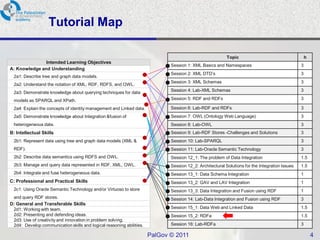
Tutorial Map

                                                                                                          Topic                                     h
               Intended Learning Objectives
                                                                             Session 1: XML Basics and Namespaces                               3
A: Knowledge and Understanding
                                                                             Session 2: XML DTD’s                                               3
 2a1: Describe tree and graph data models.
                                                                             Session 3: XML Schemas                                             3
 2a2: Understand the notation of XML, RDF, RDFS, and OWL.
 2a3: Demonstrate knowledge about querying techniques for data               Session 4: Lab-XML Schemas                                         3

 models as SPARQL and XPath.                                                 Session 5: RDF and RDFs                                            3

 2a4: Explain the concepts of identity management and Linked data.           Session 6: Lab-RDF and RDFs                                        3
 2a5: Demonstrate knowledge about Integration &fusion of                     Session 7: OWL (Ontology Web Language)                             3
 heterogeneous data.                                                         Session 8: Lab-OWL                                                 3
B: Intellectual Skills                                                       Session 9: Lab-RDF Stores -Challenges and Solutions                3
 2b1: Represent data using tree and graph data models (XML &                 Session 10: Lab-SPARQL                                             3
 RDF).                                                                       Session 11: Lab-Oracle Semantic Technology                         3
 2b2: Describe data semantics using RDFS and OWL.                            Session 12_1: The problem of Data Integration                      1.5
 2b3: Manage and query data represented in RDF, XML, OWL.                    Session 12_2: Architectural Solutions for the Integration Issues   1.5
 2b4: Integrate and fuse heterogeneous data.                                 Session 13_1: Data Schema Integration                              1
C: Professional and Practical Skills                                         Session 13_2: GAV and LAV Integration                              1
 2c1: Using Oracle Semantic Technology and/or Virtuoso to store              Session 13_3: Data Integration and Fusion using RDF                1
 and query RDF stores.                                                       Session 14: Lab-Data Integration and Fusion using RDF              3
D: General and Transferable Skills
 2d1: Working with team.                                                     Session 15_1: Data Web and Linked Data                             1.5
 2d2: Presenting and defending ideas.                                        Session 15_2: RDFa                                                 1.5
 2d3: Use of creativity and innovation in problem solving.
 2d4: Develop communication skills and logical reasoning abilities.          Session 16: Lab-RDFa                                               3

                                                                      PalGov © 2011                                                                     4
Module ILOs


After completing this module students will be
able to:
   - Demonstrate knowledge of RDFa.


                       PalGov © 2011            5
RDFa

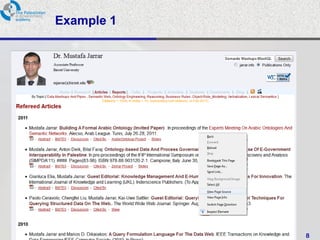
• Bridges the gap between the Web of Documents
  and the Web of Data (Web 3.0).


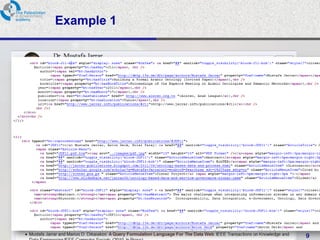
• Makes XHTML web pages structured data (by
  embedding RDF triples inside XHTML).
  • i.e., using RDFa we build small RDF graphs and
    embed them inside XHTML pages.


                      PalGov © 2011                  6
RDFa

•   As stated by Google Webmasters guide, RDFa can be roughly viewed
    as a way to label content to describe a specific type of information,
    such as a restaurant review, an event, a person, or a product listing.

• These information types are called entities or items. Each entity has
  a number of properties. For example, a Person has the properties
  name, address, job title, company, and email address.

• In general, RDFa uses simple attributes in XHTML tags (often <span>
  or <div>) to assign brief and descriptive names to entities and
  properties.


                               PalGov © 2011                           7
Example 1


            PalGov © 2011   8
Example 1


            PalGov © 2011   9
Example 2

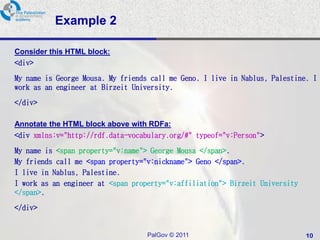
Consider this HTML block:
<div>

My name is George Mousa. My friends call me Geno. I live in Nablus, Palestine. I
work as an engineer at Birzeit University.

</div>

Annotate the HTML block above with RDFa:
<div xmlns:v="http://rdf.data-vocabulary.org/#" typeof="v:Person">

My name is <span property="v:name"> George Mousa </span>.
My friends call me <span property="v:nickname"> Geno </span>.
I live in Nablus, Palestine.
I work as an engineer at <span property="v:affiliation"> Birzeit University
</span>.

</div>


                                   PalGov © 2011                              10
Example 2

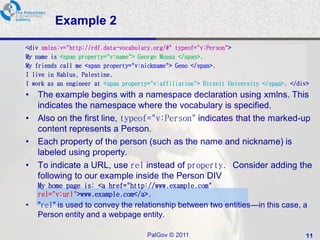
<div xmlns:v="http://rdf.data-vocabulary.org/#" typeof="v:Person">
My name is <span property="v:name"> George Mousa </span>.
My friends call me <span property="v:nickname"> Geno </span>.
I live in Nablus, Palestine.
I work as an engineer at <span property="v:affiliation"> Birzeit University </span>. </div>
•   The example begins with a namespace declaration using xmlns. This
    indicates the namespace where the vocabulary is specified.
•   Also on the first line, typeof="v:Person" indicates that the marked-up
    content represents a Person.
•   Each property of the person (such as the name and nickname) is
    labeled using property.
•   To indicate a URL, use rel instead of property. Consider adding the
    following to our example inside the Person DIV
    My home page is: <a href="http://www.example.com"
    rel="v:url">www.example.com</a>.
•   "rel" is used to convey the relationship between two entities—in this case, a
    Person entity and a webpage entity.

                                       PalGov © 2011                                     11
Example 2
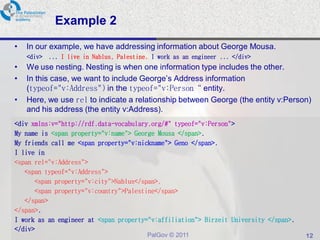
•   In our example, we have addressing information about George Mousa.
    <div> ... I live in Nablus, Palestine. I work as an engineer ... </div>
•   We use nesting. Nesting is when one information type includes the other.
•   In this case, we want to include George’s Address information
    (typeof="v:Address") in the typeof="v:Person“ entity.
•   Here, we use rel to indicate a relationship between George (the entity v:Person)
    and his address (the entity v:Address).
<div xmlns:v="http://rdf.data-vocabulary.org/#" typeof="v:Person">
My name is <span property="v:name"> George Mousa </span>.
My friends call me <span property="v:nickname"> Geno </span>.
I live in
<span rel="v:Address">
   <span typeof="v:Address">
      <span property="v:city">Nablus</span>,
      <span property="v:country">Palestine</span>
   </span>
</span>.
I work as an engineer at <span property="v:affiliation"> Birzeit University </span>.
</div>
                                          PalGov © 2011                                12
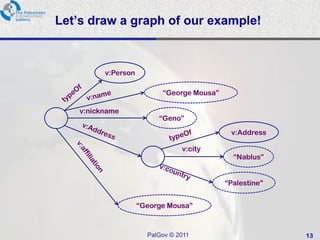
Let’s draw a graph of our example!


          v:Person

                           “George Mousa”

    v:nickname
                          “Geno”
                                             v:Address

                                 v:city
                                              “Nablus”


                                            “Palestine”


                     “George Mousa”


                       PalGov © 2011                      13
References

•   Google Webmasters Help: www.google.com/support/webmasters/

•   W3C: www.w3c.org


                            PalGov © 2011                        14

Pal gov.tutorial2.session15 2.rd_fa

  • 1.
    ‫أكاديمية الحكومة اإللكترونيةالفلسطينية‬ The Palestinian eGovernment Academy www.egovacademy.ps Tutorial II: Data Integration and Open Information Systems Session 15.2 RDFa Dr. Mustafa Jarrar University of Birzeit mjarrar@birzeit.edu www.jarrar.info PalGov © 2011 1
  • 2.
    About This tutorial ispart of the PalGov project, funded by the TEMPUS IV program of the Commission of the European Communities, grant agreement 511159-TEMPUS-1- 2010-1-PS-TEMPUS-JPHES. The project website: www.egovacademy.ps Project Consortium: Birzeit University, Palestine University of Trento, Italy (Coordinator ) Palestine Polytechnic University, Palestine Vrije Universiteit Brussel, Belgium Palestine Technical University, Palestine Université de Savoie, France Ministry of Telecom and IT, Palestine University of Namur, Belgium Ministry of Interior, Palestine TrueTrust, UK Ministry of Local Government, Palestine Coordinator: Dr. Mustafa Jarrar Birzeit University, P.O.Box 14- Birzeit, Palestine Telfax:+972 2 2982935 mjarrar@birzeit.eduPalGov © 2011 2
  • 3.
    © Copyright Notes Everyoneis encouraged to use this material, or part of it, but should properly cite the project (logo and website), and the author of that part. No part of this tutorial may be reproduced or modified in any form or by any means, without prior written permission from the project, who have the full copyrights on the material. Attribution-NonCommercial-ShareAlike CC-BY-NC-SA This license lets others remix, tweak, and build upon your work non- commercially, as long as they credit you and license their new creations under the identical terms. PalGov © 2011 3
  • 4.
    Tutorial Map Topic h Intended Learning Objectives Session 1: XML Basics and Namespaces 3 A: Knowledge and Understanding Session 2: XML DTD’s 3 2a1: Describe tree and graph data models. Session 3: XML Schemas 3 2a2: Understand the notation of XML, RDF, RDFS, and OWL. 2a3: Demonstrate knowledge about querying techniques for data Session 4: Lab-XML Schemas 3 models as SPARQL and XPath. Session 5: RDF and RDFs 3 2a4: Explain the concepts of identity management and Linked data. Session 6: Lab-RDF and RDFs 3 2a5: Demonstrate knowledge about Integration &fusion of Session 7: OWL (Ontology Web Language) 3 heterogeneous data. Session 8: Lab-OWL 3 B: Intellectual Skills Session 9: Lab-RDF Stores -Challenges and Solutions 3 2b1: Represent data using tree and graph data models (XML & Session 10: Lab-SPARQL 3 RDF). Session 11: Lab-Oracle Semantic Technology 3 2b2: Describe data semantics using RDFS and OWL. Session 12_1: The problem of Data Integration 1.5 2b3: Manage and query data represented in RDF, XML, OWL. Session 12_2: Architectural Solutions for the Integration Issues 1.5 2b4: Integrate and fuse heterogeneous data. Session 13_1: Data Schema Integration 1 C: Professional and Practical Skills Session 13_2: GAV and LAV Integration 1 2c1: Using Oracle Semantic Technology and/or Virtuoso to store Session 13_3: Data Integration and Fusion using RDF 1 and query RDF stores. Session 14: Lab-Data Integration and Fusion using RDF 3 D: General and Transferable Skills 2d1: Working with team. Session 15_1: Data Web and Linked Data 1.5 2d2: Presenting and defending ideas. Session 15_2: RDFa 1.5 2d3: Use of creativity and innovation in problem solving. 2d4: Develop communication skills and logical reasoning abilities. Session 16: Lab-RDFa 3 PalGov © 2011 4
  • 5.
    Module ILOs After completingthis module students will be able to: - Demonstrate knowledge of RDFa. PalGov © 2011 5
  • 6.
    RDFa • Bridges thegap between the Web of Documents and the Web of Data (Web 3.0). • Makes XHTML web pages structured data (by embedding RDF triples inside XHTML). • i.e., using RDFa we build small RDF graphs and embed them inside XHTML pages. PalGov © 2011 6
  • 7.
    RDFa • As stated by Google Webmasters guide, RDFa can be roughly viewed as a way to label content to describe a specific type of information, such as a restaurant review, an event, a person, or a product listing. • These information types are called entities or items. Each entity has a number of properties. For example, a Person has the properties name, address, job title, company, and email address. • In general, RDFa uses simple attributes in XHTML tags (often <span> or <div>) to assign brief and descriptive names to entities and properties. PalGov © 2011 7
  • 8.
    Example 1 PalGov © 2011 8
  • 9.
    Example 1 PalGov © 2011 9
  • 10.
    Example 2 Consider thisHTML block: <div> My name is George Mousa. My friends call me Geno. I live in Nablus, Palestine. I work as an engineer at Birzeit University. </div> Annotate the HTML block above with RDFa: <div xmlns:v="http://rdf.data-vocabulary.org/#" typeof="v:Person"> My name is <span property="v:name"> George Mousa </span>. My friends call me <span property="v:nickname"> Geno </span>. I live in Nablus, Palestine. I work as an engineer at <span property="v:affiliation"> Birzeit University </span>. </div> PalGov © 2011 10
  • 11.
    Example 2 <div xmlns:v="http://rdf.data-vocabulary.org/#"typeof="v:Person"> My name is <span property="v:name"> George Mousa </span>. My friends call me <span property="v:nickname"> Geno </span>. I live in Nablus, Palestine. I work as an engineer at <span property="v:affiliation"> Birzeit University </span>. </div> • The example begins with a namespace declaration using xmlns. This indicates the namespace where the vocabulary is specified. • Also on the first line, typeof="v:Person" indicates that the marked-up content represents a Person. • Each property of the person (such as the name and nickname) is labeled using property. • To indicate a URL, use rel instead of property. Consider adding the following to our example inside the Person DIV My home page is: <a href="http://www.example.com" rel="v:url">www.example.com</a>. • "rel" is used to convey the relationship between two entities—in this case, a Person entity and a webpage entity. PalGov © 2011 11
  • 12.
    Example 2 • In our example, we have addressing information about George Mousa. <div> ... I live in Nablus, Palestine. I work as an engineer ... </div> • We use nesting. Nesting is when one information type includes the other. • In this case, we want to include George’s Address information (typeof="v:Address") in the typeof="v:Person“ entity. • Here, we use rel to indicate a relationship between George (the entity v:Person) and his address (the entity v:Address). <div xmlns:v="http://rdf.data-vocabulary.org/#" typeof="v:Person"> My name is <span property="v:name"> George Mousa </span>. My friends call me <span property="v:nickname"> Geno </span>. I live in <span rel="v:Address"> <span typeof="v:Address"> <span property="v:city">Nablus</span>, <span property="v:country">Palestine</span> </span> </span>. I work as an engineer at <span property="v:affiliation"> Birzeit University </span>. </div> PalGov © 2011 12
  • 13.
    Let’s draw agraph of our example! v:Person “George Mousa” v:nickname “Geno” v:Address v:city “Nablus” “Palestine” “George Mousa” PalGov © 2011 13
  • 14.
    References • Google Webmasters Help: www.google.com/support/webmasters/ • W3C: www.w3c.org PalGov © 2011 14