Page Speed
Page speed is a measurement of
how fast the content on your page
loads.
(the time it takes to fully display
the content on a specific page)
04-10-2016
All Rights Reserved. Copyright (c)MERITAS CORPORATION By
Haris Hamsa
1
Google has indicated site speed (and as a result, page speed) is one of
the signals used by its algorithm to rank pages. And research has
shown that Google might be specifically measuring time to first byte as
when it considers page speed. In addition, a slow page speed means
that search engines can crawl fewer pages using their allocated crawl
budget, and this could negatively affect your indexation.
Page speed is also important to user experience. Pages with a longer
load time tend to have higher bounce rates and lower average time on
page. Longer load times have also been shown to negatively affect
conversions.
From Google Bloghttps://webmasters.googleblog.com/2010/04/using-
site-speed-in-web-search-ranking.html
04-10-2016
All Rights Reserved. Copyright (c)MERITAS CORPORATION By
Haris Hamsa
2
By optimizing your code (including removing spaces, commas, and
other unnecessary characters), you can dramatically increase your
page speed. Also remove code comments, formatting, and unused
code. Google recommends using YUI Compressor for both CSS and
JavaScript.
04-10-2016
All Rights Reserved. Copyright (c)MERITAS CORPORATION By
Haris Hamsa
3
Reduce redirects
Each time a page
redirects to another
page, your visitor faces
additional time waiting
for the HTTP request-
response cycle to
complete.
04-10-2016
All Rights Reserved. Copyright (c)MERITAS CORPORATION By
Haris Hamsa
4
Why Opt for a Redirect?
The http redirect code can be used in following cases:
•The URL of a website is broken or not working.
•The website needs to be redirected to a new domain.
•A particular webpage or website is no more active.
•For testing a specific web page.
•Website design going through a renovation.
•Two existing websites are being merged into one.
04-10-2016
All Rights Reserved. Copyright (c)MERITAS CORPORATION By
Haris Hamsa
5
301 Redirect
A 301 redirect is a permanent redirect which moves a user or a
crawler to a new URL and tells that the content has moved
permanently.
301 redirect is used in a situation when you have changed domain
of a website or the website is launched in a new CMS and the URL
structure has been changed. The 301 redirect for old content
moves to a new content and tell the search engines that you have
moved to a new page.
With a permanent redirect, all your web pages, traffic value, page
authority, and page rank will be permanently redirected to the new
website URL an remain intact.
04-10-2016
All Rights Reserved. Copyright (c)MERITAS CORPORATION By
Haris Hamsa
6
302 Redirect
A 302 redirect is a temporary redirect
which is used in a case when you move to
a new page for some time and will come
back to the original page later. This will tell
crawlers to continue indexing old page
which has impact on SEO as the search
engine will continue ranking the old page.
04-10-2016
All Rights Reserved. Copyright (c)MERITAS CORPORATION By
Haris Hamsa
7
Leverage browser caching
Browsers cache a lot of information (stylesheets, images,
JavaScript files, and more) so that when a visitor comes back to
your site, the browser doesn't have to reload the entire page.
Use a tool like YSlowto see if you already have an expiration
date set for your cache. Then set your "expires" header for how
long you want that information to be cached. In many cases,
unless your site design changes frequently, a year is a
reasonable time period
04-10-2016
All Rights Reserved. Copyright (c)MERITAS CORPORATION By
Haris Hamsa
8
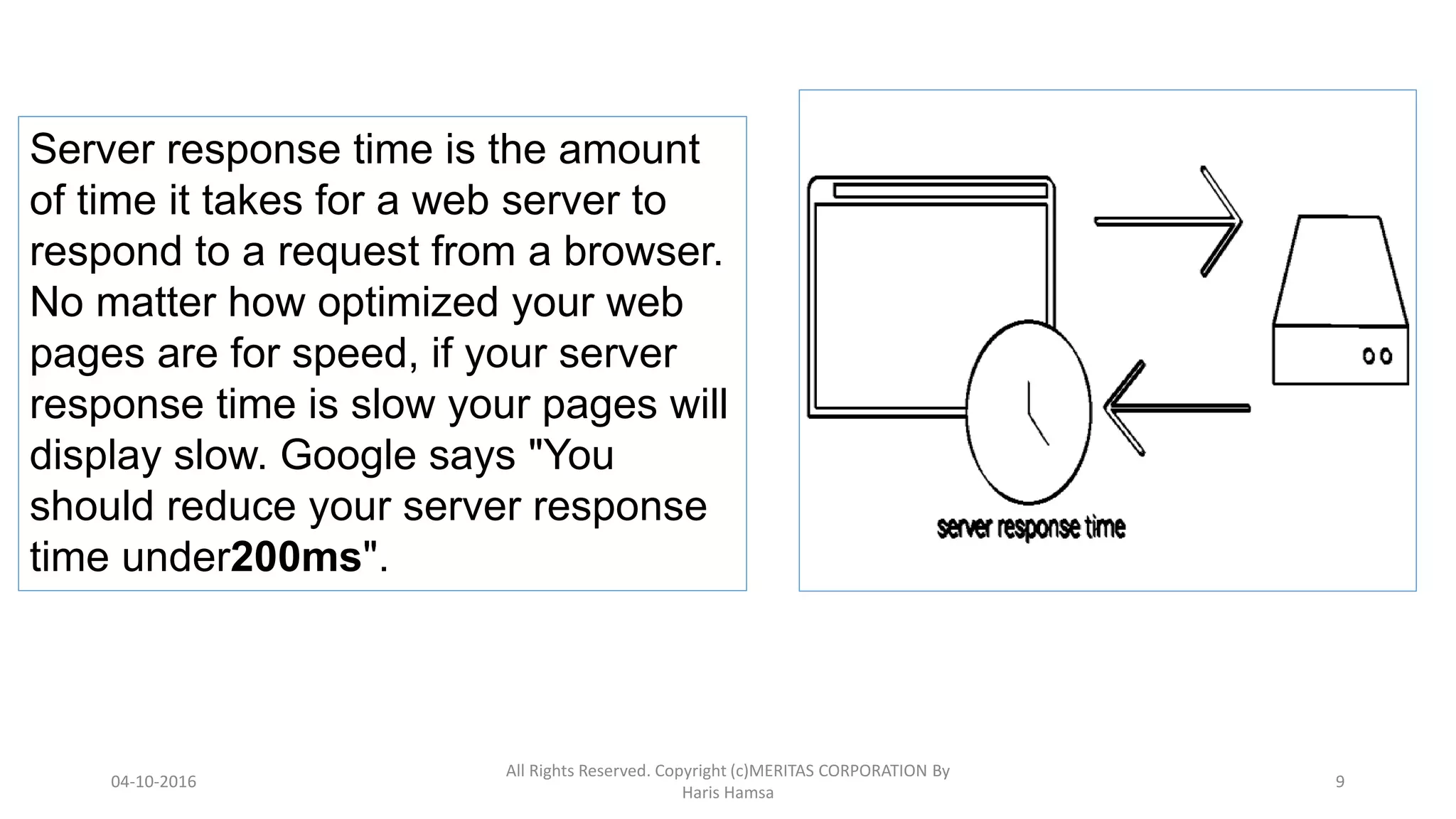
Server response time is the amount
of time it takes for a web server to
respond to a request from a browser.
No matter how optimized your web
pages are for speed, if your server
response time is slow your pages will
display slow. Google says "You
should reduce your server response
time under200ms".
04-10-2016
All Rights Reserved. Copyright (c)MERITAS CORPORATION By
Haris Hamsa
9
Optimize images
Be sure that your images are no larger than they need to be, that they
are in the right file format (PNGs are generally better for graphics with
fewer than 16 colors while JPEGs are generally better for photographs)
and that they are compressed for the web.
Use CSS sprites to create a template for images that you use frequently
on your site like buttons and icons. CSS sprites combine your images
into one large image that loads all at once (which means fewer HTTP
requests) and then display only the sections that you want to show. This
means that you are saving load time by not making users wait for
multiple images to load.
04-10-2016
All Rights Reserved. Copyright (c)MERITAS CORPORATION By
Haris Hamsa
10
04-10-2016
All Rights Reserved. Copyright (c)MERITAS CORPORATION By
Haris Hamsa
11
15 Tips to Speed Up Your Website
04-10-2016
All Rights Reserved. Copyright (c)MERITAS CORPORATION By
Haris Hamsa
12
a)Server
1. Leverage browser caching
2. Enable Keep-Alive
3. Enable gzip compression
4. Make landing page redirects cacheable
5. Use a CDN
b) Content elements
1. Minimize redirects
2. Remove query strings from static resources
3. Specify a character set
4. Minify your codes
5. Avoid bad requests
6.Serve resources from a consistent URL
7. Reduce DNS lookups
c) CSS, JS and Images
1. Specify image dimensions
2. Optimize images
3. Put CSS at the top and JS at the bottom
GTMetrics.com
04-10-2016
All Rights Reserved. Copyright (c)MERITAS CORPORATION By
Haris Hamsa
13

Pagesspeed

  • 1.
    Page Speed Page speedis a measurement of how fast the content on your page loads. (the time it takes to fully display the content on a specific page) 04-10-2016 All Rights Reserved. Copyright (c)MERITAS CORPORATION By Haris Hamsa 1
  • 2.
    Google has indicatedsite speed (and as a result, page speed) is one of the signals used by its algorithm to rank pages. And research has shown that Google might be specifically measuring time to first byte as when it considers page speed. In addition, a slow page speed means that search engines can crawl fewer pages using their allocated crawl budget, and this could negatively affect your indexation. Page speed is also important to user experience. Pages with a longer load time tend to have higher bounce rates and lower average time on page. Longer load times have also been shown to negatively affect conversions. From Google Bloghttps://webmasters.googleblog.com/2010/04/using- site-speed-in-web-search-ranking.html 04-10-2016 All Rights Reserved. Copyright (c)MERITAS CORPORATION By Haris Hamsa 2
  • 3.
    By optimizing yourcode (including removing spaces, commas, and other unnecessary characters), you can dramatically increase your page speed. Also remove code comments, formatting, and unused code. Google recommends using YUI Compressor for both CSS and JavaScript. 04-10-2016 All Rights Reserved. Copyright (c)MERITAS CORPORATION By Haris Hamsa 3
  • 4.
    Reduce redirects Each timea page redirects to another page, your visitor faces additional time waiting for the HTTP request- response cycle to complete. 04-10-2016 All Rights Reserved. Copyright (c)MERITAS CORPORATION By Haris Hamsa 4
  • 5.
    Why Opt fora Redirect? The http redirect code can be used in following cases: •The URL of a website is broken or not working. •The website needs to be redirected to a new domain. •A particular webpage or website is no more active. •For testing a specific web page. •Website design going through a renovation. •Two existing websites are being merged into one. 04-10-2016 All Rights Reserved. Copyright (c)MERITAS CORPORATION By Haris Hamsa 5
  • 6.
    301 Redirect A 301redirect is a permanent redirect which moves a user or a crawler to a new URL and tells that the content has moved permanently. 301 redirect is used in a situation when you have changed domain of a website or the website is launched in a new CMS and the URL structure has been changed. The 301 redirect for old content moves to a new content and tell the search engines that you have moved to a new page. With a permanent redirect, all your web pages, traffic value, page authority, and page rank will be permanently redirected to the new website URL an remain intact. 04-10-2016 All Rights Reserved. Copyright (c)MERITAS CORPORATION By Haris Hamsa 6
  • 7.
    302 Redirect A 302redirect is a temporary redirect which is used in a case when you move to a new page for some time and will come back to the original page later. This will tell crawlers to continue indexing old page which has impact on SEO as the search engine will continue ranking the old page. 04-10-2016 All Rights Reserved. Copyright (c)MERITAS CORPORATION By Haris Hamsa 7
  • 8.
    Leverage browser caching Browserscache a lot of information (stylesheets, images, JavaScript files, and more) so that when a visitor comes back to your site, the browser doesn't have to reload the entire page. Use a tool like YSlowto see if you already have an expiration date set for your cache. Then set your "expires" header for how long you want that information to be cached. In many cases, unless your site design changes frequently, a year is a reasonable time period 04-10-2016 All Rights Reserved. Copyright (c)MERITAS CORPORATION By Haris Hamsa 8
  • 9.
    Server response timeis the amount of time it takes for a web server to respond to a request from a browser. No matter how optimized your web pages are for speed, if your server response time is slow your pages will display slow. Google says "You should reduce your server response time under200ms". 04-10-2016 All Rights Reserved. Copyright (c)MERITAS CORPORATION By Haris Hamsa 9
  • 10.
    Optimize images Be surethat your images are no larger than they need to be, that they are in the right file format (PNGs are generally better for graphics with fewer than 16 colors while JPEGs are generally better for photographs) and that they are compressed for the web. Use CSS sprites to create a template for images that you use frequently on your site like buttons and icons. CSS sprites combine your images into one large image that loads all at once (which means fewer HTTP requests) and then display only the sections that you want to show. This means that you are saving load time by not making users wait for multiple images to load. 04-10-2016 All Rights Reserved. Copyright (c)MERITAS CORPORATION By Haris Hamsa 10
  • 11.
    04-10-2016 All Rights Reserved.Copyright (c)MERITAS CORPORATION By Haris Hamsa 11 15 Tips to Speed Up Your Website
  • 12.
    04-10-2016 All Rights Reserved.Copyright (c)MERITAS CORPORATION By Haris Hamsa 12 a)Server 1. Leverage browser caching 2. Enable Keep-Alive 3. Enable gzip compression 4. Make landing page redirects cacheable 5. Use a CDN b) Content elements 1. Minimize redirects 2. Remove query strings from static resources 3. Specify a character set 4. Minify your codes 5. Avoid bad requests 6.Serve resources from a consistent URL 7. Reduce DNS lookups c) CSS, JS and Images 1. Specify image dimensions 2. Optimize images 3. Put CSS at the top and JS at the bottom
  • 13.
    GTMetrics.com 04-10-2016 All Rights Reserved.Copyright (c)MERITAS CORPORATION By Haris Hamsa 13