By Kareem Zok
Co-Founder of Zeesweb
Kareemzok.com Zeesweb.com
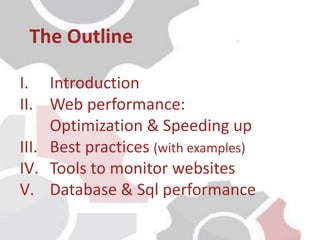
I. Introduction
II. Web performance:
Optimization & Speeding up
III. Best practices (with examples)
IV. Tools to monitor websites
V. Database & Sql performance
The Outline
I. Introduction
• Web performance refers to the speed in which web pages
are downloaded and displayed on the user's web browser
• In the first decade or so of the web's existence, web
performance improvement was focused mainly on
optimizing website code and pushing hardware
limitations
• Performance can be measured either manually or
automatically; it is rather difficult to co-ordinate several
customers hitting your web site at the same time
For more visual information about performance and loading time check
http://apmblog.dynatrace.com/2015/04/15/5-cant-miss-web-performance-optimization-basics
I. Introduction
• Performance visualization using chrome timeline
II. Web performance:
optimization &
speeding up
II. Web performance, optimization & speeding up
1. Hosting provider
• Bandwidth and disk storage are important in any website
performance
• To chose a good web hosting services you should look into :
1. RAM
2. Processor cache
3. Processor type
4. Processor speed ( CPU )
• In web performance knowing your hosting needs matter such
as :
• Website type ( blog or service )
• Content management system
• Server and/or client side code
• File storage needed
II. Web performance, optimization & speeding up
2. Combine and minify files or images
• Minimize size of files or images can save many bytes of data
and speed up downloading, parsing, and execution time
• Reduce the load times of pages by loading appropriately sized
images
• Replace images with font icon
• Combine js and css reduce the load and size of files
• Combine images to minimize disk storage and requests
Resources :
1. http://compressjpeg.com/
2. https://tinypng.com/
3. http://csssprites.com/
4. http://css.spritegen.com/
II. Web performance, optimization & speeding up
3. Minimize http request
• Reduce HTTP requests through combined js/or css files
• Reduce requests by combining images using css sprites
4. Caching technique
• Add Expires headers
• Compress components with gzip
• Reduce DNS lookups
• Set meta tags for pages caching
• Set defer for javascripts
II. Web performance, optimization & speeding up
5. Use of CDN ( Content Delivery Network)
• CDN is a system of distributed servers that deliver
webpages and other Web content to a user based on the
geographic locations of the user
• CDNs can give an equally fast web experience to your users
across the globe.
CDN services :
1. https://www.maxcdn.com/
2. https://cloud.google.com/cdn/docs/
3. https://aws.amazon.com/cloudfront/
III. Best practices
(with examples)
III. Best practices(with examples)
1. Use caching for Drupal and Wordpress ( plugins)
• https://wordpress.org/plugins/puzzler/installation/
• https://wordpress.org/plugins/ewww-image-optimizer/
• https://wordpress.org/plugins/w3-total-cache/
• https://wordpress.org/plugins/advanced-database-cleaner/
• https://www.drupal.org/documentation/performance
• https://www.drupal.org/project/boots
• https://www.drupal.org/project/advagg
2. Use caching for framework
• Yii: Yii::app()->cache->get($key) & Yii::app()->cache
• Zend: Zend_Cache_Manager::getCache()
• Codignitor: Caching Driver ( $this->cache->get('foo')) )
• Drupal ( symphony ): cache_get() & cache_set();
III. Best practices(with examples)
IV. Tools to test
and monitor
websites
IV. Tools to test and monitor websites
1. GTmetrix
• It gives you insight on how well your site loads and provides
actionable recommendations on how to optimize it.
• Analyze your page with Google PageSpeed and Yahoo!
• Get your page's Page Load Time, Total Page Size and Total #
of Requests
2. PageSpeed from google
• You can identify ways to make your site faster and more
mobile-friendly.
3. Yslow from yahoo
• YSlow analyzes web pages and why they're slow
V. Database &
Sql performance
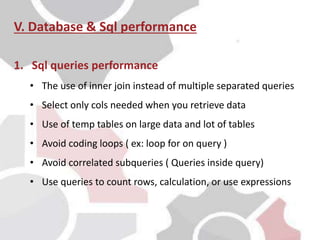
V. Database & Sql performance
1. Sql queries performance
• The use of inner join instead of multiple separated queries
• Select only cols needed when you retrieve data
• Use of temp tables on large data and lot of tables
• Avoid coding loops ( ex: loop for on query )
• Avoid correlated subqueries ( Queries inside query)
• Use queries to count rows, calculation, or use expressions
2. Database performance
• Indexes : effective way to tune your SQL database that is
often neglected during development
• Configuration : Repair , analyze and configure the
database
V. Database & Sql performance
VI. Conclusion
V. Conclusion
Web performance refers to the
speed in which web pages are
downloaded and displayed on the
user's web browser
Queries & databse
performance
Hosting
provider
Minimize http
request
Framework & php
cashing
Optimize your
files (compress
css and js)
Caching
technique
References
• http://www.webhostingsecretrevealed.net/choose-the-right-web-hosting/
• http://www.toptenreviews.com/services/web-hosting/best-web-hosting/
• https://en.wikipedia.org/wiki/Content_delivery_network
• https://www.linkedin.com/pulse/best-tips-improving-website-performance-
kareem-zock
• http://www.yiiframework.com/doc/guide/1.1/en/caching.overview
• https://www.codeigniter.com/userguide3/libraries/caching.html
• https://www.drupal.org/docs/7/caching-to-improve-performance/caching-
overview
• https://framework.zend.com/manual/1.10/en/zend.cache.html
• https://gtmetrix.com/ and https://developers.google.com/speed/pagespeed/
• http://www.infoworld.com/article/2628420/database/database-7-
performance-tips-for-faster-sql-queries.html
• https://www.toptal.com/sql/sql-database-tuning-for-developers
• https://en.wikipedia.org/wiki/Database_index
References
• http://www.yiiframework.com/doc/guide/1.1/en/caching.data
• http://www.yiiframework.com/doc-2.0/guide-caching-data.html
• https://api.drupal.org/api/drupal/includes%21cache.inc/function/cache_set/7.
x
• https://api.drupal.org/api/drupal/includes%21cache.inc/function/cache_get/7.
x

Web performance

  • 1.
    By Kareem Zok Co-Founderof Zeesweb Kareemzok.com Zeesweb.com
  • 2.
    I. Introduction II. Webperformance: Optimization & Speeding up III. Best practices (with examples) IV. Tools to monitor websites V. Database & Sql performance The Outline
  • 3.
  • 4.
    • Web performancerefers to the speed in which web pages are downloaded and displayed on the user's web browser • In the first decade or so of the web's existence, web performance improvement was focused mainly on optimizing website code and pushing hardware limitations • Performance can be measured either manually or automatically; it is rather difficult to co-ordinate several customers hitting your web site at the same time For more visual information about performance and loading time check http://apmblog.dynatrace.com/2015/04/15/5-cant-miss-web-performance-optimization-basics I. Introduction
  • 5.
    • Performance visualizationusing chrome timeline
  • 6.
  • 7.
    II. Web performance,optimization & speeding up 1. Hosting provider • Bandwidth and disk storage are important in any website performance • To chose a good web hosting services you should look into : 1. RAM 2. Processor cache 3. Processor type 4. Processor speed ( CPU ) • In web performance knowing your hosting needs matter such as : • Website type ( blog or service ) • Content management system • Server and/or client side code • File storage needed
  • 8.
    II. Web performance,optimization & speeding up 2. Combine and minify files or images • Minimize size of files or images can save many bytes of data and speed up downloading, parsing, and execution time • Reduce the load times of pages by loading appropriately sized images • Replace images with font icon • Combine js and css reduce the load and size of files • Combine images to minimize disk storage and requests Resources : 1. http://compressjpeg.com/ 2. https://tinypng.com/ 3. http://csssprites.com/ 4. http://css.spritegen.com/
  • 9.
    II. Web performance,optimization & speeding up 3. Minimize http request • Reduce HTTP requests through combined js/or css files • Reduce requests by combining images using css sprites 4. Caching technique • Add Expires headers • Compress components with gzip • Reduce DNS lookups • Set meta tags for pages caching • Set defer for javascripts
  • 10.
    II. Web performance,optimization & speeding up 5. Use of CDN ( Content Delivery Network) • CDN is a system of distributed servers that deliver webpages and other Web content to a user based on the geographic locations of the user • CDNs can give an equally fast web experience to your users across the globe. CDN services : 1. https://www.maxcdn.com/ 2. https://cloud.google.com/cdn/docs/ 3. https://aws.amazon.com/cloudfront/
  • 11.
  • 12.
    III. Best practices(withexamples) 1. Use caching for Drupal and Wordpress ( plugins) • https://wordpress.org/plugins/puzzler/installation/ • https://wordpress.org/plugins/ewww-image-optimizer/ • https://wordpress.org/plugins/w3-total-cache/ • https://wordpress.org/plugins/advanced-database-cleaner/ • https://www.drupal.org/documentation/performance • https://www.drupal.org/project/boots • https://www.drupal.org/project/advagg
  • 13.
    2. Use cachingfor framework • Yii: Yii::app()->cache->get($key) & Yii::app()->cache • Zend: Zend_Cache_Manager::getCache() • Codignitor: Caching Driver ( $this->cache->get('foo')) ) • Drupal ( symphony ): cache_get() & cache_set(); III. Best practices(with examples)
  • 14.
    IV. Tools totest and monitor websites
  • 15.
    IV. Tools totest and monitor websites 1. GTmetrix • It gives you insight on how well your site loads and provides actionable recommendations on how to optimize it. • Analyze your page with Google PageSpeed and Yahoo! • Get your page's Page Load Time, Total Page Size and Total # of Requests 2. PageSpeed from google • You can identify ways to make your site faster and more mobile-friendly. 3. Yslow from yahoo • YSlow analyzes web pages and why they're slow
  • 16.
    V. Database & Sqlperformance
  • 17.
    V. Database &Sql performance 1. Sql queries performance • The use of inner join instead of multiple separated queries • Select only cols needed when you retrieve data • Use of temp tables on large data and lot of tables • Avoid coding loops ( ex: loop for on query ) • Avoid correlated subqueries ( Queries inside query) • Use queries to count rows, calculation, or use expressions
  • 18.
    2. Database performance •Indexes : effective way to tune your SQL database that is often neglected during development • Configuration : Repair , analyze and configure the database V. Database & Sql performance
  • 19.
  • 20.
    V. Conclusion Web performancerefers to the speed in which web pages are downloaded and displayed on the user's web browser Queries & databse performance Hosting provider Minimize http request Framework & php cashing Optimize your files (compress css and js) Caching technique
  • 21.
    References • http://www.webhostingsecretrevealed.net/choose-the-right-web-hosting/ • http://www.toptenreviews.com/services/web-hosting/best-web-hosting/ •https://en.wikipedia.org/wiki/Content_delivery_network • https://www.linkedin.com/pulse/best-tips-improving-website-performance- kareem-zock • http://www.yiiframework.com/doc/guide/1.1/en/caching.overview • https://www.codeigniter.com/userguide3/libraries/caching.html • https://www.drupal.org/docs/7/caching-to-improve-performance/caching- overview • https://framework.zend.com/manual/1.10/en/zend.cache.html • https://gtmetrix.com/ and https://developers.google.com/speed/pagespeed/ • http://www.infoworld.com/article/2628420/database/database-7- performance-tips-for-faster-sql-queries.html • https://www.toptal.com/sql/sql-database-tuning-for-developers • https://en.wikipedia.org/wiki/Database_index
  • 22.
    References • http://www.yiiframework.com/doc/guide/1.1/en/caching.data • http://www.yiiframework.com/doc-2.0/guide-caching-data.html •https://api.drupal.org/api/drupal/includes%21cache.inc/function/cache_set/7. x • https://api.drupal.org/api/drupal/includes%21cache.inc/function/cache_get/7. x