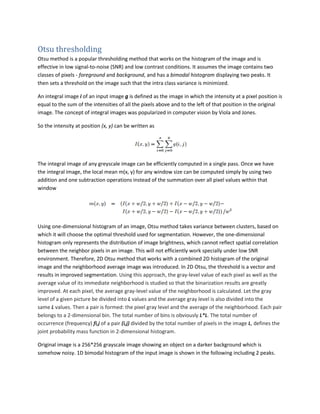
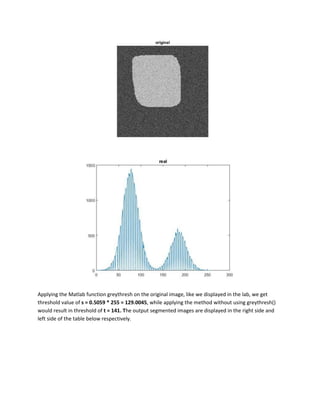
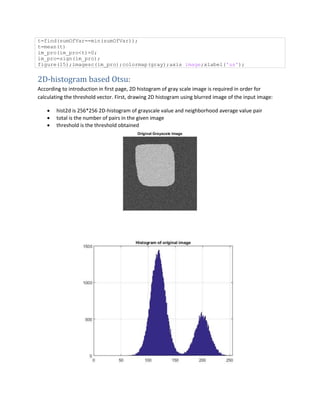
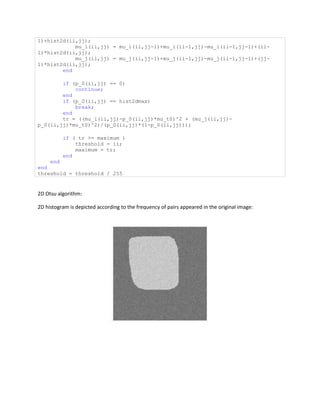
Otsu thresholding is an effective thresholding method for images with low signal-to-noise ratios and low contrast. It assumes a bimodal histogram with two peaks, foreground and background, and finds a threshold that minimizes intra-class variance. 2D Otsu thresholding uses a joint 2D histogram of pixel values and local neighborhood averages to find an optimal threshold vector, improving segmentation especially for noisy images. The algorithm calculates the 2D histogram, finds probabilities and mean values, and selects the threshold pair that maximizes between-class variance. On a noisy test image, 2D Otsu thresholding produces a clean binary segmentation with the threshold pair (171, 171).

![The 2D histogram is calculated and displayed using mesh plotting:
fontSize = 10;
grayImage = imread('16.bmp');
figure(2);
imshow(grayImage, []);
title('Original Grayscale Image', 'FontSize', fontSize);
% Let's compute and display the histogram.
[pixelCount, grayLevels] = imhist(grayImage);
figure(3);
bar(grayLevels, pixelCount);](https://image.slidesharecdn.com/b3923948-1183-420d-b816-34d791e494df-161114073455/85/Otsu-5-320.jpg)
![grid on;
title('Histogram of original image', 'FontSize', fontSize);
xlim([0 grayLevels(end)]); % Scale x axis manually.
% Get the local average image
windowWidth = 21;
kernel = ones(windowWidth)/windowWidth^2;
blurredImage = imfilter(grayImage, kernel);
% Display the original gray scale image.
figure(4);
imshow(blurredImage, []);
title('Blurred Grayscale Image', 'FontSize', fontSize);
% Compute the 2D "histogram"
[rows, columns, numberOfColorBands] = size(grayImage);
hist2d = zeros(256,256);
for row = 1 : rows
for column = 1 : columns
index1 = grayImage(row, column);
index2 = round(blurredImage(row, column));
hist2d(index1, index2) = hist2d(index1, index2) + 1;
end
end
figure(5);
%imshow(hist2d, []);
mesh(hist2d);
title('2D Histogram', 'FontSize', fontSize);
[x,y] = meshgrid([0, 255]);
size(hist2d)
%Finding Otsu threshold:
% hist2d is the 256*256 2D-histogram of grayscale value and neighborhood
average grayscale value pair.
% total is the number of pairs in the given image.
% threshold is the threshold obtained.
hist2dmax=max(hist2d(:))
maximum = 0.0;
threshold = 0;
helperVec = 0:255;
mu_t0 = sum(sum(repmat(helperVec',1,256).*hist2d));
mu_t1 = sum(sum(repmat(helperVec,256,1).*hist2d));
p_0 = zeros(256);
mu_i = p_0;
mu_j = p_0;
total = hist2dmax;
for ii = 2:256
for jj = 2:256
if jj == 2
if ii == 2
p_0(2,2) = hist2d(2,2);
else
p_0(ii,1) = p_0(ii-1,1) + hist2d(ii,1);
mu_i(ii,1) = mu_i(ii-1,1)+(ii-1)*hist2d(ii,1);
mu_j(ii,1) = mu_j(ii-1,1);
end
else
p_0(ii,jj) = p_0(ii,jj-1)+p_0(ii-1,jj)-p_0(ii-1,jj-](https://image.slidesharecdn.com/b3923948-1183-420d-b816-34d791e494df-161114073455/85/Otsu-6-320.jpg)

![% % a=M;
% %load('source_N0.02.mat');
% %a=X;
%a=imread('syn1-g2.gif');
%a=b;
%a=noise_h;
figure(6);
imshow(a);
[m,n]=size(a);
%b=imnoise(a,'salt & pepper',0.003);
%b=imnoise(b,'gaussian',0,0.0015);
%b = IMNOISE(a,'speckle',0.09);
%b=a;
a0=double(a);
h=1;
a1=zeros(m,n);
for i=1:m ...rows
for j=1:n ...columns
for k=-h:h ...3by3 window
for w=-h:h;
p=i+k;
q=j+w;
if (p<=0)|( p>m) ...not to exceed image rows
p=i;
end
if (q<=0)|(q>n) ...not to exceed image columns
q=j;
end
a1(i,j)=a0(p,q)+a1(i,j);
end
end
a2(i,j)=uint8(1/9*a1(i,j)); ...neighbourhood average image
represented by grey levels
end
end
% 2D histogram representation:
% f denotes the frequency of a pair appeared in the image
fxy=zeros(256,256);
for i=1:m
for j=1:n
c=a0(i,j);
d=double(a2(i,j));
fxy(c+1,d+1)=fxy(c+1,d+1)+1;
end
end
figure(7);
mesh(fxy);
title('2D Hist');
% to obtain a pair, P, composed by original intensity and the average
intensity
Pxy=fxy/m/n;
P0=zeros(256,256);
Ui=zeros(256,256);
Uj=zeros(256,256);
P0(1,1)=Pxy(1,1);](https://image.slidesharecdn.com/b3923948-1183-420d-b816-34d791e494df-161114073455/85/Otsu-9-320.jpg)


