SAP is the trademark or registered trademark of SAP AG in Germany and in several other countries.
Copyright © 2015 SAPtech Solutions, Inc. All Rights Reserved.
Order to Cash
Manager
For use with SAP® software
“Making the world’s best ERP system even better”
Randall Smith
President, SAPtech Solutions, Inc.
Copyright © 2015 SAPtech Solutions, Inc. All Rights Reserved. SAPtechsolutions.com
The Order to Cash Manager
The Order to Cash Manager (OTCM) is a visually oriented add-on that will help you
manage sales documents with ease. Viewing the complete order-to-cash cycle of a sales
document in SAP is a laborious process, requiring navigation through several complex
transactions. Users often have difficulty finding key data within the myriad of screens and
tabs contained in these transactions. OTCM provides an intuitive, easy-to-use alternative
that will significantly enhance the productivity of your staff.
OTCM displays multiple windows on a single screen, using a wide assortment of icons
and colors to highlight the key attributes of your sales and subsequent documents.
Copyright © 2015 SAPtech Solutions, Inc. All Rights Reserved. SAPtechsolutions.com
Order Status “at a glance”
A wide array of icons and colors visually highlight the status of sales documents.
Copyright © 2015 SAPtech Solutions, Inc. All Rights Reserved. SAPtechsolutions.com
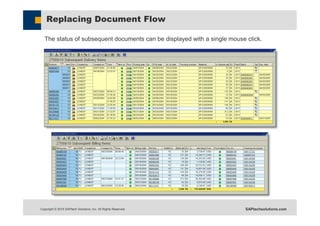
Replacing Document Flow
The status of subsequent documents can be displayed with a single mouse click.
Copyright © 2015 SAPtech Solutions, Inc. All Rights Reserved. SAPtechsolutions.com
Shipment Tracking
An icon identifies that a tracking number exists for a delivery or HU related to a sales
document. Simply click on the icon, and an HTML window appears with the associated
carrier’s tracking information.
Copyright © 2015 SAPtech Solutions, Inc. All Rights Reserved. SAPtechsolutions.com
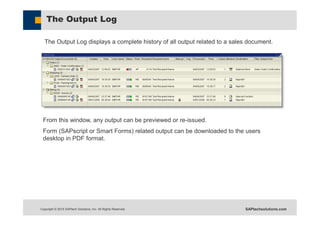
The Output Log
The Output Log displays a complete history of all output related to a sales document.
From this window, any output can be previewed or re-issued.
Form (SAPscript or Smart Forms) related output can be downloaded to the users
desktop in PDF format.
Copyright © 2015 SAPtech Solutions, Inc. All Rights Reserved. SAPtechsolutions.com
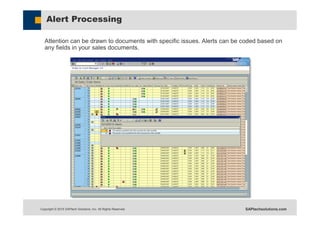
Alert Processing
Attention can be drawn to documents with specific issues. Alerts can be coded based on
any fields in your sales documents.
Copyright © 2015 SAPtech Solutions, Inc. All Rights Reserved. SAPtechsolutions.com
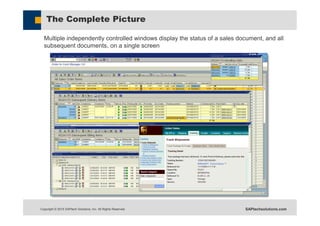
The Complete Picture
Multiple independently controlled windows display the status of a sales document, and all
subsequent documents, on a single screen
Copyright © 2015 SAPtech Solutions, Inc. All Rights Reserved. SAPtechsolutions.com
Additional Features
The Order to Cash Manager has many more features:
 Can be run at either the header or item level.
 Allows the user to decide the definition of an “open item”.
 Displays available stock related to sales document items.
 Can display all A/R documents related to sales documents.
 Reverse document flow search allows the user to find orders, and all subsequent
documents, related to a subsequent document.
 Provides credit release functionality.
 Order Clone function allows users to easily create orders based on multiple existing
orders.
 File extract options allows the OCTM to be used as a data extraction tool.
 Allows Mass Change of certain sales document fields.
 Easily customized to meet the needs of your organization via user exits.
 OTCM features are implemented as ‘Callable Functions’. This allows organizations
to use OTCM functionality in their own programs.
Copyright © 2015 SAPtech Solutions, Inc. All Rights Reserved. SAPtechsolutions.com
Houghton Mifflin Harcourt Experience
Houghton Mifflin Harcourt is one of the leading educational publishers in the United
States, publishing textbooks, instructional technology, assessments, and other
educational materials for teachers and students of every age. Their Corporate
headquarters is located in Boston, MA.
 Over 2 Billion in annual sales
 2,800 SAP users
 241 Order to Cash Manager users
Copyright © 2015 SAPtech Solutions, Inc. All Rights Reserved. SAPtechsolutions.com
Houghton Mifflin Harcourt Experience
Houghton Mifflin Harcourt implemented SAP R/3 in November, 2006. At
that time, we used standard R/3 report transactions and custom reports
that we had developed during our implementation. Using these various
reports was time consuming because we had to drill into many screens to
obtain information needed during conversations with our customers.
Many of our orders contain 50 – 150 line items. They ship from multiple
distribution centers, and there are often stock issues and subsequent
backorder releases. As a result, it was difficult to navigate through
document flow to quickly see the status of each line item. VA05 was
somewhat helpful, but still did not contain all of the information that we
needed in order to quickly respond to customer inquiries.
In May, 2007 we purchased the Order to Cash Manager. We found the
application to be very intuitive and easy to use. We no longer had to
search through the document flow to obtain line item, delivery status or
carrier tracking information. Within a month, we were hearing that our
CSR’s where no longer using VA03 or VA05 at all. They began to rely
solely on OTCM because all of the information was available in one
interactive report.
“OTCM has been the best investment we have seen since we implemented SAP. It has made
our lives so much easier, and has enhanced the service we provide to our customers.”
Sue Krohn
Director, Customer Service
Copyright © 2015 SAPtech Solutions, Inc. All Rights Reserved. SAPtechsolutions.com
Return on Investment
Organizations using OTCM have realized substantial time savings in their day to day
operations. The following are a few of the key benefits that OTCM can deliver:
 Reduces the time needed to research and resolve OTC issues.
 Replaces most standard and custom OTC reports with a single comprehensive
tool.
 Outperforms typically slow custom reports, reducing the time users spend
waiting for a report to run.
 Reduces the need for time consuming and counter productive calls to an
organizations SD production support team.
Copyright © 2015 SAPtech Solutions, Inc. All Rights Reserved. SAPtechsolutions.com
About SAPtech Solutions
Founded in 1995 by a group of seasoned systems analysts, STS has successfully
helped SAP users throughout the world get the most from their systems for over
twenty years.
Combining creative thinking, business process knowledge, functional configuration
experience and technical programming ability, STS is creating “best of breed" SAP
solutions unrivaled in today's SAP community.
SAPtech Solutions (formerly, The Smith Consulting Group)
provides users of SAP -- the world's best ERP system -- with
expert implementation services, support and innovative add-
on solutions that enhance the functionality of their ERP
system.
Our focus: enhancing SAP functionality.
Our promise: helping enterprises realize a
bottom line return on their ERP
investment.
Copyright © 2015 SAPtech Solutions, Inc. All Rights Reserved. SAPtechsolutions.com
Organizations that are using the OTC Manager
Copyright © 2015 SAPtech Solutions, Inc. All Rights Reserved. SAPtechsolutions.com
Purchasing the Order to Cash Manager
 Execute the End-user Software License Agreement Order
 Details the price, support (optional)
 Execute the End-user Software License Agreement
 Details the terms of use. Normally one DEV/QAS/PRD Instance
 There are no additional fees based on the number of users
 STS Installs the Order to Cash Manager on a development system
 Installation can be onsite or remote and normally takes one day
 The customer has thirty days to test the OTCM
 During this period STS will fix any issues encountered
 After thirty days, STS will invoice the customer
Copyright © 2015 SAPtech Solutions, Inc. All Rights Reserved. SAPtechsolutions.com
Order to Cash Manager For use with SAP® software
Thank you for your interest
Contact: Randall R. Smith
973-713-5846
RSmith@SAPtechsolutions.com
PO Box 47626
Tampa, FL 33646-0114
973-713-5846

Order to Cash Manager Overview

  • 1.
    SAP is thetrademark or registered trademark of SAP AG in Germany and in several other countries. Copyright © 2015 SAPtech Solutions, Inc. All Rights Reserved. Order to Cash Manager For use with SAP® software “Making the world’s best ERP system even better” Randall Smith President, SAPtech Solutions, Inc.
  • 2.
    Copyright © 2015SAPtech Solutions, Inc. All Rights Reserved. SAPtechsolutions.com The Order to Cash Manager The Order to Cash Manager (OTCM) is a visually oriented add-on that will help you manage sales documents with ease. Viewing the complete order-to-cash cycle of a sales document in SAP is a laborious process, requiring navigation through several complex transactions. Users often have difficulty finding key data within the myriad of screens and tabs contained in these transactions. OTCM provides an intuitive, easy-to-use alternative that will significantly enhance the productivity of your staff. OTCM displays multiple windows on a single screen, using a wide assortment of icons and colors to highlight the key attributes of your sales and subsequent documents.
  • 3.
    Copyright © 2015SAPtech Solutions, Inc. All Rights Reserved. SAPtechsolutions.com Order Status “at a glance” A wide array of icons and colors visually highlight the status of sales documents.
  • 4.
    Copyright © 2015SAPtech Solutions, Inc. All Rights Reserved. SAPtechsolutions.com Replacing Document Flow The status of subsequent documents can be displayed with a single mouse click.
  • 5.
    Copyright © 2015SAPtech Solutions, Inc. All Rights Reserved. SAPtechsolutions.com Shipment Tracking An icon identifies that a tracking number exists for a delivery or HU related to a sales document. Simply click on the icon, and an HTML window appears with the associated carrier’s tracking information.
  • 6.
    Copyright © 2015SAPtech Solutions, Inc. All Rights Reserved. SAPtechsolutions.com The Output Log The Output Log displays a complete history of all output related to a sales document. From this window, any output can be previewed or re-issued. Form (SAPscript or Smart Forms) related output can be downloaded to the users desktop in PDF format.
  • 7.
    Copyright © 2015SAPtech Solutions, Inc. All Rights Reserved. SAPtechsolutions.com Alert Processing Attention can be drawn to documents with specific issues. Alerts can be coded based on any fields in your sales documents.
  • 8.
    Copyright © 2015SAPtech Solutions, Inc. All Rights Reserved. SAPtechsolutions.com The Complete Picture Multiple independently controlled windows display the status of a sales document, and all subsequent documents, on a single screen
  • 9.
    Copyright © 2015SAPtech Solutions, Inc. All Rights Reserved. SAPtechsolutions.com Additional Features The Order to Cash Manager has many more features:  Can be run at either the header or item level.  Allows the user to decide the definition of an “open item”.  Displays available stock related to sales document items.  Can display all A/R documents related to sales documents.  Reverse document flow search allows the user to find orders, and all subsequent documents, related to a subsequent document.  Provides credit release functionality.  Order Clone function allows users to easily create orders based on multiple existing orders.  File extract options allows the OCTM to be used as a data extraction tool.  Allows Mass Change of certain sales document fields.  Easily customized to meet the needs of your organization via user exits.  OTCM features are implemented as ‘Callable Functions’. This allows organizations to use OTCM functionality in their own programs.
  • 10.
    Copyright © 2015SAPtech Solutions, Inc. All Rights Reserved. SAPtechsolutions.com Houghton Mifflin Harcourt Experience Houghton Mifflin Harcourt is one of the leading educational publishers in the United States, publishing textbooks, instructional technology, assessments, and other educational materials for teachers and students of every age. Their Corporate headquarters is located in Boston, MA.  Over 2 Billion in annual sales  2,800 SAP users  241 Order to Cash Manager users
  • 11.
    Copyright © 2015SAPtech Solutions, Inc. All Rights Reserved. SAPtechsolutions.com Houghton Mifflin Harcourt Experience Houghton Mifflin Harcourt implemented SAP R/3 in November, 2006. At that time, we used standard R/3 report transactions and custom reports that we had developed during our implementation. Using these various reports was time consuming because we had to drill into many screens to obtain information needed during conversations with our customers. Many of our orders contain 50 – 150 line items. They ship from multiple distribution centers, and there are often stock issues and subsequent backorder releases. As a result, it was difficult to navigate through document flow to quickly see the status of each line item. VA05 was somewhat helpful, but still did not contain all of the information that we needed in order to quickly respond to customer inquiries. In May, 2007 we purchased the Order to Cash Manager. We found the application to be very intuitive and easy to use. We no longer had to search through the document flow to obtain line item, delivery status or carrier tracking information. Within a month, we were hearing that our CSR’s where no longer using VA03 or VA05 at all. They began to rely solely on OTCM because all of the information was available in one interactive report. “OTCM has been the best investment we have seen since we implemented SAP. It has made our lives so much easier, and has enhanced the service we provide to our customers.” Sue Krohn Director, Customer Service
  • 12.
    Copyright © 2015SAPtech Solutions, Inc. All Rights Reserved. SAPtechsolutions.com Return on Investment Organizations using OTCM have realized substantial time savings in their day to day operations. The following are a few of the key benefits that OTCM can deliver:  Reduces the time needed to research and resolve OTC issues.  Replaces most standard and custom OTC reports with a single comprehensive tool.  Outperforms typically slow custom reports, reducing the time users spend waiting for a report to run.  Reduces the need for time consuming and counter productive calls to an organizations SD production support team.
  • 13.
    Copyright © 2015SAPtech Solutions, Inc. All Rights Reserved. SAPtechsolutions.com About SAPtech Solutions Founded in 1995 by a group of seasoned systems analysts, STS has successfully helped SAP users throughout the world get the most from their systems for over twenty years. Combining creative thinking, business process knowledge, functional configuration experience and technical programming ability, STS is creating “best of breed" SAP solutions unrivaled in today's SAP community. SAPtech Solutions (formerly, The Smith Consulting Group) provides users of SAP -- the world's best ERP system -- with expert implementation services, support and innovative add- on solutions that enhance the functionality of their ERP system. Our focus: enhancing SAP functionality. Our promise: helping enterprises realize a bottom line return on their ERP investment.
  • 14.
    Copyright © 2015SAPtech Solutions, Inc. All Rights Reserved. SAPtechsolutions.com Organizations that are using the OTC Manager
  • 15.
    Copyright © 2015SAPtech Solutions, Inc. All Rights Reserved. SAPtechsolutions.com Purchasing the Order to Cash Manager  Execute the End-user Software License Agreement Order  Details the price, support (optional)  Execute the End-user Software License Agreement  Details the terms of use. Normally one DEV/QAS/PRD Instance  There are no additional fees based on the number of users  STS Installs the Order to Cash Manager on a development system  Installation can be onsite or remote and normally takes one day  The customer has thirty days to test the OTCM  During this period STS will fix any issues encountered  After thirty days, STS will invoice the customer
  • 16.
    Copyright © 2015SAPtech Solutions, Inc. All Rights Reserved. SAPtechsolutions.com Order to Cash Manager For use with SAP® software Thank you for your interest Contact: Randall R. Smith 973-713-5846 RSmith@SAPtechsolutions.com PO Box 47626 Tampa, FL 33646-0114 973-713-5846