






+

=        CouchApps
       Blog: http://bradley-holt.com
@BradleyHolt (http://twitter.com/BradleyHolt)
        bradley.holt@foundline.com
About Me
(Bradley Holt)
Co-Founder and
Technical Director
from Vermont


     Battery Park - Burlington, Vermont by Marty Desilets, on Flickr
Organizer   BTV
(Minor) Contributor
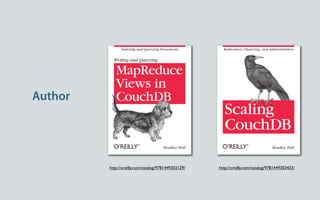
Author


         http://oreilly.com/catalog/9781449303129/   http://oreilly.com/catalog/9781449303433/
Why CouchDB?
CouchDB is a database,
web server & application server
Bene ts
Schema-less “self-contained” JSON documents—no tables, just documents

RESTful HTTP API is simple to integrate with

Custom-written MapReduce “views” index your data for fast retrieval

Multi-master replication can happen continuously, in any direction, and/or
whenever nodes can connect

Can run on anything from a server to a mobile device (CouchDB can be embedded
in Android and iOS apps)
Trade-Offs
No ad-hoc queries (you can use temporary views, but they’re slow on
large data sets)

Thinking in terms of MapReduce views can take some time to get used to

No transactions across document boundaries

Your data will be “eventually consistent” and con icts can occur (but
can be resolved)
MapReduce Views
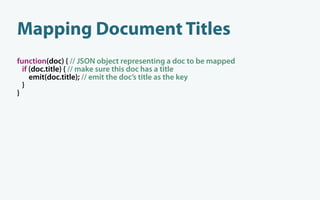
Mapping Document Titles
function(doc) { // JSON object representing a doc to be mapped
  if (doc.title) { // make sure this doc has a title
     emit(doc.title); // emit the doc’s title as the key
  }
}
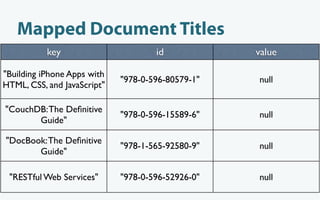
Mapped Document Titles
           key                       id            value

"Building iPhone Apps with
                             "978-0-596-80579-1"   null
HTML, CSS, and JavaScript"

"CouchDB: The Definitive
                             "978-0-596-15589-6"   null
       Guide"

"DocBook: The Definitive
                             "978-1-565-92580-9"   null
       Guide"

 "RESTful Web Services"      "978-0-596-52926-0"   null
Mapping Document Authors
function(doc) { // JSON object representing a doc to be mapped
  if (doc.authors) { // make sure this doc has an authors eld
     for (var i in doc.authors) {
       emit(doc.authors[i]); // emit each author as the key
     }
  }
}
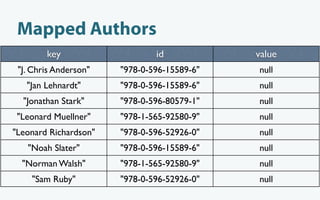
Mapped Authors
        key                    id            value
 "J. Chris Anderson"   "978-0-596-15589-6"   null
   "Jan Lehnardt"      "978-0-596-15589-6"   null
  "Jonathan Stark"     "978-0-596-80579-1"   null
 "Leonard Muellner"    "978-1-565-92580-9"   null
"Leonard Richardson"   "978-0-596-52926-0"   null
   "Noah Slater"       "978-0-596-15589-6"   null
  "Norman Walsh"       "978-1-565-92580-9"   null
    "Sam Ruby"         "978-0-596-52926-0"   null
HTTP API
via the CouchDB jQuery Plugin
http://localhost:5984/_utils/script/jquery.couch.js
The same-origin policy dictates that your HTML
and AJAX data (JSON) must be retrieved from
the same origin.
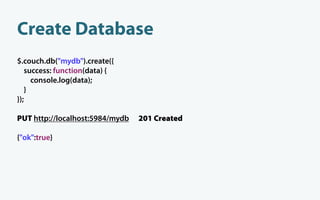
Create Database
$.couch.db("mydb").create({
   success: function(data) {
     console.log(data);
   }
});

PUT http://localhost:5984/mydb   201 Created

{"ok":true}
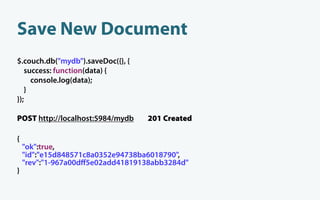
Save New Document
$.couch.db("mydb").saveDoc({}, {
   success: function(data) {
     console.log(data);
   }
});

POST http://localhost:5984/mydb    201 Created

{
    "ok":true,
    "id":"e15d848571c8a0352e94738ba6018790",
    "rev":"1-967a00dff5e02add41819138abb3284d"
}
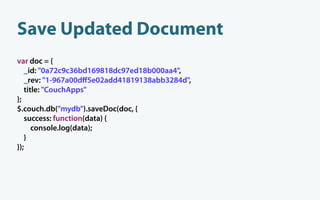
Save Updated Document
var doc = {
   _id: "0a72c9c36bd169818dc97ed18b000aa4",
   _rev: "1-967a00dff5e02add41819138abb3284d",
   title: "CouchApps"
};
$.couch.db("mydb").saveDoc(doc, {
   success: function(data) {
      console.log(data);
   }
});
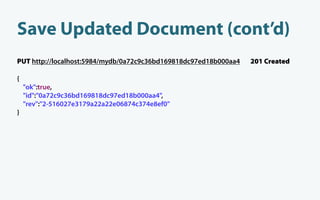
Save Updated Document (cont’d)
PUT http://localhost:5984/mydb/0a72c9c36bd169818dc97ed18b000aa4   201 Created

{
    "ok":true,
    "id":"0a72c9c36bd169818dc97ed18b000aa4",
    "rev":"2-516027e3179a22a22e06874c374e8ef0"
}
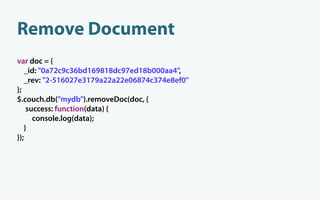
Remove Document
var doc = {
   _id: "0a72c9c36bd169818dc97ed18b000aa4",
   _rev: "2-516027e3179a22a22e06874c374e8ef0"
};
$.couch.db("mydb").removeDoc(doc, {
    success: function(data) {
      console.log(data);
   }
});
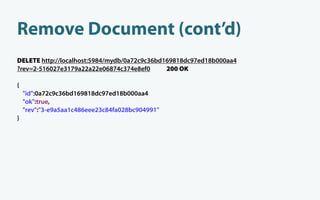
Remove Document (cont’d)
DELETE http://localhost:5984/mydb/0a72c9c36bd169818dc97ed18b000aa4
?rev=2-516027e3179a22a22e06874c374e8ef0       200 OK

{
    "id":0a72c9c36bd169818dc97ed18b000aa4
    "ok":true,
    "rev":"3-e9a5aa1c486eee23c84fa028bc904991"
}
Changes (Long Polling)
$.couch.db("mydb").changes().onChange(function(data) {
   console.log(data);
});
GET http://localhost:5984/mydb/_changes
?heartbeat=10000&feed=longpoll&since=34      200 OK
{ "results":[
     { "seq":35,
       "id":"d12ee5ea1df6baa2b06451f44a01b7b5",
       "changes":[
         { "rev":"1-967a00dff5e02add41819138abb3284d" }
       ]
     }
  ],
  "last_seq":35
}
Why CouchApps?
Bene ts
Streamlining of your codebase (no middle tier)

Same language on both the client and server (JavaScript)

Show and list functions let you generate HTML from within CouchDB, if you don’t
want to rely on JavaScript

Replication of both data and code together

Deploy/replicate an application along with its data

Goes “with the grain” of the web
“Ground Computing”
Replication lters allow you to replicate relevant data to a user

Local data means faster access to the user’s data

Offline access

Data portability

Decentralization—no need for a canonical database

Potentially gives more control to the user over his or her own data
What about the HTML5
Web Storage API?
Allows persistent storage of key/value pairs

Enjoys signi cant cross-browser support

Lacks indexed queries

No replication features

IndexedDB might help, but is not part of the HTML5 speci cation and is only
implemented in a limited number of browsers

Need to look outside the HTML5 speci cation if you need more than just a key/
value storage
Trade-Offs
Tooling could use some improvement

Terminology still unclear—CouchApp can mean many different things

Must use JavaScript for the presentation tier

Pure JavaScript applications may have SEO issues

Show and list functions must be side-effect free, which can be limiting
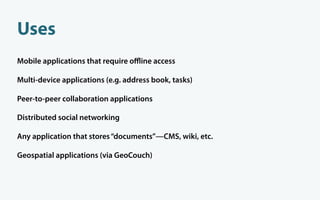
Uses
Mobile applications that require offline access

Multi-device applications (e.g. address book, tasks)

Peer-to-peer collaboration applications

Distributed social networking

Any application that stores “documents”—CMS, wiki, etc.

Geospatial applications (via GeoCouch)
}
Mustache
Logic-Less Templates
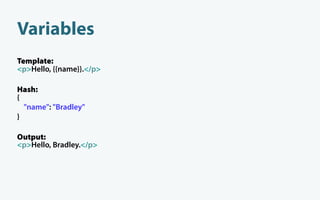
Variables
Variables
Template:
<p>Hello, {{name}}.</p>

Hash:
{
  "name": "Bradley"
}

Output:
<p>Hello, Bradley.</p>
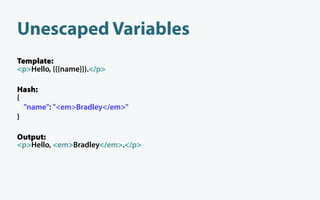
Unescaped Variables
Template:
<p>Hello, {{{name}}}.</p>

Hash:
{
  "name": "<em>Bradley</em>"
}

Output:
<p>Hello, <em>Bradley</em>.</p>
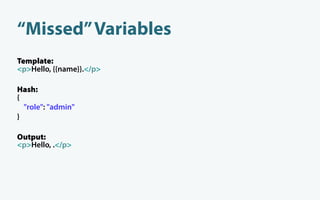
“Missed” Variables
Template:
<p>Hello, {{name}}.</p>

Hash:
{
  "role": "admin"
}

Output:
<p>Hello, .</p>
Sections
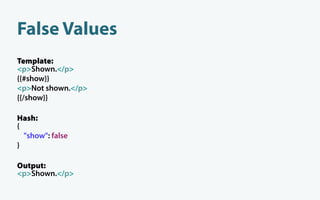
False Values
Template:
<p>Shown.</p>
{{#show}}
<p>Not shown.</p>
{{/show}}

Hash:
{
  "show": false
}

Output:
<p>Shown.</p>
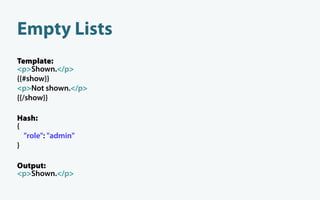
Empty Lists
Template:
<p>Shown.</p>
{{#show}}
<p>Not shown.</p>
{{/show}}

Hash:
{
  "role": "admin"
}

Output:
<p>Shown.</p>
Non-Empty Lists
Template:
{{#users}}
 <p>{{name}}</p>
{{/users}}

Hash:
{ "users": [
    { "name": "Bradley" },
    { "name": "Jason" },
  ]
}

Output:
 <p>Bradley</p>
 <p>Jason</p>
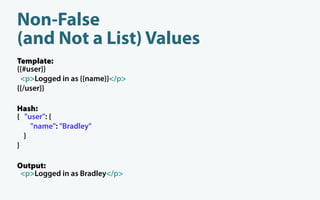
Non-False
(and Not a List) Values
Template:
{{#user}}
 <p>Logged in as {{name}}</p>
{{/user}}

Hash:
{ "user": {
    "name": "Bradley"
  }
}

Output:
 <p>Logged in as Bradley</p>
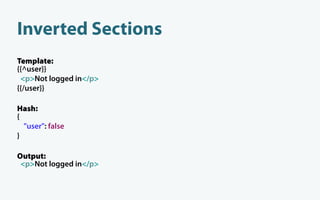
Inverted Sections
Template:
{{^user}}
 <p>Not logged in</p>
{{/user}}

Hash:
{
  "user": false
}

Output:
 <p>Not logged in</p>
Evently
Evently is a jQuery plugin for
writing event-based applications
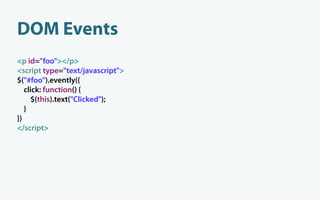
DOM Events
<p id="foo"></p>
<script type="text/javascript">
$("#foo").evently({
   click: function() {
     $(this).text("Clicked");
   }
})
</script>
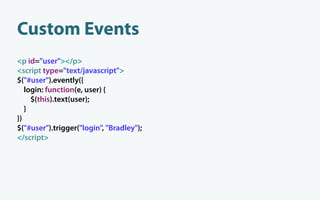
Custom Events
<p id="user"></p>
<script type="text/javascript">
$("#user").evently({
   login: function(e, user) {
     $(this).text(user);
   }
})
$("#user").trigger("login", "Bradley");
</script>
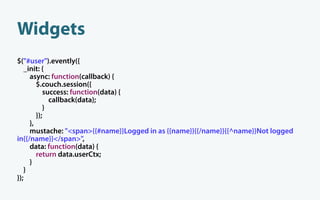
Widgets
$("#user").evently({
   _init: {
     async: function(callback) {
        $.couch.session({
           success: function(data) {
             callback(data);
           }
        });
     },
     mustache: "<span>{{#name}}Logged in as {{name}}{{/name}}{{^name}}Not logged
in{{/name}}</span>",
     data: function(data) {
        return data.userCtx;
     }
   }
});
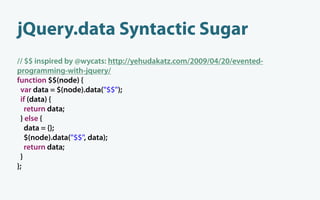
jQuery.data Syntactic Sugar
// $$ inspired by @wycats: http://yehudakatz.com/2009/04/20/evented-
programming-with-jquery/
function $$(node) {
 var data = $(node).data("$$");
 if (data) {
   return data;
 } else {
   data = {};
   $(node).data("$$", data);
   return data;
 }
};
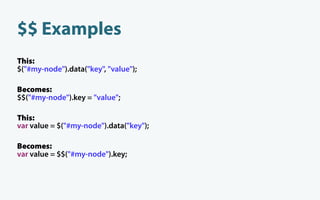
$$ Examples
This:
$("#my-node").data("key", "value");

Becomes:
$$("#my-node").key = "value";

This:
var value = $("#my-node").data("key");

Becomes:
var value = $$("#my-node").key;
Design Documents
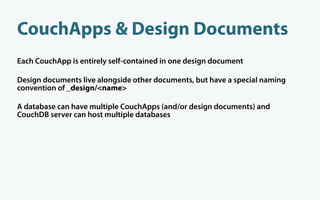
CouchApps & Design Documents
Each CouchApp is entirely self-contained in one design document

Design documents live alongside other documents, but have a special naming
convention of _design/<name>

A database can have multiple CouchApps (and/or design documents) and
CouchDB server can host multiple databases
What’s in a design document?
Can contain:
  • View de nitions
    • Map functions
    • Reduce functions
  • Show functions
  • List functions
  • Document update handlers
  • Document update validation functions
  • Rewrite de nitions
  • Any other elds you want, just like with any other document
  • Attachments, just like with any other document
ID follows the form of:
_design/<design_name>
Exploring Pages,
a CouchApp Wiki
Page Comments, JavaScript
views/recent-comments/map.js
function(doc) {
 if (doc.type == "comment") {
   emit([doc.topic, doc.at], doc);
 }
};
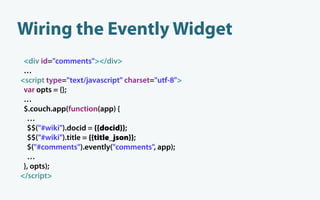
Wiring the Evently Widget
 <div id="comments"></div>
 …
<script type="text/javascript" charset="utf-8">
 var opts = {};
 …
 $.couch.app(function(app) {
  …
  $$("#wiki").docid = {{docid}};
  $$("#wiki").title = {{title_json}};
  $("#comments").evently("comments", app);
  …
 }, opts);
</script>
evently/comments/_init/query.js
function() {
 var docid = $$("#wiki").docid;
 return {
   view : "recent-comments",
   endkey : [docid, {}],
   startkey : [docid]
 };
};
evently/comments/_init/data.js
function(view) {
 var docid = $$("#wiki").docid,
   linkup = $$("#wiki").app.require("vendor/couchapp/lib/linkup");
 return {
   topic : docid,
   title : $$("#wiki").title,
   comments : view.rows.map(function(r) {
     var by = r.value.by || {};
     return {
       gravatar_url : by.gravatar_url,
       by : by.nickname,
       at : r.key[1],
       comment : linkup.encode(r.value.comment) // move to view
     }
   })
 }
};
evently/comments/_init/
mustache.html
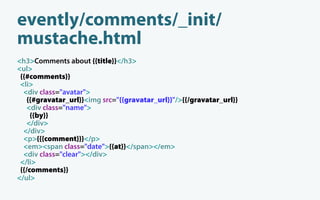
<h3>Comments about {{title}}</h3>
<ul>
 {{#comments}}
 <li>
  <div class="avatar">
    {{#gravatar_url}}<img src="{{gravatar_url}}"/>{{/gravatar_url}}
    <div class="name">
     {{by}}
    </div>
  </div>
  <p>{{{comment}}}</p>
  <em><span class="date">{{at}}</span></em>
  <div class="clear"></div>
 </li>
 {{/comments}}
</ul>
evently/comments/_init/
mustache.html (cont’d)
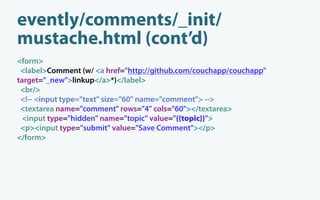
<form>
 <label>Comment (w/ <a href="http://github.com/couchapp/couchapp"
target="_new">linkup</a>*)</label>
 <br/>
 <!-- <input type="text" size="60" name="comment"> -->
 <textarea name="comment" rows="4" cols="60"></textarea>
  <input type="hidden" name="topic" value="{{topic}}">
 <p><input type="submit" value="Save Comment"></p>
</form>
evently/comments/_init/after.js
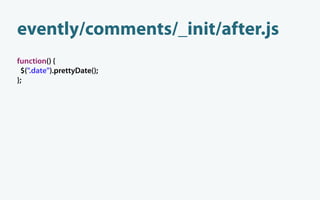
function() {
 $(".date").prettyDate();
};
evently/comments/_init/selectors/
form/submit.js
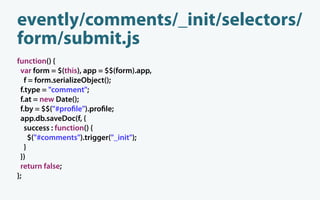
function() {
 var form = $(this), app = $$(form).app,
   f = form.serializeObject();
 f.type = "comment";
 f.at = new Date();
 f.by = $$("#pro le").pro le;
 app.db.saveDoc(f, {
   success : function() {
     $("#comments").trigger("_init");
   }
 })
 return false;
};
All Comments, HTML
rewrites.json
[
    …
    {
       "from" : "/pages/comments",
       "to" : "_list/comments/all-comments",
       "query" : {
         "descending" : true,
         "limit" : 20
       }
    },
    …
]
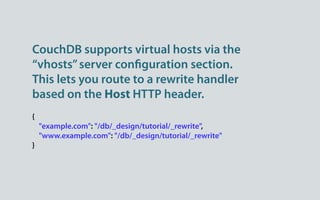
CouchDB supports virtual hosts via the
“vhosts” server con guration section.
This lets you route to a rewrite handler
based on the Host HTTP header.
{
    "example.com": "/db/_design/tutorial/_rewrite",
    "www.example.com": "/db/_design/tutorial/_rewrite"
}
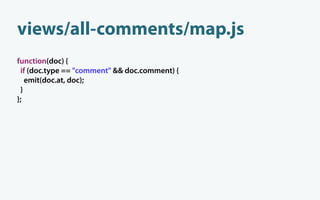
views/all-comments/map.js
function(doc) {
 if (doc.type == "comment" && doc.comment) {
   emit(doc.at, doc);
 }
};
lists/comments.js
function() {
 var row, ddoc = this,
   mustache = require("vendor/couchapp/lib/mustache"),
   markdown = require("vendor/couchapp/lib/markdown"),
   data = {
     title : "All Comments",
     site_title : this.couchapp.name,
     path : "/pages/comments",
     comments : []
   };
 provides("html", function() {
   while (row = getRow()) {
     log(row);
     data.comments.push(row.value)
   }
   send(mustache.to_html(ddoc.templates.comments, data, ddoc.templates.partials));
 });
};
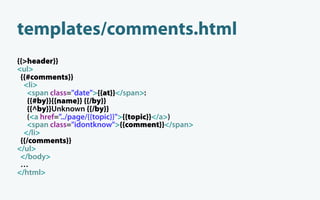
templates/comments.html
{{>header}}
<ul>
 {{#comments}}
  <li>
    <span class="date">{{at}}</span>:
    {{#by}}{{name}} {{/by}}
   {{^by}}Unknown {{/by}}
    (<a href="../page/{{topic}}">{{topic}}</a>)
    <span class="idontknow">{{comment}}</span>
  </li>
 {{/comments}}
</ul>
 </body>
 …
</html>
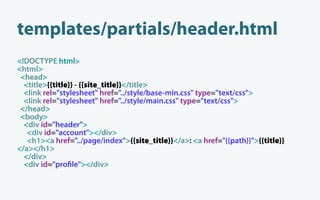
templates/partials/header.html
<!DOCTYPE html>
<html>
 <head>
  <title>{{title}} - {{site_title}}</title>
  <link rel="stylesheet" href="../style/base-min.css" type="text/css">
  <link rel="stylesheet" href="../style/main.css" type="text/css">
 </head>
 <body>
  <div id="header">
   <div id="account"></div>
   <h1><a href="../page/index">{{site_title}}</a>: <a href="{{path}}">{{title}}
</a></h1>
  </div>
  <div id="pro le"></div>
Security
validate_doc_update.js
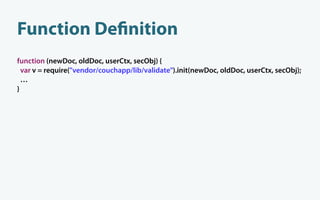
Function De nition
function (newDoc, oldDoc, userCtx, secObj) {
  var v = require("vendor/couchapp/lib/validate").init(newDoc, oldDoc, userCtx, secObj);
  …
}
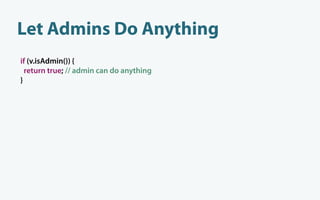
Let Admins Do Anything
if (v.isAdmin()) {
  return true; // admin can do anything
}
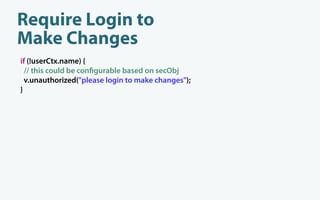
Require Login to
Make Changes
if (!userCtx.name) {
  // this could be con gurable based on secObj
  v.unauthorized("please login to make changes");
}
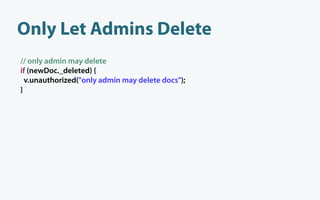
Only Let Admins Delete
// only admin may delete
if (newDoc._deleted) {
  v.unauthorized("only admin may delete docs");
}
A special _security database property
lets you de ned database admins and
database readers
CouchApp Tool (Python)
CouchApps can be built without
CouchApp tooling—but the tooling
makes things much easier.
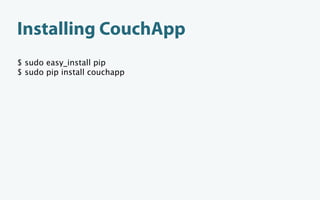
Installing CouchApp
$ sudo easy_install pip
$ sudo pip install couchapp
CouchApp Tooling Basics
Generate a CouchApp
$ couchapp generate tutorial
2011-06-15 16:25:18 [INFO] /tutorial generated.

$ cd tutorial
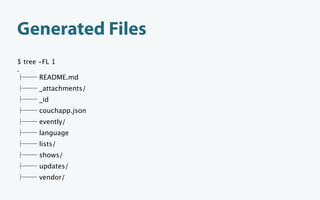
Generated Files
$ tree -FL 1
.
       README.md
     _attachments/
     _id
     couchapp.json
     evently/
     language
     lists/
     shows/
     updates/
     vendor/
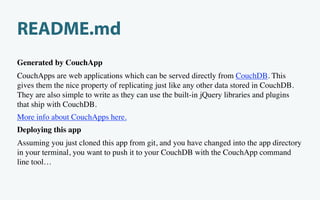
README.md
Generated by CouchApp
CouchApps are web applications which can be served directly from CouchDB. This
gives them the nice property of replicating just like any other data stored in CouchDB.
They are also simple to write as they can use the built-in jQuery libraries and plugins
that ship with CouchDB.
More info about CouchApps here.
Deploying this app
Assuming you just cloned this app from git, and you have changed into the app directory
in your terminal, you want to push it to your CouchDB with the CouchApp command
line tool…
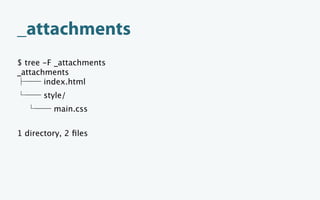
_attachments
$ tree -F _attachments
_attachments
       index.html
       style/
         main.css


1 directory, 2 files
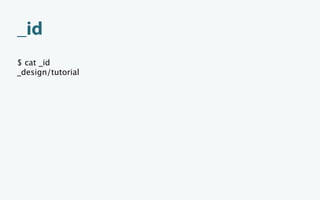
_id
$ cat _id
_design/tutorial
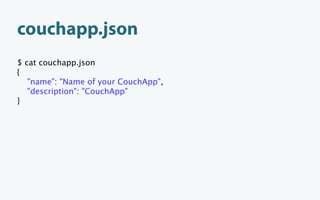
couchapp.json
$ cat couchapp.json
{
   "name": "Name of your CouchApp",
   "description": "CouchApp"
}
evently
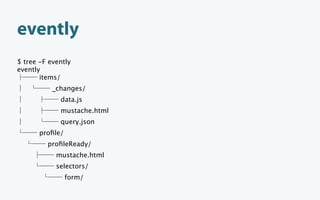
$ tree -F evently
evently
       items/
           _changes/
             data.js
             mustache.html
             query.json
       profile/
         profileReady/
            mustache.html
            selectors/
                 form/
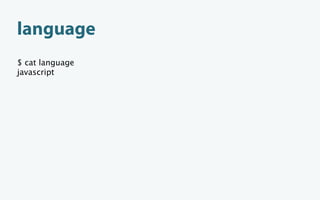
language
$ cat language
javascript
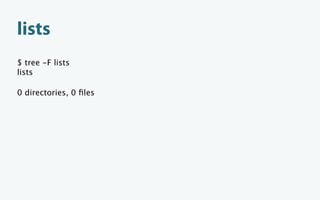
lists
$ tree -F lists
lists

0 directories, 0 files
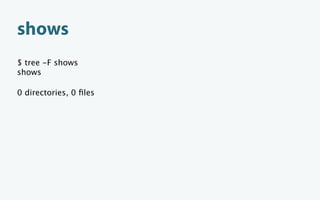
shows
$ tree -F shows
shows

0 directories, 0 files
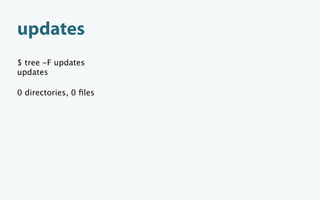
updates
$ tree -F updates
updates

0 directories, 0 files
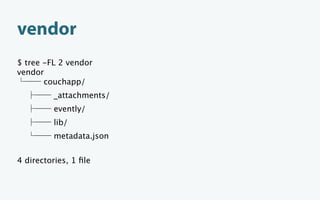
vendor
$ tree -FL 2 vendor
vendor
       couchapp/
         _attachments/
         evently/
         lib/
         metadata.json


4 directories, 1 file
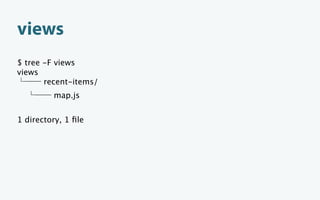
views
$ tree -F views
views
       recent-items/
         map.js


1 directory, 1 file
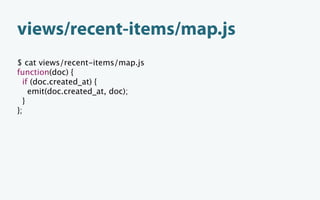
views/recent-items/map.js
$ cat views/recent-items/map.js
function(doc) {
  if (doc.created_at) {
    emit(doc.created_at, doc);
  }
};
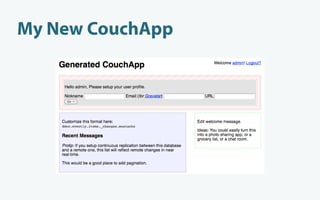
Deploying a CouchApp
Deploy to Localhost
$ couchapp push tutorial
2011-06-16 11:16:05 [INFO] Visit your CouchApp here:
http://127.0.0.1:5984/tutorial/_design/tutorial/index.html
My New CouchApp
Pathbinder
Pathbinder is a jQuery plugin for triggering
events based on the path components of a
URL hash.
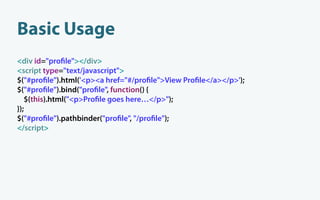
Basic Usage
<div id="pro le"></div>
<script type="text/javascript">
$("#pro le").html('<p><a href="#/pro le">View Pro le</a></p>');
$("#pro le").bind("pro le", function() {
   $(this).html("<p>Pro le goes here…</p>");
});
$("#pro le").pathbinder("pro le", "/pro le");
</script>
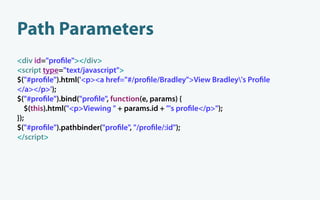
Path Parameters
<div id="pro le"></div>
<script type="text/javascript">
$("#pro le").html('<p><a href="#/pro le/Bradley">View Bradley's Pro le
</a></p>');
$("#pro le").bind("pro le", function(e, params) {
   $(this).html("<p>Viewing " + params.id + "'s pro le</p>");
});
$("#pro le").pathbinder("pro le", "/pro le/:id");
</script>
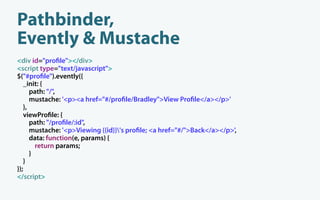
Pathbinder,
Evently & Mustache
<div id="pro le"></div>
<script type="text/javascript">
$("#pro le").evently({
   _init: {
      path: "/",
      mustache: '<p><a href="#/pro le/Bradley">View Pro le</a></p>'
   },
   viewPro le: {
      path: "/pro le/:id",
      mustache: '<p>Viewing {{id}}'s pro le; <a href="#/">Back</a></p>',
      data: function(e, params) {
        return params;
      }
   }
});
</script>
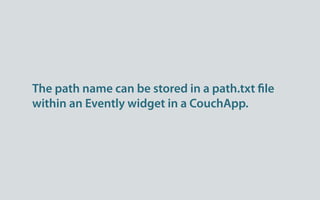
The path name can be stored in a path.txt le
within an Evently widget in a CouchApp.
Alternative CouchApp Tools
node.couchapp.js
Command-line tool, written for Node.js

Simpler folder structure

Not compatible with the Python version

Links:
  • https://github.com/mikeal/node.couchapp.js
  • http://japhr.blogspot.com/2010/04/quick-intro-to-nodecouchappjs.html
  • http://vimeo.com/26147136
Kanso Framework
Also built using Node.js

http://kansojs.org/
soca
“Sammy On Couch App” or “Sittin’ on a Couch App”

Command-line tool written in Ruby

Uses Sammy.js

https://github.com/quirkey/soca
Reupholster
A simple way to get started developing CouchApps

http://reupholster.iriscouch.com/reupholster/_design/app/index.html
See the CouchApp wiki for a list of CouchApps
Hosting is available through Iris Couch
or Cloudant.
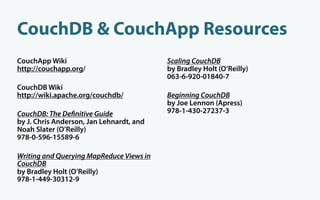
CouchDB & CouchApp Resources
CouchApp Wiki                             Scaling CouchDB
http://couchapp.org/                      by Bradley Holt (O’Reilly)
                                          063-6-920-01840-7
CouchDB Wiki
http://wiki.apache.org/couchdb/           Beginning CouchDB
                                          by Joe Lennon (Apress)
CouchDB: The De nitive Guide              978-1-430-27237-3
by J. Chris Anderson, Jan Lehnardt, and
Noah Slater (O’Reilly)
978-0-596-15589-6

Writing and Querying MapReduce Views in
CouchDB
by Bradley Holt (O’Reilly)
978-1-449-30312-9
Questions?
Thank You
                              Blog: http://bradley-holt.com
                       @BradleyHolt (http://twitter.com/BradleyHolt)
                               bradley.holt@foundline.com


Copyright © 2011 Bradley Holt. All rights reserved.

OSCON 2011 CouchApps

  • 1.
    + = CouchApps Blog: http://bradley-holt.com @BradleyHolt (http://twitter.com/BradleyHolt) bradley.holt@foundline.com
  • 2.
  • 3.
  • 4.
    from Vermont Battery Park - Burlington, Vermont by Marty Desilets, on Flickr
  • 5.
  • 6.
  • 7.
    Author http://oreilly.com/catalog/9781449303129/ http://oreilly.com/catalog/9781449303433/
  • 8.
  • 9.
    CouchDB is adatabase, web server & application server
  • 10.
    Bene ts Schema-less “self-contained”JSON documents—no tables, just documents RESTful HTTP API is simple to integrate with Custom-written MapReduce “views” index your data for fast retrieval Multi-master replication can happen continuously, in any direction, and/or whenever nodes can connect Can run on anything from a server to a mobile device (CouchDB can be embedded in Android and iOS apps)
  • 11.
    Trade-Offs No ad-hoc queries(you can use temporary views, but they’re slow on large data sets) Thinking in terms of MapReduce views can take some time to get used to No transactions across document boundaries Your data will be “eventually consistent” and con icts can occur (but can be resolved)
  • 12.
  • 13.
    Mapping Document Titles function(doc){ // JSON object representing a doc to be mapped if (doc.title) { // make sure this doc has a title emit(doc.title); // emit the doc’s title as the key } }
  • 14.
    Mapped Document Titles key id value "Building iPhone Apps with "978-0-596-80579-1" null HTML, CSS, and JavaScript" "CouchDB: The Definitive "978-0-596-15589-6" null Guide" "DocBook: The Definitive "978-1-565-92580-9" null Guide" "RESTful Web Services" "978-0-596-52926-0" null
  • 15.
    Mapping Document Authors function(doc){ // JSON object representing a doc to be mapped if (doc.authors) { // make sure this doc has an authors eld for (var i in doc.authors) { emit(doc.authors[i]); // emit each author as the key } } }
  • 16.
    Mapped Authors key id value "J. Chris Anderson" "978-0-596-15589-6" null "Jan Lehnardt" "978-0-596-15589-6" null "Jonathan Stark" "978-0-596-80579-1" null "Leonard Muellner" "978-1-565-92580-9" null "Leonard Richardson" "978-0-596-52926-0" null "Noah Slater" "978-0-596-15589-6" null "Norman Walsh" "978-1-565-92580-9" null "Sam Ruby" "978-0-596-52926-0" null
  • 17.
    HTTP API via theCouchDB jQuery Plugin http://localhost:5984/_utils/script/jquery.couch.js
  • 18.
    The same-origin policydictates that your HTML and AJAX data (JSON) must be retrieved from the same origin.
  • 19.
    Create Database $.couch.db("mydb").create({ success: function(data) { console.log(data); } }); PUT http://localhost:5984/mydb 201 Created {"ok":true}
  • 20.
    Save New Document $.couch.db("mydb").saveDoc({},{ success: function(data) { console.log(data); } }); POST http://localhost:5984/mydb 201 Created { "ok":true, "id":"e15d848571c8a0352e94738ba6018790", "rev":"1-967a00dff5e02add41819138abb3284d" }
  • 21.
    Save Updated Document vardoc = { _id: "0a72c9c36bd169818dc97ed18b000aa4", _rev: "1-967a00dff5e02add41819138abb3284d", title: "CouchApps" }; $.couch.db("mydb").saveDoc(doc, { success: function(data) { console.log(data); } });
  • 22.
    Save Updated Document(cont’d) PUT http://localhost:5984/mydb/0a72c9c36bd169818dc97ed18b000aa4 201 Created { "ok":true, "id":"0a72c9c36bd169818dc97ed18b000aa4", "rev":"2-516027e3179a22a22e06874c374e8ef0" }
  • 23.
    Remove Document var doc= { _id: "0a72c9c36bd169818dc97ed18b000aa4", _rev: "2-516027e3179a22a22e06874c374e8ef0" }; $.couch.db("mydb").removeDoc(doc, { success: function(data) { console.log(data); } });
  • 24.
    Remove Document (cont’d) DELETEhttp://localhost:5984/mydb/0a72c9c36bd169818dc97ed18b000aa4 ?rev=2-516027e3179a22a22e06874c374e8ef0 200 OK { "id":0a72c9c36bd169818dc97ed18b000aa4 "ok":true, "rev":"3-e9a5aa1c486eee23c84fa028bc904991" }
  • 25.
    Changes (Long Polling) $.couch.db("mydb").changes().onChange(function(data){ console.log(data); }); GET http://localhost:5984/mydb/_changes ?heartbeat=10000&feed=longpoll&since=34 200 OK { "results":[ { "seq":35, "id":"d12ee5ea1df6baa2b06451f44a01b7b5", "changes":[ { "rev":"1-967a00dff5e02add41819138abb3284d" } ] } ], "last_seq":35 }
  • 26.
  • 27.
    Bene ts Streamlining ofyour codebase (no middle tier) Same language on both the client and server (JavaScript) Show and list functions let you generate HTML from within CouchDB, if you don’t want to rely on JavaScript Replication of both data and code together Deploy/replicate an application along with its data Goes “with the grain” of the web
  • 28.
    “Ground Computing” Replication ltersallow you to replicate relevant data to a user Local data means faster access to the user’s data Offline access Data portability Decentralization—no need for a canonical database Potentially gives more control to the user over his or her own data
  • 29.
    What about theHTML5 Web Storage API? Allows persistent storage of key/value pairs Enjoys signi cant cross-browser support Lacks indexed queries No replication features IndexedDB might help, but is not part of the HTML5 speci cation and is only implemented in a limited number of browsers Need to look outside the HTML5 speci cation if you need more than just a key/ value storage
  • 30.
    Trade-Offs Tooling could usesome improvement Terminology still unclear—CouchApp can mean many different things Must use JavaScript for the presentation tier Pure JavaScript applications may have SEO issues Show and list functions must be side-effect free, which can be limiting
  • 31.
    Uses Mobile applications thatrequire offline access Multi-device applications (e.g. address book, tasks) Peer-to-peer collaboration applications Distributed social networking Any application that stores “documents”—CMS, wiki, etc. Geospatial applications (via GeoCouch)
  • 32.
  • 33.
  • 34.
    Variables Template: <p>Hello, {{name}}.</p> Hash: { "name": "Bradley" } Output: <p>Hello, Bradley.</p>
  • 35.
    Unescaped Variables Template: <p>Hello, {{{name}}}.</p> Hash: { "name": "<em>Bradley</em>" } Output: <p>Hello, <em>Bradley</em>.</p>
  • 36.
  • 37.
  • 38.
  • 39.
  • 40.
    Non-Empty Lists Template: {{#users}} <p>{{name}}</p> {{/users}} Hash: {"users": [ { "name": "Bradley" }, { "name": "Jason" }, ] } Output: <p>Bradley</p> <p>Jason</p>
  • 41.
    Non-False (and Not aList) Values Template: {{#user}} <p>Logged in as {{name}}</p> {{/user}} Hash: { "user": { "name": "Bradley" } } Output: <p>Logged in as Bradley</p>
  • 42.
    Inverted Sections Template: {{^user}} <p>Notlogged in</p> {{/user}} Hash: { "user": false } Output: <p>Not logged in</p>
  • 43.
  • 44.
    Evently is ajQuery plugin for writing event-based applications
  • 45.
    DOM Events <p id="foo"></p> <scripttype="text/javascript"> $("#foo").evently({ click: function() { $(this).text("Clicked"); } }) </script>
  • 46.
    Custom Events <p id="user"></p> <scripttype="text/javascript"> $("#user").evently({ login: function(e, user) { $(this).text(user); } }) $("#user").trigger("login", "Bradley"); </script>
  • 47.
    Widgets $("#user").evently({ _init: { async: function(callback) { $.couch.session({ success: function(data) { callback(data); } }); }, mustache: "<span>{{#name}}Logged in as {{name}}{{/name}}{{^name}}Not logged in{{/name}}</span>", data: function(data) { return data.userCtx; } } });
  • 48.
    jQuery.data Syntactic Sugar //$$ inspired by @wycats: http://yehudakatz.com/2009/04/20/evented- programming-with-jquery/ function $$(node) { var data = $(node).data("$$"); if (data) { return data; } else { data = {}; $(node).data("$$", data); return data; } };
  • 49.
    $$ Examples This: $("#my-node").data("key", "value"); Becomes: $$("#my-node").key= "value"; This: var value = $("#my-node").data("key"); Becomes: var value = $$("#my-node").key;
  • 50.
  • 51.
    CouchApps & DesignDocuments Each CouchApp is entirely self-contained in one design document Design documents live alongside other documents, but have a special naming convention of _design/<name> A database can have multiple CouchApps (and/or design documents) and CouchDB server can host multiple databases
  • 52.
    What’s in adesign document? Can contain: • View de nitions • Map functions • Reduce functions • Show functions • List functions • Document update handlers • Document update validation functions • Rewrite de nitions • Any other elds you want, just like with any other document • Attachments, just like with any other document ID follows the form of: _design/<design_name>
  • 53.
  • 54.
  • 55.
    views/recent-comments/map.js function(doc) { if(doc.type == "comment") { emit([doc.topic, doc.at], doc); } };
  • 56.
    Wiring the EventlyWidget <div id="comments"></div> … <script type="text/javascript" charset="utf-8"> var opts = {}; … $.couch.app(function(app) { … $$("#wiki").docid = {{docid}}; $$("#wiki").title = {{title_json}}; $("#comments").evently("comments", app); … }, opts); </script>
  • 57.
    evently/comments/_init/query.js function() { vardocid = $$("#wiki").docid; return { view : "recent-comments", endkey : [docid, {}], startkey : [docid] }; };
  • 58.
    evently/comments/_init/data.js function(view) { vardocid = $$("#wiki").docid, linkup = $$("#wiki").app.require("vendor/couchapp/lib/linkup"); return { topic : docid, title : $$("#wiki").title, comments : view.rows.map(function(r) { var by = r.value.by || {}; return { gravatar_url : by.gravatar_url, by : by.nickname, at : r.key[1], comment : linkup.encode(r.value.comment) // move to view } }) } };
  • 59.
    evently/comments/_init/ mustache.html <h3>Comments about {{title}}</h3> <ul> {{#comments}} <li> <div class="avatar"> {{#gravatar_url}}<img src="{{gravatar_url}}"/>{{/gravatar_url}} <div class="name"> {{by}} </div> </div> <p>{{{comment}}}</p> <em><span class="date">{{at}}</span></em> <div class="clear"></div> </li> {{/comments}} </ul>
  • 60.
    evently/comments/_init/ mustache.html (cont’d) <form> <label>Comment(w/ <a href="http://github.com/couchapp/couchapp" target="_new">linkup</a>*)</label> <br/> <!-- <input type="text" size="60" name="comment"> --> <textarea name="comment" rows="4" cols="60"></textarea> <input type="hidden" name="topic" value="{{topic}}"> <p><input type="submit" value="Save Comment"></p> </form>
  • 61.
  • 62.
    evently/comments/_init/selectors/ form/submit.js function() { varform = $(this), app = $$(form).app, f = form.serializeObject(); f.type = "comment"; f.at = new Date(); f.by = $$("#pro le").pro le; app.db.saveDoc(f, { success : function() { $("#comments").trigger("_init"); } }) return false; };
  • 63.
  • 64.
    rewrites.json [ … { "from" : "/pages/comments", "to" : "_list/comments/all-comments", "query" : { "descending" : true, "limit" : 20 } }, … ]
  • 65.
    CouchDB supports virtualhosts via the “vhosts” server con guration section. This lets you route to a rewrite handler based on the Host HTTP header. { "example.com": "/db/_design/tutorial/_rewrite", "www.example.com": "/db/_design/tutorial/_rewrite" }
  • 66.
    views/all-comments/map.js function(doc) { if(doc.type == "comment" && doc.comment) { emit(doc.at, doc); } };
  • 67.
    lists/comments.js function() { varrow, ddoc = this, mustache = require("vendor/couchapp/lib/mustache"), markdown = require("vendor/couchapp/lib/markdown"), data = { title : "All Comments", site_title : this.couchapp.name, path : "/pages/comments", comments : [] }; provides("html", function() { while (row = getRow()) { log(row); data.comments.push(row.value) } send(mustache.to_html(ddoc.templates.comments, data, ddoc.templates.partials)); }); };
  • 68.
    templates/comments.html {{>header}} <ul> {{#comments}} <li> <span class="date">{{at}}</span>: {{#by}}{{name}} {{/by}} {{^by}}Unknown {{/by}} (<a href="../page/{{topic}}">{{topic}}</a>) <span class="idontknow">{{comment}}</span> </li> {{/comments}} </ul> </body> … </html>
  • 69.
    templates/partials/header.html <!DOCTYPE html> <html> <head> <title>{{title}} - {{site_title}}</title> <link rel="stylesheet" href="../style/base-min.css" type="text/css"> <link rel="stylesheet" href="../style/main.css" type="text/css"> </head> <body> <div id="header"> <div id="account"></div> <h1><a href="../page/index">{{site_title}}</a>: <a href="{{path}}">{{title}} </a></h1> </div> <div id="pro le"></div>
  • 70.
  • 71.
    Function De nition function(newDoc, oldDoc, userCtx, secObj) { var v = require("vendor/couchapp/lib/validate").init(newDoc, oldDoc, userCtx, secObj); … }
  • 72.
    Let Admins DoAnything if (v.isAdmin()) { return true; // admin can do anything }
  • 73.
    Require Login to MakeChanges if (!userCtx.name) { // this could be con gurable based on secObj v.unauthorized("please login to make changes"); }
  • 74.
    Only Let AdminsDelete // only admin may delete if (newDoc._deleted) { v.unauthorized("only admin may delete docs"); }
  • 75.
    A special _securitydatabase property lets you de ned database admins and database readers
  • 76.
  • 77.
    CouchApps can bebuilt without CouchApp tooling—but the tooling makes things much easier.
  • 78.
    Installing CouchApp $ sudoeasy_install pip $ sudo pip install couchapp
  • 79.
  • 80.
    Generate a CouchApp $couchapp generate tutorial 2011-06-15 16:25:18 [INFO] /tutorial generated. $ cd tutorial
  • 81.
    Generated Files $ tree-FL 1 . README.md _attachments/ _id couchapp.json evently/ language lists/ shows/ updates/ vendor/
  • 82.
    README.md Generated by CouchApp CouchAppsare web applications which can be served directly from CouchDB. This gives them the nice property of replicating just like any other data stored in CouchDB. They are also simple to write as they can use the built-in jQuery libraries and plugins that ship with CouchDB. More info about CouchApps here. Deploying this app Assuming you just cloned this app from git, and you have changed into the app directory in your terminal, you want to push it to your CouchDB with the CouchApp command line tool…
  • 83.
    _attachments $ tree -F_attachments _attachments index.html style/ main.css 1 directory, 2 files
  • 84.
  • 85.
    couchapp.json $ cat couchapp.json { "name": "Name of your CouchApp", "description": "CouchApp" }
  • 86.
    evently $ tree -Fevently evently items/    _changes/    data.js    mustache.html    query.json profile/ profileReady/ mustache.html selectors/ form/
  • 87.
  • 88.
    lists $ tree -Flists lists 0 directories, 0 files
  • 89.
    shows $ tree -Fshows shows 0 directories, 0 files
  • 90.
    updates $ tree -Fupdates updates 0 directories, 0 files
  • 91.
    vendor $ tree -FL2 vendor vendor couchapp/ _attachments/ evently/ lib/ metadata.json 4 directories, 1 file
  • 92.
    views $ tree -Fviews views recent-items/ map.js 1 directory, 1 file
  • 93.
    views/recent-items/map.js $ cat views/recent-items/map.js function(doc){ if (doc.created_at) { emit(doc.created_at, doc); } };
  • 94.
  • 95.
    Deploy to Localhost $couchapp push tutorial 2011-06-16 11:16:05 [INFO] Visit your CouchApp here: http://127.0.0.1:5984/tutorial/_design/tutorial/index.html
  • 96.
  • 97.
  • 98.
    Pathbinder is ajQuery plugin for triggering events based on the path components of a URL hash.
  • 99.
    Basic Usage <div id="prole"></div> <script type="text/javascript"> $("#pro le").html('<p><a href="#/pro le">View Pro le</a></p>'); $("#pro le").bind("pro le", function() { $(this).html("<p>Pro le goes here…</p>"); }); $("#pro le").pathbinder("pro le", "/pro le"); </script>
  • 100.
    Path Parameters <div id="prole"></div> <script type="text/javascript"> $("#pro le").html('<p><a href="#/pro le/Bradley">View Bradley's Pro le </a></p>'); $("#pro le").bind("pro le", function(e, params) { $(this).html("<p>Viewing " + params.id + "'s pro le</p>"); }); $("#pro le").pathbinder("pro le", "/pro le/:id"); </script>
  • 101.
    Pathbinder, Evently & Mustache <divid="pro le"></div> <script type="text/javascript"> $("#pro le").evently({ _init: { path: "/", mustache: '<p><a href="#/pro le/Bradley">View Pro le</a></p>' }, viewPro le: { path: "/pro le/:id", mustache: '<p>Viewing {{id}}'s pro le; <a href="#/">Back</a></p>', data: function(e, params) { return params; } } }); </script>
  • 102.
    The path namecan be stored in a path.txt le within an Evently widget in a CouchApp.
  • 103.
  • 104.
    node.couchapp.js Command-line tool, writtenfor Node.js Simpler folder structure Not compatible with the Python version Links: • https://github.com/mikeal/node.couchapp.js • http://japhr.blogspot.com/2010/04/quick-intro-to-nodecouchappjs.html • http://vimeo.com/26147136
  • 105.
    Kanso Framework Also builtusing Node.js http://kansojs.org/
  • 106.
    soca “Sammy On CouchApp” or “Sittin’ on a Couch App” Command-line tool written in Ruby Uses Sammy.js https://github.com/quirkey/soca
  • 107.
    Reupholster A simple wayto get started developing CouchApps http://reupholster.iriscouch.com/reupholster/_design/app/index.html
  • 108.
    See the CouchAppwiki for a list of CouchApps
  • 109.
    Hosting is availablethrough Iris Couch or Cloudant.
  • 110.
    CouchDB & CouchAppResources CouchApp Wiki Scaling CouchDB http://couchapp.org/ by Bradley Holt (O’Reilly) 063-6-920-01840-7 CouchDB Wiki http://wiki.apache.org/couchdb/ Beginning CouchDB by Joe Lennon (Apress) CouchDB: The De nitive Guide 978-1-430-27237-3 by J. Chris Anderson, Jan Lehnardt, and Noah Slater (O’Reilly) 978-0-596-15589-6 Writing and Querying MapReduce Views in CouchDB by Bradley Holt (O’Reilly) 978-1-449-30312-9
  • 111.
  • 112.
    Thank You Blog: http://bradley-holt.com @BradleyHolt (http://twitter.com/BradleyHolt) bradley.holt@foundline.com Copyright © 2011 Bradley Holt. All rights reserved.

Editor's Notes