Working With Record Groups
http://ebiztechnics.blogspot.com
Objectives
• Describe the record group object
• Use record groups
• Define record groups at design time
• Control record groups by using built-in functions
• Define query record groups programmatically
• Define nonquery record groups programmatically
• Manipulate record group rows
• Define lists of values (LOVs) programmatically
• Manipulate list items programmatically
• Implement dynamic list items
• Add values to combo boxes
http://ebiztechnics.blogspot.com
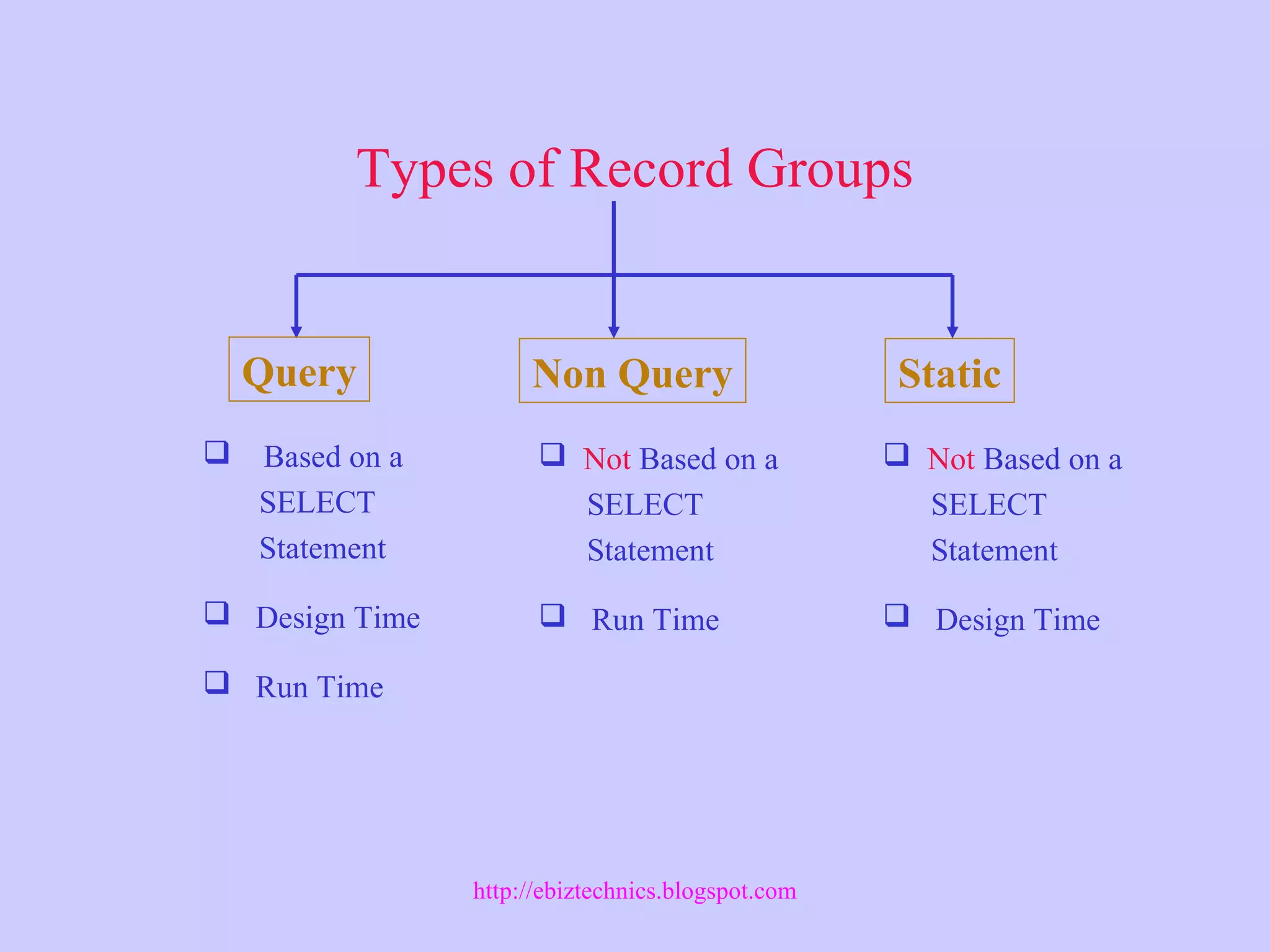
Types of Record Groups
Query Non Query Static
 Based on a
SELECT
Statement
 Design Time
 Run Time
 Not Based on a
SELECT
Statement
 Run Time
 Not Based on a
SELECT
Statement
 Design Time
http://ebiztechnics.blogspot.com
Record Groups and LOVs
Record groups and LOVs
• Forms implicitly creates query record groups.
• Use SET_LOV_PROPERTY to replace
default record group.
...
IF Get_LOV_Property(lov_id,GROUP_NAME) ='GROUP1'
THEN
Set_LOV_Property(lov_id,GROUP_NAME,'GROUP2');
END IF;
...
http://ebiztechnics.blogspot.com
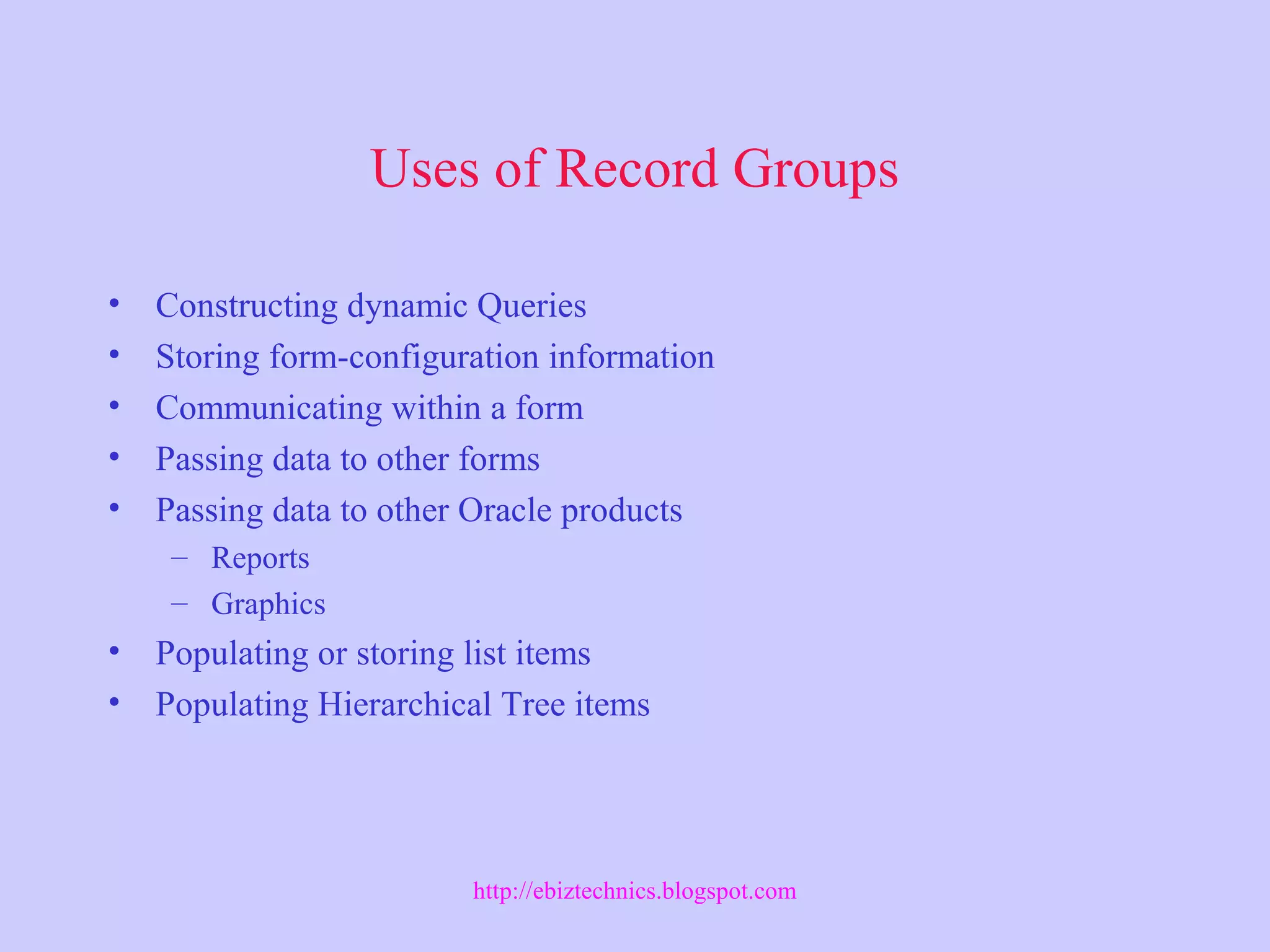
Uses of Record Groups
• Constructing dynamic Queries
• Storing form-configuration information
• Communicating within a form
• Passing data to other forms
• Passing data to other Oracle products
– Reports
– Graphics
• Populating or storing list items
• Populating Hierarchical Tree items
http://ebiztechnics.blogspot.com
Defining Record Groups at Design Time
http://ebiztechnics.blogspot.com
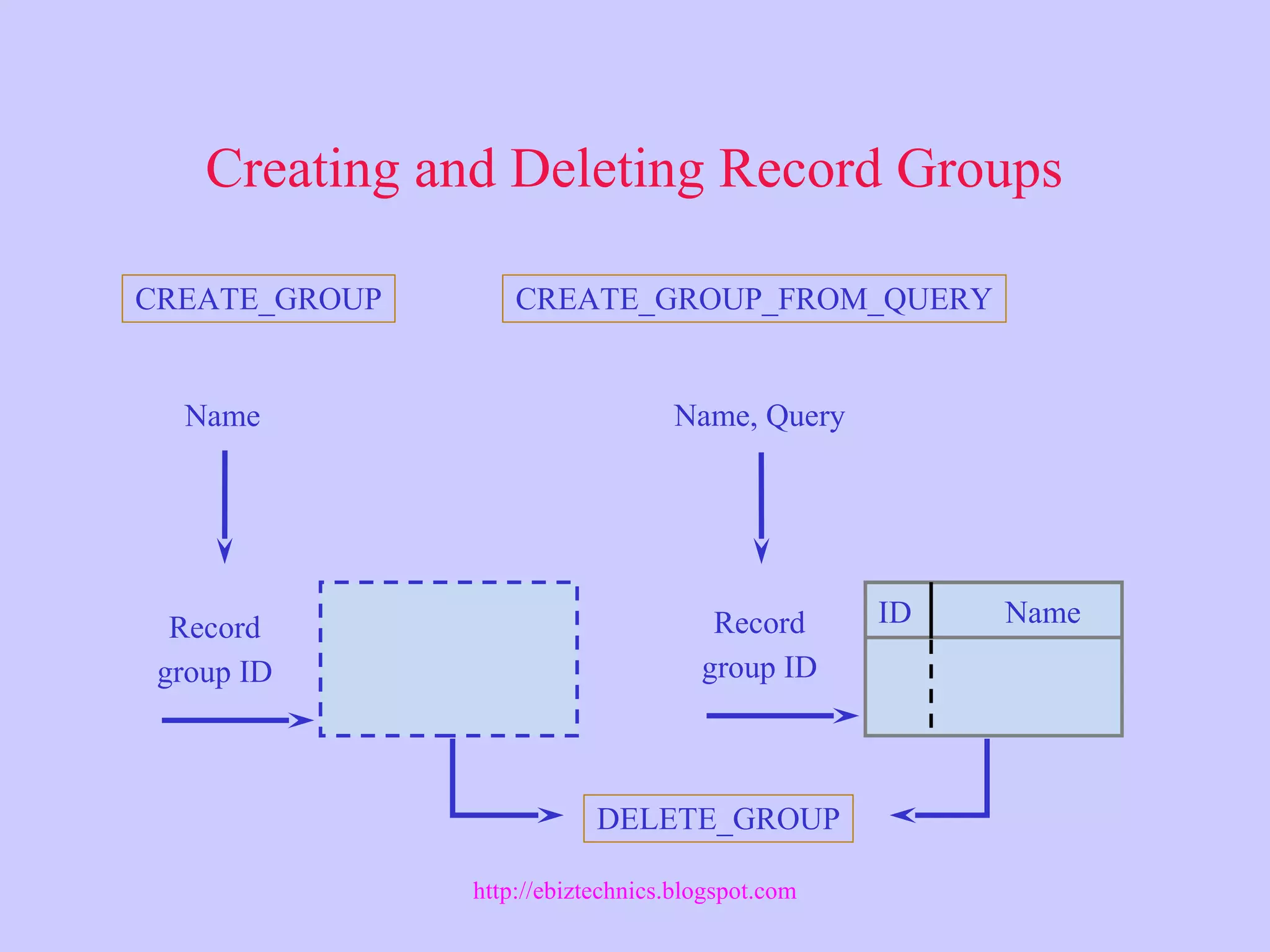
Creating and Deleting Record Groups
CREATE_GROUP CREATE_GROUP_FROM_QUERY
Record
group ID
Record
group ID
ID Name
DELETE_GROUP
Name, QueryName
http://ebiztechnics.blogspot.com
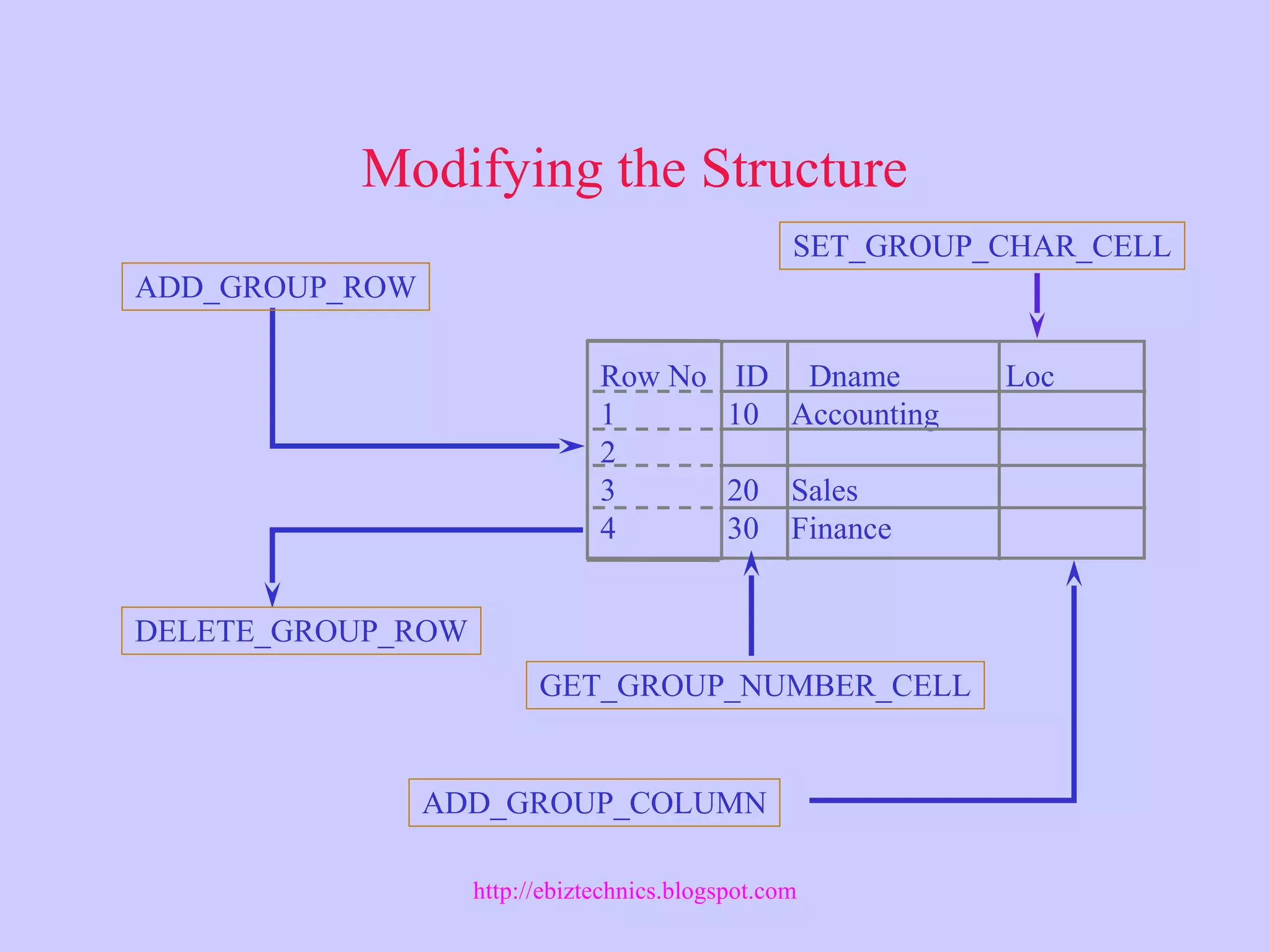
Modifying the Structure
ADD_GROUP_ROW
DELETE_GROUP_ROW
Row No ID Dname Loc
1 10 Accounting
2
3 20 Sales
4 30 Finance
ADD_GROUP_COLUMN
SET_GROUP_CHAR_CELL
GET_GROUP_NUMBER_CELL
http://ebiztechnics.blogspot.com
Populating Query Record Groups
POPULATE_GROUP
(_WITH_QUERY)
SELECT deptno ID, dname
FROM dept
ID
10
20
30
40
Dname
ACCOUNTING
SALES
FINANCE
OPERATIONS
http://ebiztechnics.blogspot.com
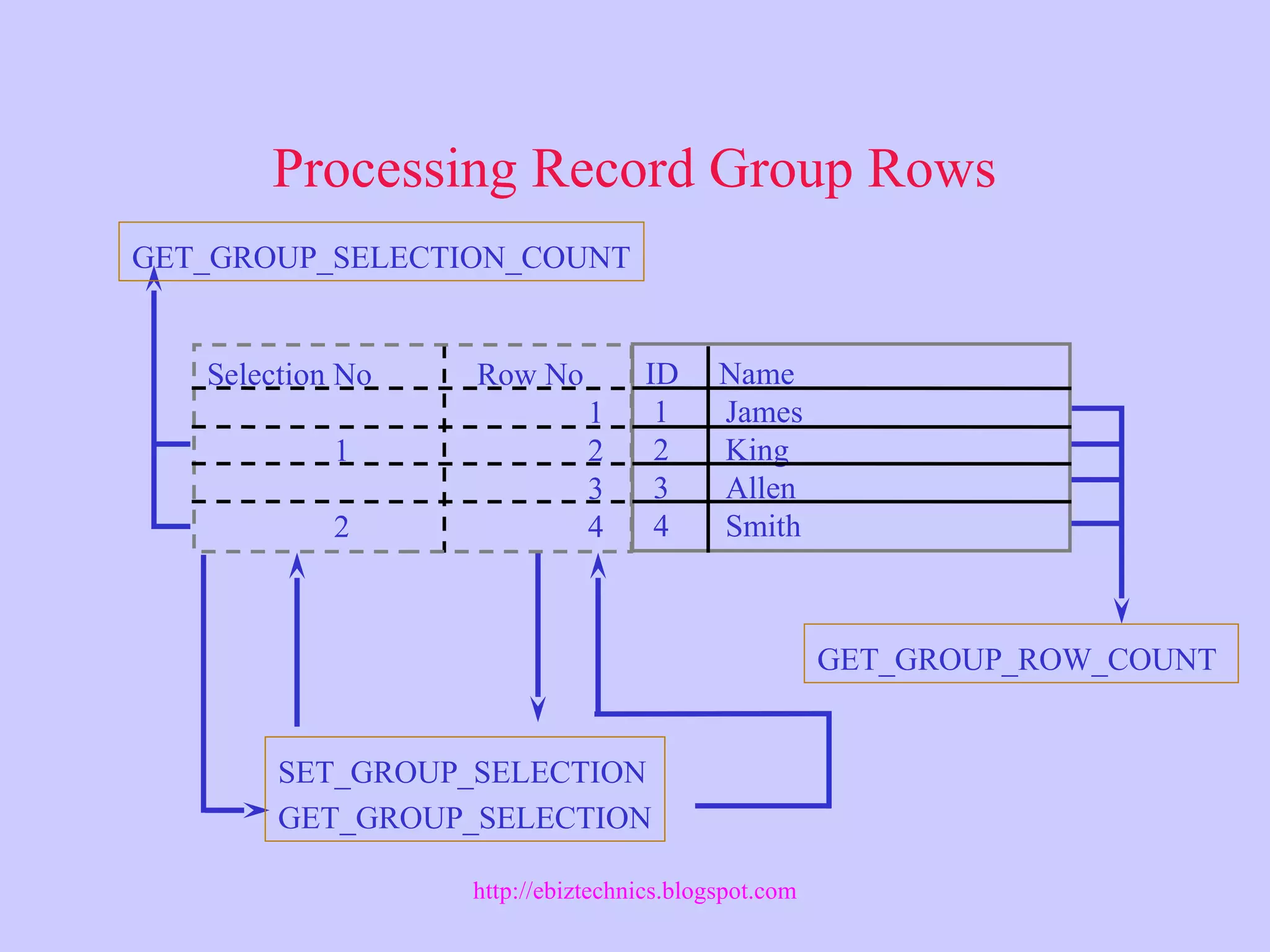
Processing Record Group Rows
GET_GROUP_SELECTION_COUNT
SET_GROUP_SELECTION
GET_GROUP_SELECTION
Selection No Row No
1
1 2
3
2 4
ID Name
1 James
2 King
3 Allen
4 Smith
GET_GROUP_ROW_COUNT
http://ebiztechnics.blogspot.com
Defining Query Record Groups
Programmatically
Find Record Group
ID NULL ?
Create Group from Query
Populate Group
Yes
No
http://ebiztechnics.blogspot.com
Defining Nonquery Record Groups
Programmatically
Find Record Group
ID NULL ?
Create Group
Yes
No
Add Group Columns
Add Group Row
Set Group Cell Values
Delete Group Rows
Find Group Columns
http://ebiztechnics.blogspot.com
Manipulating Record Groups
Get number of group rows
For all
group
rows
Cell value=
given value
Yes No
Return row
number
Return NULL
http://ebiztechnics.blogspot.com
Manipulating Selected Record Group Rows
For all
group
rows
Get number of group rows
Row number
even?
Yes No
Mark row
as selected
http://ebiztechnics.blogspot.com
Defining Global Record Groups
• Record group visible to all forms in
an application
• “Scope” parameter
– FORM_SCOPE (default)
– GLOBAL_SCOPE
...CREATE_GROUP(‘emp_rg’, GLOBAL_SCOPE’);
...CREATE_GROUP_FROM_QUERY(‘emp_rg’,
‘SELECT empno FROM emp’, ‘GLOBAL_SCOPE’);
http://ebiztechnics.blogspot.com
Manipulating List Items Programmatically
• ADD_LIST_ELEMENT
• DELETE_LIST_ELEMENT
• CLEAR_LIST
• GET_LIST_ELEMENT_LABEL
• GET_LIST_ELEMENT_VALUE
• GET_LIST_ELEMENT_COUNT
• POPULATE_LIST
• RETRIEVE_LIST
http://ebiztechnics.blogspot.com
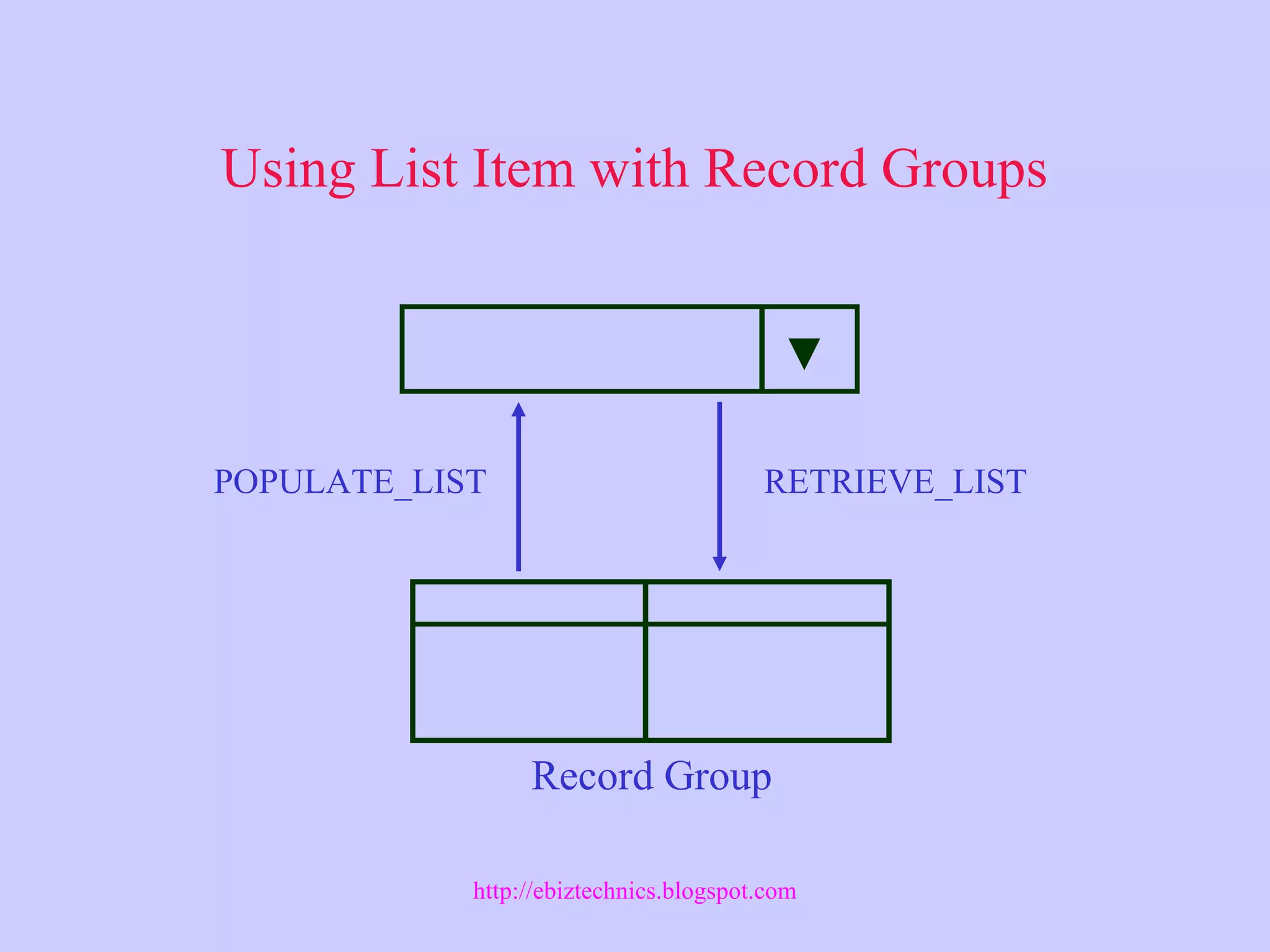
Using List Item with Record Groups
Record Group
POPULATE_LIST RETRIEVE_LIST
http://ebiztechnics.blogspot.com
Implementing Dynamic List Items
Find record group
Yes ID NULL? No
Create group from query
Populate group
Yes Success? No
Populate list
Display first list label
http://ebiztechnics.blogspot.com
Adding Values to Combo Boxes
Get number of list elements
For all
list
elements
Element value=
Item value?
Yes No
Return
Add list element with item value
http://ebiztechnics.blogspot.com
Summary
• Define design-time query and static record groups
• Define run time query and non-query record groups
• Use Built-in functions for populating record groups
• Define Global record groups
• Use record groups for:
– Constructing dynamic SELECT statements
– Storing or passing data
– Populating or storing list items
• Manipulate list items programmatically
– Built-in functions for list items
http://ebiztechnics.blogspot.com

Oracle Forms: Record Groups

  • 1.
    Working With RecordGroups http://ebiztechnics.blogspot.com
  • 2.
    Objectives • Describe therecord group object • Use record groups • Define record groups at design time • Control record groups by using built-in functions • Define query record groups programmatically • Define nonquery record groups programmatically • Manipulate record group rows • Define lists of values (LOVs) programmatically • Manipulate list items programmatically • Implement dynamic list items • Add values to combo boxes http://ebiztechnics.blogspot.com
  • 3.
    Types of RecordGroups Query Non Query Static  Based on a SELECT Statement  Design Time  Run Time  Not Based on a SELECT Statement  Run Time  Not Based on a SELECT Statement  Design Time http://ebiztechnics.blogspot.com
  • 4.
    Record Groups andLOVs Record groups and LOVs • Forms implicitly creates query record groups. • Use SET_LOV_PROPERTY to replace default record group. ... IF Get_LOV_Property(lov_id,GROUP_NAME) ='GROUP1' THEN Set_LOV_Property(lov_id,GROUP_NAME,'GROUP2'); END IF; ... http://ebiztechnics.blogspot.com
  • 5.
    Uses of RecordGroups • Constructing dynamic Queries • Storing form-configuration information • Communicating within a form • Passing data to other forms • Passing data to other Oracle products – Reports – Graphics • Populating or storing list items • Populating Hierarchical Tree items http://ebiztechnics.blogspot.com
  • 6.
    Defining Record Groupsat Design Time http://ebiztechnics.blogspot.com
  • 7.
    Creating and DeletingRecord Groups CREATE_GROUP CREATE_GROUP_FROM_QUERY Record group ID Record group ID ID Name DELETE_GROUP Name, QueryName http://ebiztechnics.blogspot.com
  • 8.
    Modifying the Structure ADD_GROUP_ROW DELETE_GROUP_ROW RowNo ID Dname Loc 1 10 Accounting 2 3 20 Sales 4 30 Finance ADD_GROUP_COLUMN SET_GROUP_CHAR_CELL GET_GROUP_NUMBER_CELL http://ebiztechnics.blogspot.com
  • 9.
    Populating Query RecordGroups POPULATE_GROUP (_WITH_QUERY) SELECT deptno ID, dname FROM dept ID 10 20 30 40 Dname ACCOUNTING SALES FINANCE OPERATIONS http://ebiztechnics.blogspot.com
  • 10.
    Processing Record GroupRows GET_GROUP_SELECTION_COUNT SET_GROUP_SELECTION GET_GROUP_SELECTION Selection No Row No 1 1 2 3 2 4 ID Name 1 James 2 King 3 Allen 4 Smith GET_GROUP_ROW_COUNT http://ebiztechnics.blogspot.com
  • 11.
    Defining Query RecordGroups Programmatically Find Record Group ID NULL ? Create Group from Query Populate Group Yes No http://ebiztechnics.blogspot.com
  • 12.
    Defining Nonquery RecordGroups Programmatically Find Record Group ID NULL ? Create Group Yes No Add Group Columns Add Group Row Set Group Cell Values Delete Group Rows Find Group Columns http://ebiztechnics.blogspot.com
  • 13.
    Manipulating Record Groups Getnumber of group rows For all group rows Cell value= given value Yes No Return row number Return NULL http://ebiztechnics.blogspot.com
  • 14.
    Manipulating Selected RecordGroup Rows For all group rows Get number of group rows Row number even? Yes No Mark row as selected http://ebiztechnics.blogspot.com
  • 15.
    Defining Global RecordGroups • Record group visible to all forms in an application • “Scope” parameter – FORM_SCOPE (default) – GLOBAL_SCOPE ...CREATE_GROUP(‘emp_rg’, GLOBAL_SCOPE’); ...CREATE_GROUP_FROM_QUERY(‘emp_rg’, ‘SELECT empno FROM emp’, ‘GLOBAL_SCOPE’); http://ebiztechnics.blogspot.com
  • 16.
    Manipulating List ItemsProgrammatically • ADD_LIST_ELEMENT • DELETE_LIST_ELEMENT • CLEAR_LIST • GET_LIST_ELEMENT_LABEL • GET_LIST_ELEMENT_VALUE • GET_LIST_ELEMENT_COUNT • POPULATE_LIST • RETRIEVE_LIST http://ebiztechnics.blogspot.com
  • 17.
    Using List Itemwith Record Groups Record Group POPULATE_LIST RETRIEVE_LIST http://ebiztechnics.blogspot.com
  • 18.
    Implementing Dynamic ListItems Find record group Yes ID NULL? No Create group from query Populate group Yes Success? No Populate list Display first list label http://ebiztechnics.blogspot.com
  • 19.
    Adding Values toCombo Boxes Get number of list elements For all list elements Element value= Item value? Yes No Return Add list element with item value http://ebiztechnics.blogspot.com
  • 20.
    Summary • Define design-timequery and static record groups • Define run time query and non-query record groups • Use Built-in functions for populating record groups • Define Global record groups • Use record groups for: – Constructing dynamic SELECT statements – Storing or passing data – Populating or storing list items • Manipulate list items programmatically – Built-in functions for list items http://ebiztechnics.blogspot.com

Editor's Notes

  • #10 Technical Note POPULATE_GROUP built-in function returns 0 when population succeeds And 1 if population does not succeed.
  • #16 Technical Note If a global record group is created from (or populated with) a query while Executing a form A. and the query string contains bind variable references That are local to A (:block.item or :PARAMETER.param), then when Form A Terminates execution, the global query record group is converted to a Global nonquery record group. The record group retains its data, but a Subsequent POPULATE_GROUP is considered an error.
  • #19 Technical Note Because a base table list item must specify a value for either the initial Property or the Mapping of Other Values property, the record group used to Dynamically populate a list item must also contain this value. Be sure the Record group query returns this value.