Creating Multiple Form Applications
http://ebiztechnics.blogspot.com
Objectives
• Describe the different ways of invoking additional forms
• Open, call, and close forms
• Navigation between forms
• Control opened forms and called forms
• Manage transaction processing for opened forms and called forms
• Choose the most appropriate method for invoking forms
• Pass form parameters
http://ebiztechnics.blogspot.com
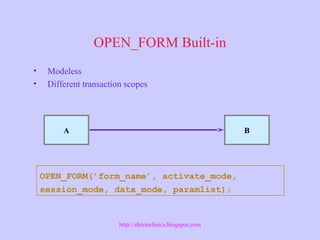
OPEN_FORM Built-in
A B
OPEN_FORM(’form_name’, activate_mode,
session_mode, data_mode, paramlist);
• Modeless
• Different transaction scopes
http://ebiztechnics.blogspot.com
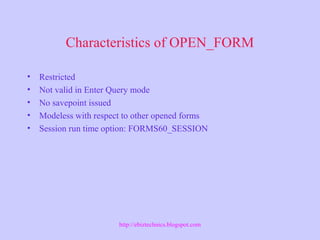
Characteristics of OPEN_FORM
• Restricted
• Not valid in Enter Query mode
• No savepoint issued
• Modeless with respect to other opened forms
• Session run time option: FORMS60_SESSION
http://ebiztechnics.blogspot.com
Navigating Between Forms
Built-ins for navigation between forms:
• NEXT_FORM
• PREVIOUS_FORM
• GO_FORM
http://ebiztechnics.blogspot.com
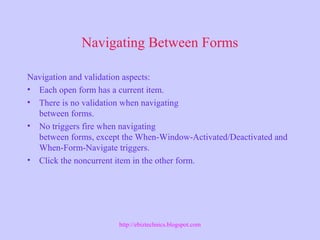
Navigating Between Forms
Navigation and validation aspects:
• Each open form has a current item.
• There is no validation when navigating
between forms.
• No triggers fire when navigating
between forms, except the When-Window-Activated/Deactivated and
When-Form-Navigate triggers.
• Click the noncurrent item in the other form.
http://ebiztechnics.blogspot.com
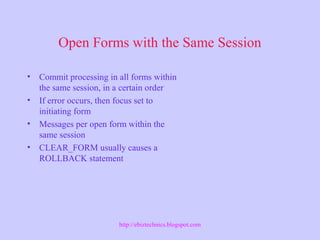
Open Forms with the Same Session
• Commit processing in all forms within
the same session, in a certain order
• If error occurs, then focus set to
initiating form
• Messages per open form within the
same session
• CLEAR_FORM usually causes a
ROLLBACK statement
http://ebiztechnics.blogspot.com
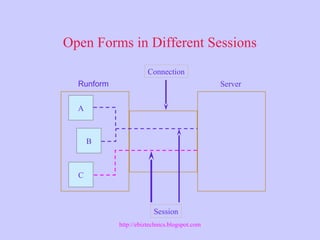
Open Forms in Different Sessions
Runform Server
Connection
A
B
C
Session
http://ebiztechnics.blogspot.com
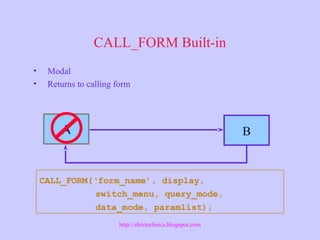
CALL_FORM Built-in
A B
CALL_FORM(‘form_name’, display,
switch_menu, query_mode,
data_mode, paramlist);
• Modal
• Returns to calling form
http://ebiztechnics.blogspot.com
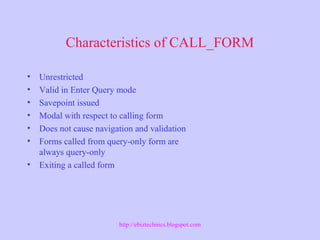
Characteristics of CALL_FORM
• Unrestricted
• Valid in Enter Query mode
• Savepoint issued
• Modal with respect to calling form
• Does not cause navigation and validation
• Forms called from query-only form are
always query-only
• Exiting a called form
http://ebiztechnics.blogspot.com
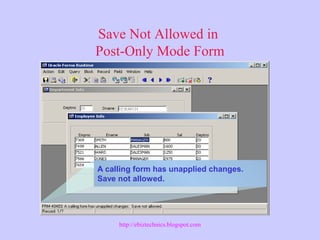
Save Not Allowed in
Post-Only Mode Form
A calling form has unapplied changes.
Save not allowed.
http://ebiztechnics.blogspot.com
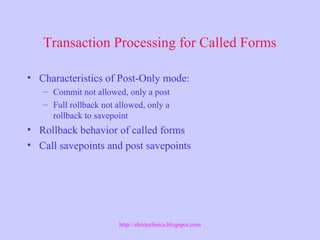
Transaction Processing for Called Forms
• Characteristics of Post-Only mode:
– Commit not allowed, only a post
– Full rollback not allowed, only a
rollback to savepoint
• Rollback behavior of called forms
• Call savepoints and post savepoints
http://ebiztechnics.blogspot.com
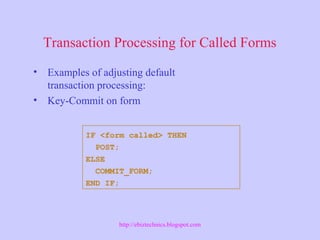
Transaction Processing for Called Forms
IF <form called> THEN
POST;
ELSE
COMMIT_FORM;
END IF;
• Examples of adjusting default
transaction processing:
• Key-Commit on form
http://ebiztechnics.blogspot.com
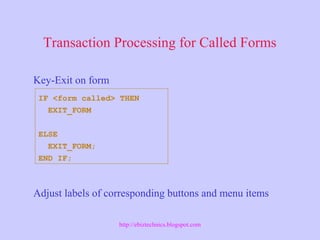
Transaction Processing for Called Forms
Key-Exit on form
Adjust labels of corresponding buttons and menu items
IF <form called> THEN
EXIT_FORM
ELSE
EXIT_FORM;
END IF;
http://ebiztechnics.blogspot.com
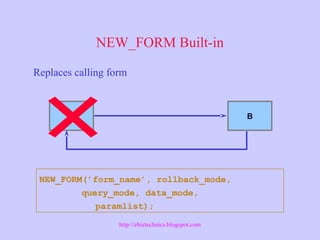
NEW_FORM Built-in
A B
NEW_FORM(’form_name’, rollback_mode,
query_mode, data_mode,
paramlist);
Replaces calling form
http://ebiztechnics.blogspot.com
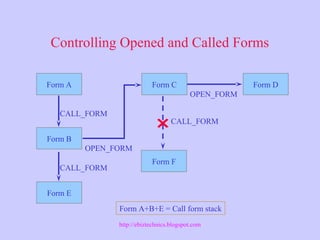
Controlling Opened and Called Forms
Form A
CALL_FORM
Form B
Form C
OPEN_FORM
Form D
OPEN_FORM
CALL_FORM
Form E
Form F
CALL_FORM
Form A+B+E = Call form stack
http://ebiztechnics.blogspot.com
Different Ways of Invoking Forms
• When to use OPEN_FORM
• When to open a form in a new session
• When to use CALL_FORM
• When to use NEW_FORM
http://ebiztechnics.blogspot.com
Closing a Form
• CLOSE_FORM:
– form_name
– form_id
• Characteristics of CLOSE_FORM:
– Restricted
– Not valid in Enter-Query mode
– CLOSE_FORM or EXIT_FORM
– Cannot close a form that called
another form
http://ebiztechnics.blogspot.com
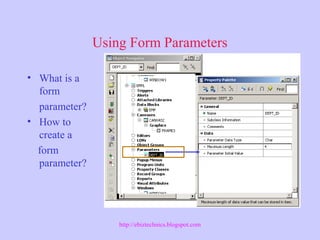
Using Form Parameters
• What is a
form
parameter?
• How to
create a
form
parameter?
http://ebiztechnics.blogspot.com
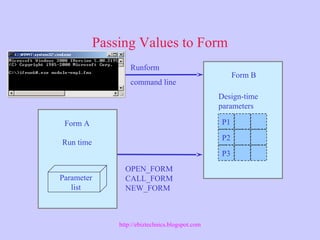
Passing Values to Form
P1
P2
P3
Runform
command line
Design-time
parameters
Form B
Parameter
list
OPEN_FORM
CALL_FORM
NEW_FORM
Form A
Run time
http://ebiztechnics.blogspot.com
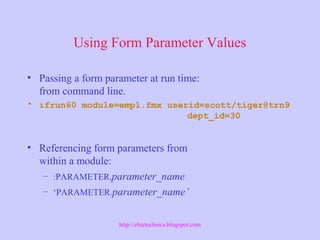
Using Form Parameter Values
• Passing a form parameter at run time:
from command line.
• ifrun60 module=empl.fmx userid=scott/tiger@trn9
dept_id=30
• Referencing form parameters from
within a module:
– :PARAMETER.parameter_name
– ‘PARAMETER.parameter_name’
http://ebiztechnics.blogspot.com
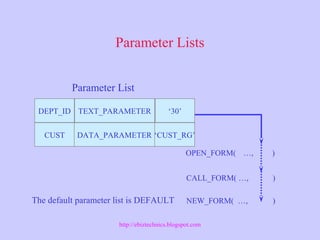
Parameter Lists
OPEN_FORM( …, )
CALL_FORM( …, )
NEW_FORM( …, )
DEPT_ID
CUST
TEXT_PARAMETER
DATA_PARAMETER
‘30’
‘CUST_RG’
Parameter List
The default parameter list is DEFAULT
http://ebiztechnics.blogspot.com
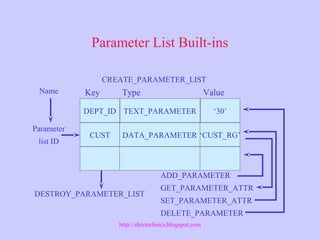
Parameter List Built-ins
DEPT_ID
CUST
TEXT_PARAMETER
DATA_PARAMETER
‘30’
‘CUST_RG’
Key Type Value
ADD_PARAMETER
GET_PARAMETER_ATTR
SET_PARAMETER_ATTR
DELETE_PARAMETER
DESTROY_PARAMETER_LIST
Name
Parameter
list ID
CREATE_PARAMETER_LIST
http://ebiztechnics.blogspot.com
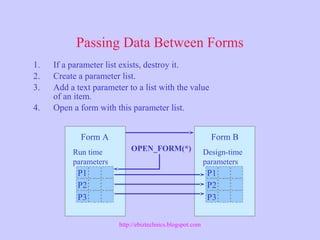
Passing Data Between Forms
P1
P2
P3
P1
P2
P3
OPEN_FORM(*)
1. If a parameter list exists, destroy it.
2. Create a parameter list.
3. Add a text parameter to a list with the value
of an item.
4. Open a form with this parameter list.
Design-time
parameters
Form B
Run time
parameters
Form A
http://ebiztechnics.blogspot.com
Passing Data Between Forms
• Characteristics of form parameters:
– Can be used only as input parameters
– Have data type CHAR, NUMBER, or DATE
– CHAR parameter can be up to 64 K long
– Can be design-time objects
• Characteristics of global variables:
– Are programmatic constructs
– Have type CHAR(255)
– Are visible to all forms in the current
Runform session
http://ebiztechnics.blogspot.com
Summary
• Open, call, and close forms:
– OPEN_FORM, CALL_FORM, and CLOSE_FORM
– Multiple database sessions
• Navigate between forms:
– NEXT_FORM,
PREVIOUS_FORM, and GO_FORM
• Identify restrictions on the call form stack
• Passing parameters to forms.
http://ebiztechnics.blogspot.com

Oracle Forms : Multiple Forms

  • 1.
    Creating Multiple FormApplications http://ebiztechnics.blogspot.com
  • 2.
    Objectives • Describe thedifferent ways of invoking additional forms • Open, call, and close forms • Navigation between forms • Control opened forms and called forms • Manage transaction processing for opened forms and called forms • Choose the most appropriate method for invoking forms • Pass form parameters http://ebiztechnics.blogspot.com
  • 3.
    OPEN_FORM Built-in A B OPEN_FORM(’form_name’,activate_mode, session_mode, data_mode, paramlist); • Modeless • Different transaction scopes http://ebiztechnics.blogspot.com
  • 4.
    Characteristics of OPEN_FORM •Restricted • Not valid in Enter Query mode • No savepoint issued • Modeless with respect to other opened forms • Session run time option: FORMS60_SESSION http://ebiztechnics.blogspot.com
  • 5.
    Navigating Between Forms Built-insfor navigation between forms: • NEXT_FORM • PREVIOUS_FORM • GO_FORM http://ebiztechnics.blogspot.com
  • 6.
    Navigating Between Forms Navigationand validation aspects: • Each open form has a current item. • There is no validation when navigating between forms. • No triggers fire when navigating between forms, except the When-Window-Activated/Deactivated and When-Form-Navigate triggers. • Click the noncurrent item in the other form. http://ebiztechnics.blogspot.com
  • 7.
    Open Forms withthe Same Session • Commit processing in all forms within the same session, in a certain order • If error occurs, then focus set to initiating form • Messages per open form within the same session • CLEAR_FORM usually causes a ROLLBACK statement http://ebiztechnics.blogspot.com
  • 8.
    Open Forms inDifferent Sessions Runform Server Connection A B C Session http://ebiztechnics.blogspot.com
  • 9.
    CALL_FORM Built-in A B CALL_FORM(‘form_name’,display, switch_menu, query_mode, data_mode, paramlist); • Modal • Returns to calling form http://ebiztechnics.blogspot.com
  • 10.
    Characteristics of CALL_FORM •Unrestricted • Valid in Enter Query mode • Savepoint issued • Modal with respect to calling form • Does not cause navigation and validation • Forms called from query-only form are always query-only • Exiting a called form http://ebiztechnics.blogspot.com
  • 11.
    Save Not Allowedin Post-Only Mode Form A calling form has unapplied changes. Save not allowed. http://ebiztechnics.blogspot.com
  • 12.
    Transaction Processing forCalled Forms • Characteristics of Post-Only mode: – Commit not allowed, only a post – Full rollback not allowed, only a rollback to savepoint • Rollback behavior of called forms • Call savepoints and post savepoints http://ebiztechnics.blogspot.com
  • 13.
    Transaction Processing forCalled Forms IF <form called> THEN POST; ELSE COMMIT_FORM; END IF; • Examples of adjusting default transaction processing: • Key-Commit on form http://ebiztechnics.blogspot.com
  • 14.
    Transaction Processing forCalled Forms Key-Exit on form Adjust labels of corresponding buttons and menu items IF <form called> THEN EXIT_FORM ELSE EXIT_FORM; END IF; http://ebiztechnics.blogspot.com
  • 15.
    NEW_FORM Built-in A B NEW_FORM(’form_name’,rollback_mode, query_mode, data_mode, paramlist); Replaces calling form http://ebiztechnics.blogspot.com
  • 16.
    Controlling Opened andCalled Forms Form A CALL_FORM Form B Form C OPEN_FORM Form D OPEN_FORM CALL_FORM Form E Form F CALL_FORM Form A+B+E = Call form stack http://ebiztechnics.blogspot.com
  • 17.
    Different Ways ofInvoking Forms • When to use OPEN_FORM • When to open a form in a new session • When to use CALL_FORM • When to use NEW_FORM http://ebiztechnics.blogspot.com
  • 18.
    Closing a Form •CLOSE_FORM: – form_name – form_id • Characteristics of CLOSE_FORM: – Restricted – Not valid in Enter-Query mode – CLOSE_FORM or EXIT_FORM – Cannot close a form that called another form http://ebiztechnics.blogspot.com
  • 19.
    Using Form Parameters •What is a form parameter? • How to create a form parameter? http://ebiztechnics.blogspot.com
  • 20.
    Passing Values toForm P1 P2 P3 Runform command line Design-time parameters Form B Parameter list OPEN_FORM CALL_FORM NEW_FORM Form A Run time http://ebiztechnics.blogspot.com
  • 21.
    Using Form ParameterValues • Passing a form parameter at run time: from command line. • ifrun60 module=empl.fmx userid=scott/tiger@trn9 dept_id=30 • Referencing form parameters from within a module: – :PARAMETER.parameter_name – ‘PARAMETER.parameter_name’ http://ebiztechnics.blogspot.com
  • 22.
    Parameter Lists OPEN_FORM( …,) CALL_FORM( …, ) NEW_FORM( …, ) DEPT_ID CUST TEXT_PARAMETER DATA_PARAMETER ‘30’ ‘CUST_RG’ Parameter List The default parameter list is DEFAULT http://ebiztechnics.blogspot.com
  • 23.
    Parameter List Built-ins DEPT_ID CUST TEXT_PARAMETER DATA_PARAMETER ‘30’ ‘CUST_RG’ KeyType Value ADD_PARAMETER GET_PARAMETER_ATTR SET_PARAMETER_ATTR DELETE_PARAMETER DESTROY_PARAMETER_LIST Name Parameter list ID CREATE_PARAMETER_LIST http://ebiztechnics.blogspot.com
  • 24.
    Passing Data BetweenForms P1 P2 P3 P1 P2 P3 OPEN_FORM(*) 1. If a parameter list exists, destroy it. 2. Create a parameter list. 3. Add a text parameter to a list with the value of an item. 4. Open a form with this parameter list. Design-time parameters Form B Run time parameters Form A http://ebiztechnics.blogspot.com
  • 25.
    Passing Data BetweenForms • Characteristics of form parameters: – Can be used only as input parameters – Have data type CHAR, NUMBER, or DATE – CHAR parameter can be up to 64 K long – Can be design-time objects • Characteristics of global variables: – Are programmatic constructs – Have type CHAR(255) – Are visible to all forms in the current Runform session http://ebiztechnics.blogspot.com
  • 26.
    Summary • Open, call,and close forms: – OPEN_FORM, CALL_FORM, and CLOSE_FORM – Multiple database sessions • Navigate between forms: – NEXT_FORM, PREVIOUS_FORM, and GO_FORM • Identify restrictions on the call form stack • Passing parameters to forms. http://ebiztechnics.blogspot.com

Editor's Notes

  • #14 Example Key-Commit trigger at form level: BEGIN IF GET_APPLICATION_PROPERTY(calling_form) is not null THEN POST; ELSE COMMIT_FORM; END IF; END;
  • #15 Example Key-Exit trigger at form level: BEGIN IF GET_APPLICATION_PROPERTY(calling_form) is not null THEN EXIT_FORM(ask_commit , no_rollback); ELSE EXIT_FORM; END IF; END;
  • #17 Technical Note You can obtain information about the call form stack by using the GET_APPLICATION_PROPERTY built-in with the CALLING_FORM parameters.
  • #23 Technical Note The parameters whose values are being passed must be defined in the called form at Design time. That is, the called form must be expecting a value for each of the Parameters included in the parameter list it receives from the calling form.
  • #24 Technical Note You can not create a parameter list named DEFAULT or that already exists. Use GET_PARAMETER_LIST and ID_NULL to check whether a parameter list already Exists.
  • #25 Technical Note Global variables are used more often than parameters for passing data between forms.