Creating and Managing Menu Modules
http://ebiztechnics.blogspot.com
Objectives
• Identify Menu components
• Create, save and attach Menu modules
• Modifying properties of Menu items
• Creating Popup menu and attaching
• Controlling Menus Programmatically
• Manage Menu Security
http://ebiztechnics.blogspot.com
Menu Module Components
Main
Menu
Individual
Menu
Menu
Toolbar
Menu
Item
http://ebiztechnics.blogspot.com
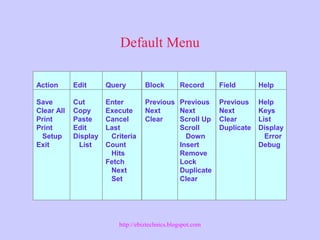
Default Menu
Action
Save
Clear All
Print
Print
Setup
Exit
Edit
Cut
Copy
Paste
Edit
Display
List
Block
Previous
Next
Clear
Field
Previous
Next
Clear
Duplicate
Record
Previous
Next
Scroll Up
Scroll
Down
Insert
Remove
Lock
Duplicate
Clear
Query
Enter
Execute
Cancel
Last
Criteria
Count
Hits
Fetch
Next
Set
Help
Help
Keys
List
Display
Error
Debug
http://ebiztechnics.blogspot.com
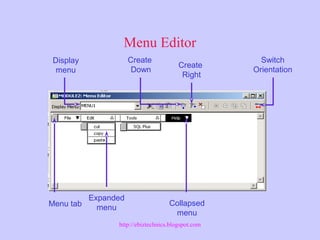
Menu Editor
Display
menu
Create
Down
Create
Right
Switch
Orientation
Menu tab
Expanded
menu
Collapsed
menu
http://ebiztechnics.blogspot.com
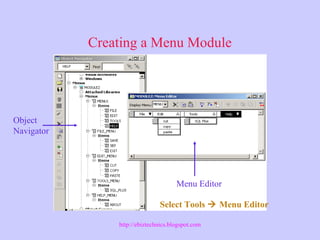
Creating a Menu Module
Object
Navigator
Menu Editor
Select Tools  Menu Editor
http://ebiztechnics.blogspot.com
Menu Module Properties
Main Menu
Menu Directory
Menu Filename
Startup Code
Share Library with Form
Use Security
Module Roles
http://ebiztechnics.blogspot.com
Menu Item Properties
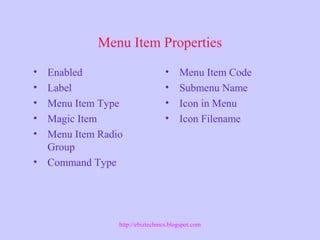
• Enabled
• Label
• Menu Item Type
• Magic Item
• Menu Item Radio
Group
• Command Type
• Menu Item Code
• Submenu Name
• Icon in Menu
• Icon Filename
http://ebiztechnics.blogspot.com
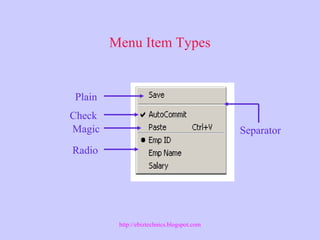
Menu Item Types
Separator
Plain
Check
Magic
Radio
http://ebiztechnics.blogspot.com
Magic Items
• About
• Undo
• Clear
• Copy
• Cut
• Paste
• Help
• Quit
• Window
http://ebiztechnics.blogspot.com
Menu Item Command Types
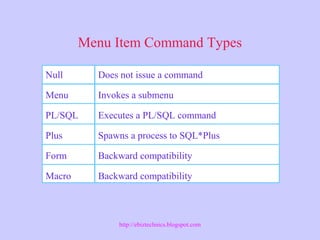
Null
Menu
PL/SQL
Plus
Form
Macro
Does not issue a command
Invokes a submenu
Executes a PL/SQL command
Spawns a process to SQL*Plus
Backward compatibility
http://ebiztechnics.blogspot.com
Menu Module File Types
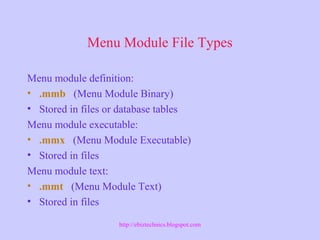
Menu module definition:
• .mmb (Menu Module Binary)
• Stored in files or database tables
Menu module executable:
• .mmx (Menu Module Executable)
• Stored in files
Menu module text:
• .mmt (Menu Module Text)
• Stored in files
http://ebiztechnics.blogspot.com
Attaching Menu Module
• Open Form Module Property
Pallet.
• Modify Menu Module Property.
• Specify the name of your menu
module.
http://ebiztechnics.blogspot.com
Pop-up Menus
Menu that appears on the screen at the
location it was invoked
• Enables users to
access commonly used
functions easily
• Is accessed by pressing
the right mouse button
(Microsoft Windows and
Motif)
http://ebiztechnics.blogspot.com
Using Pop-up Menus
• Pop-up menus are:
– Form module objects in the object navigator,
such as alerts or Data Blocks
– Built through the Property Palette or
Menu Editor
– Associated with items and canvases
with a pop-up menu property
• Pre-Popup-Menu trigger provides
dynamic control
http://ebiztechnics.blogspot.com
Writing PL/SQL Code in Menu Triggers
• Similar to PL/SQL code in form triggers
• You can share code between a form
module and a menu module by using
the following:
– Libraries
– User-defined triggers
– DO_KEY built-in
http://ebiztechnics.blogspot.com
Writing PL/SQL Code in Menu Triggers
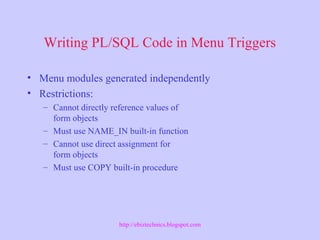
• Menu modules generated independently
• Restrictions:
– Cannot directly reference values of
form objects
– Must use NAME_IN built-in function
– Cannot use direct assignment for
form objects
– Must use COPY built-in procedure
http://ebiztechnics.blogspot.com
Built-ins Used
• FIND_MENU_ITEM
• GET_MENU_ITEM_PROPERTY
• SET_MENU_ITEM_PROPERTY
• ITEM_ENABLED
• MENU_SHOW_KEYS
http://ebiztechnics.blogspot.com
Built-ins Showing and Hiding
REPLACE_MENU
Character mode built-ins:
• HIDE_MENU
• SHOW_MENU
• MENU_REDISPLAY
http://ebiztechnics.blogspot.com
Managing Menu Security
• Defining security roles
• Choosing roles for the menu module
• Assigning access to menu items
• Setting the Use Security property
http://ebiztechnics.blogspot.com
Roles
Role
Privileges
Users
http://ebiztechnics.blogspot.com
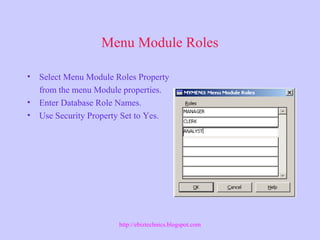
Menu Module Roles
• Select Menu Module Roles Property
from the menu Module properties.
• Enter Database Role Names.
• Use Security Property Set to Yes.
http://ebiztechnics.blogspot.com
Menu Item Roles
• Invoke Property pallet of
a Menu item.
• Choose Menu Item roles
property.
• Select Menu Item roles.
• Press OK button.
http://ebiztechnics.blogspot.com
Summary
• Creating Menu Modules
• Attaching Menu Modules to Forms
• Popup menu items
• Pre-Popup menu trigger.
• Built-ins for Managing Menu items programmatically.
• Menu Module security with Roles.
http://ebiztechnics.blogspot.com

Oracle Forms: Menu

Editor's Notes

  • #3 Introduction Overview By default, each form module uses the same menu structure, call the Default menu, This lesson teaches you how to customize this menu and how to create your own menu Modules. You will also learn how to enhance your application b including menu toolbars and pop-up menus.
  • #4 Components of the Menu Module What is a Menu Module? A menu module is a hierarchically structured object that provides a quick and easy Method for operating you Forms application. Like the form module menu module Is one of the main components of an application. Each menu module displays as a pull-down menu. A pull-down menu comprises a set Of options, displayed horizontally under the application window title. Each option can Represent a submenu or an action. Selecting a submenu displays a vertical list. Selecting an action executes the action.
  • #5 What is the Default Menu? The Default menu is not a separate menu module and is built in to every form module. A custom menu is stored in a separate module that has a suffix of .mmb. A custom menu that is Exactly the same as the default menu, menudef.mmb, ships with Oracle Developer Forms.
  • #6 Technical Note By default, the Menu Editor displays a pull-down menu, with the top-level menu displayed Horizontally. If you are developing a full-screen menu, you may want to display the top-level Menu vertically, so that the display matches the way your menu will appear at run time. To Change the orientation, click the Switch Orientation button.
  • #9 Technical Note Radio menu items must belong to a radio group. All of the radio items for a radio group must be Contiguous on the same menu. Radio group names are internal names that are not displayed at Runtime.
  • #12 Note: The command types of Form, Plus and Macro are available for backward compatibility only. Web Design Tip If you invoke the HOST command with web-deployed forms, the required process will run on the Forms Services machine, not on the client. The client will not be able to view or participate in that Process.
  • #14 Technical Note If you want to use the Default menu without the associated menu toolbar, replace the Value DEFAULT&SMARTBAR in the Menu Module property with DEFAULT only.
  • #20 Technical Note REPLACE_MENU replaces the menu for all windows in the application. If You are using CALL_FORM, REPLACE_MENU replaces the menu for Both the calling form and the called form with the specified menu.
  • #23 Technical Note If Use Security is modified by must recompile the menu module.